cruise control CHEVROLET CAMARO 2022 User Guide
[x] Cancel search | Manufacturer: CHEVROLET, Model Year: 2022, Model line: CAMARO, Model: CHEVROLET CAMARO 2022Pages: 357, PDF Size: 7.99 MB
Page 219 of 357
Chevrolet Camaro Owner Manual (GMNA-Localizing-U.S./Canada/Mexico-
14583589) - 2021 - CRC - 3/24/20
218 Driving and Operating
When the vehicle is stopped on a grade, Hill
Start Assist (HSA) temporarily prevents the
vehicle from rolling in an unintended
direction during the transition from brake
pedal release to accelerator pedal apply. The
brakes release when the accelerator pedal is
applied or automatically release after a few
seconds. The brakes may also release under
other conditions. Do not rely on HSA to hold
the vehicle.
HSA is available when the vehicle is facing
uphill in a forward gear, or when facing
downhill in R (Reverse). The vehicle must
come to a complete stop on a grade for HSA
to activate.
Ride Control Systems
Traction Control/Electronic
Stability Control
System Operation
The vehicle has a Traction Control System
(TCS) and StabiliTrak/Electronic Stability
Control (ESC). These systems help limit
wheel slip and assist the driver in
maintaining control, especially on slippery
road conditions.TCS activates if it senses that any of the
drive wheels are spinning or beginning to
lose traction. When this happens, TCS
applies the brakes to the spinning wheels
and reduces engine power to limit
wheel spin.
StabiliTrak/ESC activates when the vehicle
senses a difference between the intended
path and the direction the vehicle is actually
traveling. StabiliTrak/ESC selectively applies
braking pressure to any one of the vehicle
wheel brakes to assist the driver in keeping
the vehicle on the intended path.
If cruise control is being used and traction
control or StabiliTrak/ESC begins to limit
wheel spin, cruise control will disengage.
Cruise control may be turned back on when
road conditions allow.
Both systems come on automatically when
the vehicle is started and begins to move.
The systems may be heard or felt while
they are operating or while performing
diagnostic checks. This is normal and does
not mean there is a problem with the
vehicle.
It is recommended to leave both systems on
for normal driving conditions, but it may be
necessary to turn TCS off if the vehicle getsstuck in sand, mud, ice, or snow. See
If the
Vehicle Is Stuck 0198 and “Turning the
Systems Off and On” later in this section.
The indicator light for both systems is in the
instrument cluster. This light will:
.Flash when TCS is limiting wheel spin
.Flash when StabiliTrak/ESC is activated
.Turn on and stay on when either system
is not working
If either system fails to turn on or to
activate, a message displays in the Driver
Information Center (DIC), and
dcomes on
and stays on to indicate that the system is
inactive and is not assisting the driver in
maintaining control. The vehicle is safe to
drive, but driving should be adjusted
accordingly.
If
dcomes on and stays on:
1. Stop the vehicle.
2. Turn the engine off and wait 15 seconds.
3. Start the engine.
Page 226 of 357
Chevrolet Camaro Owner Manual (GMNA-Localizing-U.S./Canada/Mexico-
14583589) - 2021 - CRC - 3/24/20
Driving and Operating 225
Cruise Control
When using cruise control, the vehicle can
maintain a speed of about 40 km/h (25 mph)
or more without keeping your foot on the
accelerator. Cruise control does not work at
speeds below 40 km/h (25 mph).
{Warning
Cruise control can be dangerous where
you cannot drive safely at a steady
speed. Do not use cruise control on
winding roads or in heavy traffic.
Cruise control can be dangerous on
slippery roads. On such roads, fast
changes in tire traction can cause
excessive wheel slip, and you could lose
control. Do not use cruise control on
slippery roads.
If equipped with a manual transmission, the
cruise control will remain active when the
gears are shifted. The cruise is disengaged if
the clutch is pressed for several seconds.
If the StabiliTrak/Electronic Stability Control
(ESC) system begins to limit wheel spin
while using cruise control, the cruise control automatically disengages. See
Traction
Control/Electronic Stability Control 0218.
When road conditions allow you to safely
use it again, cruise control can be turned
back on.
Cruise control will disengage if either TCS or
StabiliTrak/ESC is turned off.
Cruise control is not available when using
Competitive Driving Mode, if equipped. See
Competitive Driving Mode (SS, ZL1 and 1LE
Models Only) 0223.
If the brakes are applied, cruise control
disengages.
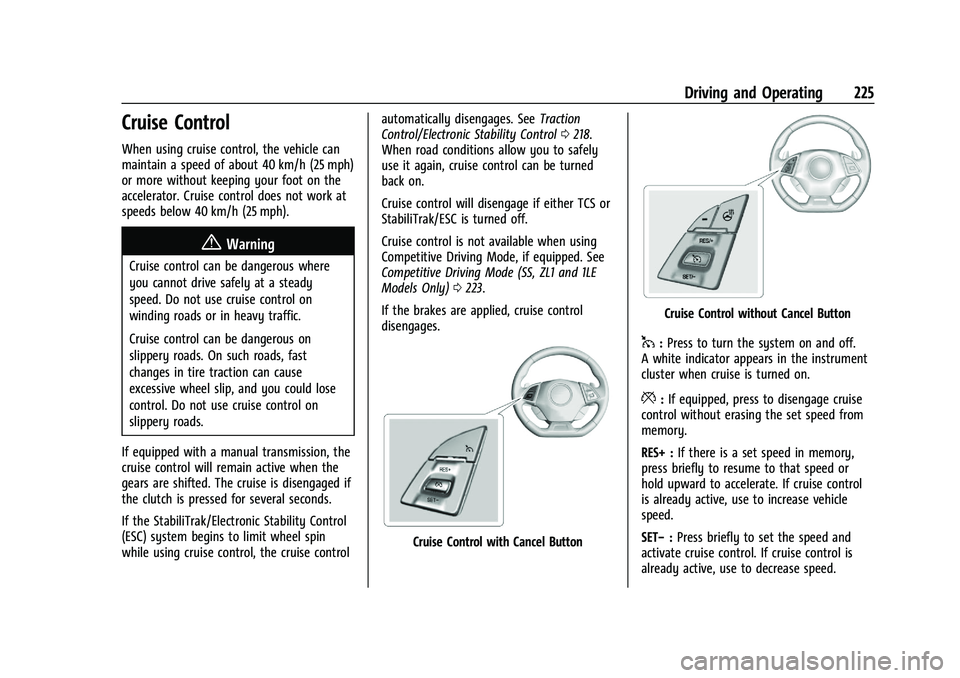
Cruise Control with Cancel Button
Cruise Control without Cancel Button
1: Press to turn the system on and off.
A white indicator appears in the instrument
cluster when cruise is turned on.
*: If equipped, press to disengage cruise
control without erasing the set speed from
memory.
RES+ : If there is a set speed in memory,
press briefly to resume to that speed or
hold upward to accelerate. If cruise control
is already active, use to increase vehicle
speed.
SET− :Press briefly to set the speed and
activate cruise control. If cruise control is
already active, use to decrease speed.
Page 227 of 357
Chevrolet Camaro Owner Manual (GMNA-Localizing-U.S./Canada/Mexico-
14583589) - 2021 - CRC - 3/24/20
226 Driving and Operating
Setting Cruise Control
If
1is on when not in use, SET−or RES+
could get bumped and go into cruise when
not desired. Keep
1off when cruise control
is not being used.
1. Press
1to turn cruise control on.
2. Get up to the speed desired.
3. Press and release SET−.
4. Remove your foot from the accelerator.
The cruise control indicator on the
instrument cluster turns green after cruise
control has been set to the desired speed.
See Instrument Cluster 083.
Resuming a Set Speed
If the cruise control is set at a desired speed
and then the brakes are applied or
*is
pressed, if equipped, the cruise control is
disengaged without erasing the set speed
from memory.
Once the vehicle speed reaches about
40 km/h (25 mph) or more, briefly press RES
+. The vehicle returns to the previous set
speed. Increasing Speed While Using Cruise Control
If the cruise control system is already
activated:
.Press and hold RES+ until the desired
speed is reached, and then release it.
.To increase the vehicle speed in small
increments, briefly press RES+. For each
press, the vehicle goes about 1 km/h
(1 mph) faster.
The speedometer reading can be displayed
in either English or metric units. See
“Options” underInstrument Cluster 083.
The increment value used depends on the
units displayed.
Reducing Speed While Using Cruise Control
If the cruise control system is already
activated:
.Press and hold SET− until the desired
lower speed is reached, then release it.
.To decrease the vehicle speed in small
increments, briefly press SET−. For each
press, the vehicle goes about 1 km/h
(1 mph) slower. The speedometer reading can be displayed
in either English or metric units. See
“Options”
underInstrument Cluster 083.
The increment value used depends on the
units displayed.
Passing Another Vehicle While Using Cruise
Control
Use the accelerator pedal to increase the
vehicle speed. When you take your foot off
the pedal, the vehicle slows down to the
previously set cruise control speed. While
pressing the accelerator pedal or shortly
following the release to override cruise
control, briefly pressing SET– will result in
cruise control set to the current vehicle
speed.
Using Cruise Control on Hills
How well the cruise control works on hills
depends upon the vehicle speed, load, and
the steepness of the hills. When going up
steep hills, you might have to step on the
accelerator pedal to maintain the vehicle
speed. When going downhill, you might
have to brake or shift to a lower gear to
keep your speed down. If the brake pedal is
applied, cruise control will disengage.
Page 228 of 357
Chevrolet Camaro Owner Manual (GMNA-Localizing-U.S./Canada/Mexico-
14583589) - 2021 - CRC - 3/24/20
Driving and Operating 227
Ending Cruise Control
There are five ways to end cruise control:
.Step lightly on the brake pedal (manual
and automatic transmissions).
.Press the clutch pedal for several seconds
or shift to Neutral (manual transmissions).
.Shift to N (Neutral) (automatic
transmissions).
.Press*, if equipped.
.To turn off cruise control, press1.
Erasing Speed Memory
The cruise control set speed is erased from
memory if
1is pressed or if the vehicle is
turned off.
Driver Assistance Systems
This vehicle may have features that work
together to help avoid crashes or reduce
crash damage while driving, backing, and
parking. Read this entire section before
using these systems.
{Warning
Do not rely on the Driver Assistance
Systems. These systems do not replace
the need for paying attention and driving
safely. You may not hear or see alerts or
warnings provided by these systems.
Failure to use proper care when driving
may result in injury, death, or vehicle
damage. See Defensive Driving 0185.
Under many conditions, these systems
will not:
.Detect children, pedestrians, bicyclists,
or animals.
.Detect vehicles or objects outside the
area monitored by the system.
.Work at all driving speeds.
.Warn you or provide you with enough
time to avoid a crash.
.Work under poor visibility or bad
weather conditions.
.Work if the detection sensor is not
cleaned or is covered by ice, snow,
mud, or dirt. (Continued)
Warning (Continued)
.Work if the detection sensor is
covered up, such as with a sticker,
magnet, or metal plate.
.Work if the area surrounding the
detection sensor is damaged or not
properly repaired.
Complete attention is always required
while driving, and you should be ready to
take action and apply the brakes and/or
steer the vehicle to avoid crashes.
Audible Alert
Some driver assistance features alert the
driver of obstacles by beeping. To change
the volume of the warning chime, see
“Comfort and Convenience” underVehicle
Personalization 0105.
Cleaning
Depending on vehicle options, keep these
areas of the vehicle clean to ensure the best
driver assistance feature performance. Driver
Information Center (DIC) messages may
display when the systems are unavailable or
blocked.
Page 232 of 357
Chevrolet Camaro Owner Manual (GMNA-Localizing-U.S./Canada/Mexico-
14583589) - 2021 - CRC - 3/24/20
Driving and Operating 231
Collision Alert
With Head-Up Display
Without Head-Up Display
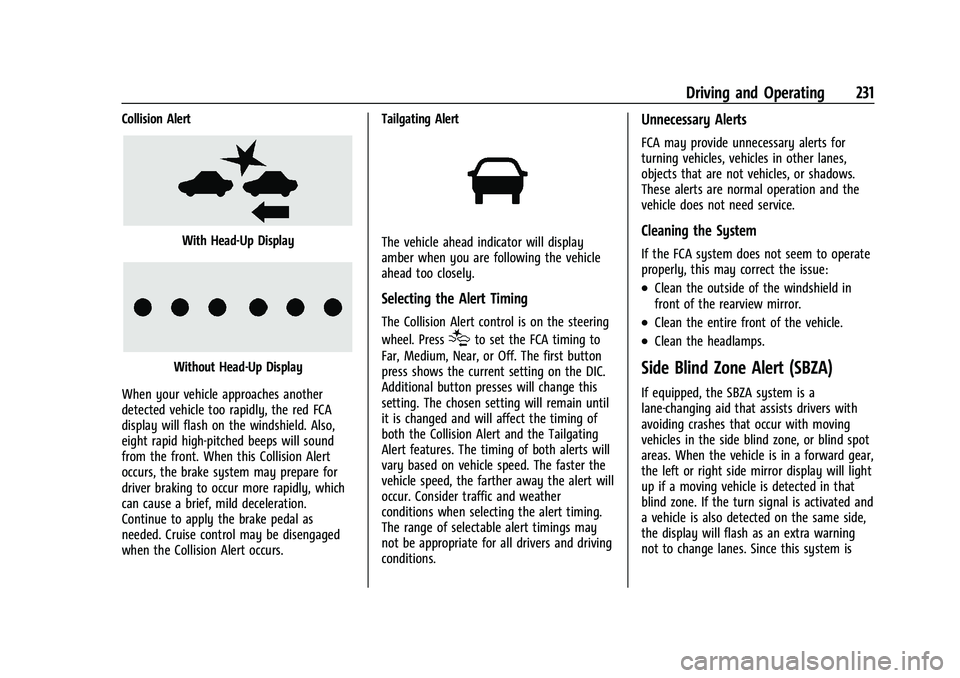
When your vehicle approaches another
detected vehicle too rapidly, the red FCA
display will flash on the windshield. Also,
eight rapid high-pitched beeps will sound
from the front. When this Collision Alert
occurs, the brake system may prepare for
driver braking to occur more rapidly, which
can cause a brief, mild deceleration.
Continue to apply the brake pedal as
needed. Cruise control may be disengaged
when the Collision Alert occurs. Tailgating Alert
The vehicle ahead indicator will display
amber when you are following the vehicle
ahead too closely.
Selecting the Alert Timing
The Collision Alert control is on the steering
wheel. Press
[to set the FCA timing to
Far, Medium, Near, or Off. The first button
press shows the current setting on the DIC.
Additional button presses will change this
setting. The chosen setting will remain until
it is changed and will affect the timing of
both the Collision Alert and the Tailgating
Alert features. The timing of both alerts will
vary based on vehicle speed. The faster the
vehicle speed, the farther away the alert will
occur. Consider traffic and weather
conditions when selecting the alert timing.
The range of selectable alert timings may
not be appropriate for all drivers and driving
conditions.
Unnecessary Alerts
FCA may provide unnecessary alerts for
turning vehicles, vehicles in other lanes,
objects that are not vehicles, or shadows.
These alerts are normal operation and the
vehicle does not need service.
Cleaning the System
If the FCA system does not seem to operate
properly, this may correct the issue:
.Clean the outside of the windshield in
front of the rearview mirror.
.Clean the entire front of the vehicle.
.Clean the headlamps.
Side Blind Zone Alert (SBZA)
If equipped, the SBZA system is a
lane-changing aid that assists drivers with
avoiding crashes that occur with moving
vehicles in the side blind zone, or blind spot
areas. When the vehicle is in a forward gear,
the left or right side mirror display will light
up if a moving vehicle is detected in that
blind zone. If the turn signal is activated and
a vehicle is also detected on the same side,
the display will flash as an extra warning
not to change lanes. Since this system is
Page 348 of 357
Chevrolet Camaro Owner Manual (GMNA-Localizing-U.S./Canada/Mexico-
14583589) - 2021 - CRC - 3/24/20
Index 347
Compass . . . . . . . . . . . . . . . . . . . . . . . . . . . . . . . . . . 79
Competitive Driving Mode . . . . . . . . . . . . . . . 223
Compressor Kit, Tire Sealant . . . . . . . . . . . . . 291
Connected ServicesConnections . . . . . . . . . . . . . . . . . . . . . . . . . . . 343
Diagnostics . . . . . . . . . . . . . . . . . . . . . . . . . . . . 344
Navigation . . . . . . . . . . . . . . . . . . . . . . . . . . . . . 342
Connections Connected Services . . . . . . . . . . . . . . . . . . . . 343
Control Traction and Electronic Stability . . . . . . . 218
Control of a Vehicle . . . . . . . . . . . . . . . . . . . . . 186
Controls Steering Wheel . . . . . . . . . . . . . . . . . . . . . . . . . 119
Convenience Net . . . . . . . . . . . . . . . . . . . . . . . . . . 76
Convertible Top . . . . . . . . . . . . . . . . . . . . . . . . . . . 30
Convex Mirrors . . . . . . . . . . . . . . . . . . . . . . . . . . . .23
Coolant Engine Temperature Gauge . . . . . . . . . . . . . 89
Cooling . . . . . . . . . . . . . . . . . . . . . . . . . . . . . . 176, 179
Cooling System . . . . . . . . . . . . . . . . . . . . . . . . . . 253
Courtesy Transportation Program . . . . . . . . . 331
Coverage Explanations . . . . . . . . . . . . . . . . . . . .142
Cruise Control . . . . . . . . . . . . . . . . . . . . . . . . . . . 225 Light . . . . . . . . . . . . . . . . . . . . . . . . . . . . . . . . . . . . 98
Customer Assistance . . . . . . . . . . . . . . . . . . . . . 328 Offices . . . . . . . . . . . . . . . . . . . . . . . . . . . . . . . . . 328
Text Telephone (TTY) Users . . . . . . . . . . . . 328 Customer Information
Publications Ordering Information . . . . . 333
Customer Satisfaction Procedure . . . . . . . . . 326
Cybersecurity . . . . . . . . . . . . . . . . . . . . . . . . . . . . 335
D
Damage Repair, Collision . . . . . . . . . . . . . . . . . 332
Danger, Warning, and Caution . . . . . . . . . . . . . .2
Data Collection Infotainment System . . . . . . . . . . . . . . . . . . 336
OnStar . . . . . . . . . . . . . . . . . . . . . . . . . . . . . . . . . 336
Data Recorder
Performance . . . . . . . . . . . . . . . . . . . . . . . . . . . 148
Data Recorders, Event . . . . . . . . . . . . . . . . . . . 336
Database Coverage Explanations . . . . . . . . . .142
Daytime Running Lamps (DRL) . . . . . . . . . . . . 111
Defensive Driving . . . . . . . . . . . . . . . . . . . . . . . . .185
Delayed Locking . . . . . . . . . . . . . . . . . . . . . . . . . . . 17
Destination . . . . . . . . . . . . . . . . . . . . . . . . . . . . . . . 135
Diagnostics Connected Services . . . . . . . . . . . . . . . . . . . . 344
Distracted Driving . . . . . . . . . . . . . . . . . . . . . . . . .185
Door Ajar Light . . . . . . . . . . . . . . . . . . . . . . . . . . . . . . . 98
Delayed Locking . . . . . . . . . . . . . . . . . . . . . . . . . 17
Locks . . . . . . . . . . . . . . . . . . . . . . . . . . . . . . . . . . . . 15
Power Locks . . . . . . . . . . . . . . . . . . . . . . . . . . . . . 17
Drive Belt Routing, Engine . . . . . . . . . . . . . . . 325 Driver
Teen . . . . . . . . . . . . . . . . . . . . . . . . . . . . . . . . . . . 164
Driver Assistance Systems . . . . . . . . . . . . . . . 227
Driver Information Center (DIC) . . . . . . . . . . . 99
Driver Mode Control . . . . . . . . . . . . . . . . . . . . . 219
Driving Better Fuel Economy . . . . . . . . . . . . . . . . . . . 185
Competitive . . . . . . . . . . . . . . . . . . . . . . . . . . . . 223
Defensive . . . . . . . . . . . . . . . . . . . . . . . . . . . . . . 185
Hill and Mountain Roads . . . . . . . . . . . . . . 197
If the Vehicle is Stuck . . . . . . . . . . . . . . . . . 198
Impaired . . . . . . . . . . . . . . . . . . . . . . . . . . . . . . . 186
Loss of Control . . . . . . . . . . . . . . . . . . . . . . . . 187
Off-Road Recovery . . . . . . . . . . . . . . . . . . . . . 187
Track Events and Competitive . . . . . . . . . . 188
Vehicle Load Limits . . . . . . . . . . . . . . . . . . . . 199
Wet Roads . . . . . . . . . . . . . . . . . . . . . . . . . . . . . 196
Winter . . . . . . . . . . . . . . . . . . . . . . . . . . . . . . . . . 197
Dual Automatic Climate Control System . . . . . . . . . . . . . . . . . . . . . . . . . . . . . . . . 179
E
Electric Parking Brake . . . . . . . . . . . . . . . . . . . . 216
Electric Parking Brake Light . . . . . . . . . . . . . . . 94
Electrical Equipment, Add-On . . . . . . . . . . . . 237
Electrical SystemEngine Compartment Fuse Block . . . . . . . 266
Fuses and Circuit Breakers . . . . . . . . . . . . . 266
Page 351 of 357
Chevrolet Camaro Owner Manual (GMNA-Localizing-U.S./Canada/Mexico-
14583589) - 2021 - CRC - 3/24/20
350 Index
LED Lighting . . . . . . . . . . . . . . . . . . . . . . . . . . . . . 264
LightingEntry . . . . . . . . . . . . . . . . . . . . . . . . . . . . . . . . . . . 114
Exit . . . . . . . . . . . . . . . . . . . . . . . . . . . . . . . . . . . . . 114
Illumination Control . . . . . . . . . . . . . . . . . . . . 113
LED . . . . . . . . . . . . . . . . . . . . . . . . . . . . . . . . . . . . 264
Theater Dimming . . . . . . . . . . . . . . . . . . . . . . . 114
Lights Airbag Readiness . . . . . . . . . . . . . . . . . . . . . . . 91
Antilock Brake System (ABS)Warning . . . . . . . . . . . . . . . . . . . . . . . . . . . . . . 95
Brake System Warning . . . . . . . . . . . . . . . . . 94
Charging System . . . . . . . . . . . . . . . . . . . . . . . 92
Check Engine (Malfunction Indicator) . . . . . . . . . . . . . . . . . . . . . . . . . . . . . 92
Cruise Control . . . . . . . . . . . . . . . . . . . . . . . . . . 98
Door Ajar . . . . . . . . . . . . . . . . . . . . . . . . . . . . . . . 98
Electric Parking Brake . . . . . . . . . . . . . . . . . . . 94
Engine Oil Pressure . . . . . . . . . . . . . . . . . . . . . 97
Flash-to-Pass . . . . . . . . . . . . . . . . . . . . . . . . . . . . 111
High-Beam On . . . . . . . . . . . . . . . . . . . . . . . . . . 98
High/Low Beam Changer . . . . . . . . . . . . . . 110
Low Fuel Warning . . . . . . . . . . . . . . . . . . . . . . 97
Seat Belt Reminders . . . . . . . . . . . . . . . . . . . . 90
Security . . . . . . . . . . . . . . . . . . . . . . . . . . . . . . . . . 98
Service Electric Parking Brake . . . . . . . . . . . 95
StabiliTrak OFF . . . . . . . . . . . . . . . . . . . . . . . . . . 96
Tire Pressure . . . . . . . . . . . . . . . . . . . . . . . . . . . . 97 Lights (cont'd)
Traction Control System
(TCS)/StabiliTrak . . . . . . . . . . . . . . . . . . . . . . 96
Traction Off . . . . . . . . . . . . . . . . . . . . . . . . . . . . . 96
Limited-Slip Rear Axle . . . . . . . . . . . . . . . . . . . . 224
Locks Automatic Door . . . . . . . . . . . . . . . . . . . . . . . . . . 17
Delayed Locking . . . . . . . . . . . . . . . . . . . . . . . . . 17
Door . . . . . . . . . . . . . . . . . . . . . . . . . . . . . . . . . . . . . 15
Lockout Protection . . . . . . . . . . . . . . . . . . . . . . 18
Power Door . . . . . . . . . . . . . . . . . . . . . . . . . . . . . . 17
Loss of Control . . . . . . . . . . . . . . . . . . . . . . . . . . .187
Low Fuel Warning Light . . . . . . . . . . . . . . . . . . 97
Low-Profile Tires . . . . . . . . . . . . . . . . . . . . . . . . . 274
Lower Anchors and Tethers for Children (LATCH System) . . . . . . . . . . . . . . . . 65
M
Maintenance
Records . . . . . . . . . . . . . . . . . . . . . . . . . . . . . . . . 321
Maintenance and Care Additional . . . . . . . . . . . . . . . . . . . . . . . . . . . . . 316
Maintenance Schedule . . . . . . . . . . . . . . . . . . . 310 Recommended Fluids andLubricants . . . . . . . . . . . . . . . . . . . . . . . . . . . . 318
Malfunction Indicator Lamp . . . . . . . . . . . . . . . 92
Manual Mode . . . . . . . . . . . . . . . . . . . . . . . . . . . . 211
Manual Transmission . . . . . . . . . . . . . . . . . . . . . 213 Manual Transmission (cont'd)
Fluid . . . . . . . . . . . . . . . . . . . . . . . . . . . . . . . . . . . 250
Map Data Updates . . . . . . . . . . . . . . . . . . . . . . . .142
Maps . . . . . . . . . . . . . . . . . . . . . . . . . . . . . . . . . . . . . 133
Matching Active Rev . . . . . . . . . . . . . . . . . . . . . . . . . . . . . 215
Media
Avoiding Untrusted Devices . . . . . . . . . . . . 126
Memory Seats . . . . . . . . . . . . . . . . . . . . . . . . . . . . .37
Messages Engine Power . . . . . . . . . . . . . . . . . . . . . . . . . . 105
Vehicle . . . . . . . . . . . . . . . . . . . . . . . . . . . . . . . . 104
Vehicle Speed . . . . . . . . . . . . . . . . . . . . . . . . . . 105
Mirror Rear Camera . . . . . . . . . . . . . . . . . . . . . . . . . . . . 24
Mirrors
Automatic Dimming . . . . . . . . . . . . . . . . . . . . 24
Automatic Dimming Rearview . . . . . . . . . . 24
Convex . . . . . . . . . . . . . . . . . . . . . . . . . . . . . . . . . 23
Heated . . . . . . . . . . . . . . . . . . . . . . . . . . . . . . . . . 23
Manual Rearview . . . . . . . . . . . . . . . . . . . . . . . 24
Power . . . . . . . . . . . . . . . . . . . . . . . . . . . . . . . . . . 23
Tilt in Reverse . . . . . . . . . . . . . . . . . . . . . . . . . . 24
Mirrors, Interior Rearview . . . . . . . . . . . . . . . . . 24
Mode . . . . . . . . . . . . . . . . . . . . . . . . . . . . . . . . . . . . 219 Driver Control . . . . . . . . . . . . . . . . . . . . . . . . . 219
Monitor System, Tire Pressure . . . . . . . . . . . 280
Multi-band Antenna . . . . . . . . . . . . . . . . . . . . . 126