engine CHEVROLET CAMARO 2022 User Guide
[x] Cancel search | Manufacturer: CHEVROLET, Model Year: 2022, Model line: CAMARO, Model: CHEVROLET CAMARO 2022Pages: 357, PDF Size: 7.99 MB
Page 29 of 357
Chevrolet Camaro Owner Manual (GMNA-Localizing-U.S./Canada/Mexico-
14583589) - 2021 - CRC - 3/24/20
28 Keys, Doors, and Windows
Window Express Movement
All windows can be opened without holding
the window switch. Press the switch down
fully and quickly release to express open the
window.
If equipped, pull the window switch up fully
and quickly release to express close the
window.
Briefly press or pull the window switch in
the same direction to stop that window’s
express movement.
Front window express-up motion is disabled
when the corresponding rear window is not
fully closed.
Window Selector Switch
This feature allows the window switches to
operate both the front and rear windows.
Press the front or rear button to operate the
desired windows. The light will indicate
which windows are being operated. The
default operation is the front windows.
Window Automatic Reversal System
The express-close feature will reverse
window movement if it comes in contact
with an object. Extreme cold or ice could
cause the window to auto-reverse. The
window will operate normally after the
object or condition is removed.
Automatic Reversal System Override
{Warning
If automatic reversal system override is
active, the window will not reverse
automatically. You or others could be
injured and the window could be
damaged. Before using automatic reversal
system override, make sure that all
people and obstructions are clear of the
window path.
When the engine is on, override the
automatic reversal system by pulling and
holding the window switch if conditions
prevent it from closing.
Programming the Power Windows
Programming may be necessary if the
vehicle's battery has been disconnected or
discharged. If the window is unable to
express-close, program each express-close
window: 1. Close all doors.
2. Turn the ignition on or to ACC/ ACCESSORY.
3. Partially open the window to be programmed. Then close it and continue
to pull the switch briefly after the
window has fully closed.
4. Open the window and continue to press the switch briefly after the window has
fully opened.
Window Operation with Convertible Top
Windows will automatically lower fully
when the convertible top is lowered or
raised. See Convertible Top 030.
The rear windows should always be raised
before the front windows to ensure the
best seal.
Page 32 of 357
Chevrolet Camaro Owner Manual (GMNA-Localizing-U.S./Canada/Mexico-
14583589) - 2021 - CRC - 3/24/20
Keys, Doors, and Windows 31
Caution (Continued)
.Do not open or close the top while
driving in high wind conditions.
.Do not operate the convertible top
multiple times in a short period of
time without starting the engine to
avoid draining the vehicle battery.
.Do not open or store the convertible
top when it is dirty or wet. This could
result in stains, mildew, or other
damage.
.Only store the vehicle with the top
fully closed.
Caution
When the convertible top is open, there
are sliding covers next to the rear seat on
each side of the vehicle. Do not press
down on or move these covers as
damage may occur to the covers or the
convertible top.
Opening the Convertible Top
Using the Overhead Console Switch 1. Remove all objects from the top of the tonneau cover and forward of the rear
trunk partition. Place the partition in the
rear storage area in the upright position.
Fasten both sides of the partition to the
posts just below the tonneau cover. See
Rear Storage 075.
2. Close the trunk.
3. Start the vehicle or place it in ACC/ ACCESSORY.
4. When possible, operate the convertible top when the vehicle is stopped. The top
can be operated while driving below
50 km/h (31 mph) and will stop if that
speed is exceeded. The top operation will
take approximately 25 seconds. Make
sure the top operation can be completed
before that speed is reached.
5. Press and hold the bottom ofM. The
windows will automatically lower.
6. After the convertible top is completely open, a Driver Information Center (DIC)
message displays. Release the switch.
If the radio is on, the sound may be muted
for a brief time due to a new audio system
equalization being loaded.
Using the RKE Transmitter
1. If equipped, press and release
K, and
then immediately press and hold
M
continuously to open the convertible top
all the way. The vehicle must be off to
operate the convertible top with the RKE
transmitter.
Page 42 of 357
Chevrolet Camaro Owner Manual (GMNA-Localizing-U.S./Canada/Mexico-
14583589) - 2021 - CRC - 3/24/20
Seats and Restraints 41
If available, the engine must be running to
operate.
Press
LorMto turn on the heated seat.
A light indicates this feature is on.
Press the button once for the highest
setting. With each press of the button, the
heated seat will change to the next lower
setting, and then the off setting. Three
lights indicate the highest setting, and one
light indicates the lowest.
The passenger seat may take longer to
heat up.
Press
{orCto turn on the ventilated
seat. A light indicates this feature is on.
Press the button once for the highest
setting. With each press of the button, the
ventilated seat will change to the next lower setting, and then the off setting. Three
lights indicate the highest setting, and one
light indicates the lowest.
Remote Start Heated and Ventilated Seats
If equipped, the heated seats will turn on
automatically during a remote start if it is
cold outside and the ventilated seats will
turn on automatically if it is hot outside.
The heated and ventilated seat indicators
may not come on during this operation.
The heated and ventilated seats may cancel
after the ignition is turned on and the
engine is running. These features can be
manually selected after the ignition is
turned on.
The temperature performance of an
unoccupied seat may be reduced. This is
normal.
The heated or ventilated seats may turn on
during a remote start unless they are
disabled in the vehicle personalization menu.
See
Remote Vehicle Start 014 and
Vehicle Personalization 0105.
Rear Seats
If equipped, the coupe seat can be folded
for more cargo space. The rear seat has two
designated seating positions. Fold the seat
only when the vehicle is parked.
To fold the seatback down:
1. Pull on the strap on the top of the rear
seatback.
2. Fold the seatback down.
Page 54 of 357
Chevrolet Camaro Owner Manual (GMNA-Localizing-U.S./Canada/Mexico-
14583589) - 2021 - CRC - 3/24/20
Seats and Restraints 53
Rollover capable roof-rail airbags,
if equipped, are designed to help contain
the head and chest of occupants in the
outboard seating positions in the first and
second rows. The rollover capable roof-rail
airbags are designed to help reduce the risk
of full or partial ejection in rollover events,
although no system can prevent all such
ejections.
But airbags would not help in many types
of collisions, primarily because the
occupant's motion is not toward those
airbags. SeeWhen Should an Airbag Inflate?
0 51.
Airbags should never be regarded as
anything more than a supplement to seat
belts.
What Will You See after an
Airbag Inflates?
After frontal, knee, and seat-mounted side
impact airbags inflate, they quickly deflate,
so quickly that some people may not even
realize the airbags inflated. Roof-rail airbags
may still be at least partially inflated for
some time after they inflate. Some
components of the airbag module may be
hot for several minutes. For location of the
airbags, see Where Are the Airbags? 050. The parts of the airbag that come into
contact with you may be warm, but not too
hot to touch. There may be some smoke
and dust coming from the vents in the
deflated airbags. Airbag inflation does not
prevent the driver from seeing out of the
windshield or being able to steer the
vehicle, nor does it prevent people from
leaving the vehicle.
{Warning
When an airbag inflates, there may be
dust in the air. This dust could cause
breathing problems for people with a
history of asthma or other breathing
trouble. To avoid this, everyone in the
vehicle should get out as soon as it is
safe to do so. If you have breathing
problems but cannot get out of the
vehicle after an airbag inflates, then get
fresh air by opening a window or a door.
If you experience breathing problems
following an airbag deployment, you
should seek medical attention.
The vehicle has a feature that may
automatically unlock the doors, turn on the
interior lamps and hazard warning flashers,
and shut off the fuel system after the airbags inflate. The feature may also
activate, without airbag inflation, after an
event that exceeds a predetermined
threshold. After turning the ignition off and
then on again, the fuel system will return to
normal operation; the doors can be locked,
the interior lamps can be turned off, and
the hazard warning flashers can be turned
off using the controls for those features.
If any of these systems are damaged in the
crash they may not operate as normal.{Warning
A crash severe enough to inflate the
airbags may have also damaged
important functions in the vehicle, such
as the fuel system, brake and steering
systems, etc. Even if the vehicle appears
to be drivable after a moderate crash,
there may be concealed damage that
could make it difficult to safely operate
the vehicle.
Use caution if you should attempt to
restart the engine after a crash has
occurred.
Page 78 of 357
Chevrolet Camaro Owner Manual (GMNA-Localizing-U.S./Canada/Mexico-
14583589) - 2021 - CRC - 3/26/20
Instruments and Controls 77
Instruments and Controls
Controls
Steering Wheel Adjustment . . . . . . . . . . . . 78
Steering Wheel Controls . . . . . . . . . . . . . . . . 78
Heated Steering Wheel . . . . . . . . . . . . . . . . . 78
Horn . . . . . . . . . . . . . . . . . . . . . . . . . . . . . . . . . . . 78
Windshield Wiper/Washer . . . . . . . . . . . . . . 78
Compass . . . . . . . . . . . . . . . . . . . . . . . . . . . . . . . 79
Clock . . . . . . . . . . . . . . . . . . . . . . . . . . . . . . . . . . . 79
Power Outlets . . . . . . . . . . . . . . . . . . . . . . . . . . 80
Wireless Charging . . . . . . . . . . . . . . . . . . . . . . 80
Warning Lights, Gauges, and Indicators
Warning Lights, Gauges, andIndicators . . . . . . . . . . . . . . . . . . . . . . . . . . . . . 82
Instrument Cluster . . . . . . . . . . . . . . . . . . . . . 83
Speedometer . . . . . . . . . . . . . . . . . . . . . . . . . . . 86
Odometer . . . . . . . . . . . . . . . . . . . . . . . . . . . . . . 86
Trip Odometer . . . . . . . . . . . . . . . . . . . . . . . . . 86
Tachometer . . . . . . . . . . . . . . . . . . . . . . . . . . . . . 87
Fuel Gauge . . . . . . . . . . . . . . . . . . . . . . . . . . . . . 87
Boost Gauge (Uplevel Cluster Only) . . . . 88
Engine Oil Pressure Gauge (Uplevel Cluster Only) . . . . . . . . . . . . . . . . . . . . . . . . . 88
Engine Coolant Temperature Gauge . . . . 89
Voltmeter Gauge (Uplevel Cluster Only) . . . . . . . . . . . . . . . . . . . . . . . . . 90
Seat Belt Reminders . . . . . . . . . . . . . . . . . . . . 90
Airbag Readiness Light . . . . . . . . . . . . . . . . . . 91 Passenger Airbag Status Indicator . . . . . . 91
Charging System Light . . . . . . . . . . . . . . . . . 92
Malfunction Indicator Lamp . . . . . . . . . . . . 92
Brake System Warning Light . . . . . . . . . . . 94
Electric Parking Brake Light . . . . . . . . . . . . . 94
Service Electric Parking Brake Light . . . . . 95
Antilock Brake System (ABS) Warning
Light . . . . . . . . . . . . . . . . . . . . . . . . . . . . . . . . . . 95
Vehicle Ahead Indicator . . . . . . . . . . . . . . . . 95
Traction Off Light . . . . . . . . . . . . . . . . . . . . . . 96
StabiliTrak OFF Light . . . . . . . . . . . . . . . . . . . 96
Traction Control System (TCS)/StabiliTrak Light . . . . . . . . . . . . . . . . . . . . . . . . . . . . . . . . . 96
Tire Pressure Light . . . . . . . . . . . . . . . . . . . . . . 97
Engine Oil Pressure Light . . . . . . . . . . . . . . . 97
Low Fuel Warning Light . . . . . . . . . . . . . . . . 97
Security Light . . . . . . . . . . . . . . . . . . . . . . . . . . 98
High-Beam On Light . . . . . . . . . . . . . . . . . . . . 98
Lamps On Reminder . . . . . . . . . . . . . . . . . . . . 98
Cruise Control Light . . . . . . . . . . . . . . . . . . . . 98
Door Ajar Light . . . . . . . . . . . . . . . . . . . . . . . . . 98
Information Displays
Driver Information Center (DIC) . . . . . . . . 99
Head-Up Display (HUD) . . . . . . . . . . . . . . . . 101
Vehicle Messages
Vehicle Messages . . . . . . . . . . . . . . . . . . . . . . 104
Engine Power Messages . . . . . . . . . . . . . . . 105
Vehicle Speed Messages . . . . . . . . . . . . . . . 105
Vehicle Personalization
Vehicle Personalization . . . . . . . . . . . . . . . . 105
Page 83 of 357
Chevrolet Camaro Owner Manual (GMNA-Localizing-U.S./Canada/Mexico-
14583589) - 2021 - CRC - 3/26/20
82 Instruments and Controls
3. Neither the name of the copyright holdernor the names of its contributors may be
used to endorse or promote products
derived from this software without
specific prior written permission.
THIS SOFTWARE IS PROVIDED BY THE
COPYRIGHT HOLDERS AND CONTRIBUTORS
"AS IS" AND ANY EXPRESS OR IMPLIED
WARRANTIES, INCLUDING, BUT NOT LIMITED
TO, THE IMPLIED WARRANTIES OF
MERCHANTABILITY AND FITNESS FOR A
PARTICULAR PURPOSE ARE DISCLAIMED. IN
NO EVENT SHALL THE COPYRIGHT HOLDER
OR CONTRIBUTORS BE LIABLE FOR ANY
DIRECT, INDIRECT, INCIDENTAL, SPECIAL,
EXEMPLARY, OR CONSEQUENTIAL DAMAGES
(INCLUDING, BUT NOT LIMITED TO,
PROCUREMENT OF SUBSTITUTE GOODS OR
SERVICES; LOSS OF USE, DATA, OR PROFITS;
OR BUSINESS INTERRUPTION) HOWEVER
CAUSED AND ON ANY THEORY OF LIABILITY,
WHETHER IN CONTRACT, STRICT LIABILITY, OR
TORT (INCLUDING NEGLIGENCE OR
OTHERWISE) ARISING IN ANY WAY OUT OF
THE USE OF THIS SOFTWARE, EVEN IF
ADVISED OF THE POSSIBILITY OF SUCH
DAMAGE.Warning Lights, Gauges, and
Indicators
Warning lights and gauges can signal that
something is wrong before it becomes
serious enough to cause an expensive repair
or replacement. Paying attention to the
warning lights and gauges could prevent
injury.
Some warning lights come on briefly when
the engine is started to indicate they are
working. When one of the warning lights
comes on and stays on while driving,
or when one of the gauges shows there
may be a problem, check the section that
explains what to do. Waiting to do repairs
can be costly and even dangerous.
Page 84 of 357
Chevrolet Camaro Owner Manual (GMNA-Localizing-U.S./Canada/Mexico-
14583589) - 2021 - CRC - 3/26/20
Instruments and Controls 83
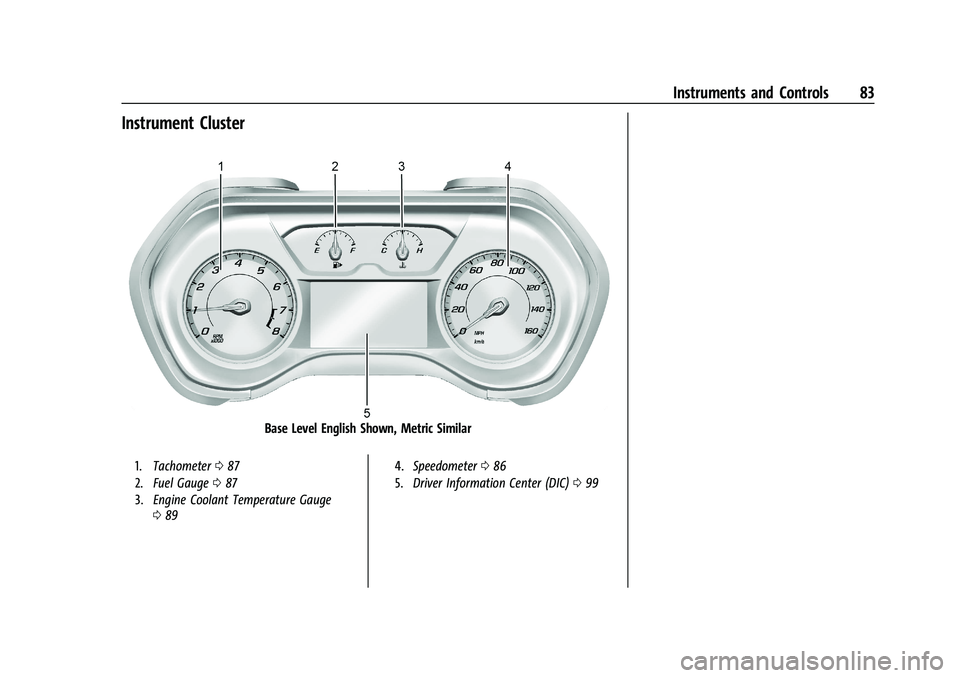
Instrument Cluster
Base Level English Shown, Metric Similar
1.Tachometer 087
2. Fuel Gauge 087
3. Engine Coolant Temperature Gauge
089 4.
Speedometer 086
5. Driver Information Center (DIC) 099
Page 85 of 357
Chevrolet Camaro Owner Manual (GMNA-Localizing-U.S./Canada/Mexico-
14583589) - 2021 - CRC - 3/26/20
84 Instruments and Controls
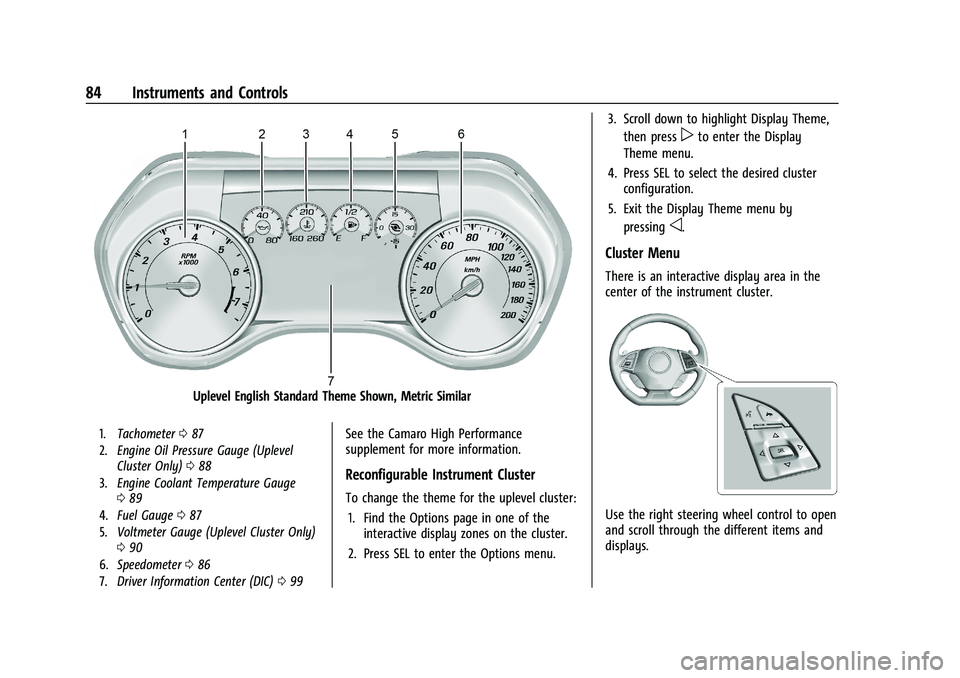
Uplevel English Standard Theme Shown, Metric Similar
1.Tachometer 087
2. Engine Oil Pressure Gauge (Uplevel
Cluster Only) 088
3. Engine Coolant Temperature Gauge
089
4. Fuel Gauge 087
5. Voltmeter Gauge (Uplevel Cluster Only)
090
6. Speedometer 086
7. Driver Information Center (DIC) 099See the Camaro High Performance
supplement for more information.
Reconfigurable Instrument Cluster
To change the theme for the uplevel cluster:
1. Find the Options page in one of the interactive display zones on the cluster.
2. Press SEL to enter the Options menu. 3. Scroll down to highlight Display Theme,
then press
pto enter the Display
Theme menu.
4. Press SEL to select the desired cluster configuration.
5. Exit the Display Theme menu by pressing
o.
Cluster Menu
There is an interactive display area in the
center of the instrument cluster.
Use the right steering wheel control to open
and scroll through the different items and
displays.
Page 88 of 357
Chevrolet Camaro Owner Manual (GMNA-Localizing-U.S./Canada/Mexico-
14583589) - 2021 - CRC - 3/26/20
Instruments and Controls 87
Tachometer
The tachometer displays the engine speed in
revolutions per minute (rpm).
Caution
If the engine is operated with the rpm’s
in the warning area at the high end of
the tachometer, the vehicle could be
damaged, and the damage would not be
covered by the vehicle warranty. Do not
operate the engine with the rpm’s in the
warning area.
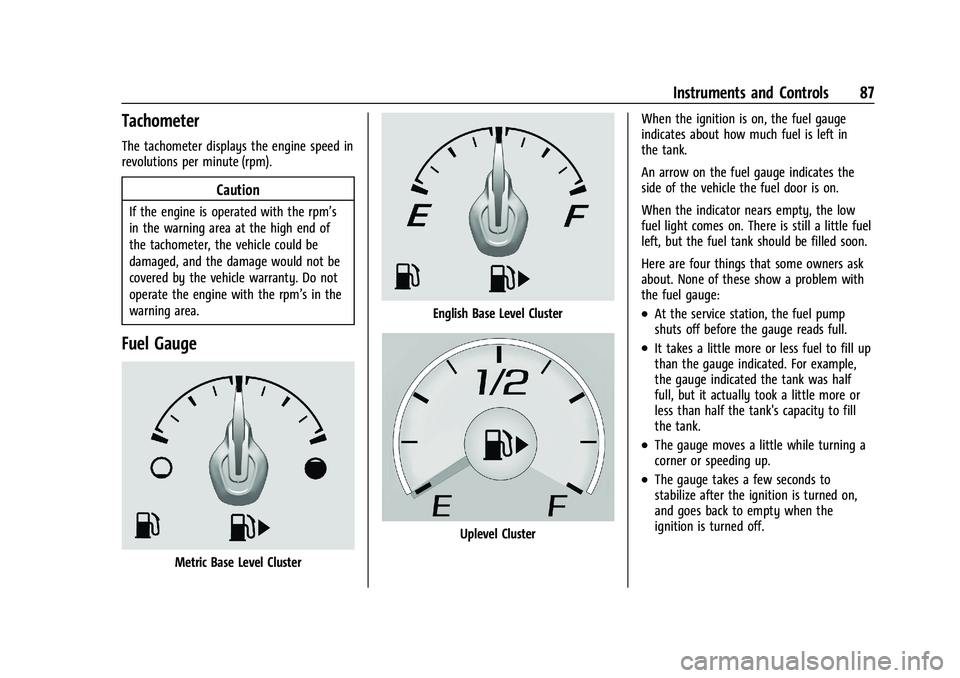
Fuel Gauge
Metric Base Level Cluster
English Base Level Cluster
Uplevel ClusterWhen the ignition is on, the fuel gauge
indicates about how much fuel is left in
the tank.
An arrow on the fuel gauge indicates the
side of the vehicle the fuel door is on.
When the indicator nears empty, the low
fuel light comes on. There is still a little fuel
left, but the fuel tank should be filled soon.
Here are four things that some owners ask
about. None of these show a problem with
the fuel gauge:
.At the service station, the fuel pump
shuts off before the gauge reads full.
.It takes a little more or less fuel to fill up
than the gauge indicated. For example,
the gauge indicated the tank was half
full, but it actually took a little more or
less than half the tank's capacity to fill
the tank.
.The gauge moves a little while turning a
corner or speeding up.
.The gauge takes a few seconds to
stabilize after the ignition is turned on,
and goes back to empty when the
ignition is turned off.
Page 89 of 357
Chevrolet Camaro Owner Manual (GMNA-Localizing-U.S./Canada/Mexico-
14583589) - 2021 - CRC - 3/26/20
88 Instruments and Controls
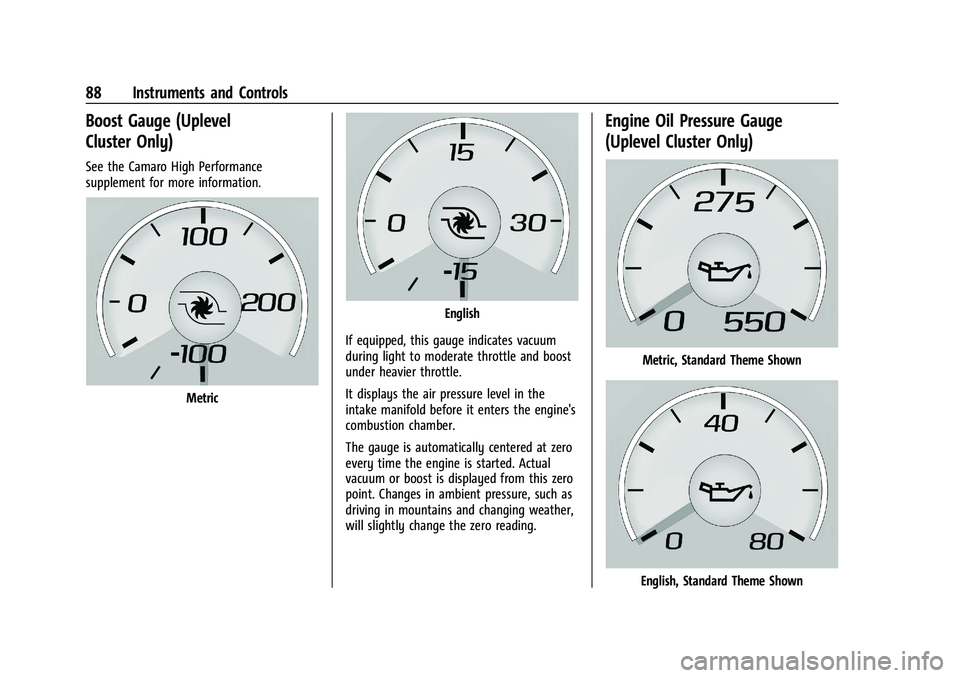
Boost Gauge (Uplevel
Cluster Only)
See the Camaro High Performance
supplement for more information.
Metric
English
If equipped, this gauge indicates vacuum
during light to moderate throttle and boost
under heavier throttle.
It displays the air pressure level in the
intake manifold before it enters the engine's
combustion chamber.
The gauge is automatically centered at zero
every time the engine is started. Actual
vacuum or boost is displayed from this zero
point. Changes in ambient pressure, such as
driving in mountains and changing weather,
will slightly change the zero reading.
Engine Oil Pressure Gauge
(Uplevel Cluster Only)
Metric, Standard Theme Shown
English, Standard Theme Shown