instrument CHEVROLET CAMARO 2022 User Guide
[x] Cancel search | Manufacturer: CHEVROLET, Model Year: 2022, Model line: CAMARO, Model: CHEVROLET CAMARO 2022Pages: 357, PDF Size: 7.99 MB
Page 53 of 357
Chevrolet Camaro Owner Manual (GMNA-Localizing-U.S./Canada/Mexico-
14583589) - 2021 - CRC - 3/24/20
52 Seats and Restraints
Frontal airbags are designed to inflate in
moderate to severe frontal or near frontal
crashes to help reduce the potential for
severe injuries, mainly to the driver's or
front outboard passenger's head and chest.
Whether the frontal airbags will or should
inflate is not based primarily on how fast
the vehicle is traveling. It depends on what
is hit, the direction of the impact, and how
quickly the vehicle slows down.
Frontal airbags may inflate at different crash
speeds depending on whether the vehicle
hits an object straight on or at an angle,
and whether the object is fixed or moving,
rigid or deformable, narrow or wide.
Frontal airbags are not intended to inflate
during vehicle rollovers, rear impacts, or in
many side impacts.
In addition, the vehicle has advanced
technology frontal airbags. Advanced
technology frontal airbags adjust the
restraint according to crash severity.
Knee airbags are designed to inflate in
moderate to severe frontal or near frontal
impacts. Knee airbags are not designed to
inflate during vehicle rollovers, in rear
impacts, or in many side impacts.The vehicle may have a seat position sensor
that enables the sensing system to monitor
the position of the front outboard passenger
seat. If equipped, the passenger seat
position sensor and the passenger seat belt
buckle provide information that is used to
determine if the passenger knee airbag
should inflate.
Seat-mounted side impact airbags are
designed to inflate in moderate to severe
side crashes depending on the location of
the impact. Seat-mounted side impact
airbags are not designed to inflate in frontal
impacts, near frontal impacts, rollovers,
or rear impacts. A seat-mounted side impact
airbag is designed to inflate on the side of
the vehicle that is struck.
Roof-rail airbags, if equipped, are designed
to inflate in moderate to severe side crashes
depending on the location of the impact. In
addition, these roof-rail airbags are designed
to inflate during a rollover or in a severe
frontal impact. Roof-rail airbags are not
designed to inflate in rear impacts. Both
roof-rail airbags will inflate when either side
of the vehicle is struck, if the sensing
system predicts that the vehicle is about to
roll over on its side, or in a severe frontal
impact.In any particular crash, no one can say
whether an airbag should have inflated
simply because of the vehicle damage or
repair costs.
What Makes an Airbag Inflate?
In a deployment event, the sensing system
sends an electrical signal triggering a release
of gas from the inflator. Gas from the
inflator fills the airbag causing the bag to
break out of the cover. The inflator, the
airbag, and related hardware are all part of
the airbag module.
For airbag locations, see
Where Are the
Airbags? 050.
How Does an Airbag Restrain?
In moderate to severe frontal or near frontal
collisions, even belted occupants can contact
the steering wheel or the instrument panel.
In moderate to severe side collisions, even
belted occupants can contact the inside of
the vehicle.
Airbags supplement the protection provided
by seat belts by distributing the force of the
impact more evenly over the
occupant's body.
Page 59 of 357
Chevrolet Camaro Owner Manual (GMNA-Localizing-U.S./Canada/Mexico-
14583589) - 2021 - CRC - 3/24/20
58 Seats and Restraints
{Warning
For up to 10 seconds after the vehicle is
turned off and the battery is
disconnected, an airbag can still inflate
during improper service. You can be
injured if you are close to an airbag
when it inflates. Avoid yellow connectors.
They are probably part of the airbag
system. Be sure to follow proper service
procedures, and make sure the person
performing work for you is qualified to
do so.
Adding Equipment to the
Airbag-Equipped Vehicle
Adding accessories that change the vehicle's
frame, bumper system, height, front end,
or side sheet metal may keep the airbag
system from working properly.
The operation of the airbag system can also
be affected by changing, including
improperly repairing or replacing, any parts
of the following:
.Airbag system, including airbag modules,
front or side impact sensors, sensing and
diagnostic module, or airbag wiring
.Front seats, including stitching, seams or
zippers
.Seat belts
.Steering wheel, instrument panel,
overhead console, ceiling trim, or pillar
garnish trim
.Inner door seals, including speakers
Your dealer and the service manual have
information about the location of the airbag
modules and sensors, sensing and diagnostic
module, and airbag wiring along with the
proper replacement procedures.
In addition, the vehicle has a passenger
sensing system for the front outboard
passenger position, which includes sensors
that are part of the passenger seat. The
passenger sensing system may not operate
properly if the original seat trim is replaced
with non-GM covers, upholstery, or trim; or
with GM covers, upholstery, or trim
designed for a different vehicle. Any object,
such as an aftermarket seat heater or a
comfort-enhancing pad or device, installed
under or on top of the seat fabric, could
also interfere with the operation of the
passenger sensing system. This could either
prevent proper deployment of the passenger
airbag(s) or prevent the passenger sensing system from properly turning off the
passenger airbag(s). See
Passenger Sensing
System 054.
If the vehicle has rollover roof-rail airbags,
see Different Size Tires and Wheels 0287 for
additional important information.
If the vehicle must be modified because you
have a disability and have questions about
whether the modifications will affect the
vehicle's airbag system, or if you have
questions about whether the airbag system
will be affected if the vehicle is modified for
any other reason, call Customer Assistance.
See Customer Assistance Offices 0328.
Airbag System Check
The airbag system does not need regularly
scheduled maintenance or replacement.
Make sure the airbag readiness light is
working. See Airbag Readiness Light 091.
Caution
If an airbag covering is damaged, opened,
or broken, the airbag may not work
properly. Do not open or break the airbag
coverings. If there are any opened or
broken airbag coverings, have the airbag
(Continued)
Page 78 of 357
Chevrolet Camaro Owner Manual (GMNA-Localizing-U.S./Canada/Mexico-
14583589) - 2021 - CRC - 3/26/20
Instruments and Controls 77
Instruments and Controls
Controls
Steering Wheel Adjustment . . . . . . . . . . . . 78
Steering Wheel Controls . . . . . . . . . . . . . . . . 78
Heated Steering Wheel . . . . . . . . . . . . . . . . . 78
Horn . . . . . . . . . . . . . . . . . . . . . . . . . . . . . . . . . . . 78
Windshield Wiper/Washer . . . . . . . . . . . . . . 78
Compass . . . . . . . . . . . . . . . . . . . . . . . . . . . . . . . 79
Clock . . . . . . . . . . . . . . . . . . . . . . . . . . . . . . . . . . . 79
Power Outlets . . . . . . . . . . . . . . . . . . . . . . . . . . 80
Wireless Charging . . . . . . . . . . . . . . . . . . . . . . 80
Warning Lights, Gauges, and Indicators
Warning Lights, Gauges, andIndicators . . . . . . . . . . . . . . . . . . . . . . . . . . . . . 82
Instrument Cluster . . . . . . . . . . . . . . . . . . . . . 83
Speedometer . . . . . . . . . . . . . . . . . . . . . . . . . . . 86
Odometer . . . . . . . . . . . . . . . . . . . . . . . . . . . . . . 86
Trip Odometer . . . . . . . . . . . . . . . . . . . . . . . . . 86
Tachometer . . . . . . . . . . . . . . . . . . . . . . . . . . . . . 87
Fuel Gauge . . . . . . . . . . . . . . . . . . . . . . . . . . . . . 87
Boost Gauge (Uplevel Cluster Only) . . . . 88
Engine Oil Pressure Gauge (Uplevel Cluster Only) . . . . . . . . . . . . . . . . . . . . . . . . . 88
Engine Coolant Temperature Gauge . . . . 89
Voltmeter Gauge (Uplevel Cluster Only) . . . . . . . . . . . . . . . . . . . . . . . . . 90
Seat Belt Reminders . . . . . . . . . . . . . . . . . . . . 90
Airbag Readiness Light . . . . . . . . . . . . . . . . . . 91 Passenger Airbag Status Indicator . . . . . . 91
Charging System Light . . . . . . . . . . . . . . . . . 92
Malfunction Indicator Lamp . . . . . . . . . . . . 92
Brake System Warning Light . . . . . . . . . . . 94
Electric Parking Brake Light . . . . . . . . . . . . . 94
Service Electric Parking Brake Light . . . . . 95
Antilock Brake System (ABS) Warning
Light . . . . . . . . . . . . . . . . . . . . . . . . . . . . . . . . . . 95
Vehicle Ahead Indicator . . . . . . . . . . . . . . . . 95
Traction Off Light . . . . . . . . . . . . . . . . . . . . . . 96
StabiliTrak OFF Light . . . . . . . . . . . . . . . . . . . 96
Traction Control System (TCS)/StabiliTrak Light . . . . . . . . . . . . . . . . . . . . . . . . . . . . . . . . . 96
Tire Pressure Light . . . . . . . . . . . . . . . . . . . . . . 97
Engine Oil Pressure Light . . . . . . . . . . . . . . . 97
Low Fuel Warning Light . . . . . . . . . . . . . . . . 97
Security Light . . . . . . . . . . . . . . . . . . . . . . . . . . 98
High-Beam On Light . . . . . . . . . . . . . . . . . . . . 98
Lamps On Reminder . . . . . . . . . . . . . . . . . . . . 98
Cruise Control Light . . . . . . . . . . . . . . . . . . . . 98
Door Ajar Light . . . . . . . . . . . . . . . . . . . . . . . . . 98
Information Displays
Driver Information Center (DIC) . . . . . . . . 99
Head-Up Display (HUD) . . . . . . . . . . . . . . . . 101
Vehicle Messages
Vehicle Messages . . . . . . . . . . . . . . . . . . . . . . 104
Engine Power Messages . . . . . . . . . . . . . . . 105
Vehicle Speed Messages . . . . . . . . . . . . . . . 105
Vehicle Personalization
Vehicle Personalization . . . . . . . . . . . . . . . . 105
Page 79 of 357
Chevrolet Camaro Owner Manual (GMNA-Localizing-U.S./Canada/Mexico-
14583589) - 2021 - CRC - 3/26/20
78 Instruments and Controls
Controls
Steering Wheel Adjustment
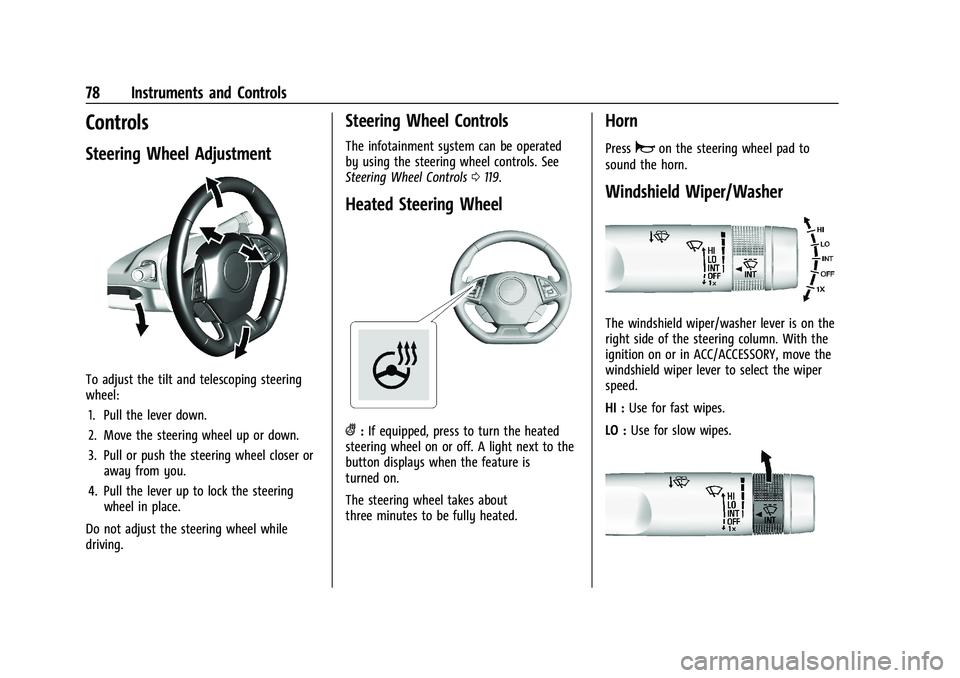
To adjust the tilt and telescoping steering
wheel:1. Pull the lever down.
2. Move the steering wheel up or down.
3. Pull or push the steering wheel closer or away from you.
4. Pull the lever up to lock the steering wheel in place.
Do not adjust the steering wheel while
driving.
Steering Wheel Controls
The infotainment system can be operated
by using the steering wheel controls. See
Steering Wheel Controls 0119.
Heated Steering Wheel
(:If equipped, press to turn the heated
steering wheel on or off. A light next to the
button displays when the feature is
turned on.
The steering wheel takes about
three minutes to be fully heated.
Horn
Pressaon the steering wheel pad to
sound the horn.
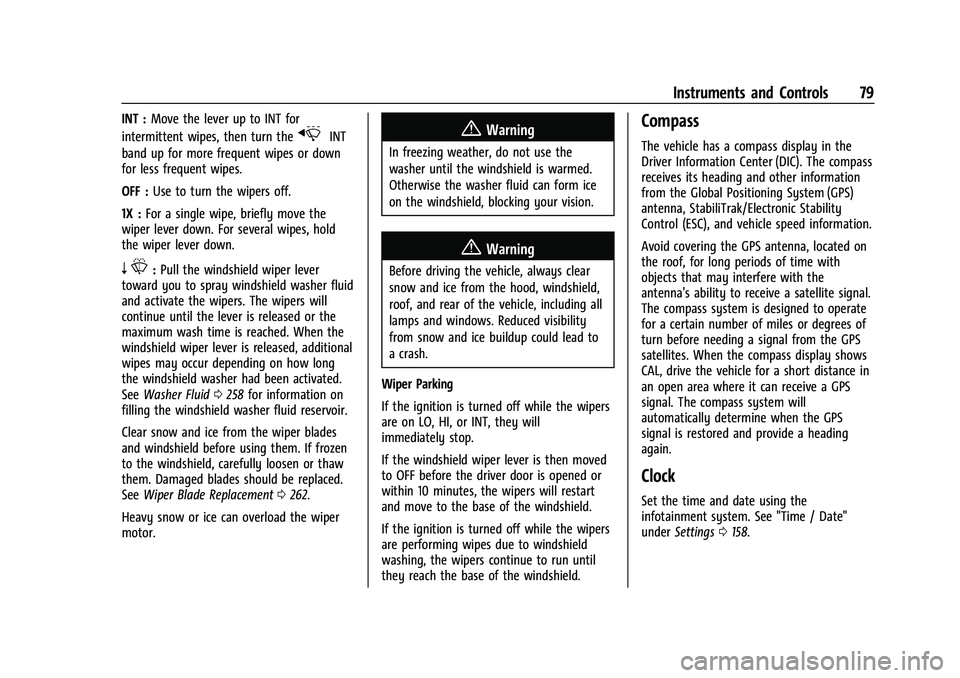
Windshield Wiper/Washer
The windshield wiper/washer lever is on the
right side of the steering column. With the
ignition on or in ACC/ACCESSORY, move the
windshield wiper lever to select the wiper
speed.
HI : Use for fast wipes.
LO : Use for slow wipes.
Page 80 of 357
Chevrolet Camaro Owner Manual (GMNA-Localizing-U.S./Canada/Mexico-
14583589) - 2021 - CRC - 3/26/20
Instruments and Controls 79
INT :Move the lever up to INT for
intermittent wipes, then turn the
xINT
band up for more frequent wipes or down
for less frequent wipes.
OFF : Use to turn the wipers off.
1X : For a single wipe, briefly move the
wiper lever down. For several wipes, hold
the wiper lever down.
n L: Pull the windshield wiper lever
toward you to spray windshield washer fluid
and activate the wipers. The wipers will
continue until the lever is released or the
maximum wash time is reached. When the
windshield wiper lever is released, additional
wipes may occur depending on how long
the windshield washer had been activated.
See Washer Fluid 0258 for information on
filling the windshield washer fluid reservoir.
Clear snow and ice from the wiper blades
and windshield before using them. If frozen
to the windshield, carefully loosen or thaw
them. Damaged blades should be replaced.
See Wiper Blade Replacement 0262.
Heavy snow or ice can overload the wiper
motor.
{Warning
In freezing weather, do not use the
washer until the windshield is warmed.
Otherwise the washer fluid can form ice
on the windshield, blocking your vision.
{Warning
Before driving the vehicle, always clear
snow and ice from the hood, windshield,
roof, and rear of the vehicle, including all
lamps and windows. Reduced visibility
from snow and ice buildup could lead to
a crash.
Wiper Parking
If the ignition is turned off while the wipers
are on LO, HI, or INT, they will
immediately stop.
If the windshield wiper lever is then moved
to OFF before the driver door is opened or
within 10 minutes, the wipers will restart
and move to the base of the windshield.
If the ignition is turned off while the wipers
are performing wipes due to windshield
washing, the wipers continue to run until
they reach the base of the windshield.
Compass
The vehicle has a compass display in the
Driver Information Center (DIC). The compass
receives its heading and other information
from the Global Positioning System (GPS)
antenna, StabiliTrak/Electronic Stability
Control (ESC), and vehicle speed information.
Avoid covering the GPS antenna, located on
the roof, for long periods of time with
objects that may interfere with the
antenna's ability to receive a satellite signal.
The compass system is designed to operate
for a certain number of miles or degrees of
turn before needing a signal from the GPS
satellites. When the compass display shows
CAL, drive the vehicle for a short distance in
an open area where it can receive a GPS
signal. The compass system will
automatically determine when the GPS
signal is restored and provide a heading
again.
Clock
Set the time and date using the
infotainment system. See "Time / Date"
under Settings 0158.
Page 81 of 357
Chevrolet Camaro Owner Manual (GMNA-Localizing-U.S./Canada/Mexico-
14583589) - 2021 - CRC - 3/26/20
80 Instruments and Controls
Power Outlets
The vehicle has an accessory power outlet
on the center floor console in front of the
cupholders. It can be used to plug in
electrical equipment, such as a cell phone or
an MP3 player.
The accessory power outlet does not work
when the ignition is turned off and the
driver door is opened. This helps to preserve
the battery life of the vehicle.
Certain power accessory plugs may not be
compatible with the accessory power outlet
and could overload vehicle and adapter
fuses. If a problem is experienced, see your
dealer.
Caution
Adding any electrical equipment to the
vehicle may damage it or keep other
components from working as they
should. The repairs would not be covered
by the vehicle warranty. Do not use
equipment exceeding
maximum amperage rating of
15 amperes. Check with your dealer
before adding electrical equipment.When adding electrical equipment, be sure
to follow the proper installation instructions
included with the equipment. See
Add-On
Electrical Equipment 0237.
Caution
Hanging heavy equipment from the
power outlet can cause damage not
covered by the vehicle warranty. The
power outlets are designed for accessory
power plugs only, such as cell phone
charge cords.
Wireless Charging
If equipped, the vehicle has wireless
charging in the storage bin at the back of
the floor console. The system operates at
145 kHz and wirelessly charges one Qi
compatible smartphone. The power output
of the system is capable of charging at a
rate up to 1 amp (5W), as requested by the
compatible smartphone. See Radio
Frequency Statement 0334.
{Warning
Wireless charging can affect the
operation of an implanted pacemaker or
other medical devices. If you have one, it
is recommended to consult with your
doctor before using the wireless charging
system.
The vehicle must be on, in ACC/ACCESSORY,
or Retained Accessory Power (RAP) must be
active. The wireless charging feature may
not correctly indicate charging when the
vehicle is in RAP. See Retained Accessory
Power (RAP) 0207.
The operating temperature is −20 °C (−4 °F)
to 60 °C (140 °F) for the charging system
and 0 °C (32 °F) to 35 °C (95 °F) for the
smartphone.
{Warning
Remove all objects from the charging pad
before charging your compatible
smartphone. Objects, such as coins, keys,
rings, paper clips, or cards, between the
smartphone and charging pad will
become very hot. On the rare occasion
(Continued)
Page 82 of 357
Chevrolet Camaro Owner Manual (GMNA-Localizing-U.S./Canada/Mexico-
14583589) - 2021 - CRC - 3/26/20
Instruments and Controls 81
Warning (Continued)
that the charging system does not detect
an object, and the object gets wedged
between the smartphone and charger,
remove the smartphone and allow the
object to cool before removing it from
the charging pad, to prevent burns.
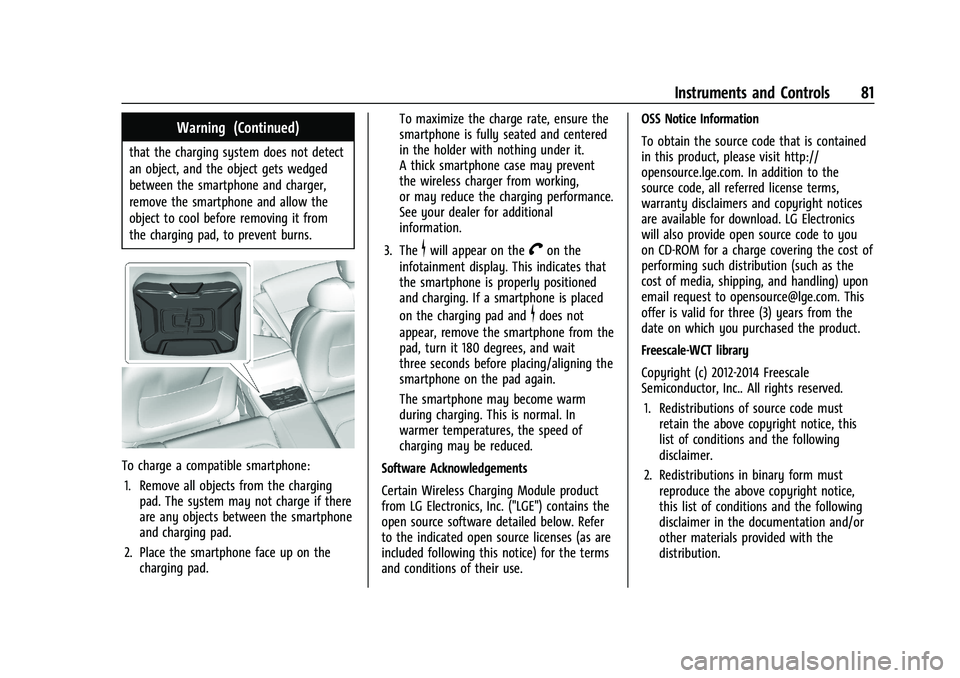
To charge a compatible smartphone:1. Remove all objects from the charging pad. The system may not charge if there
are any objects between the smartphone
and charging pad.
2. Place the smartphone face up on the charging pad. To maximize the charge rate, ensure the
smartphone is fully seated and centered
in the holder with nothing under it.
A thick smartphone case may prevent
the wireless charger from working,
or may reduce the charging performance.
See your dealer for additional
information.
3. The
$will appear on theVon the
infotainment display. This indicates that
the smartphone is properly positioned
and charging. If a smartphone is placed
on the charging pad and
$does not
appear, remove the smartphone from the
pad, turn it 180 degrees, and wait
three seconds before placing/aligning the
smartphone on the pad again.
The smartphone may become warm
during charging. This is normal. In
warmer temperatures, the speed of
charging may be reduced.
Software Acknowledgements
Certain Wireless Charging Module product
from LG Electronics, Inc. ("LGE") contains the
open source software detailed below. Refer
to the indicated open source licenses (as are
included following this notice) for the terms
and conditions of their use. OSS Notice Information
To obtain the source code that is contained
in this product, please visit http://
opensource.lge.com. In addition to the
source code, all referred license terms,
warranty disclaimers and copyright notices
are available for download. LG Electronics
will also provide open source code to you
on CD-ROM for a charge covering the cost of
performing such distribution (such as the
cost of media, shipping, and handling) upon
email request to [email protected]. This
offer is valid for three (3) years from the
date on which you purchased the product.
Freescale-WCT library
Copyright (c) 2012-2014 Freescale
Semiconductor, Inc.. All rights reserved.
1. Redistributions of source code must retain the above copyright notice, this
list of conditions and the following
disclaimer.
2. Redistributions in binary form must reproduce the above copyright notice,
this list of conditions and the following
disclaimer in the documentation and/or
other materials provided with the
distribution.
Page 83 of 357
Chevrolet Camaro Owner Manual (GMNA-Localizing-U.S./Canada/Mexico-
14583589) - 2021 - CRC - 3/26/20
82 Instruments and Controls
3. Neither the name of the copyright holdernor the names of its contributors may be
used to endorse or promote products
derived from this software without
specific prior written permission.
THIS SOFTWARE IS PROVIDED BY THE
COPYRIGHT HOLDERS AND CONTRIBUTORS
"AS IS" AND ANY EXPRESS OR IMPLIED
WARRANTIES, INCLUDING, BUT NOT LIMITED
TO, THE IMPLIED WARRANTIES OF
MERCHANTABILITY AND FITNESS FOR A
PARTICULAR PURPOSE ARE DISCLAIMED. IN
NO EVENT SHALL THE COPYRIGHT HOLDER
OR CONTRIBUTORS BE LIABLE FOR ANY
DIRECT, INDIRECT, INCIDENTAL, SPECIAL,
EXEMPLARY, OR CONSEQUENTIAL DAMAGES
(INCLUDING, BUT NOT LIMITED TO,
PROCUREMENT OF SUBSTITUTE GOODS OR
SERVICES; LOSS OF USE, DATA, OR PROFITS;
OR BUSINESS INTERRUPTION) HOWEVER
CAUSED AND ON ANY THEORY OF LIABILITY,
WHETHER IN CONTRACT, STRICT LIABILITY, OR
TORT (INCLUDING NEGLIGENCE OR
OTHERWISE) ARISING IN ANY WAY OUT OF
THE USE OF THIS SOFTWARE, EVEN IF
ADVISED OF THE POSSIBILITY OF SUCH
DAMAGE.Warning Lights, Gauges, and
Indicators
Warning lights and gauges can signal that
something is wrong before it becomes
serious enough to cause an expensive repair
or replacement. Paying attention to the
warning lights and gauges could prevent
injury.
Some warning lights come on briefly when
the engine is started to indicate they are
working. When one of the warning lights
comes on and stays on while driving,
or when one of the gauges shows there
may be a problem, check the section that
explains what to do. Waiting to do repairs
can be costly and even dangerous.
Page 84 of 357
Chevrolet Camaro Owner Manual (GMNA-Localizing-U.S./Canada/Mexico-
14583589) - 2021 - CRC - 3/26/20
Instruments and Controls 83
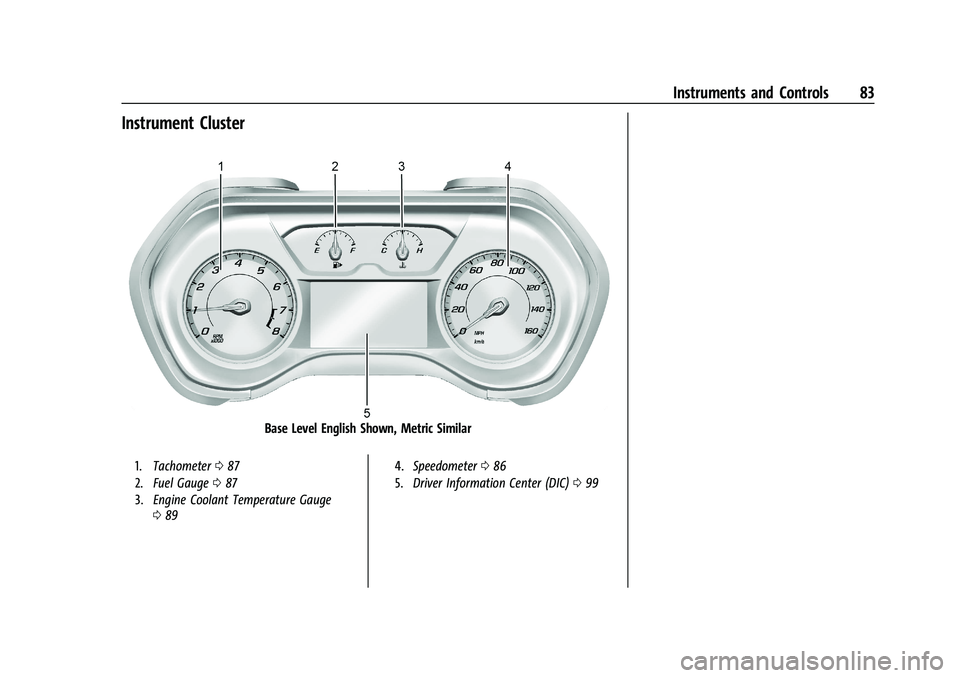
Instrument Cluster
Base Level English Shown, Metric Similar
1.Tachometer 087
2. Fuel Gauge 087
3. Engine Coolant Temperature Gauge
089 4.
Speedometer 086
5. Driver Information Center (DIC) 099
Page 85 of 357
Chevrolet Camaro Owner Manual (GMNA-Localizing-U.S./Canada/Mexico-
14583589) - 2021 - CRC - 3/26/20
84 Instruments and Controls
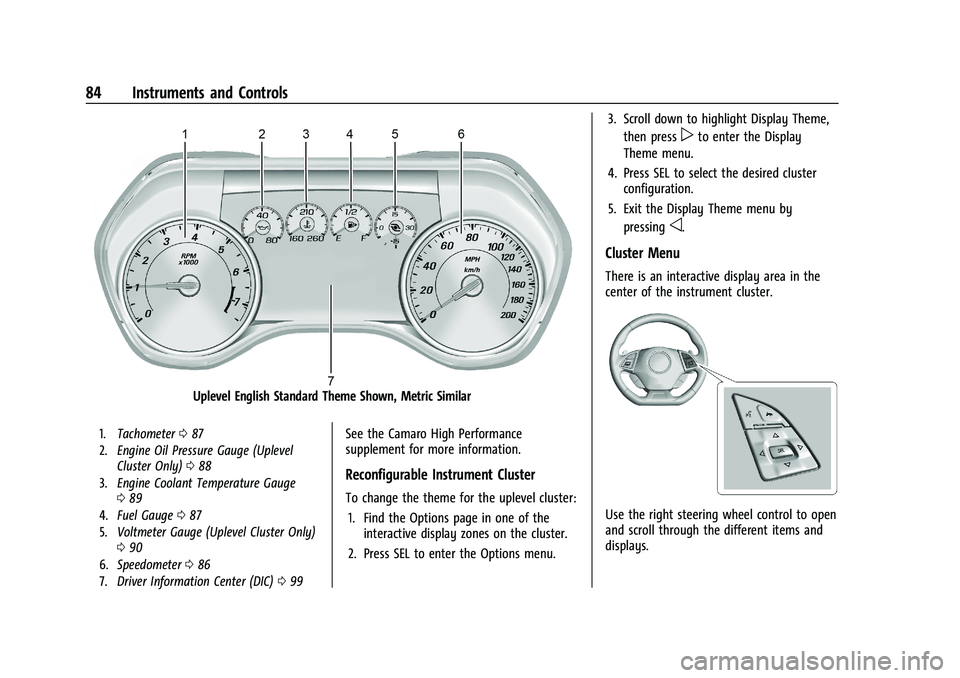
Uplevel English Standard Theme Shown, Metric Similar
1.Tachometer 087
2. Engine Oil Pressure Gauge (Uplevel
Cluster Only) 088
3. Engine Coolant Temperature Gauge
089
4. Fuel Gauge 087
5. Voltmeter Gauge (Uplevel Cluster Only)
090
6. Speedometer 086
7. Driver Information Center (DIC) 099See the Camaro High Performance
supplement for more information.
Reconfigurable Instrument Cluster
To change the theme for the uplevel cluster:
1. Find the Options page in one of the interactive display zones on the cluster.
2. Press SEL to enter the Options menu. 3. Scroll down to highlight Display Theme,
then press
pto enter the Display
Theme menu.
4. Press SEL to select the desired cluster configuration.
5. Exit the Display Theme menu by pressing
o.
Cluster Menu
There is an interactive display area in the
center of the instrument cluster.
Use the right steering wheel control to open
and scroll through the different items and
displays.