keyless entry CHEVROLET CAMARO 2022 User Guide
[x] Cancel search | Manufacturer: CHEVROLET, Model Year: 2022, Model line: CAMARO, Model: CHEVROLET CAMARO 2022Pages: 357, PDF Size: 7.99 MB
Page 40 of 357
Chevrolet Camaro Owner Manual (GMNA-Localizing-U.S./Canada/Mexico-
14583589) - 2021 - CRC - 3/24/20
Seats and Restraints 39
To save the position forBand Seat Exit
Memory features, repeat Steps 1–4 using
B. This saves the position for getting out
of the vehicle.
Save preferred memory feature positions to
both 1 and 2 if you are the only driver.
Manually Recalling Memory Positions
Press and hold 1, 2, or
Bto recall the
previously saved memory positions if you
are driver 1 or 2 identified in the DIC
welcome message.
To stop Manual Memory recall movement,
release 1, 2, or
Bor press any of the
following controls:
.Power seat
.Memory SET
.Power mirror, with the driver or
passenger side mirror selected
.Power steering wheel, if equipped
If equipped with an automatic transmission,
Manual Memory recall movement for 1, 2,
or
Bbuttons may be initiated and will
complete to the saved memory position if
the vehicle is in or out of P (Park). Seat Entry Memory
The vehicle identifies the number of the
current driver’s RKE transmitter (1–8). See
Remote Keyless Entry (RKE) System
Operation
07. If the RKE transmitter is 1 or
2, and Seat Entry Memory is enabled in
vehicle personalization, the positions saved
to the same memory button number 1 or 2
are automatically recalled when the vehicle
is turned on, or turned from off to ACC/
ACCESSORY. RKE transmitters 3–8 will not
provide automatic memory recalls.
To turn Seat Entry Memory on or off, see
“Vehicle Personalization Settings” previously
in this section and Vehicle Personalization
0 105.
If equipped with an automatic transmission,
the shift lever must be in P (Park) to start
Seat Entry Memory recall. Seat Entry
Memory recall will complete if the vehicle is
shifted out of P (Park) prior to reaching the
saved memory position.
If equipped with a manual transmission, the
parking brake must be set to start Seat
Entry Memory recall. Seat Entry Memory
recall will complete if the parking brake is
released prior to reaching the saved memory
position. To stop Seat Entry Memory recall
movement, turn the vehicle off or press any
of the following controls:
.Power seat
.Memory SET, 1, 2, orB
.Power mirror, with the driver or
passenger side mirror selected
.Power steering wheel, if equipped
If the saved memory seat position does not
automatically recall or recalls to the wrong
positions, the driver’s RKE transmitter
number (1 or 2) may not match the memory
button number that positions were saved to.
Try storing the position to the other
memory button or try the other RKE
transmitter.
Seat Exit Memory
Seat Exit Memory is not linked to an RKE
transmitter. The position saved to
Bis
used for all drivers. To turn Seat Exit
Memory on or off, see "Vehicle
Personalization Settings" previously in this
section and Vehicle Personalization 0105.
Page 108 of 357
Chevrolet Camaro Owner Manual (GMNA-Localizing-U.S./Canada/Mexico-
14583589) - 2021 - CRC - 3/26/20
Instruments and Controls 107
Comfort and Convenience
Touch and the following may display:
.Chime Volume
.Reverse Tilt Mirror
Chime Volume
This setting determines the chime volume
level.
Touch the controls on the infotainment
display to adjust the volume.
Reverse Tilt Mirror
When on, the driver, passenger, or both
driver and passenger outside mirrors will tilt
downward when the vehicle is shifted into
R (Reverse) to improve visibility of the
ground near the rear wheels. They may
move from their tilted position when the
vehicle is shifted out of R (Reverse) or
turned off. See Reverse Tilt Mirrors 024.
Touch Off, On - Driver and Passenger, On -
Driver, or On - Passenger.
Lighting
Touch and the following may display:
.Ambient Lighting
.Vehicle Locator Lights
.Exit Lighting Ambient Lighting
This setting allows the selection of available
colors for the ambient lighting in the
vehicle.
The Link to Drive Mode option will change
the ambient lighting to match the color
being used in the instrument cluster based
on the setting of the drive mode button.
This feature can be turned off or on.
Vehicle Locator Lights
This setting flashes the vehicle’s headlamps
when
Kis pressed on the Remote Keyless
Entry (RKE) transmitter.
Touch Off or On.
Exit Lighting
This setting specifies how long the
headlamps stay on after the vehicle is
turned off and exited.
Touch Off, 30 Seconds, 60 Seconds,
or 120 Seconds.
Power Door Locks
Touch and the following may display:
.Open Door Anti Lock Out
.Auto Door Unlock
.Delayed Door Lock
Open Door Anti Lock Out
This setting prevents the driver door from
locking when the door is open. If this
setting is on, the Delayed Door Lock menu
will not be available.
Touch Off or On.
Auto Door Unlock
This allows selection of which of the doors
will automatically unlock when the vehicle is
shifted into P (Park) with an automatic
transmission or when the vehicle is turned
off with a manual transmission.
Select Off, All Doors, or Driver Door.
Delayed Door Lock
When on, this feature will delay the locking
of the doors. To override the delay, press
the power door lock switch on the door.
Touch Off or On.
Remote Lock, Unlock, and Start
Touch and the following may display:
.Remote Unlock Light Feedback
.Remote Lock Feedback
.Remote Door Unlock
.Remote Start Auto Cool Seats
Page 109 of 357
Chevrolet Camaro Owner Manual (GMNA-Localizing-U.S./Canada/Mexico-
14583589) - 2021 - CRC - 3/26/20
108 Instruments and Controls
.Remote Start Auto Heat Seats
.Remote Window Operation
.Passive Door Unlock
.Passive Door Lock
.Remote Left in Vehicle Alert
Remote Unlock Light Feedback
This setting flashes the exterior lamps when
the vehicle is unlocked with the RKE
transmitter.
Touch Off or Flash Lights.
Remote Lock Feedback
This setting specifies how the vehicle
responds when the vehicle is locked with
the RKE transmitter.
Touch Off, Lights and Horn, Lights Only,
or Horn Only.
Remote Door Unlock
This setting specifies whether all doors,
or just the driver door, unlock when pressing
Kon the RKE transmitter.
Touch All Doors or Driver Door. Remote Start Auto Cool Seats
If equipped and turned on, this feature will
turn the ventilated seats on when using
remote start on warm days.
Touch Off, On-Driver and Passenger,
or On-Driver.
Remote Start Auto Heat Seats
This setting automatically turns on the
heated seats when using the remote start
function on cold days. See
Heated and
Ventilated Front Seats 040 and
Remote Vehicle Start 014.
Touch Off, On-Driver and Passenger,
or On-Driver.
Remote Window Operation
If equipped, this feature enables remote
operation of the windows with the RKE
transmitter. See Remote Keyless Entry (RKE)
System Operation 07.
Touch Off or On.
Passive Door Unlock
This setting specifies which doors unlock
when using the button on the driver door
handle to unlock the vehicle.
Touch Off, All Doors, or Driver Door Only. Passive Door Lock
This setting specifies if the vehicle will
automatically lock, or lock and provide an
alert after all the doors are closed, and you
walk away from the vehicle with the RKE
transmitter. See
Remote Keyless Entry (RKE)
System Operation 07.
Touch Off, On with Horn Chirp, or On.
Remote Left in Vehicle Alert
This feature sounds an alert when the RKE
transmitter is left in the vehicle. This menu
also enables Remote No Longer in Vehicle
Alert.
Touch Off or On.
Seating Position
Touch and the following may display:
.Seat Entry Memory
.Seat Exit Memory
Seat Entry Memory
This feature automatically recalls the
previously stored 1 or 2 button positions
when the ignition is changed from off to on
or ACC/ACCESSORY. See Memory Seats037.
Touch Off or On.
Page 115 of 357
Chevrolet Camaro Owner Manual (GMNA-Localizing-U.S./Canada/Mexico-
14583589) - 2021 - CRC - 3/24/20
114 Lighting
Lighting Features
Entry Lighting
Some exterior lamps and interior lamps turn
on briefly at night, or in areas with limited
lighting, when
Kis pressed on the Remote
Keyless Entry (RKE) transmitter. After about
30 seconds the exterior lamps turn off.
Entry lighting can be disabled manually by
turning the ignition on or to ACC/
ACCESSORY, or by pressing
Qon the RKE
transmitter. When any door is opened or
remote unlock pressed, all interior lights
turn on and then interior lamps dim to off
after 20 seconds.
The entry lighting feature for exterior
lighting can be changed. See “Vehicle
Locator Lights” underVehicle Personalization
0 105.
Exit Lighting
Some exterior lamps come on at night or in
areas with limited lighting when the driver
door is opened after the ignition is
turned off.
The interior lamps come on after the
ignition is turned off or any door is opened. The exterior and interior lamps remain on
after the door is closed for a set amount of
time then automatically turn off.
Exit lighting for exterior lights can be
changed. See
Vehicle Personalization 0105.
Theater Dimming
This feature allows for a three to five
second fade out of the interior lamps
instead of having them turn off
immediately.
Battery Load Management
The vehicle has Electric Power Management
(EPM) that estimates the battery's
temperature and state of charge. It then
adjusts the voltage for best performance
and extended life of the battery.
When the battery's state of charge is low,
the voltage is raised slightly to quickly bring
the charge back up. When the state of
charge is high, the voltage is lowered
slightly to prevent overcharging. If the
vehicle has a voltmeter gauge or a voltage
display on the Driver Information Center
(DIC), you may see the voltage move up or
down. This is normal. If there is a problem,
an alert will be displayed. The battery can be discharged at idle if the
electrical loads are very high. This is true for
all vehicles. This is because the generator
(alternator) may not be spinning fast
enough at idle to produce all of the power
needed for very high electrical loads.
A high electrical load occurs when several of
the following are on, such as: headlamps,
high beams, rear window defogger, climate
control fan at high speed, heated seats,
engine cooling fans, trailer loads, and loads
plugged into accessory power outlets.
EPM works to prevent excessive discharge of
the battery. It does this by balancing the
generator's output and the vehicle's
electrical needs. It can increase engine idle
speed to generate more power whenever
needed. It can temporarily reduce the power
demands of some accessories.
Normally, these actions occur in steps or
levels, without being noticeable. In rare
cases at the highest levels of corrective
action, this action may be noticeable to the
driver. If so, a DIC message might be
displayed and it is recommended that the
driver reduce the electrical loads as much as
possible.
Page 165 of 357
Chevrolet Camaro Owner Manual (GMNA-Localizing-U.S./Canada/Mexico-
14583589) - 2021 - CRC - 3/24/20
164 Infotainment System
.Sort Contacts: Touch to sort by first or
last name.
.Re-sync Device Contacts:
This allows the device contacts to re-sync
if you are having difficulty accessing all of
the contacts on your cell phone.
.Delete All Vehicle Contacts: Touch to
delete all vehicle stored contacts.
.OnStar Phone TTY Mode: This enables
OnStar cell phone TTY mode.
Touch Disable or Enable.
Vehicle
This menu allows adjustment of different
vehicle features. SeeVehicle Personalization
0 105.
Personal
If equipped, this menu allows adjustment of
different user profile settings. See “Users”in
Using the System 0119 for information on
setting up user profiles.
The menu may contain the following:
Name
Touch to edit your user name that will be
displayed in the vehicle. Vehicle Account Information
Touch to view the vehicle account
information and to change the account
password.
An
“unverified user account” pop-up will
display until the account information
verification process has been completed on
the Internet. Check your registered e-mail
account for an activation e-mail to complete
the verification process.
Profile Picture
Touch to choose or change your profile
picture.
Profile Identifiers
Touch to have the vehicle recognize the
identifier you choose.
Touch Vehicle Key 1 and/or Vehicle Key 2.
If the Remote Keyless Entry (RKE)
transmitter is lost or stolen, see your dealer.
Security
Touch to have your profile secured with
a PIN.
Touch No or Yes.
Vehicle Name
Touch to edit your vehicle name. Vehicle Account
Touch to view the vehicle account
information and to change the account
password.
Delete Profile
Touch to remove the profile from the
vehicle.
Touch Remove or Cancel.
Teen Driver
If equipped, this allows multiple keys to be
registered for beginner drivers to encourage
safe driving habits. When the vehicle is
started with a Teen Driver key, it will
automatically activate certain safety
systems, allow setting of some features, and
limit the use of others. The Report Card will
record vehicle data about driving behavior
that can be viewed later. When the vehicle
is started with a registered key, the Driver
Information Center (DIC) displays a message
that Teen Driver is active.
To access:
1. Touch Settings on the Home Page, then touch Vehicle, and then Teen Driver.
Page 166 of 357
Chevrolet Camaro Owner Manual (GMNA-Localizing-U.S./Canada/Mexico-
14583589) - 2021 - CRC - 3/24/20
Infotainment System 165
2. Create a Personal Identification Number(PIN) by choosing a four-digit PIN.
Re-enter the PIN to confirm. To change
the PIN, touch Change PIN.
The PIN is required to:
.Register or unregister keys.
.Change Teen Driver settings.
.Change or clear the Teen Driver PIN.
.Access or delete Report Card data.
Register keys to activate Teen Driver and
assign restrictions to the key:
Any vehicle key can be registered, up to a
maximum of eight keys. Label the key to
tell it apart from the other keys.
For a pushbutton start system: 1. Start the engine.
2. For automatic transmissions, the vehicle must be in P (Park). For manual
transmissions, the vehicle must be
stopped with the parking brake set.
3. From the Settings menu, touch Vehicle and then Teen Driver.
4. Enter the PIN.
5. Place the Remote Keyless Entry (RKE) transmitter key you wish to register in
the transmitter pocket. The key does not need to be the one that started the
vehicle. See
Remote Keyless Entry (RKE)
System Operation 07for transmitter
pocket location.
6. From the Teen Driver menu, touch Setup Keys.
.If the transmitter key has not
previously been registered, the option
to add the key displays. Touch Setup
and a confirmation message displays.
Teen Driver restrictions will be
applied whenever this key is used to
operate the vehicle.
.If the transmitter key has already
been registered, the option to
remove the key displays. If Remove is
touched, the transmitter key is no
longer registered. A confirmation
message displays, and Teen Driver
restrictions will not be applied if this
transmitter key is used to operate
the vehicle.
In vehicles with a pushbutton start system,
if a Teen Driver and a non-Teen Driver key
are both present at start up, the vehicle will
recognize the non-Teen Driver key to start
the vehicle. The Teen Driver settings will not
be active. For a keyed ignition system:
1. Start the engine.
2. For automatic transmissions, the vehicle must be in P (Park). For manual
transmissions, the vehicle must be
stopped with the parking brake set.
3. From the Settings menu, touch Vehicle and then Teen Driver.
4. Enter the PIN.
5. Touch Setup Keys. The system displays instructions for registering or
unregistering a key. A confirmation
message displays.
Manage Settings
Audio Volume Limit : Allows the audio
volume limit to be turned on or off. Touch
Set Audio Volume Limit to choose the
maximum allowable audio volume level.
Set Audio Volume Limit : Allows a
maximum radio volume to be set. Use the
arrows to choose the maximum allowable
level for the audio volume.
Teen Driver Speed Limiter : Limits the
maximum speed of the vehicle. When the
speed limiter is turned on and the vehicle is
Page 204 of 357
Chevrolet Camaro Owner Manual (GMNA-Localizing-U.S./Canada/Mexico-
14583589) - 2021 - CRC - 3/24/20
Driving and Operating 203
Ignition Positions
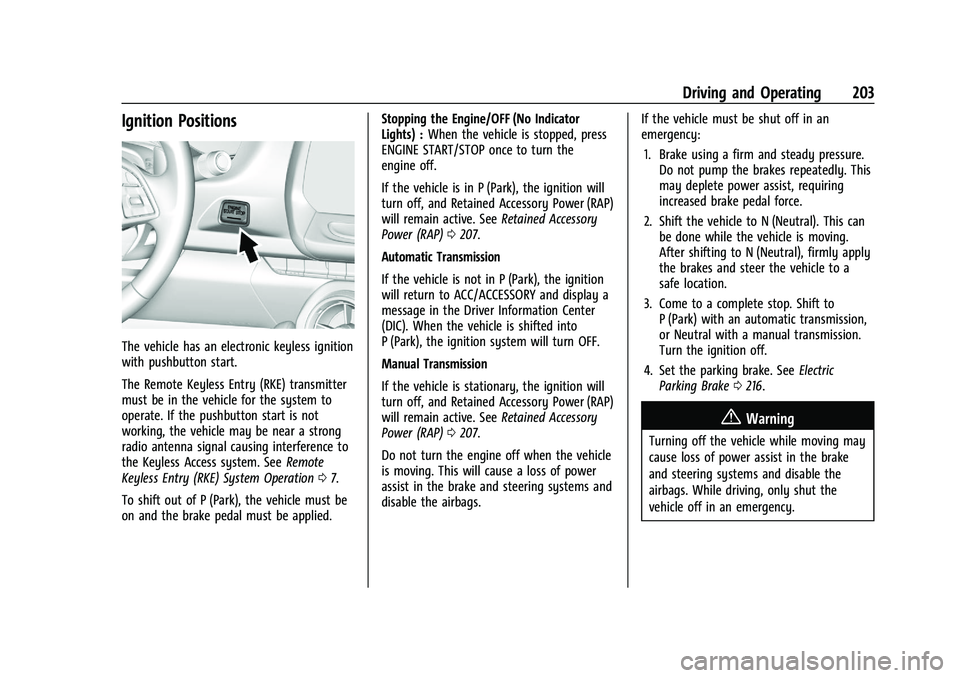
The vehicle has an electronic keyless ignition
with pushbutton start.
The Remote Keyless Entry (RKE) transmitter
must be in the vehicle for the system to
operate. If the pushbutton start is not
working, the vehicle may be near a strong
radio antenna signal causing interference to
the Keyless Access system. SeeRemote
Keyless Entry (RKE) System Operation 07.
To shift out of P (Park), the vehicle must be
on and the brake pedal must be applied. Stopping the Engine/OFF (No Indicator
Lights) :
When the vehicle is stopped, press
ENGINE START/STOP once to turn the
engine off.
If the vehicle is in P (Park), the ignition will
turn off, and Retained Accessory Power (RAP)
will remain active. See Retained Accessory
Power (RAP) 0207.
Automatic Transmission
If the vehicle is not in P (Park), the ignition
will return to ACC/ACCESSORY and display a
message in the Driver Information Center
(DIC). When the vehicle is shifted into
P (Park), the ignition system will turn OFF.
Manual Transmission
If the vehicle is stationary, the ignition will
turn off, and Retained Accessory Power (RAP)
will remain active. See Retained Accessory
Power (RAP) 0207.
Do not turn the engine off when the vehicle
is moving. This will cause a loss of power
assist in the brake and steering systems and
disable the airbags. If the vehicle must be shut off in an
emergency:
1. Brake using a firm and steady pressure. Do not pump the brakes repeatedly. This
may deplete power assist, requiring
increased brake pedal force.
2. Shift the vehicle to N (Neutral). This can be done while the vehicle is moving.
After shifting to N (Neutral), firmly apply
the brakes and steer the vehicle to a
safe location.
3. Come to a complete stop. Shift to P (Park) with an automatic transmission,
or Neutral with a manual transmission.
Turn the ignition off.
4. Set the parking brake. See Electric
Parking Brake 0216.
{Warning
Turning off the vehicle while moving may
cause loss of power assist in the brake
and steering systems and disable the
airbags. While driving, only shut the
vehicle off in an emergency.
Page 206 of 357
Chevrolet Camaro Owner Manual (GMNA-Localizing-U.S./Canada/Mexico-
14583589) - 2021 - CRC - 3/24/20
Driving and Operating 205
Hold the clutch pedal down to the floor,
press the brake pedal, then press ENGINE
START/STOP.
If there is no RKE transmitter in the
vehicle or if there is something causing
interference with it, the Driver
Information Center (DIC) will display a
message.
2. When the engine begins cranking, let go of the button and the engine cranks
automatically until it starts. If the
battery in the RKE transmitter is weak,
the DIC will display a message. The
vehicle can still be driven.
See “Starting the Vehicle with a Low
Transmitter Battery” underRemote
Keyless Entry (RKE) System Operation 07
. If the RKE transmitter battery is dead,
insert it into the rear cupholder to
enable engine starting.
3. Do not race the engine immediately after starting it. Operate the engine and
transmission gently until the oil warms
up and lubricates all moving parts.
4. If the engine does not start and no DIC message is displayed, wait 15 seconds
before trying again to let the cranking
motor cool down. If the engine does not start after five to
10 seconds, especially in very cold
weather (below
−18 °C or 0 °F), it could
be flooded with too much gasoline. Try
pushing the accelerator pedal all the way
to the floor while cranking for up to
15 seconds maximum. Wait at least
15 seconds between each try, to allow
the cranking motor to cool down. When
the engine starts, let go of the
accelerator. If the vehicle starts briefly
but then stops again, repeat these steps.
This clears the extra gasoline from the
engine.
Caution
Cranking the engine for long periods of
time, by returning the ignition to the
START position immediately after
cranking has ended, can overheat and
damage the cranking motor, and drain
the battery. Wait at least 15 seconds
between each try, to let the cranking
motor cool down.
Stopping the Engine
If the vehicle has an automatic transmission,
move the shift lever to P (Park) and press
and hold ENGINE START/STOP on the instrument panel, until the engine shuts off.
If the shift lever is not in P (Park), the
engine shuts off and the ignition goes to
ACC/ACCESSORY. The DIC displays SHIFT TO
PARK. Once the shift lever is moved to
P (Park), the vehicle turns off.
If the vehicle has a manual transmission,
before getting out of the vehicle, shift to
1 (First) or R (Reverse) and apply the parking
brake. Then turn off the ignition off by
pressing ENGINE START/STOP and release
the clutch pedal when the engine has
stopped.
If the RKE transmitter is not detected inside
the vehicle when it is turned off the DIC
displays a message.
Engine Heater
{Warning
Do not plug in the engine block heater
while the vehicle is parked in a garage or
under a carport. Property damage or
personal injury may result. Always park
the vehicle in a clear open area away
from buildings or structures.
Page 209 of 357
Chevrolet Camaro Owner Manual (GMNA-Localizing-U.S./Canada/Mexico-
14583589) - 2021 - CRC - 3/24/20
208 Driving and Operating
The shift lock release is always functional
except in the case of an uncharged or low
voltage (less than 9 volt) battery.
If the vehicle has an uncharged battery or a
battery with low voltage, try charging or
jump starting the battery. SeeJump Starting
- North America 0297 for more information.
To shift out of P (Park): 1. Apply the brake pedal.
2. Release the parking brake. See Electric
Parking Brake 0216.
3. Press the shift lever button.
4. Move the shift lever.
If unable to shift out of P (Park): 1. Fully release the shift lever button.
2. While holding down the brake pedal, press the shift lever button again.
3. Move the shift lever.
If the shift lever will not move from P (Park),
consult your dealer or a professional towing
service.Parking (Manual Transmission)
{Warning
If the vehicle has a manual transmission,
never get out of the vehicle without first
moving the shift lever into 1st or
R (Reverse), setting the parking brake and
turning the ignition off. The vehicle can
roll, which could cause serious injury or
death.
Parking over Things That Burn
{Warning
Things that can burn could touch hot
exhaust parts under the vehicle and
ignite. Do not park over papers, leaves,
dry grass, or other things that can burn.
Active Fuel Management
Vehicles with V6 and V8 engines and an
automatic transmission have Active Fuel
Management. This system allows the engine
to operate on either all or four of its
cylinders, depending on the driving
conditions. When less power is required, such as
cruising at a constant vehicle speed, the
system will operate in four cylinder mode,
allowing the vehicle to achieve better fuel
economy. When greater power demands are
required, such as accelerating from a stop,
passing, or merging onto a freeway, the
system will maintain full-cylinder operation.
Extended Parking
It is best not to park with the vehicle
running. If the vehicle is left running, be
sure it will not move and there is adequate
ventilation. See
Shifting Into Park 0207 and
Engine Exhaust 0209.
If the vehicle is left parked and running with
the Remote Keyless Entry (RKE) transmitter
outside the vehicle, it will continue to run
for up to half an hour.
If the vehicle is left parked and running with
the RKE transmitter inside the vehicle, it will
continue to run for up to an hour.
The vehicle could turn off sooner if it is
parked on a hill, due to lack of
available fuel.
Automatic Transmission
The timer will reset if the vehicle is taken
out of P (Park) while it is running.
Page 350 of 357
Chevrolet Camaro Owner Manual (GMNA-Localizing-U.S./Canada/Mexico-
14583589) - 2021 - CRC - 3/24/20
Index 349
GM Mobility ReimbursementProgram . . . . . . . . . . . . . . . . . . . . . . . . . . . . . . . 329
Guidance Problems with the Route . . . . . . . . . . . . . . . 141
H
Halogen Bulbs . . . . . . . . . . . . . . . . . . . . . . . . . . . 264
Hazard Warning Flashers . . . . . . . . . . . . . . . . . 112
HD Radio Technology . . . . . . . . . . . . . . . . . . . . .124
Head Restraints . . . . . . . . . . . . . . . . . . . . . . . . . . . .35
Head-up Display . . . . . . . . . . . . . . . . . . . . . . . . . .101
HeadlampsAiming . . . . . . . . . . . . . . . . . . . . . . . . . . . . . . . . 264
Automatic . . . . . . . . . . . . . . . . . . . . . . . . . . . . . . 111
Bulb Replacement . . . . . . . . . . . . . . . . . . . . . . 264
Daytime Running Lamps (DRL) . . . . . . . . . . 111
Flash-to-Pass . . . . . . . . . . . . . . . . . . . . . . . . . . . . 111
High Intensity Discharge (HID)Lighting . . . . . . . . . . . . . . . . . . . . . . . . . . . . . . 264
High-Beam On Light . . . . . . . . . . . . . . . . . . . . 98
High/Low Beam Changer . . . . . . . . . . . . . . 110
Lamps On Reminder . . . . . . . . . . . . . . . . . . . . 98
Heated Steering Wheel . . . . . . . . . . . . . . . . . . . . . . . . . 78
Heated and Ventilated Front Seats . . . . . . . 40
Heated Mirrors . . . . . . . . . . . . . . . . . . . . . . . . . . . .23
Heater Engine . . . . . . . . . . . . . . . . . . . . . . . . . . . . . . . . . 205 Heating . . . . . . . . . . . . . . . . . . . . . . . . . . . . . . 176, 179
High-Beam On Light . . . . . . . . . . . . . . . . . . . . . . 98
High-Speed Operation . . . . . . . . . . . . . . . . . . . 279
Hill and Mountain Roads . . . . . . . . . . . . . . . . 197
Hill Start Assist (HSA) . . . . . . . . . . . . . . . . . . . . . 217
Hood . . . . . . . . . . . . . . . . . . . . . . . . . . . . . . . . . . . . 240
Horn . . . . . . . . . . . . . . . . . . . . . . . . . . . . . . . . . . . . . . 78
How to Wear Seat Belts Properly . . . . . . . . . 43
HVAC . . . . . . . . . . . . . . . . . . . . . . . . . . . . . . . . 176, 179
Hydraulic Clutch . . . . . . . . . . . . . . . . . . . . . . . . . 250
I
If the System Needs Service . . . . . . . . . . . . . .142
Ignition Positions . . . . . . . . . . . . . . . . . . . . . . . . 203
Immobilizer . . . . . . . . . . . . . . . . . . . . . . . . . . . . . . . .22
Indicator
Vehicle Ahead . . . . . . . . . . . . . . . . . . . . . . . . . . 95
Infants and Young Children, Restraints . . . . 60
Information Publication Ordering . . . . . . . . . . . . . . . . . . . 333
Infotainment System . . . . . . . . . . . . . . . . . . . . 336
Instrument Cluster . . . . . . . . . . . . . . . . . . . . . . . . 83
Instrument Panel Overview . . . . . . . . . . . . . . . . 4
Interior Lamps . . . . . . . . . . . . . . . . . . . . . . . . . . . . 113
Interior Rearview Mirrors . . . . . . . . . . . . . . . . . 24
Introduction . . . . . . . . . . . . . . . . . . . . . . . . . . . .1, 116
J
Jack
Auxiliary . . . . . . . . . . . . . . . . . . . . . . . . . . . . . . . 129
Jump Starting - North America . . . . . . . . . . . 297
K
Keyless Entry Remote (RKE) System . . . . . . . . . . . . . . . . . . . . 7
Keys . . . . . . . . . . . . . . . . . . . . . . . . . . . . . . . . . . . . . . . 6
L
Labeling, Tire Sidewall . . . . . . . . . . . . . . . . . . . 275
Lamps Daytime Running (DRL) . . . . . . . . . . . . . . . . . 111
Exterior Controls . . . . . . . . . . . . . . . . . . . . . . . 110
Exterior Lighting Battery Saver . . . . . . . . . 115
Interior . . . . . . . . . . . . . . . . . . . . . . . . . . . . . . . . . 113
License Plate . . . . . . . . . . . . . . . . . . . . . . . . . . . 265
Malfunction Indicator (CheckEngine) . . . . . . . . . . . . . . . . . . . . . . . . . . . . . . . 92
On Reminder . . . . . . . . . . . . . . . . . . . . . . . . . . . 98
Reading . . . . . . . . . . . . . . . . . . . . . . . . . . . . . . . . . 113
Lane Change Alert (LCA) . . . . . . . . . . . . . . . . . 232
Lap-Shoulder Belt . . . . . . . . . . . . . . . . . . . . . . . . . 45
LATCH System Replacing Parts after a Crash . . . . . . . . . . . 70
LATCH, Lower Anchors and Tethers for Children . . . . . . . . . . . . . . . . . . . . . . . . . . . . . . . . . 65
Latches, Seatback . . . . . . . . . . . . . . . . . . . . . . . . . 40