light CHEVROLET CAMARO 2022 Owner's Manual
[x] Cancel search | Manufacturer: CHEVROLET, Model Year: 2022, Model line: CAMARO, Model: CHEVROLET CAMARO 2022Pages: 357, PDF Size: 7.99 MB
Page 74 of 357
Chevrolet Camaro Owner Manual (GMNA-Localizing-U.S./Canada/Mexico-
14583589) - 2021 - CRC - 3/24/20
Seats and Restraints 73
Warning (Continued)
Secure rear-facing child restraints in a
rear seat, even if the airbag(s) are off.
If you secure a forward-facing child
restraint in the front outboard passenger
seat, always move the seat as far back as
it will go. It is better to secure the child
restraint in a rear seat.
SeePassenger Sensing System 054 for
additional information.
If the child restraint uses a top tether, see
Lower Anchors and Tethers for Children
(LATCH System) 065 for top tether anchor
locations.
Do not secure a child seat in a position
without a top tether anchor if a national or
local law requires that the top tether be
anchored, or if the instructions that come
with the child restraint say that the top
tether must be anchored.
In Canada, the law requires that
forward-facing child restraints have a top
tether, and that the tether be attached. When using the lap-shoulder belt to secure
the child restraint in this position, follow the
instructions that came with the child
restraint and the following instructions:
1. Move the seat as far back as it will go before securing the forward-facing child
restraint. Move the seat upward or the
seatback to an upright position,
if needed, to get a tight installation of
the child restraint.
When the passenger sensing system has
turned off the front outboard passenger
frontal airbag and knee airbag, the OFF
indicator on the passenger airbag status
indicator should light and stay lit when
you start the vehicle. See Passenger
Airbag Status Indicator 091.
2. Put the child restraint on the seat.
3. Pick up the latch plate, and run the lap and shoulder portions of the vehicle seat
belt through or around the child
restraint. The child restraint instructions
will show you how.
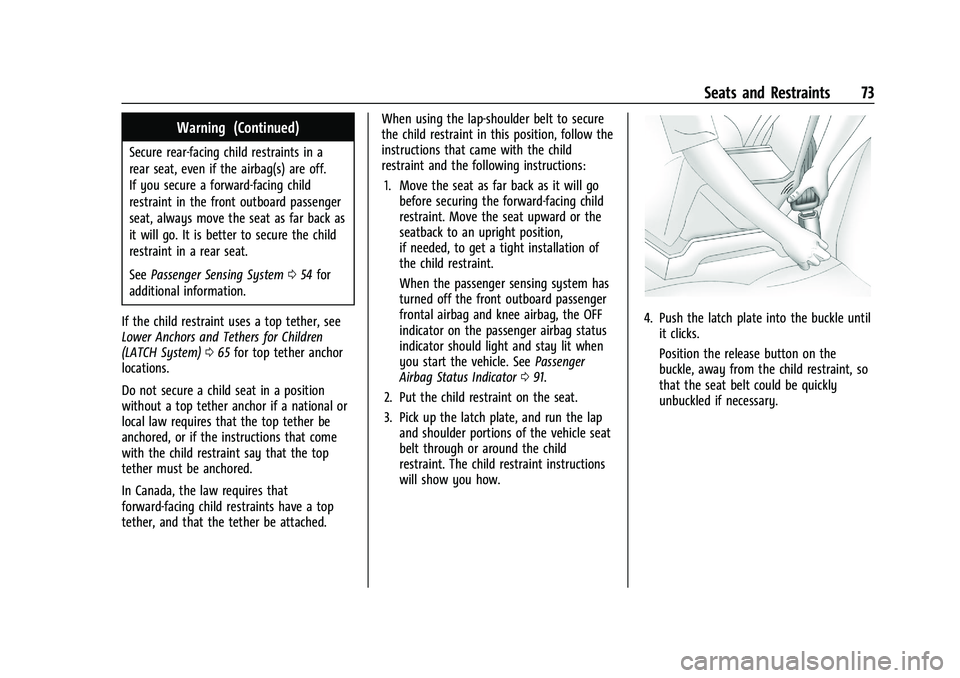
4. Push the latch plate into the buckle untilit clicks.
Position the release button on the
buckle, away from the child restraint, so
that the seat belt could be quickly
unbuckled if necessary.
Page 78 of 357
Chevrolet Camaro Owner Manual (GMNA-Localizing-U.S./Canada/Mexico-
14583589) - 2021 - CRC - 3/26/20
Instruments and Controls 77
Instruments and Controls
Controls
Steering Wheel Adjustment . . . . . . . . . . . . 78
Steering Wheel Controls . . . . . . . . . . . . . . . . 78
Heated Steering Wheel . . . . . . . . . . . . . . . . . 78
Horn . . . . . . . . . . . . . . . . . . . . . . . . . . . . . . . . . . . 78
Windshield Wiper/Washer . . . . . . . . . . . . . . 78
Compass . . . . . . . . . . . . . . . . . . . . . . . . . . . . . . . 79
Clock . . . . . . . . . . . . . . . . . . . . . . . . . . . . . . . . . . . 79
Power Outlets . . . . . . . . . . . . . . . . . . . . . . . . . . 80
Wireless Charging . . . . . . . . . . . . . . . . . . . . . . 80
Warning Lights, Gauges, and Indicators
Warning Lights, Gauges, andIndicators . . . . . . . . . . . . . . . . . . . . . . . . . . . . . 82
Instrument Cluster . . . . . . . . . . . . . . . . . . . . . 83
Speedometer . . . . . . . . . . . . . . . . . . . . . . . . . . . 86
Odometer . . . . . . . . . . . . . . . . . . . . . . . . . . . . . . 86
Trip Odometer . . . . . . . . . . . . . . . . . . . . . . . . . 86
Tachometer . . . . . . . . . . . . . . . . . . . . . . . . . . . . . 87
Fuel Gauge . . . . . . . . . . . . . . . . . . . . . . . . . . . . . 87
Boost Gauge (Uplevel Cluster Only) . . . . 88
Engine Oil Pressure Gauge (Uplevel Cluster Only) . . . . . . . . . . . . . . . . . . . . . . . . . 88
Engine Coolant Temperature Gauge . . . . 89
Voltmeter Gauge (Uplevel Cluster Only) . . . . . . . . . . . . . . . . . . . . . . . . . 90
Seat Belt Reminders . . . . . . . . . . . . . . . . . . . . 90
Airbag Readiness Light . . . . . . . . . . . . . . . . . . 91 Passenger Airbag Status Indicator . . . . . . 91
Charging System Light . . . . . . . . . . . . . . . . . 92
Malfunction Indicator Lamp . . . . . . . . . . . . 92
Brake System Warning Light . . . . . . . . . . . 94
Electric Parking Brake Light . . . . . . . . . . . . . 94
Service Electric Parking Brake Light . . . . . 95
Antilock Brake System (ABS) Warning
Light . . . . . . . . . . . . . . . . . . . . . . . . . . . . . . . . . . 95
Vehicle Ahead Indicator . . . . . . . . . . . . . . . . 95
Traction Off Light . . . . . . . . . . . . . . . . . . . . . . 96
StabiliTrak OFF Light . . . . . . . . . . . . . . . . . . . 96
Traction Control System (TCS)/StabiliTrak Light . . . . . . . . . . . . . . . . . . . . . . . . . . . . . . . . . 96
Tire Pressure Light . . . . . . . . . . . . . . . . . . . . . . 97
Engine Oil Pressure Light . . . . . . . . . . . . . . . 97
Low Fuel Warning Light . . . . . . . . . . . . . . . . 97
Security Light . . . . . . . . . . . . . . . . . . . . . . . . . . 98
High-Beam On Light . . . . . . . . . . . . . . . . . . . . 98
Lamps On Reminder . . . . . . . . . . . . . . . . . . . . 98
Cruise Control Light . . . . . . . . . . . . . . . . . . . . 98
Door Ajar Light . . . . . . . . . . . . . . . . . . . . . . . . . 98
Information Displays
Driver Information Center (DIC) . . . . . . . . 99
Head-Up Display (HUD) . . . . . . . . . . . . . . . . 101
Vehicle Messages
Vehicle Messages . . . . . . . . . . . . . . . . . . . . . . 104
Engine Power Messages . . . . . . . . . . . . . . . 105
Vehicle Speed Messages . . . . . . . . . . . . . . . 105
Vehicle Personalization
Vehicle Personalization . . . . . . . . . . . . . . . . 105
Page 79 of 357
Chevrolet Camaro Owner Manual (GMNA-Localizing-U.S./Canada/Mexico-
14583589) - 2021 - CRC - 3/26/20
78 Instruments and Controls
Controls
Steering Wheel Adjustment
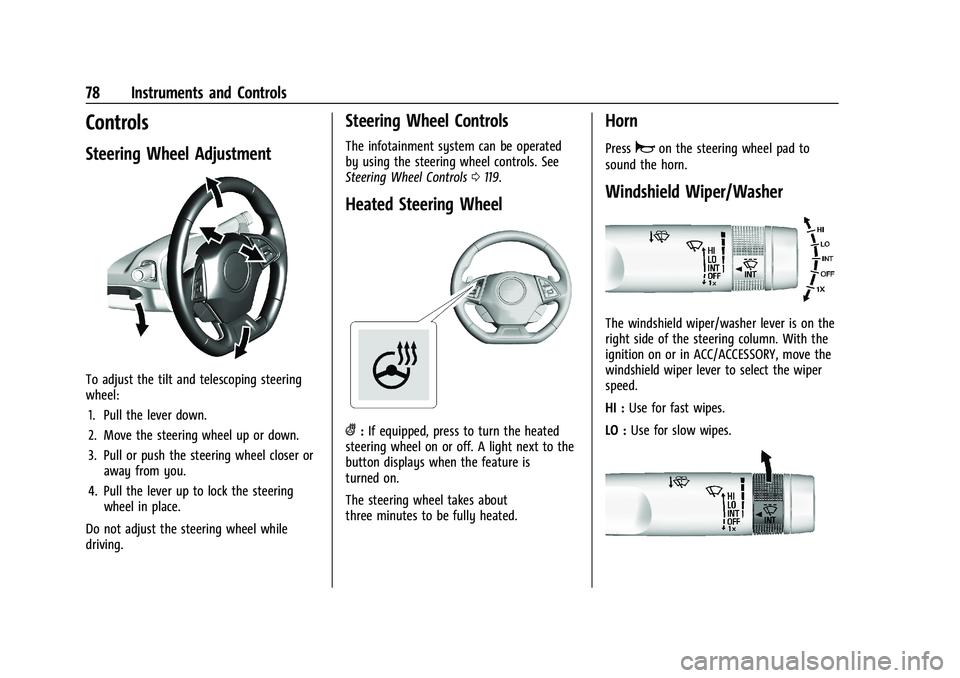
To adjust the tilt and telescoping steering
wheel:1. Pull the lever down.
2. Move the steering wheel up or down.
3. Pull or push the steering wheel closer or away from you.
4. Pull the lever up to lock the steering wheel in place.
Do not adjust the steering wheel while
driving.
Steering Wheel Controls
The infotainment system can be operated
by using the steering wheel controls. See
Steering Wheel Controls 0119.
Heated Steering Wheel
(:If equipped, press to turn the heated
steering wheel on or off. A light next to the
button displays when the feature is
turned on.
The steering wheel takes about
three minutes to be fully heated.
Horn
Pressaon the steering wheel pad to
sound the horn.
Windshield Wiper/Washer
The windshield wiper/washer lever is on the
right side of the steering column. With the
ignition on or in ACC/ACCESSORY, move the
windshield wiper lever to select the wiper
speed.
HI : Use for fast wipes.
LO : Use for slow wipes.
Page 83 of 357
Chevrolet Camaro Owner Manual (GMNA-Localizing-U.S./Canada/Mexico-
14583589) - 2021 - CRC - 3/26/20
82 Instruments and Controls
3. Neither the name of the copyright holdernor the names of its contributors may be
used to endorse or promote products
derived from this software without
specific prior written permission.
THIS SOFTWARE IS PROVIDED BY THE
COPYRIGHT HOLDERS AND CONTRIBUTORS
"AS IS" AND ANY EXPRESS OR IMPLIED
WARRANTIES, INCLUDING, BUT NOT LIMITED
TO, THE IMPLIED WARRANTIES OF
MERCHANTABILITY AND FITNESS FOR A
PARTICULAR PURPOSE ARE DISCLAIMED. IN
NO EVENT SHALL THE COPYRIGHT HOLDER
OR CONTRIBUTORS BE LIABLE FOR ANY
DIRECT, INDIRECT, INCIDENTAL, SPECIAL,
EXEMPLARY, OR CONSEQUENTIAL DAMAGES
(INCLUDING, BUT NOT LIMITED TO,
PROCUREMENT OF SUBSTITUTE GOODS OR
SERVICES; LOSS OF USE, DATA, OR PROFITS;
OR BUSINESS INTERRUPTION) HOWEVER
CAUSED AND ON ANY THEORY OF LIABILITY,
WHETHER IN CONTRACT, STRICT LIABILITY, OR
TORT (INCLUDING NEGLIGENCE OR
OTHERWISE) ARISING IN ANY WAY OUT OF
THE USE OF THIS SOFTWARE, EVEN IF
ADVISED OF THE POSSIBILITY OF SUCH
DAMAGE.Warning Lights, Gauges, and
Indicators
Warning lights and gauges can signal that
something is wrong before it becomes
serious enough to cause an expensive repair
or replacement. Paying attention to the
warning lights and gauges could prevent
injury.
Some warning lights come on briefly when
the engine is started to indicate they are
working. When one of the warning lights
comes on and stays on while driving,
or when one of the gauges shows there
may be a problem, check the section that
explains what to do. Waiting to do repairs
can be costly and even dangerous.
Page 85 of 357
Chevrolet Camaro Owner Manual (GMNA-Localizing-U.S./Canada/Mexico-
14583589) - 2021 - CRC - 3/26/20
84 Instruments and Controls
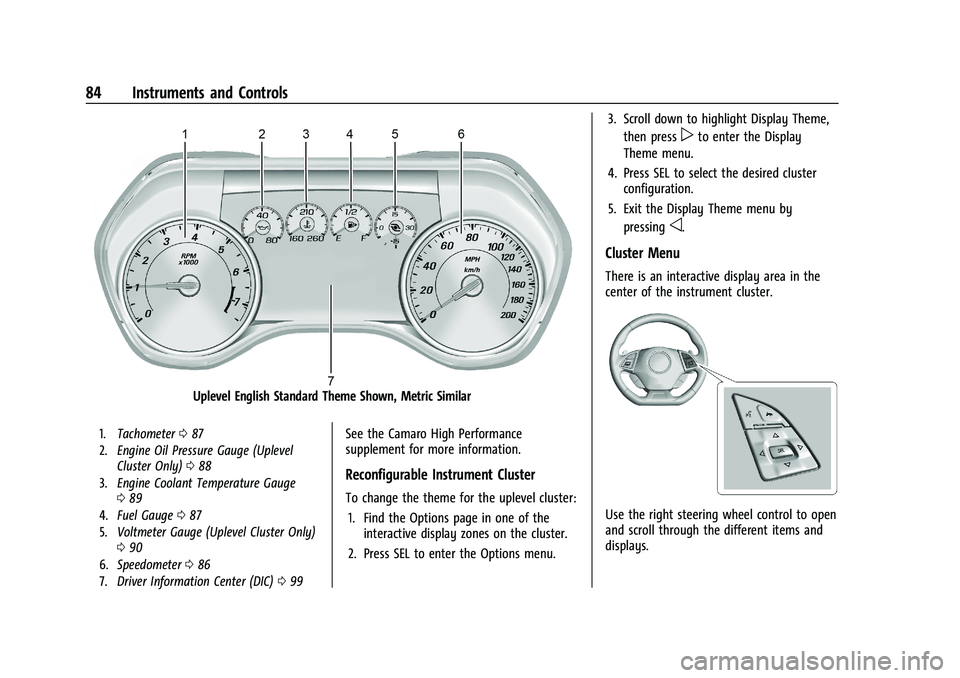
Uplevel English Standard Theme Shown, Metric Similar
1.Tachometer 087
2. Engine Oil Pressure Gauge (Uplevel
Cluster Only) 088
3. Engine Coolant Temperature Gauge
089
4. Fuel Gauge 087
5. Voltmeter Gauge (Uplevel Cluster Only)
090
6. Speedometer 086
7. Driver Information Center (DIC) 099See the Camaro High Performance
supplement for more information.
Reconfigurable Instrument Cluster
To change the theme for the uplevel cluster:
1. Find the Options page in one of the interactive display zones on the cluster.
2. Press SEL to enter the Options menu. 3. Scroll down to highlight Display Theme,
then press
pto enter the Display
Theme menu.
4. Press SEL to select the desired cluster configuration.
5. Exit the Display Theme menu by pressing
o.
Cluster Menu
There is an interactive display area in the
center of the instrument cluster.
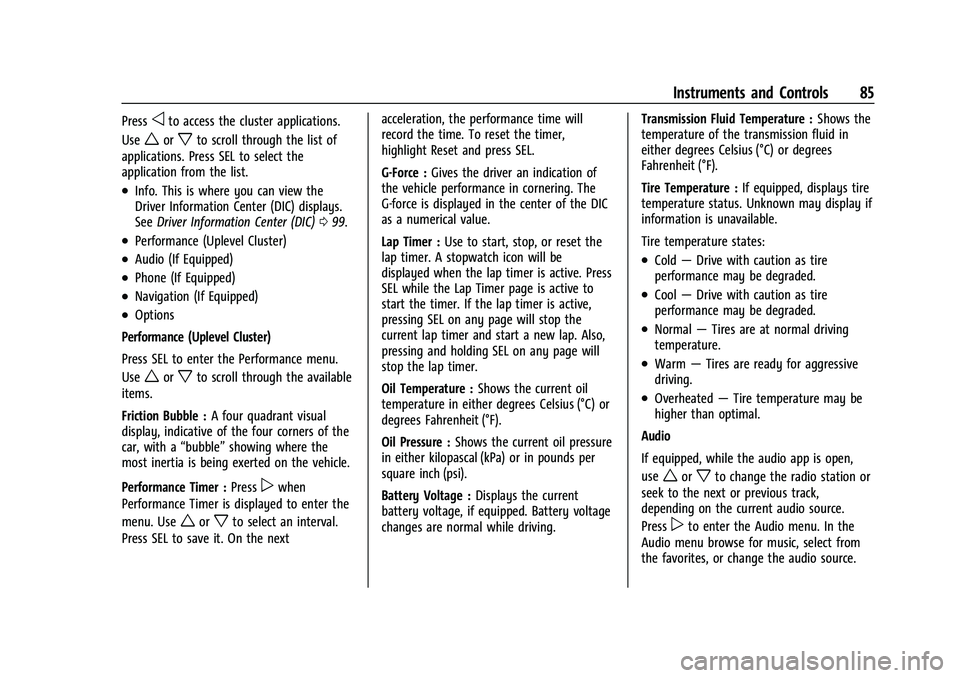
Use the right steering wheel control to open
and scroll through the different items and
displays.
Page 86 of 357
Chevrolet Camaro Owner Manual (GMNA-Localizing-U.S./Canada/Mexico-
14583589) - 2021 - CRC - 3/26/20
Instruments and Controls 85
Pressoto access the cluster applications.
Use
worxto scroll through the list of
applications. Press SEL to select the
application from the list.
.Info. This is where you can view the
Driver Information Center (DIC) displays.
See Driver Information Center (DIC) 099.
.Performance (Uplevel Cluster)
.Audio (If Equipped)
.Phone (If Equipped)
.Navigation (If Equipped)
.Options
Performance (Uplevel Cluster)
Press SEL to enter the Performance menu.
Use
worxto scroll through the available
items.
Friction Bubble : A four quadrant visual
display, indicative of the four corners of the
car, with a “bubble”showing where the
most inertia is being exerted on the vehicle.
Performance Timer : Press
pwhen
Performance Timer is displayed to enter the
menu. Use
worxto select an interval.
Press SEL to save it. On the next acceleration, the performance time will
record the time. To reset the timer,
highlight Reset and press SEL.
G-Force :
Gives the driver an indication of
the vehicle performance in cornering. The
G-force is displayed in the center of the DIC
as a numerical value.
Lap Timer : Use to start, stop, or reset the
lap timer. A stopwatch icon will be
displayed when the lap timer is active. Press
SEL while the Lap Timer page is active to
start the timer. If the lap timer is active,
pressing SEL on any page will stop the
current lap timer and start a new lap. Also,
pressing and holding SEL on any page will
stop the lap timer.
Oil Temperature : Shows the current oil
temperature in either degrees Celsius (°C) or
degrees Fahrenheit (°F).
Oil Pressure : Shows the current oil pressure
in either kilopascal (kPa) or in pounds per
square inch (psi).
Battery Voltage : Displays the current
battery voltage, if equipped. Battery voltage
changes are normal while driving. Transmission Fluid Temperature :
Shows the
temperature of the transmission fluid in
either degrees Celsius (°C) or degrees
Fahrenheit (°F).
Tire Temperature : If equipped, displays tire
temperature status. Unknown may display if
information is unavailable.
Tire temperature states:
.Cold —Drive with caution as tire
performance may be degraded.
.Cool —Drive with caution as tire
performance may be degraded.
.Normal —Tires are at normal driving
temperature.
.Warm —Tires are ready for aggressive
driving.
.Overheated —Tire temperature may be
higher than optimal.
Audio
If equipped, while the audio app is open,
use
worxto change the radio station or
seek to the next or previous track,
depending on the current audio source.
Press
pto enter the Audio menu. In the
Audio menu browse for music, select from
the favorites, or change the audio source.
Page 87 of 357
Chevrolet Camaro Owner Manual (GMNA-Localizing-U.S./Canada/Mexico-
14583589) - 2021 - CRC - 3/26/20
86 Instruments and Controls
Phone
If equipped, press
pto enter the Phone
menu. In the Phone menu, if there is no
active phone call, view recent calls, or scroll
through contacts. If there is an active call,
mute or unmute the phone or switch to
handset or hands-free operation.
Navigation
If equipped, press
pto enter the
Navigation menu. If there is no active route,
a compass will be displayed. If there is an
active route, press SEL to cancel route
guidance or turn the voice prompts on/off.
Options
Press SEL to enter the Options menu. Use
worxto scroll through items in
the menu.
Units : Press
pwhile Units is displayed to
enter the Units menu. Choose US or Metric
units by pressing SEL while the desired item
is highlighted.
Speed Warning : The Speed Warning display
allows the driver to set a speed that they
do not want to exceed. To set the Speed
Warning, press
pwhen Speed Warning is
displayed. Enable the speed warning and then use
worxto adjust the value. Press
SEL to set the speed. Once the speed is set,
this feature can be turned off by pressing
SEL while viewing this page. If the selected
speed limit is exceeded, a pop-up warning is
displayed with a chime.
Display Theme (Uplevel) : Press SEL while
Display Theme is highlighted to change the
configuration of the uplevel cluster. See
“Reconfigurable Instrument Cluster” earlier
in this section.
Launch Control : If equipped, the Launch
Control display allows the driver to adjust
the parameters of the Launch Control
System. See Track Events and Competitive
Driving 0188.
Head-Up Display (HUD) Rotation :
If equipped, this feature allows for adjusting
the angle of the HUD image. Press SEL on
the steering wheel controls while Head-Up
Display Rotation is highlighted to enter
Adjust Mode. Press
worxto highlight
OK, then press SEL to save the setting.
Cancel can also be selected to cancel the
setting. The vehicle must be on P (Park). Info Pages :
Press
pwhile Info Pages is
highlighted to select the items to be
displayed in the DIC info displays. See Driver
Information Center (DIC) 099.
Software Info : Displays open source
software information.
Speedometer
The speedometer shows the vehicle's speed
in either kilometers per hour (km/h) or
miles per hour (mph).
Odometer
The odometer shows how far the vehicle has
been driven, in either kilometers or miles.
Trip Odometer
The trip odometer shows how far the
vehicle has been driven since the trip
odometer was last reset.
The trip odometer is accessed and reset
through the Driver Information Center (DIC).
See Driver Information Center (DIC) 099.
Page 88 of 357
Chevrolet Camaro Owner Manual (GMNA-Localizing-U.S./Canada/Mexico-
14583589) - 2021 - CRC - 3/26/20
Instruments and Controls 87
Tachometer
The tachometer displays the engine speed in
revolutions per minute (rpm).
Caution
If the engine is operated with the rpm’s
in the warning area at the high end of
the tachometer, the vehicle could be
damaged, and the damage would not be
covered by the vehicle warranty. Do not
operate the engine with the rpm’s in the
warning area.
Fuel Gauge
Metric Base Level Cluster
English Base Level Cluster
Uplevel ClusterWhen the ignition is on, the fuel gauge
indicates about how much fuel is left in
the tank.
An arrow on the fuel gauge indicates the
side of the vehicle the fuel door is on.
When the indicator nears empty, the low
fuel light comes on. There is still a little fuel
left, but the fuel tank should be filled soon.
Here are four things that some owners ask
about. None of these show a problem with
the fuel gauge:
.At the service station, the fuel pump
shuts off before the gauge reads full.
.It takes a little more or less fuel to fill up
than the gauge indicated. For example,
the gauge indicated the tank was half
full, but it actually took a little more or
less than half the tank's capacity to fill
the tank.
.The gauge moves a little while turning a
corner or speeding up.
.The gauge takes a few seconds to
stabilize after the ignition is turned on,
and goes back to empty when the
ignition is turned off.
Page 89 of 357
Chevrolet Camaro Owner Manual (GMNA-Localizing-U.S./Canada/Mexico-
14583589) - 2021 - CRC - 3/26/20
88 Instruments and Controls
Boost Gauge (Uplevel
Cluster Only)
See the Camaro High Performance
supplement for more information.
Metric
English
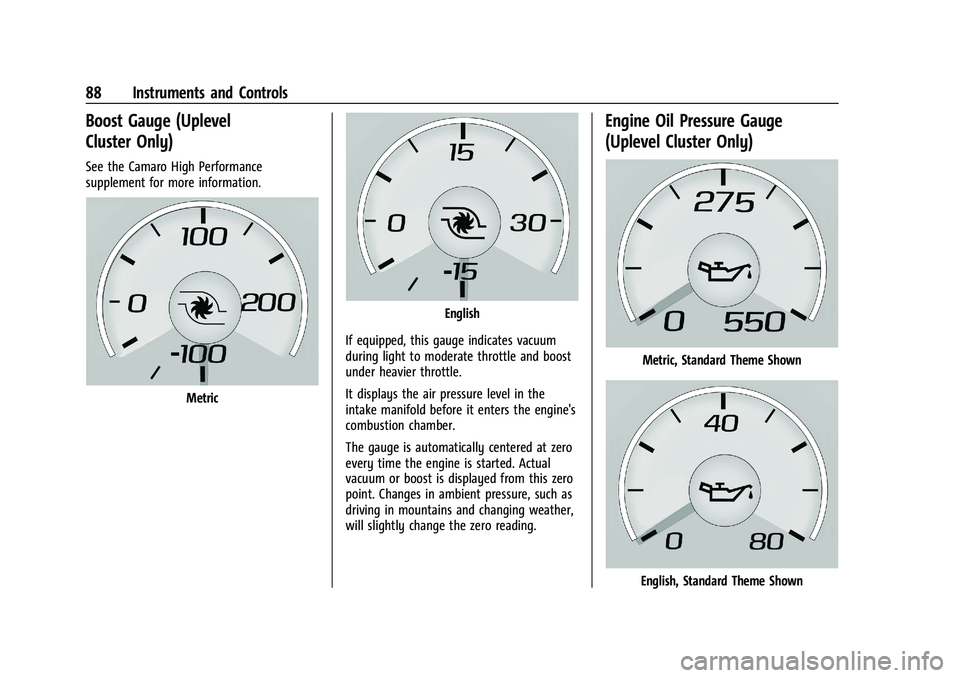
If equipped, this gauge indicates vacuum
during light to moderate throttle and boost
under heavier throttle.
It displays the air pressure level in the
intake manifold before it enters the engine's
combustion chamber.
The gauge is automatically centered at zero
every time the engine is started. Actual
vacuum or boost is displayed from this zero
point. Changes in ambient pressure, such as
driving in mountains and changing weather,
will slightly change the zero reading.
Engine Oil Pressure Gauge
(Uplevel Cluster Only)
Metric, Standard Theme Shown
English, Standard Theme Shown
Page 90 of 357
Chevrolet Camaro Owner Manual (GMNA-Localizing-U.S./Canada/Mexico-
14583589) - 2021 - CRC - 3/26/20
Instruments and Controls 89
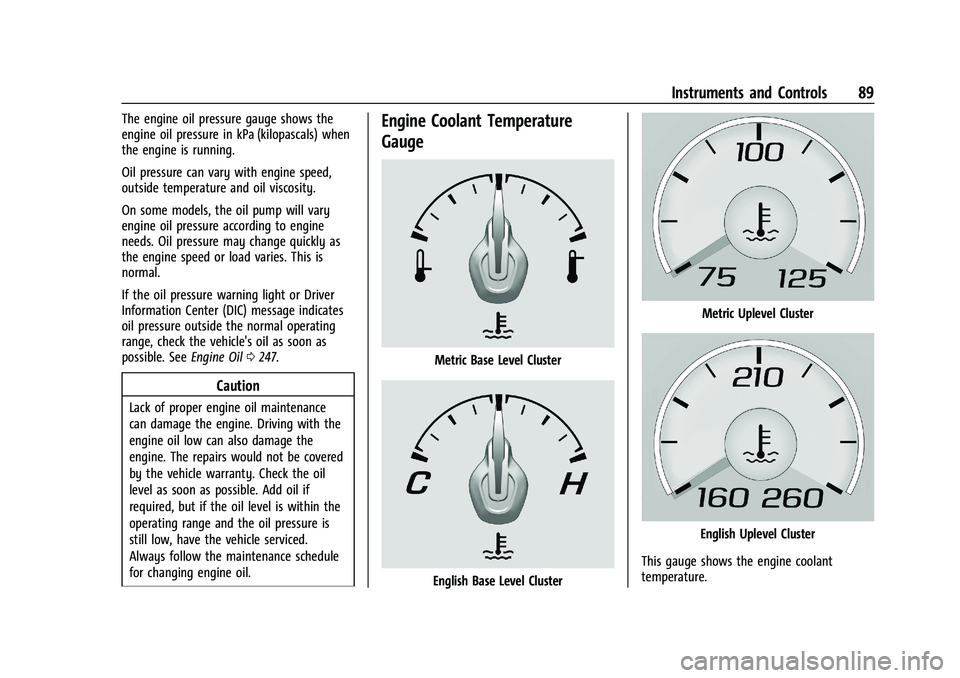
The engine oil pressure gauge shows the
engine oil pressure in kPa (kilopascals) when
the engine is running.
Oil pressure can vary with engine speed,
outside temperature and oil viscosity.
On some models, the oil pump will vary
engine oil pressure according to engine
needs. Oil pressure may change quickly as
the engine speed or load varies. This is
normal.
If the oil pressure warning light or Driver
Information Center (DIC) message indicates
oil pressure outside the normal operating
range, check the vehicle's oil as soon as
possible. SeeEngine Oil0247.
Caution
Lack of proper engine oil maintenance
can damage the engine. Driving with the
engine oil low can also damage the
engine. The repairs would not be covered
by the vehicle warranty. Check the oil
level as soon as possible. Add oil if
required, but if the oil level is within the
operating range and the oil pressure is
still low, have the vehicle serviced.
Always follow the maintenance schedule
for changing engine oil.
Engine Coolant Temperature
Gauge
Metric Base Level Cluster
English Base Level Cluster
Metric Uplevel Cluster
English Uplevel Cluster
This gauge shows the engine coolant
temperature.