cool CHEVROLET CAMARO 2022 Owners Manual
[x] Cancel search | Manufacturer: CHEVROLET, Model Year: 2022, Model line: CAMARO, Model: CHEVROLET CAMARO 2022Pages: 357, PDF Size: 7.99 MB
Page 3 of 357
Chevrolet Camaro Owner Manual (GMNA-Localizing-U.S./Canada/Mexico-
14583589) - 2021 - CRC - 3/24/20
2 Introduction
Using this Manual
To quickly locate information about the
vehicle, use the Index in the back of the
manual. It is an alphabetical list of what is
in the manual and the page number where
it can be found.
Danger, Warning, and Caution
Warning messages found on vehicle labels
and in this manual describe hazards and
what to do to avoid or reduce them.
{Danger
Danger indicates a hazard with a high
level of risk which will result in serious
injury or death.
{Warning
Warning indicates a hazard that could
result in injury or death.
Caution
Caution indicates a hazard that could
result in property or vehicle damage.
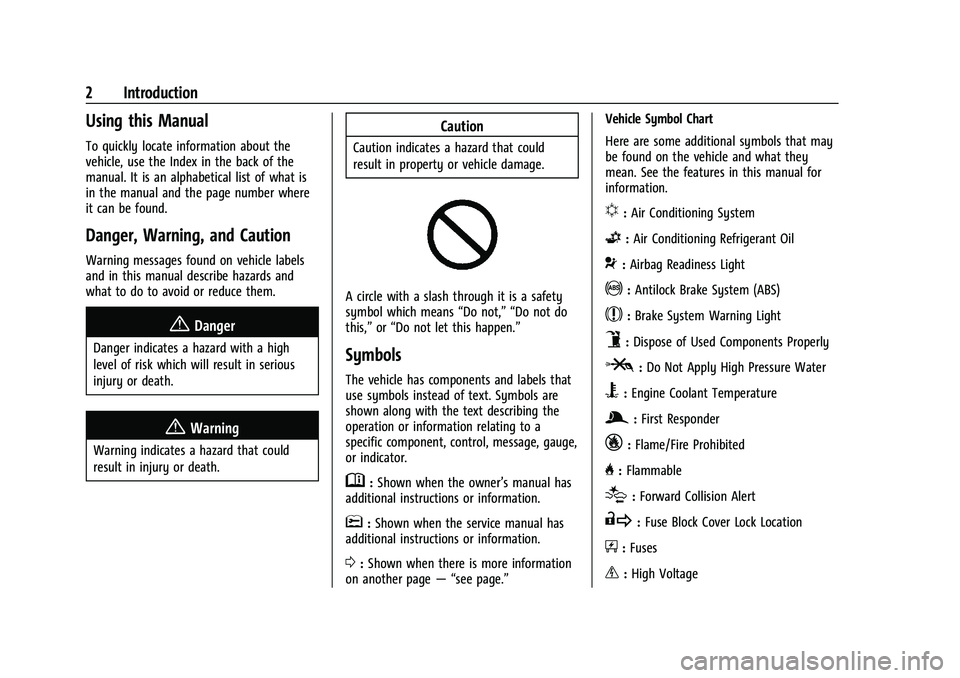
A circle with a slash through it is a safety
symbol which means“Do not,” “Do not do
this,” or“Do not let this happen.”
Symbols
The vehicle has components and labels that
use symbols instead of text. Symbols are
shown along with the text describing the
operation or information relating to a
specific component, control, message, gauge,
or indicator.
M:Shown when the owner’s manual has
additional instructions or information.
*: Shown when the service manual has
additional instructions or information.
0: Shown when there is more information
on another page — “see page.” Vehicle Symbol Chart
Here are some additional symbols that may
be found on the vehicle and what they
mean. See the features in this manual for
information.
u:
Air Conditioning System
G:Air Conditioning Refrigerant Oil
9:Airbag Readiness Light
!:Antilock Brake System (ABS)
$:Brake System Warning Light
9:Dispose of Used Components Properly
P:Do Not Apply High Pressure Water
B:Engine Coolant Temperature
g: First Responder
_:Flame/Fire Prohibited
H: Flammable
[:Forward Collision Alert
R:Fuse Block Cover Lock Location
+:Fuses
_:High Voltage
Page 15 of 357

Chevrolet Camaro Owner Manual (GMNA-Localizing-U.S./Canada/Mexico-
14583589) - 2021 - CRC - 3/24/20
14 Keys, Doors, and Windows
2. Separate the two halves of thetransmitter using a flat tool inserted into
the area near the key slot.
3. Remove the battery by pushing on thebattery and sliding it toward the bottom
of the transmitter.
4. Insert the new battery, positive side facing the back cover. Push the battery
down until it is held in place. Replace
with a CR2032 or equivalent battery.
5. Snap the battery cover back on to the transmitter.
6. Reinsert the key.
Remote Vehicle Start
If equipped, this feature allows the engine
to be started from outside the vehicle.
/: This button will be on the RKE
transmitter if equipped with remote start.
The climate control system will use the
previous settings during a remote start. The
rear window defogger and heated and
ventilated seats, if equipped, may also come
on. See "Remote Start Heated and Ventilated
Seats" in Heated and Ventilated Front Seats
0 40 and "Remote Start Auto Heat Seats" or
"Remote Start Auto Cool Seats" in Vehicle
Personalization 0105.
Laws in some local communities may restrict
the use of remote starters. For example,
some laws may require a person using remote start to have the vehicle in view.
Check local regulations for any
requirements.
Other conditions can affect the performance
of the transmitter. See
Remote Keyless Entry
(RKE) System 07.
Starting the Engine Using Remote Start
To start the engine using the remote start
feature:
1. Press and release
Q.
2. Immediately after completing Step 1, press and hold
/for at least
four seconds or until the turn signal
lamps flash. The turn signal lamps
flashing confirms the request to remote
start the vehicle has been received.
When the engine starts, the parking
lamps will turn on and remain on as
long as the engine is running. The
vehicle's doors will be locked and the
climate control system may come on.
The engine will continue to run for
15 minutes. After 30 seconds, repeat the
steps for a 15-minute time extension.
Remote start can be extended only once.
Start the vehicle before driving.
Page 16 of 357
Chevrolet Camaro Owner Manual (GMNA-Localizing-U.S./Canada/Mexico-
14583589) - 2021 - CRC - 3/24/20
Keys, Doors, and Windows 15
If the vehicle is low on fuel, do not use the
remote start feature. The vehicle may run
out of fuel.
Extending Engine Run Time
The engine run time can also be extended
by another 15 minutes, if during the first
15 minutes Steps 1 and 2 are repeated while
the engine is still running. An extension can
be requested, 30 seconds after starting. This
provides a total of 30 minutes.
The remote start can only be extended once.
When the remote start is extended, the
second 15-minute period is added on to the
first 15 minutes for a total of 30 minutes.
A maximum of two remote starts, or a
remote start with an extension, are allowed
between ignition cycles.
The ignition must be turned on and then off
before the remote start procedure can be
used again.
Canceling a Remote Start
To cancel a remote start, do one of the
following:
.Press and hold/until the parking lamps
turn off.
.Turn on the hazard warning flashers.
.Turn the vehicle on and then off.
Conditions in Which Remote Start Will
Not Work
The remote start will not operate if:
.The RKE transmitter is in the vehicle.
.The vehicle is not off.
.The hood is not closed.
.The hazard warning flashers are on.
.There is an emission control system
malfunction.
.The engine coolant temperature is
too high.
.The oil pressure is low.
.Two remote vehicle starts, or a single
remote start with an extension, have
already been used.
.The vehicle is not in P (Park).
Door Locks
{Warning
Unlocked doors can be dangerous.
.Passengers, especially children, can
easily open the doors and fall out of a
moving vehicle. The doors can be
unlocked and opened while the vehicle (Continued)
Warning (Continued)
is moving. The chance of being thrown
out of the vehicle in a crash is
increased if the doors are not locked.
So, all passengers should wear seat
belts properly and the doors should be
locked whenever the vehicle is driven.
.Young children who get into unlocked
vehicles may be unable to get out.
A child can be overcome by extreme
heat and can suffer permanent injuries
or even death from heat stroke.
Always lock the vehicle whenever
leaving it.
.Outsiders can easily enter through an
unlocked door when you slow down
or stop the vehicle. Locking the doors
can help prevent this from happening.
To lock or unlock the doors from outside the
vehicle:
.PressQorKon the Remote Keyless
Entry (RKE) transmitter.
.Use Keyless Access. See Remote Keyless
Entry (RKE) System Operation 07.
.Use the key in the driver door. The key
cylinder is covered with a cap.
Page 33 of 357
Chevrolet Camaro Owner Manual (GMNA-Localizing-U.S./Canada/Mexico-
14583589) - 2021 - CRC - 3/24/20
32 Keys, Doors, and Windows
2. The top will stop movementapproximately one second after
Kis
released. To stop the top immediately,
press
7,K, orQon the RKE
transmitter.
Mwill only open the
convertible top.
See Remote Keyless Entry (RKE) System
0 7and
Remote Keyless Entry (RKE) System
Operation 07.
Closing the Convertible Top
The RKE transmitter cannot be used to close
the convertible top. 1. Make sure the sun visors are stored in the center mount position.
2. Remove all objects from the top of the tonneau cover and forward of the
partition. Place the partition in the rear
storage area in the upright position.
Fasten both sides of the partition to the
posts just below the tonneau cover. See
Rear Storage 075.
3. Close the trunk.
4. Start the vehicle or place it in ACC/ ACCESSORY. 5. When possible, operate the convertible
top when the vehicle is stopped. The top
can be operated while driving below
50 km/h (31 mph) and will stop if that
speed is exceeded. The top operation will
take approximately 25 seconds. Make
sure the top operation can be completed
before that speed is reached.
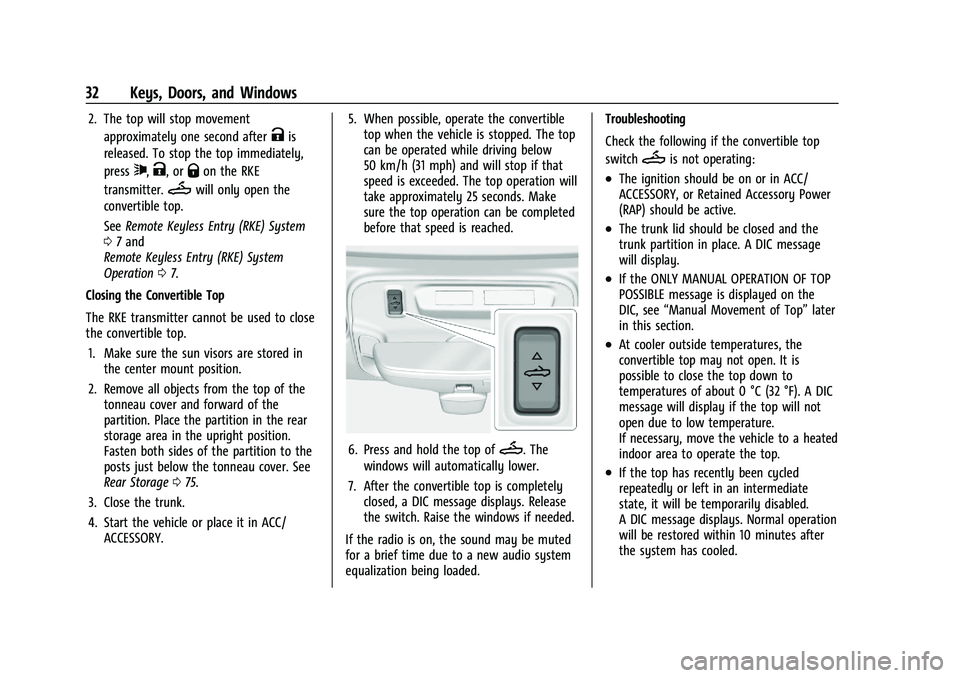
6. Press and hold the top ofM. The
windows will automatically lower.
7. After the convertible top is completely closed, a DIC message displays. Release
the switch. Raise the windows if needed.
If the radio is on, the sound may be muted
for a brief time due to a new audio system
equalization being loaded. Troubleshooting
Check the following if the convertible top
switch
Mis not operating:
.The ignition should be on or in ACC/
ACCESSORY, or Retained Accessory Power
(RAP) should be active.
.The trunk lid should be closed and the
trunk partition in place. A DIC message
will display.
.If the ONLY MANUAL OPERATION OF TOP
POSSIBLE message is displayed on the
DIC, see
“Manual Movement of Top” later
in this section.
.At cooler outside temperatures, the
convertible top may not open. It is
possible to close the top down to
temperatures of about 0 °C (32 °F). A DIC
message will display if the top will not
open due to low temperature.
If necessary, move the vehicle to a heated
indoor area to operate the top.
.If the top has recently been cycled
repeatedly or left in an intermediate
state, it will be temporarily disabled.
A DIC message displays. Normal operation
will be restored within 10 minutes after
the system has cooled.
Page 78 of 357
Chevrolet Camaro Owner Manual (GMNA-Localizing-U.S./Canada/Mexico-
14583589) - 2021 - CRC - 3/26/20
Instruments and Controls 77
Instruments and Controls
Controls
Steering Wheel Adjustment . . . . . . . . . . . . 78
Steering Wheel Controls . . . . . . . . . . . . . . . . 78
Heated Steering Wheel . . . . . . . . . . . . . . . . . 78
Horn . . . . . . . . . . . . . . . . . . . . . . . . . . . . . . . . . . . 78
Windshield Wiper/Washer . . . . . . . . . . . . . . 78
Compass . . . . . . . . . . . . . . . . . . . . . . . . . . . . . . . 79
Clock . . . . . . . . . . . . . . . . . . . . . . . . . . . . . . . . . . . 79
Power Outlets . . . . . . . . . . . . . . . . . . . . . . . . . . 80
Wireless Charging . . . . . . . . . . . . . . . . . . . . . . 80
Warning Lights, Gauges, and Indicators
Warning Lights, Gauges, andIndicators . . . . . . . . . . . . . . . . . . . . . . . . . . . . . 82
Instrument Cluster . . . . . . . . . . . . . . . . . . . . . 83
Speedometer . . . . . . . . . . . . . . . . . . . . . . . . . . . 86
Odometer . . . . . . . . . . . . . . . . . . . . . . . . . . . . . . 86
Trip Odometer . . . . . . . . . . . . . . . . . . . . . . . . . 86
Tachometer . . . . . . . . . . . . . . . . . . . . . . . . . . . . . 87
Fuel Gauge . . . . . . . . . . . . . . . . . . . . . . . . . . . . . 87
Boost Gauge (Uplevel Cluster Only) . . . . 88
Engine Oil Pressure Gauge (Uplevel Cluster Only) . . . . . . . . . . . . . . . . . . . . . . . . . 88
Engine Coolant Temperature Gauge . . . . 89
Voltmeter Gauge (Uplevel Cluster Only) . . . . . . . . . . . . . . . . . . . . . . . . . 90
Seat Belt Reminders . . . . . . . . . . . . . . . . . . . . 90
Airbag Readiness Light . . . . . . . . . . . . . . . . . . 91 Passenger Airbag Status Indicator . . . . . . 91
Charging System Light . . . . . . . . . . . . . . . . . 92
Malfunction Indicator Lamp . . . . . . . . . . . . 92
Brake System Warning Light . . . . . . . . . . . 94
Electric Parking Brake Light . . . . . . . . . . . . . 94
Service Electric Parking Brake Light . . . . . 95
Antilock Brake System (ABS) Warning
Light . . . . . . . . . . . . . . . . . . . . . . . . . . . . . . . . . . 95
Vehicle Ahead Indicator . . . . . . . . . . . . . . . . 95
Traction Off Light . . . . . . . . . . . . . . . . . . . . . . 96
StabiliTrak OFF Light . . . . . . . . . . . . . . . . . . . 96
Traction Control System (TCS)/StabiliTrak Light . . . . . . . . . . . . . . . . . . . . . . . . . . . . . . . . . 96
Tire Pressure Light . . . . . . . . . . . . . . . . . . . . . . 97
Engine Oil Pressure Light . . . . . . . . . . . . . . . 97
Low Fuel Warning Light . . . . . . . . . . . . . . . . 97
Security Light . . . . . . . . . . . . . . . . . . . . . . . . . . 98
High-Beam On Light . . . . . . . . . . . . . . . . . . . . 98
Lamps On Reminder . . . . . . . . . . . . . . . . . . . . 98
Cruise Control Light . . . . . . . . . . . . . . . . . . . . 98
Door Ajar Light . . . . . . . . . . . . . . . . . . . . . . . . . 98
Information Displays
Driver Information Center (DIC) . . . . . . . . 99
Head-Up Display (HUD) . . . . . . . . . . . . . . . . 101
Vehicle Messages
Vehicle Messages . . . . . . . . . . . . . . . . . . . . . . 104
Engine Power Messages . . . . . . . . . . . . . . . 105
Vehicle Speed Messages . . . . . . . . . . . . . . . 105
Vehicle Personalization
Vehicle Personalization . . . . . . . . . . . . . . . . 105
Page 82 of 357
Chevrolet Camaro Owner Manual (GMNA-Localizing-U.S./Canada/Mexico-
14583589) - 2021 - CRC - 3/26/20
Instruments and Controls 81
Warning (Continued)
that the charging system does not detect
an object, and the object gets wedged
between the smartphone and charger,
remove the smartphone and allow the
object to cool before removing it from
the charging pad, to prevent burns.
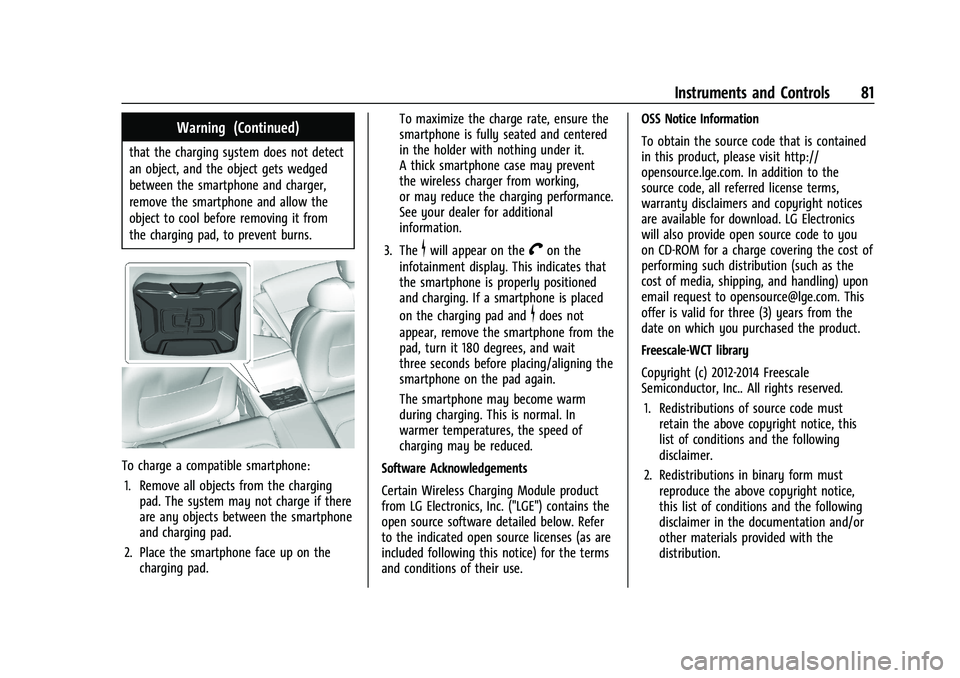
To charge a compatible smartphone:1. Remove all objects from the charging pad. The system may not charge if there
are any objects between the smartphone
and charging pad.
2. Place the smartphone face up on the charging pad. To maximize the charge rate, ensure the
smartphone is fully seated and centered
in the holder with nothing under it.
A thick smartphone case may prevent
the wireless charger from working,
or may reduce the charging performance.
See your dealer for additional
information.
3. The
$will appear on theVon the
infotainment display. This indicates that
the smartphone is properly positioned
and charging. If a smartphone is placed
on the charging pad and
$does not
appear, remove the smartphone from the
pad, turn it 180 degrees, and wait
three seconds before placing/aligning the
smartphone on the pad again.
The smartphone may become warm
during charging. This is normal. In
warmer temperatures, the speed of
charging may be reduced.
Software Acknowledgements
Certain Wireless Charging Module product
from LG Electronics, Inc. ("LGE") contains the
open source software detailed below. Refer
to the indicated open source licenses (as are
included following this notice) for the terms
and conditions of their use. OSS Notice Information
To obtain the source code that is contained
in this product, please visit http://
opensource.lge.com. In addition to the
source code, all referred license terms,
warranty disclaimers and copyright notices
are available for download. LG Electronics
will also provide open source code to you
on CD-ROM for a charge covering the cost of
performing such distribution (such as the
cost of media, shipping, and handling) upon
email request to [email protected]. This
offer is valid for three (3) years from the
date on which you purchased the product.
Freescale-WCT library
Copyright (c) 2012-2014 Freescale
Semiconductor, Inc.. All rights reserved.
1. Redistributions of source code must retain the above copyright notice, this
list of conditions and the following
disclaimer.
2. Redistributions in binary form must reproduce the above copyright notice,
this list of conditions and the following
disclaimer in the documentation and/or
other materials provided with the
distribution.
Page 84 of 357
Chevrolet Camaro Owner Manual (GMNA-Localizing-U.S./Canada/Mexico-
14583589) - 2021 - CRC - 3/26/20
Instruments and Controls 83
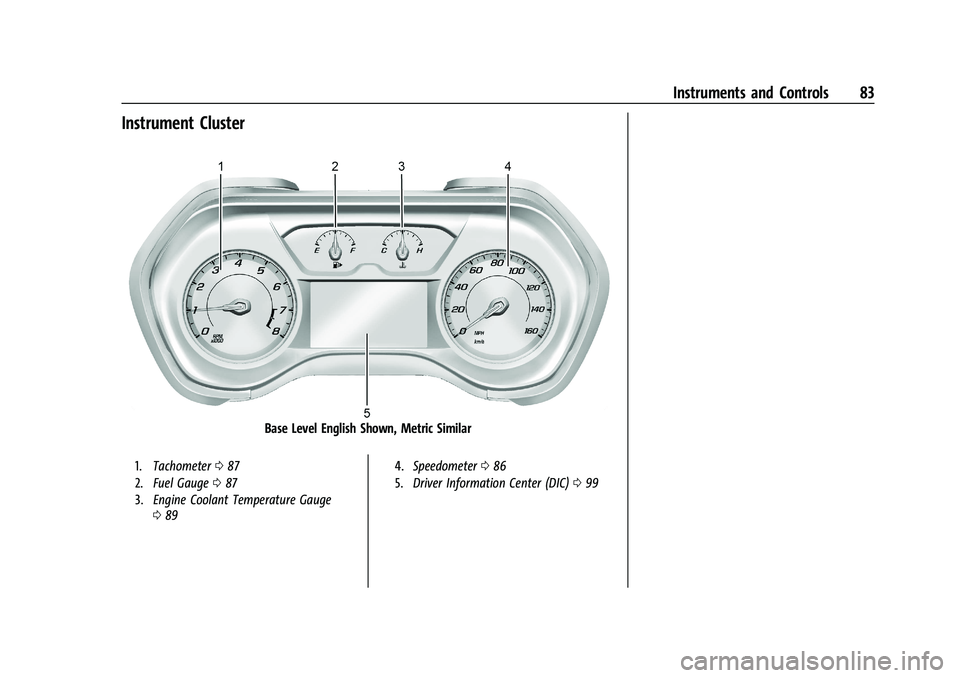
Instrument Cluster
Base Level English Shown, Metric Similar
1.Tachometer 087
2. Fuel Gauge 087
3. Engine Coolant Temperature Gauge
089 4.
Speedometer 086
5. Driver Information Center (DIC) 099
Page 85 of 357
Chevrolet Camaro Owner Manual (GMNA-Localizing-U.S./Canada/Mexico-
14583589) - 2021 - CRC - 3/26/20
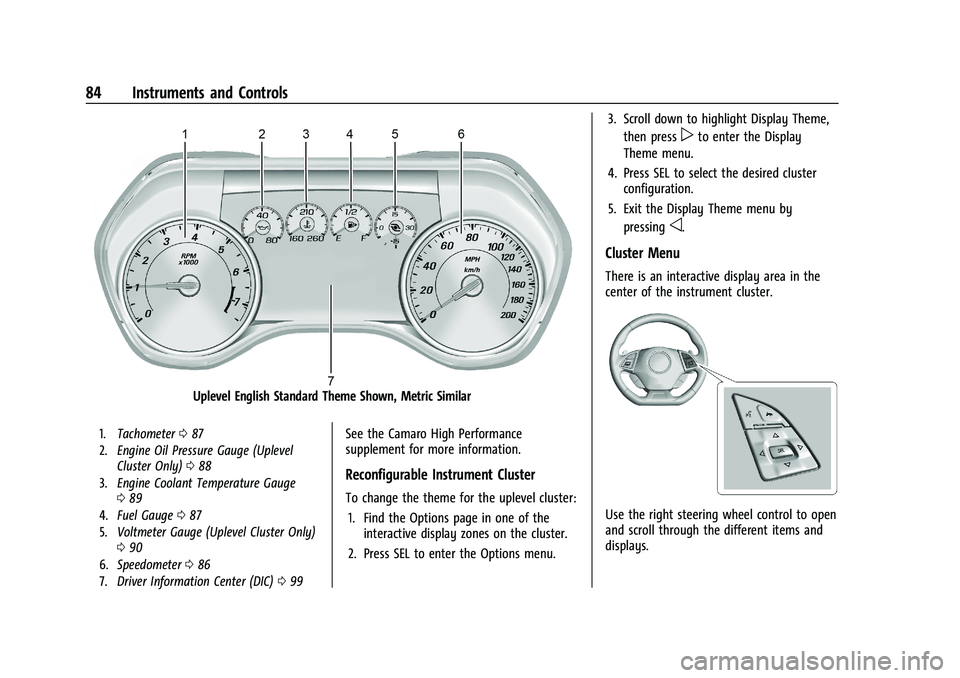
84 Instruments and Controls
Uplevel English Standard Theme Shown, Metric Similar
1.Tachometer 087
2. Engine Oil Pressure Gauge (Uplevel
Cluster Only) 088
3. Engine Coolant Temperature Gauge
089
4. Fuel Gauge 087
5. Voltmeter Gauge (Uplevel Cluster Only)
090
6. Speedometer 086
7. Driver Information Center (DIC) 099See the Camaro High Performance
supplement for more information.
Reconfigurable Instrument Cluster
To change the theme for the uplevel cluster:
1. Find the Options page in one of the interactive display zones on the cluster.
2. Press SEL to enter the Options menu. 3. Scroll down to highlight Display Theme,
then press
pto enter the Display
Theme menu.
4. Press SEL to select the desired cluster configuration.
5. Exit the Display Theme menu by pressing
o.
Cluster Menu
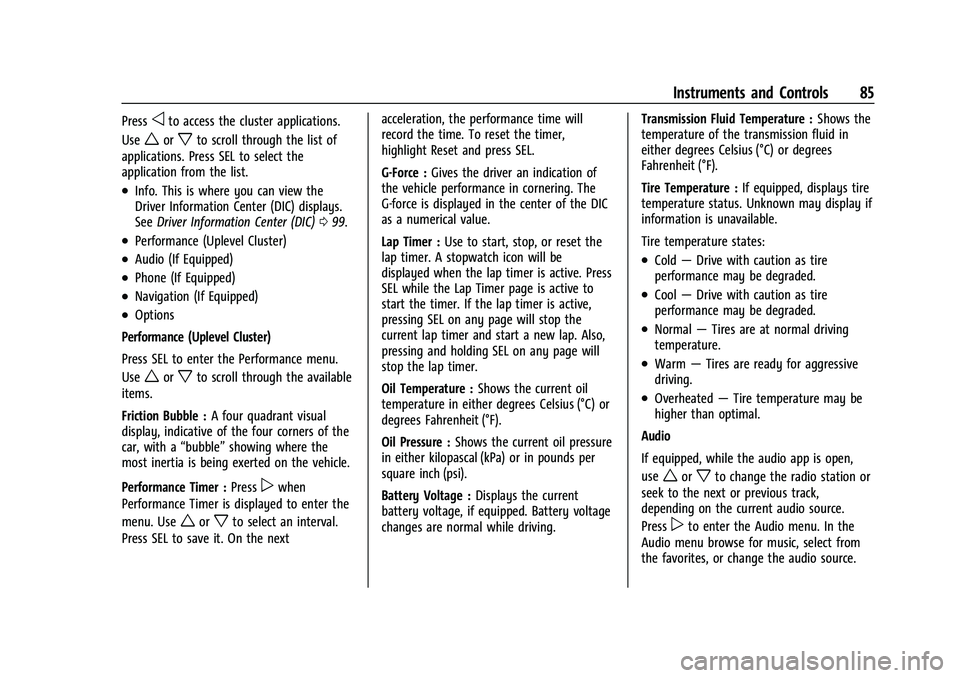
There is an interactive display area in the
center of the instrument cluster.
Use the right steering wheel control to open
and scroll through the different items and
displays.
Page 86 of 357
Chevrolet Camaro Owner Manual (GMNA-Localizing-U.S./Canada/Mexico-
14583589) - 2021 - CRC - 3/26/20
Instruments and Controls 85
Pressoto access the cluster applications.
Use
worxto scroll through the list of
applications. Press SEL to select the
application from the list.
.Info. This is where you can view the
Driver Information Center (DIC) displays.
See Driver Information Center (DIC) 099.
.Performance (Uplevel Cluster)
.Audio (If Equipped)
.Phone (If Equipped)
.Navigation (If Equipped)
.Options
Performance (Uplevel Cluster)
Press SEL to enter the Performance menu.
Use
worxto scroll through the available
items.
Friction Bubble : A four quadrant visual
display, indicative of the four corners of the
car, with a “bubble”showing where the
most inertia is being exerted on the vehicle.
Performance Timer : Press
pwhen
Performance Timer is displayed to enter the
menu. Use
worxto select an interval.
Press SEL to save it. On the next acceleration, the performance time will
record the time. To reset the timer,
highlight Reset and press SEL.
G-Force :
Gives the driver an indication of
the vehicle performance in cornering. The
G-force is displayed in the center of the DIC
as a numerical value.
Lap Timer : Use to start, stop, or reset the
lap timer. A stopwatch icon will be
displayed when the lap timer is active. Press
SEL while the Lap Timer page is active to
start the timer. If the lap timer is active,
pressing SEL on any page will stop the
current lap timer and start a new lap. Also,
pressing and holding SEL on any page will
stop the lap timer.
Oil Temperature : Shows the current oil
temperature in either degrees Celsius (°C) or
degrees Fahrenheit (°F).
Oil Pressure : Shows the current oil pressure
in either kilopascal (kPa) or in pounds per
square inch (psi).
Battery Voltage : Displays the current
battery voltage, if equipped. Battery voltage
changes are normal while driving. Transmission Fluid Temperature :
Shows the
temperature of the transmission fluid in
either degrees Celsius (°C) or degrees
Fahrenheit (°F).
Tire Temperature : If equipped, displays tire
temperature status. Unknown may display if
information is unavailable.
Tire temperature states:
.Cold —Drive with caution as tire
performance may be degraded.
.Cool —Drive with caution as tire
performance may be degraded.
.Normal —Tires are at normal driving
temperature.
.Warm —Tires are ready for aggressive
driving.
.Overheated —Tire temperature may be
higher than optimal.
Audio
If equipped, while the audio app is open,
use
worxto change the radio station or
seek to the next or previous track,
depending on the current audio source.
Press
pto enter the Audio menu. In the
Audio menu browse for music, select from
the favorites, or change the audio source.
Page 90 of 357
Chevrolet Camaro Owner Manual (GMNA-Localizing-U.S./Canada/Mexico-
14583589) - 2021 - CRC - 3/26/20
Instruments and Controls 89
The engine oil pressure gauge shows the
engine oil pressure in kPa (kilopascals) when
the engine is running.
Oil pressure can vary with engine speed,
outside temperature and oil viscosity.
On some models, the oil pump will vary
engine oil pressure according to engine
needs. Oil pressure may change quickly as
the engine speed or load varies. This is
normal.
If the oil pressure warning light or Driver
Information Center (DIC) message indicates
oil pressure outside the normal operating
range, check the vehicle's oil as soon as
possible. SeeEngine Oil0247.
Caution
Lack of proper engine oil maintenance
can damage the engine. Driving with the
engine oil low can also damage the
engine. The repairs would not be covered
by the vehicle warranty. Check the oil
level as soon as possible. Add oil if
required, but if the oil level is within the
operating range and the oil pressure is
still low, have the vehicle serviced.
Always follow the maintenance schedule
for changing engine oil.
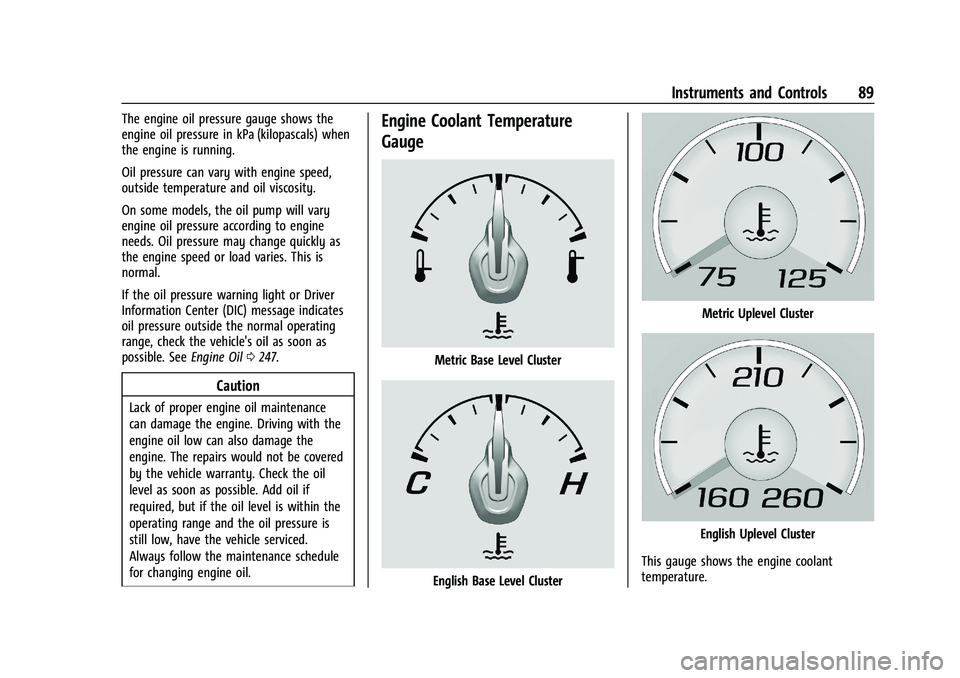
Engine Coolant Temperature
Gauge
Metric Base Level Cluster
English Base Level Cluster
Metric Uplevel Cluster
English Uplevel Cluster
This gauge shows the engine coolant
temperature.