roof CHEVROLET CAMARO 2023 User Guide
[x] Cancel search | Manufacturer: CHEVROLET, Model Year: 2023, Model line: CAMARO, Model: CHEVROLET CAMARO 2023Pages: 345, PDF Size: 16.19 MB
Page 81 of 345
Chevrolet Camaro Owner Manual (GMNA-Localizing-U.S./Canada/Mexico-
16408685) - 2023 - CRC - 3/28/22
80 Instruments and Controls
{Warning
Before driving the vehicle, always clear
snow and ice from the hood, windshield,
washer nozzles, roof, and rear of the
vehicle, including all lamps and windows.
Reduced visibility from snow and ice
buildup could lead to a crash.
Wiper Parking
If the ignition is turned off while the wipers
are on LO, HI, or INT, they will
immediately stop.
If the windshield wiper lever is then moved
to OFF before the driver door is opened or
within 10 minutes, the wipers will restart
and move to the base of the windshield.
If the ignition is turned off while the wipers
are performing wipes due to windshield
washing, the wipers continue to run until
they reach the base of the windshield.
Compass
The vehicle has a compass display in the
Driver Information Center (DIC). The compass
receives its heading and other information from the Global Positioning System (GPS)
antenna, StabiliTrak/Electronic Stability
Control (ESC), and vehicle speed information.
Avoid covering the GPS antenna, located on
the roof, for long periods of time with
objects that may interfere with the
antenna's ability to receive a satellite signal.
The compass system is designed to operate
for a certain number of miles or degrees of
turn before needing a signal from the GPS
satellites. When the compass display shows
CAL, drive the vehicle for a short distance in
an open area where it can receive a GPS
signal. The compass system will
automatically determine when the GPS
signal is restored and provide a heading
again.
Clock
Set the time and date using the
infotainment system. See "Time/Date" under
Settings
0152.
Power Outlets
The vehicle has an accessory power outlet
on the center floor console in front of the
cupholders. It can be used to plug in
electrical equipment, such as a cell phone or
an MP3 player. The accessory power outlet does not work
when the ignition is turned off and the
driver door is opened. This helps to preserve
the battery life of the vehicle.
Certain power accessory plugs may not be
compatible with the accessory power outlet
and could overload vehicle and adapter
fuses. If a problem is experienced, see your
dealer.
Caution
Adding any electrical equipment to the
vehicle may damage it or keep other
components from working as they
should. The repairs would not be covered
by the vehicle warranty. Do not use
equipment exceeding
maximum amperage rating of
15 amperes. Check with your dealer
before adding electrical equipment.
When adding electrical equipment, be sure
to follow the proper installation instructions
included with the equipment. See Add-On
Electrical Equipment 0226.
Page 136 of 345
Chevrolet Camaro Owner Manual (GMNA-Localizing-U.S./Canada/Mexico-
16408685) - 2023 - CRC - 3/28/22
Infotainment System 135
Auto Complete
Enter a partial location in the field entry box
on the search display. Auto complete will
attempt to complete the destination based
on what is being entered. Touch the
suggested item to search.
Search While in Motion with No Front Seat
Passenger Present
The search display will not allow changes or
text input with the keyboard when the
vehicle is in motion. As a result, a display
showing three rows of the most commonly
used categories appears. Touching the search
box will activate speech recognition.
Search While in Motion with Front Seat
Passenger Present
If the system detects that the front seat
passenger is present with both driver and
passenger seat belts buckled, touching the
search icon will display an alert message
that allows the passenger to search for a
destination as if the vehicle were stopped.
Connected Navigation
Connected Navigation is a subscription
service that enables certain capabilities
within the navigation system, such as
Traffic, Smart Search/Routing, and PredictiveNavigation capabilities. The system will
show an alert when the subscription is
expiring and will ask to renew the plan.
Global Positioning System (GPS)
If equipped, the position of the vehicle is
determined by using satellite signals, various
vehicle signals, and map data.
At times, other interference such as the
satellite condition, road configuration,
condition of the vehicle, and/or other
circumstances can affect the navigation
system's ability to determine the accurate
position of the vehicle.
The GPS shows the current position of the
vehicle using signals sent by GPS satellites.
When the vehicle is not receiving signals
from the satellites, a symbol appears in the
status bar.
This system might not be available or
interference can occur if any of the
following are true:
.Signals are obstructed by tall buildings,
trees, large trucks, or a tunnel.
.Satellites are being repaired or improved.
For more information if the GPS is not
functioning properly, see
Problems with
Route Guidance 0136 and
If the System Needs Service 0136.
Vehicle Positioning
At times, the position of the vehicle on the
map could be inaccurate due to one or more
of the following reasons:
.The road system has changed.
.The vehicle is driving on slippery road
surfaces such as sand, gravel, or snow.
.The vehicle is traveling on winding roads
or long, straight roads.
.The vehicle is approaching a tall building
or a large vehicle.
.The surface streets run parallel to a
freeway.
.The vehicle has been transferred by a
vehicle carrier or a ferry.
.The current position calibration is set
incorrectly.
.The vehicle is traveling at high speed.
.The vehicle changes directions more than
once, or the vehicle is turning on a turn
table in a parking lot.
.The vehicle is entering and/or exiting a
parking lot, garage, or a lot with a roof.
Page 137 of 345
Chevrolet Camaro Owner Manual (GMNA-Localizing-U.S./Canada/Mexico-
16408685) - 2023 - CRC - 3/28/22
136 Infotainment System
.The GPS signal is not received.
.A roof carrier is installed on the vehicle.
.Tire chains are installed on the vehicle.
.The tires are replaced or worn.
.The tire pressure for the tires is incorrect.
.This is the first navigation use after the
map data is updated.
.The 12-volt battery has been disconnected
for several days.
.The vehicle is driving in heavy traffic
where driving is at low speeds, and the
vehicle is stopped and started repeatedly.
Problems with Route Guidance
Inappropriate route guidance can occur
under one or more of the following
conditions:
.The turn was not made on the road
indicated.
.Route guidance might not be available
when using automatic rerouting for the
next right or left turn.
.The route might not be changed when
using automatic rerouting.
.There is no route guidance when turning
at an intersection.
.Plural names of places might be
announced occasionally.
.It could take a long time to operate
automatic rerouting during high-speed
driving.
.Automatic rerouting might display a route
returning to the set waypoint if heading
for a destination without passing through
a set waypoint.
.The route prohibits the entry of a vehicle
due to a regulation by time or season or
any other regulation which may be given.
.Some routes might not be searched.
.The route to the destination might not be
shown if there are new roads, if roads
have recently changed, or if certain roads
are not listed in the map data. SeeMaps
0 128.
To recalibrate the vehicle's position on the
map, park with the vehicle running for two
to five minutes, until the vehicle position
updates. Make sure the vehicle is parked in
a location that is safe and has a clear view
of the sky and away from large
obstructions.
If the System Needs Service
If the navigation system needs service, see
your dealer.
Map Data Updates
The map data in the vehicle is the most
up-to-date information available when the
vehicle was produced. The map data is
updated periodically, provided that the map
information has changed and the vehicle has
a relevant service plan.
See www.gmnavdisc.com for details on
ordering, purchasing, and installing a new or
replacement SD card. Features are subject to
change. For more information on this
feature, visit your brand website. See Online
Account 0316 for details.
If the vehicle is equipped with Connected
Navigation, which is a subscription service
that enables certain features of the
navigation system, such as Traffic, Smart
Search/Routing, and Predictive Navigation,
then the system will download the latest
map data from the cloud.
Database Coverage Explanations
Coverage areas vary with respect to the
level of map detail available for any given
area. Some areas feature greater levels of
detail than others. If this happens, it does
not mean there is a problem with the
system. As the map data is updated, more
Page 197 of 345
Chevrolet Camaro Owner Manual (GMNA-Localizing-U.S./Canada/Mexico-
16408685) - 2023 - CRC - 3/28/22
196 Driving and Operating
{Warning
Improper use of the heater cord or an
extension cord can damage the cord and
may result in overheating and fire.
.Plug the cord into a three-prong
electrical utility receptacle that is
protected by a ground fault detection
function. An ungrounded outlet could
cause an electric shock.
.Use a weatherproof, heavy-duty,
15 amp-rated extension cord if needed.
Failure to use the recommended
extension cord in good operating
condition, or using a damaged heater
or extension cord, could make it
overheat and cause a fire, property
damage, electric shock, and injury.
.Do not operate the vehicle with the
heater cord permanently attached to
the vehicle. Possible heater cord and
thermostat damage could occur.(Continued)
Warning (Continued)
.While in use, do not let the heater
cord touch vehicle parts or sharp
edges. Never close the hood on the
heater cord.
.Before starting the vehicle, unplug the
cord, reattach the cover to the plug,
and securely fasten the cord. Keep the
cord away from any moving parts.
4. Before starting the engine, be sure to unplug and store the cord as it was
before to keep it away from moving
engine parts. If you do not it could be
damaged.
The length of time the heater should remain
plugged in depends on several factors. Ask a
dealer in the area where you will be parking
the vehicle for the best advice on this.
Retained Accessory Power (RAP)
When the vehicle is turned from on to off,
the following features (if equipped) will
continue to function for up to 10 minutes,
or until the driver door is opened. These
features will also work when the vehicle is
on or in accessory mode:
.Infotainment System
.Power Windows (during RAP this
functionality will be lost when any door
is opened)
.Sunroof (during RAP this functionality will
be lost when any door is opened)
.Auxiliary Power Outlet
.Audio System
.OnStar System
Shifting Into Park
To shift into P (Park): 1. Hold the brake pedal down and set the parking brake.
See Electric Parking Brake 0206.
2. Move the shift lever into P (Park) by holding in the button on the shift lever
and pushing the shift lever all the way
toward the front of the vehicle.
3. Turn the ignition off.
Page 259 of 345
Chevrolet Camaro Owner Manual (GMNA-Localizing-U.S./Canada/Mexico-
16408685) - 2023 - CRC - 3/28/22
258 Vehicle Care
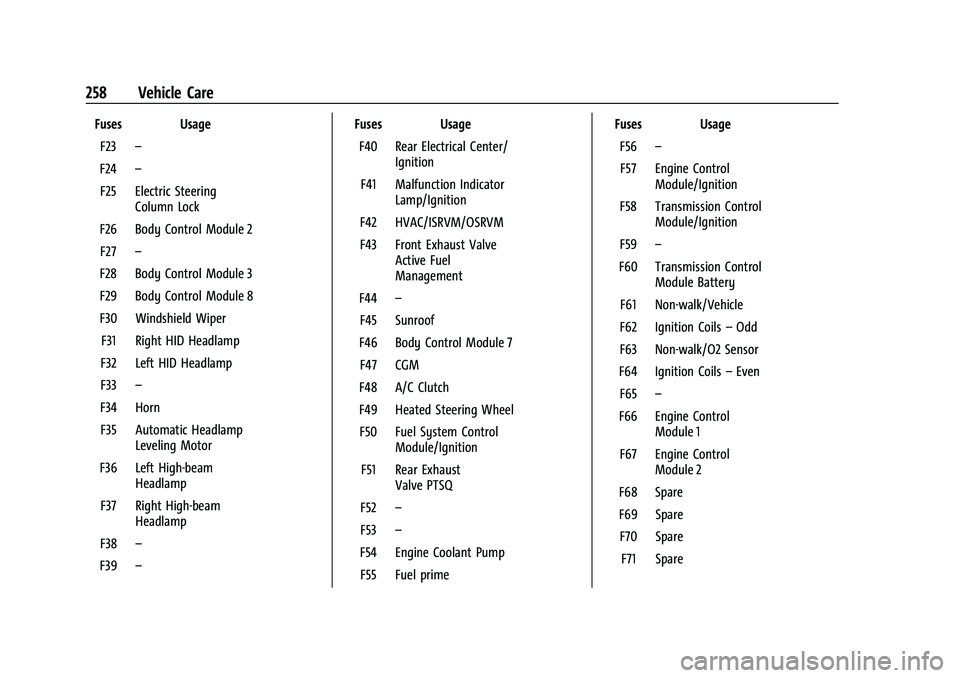
Fuses UsageF23 –
F24 –
F25 Electric Steering Column Lock
F26 Body Control Module 2 F27 –
F28 Body Control Module 3
F29 Body Control Module 8
F30 Windshield Wiper F31 Right HID Headlamp
F32 Left HID Headlamp
F33 –
F34 Horn F35 Automatic Headlamp Leveling Motor
F36 Left High-beam Headlamp
F37 Right High-beam Headlamp
F38 –
F39 – Fuses Usage
F40 Rear Electrical Center/ Ignition
F41 Malfunction Indicator Lamp/Ignition
F42 HVAC/ISRVM/OSRVM
F43 Front Exhaust Valve Active Fuel
Management
F44 –
F45 Sunroof
F46 Body Control Module 7 F47 CGM
F48 A/C Clutch
F49 Heated Steering Wheel F50 Fuel System Control Module/Ignition
F51 Rear Exhaust Valve PTSQ
F52 –
F53 –
F54 Engine Coolant Pump F55 Fuel prime Fuses Usage
F56 –
F57 Engine Control Module/Ignition
F58 Transmission Control Module/Ignition
F59 –
F60 Transmission Control Module Battery
F61 Non-walk/Vehicle
F62 Ignition Coils –Odd
F63 Non-walk/O2 Sensor
F64 Ignition Coils –Even
F65 –
F66 Engine Control Module 1
F67 Engine Control Module 2
F68 Spare
F69 Spare F70 Spare F71 Spare
Page 341 of 345
Chevrolet Camaro Owner Manual (GMNA-Localizing-U.S./Canada/Mexico-
16408685) - 2023 - CRC - 3/28/22
340 Index
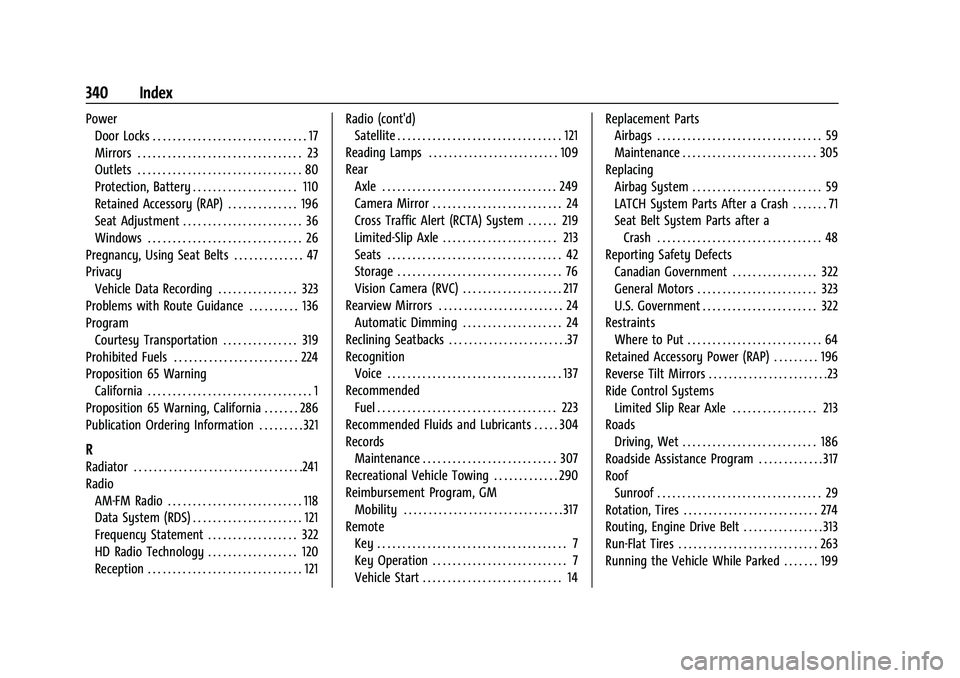
PowerDoor Locks . . . . . . . . . . . . . . . . . . . . . . . . . . . . . . . 17
Mirrors . . . . . . . . . . . . . . . . . . . . . . . . . . . . . . . . . 23
Outlets . . . . . . . . . . . . . . . . . . . . . . . . . . . . . . . . . 80
Protection, Battery . . . . . . . . . . . . . . . . . . . . . 110
Retained Accessory (RAP) . . . . . . . . . . . . . . 196
Seat Adjustment . . . . . . . . . . . . . . . . . . . . . . . . 36
Windows . . . . . . . . . . . . . . . . . . . . . . . . . . . . . . . 26
Pregnancy, Using Seat Belts . . . . . . . . . . . . . . 47
Privacy Vehicle Data Recording . . . . . . . . . . . . . . . . 323
Problems with Route Guidance . . . . . . . . . . 136
Program Courtesy Transportation . . . . . . . . . . . . . . . 319
Prohibited Fuels . . . . . . . . . . . . . . . . . . . . . . . . . 224
Proposition 65 Warning California . . . . . . . . . . . . . . . . . . . . . . . . . . . . . . . . . 1
Proposition 65 Warning, California . . . . . . . 286
Publication Ordering Information . . . . . . . . . 321
R
Radiator . . . . . . . . . . . . . . . . . . . . . . . . . . . . . . . . . .241
Radio AM-FM Radio . . . . . . . . . . . . . . . . . . . . . . . . . . . 118
Data System (RDS) . . . . . . . . . . . . . . . . . . . . . . 121
Frequency Statement . . . . . . . . . . . . . . . . . . 322
HD Radio Technology . . . . . . . . . . . . . . . . . . 120
Reception . . . . . . . . . . . . . . . . . . . . . . . . . . . . . . . 121 Radio (cont'd)
Satellite . . . . . . . . . . . . . . . . . . . . . . . . . . . . . . . . . 121
Reading Lamps . . . . . . . . . . . . . . . . . . . . . . . . . . 109
Rear Axle . . . . . . . . . . . . . . . . . . . . . . . . . . . . . . . . . . . 249
Camera Mirror . . . . . . . . . . . . . . . . . . . . . . . . . . 24
Cross Traffic Alert (RCTA) System . . . . . . 219
Limited-Slip Axle . . . . . . . . . . . . . . . . . . . . . . . 213
Seats . . . . . . . . . . . . . . . . . . . . . . . . . . . . . . . . . . . 42
Storage . . . . . . . . . . . . . . . . . . . . . . . . . . . . . . . . . 76
Vision Camera (RVC) . . . . . . . . . . . . . . . . . . . . 217
Rearview Mirrors . . . . . . . . . . . . . . . . . . . . . . . . . 24
Automatic Dimming . . . . . . . . . . . . . . . . . . . . 24
Reclining Seatbacks . . . . . . . . . . . . . . . . . . . . . . . .37
Recognition Voice . . . . . . . . . . . . . . . . . . . . . . . . . . . . . . . . . . . 137
Recommended Fuel . . . . . . . . . . . . . . . . . . . . . . . . . . . . . . . . . . . . 223
Recommended Fluids and Lubricants . . . . . 304
Records Maintenance . . . . . . . . . . . . . . . . . . . . . . . . . . . 307
Recreational Vehicle Towing . . . . . . . . . . . . . 290
Reimbursement Program, GM Mobility . . . . . . . . . . . . . . . . . . . . . . . . . . . . . . . . 317
Remote Key . . . . . . . . . . . . . . . . . . . . . . . . . . . . . . . . . . . . . . 7
Key Operation . . . . . . . . . . . . . . . . . . . . . . . . . . . 7
Vehicle Start . . . . . . . . . . . . . . . . . . . . . . . . . . . . 14 Replacement Parts
Airbags . . . . . . . . . . . . . . . . . . . . . . . . . . . . . . . . . 59
Maintenance . . . . . . . . . . . . . . . . . . . . . . . . . . . 305
Replacing Airbag System . . . . . . . . . . . . . . . . . . . . . . . . . . 59
LATCH System Parts After a Crash . . . . . . . 71
Seat Belt System Parts after aCrash . . . . . . . . . . . . . . . . . . . . . . . . . . . . . . . . . 48
Reporting Safety Defects Canadian Government . . . . . . . . . . . . . . . . . 322
General Motors . . . . . . . . . . . . . . . . . . . . . . . . 323
U.S. Government . . . . . . . . . . . . . . . . . . . . . . . 322
Restraints Where to Put . . . . . . . . . . . . . . . . . . . . . . . . . . . 64
Retained Accessory Power (RAP) . . . . . . . . . 196
Reverse Tilt Mirrors . . . . . . . . . . . . . . . . . . . . . . . .23
Ride Control Systems Limited Slip Rear Axle . . . . . . . . . . . . . . . . . 213
Roads Driving, Wet . . . . . . . . . . . . . . . . . . . . . . . . . . . 186
Roadside Assistance Program . . . . . . . . . . . . . 317
Roof
Sunroof . . . . . . . . . . . . . . . . . . . . . . . . . . . . . . . . . 29
Rotation, Tires . . . . . . . . . . . . . . . . . . . . . . . . . . . 274
Routing, Engine Drive Belt . . . . . . . . . . . . . . . . 313
Run-Flat Tires . . . . . . . . . . . . . . . . . . . . . . . . . . . . 263
Running the Vehicle While Parked . . . . . . . 199
Page 342 of 345
Chevrolet Camaro Owner Manual (GMNA-Localizing-U.S./Canada/Mexico-
16408685) - 2023 - CRC - 3/28/22
Index 341
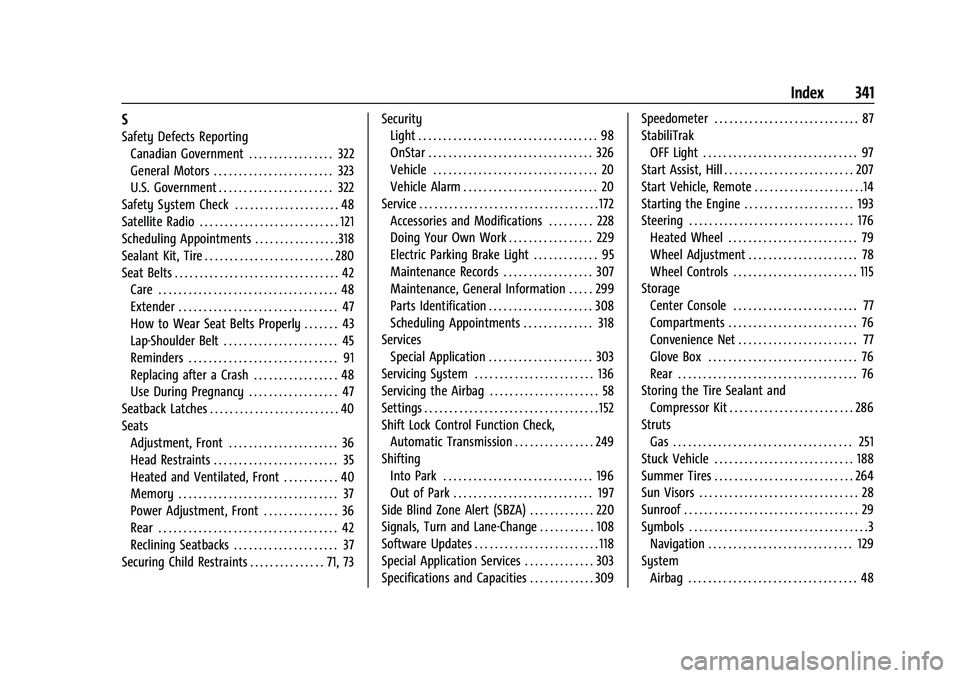
S
Safety Defects ReportingCanadian Government . . . . . . . . . . . . . . . . . 322
General Motors . . . . . . . . . . . . . . . . . . . . . . . . 323
U.S. Government . . . . . . . . . . . . . . . . . . . . . . . 322
Safety System Check . . . . . . . . . . . . . . . . . . . . . 48
Satellite Radio . . . . . . . . . . . . . . . . . . . . . . . . . . . . 121
Scheduling Appointments . . . . . . . . . . . . . . . . .318
Sealant Kit, Tire . . . . . . . . . . . . . . . . . . . . . . . . . . 280
Seat Belts . . . . . . . . . . . . . . . . . . . . . . . . . . . . . . . . . 42 Care . . . . . . . . . . . . . . . . . . . . . . . . . . . . . . . . . . . . 48
Extender . . . . . . . . . . . . . . . . . . . . . . . . . . . . . . . . 47
How to Wear Seat Belts Properly . . . . . . . 43
Lap-Shoulder Belt . . . . . . . . . . . . . . . . . . . . . . . 45
Reminders . . . . . . . . . . . . . . . . . . . . . . . . . . . . . . 91
Replacing after a Crash . . . . . . . . . . . . . . . . . 48
Use During Pregnancy . . . . . . . . . . . . . . . . . . 47
Seatback Latches . . . . . . . . . . . . . . . . . . . . . . . . . . 40
Seats Adjustment, Front . . . . . . . . . . . . . . . . . . . . . . 36
Head Restraints . . . . . . . . . . . . . . . . . . . . . . . . . 35
Heated and Ventilated, Front . . . . . . . . . . . 40
Memory . . . . . . . . . . . . . . . . . . . . . . . . . . . . . . . . 37
Power Adjustment, Front . . . . . . . . . . . . . . . 36
Rear . . . . . . . . . . . . . . . . . . . . . . . . . . . . . . . . . . . . 42
Reclining Seatbacks . . . . . . . . . . . . . . . . . . . . . 37
Securing Child Restraints . . . . . . . . . . . . . . . 71, 73 Security
Light . . . . . . . . . . . . . . . . . . . . . . . . . . . . . . . . . . . . 98
OnStar . . . . . . . . . . . . . . . . . . . . . . . . . . . . . . . . . 326
Vehicle . . . . . . . . . . . . . . . . . . . . . . . . . . . . . . . . . 20
Vehicle Alarm . . . . . . . . . . . . . . . . . . . . . . . . . . . 20
Service . . . . . . . . . . . . . . . . . . . . . . . . . . . . . . . . . . . . 172 Accessories and Modifications . . . . . . . . . 228
Doing Your Own Work . . . . . . . . . . . . . . . . . 229
Electric Parking Brake Light . . . . . . . . . . . . . 95
Maintenance Records . . . . . . . . . . . . . . . . . . 307
Maintenance, General Information . . . . . 299
Parts Identification . . . . . . . . . . . . . . . . . . . . . 308
Scheduling Appointments . . . . . . . . . . . . . . 318
Services Special Application . . . . . . . . . . . . . . . . . . . . . 303
Servicing System . . . . . . . . . . . . . . . . . . . . . . . . 136
Servicing the Airbag . . . . . . . . . . . . . . . . . . . . . . 58
Settings . . . . . . . . . . . . . . . . . . . . . . . . . . . . . . . . . . . 152
Shift Lock Control Function Check,
Automatic Transmission . . . . . . . . . . . . . . . . 249
Shifting
Into Park . . . . . . . . . . . . . . . . . . . . . . . . . . . . . . 196
Out of Park . . . . . . . . . . . . . . . . . . . . . . . . . . . . 197
Side Blind Zone Alert (SBZA) . . . . . . . . . . . . . 220
Signals, Turn and Lane-Change . . . . . . . . . . . 108
Software Updates . . . . . . . . . . . . . . . . . . . . . . . . . 118
Special Application Services . . . . . . . . . . . . . . 303
Specifications and Capacities . . . . . . . . . . . . . 309 Speedometer . . . . . . . . . . . . . . . . . . . . . . . . . . . . . 87
StabiliTrak
OFF Light . . . . . . . . . . . . . . . . . . . . . . . . . . . . . . . 97
Start Assist, Hill . . . . . . . . . . . . . . . . . . . . . . . . . . 207
Start Vehicle, Remote . . . . . . . . . . . . . . . . . . . . . .14
Starting the Engine . . . . . . . . . . . . . . . . . . . . . . 193
Steering . . . . . . . . . . . . . . . . . . . . . . . . . . . . . . . . . 176 Heated Wheel . . . . . . . . . . . . . . . . . . . . . . . . . . 79
Wheel Adjustment . . . . . . . . . . . . . . . . . . . . . . 78
Wheel Controls . . . . . . . . . . . . . . . . . . . . . . . . . 115
Storage
Center Console . . . . . . . . . . . . . . . . . . . . . . . . . 77
Compartments . . . . . . . . . . . . . . . . . . . . . . . . . . 76
Convenience Net . . . . . . . . . . . . . . . . . . . . . . . . 77
Glove Box . . . . . . . . . . . . . . . . . . . . . . . . . . . . . . 76
Rear . . . . . . . . . . . . . . . . . . . . . . . . . . . . . . . . . . . . 76
Storing the Tire Sealant and Compressor Kit . . . . . . . . . . . . . . . . . . . . . . . . . 286
Struts Gas . . . . . . . . . . . . . . . . . . . . . . . . . . . . . . . . . . . . 251
Stuck Vehicle . . . . . . . . . . . . . . . . . . . . . . . . . . . . 188
Summer Tires . . . . . . . . . . . . . . . . . . . . . . . . . . . . 264
Sun Visors . . . . . . . . . . . . . . . . . . . . . . . . . . . . . . . . 28
Sunroof . . . . . . . . . . . . . . . . . . . . . . . . . . . . . . . . . . . 29
Symbols . . . . . . . . . . . . . . . . . . . . . . . . . . . . . . . . . . . .3
Navigation . . . . . . . . . . . . . . . . . . . . . . . . . . . . . 129
System Airbag . . . . . . . . . . . . . . . . . . . . . . . . . . . . . . . . . . 48