Ign CHEVROLET CAMARO 2023 Owners Manual
[x] Cancel search | Manufacturer: CHEVROLET, Model Year: 2023, Model line: CAMARO, Model: CHEVROLET CAMARO 2023Pages: 345, PDF Size: 16.19 MB
Page 3 of 345
Chevrolet Camaro Owner Manual (GMNA-Localizing-U.S./Canada/Mexico-
16408685) - 2023 - CRC - 3/28/22
2 Introduction
Introduction
The names, logos, emblems, slogans, vehicle
model names, and vehicle body designs
appearing in this manual including, but not
limited to, GM, the GM logo, CHEVROLET,
the CHEVROLET Emblem, CAMARO, and the
CAMARO Emblem are trademarks and/or
service marks of General Motors LLC, its
subsidiaries, affiliates, or licensors.
For vehicles first sold in Canada, substitute
the name“General Motors of Canada
Company” for Chevrolet Motor Division
wherever it appears in this manual.
This manual describes features that may or
may not be on the vehicle because of
optional equipment that was not purchased
on the vehicle, model variants, country
specifications, features/applications that may
not be available in your region, or changes
subsequent to the printing of this owner’s
manual, including changes in standard or
optional content. Refer to the purchase documentation
relating to your specific vehicle to confirm
the features.
Keep this manual in the vehicle for quick
reference.
Canadian Vehicle Owners
A French language manual can be obtained
from your dealer, at www.helminc.com,
or from:
Propriétaires Canadiens
On peut obtenir un exemplaire de ce guide
en français auprès du concessionnaire ou à
l'adresse suivante:
Helm, Incorporated
Attention: Customer Service
47911 Halyard Drive
Plymouth, MI 48170
USA
Using this Manual
To quickly locate information about the
vehicle, use the Index in the back of the
manual. It is an alphabetical list of what is
in the manual and the page number where
it can be found.
Danger, Warning, and Caution
Warning messages found on vehicle labels
and in this manual describe hazards and
what to do to avoid or reduce them.
{Danger
Danger indicates a hazard with a high
level of risk which will result in serious
injury or death.
{Warning
Warning indicates a hazard that could
result in injury or death.
Caution
Caution indicates a hazard that could
result in property or vehicle damage.
Page 6 of 345
Chevrolet Camaro Owner Manual (GMNA-Localizing-U.S./Canada/Mexico-
16408685) - 2023 - CRC - 3/28/22
Introduction 5
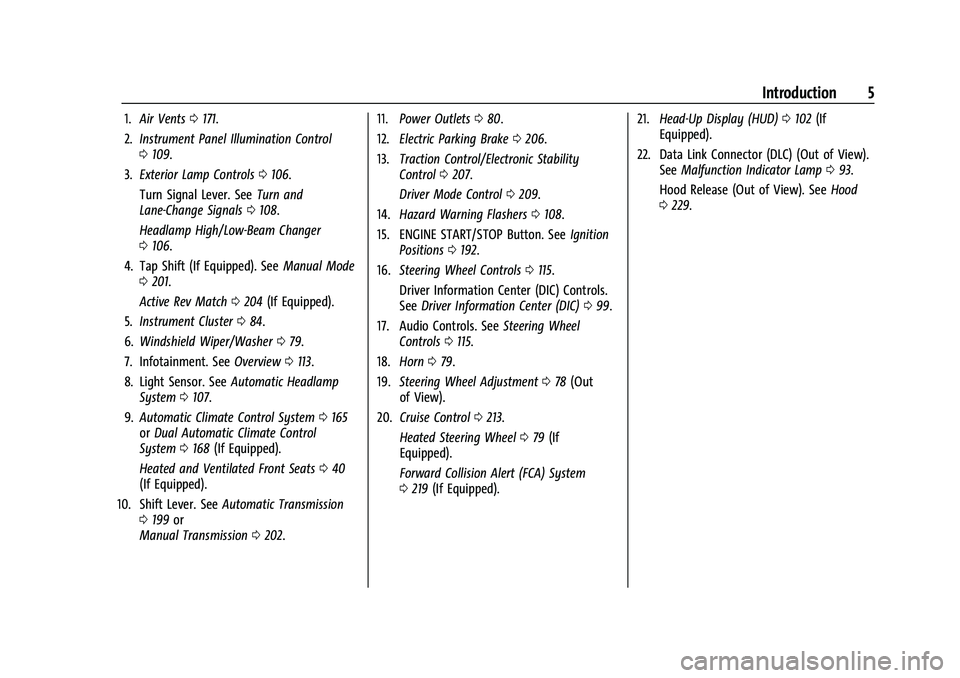
1.Air Vents 0171.
2. Instrument Panel Illumination Control
0109.
3. Exterior Lamp Controls 0106.
Turn Signal Lever. See Turn and
Lane-Change Signals 0108.
Headlamp High/Low-Beam Changer
0 106.
4. Tap Shift (If Equipped). See Manual Mode
0 201.
Active Rev Match 0204 (If Equipped).
5. Instrument Cluster 084.
6. Windshield Wiper/Washer 079.
7. Infotainment. See Overview0113.
8. Light Sensor. See Automatic Headlamp
System 0107.
9. Automatic Climate Control System 0165
or Dual Automatic Climate Control
System 0168 (If Equipped).
Heated and Ventilated Front Seats 040
(If Equipped).
10. Shift Lever. See Automatic Transmission
0 199 or
Manual Transmission 0202. 11.
Power Outlets 080.
12. Electric Parking Brake 0206.
13. Traction Control/Electronic Stability
Control 0207.
Driver Mode Control 0209.
14. Hazard Warning Flashers 0108.
15. ENGINE START/STOP Button. See Ignition
Positions 0192.
16. Steering Wheel Controls 0115.
Driver Information Center (DIC) Controls.
See Driver Information Center (DIC) 099.
17. Audio Controls. See Steering Wheel
Controls 0115.
18. Horn 079.
19. Steering Wheel Adjustment 078 (Out
of View).
20. Cruise Control 0213.
Heated Steering Wheel 079 (If
Equipped).
Forward Collision Alert (FCA) System
0 219 (If Equipped). 21.
Head-Up Display (HUD) 0102 (If
Equipped).
22. Data Link Connector (DLC) (Out of View). SeeMalfunction Indicator Lamp 093.
Hood Release (Out of View). See Hood
0 229.
Page 8 of 345
Chevrolet Camaro Owner Manual (GMNA-Localizing-U.S./Canada/Mexico-
16408685) - 2023 - CRC - 3/28/22
Keys, Doors, and Windows 7
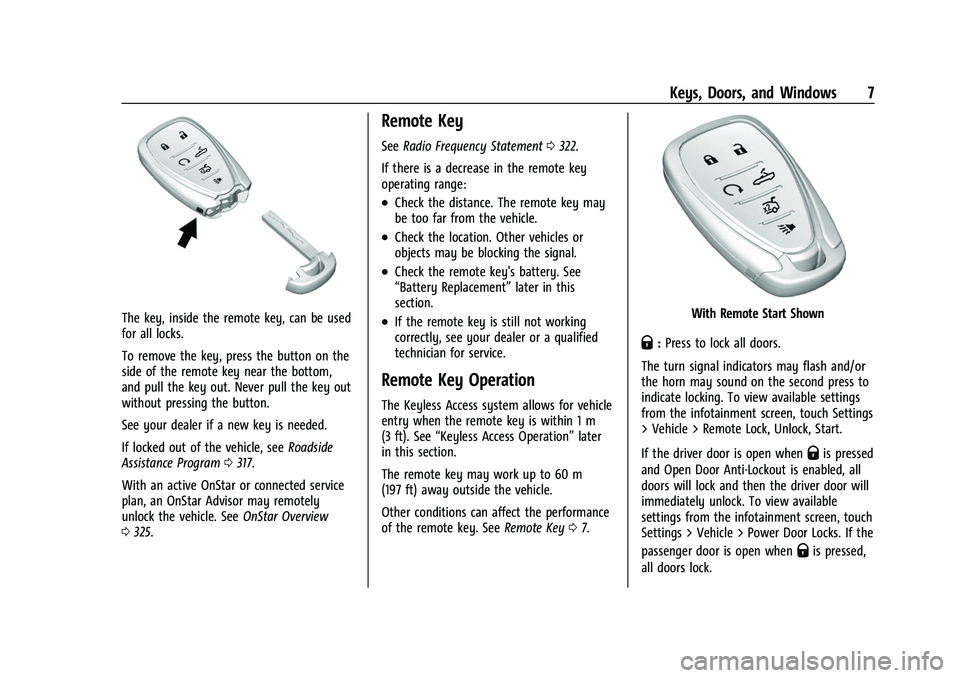
The key, inside the remote key, can be used
for all locks.
To remove the key, press the button on the
side of the remote key near the bottom,
and pull the key out. Never pull the key out
without pressing the button.
See your dealer if a new key is needed.
If locked out of the vehicle, seeRoadside
Assistance Program 0317.
With an active OnStar or connected service
plan, an OnStar Advisor may remotely
unlock the vehicle. See OnStar Overview
0 325.
Remote Key
See Radio Frequency Statement 0322.
If there is a decrease in the remote key
operating range:
.Check the distance. The remote key may
be too far from the vehicle.
.Check the location. Other vehicles or
objects may be blocking the signal.
.Check the remote key's battery. See
“Battery Replacement” later in this
section.
.If the remote key is still not working
correctly, see your dealer or a qualified
technician for service.
Remote Key Operation
The Keyless Access system allows for vehicle
entry when the remote key is within 1 m
(3 ft). See “Keyless Access Operation” later
in this section.
The remote key may work up to 60 m
(197 ft) away outside the vehicle.
Other conditions can affect the performance
of the remote key. See Remote Key07.
With Remote Start Shown
Q:Press to lock all doors.
The turn signal indicators may flash and/or
the horn may sound on the second press to
indicate locking. To view available settings
from the infotainment screen, touch Settings
> Vehicle > Remote Lock, Unlock, Start.
If the driver door is open when
Qis pressed
and Open Door Anti-Lockout is enabled, all
doors will lock and then the driver door will
immediately unlock. To view available
settings from the infotainment screen, touch
Settings > Vehicle > Power Door Locks. If the
passenger door is open when
Qis pressed,
all doors lock.
Page 9 of 345
Chevrolet Camaro Owner Manual (GMNA-Localizing-U.S./Canada/Mexico-
16408685) - 2023 - CRC - 3/28/22
8 Keys, Doors, and Windows
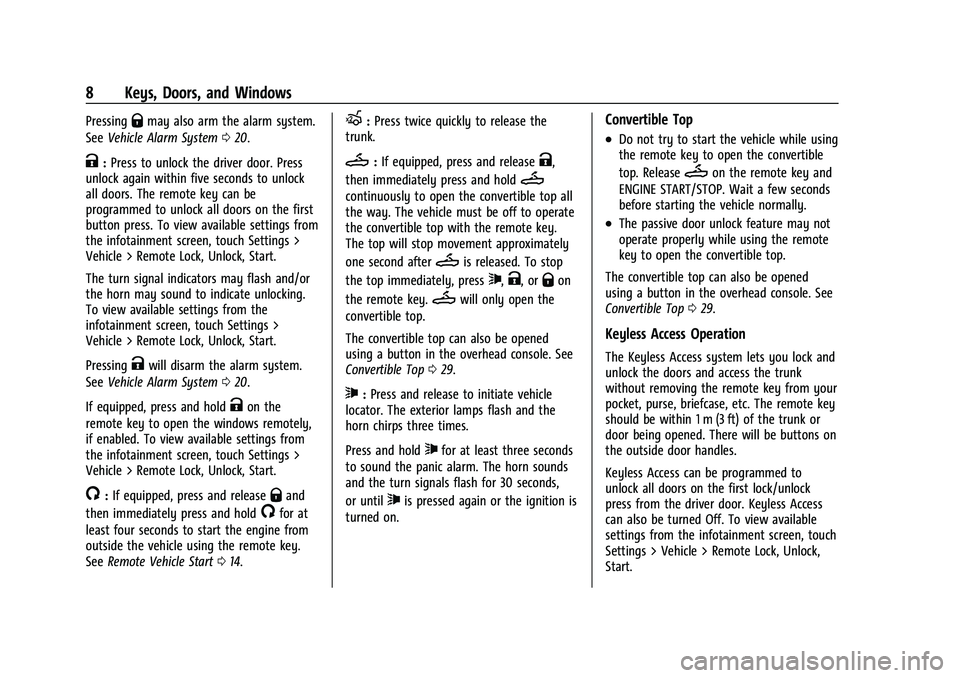
PressingQmay also arm the alarm system.
See Vehicle Alarm System 020.
K:Press to unlock the driver door. Press
unlock again within five seconds to unlock
all doors. The remote key can be
programmed to unlock all doors on the first
button press. To view available settings from
the infotainment screen, touch Settings >
Vehicle > Remote Lock, Unlock, Start.
The turn signal indicators may flash and/or
the horn may sound to indicate unlocking.
To view available settings from the
infotainment screen, touch Settings >
Vehicle > Remote Lock, Unlock, Start.
Pressing
Kwill disarm the alarm system.
See Vehicle Alarm System 020.
If equipped, press and hold
Kon the
remote key to open the windows remotely,
if enabled. To view available settings from
the infotainment screen, touch Settings >
Vehicle > Remote Lock, Unlock, Start.
/: If equipped, press and releaseQand
then immediately press and hold
/for at
least four seconds to start the engine from
outside the vehicle using the remote key.
See Remote Vehicle Start 014.
X:Press twice quickly to release the
trunk.
M: If equipped, press and releaseK,
then immediately press and hold
M
continuously to open the convertible top all
the way. The vehicle must be off to operate
the convertible top with the remote key.
The top will stop movement approximately
one second after
Mis released. To stop
the top immediately, press
7,K, orQon
the remote key.
Mwill only open the
convertible top.
The convertible top can also be opened
using a button in the overhead console. See
Convertible Top 029.
7:Press and release to initiate vehicle
locator. The exterior lamps flash and the
horn chirps three times.
Press and hold
7for at least three seconds
to sound the panic alarm. The horn sounds
and the turn signals flash for 30 seconds,
or until
7is pressed again or the ignition is
turned on.
Convertible Top
.Do not try to start the vehicle while using
the remote key to open the convertible
top. Release
Mon the remote key and
ENGINE START/STOP. Wait a few seconds
before starting the vehicle normally.
.The passive door unlock feature may not
operate properly while using the remote
key to open the convertible top.
The convertible top can also be opened
using a button in the overhead console. See
Convertible Top 029.
Keyless Access Operation
The Keyless Access system lets you lock and
unlock the doors and access the trunk
without removing the remote key from your
pocket, purse, briefcase, etc. The remote key
should be within 1 m (3 ft) of the trunk or
door being opened. There will be buttons on
the outside door handles.
Keyless Access can be programmed to
unlock all doors on the first lock/unlock
press from the driver door. Keyless Access
can also be turned Off. To view available
settings from the infotainment screen, touch
Settings > Vehicle > Remote Lock, Unlock,
Start.
Page 10 of 345
Chevrolet Camaro Owner Manual (GMNA-Localizing-U.S./Canada/Mexico-
16408685) - 2023 - CRC - 3/28/22
Keys, Doors, and Windows 9
If equipped with memory seats, remote keys
1 and 2 are linked to the seating positions of
memory 1 or 2. SeeMemory Seats037.
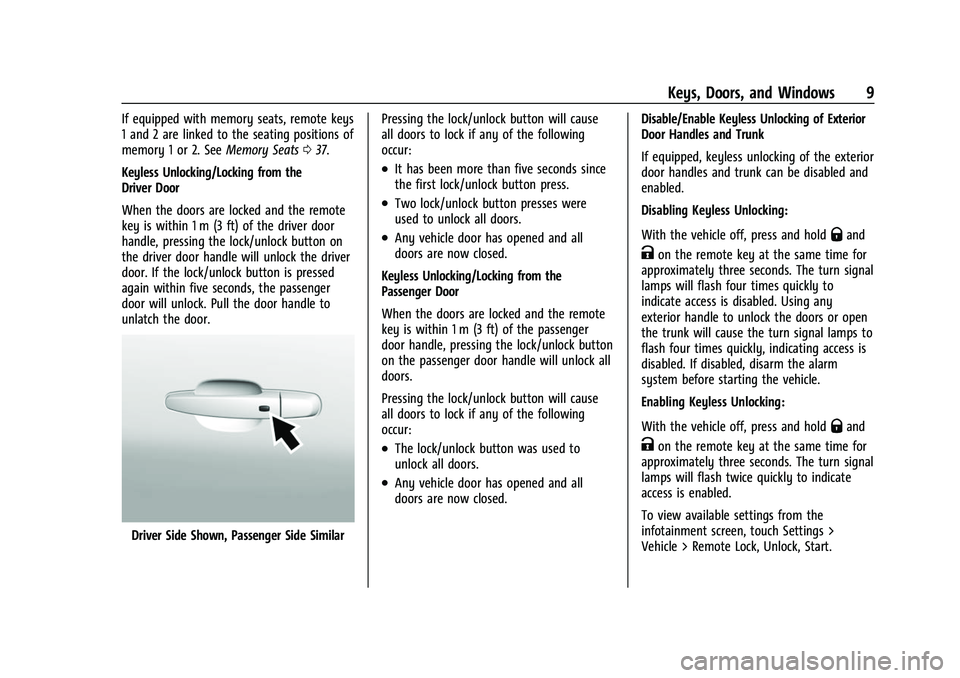
Keyless Unlocking/Locking from the
Driver Door
When the doors are locked and the remote
key is within 1 m (3 ft) of the driver door
handle, pressing the lock/unlock button on
the driver door handle will unlock the driver
door. If the lock/unlock button is pressed
again within five seconds, the passenger
door will unlock. Pull the door handle to
unlatch the door.
Driver Side Shown, Passenger Side Similar Pressing the lock/unlock button will cause
all doors to lock if any of the following
occur:
.It has been more than five seconds since
the first lock/unlock button press.
.Two lock/unlock button presses were
used to unlock all doors.
.Any vehicle door has opened and all
doors are now closed.
Keyless Unlocking/Locking from the
Passenger Door
When the doors are locked and the remote
key is within 1 m (3 ft) of the passenger
door handle, pressing the lock/unlock button
on the passenger door handle will unlock all
doors.
Pressing the lock/unlock button will cause
all doors to lock if any of the following
occur:
.The lock/unlock button was used to
unlock all doors.
.Any vehicle door has opened and all
doors are now closed. Disable/Enable Keyless Unlocking of Exterior
Door Handles and Trunk
If equipped, keyless unlocking of the exterior
door handles and trunk can be disabled and
enabled.
Disabling Keyless Unlocking:
With the vehicle off, press and hold
Qand
Kon the remote key at the same time for
approximately three seconds. The turn signal
lamps will flash four times quickly to
indicate access is disabled. Using any
exterior handle to unlock the doors or open
the trunk will cause the turn signal lamps to
flash four times quickly, indicating access is
disabled. If disabled, disarm the alarm
system before starting the vehicle.
Enabling Keyless Unlocking:
With the vehicle off, press and hold
Qand
Kon the remote key at the same time for
approximately three seconds. The turn signal
lamps will flash twice quickly to indicate
access is enabled.
To view available settings from the
infotainment screen, touch Settings >
Vehicle > Remote Lock, Unlock, Start.
Page 11 of 345
Chevrolet Camaro Owner Manual (GMNA-Localizing-U.S./Canada/Mexico-
16408685) - 2023 - CRC - 3/28/22
10 Keys, Doors, and Windows
Passive Locking
With Keyless Access the vehicle will lock
several seconds after all doors are closed if
the vehicle is off and at least one remote
key has been removed or none remain in
the vehicle.
If other electronic devices interfere with the
remote key signal, the vehicle may not
detect the remote key inside the vehicle.
If passive locking is enabled, the doors may
lock with the remote key inside the vehicle.
Do not leave the remote key in an
unattended vehicle.
To view available settings from the
infotainment screen, touch Settings >
Vehicle > Remote Lock, Unlock, Start.
Temporary Disable of Passive Locking
Temporarily disable passive locking by
pressing and holding
Kon the interior door
switch with a door open for at least
four seconds, or until three chimes are
heard. Passive locking will then remain
disabled until
Qon the interior door is
pressed, or until the vehicle is turned on. Remote Left In Vehicle Alert
When the vehicle is turned off and an
remote key is left in the vehicle, the horn
will chirp three times after all doors are
closed. To view available settings from the
infotainment screen, touch Settings >
Vehicle > Remote Lock, Unlock, Start.
Remote No Longer In Vehicle Alert
If the vehicle is on with a door open, and
then all doors are closed, the vehicle will
check for remote keys inside. If an remote
key is not detected, the Driver Information
Center (DIC) will display NO REMOTE
DETECTED and the horn will chirp three
times.
This occurs only once each time the vehicle
is driven.
To view available settings from the
infotainment screen, touch Settings >
Vehicle > Remote Lock, Unlock, Start.
Keyless Trunk Opening
When the doors are locked, press the touch
pad to open the trunk if the remote key is
within 1 m (3 ft).Key Access
To access a vehicle with a weak remote key
battery, see
Door Locks015.
Programming Remote Keys to the
Vehicle
Only remote keys programmed to the
vehicle will work. If a remote key is lost or
stolen, a replacement can be purchased and
programmed through your dealer. The
vehicle can be reprogrammed so that lost or
stolen remote keys no longer work. Any
remaining remote keys will need to be
reprogrammed. Each vehicle can have up to
eight remote keys matched to it.
Programming with Recognized Remote Keys
A new remote key can be programmed to
the vehicle when there are two recognized
remote keys. To program, the vehicle must
be off and all of the remote keys, both
currently recognized and new, must be
with you.
Page 13 of 345
Chevrolet Camaro Owner Manual (GMNA-Localizing-U.S./Canada/Mexico-
16408685) - 2023 - CRC - 3/28/22
12 Keys, Doors, and Windows
The DIC display will again show REMOTE
LEARN PENDING, PLEASE WAIT.
4. Repeat Step 2 two additional times. After the third time, all previously known
remote keys will no longer work with
the vehicle. Remaining remote keys can
be relearned during the next steps.
The DIC display should now show READY
FOR REMOTE # 1.
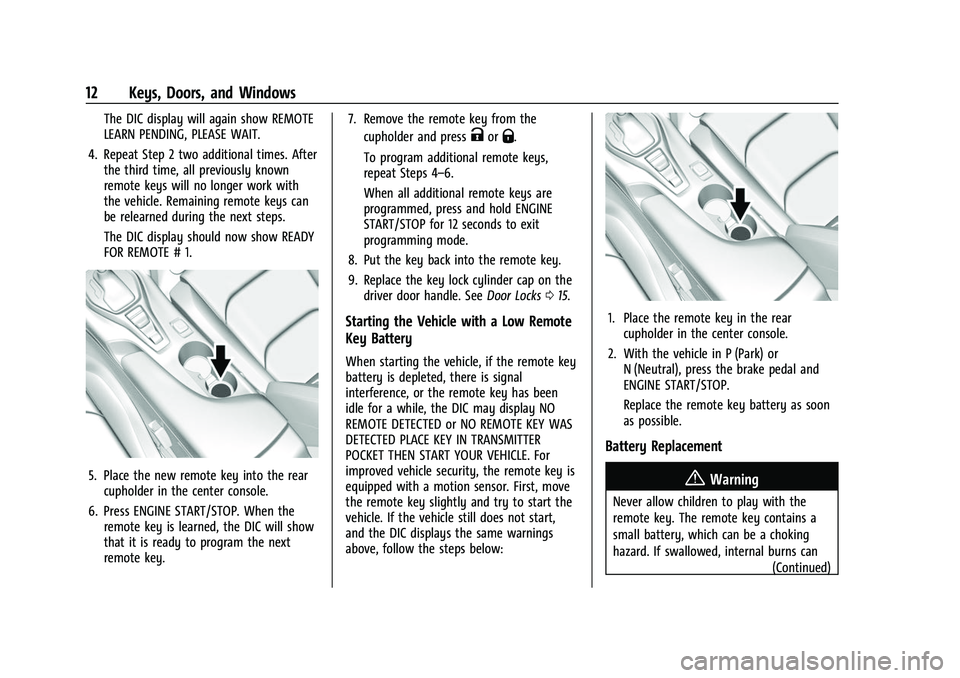
5. Place the new remote key into the rearcupholder in the center console.
6. Press ENGINE START/STOP. When the remote key is learned, the DIC will show
that it is ready to program the next
remote key. 7. Remove the remote key from the
cupholder and press
KorQ.
To program additional remote keys,
repeat Steps 4–6.
When all additional remote keys are
programmed, press and hold ENGINE
START/STOP for 12 seconds to exit
programming mode.
8. Put the key back into the remote key.
9. Replace the key lock cylinder cap on the driver door handle. See Door Locks015.
Starting the Vehicle with a Low Remote
Key Battery
When starting the vehicle, if the remote key
battery is depleted, there is signal
interference, or the remote key has been
idle for a while, the DIC may display NO
REMOTE DETECTED or NO REMOTE KEY WAS
DETECTED PLACE KEY IN TRANSMITTER
POCKET THEN START YOUR VEHICLE. For
improved vehicle security, the remote key is
equipped with a motion sensor. First, move
the remote key slightly and try to start the
vehicle. If the vehicle still does not start,
and the DIC displays the same warnings
above, follow the steps below:
1. Place the remote key in the rear
cupholder in the center console.
2. With the vehicle in P (Park) or N (Neutral), press the brake pedal and
ENGINE START/STOP.
Replace the remote key battery as soon
as possible.
Battery Replacement
{Warning
Never allow children to play with the
remote key. The remote key contains a
small battery, which can be a choking
hazard. If swallowed, internal burns can
(Continued)
Page 15 of 345
Chevrolet Camaro Owner Manual (GMNA-Localizing-U.S./Canada/Mexico-
16408685) - 2023 - CRC - 3/28/22
14 Keys, Doors, and Windows
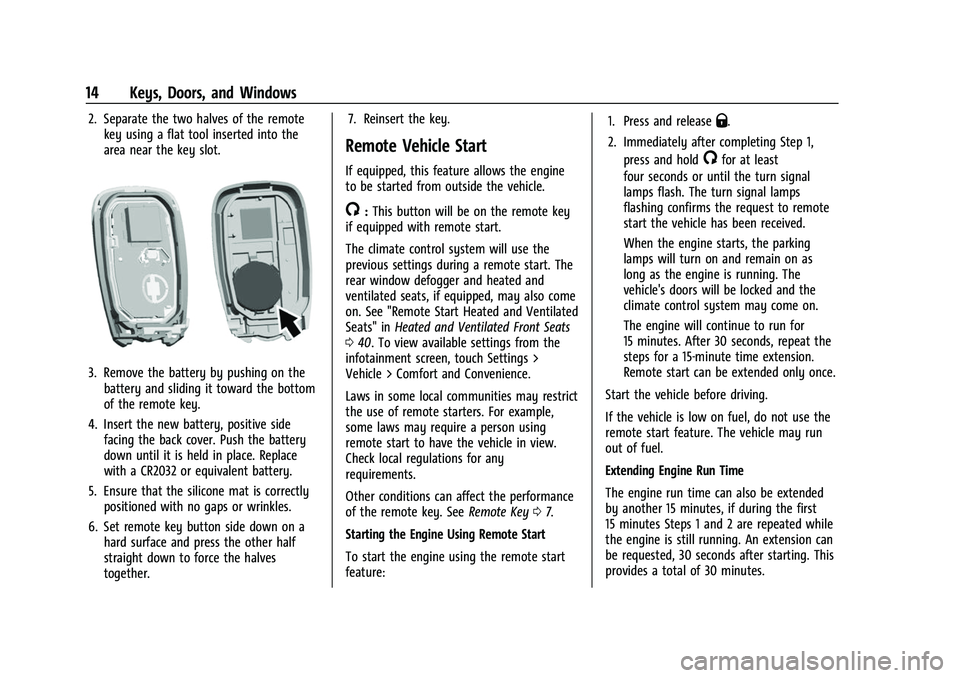
2. Separate the two halves of the remotekey using a flat tool inserted into the
area near the key slot.
3. Remove the battery by pushing on thebattery and sliding it toward the bottom
of the remote key.
4. Insert the new battery, positive side facing the back cover. Push the battery
down until it is held in place. Replace
with a CR2032 or equivalent battery.
5. Ensure that the silicone mat is correctly positioned with no gaps or wrinkles.
6. Set remote key button side down on a hard surface and press the other half
straight down to force the halves
together. 7. Reinsert the key.
Remote Vehicle Start
If equipped, this feature allows the engine
to be started from outside the vehicle.
/:
This button will be on the remote key
if equipped with remote start.
The climate control system will use the
previous settings during a remote start. The
rear window defogger and heated and
ventilated seats, if equipped, may also come
on. See "Remote Start Heated and Ventilated
Seats" in Heated and Ventilated Front Seats
0 40. To view available settings from the
infotainment screen, touch Settings >
Vehicle > Comfort and Convenience.
Laws in some local communities may restrict
the use of remote starters. For example,
some laws may require a person using
remote start to have the vehicle in view.
Check local regulations for any
requirements.
Other conditions can affect the performance
of the remote key. See Remote Key07.
Starting the Engine Using Remote Start
To start the engine using the remote start
feature: 1. Press and release
Q.
2. Immediately after completing Step 1, press and hold
/for at least
four seconds or until the turn signal
lamps flash. The turn signal lamps
flashing confirms the request to remote
start the vehicle has been received.
When the engine starts, the parking
lamps will turn on and remain on as
long as the engine is running. The
vehicle's doors will be locked and the
climate control system may come on.
The engine will continue to run for
15 minutes. After 30 seconds, repeat the
steps for a 15-minute time extension.
Remote start can be extended only once.
Start the vehicle before driving.
If the vehicle is low on fuel, do not use the
remote start feature. The vehicle may run
out of fuel.
Extending Engine Run Time
The engine run time can also be extended
by another 15 minutes, if during the first
15 minutes Steps 1 and 2 are repeated while
the engine is still running. An extension can
be requested, 30 seconds after starting. This
provides a total of 30 minutes.
Page 16 of 345
Chevrolet Camaro Owner Manual (GMNA-Localizing-U.S./Canada/Mexico-
16408685) - 2023 - CRC - 3/28/22
Keys, Doors, and Windows 15
The remote start can only be extended once.
When the remote start is extended, the
second 15-minute period is added on to the
first 15 minutes for a total of 30 minutes.
A maximum of two remote starts, or a
remote start with an extension, are allowed
between ignition cycles.
The ignition must be turned on and then off
before the remote start procedure can be
used again.
Canceling a Remote Start
To cancel a remote start, do one of the
following:
.Press and hold/until the parking lamps
turn off.
.Turn on the hazard warning flashers.
.Turn the vehicle on and then off.
Conditions in Which Remote Start Will
Not Work
The remote start will not operate if:
.The remote key is in the vehicle.
.The vehicle is not off.
.The hood is not closed.
.The hazard warning flashers are on.
.There is an emission control system
malfunction.
.The engine coolant temperature is
too high.
.The oil pressure is low.
.Two remote vehicle starts, or a single
remote start with an extension, have
already been used.
.The vehicle is not in P (Park).
Door Locks
{Warning
Unlocked doors can be dangerous.
.Passengers, especially children, can
easily open the doors and fall out of a
moving vehicle. The doors can be
unlocked and opened while the vehicle
is moving. The chance of being thrown
out of the vehicle in a crash is
increased if the doors are not locked.
So, all passengers should wear seat
belts properly and the doors should be
locked whenever the vehicle is driven.
.Young children who get into unlocked
vehicles may be unable to get out.
A child can be overcome by extreme
heat and can suffer permanent injuries (Continued)
Warning (Continued)
or even death from heat stroke.
Always lock the vehicle whenever
leaving it.
.Outsiders can easily enter through an
unlocked door when you slow down
or stop the vehicle. Locking the doors
can help prevent this from happening.
To lock or unlock the doors from outside the
vehicle:
.PressQorKon the remote key.
.Use Keyless Access. See Remote Key
Operation 07.
.Use the key in the driver door. The key
cylinder is covered with a cap.
To lock or unlock the doors from inside the
vehicle:
.PressQorKon the power door lock
switch.
.Pulling an interior door handle will unlock
the door. Pulling the door handle again
unlatches it.
Page 18 of 345
Chevrolet Camaro Owner Manual (GMNA-Localizing-U.S./Canada/Mexico-
16408685) - 2023 - CRC - 3/28/22
Keys, Doors, and Windows 17
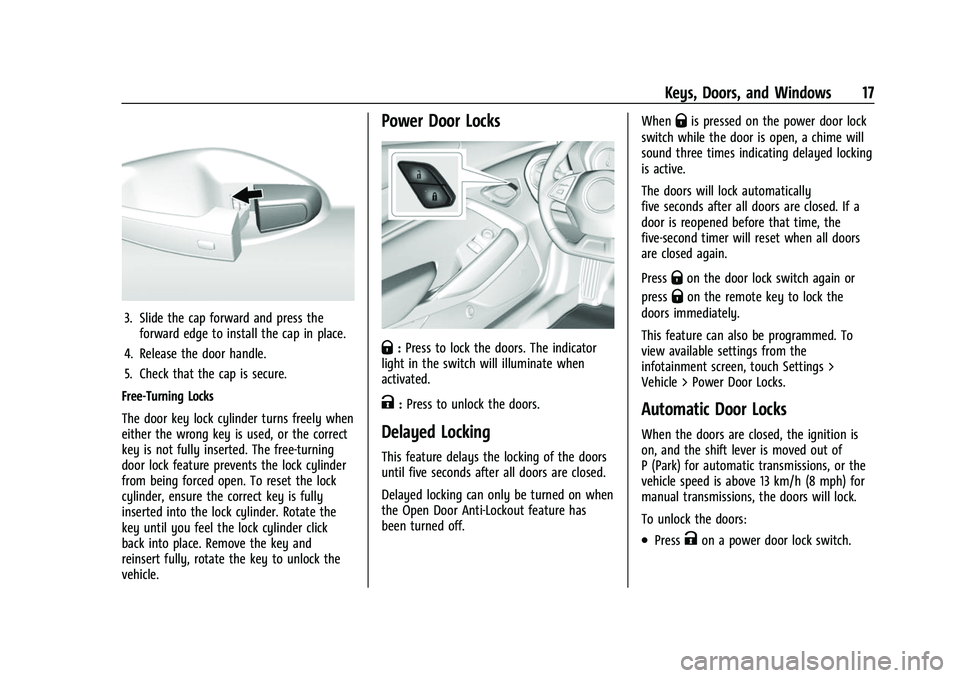
3. Slide the cap forward and press theforward edge to install the cap in place.
4. Release the door handle.
5. Check that the cap is secure.
Free-Turning Locks
The door key lock cylinder turns freely when
either the wrong key is used, or the correct
key is not fully inserted. The free-turning
door lock feature prevents the lock cylinder
from being forced open. To reset the lock
cylinder, ensure the correct key is fully
inserted into the lock cylinder. Rotate the
key until you feel the lock cylinder click
back into place. Remove the key and
reinsert fully, rotate the key to unlock the
vehicle.
Power Door Locks
Q: Press to lock the doors. The indicator
light in the switch will illuminate when
activated.
K: Press to unlock the doors.
Delayed Locking
This feature delays the locking of the doors
until five seconds after all doors are closed.
Delayed locking can only be turned on when
the Open Door Anti-Lockout feature has
been turned off. When
Qis pressed on the power door lock
switch while the door is open, a chime will
sound three times indicating delayed locking
is active.
The doors will lock automatically
five seconds after all doors are closed. If a
door is reopened before that time, the
five-second timer will reset when all doors
are closed again.
Press
Qon the door lock switch again or
press
Qon the remote key to lock the
doors immediately.
This feature can also be programmed. To
view available settings from the
infotainment screen, touch Settings >
Vehicle > Power Door Locks.
Automatic Door Locks
When the doors are closed, the ignition is
on, and the shift lever is moved out of
P (Park) for automatic transmissions, or the
vehicle speed is above 13 km/h (8 mph) for
manual transmissions, the doors will lock.
To unlock the doors:
.PressKon a power door lock switch.