oil CHEVROLET CAMARO 2023 Owners Manual
[x] Cancel search | Manufacturer: CHEVROLET, Model Year: 2023, Model line: CAMARO, Model: CHEVROLET CAMARO 2023Pages: 345, PDF Size: 16.19 MB
Page 4 of 345
Chevrolet Camaro Owner Manual (GMNA-Localizing-U.S./Canada/Mexico-
16408685) - 2023 - CRC - 3/28/22
Introduction 3
A circle with a slash through it is a safety
symbol which means“Do not,” “Do not do
this,” or“Do not let this happen.”
Symbols
The vehicle has components and labels that
use symbols instead of text. Symbols are
shown along with the text describing the
operation or information relating to a
specific component, control, message, gauge,
or indicator.
M:Shown when the owner’s manual has
additional instructions or information.
*: Shown when the service manual has
additional instructions or information.
0: Shown when there is more information
on another page — “see page.”
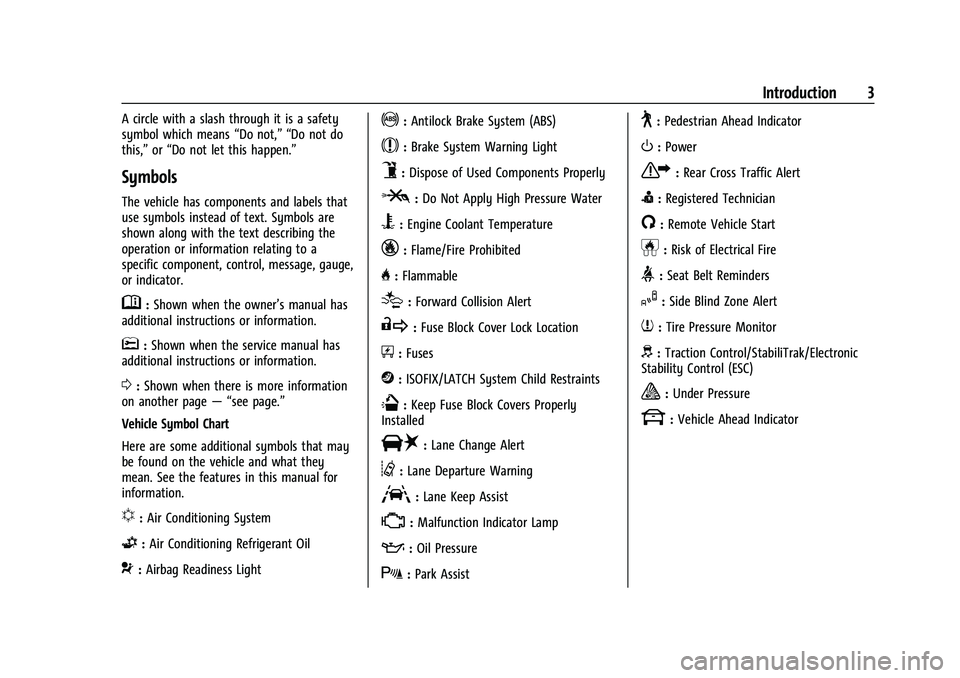
Vehicle Symbol Chart
Here are some additional symbols that may
be found on the vehicle and what they
mean. See the features in this manual for
information.
u: Air Conditioning System
G:Air Conditioning Refrigerant Oil
9:Airbag Readiness Light
!:Antilock Brake System (ABS)
$:Brake System Warning Light
9:Dispose of Used Components Properly
P:Do Not Apply High Pressure Water
B:Engine Coolant Temperature
_:Flame/Fire Prohibited
H: Flammable
[:Forward Collision Alert
R:Fuse Block Cover Lock Location
+:Fuses
j:ISOFIX/LATCH System Child Restraints
Q:Keep Fuse Block Covers Properly
Installed
|: Lane Change Alert
@:Lane Departure Warning
A:Lane Keep Assist
*: Malfunction Indicator Lamp
::Oil Pressure
X:Park Assist
~:Pedestrian Ahead Indicator
O:Power
7:Rear Cross Traffic Alert
I:Registered Technician
/:Remote Vehicle Start
h:Risk of Electrical Fire
>:Seat Belt Reminders
I:Side Blind Zone Alert
7:Tire Pressure Monitor
d:Traction Control/StabiliTrak/Electronic
Stability Control (ESC)
a: Under Pressure
k: Vehicle Ahead Indicator
Page 16 of 345
Chevrolet Camaro Owner Manual (GMNA-Localizing-U.S./Canada/Mexico-
16408685) - 2023 - CRC - 3/28/22
Keys, Doors, and Windows 15
The remote start can only be extended once.
When the remote start is extended, the
second 15-minute period is added on to the
first 15 minutes for a total of 30 minutes.
A maximum of two remote starts, or a
remote start with an extension, are allowed
between ignition cycles.
The ignition must be turned on and then off
before the remote start procedure can be
used again.
Canceling a Remote Start
To cancel a remote start, do one of the
following:
.Press and hold/until the parking lamps
turn off.
.Turn on the hazard warning flashers.
.Turn the vehicle on and then off.
Conditions in Which Remote Start Will
Not Work
The remote start will not operate if:
.The remote key is in the vehicle.
.The vehicle is not off.
.The hood is not closed.
.The hazard warning flashers are on.
.There is an emission control system
malfunction.
.The engine coolant temperature is
too high.
.The oil pressure is low.
.Two remote vehicle starts, or a single
remote start with an extension, have
already been used.
.The vehicle is not in P (Park).
Door Locks
{Warning
Unlocked doors can be dangerous.
.Passengers, especially children, can
easily open the doors and fall out of a
moving vehicle. The doors can be
unlocked and opened while the vehicle
is moving. The chance of being thrown
out of the vehicle in a crash is
increased if the doors are not locked.
So, all passengers should wear seat
belts properly and the doors should be
locked whenever the vehicle is driven.
.Young children who get into unlocked
vehicles may be unable to get out.
A child can be overcome by extreme
heat and can suffer permanent injuries (Continued)
Warning (Continued)
or even death from heat stroke.
Always lock the vehicle whenever
leaving it.
.Outsiders can easily enter through an
unlocked door when you slow down
or stop the vehicle. Locking the doors
can help prevent this from happening.
To lock or unlock the doors from outside the
vehicle:
.PressQorKon the remote key.
.Use Keyless Access. See Remote Key
Operation 07.
.Use the key in the driver door. The key
cylinder is covered with a cap.
To lock or unlock the doors from inside the
vehicle:
.PressQorKon the power door lock
switch.
.Pulling an interior door handle will unlock
the door. Pulling the door handle again
unlatches it.
Page 79 of 345
Chevrolet Camaro Owner Manual (GMNA-Localizing-U.S./Canada/Mexico-
16408685) - 2023 - CRC - 3/28/22
78 Instruments and Controls
Instruments and Controls
Controls
Steering Wheel Adjustment . . . . . . . . . . . . 78
Heated Steering Wheel . . . . . . . . . . . . . . . . . 79
Horn . . . . . . . . . . . . . . . . . . . . . . . . . . . . . . . . . . . 79
Windshield Wiper/Washer . . . . . . . . . . . . . . 79
Compass . . . . . . . . . . . . . . . . . . . . . . . . . . . . . . . 80
Clock . . . . . . . . . . . . . . . . . . . . . . . . . . . . . . . . . . . 80
Power Outlets . . . . . . . . . . . . . . . . . . . . . . . . . . 80
Wireless Charging . . . . . . . . . . . . . . . . . . . . . . 81
Warning Lights, Gauges, and Indicators
Warning Lights, Gauges, andIndicators . . . . . . . . . . . . . . . . . . . . . . . . . . . . . 83
Instrument Cluster . . . . . . . . . . . . . . . . . . . . . 84
Speedometer . . . . . . . . . . . . . . . . . . . . . . . . . . . 87
Odometer . . . . . . . . . . . . . . . . . . . . . . . . . . . . . . 88
Trip Odometer . . . . . . . . . . . . . . . . . . . . . . . . . 88
Tachometer . . . . . . . . . . . . . . . . . . . . . . . . . . . . 88
Fuel Gauge . . . . . . . . . . . . . . . . . . . . . . . . . . . . . 88
Boost Gauge (Uplevel Cluster Only) . . . . 89
Engine Oil Pressure Gauge (Uplevel Cluster Only) . . . . . . . . . . . . . . . . . . . . . . . . . 89
Engine Coolant Temperature Gauge . . . . 90
Voltmeter Gauge (Uplevel Cluster Only) . . . . . . . . . . . . . . . . . . . . . . . . . . 91
Seat Belt Reminders . . . . . . . . . . . . . . . . . . . . 91
Airbag Readiness Light . . . . . . . . . . . . . . . . . 92
Passenger Airbag Status Indicator . . . . . . 92 Charging System Light . . . . . . . . . . . . . . . . . 93
Malfunction Indicator Lamp . . . . . . . . . . . . 93
Brake System Warning Light . . . . . . . . . . . 95
Electric Parking Brake Light . . . . . . . . . . . . . 95
Service Electric Parking Brake Light . . . . . 95
Antilock Brake System (ABS) Warning
Light . . . . . . . . . . . . . . . . . . . . . . . . . . . . . . . . . 96
Performance Shifting Light . . . . . . . . . . . . . 96
Vehicle Ahead Indicator . . . . . . . . . . . . . . . . 96
Traction Off Light . . . . . . . . . . . . . . . . . . . . . . 96
StabiliTrak OFF Light . . . . . . . . . . . . . . . . . . . . 97
Traction Control System (TCS)/StabiliTrak Light . . . . . . . . . . . . . . . . . . . . . . . . . . . . . . . . . . 97
Tire Pressure Light . . . . . . . . . . . . . . . . . . . . . . 97
Engine Oil Pressure Light . . . . . . . . . . . . . . . 98
Low Fuel Warning Light . . . . . . . . . . . . . . . . 98
Security Light . . . . . . . . . . . . . . . . . . . . . . . . . . 98
High-Beam On Light . . . . . . . . . . . . . . . . . . . . 99
Lamps On Reminder . . . . . . . . . . . . . . . . . . . . 99
Cruise Control Light . . . . . . . . . . . . . . . . . . . . 99
Door Ajar Light . . . . . . . . . . . . . . . . . . . . . . . . . 99
Information Displays
Driver Information Center (DIC) . . . . . . . . 99
Head-Up Display (HUD) . . . . . . . . . . . . . . . . 102
Vehicle Messages
Vehicle Messages . . . . . . . . . . . . . . . . . . . . . . 105
Engine Power Messages . . . . . . . . . . . . . . . 105
Vehicle Speed Messages . . . . . . . . . . . . . . . 105
Controls
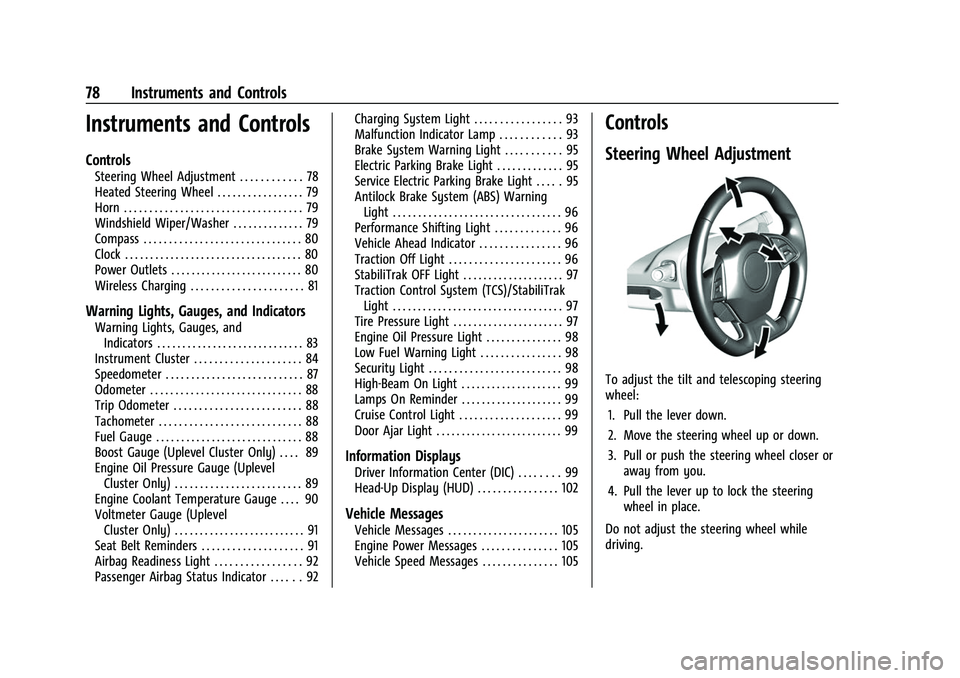
Steering Wheel Adjustment
To adjust the tilt and telescoping steering
wheel:
1. Pull the lever down.
2. Move the steering wheel up or down.
3. Pull or push the steering wheel closer or away from you.
4. Pull the lever up to lock the steering wheel in place.
Do not adjust the steering wheel while
driving.
Page 86 of 345
Chevrolet Camaro Owner Manual (GMNA-Localizing-U.S./Canada/Mexico-
16408685) - 2023 - CRC - 3/28/22
Instruments and Controls 85
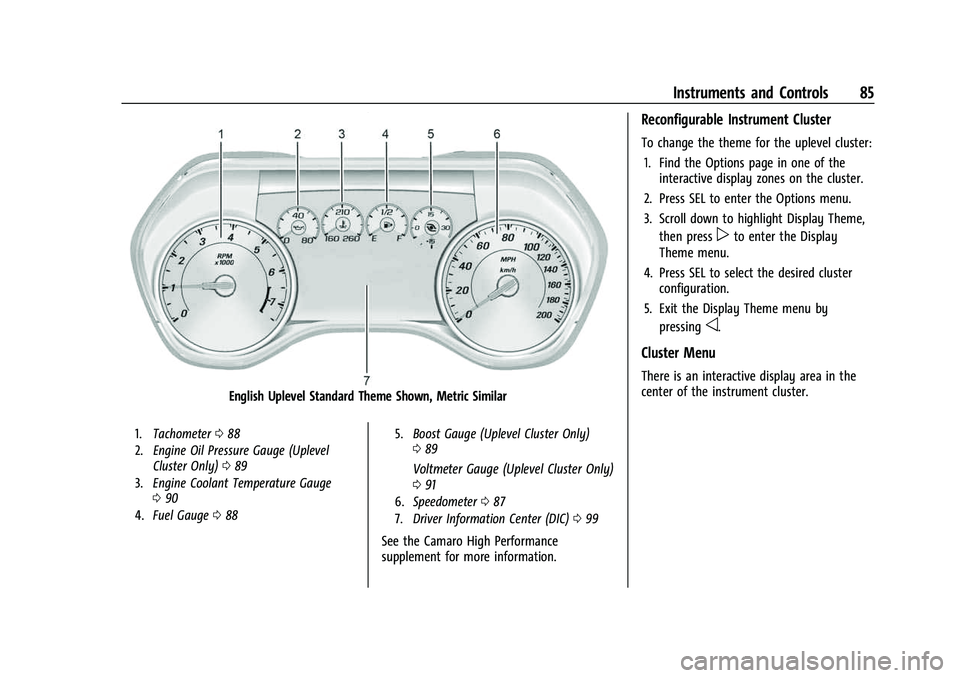
English Uplevel Standard Theme Shown, Metric Similar
1.Tachometer 088
2. Engine Oil Pressure Gauge (Uplevel
Cluster Only) 089
3. Engine Coolant Temperature Gauge
090
4. Fuel Gauge 088 5.
Boost Gauge (Uplevel Cluster Only)
089
Voltmeter Gauge (Uplevel Cluster Only)
0 91
6. Speedometer 087
7. Driver Information Center (DIC) 099
See the Camaro High Performance
supplement for more information.
Reconfigurable Instrument Cluster
To change the theme for the uplevel cluster:
1. Find the Options page in one of the interactive display zones on the cluster.
2. Press SEL to enter the Options menu.
3. Scroll down to highlight Display Theme, then press
pto enter the Display
Theme menu.
4. Press SEL to select the desired cluster configuration.
5. Exit the Display Theme menu by pressing
o.
Cluster Menu
There is an interactive display area in the
center of the instrument cluster.
Page 87 of 345
Chevrolet Camaro Owner Manual (GMNA-Localizing-U.S./Canada/Mexico-
16408685) - 2023 - CRC - 3/28/22
86 Instruments and Controls
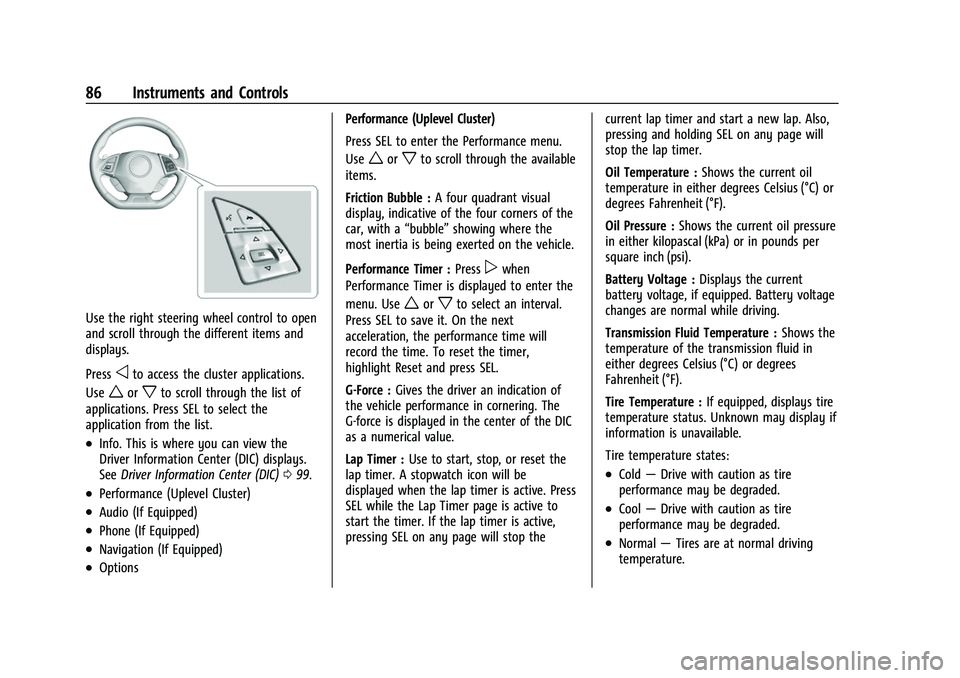
Use the right steering wheel control to open
and scroll through the different items and
displays.
Press
oto access the cluster applications.
Use
worxto scroll through the list of
applications. Press SEL to select the
application from the list.
.Info. This is where you can view the
Driver Information Center (DIC) displays.
See Driver Information Center (DIC) 099.
.Performance (Uplevel Cluster)
.Audio (If Equipped)
.Phone (If Equipped)
.Navigation (If Equipped)
.Options Performance (Uplevel Cluster)
Press SEL to enter the Performance menu.
Use
worxto scroll through the available
items.
Friction Bubble : A four quadrant visual
display, indicative of the four corners of the
car, with a “bubble”showing where the
most inertia is being exerted on the vehicle.
Performance Timer : Press
pwhen
Performance Timer is displayed to enter the
menu. Use
worxto select an interval.
Press SEL to save it. On the next
acceleration, the performance time will
record the time. To reset the timer,
highlight Reset and press SEL.
G-Force : Gives the driver an indication of
the vehicle performance in cornering. The
G-force is displayed in the center of the DIC
as a numerical value.
Lap Timer : Use to start, stop, or reset the
lap timer. A stopwatch icon will be
displayed when the lap timer is active. Press
SEL while the Lap Timer page is active to
start the timer. If the lap timer is active,
pressing SEL on any page will stop the current lap timer and start a new lap. Also,
pressing and holding SEL on any page will
stop the lap timer.
Oil Temperature :
Shows the current oil
temperature in either degrees Celsius (°C) or
degrees Fahrenheit (°F).
Oil Pressure : Shows the current oil pressure
in either kilopascal (kPa) or in pounds per
square inch (psi).
Battery Voltage : Displays the current
battery voltage, if equipped. Battery voltage
changes are normal while driving.
Transmission Fluid Temperature : Shows the
temperature of the transmission fluid in
either degrees Celsius (°C) or degrees
Fahrenheit (°F).
Tire Temperature : If equipped, displays tire
temperature status. Unknown may display if
information is unavailable.
Tire temperature states:
.Cold —Drive with caution as tire
performance may be degraded.
.Cool —Drive with caution as tire
performance may be degraded.
.Normal —Tires are at normal driving
temperature.
Page 90 of 345
Chevrolet Camaro Owner Manual (GMNA-Localizing-U.S./Canada/Mexico-
16408685) - 2023 - CRC - 3/28/22
Instruments and Controls 89
but it actually will take a little more,
or less than half the tank's capacity to fill
the tank.
.Moves a little while turning a corner,
speeding up, or braking.
.Take a few seconds to stabilize after the
ignition is turned on and goes back to
empty when the ignition is turned off.
These are normal conditions, none of which
indicate a problem with the fuel gauge.
Boost Gauge (Uplevel
Cluster Only)
See the Camaro High Performance
supplement for more information.
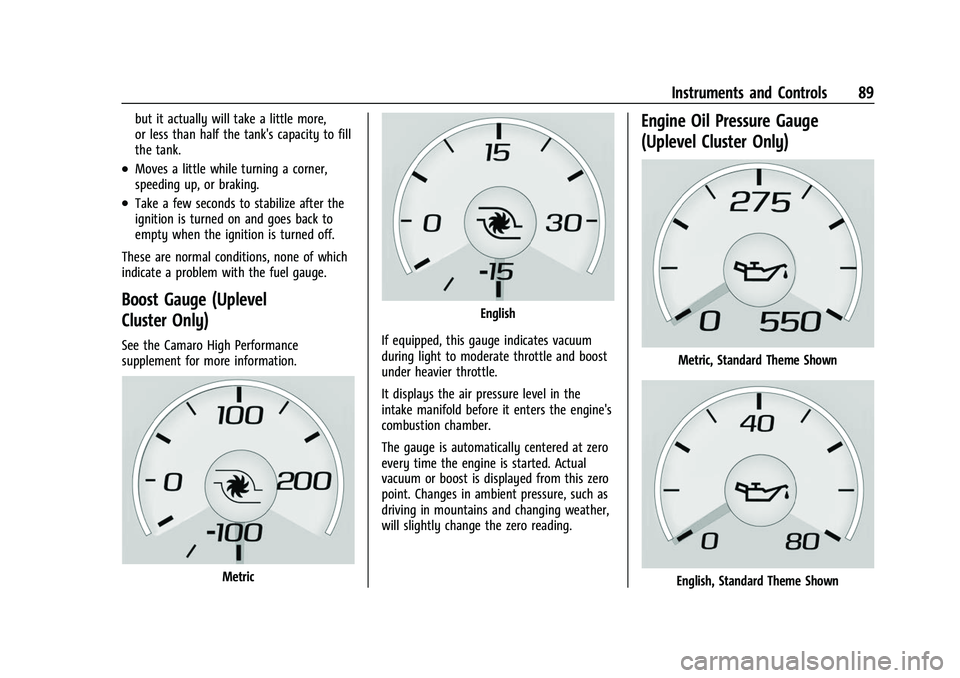
Metric
English
If equipped, this gauge indicates vacuum
during light to moderate throttle and boost
under heavier throttle.
It displays the air pressure level in the
intake manifold before it enters the engine's
combustion chamber.
The gauge is automatically centered at zero
every time the engine is started. Actual
vacuum or boost is displayed from this zero
point. Changes in ambient pressure, such as
driving in mountains and changing weather,
will slightly change the zero reading.
Engine Oil Pressure Gauge
(Uplevel Cluster Only)
Metric, Standard Theme Shown
English, Standard Theme Shown
Page 91 of 345
Chevrolet Camaro Owner Manual (GMNA-Localizing-U.S./Canada/Mexico-
16408685) - 2023 - CRC - 3/28/22
90 Instruments and Controls
The engine oil pressure gauge shows the
engine oil pressure in kPa (kilopascals) when
the engine is running.
Oil pressure can vary with engine speed,
outside temperature and oil viscosity.
On some models, the oil pump will vary
engine oil pressure according to engine
needs. Oil pressure may change quickly as
the engine speed or load varies. This is
normal.
If the oil pressure warning light or Driver
Information Center (DIC) message indicates
oil pressure outside the normal operating
range, check the engine oil as soon as
possible. SeeEngine Oil0235.
Caution
Lack of proper engine oil maintenance
can damage the engine. Driving with the
engine oil low can also damage the
engine. The repairs would not be covered
by the vehicle warranty. Check the oil
level as soon as possible. Add oil if
required, but if the oil level is within the
operating range and the oil pressure is
still low, have the vehicle serviced.
Always follow the maintenance schedule
for changing engine oil.
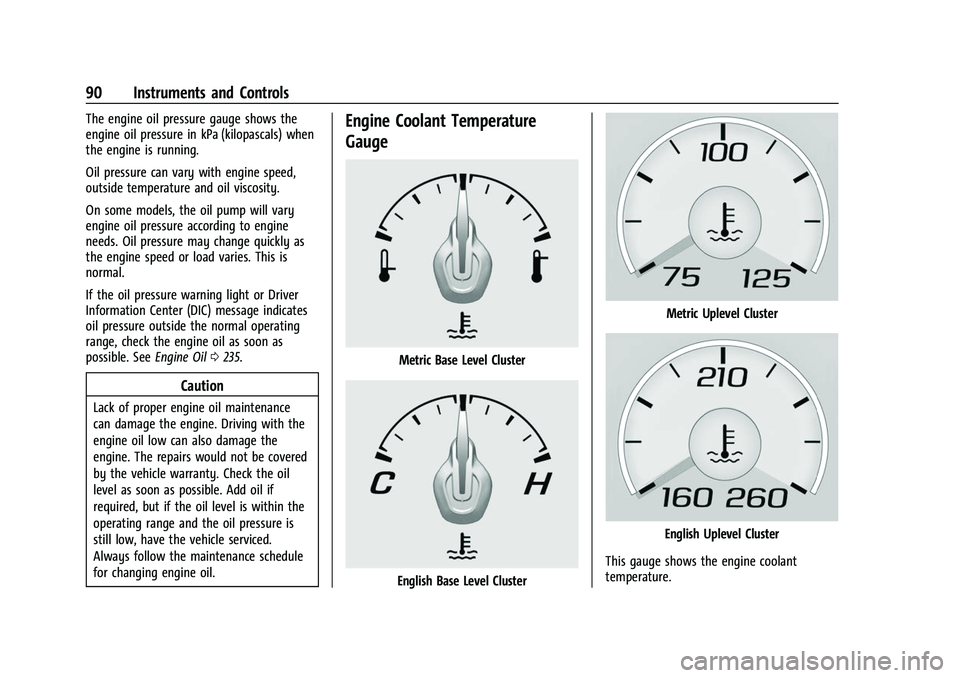
Engine Coolant Temperature
Gauge
Metric Base Level Cluster
English Base Level Cluster
Metric Uplevel Cluster
English Uplevel Cluster
This gauge shows the engine coolant
temperature.
Page 99 of 345
Chevrolet Camaro Owner Manual (GMNA-Localizing-U.S./Canada/Mexico-
16408685) - 2023 - CRC - 3/28/22
98 Instruments and Controls
When the Light Flashes First and Then Is On
Steady
If the light flashes for about a minute and
then stays on, there may be a problem with
the TPMS. If the problem is not corrected,
the light will come on every time the
vehicle is started. SeeTire Pressure Monitor
Operation 0271.
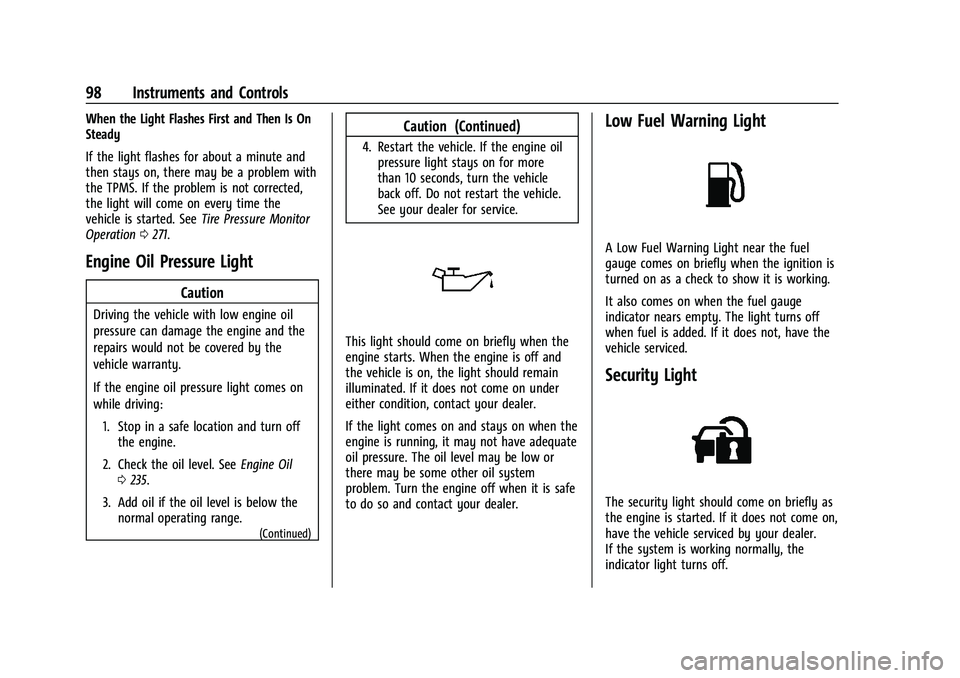
Engine Oil Pressure Light
Caution
Driving the vehicle with low engine oil
pressure can damage the engine and the
repairs would not be covered by the
vehicle warranty.
If the engine oil pressure light comes on
while driving:
1. Stop in a safe location and turn off the engine.
2. Check the oil level. See Engine Oil
0 235.
3. Add oil if the oil level is below the normal operating range.
(Continued)
Caution (Continued)
4. Restart the vehicle. If the engine oilpressure light stays on for more
than 10 seconds, turn the vehicle
back off. Do not restart the vehicle.
See your dealer for service.
This light should come on briefly when the
engine starts. When the engine is off and
the vehicle is on, the light should remain
illuminated. If it does not come on under
either condition, contact your dealer.
If the light comes on and stays on when the
engine is running, it may not have adequate
oil pressure. The oil level may be low or
there may be some other oil system
problem. Turn the engine off when it is safe
to do so and contact your dealer.
Low Fuel Warning Light
A Low Fuel Warning Light near the fuel
gauge comes on briefly when the ignition is
turned on as a check to show it is working.
It also comes on when the fuel gauge
indicator nears empty. The light turns off
when fuel is added. If it does not, have the
vehicle serviced.
Security Light
The security light should come on briefly as
the engine is started. If it does not come on,
have the vehicle serviced by your dealer.
If the system is working normally, the
indicator light turns off.
Page 102 of 345
Chevrolet Camaro Owner Manual (GMNA-Localizing-U.S./Canada/Mexico-
16408685) - 2023 - CRC - 3/28/22
Instruments and Controls 101
of time that has passed since the timer was
last reset. To reset the timer to zero, press
and hold SEL or use
pto access the menu
while this display is active.
Oil Life : Displays an estimate of the oil's
remaining useful life. If REMAINING OIL LIFE
99% is displayed, that means 99% of the
current oil life remains.
When the remaining oil life is low, the
CHANGE ENGINE OIL SOON message will
appear on the display. The oil should be
changed as soon as possible. See Engine Oil
0 235. In addition to the engine oil life
system monitoring the oil life, additional
maintenance is recommended. See
Maintenance Schedule 0300.
The Oil Life display must be reset after each
oil change. It will not reset itself. Do not
reset the Oil Life display accidentally at any
time other than when the oil has just been
changed. It cannot be reset accurately until
the next oil change. To reset the engine oil
life system, see Engine Oil Life System
0 237.
Air Filter Life : If equipped, shows an
estimate of the engine air filter’s remaining
useful life and the state of the system.
Engine Air Filter Life 95% means 95% of the current air filter life remains. Messages will
display based on the engine air filter life
and the state of the system. When the
REPLACE AT NEXT OIL CHANGE message
displays, the engine air filter should be
replaced at the time of the next oil change.
When the REPLACE NOW message displays,
the engine air filter should be replaced as
soon as possible.
The Air Filter Life display must be reset after
the engine air filter replacement. To reset,
see
Engine Air Filter Life System (2.0L LTG
and 3.6L LGX Engines Only) 0239.
Engine Hours : If equipped, shows the total
number of hours the engine has run.
Coolant Temperature : Displays the coolant
temperature in either degrees Celsius (°C) or
degrees Fahrenheit (°F).
Tire Pressure : Displays the approximate
pressures of all four tires. Tire pressure is
displayed in either kilopascal (kPa) or in
pounds per square inch (psi). If the pressure
is low, the value for that tire is shown in
amber. See Tire Pressure Monitor System
0 270 and
Tire Pressure Monitor Operation 0271. Battery Voltage :
Displays the current
battery voltage. The battery voltage can
fluctuate while viewing this information on
the DIC. This is normal.
Speed Limit (Uplevel Cluster) : Displays sign
information, which comes from a roadway
database in the onboard navigation.
Oil Temperature (Base Cluster) : Shows the
current oil temperature in either degrees
Celsius (°C) or degrees Fahrenheit (°F). This
display is available in the Performance app
on the uplevel cluster.
Oil Pressure (Base Cluster) : Shows the
current oil pressure in either kilopascal (kPa)
or in pounds per square inch (psi). This
display is available in the Performance app
on the uplevel cluster.
Performance Timer (Base Cluster) : Press
p
when Performance Timer is displayed to
enter the menu. Press
pwhile Set Start
Speed is highlighted then use
worxto
enter the start speed. Press SEL to save it.
Press
pwhile Set End Speed is highlighted
then use
worxto enter the end speed.
Press SEL to save it. After the start and end
speeds have been entered, press
oto set
the Sport display to the set speeds and the
Page 123 of 345
Chevrolet Camaro Owner Manual (GMNA-Localizing-U.S./Canada/Mexico-
16408685) - 2023 - CRC - 3/28/22
122 Infotainment System
lines interfere with radio reception. When
this happens, try reducing the treble on the
radio.
SiriusXM Satellite Radio Service
If equipped, SiriusXM Satellite Radio Service
provides digital radio reception. Tall
buildings or hills can interfere with satellite
radio signals, causing the sound to fade in
and out. In addition, traveling or standing
under heavy foliage, bridges, garages,
or tunnels may cause loss of the SiriusXM
signal for a period of time. Some cellular
services may interfere with SXM reception
causing loss of signal.
Mobile Device Usage
Mobile device usage, such as making or
receiving calls, charging, or just having the
mobile device on may cause static
interference in the radio. Unplug the mobile
device or turn it off if this happens.
Antenna
The AM/FM antenna is integrated in the
rear glass for coupe models, and integrated
in the rear spoiler for convertible models.
No maintenance or adjustments are needed.
Do not place loads on the spoiler.If the spoiler is replaced, be sure it is
replaced with the correct GM parts for the
best AM and FM reception.
Audio Players
Avoiding Untrusted Media Devices
When using media devices such as USB and
mobile devices, consider the source.
Untrusted media devices could contain files
that affect system operation or performance
and should be avoided.
USB Port
Audio stored on a USB device may be
listened to.
Depending on your vehicle, it may be
equipped with two USB ports in the center
console under the armrest and another two
on the center stack. These ports are for data
and charging. There may also be two USB
ports at the rear of the center console and a
USB port on each side of the third row seats
for charging only.
Caution
To avoid vehicle damage, unplug all
accessories and disconnect all accessory
cables from the vehicle when not in use.
Accessory cables left plugged into the
vehicle, unconnected to a device, could be
damaged or cause an electrical short if
the unconnected end comes in contact
with liquids or another power source such
as the accessory power outlet.
Playing from a USB
A USB mass storage device can be connected
to the USB port.
Audio extensions supported by the USB may
include:
.MP3
.AAC
.OGG
.3GP
My Media Library
MyMedia is only available when more than
one indexed device is connected. It allows
access to content from all indexed media
sources. MyMedia will show as an available
source in the Source page.