cruise control CHEVROLET CAMARO SS 2010 User Guide
[x] Cancel search | Manufacturer: CHEVROLET, Model Year: 2010, Model line: CAMARO SS, Model: CHEVROLET CAMARO SS 2010Pages: 372, PDF Size: 1.91 MB
Page 212 of 372
StabiliTrak System
The vehicle has an electronic
stability control system called
StabiliTrak. It is an advanced
computer controlled system that
assists with directional control of the
vehicle in difficult driving conditions.
StabiliTrak activates when the
computer senses a discrepancy
between the intended path and
the direction the vehicle is actually
traveling. StabiliTrak selectively
applies braking pressure at any
one of the vehicle’s brakes to help
steer the vehicle in the direction
which you are steering.
If cruise control is being used when
StabiliTrak activates, the cruise
control will automatically disengage.
Press the cruise control button to
reengage when road conditions
allow. SeeCruise Control on
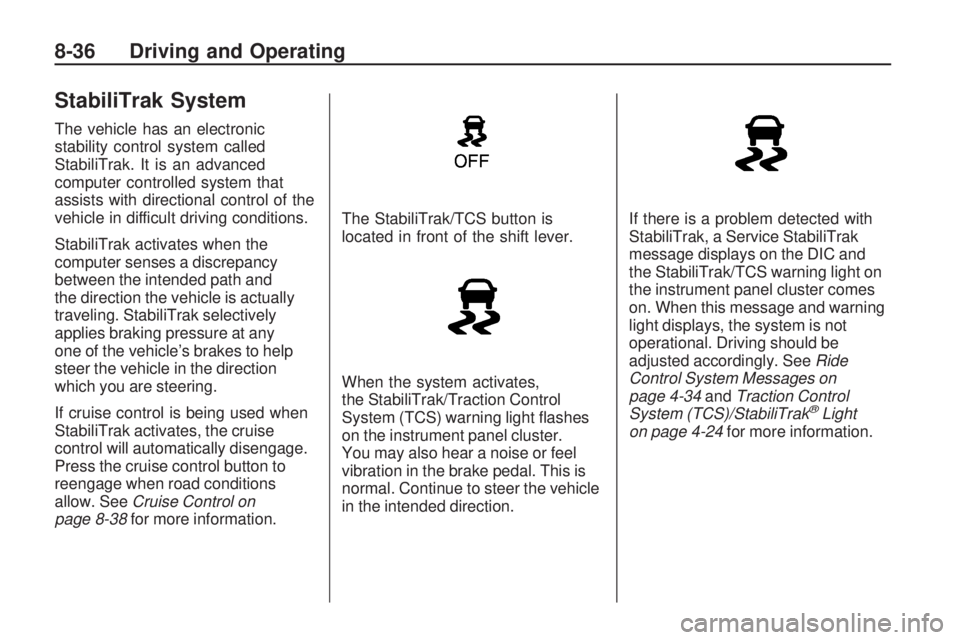
page 8-38for more information.The StabiliTrak/TCS button is
located in front of the shift lever.
When the system activates,
the StabiliTrak/Traction Control
System (TCS) warning light flashes
on the instrument panel cluster.
You may also hear a noise or feel
vibration in the brake pedal. This is
normal. Continue to steer the vehicle
in the intended direction.If there is a problem detected with
StabiliTrak, a Service StabiliTrak
message displays on the DIC and
the StabiliTrak/TCS warning light on
the instrument panel cluster comes
on. When this message and warning
light displays, the system is not
operational. Driving should be
adjusted accordingly. SeeRide
Control System Messages on
page 4-34andTraction Control
System (TCS)/StabiliTrak
®Light
on page 4-24for more information.
8-36 Driving and Operating
Page 214 of 372
Competitive Driving Mode is
designed and recommended for
use only during closed track events
and at competitive driving venues.
The TCS system uses engine and
brake systems to control wheel spin
during acceleration and cornering
while the StabiliTrak system helps
maintain directional control of
the vehicle by selective brake
application.
When the StabiliTrak button is
pressed again, or the vehicle is
restarted, the StabiliTrak and TCS
will be turned back on to normal
operation.
Notice:When traction control
is turned off, or Competitive
Driving Mode is active, it is
possible to lose traction. If youattempt to shift with the drive
wheels spinning with a loss of
traction, it is possible to cause
damage to the transmission.
Do not attempt to shift when the
drive wheels do not have traction.
Damage caused by misuse of the
vehicle is not covered. See the
warranty book for additional
information.
Limited-Slip Rear Axle
Vehicles with a limited-slip rear
axle can give more traction on snow,
mud, ice, sand or gravel. It works
like a standard axle most of the time,
but when traction is low, this feature
allows the drive wheel with the most
traction to move the vehicle.
Cruise Control
With cruise control, the vehicle
can maintain a speed of about
40 km/h (25 mph) or more without
keeping your foot on the accelerator.
Cruise control does not work at
speeds below 40 km/h (25 mph).
{WARNING
Cruise control can be dangerous
where you cannot drive safely at
a steady speed. So, do not use
the cruise control on winding
roads or in heavy traffic.
Cruise control can be dangerous
on slippery roads. On such roads,
fast changes in tire traction can
cause excessive wheel slip, and
you could lose control. Do not use
cruise control on slippery roads.
8-38 Driving and Operating
Page 215 of 372
Setting Cruise Control
{WARNING
If you leave your cruise control
on when you are not using cruise,
you might hit a button and go into
cruise when you do not want to.
You could be startled and even
lose control. Keep the cruise
control switch off until you want
to use cruise control.
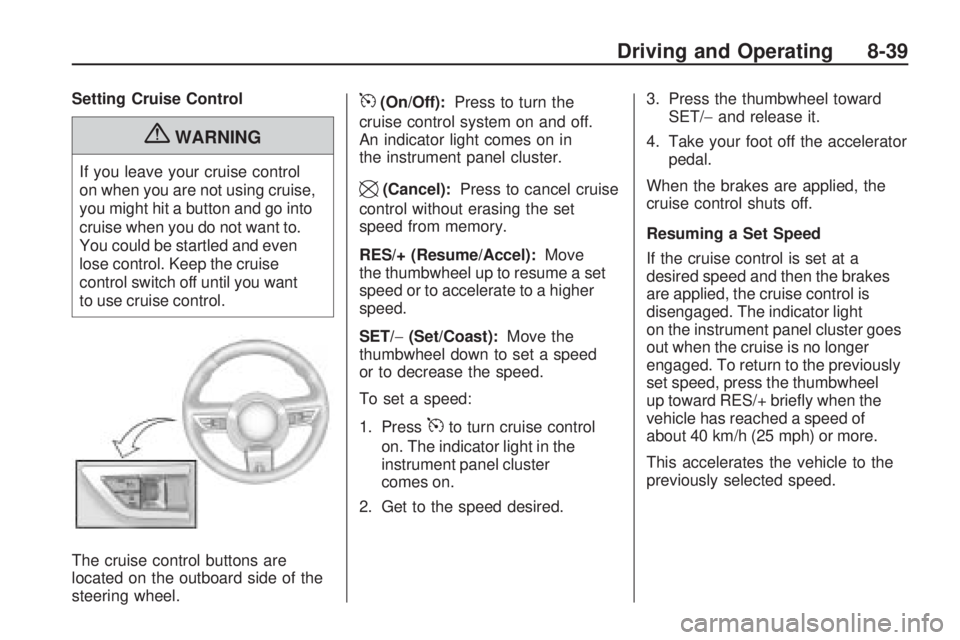
The cruise control buttons are
located on the outboard side of the
steering wheel.
5(On/Off):Press to turn the
cruise control system on and off.
An indicator light comes on in
the instrument panel cluster.
\(Cancel):Press to cancel cruise
control without erasing the set
speed from memory.
RES/+ (Resume/Accel):Move
the thumbwheel up to resume a set
speed or to accelerate to a higher
speed.
SET/−(Set/Coast):Move the
thumbwheel down to set a speed
or to decrease the speed.
To set a speed:
1. Press
5to turn cruise control
on. The indicator light in the
instrument panel cluster
comes on.
2. Get to the speed desired.3. Press the thumbwheel toward
SET/−and release it.
4. Take your foot off the accelerator
pedal.
When the brakes are applied, the
cruise control shuts off.
Resuming a Set Speed
If the cruise control is set at a
desired speed and then the brakes
are applied, the cruise control is
disengaged. The indicator light
on the instrument panel cluster goes
out when the cruise is no longer
engaged. To return to the previously
set speed, press the thumbwheel
up toward RES/+ briefly when the
vehicle has reached a speed of
about 40 km/h (25 mph) or more.
This accelerates the vehicle to the
previously selected speed.
Driving and Operating 8-39
Page 216 of 372
Increasing Speed While Using
Cruise Control
There are two ways to go to a
higher speed.
•Disengage the cruise control,
but do not turn it off.
•If the cruise control system is
already engaged, press the
thumbwheel up toward RES/+
and hold it until the vehicle
accelerates to the desired speed,
and then release the switch.
To increase the speed in small
amounts, press the thumbwheel
up toward RES/+ briefly and then
release it. Each time this is done,
the vehicle goes about 1.6 km/h
(1 mph) faster.
Reducing Speed While Using
Cruise Control
If the cruise control system is
already engaged,
•Push the thumbwheel toward
SET/−and hold until the desired
lower speed is reached, then
release it.
•To slow down in very small
amounts, push the thumbwheel
toward SET/−briefly. Each time
this is done, the vehicle goes
about 1.6 km/h (1 mph) slower.
Passing Another Vehicle While
Using Cruise Control
Use the accelerator pedal to
increase the vehicle’s speed.
When you take your foot off the
pedal, the vehicle will slow down
to the previously set cruise control
speed.
Using Cruise Control on Hills
How well the cruise control works
on hills depends upon the vehicle’s
speed, load, and the steepness of
the hills. When going up steep hills,
you might have to step on the
accelerator pedal to maintain the
vehicle’s speed. When going
downhill, you might have to brake
or shift to a lower gear to maintain
the vehicle’s speed. When the
brakes are applied the cruise
control shuts off.Ending Cruise Control
There are three ways to end the
cruise control:
•Step lightly on the brake pedal
or clutch; when cruise control
disengages, the indicator light
on the instrument panel cluster
goes out.
•Press5to turn off the cruise
control system.
•Press\to disengage the cruise
control.
Erasing Speed Memory
The cruise control set speed
memory is erased when the cruise
control or the ignition is turned off.
8-40 Driving and Operating
Page 226 of 372

•Vehicles with automatic
transmissions can tow in D (Drive)
but M (Manual Mode) is
recommended. See “Manual
Mode” inAutomatic Transmission
on page 8-26for more
information. Use a lower gear if
the transmission shifts too often.
For vehicles with a manual
transmission, it is better not
to use the highest gear.
•Use the cruise control when
towing.
•Obey speed limit restrictions.
Do not drive faster than the
maximum posted speed for
trailers, or no more than 90 km/h
(55 mph), to reduce wear on the
vehicle.
Driving with a Trailer
Towing a trailer requires experience.
Get familiar with handling and
braking with the added trailer weight.
The vehicle is now longer and not as
responsive as the vehicle is by itself.
Check all trailer hitch parts and
attachments, safety chains, electrical
connectors, lamps, tires and mirror
adjustments. If the trailer has electric
brakes, start the vehicle and trailer
moving and then apply the trailer
brake controller by hand to be sure
the brakes are working.
During the trip, check regularly to
be sure that the load is secure, and
the lamps and trailer brakes are
working properly.
Towing with a Stability
Control System
When towing, the sound of the
stability control system might be
heard. The system is reacting to the
vehicle movement caused by the
trailer, which mainly occurs during
cornering. This is normal when
towing heavier trailers.
Following Distance
Stay at least twice as far behind the
vehicle ahead as you would when
driving the vehicle without a trailer.
This can help to avoid situations that
require heavy braking and sudden
turns.
Passing
More passing distance is needed
when towing a trailer. Because the
rig is longer, it is necessary to go
much farther beyond the passed
vehicle before returning to the lane.
8-50 Driving and Operating
Page 363 of 372
Compressor Kit, Tire
Sealant...........................9-71
Control of a Vehicle............... 8-3
Convenience Net................... 3-1
Convex Mirrors....................1-12
Coolant
Engine............................9-19
Engine Temperature Gage . . . 4-14
Cooling System...................9-17
Engine Messages.............4-32
Courtesy Transportation
Program..........................12-8
Covers
Engine.............................. 9-9
Cruise Control.....................8-38
Light...............................4-26
Messages........................4-31
Customer Assistance............12-4
Offices............................12-3
Text Telephone (TTY)
Users..........................12-4
Customer Information
Service Publications
Ordering Information.....12-12
Customer Satisfaction
Procedure........................12-1D
Damage Repair, Collision......12-9
Danger, Warnings, and
Cautions............................. iv
Data Recorders, Event........12-14
Daytime Running
Lamps (DRL) .............5-3, 9-39
Defensive Driving................... 8-2
Devices, Auxiliary.................6-16
Dome Lamps ........................ 5-6
Door
Ajar Messages.................4-31
Locks............................... 1-6
Power Locks...................... 1-7
Driver Information
Center (DIC)....................4-27
Driving
Better Fuel Economy.......... 8-2
Characteristics and
Towing Tips ..................8-49
Competitive...............8-7, 8-37
Defensive.......................... 8-2
Drunk............................... 8-3
Highway Hypnosis.............. 8-9
Hill and Mountain Roads..... 8-9
If the Vehicle is Stuck.......8-11Driving (cont.)
Loss of Control.................. 8-6
Off-Road Recovery............. 8-6
Vehicle Load Limits...........8-12
Winter.............................8-10
E
Electrical Equipment,
Add-On...........................8-55
Electrical System
Engine Compartment
Fuse Block...................9-42
Fuses and Circuit
Breakers......................9-42
Instrument Panel Fuse
Block...........................9-45
Overload.........................9-41
Rear Compartment
Fuse Block...................9-46
Engine
Air Cleaner/Filter...............9-16
Check and Service Engine
Soon Lamp..................4-19
Compartment Overview....... 9-6
Coolant...........................9-19
INDEX i-3
Page 366 of 372
L
Labeling, Tire Sidewall..........9-49
Lamp Messages..................4-33
Lamps
Daytime
Running (DRL).......5-3, 9-39
Dome ............................... 5-6
Exterior Controls................ 5-1
Front Fog.......................... 5-5
Headlamps, Front Turn
Signal and Parking
Lamps .................9-37, 9-38
License Plate...................9-40
Malfunction Indicator.........4-19
Lap-Shoulder Belt................2-16
Latch, Lower Anchors and
Tethers for Children...........2-43
LATCH System
Replacing Parts After a
Crash..........................2-48
Latches, Seatback................. 2-5
Lighting
Entry................................ 5-6
Theater Dimming................ 5-6
Lights
Airbag Readiness.............4-17Lights (cont.)
Antilock Brake System
(ABS) Warning..............4-23
Charging System..............4-19
Cruise Control..................4-26
Engine Oil Pressure..........4-25
Flash-to-Pass..................... 5-3
Fog Lamps ......................4-26
High/Low Beam Changer..... 5-2
Immobilizer......................4-26
Safety Belt Reminders.......4-16
Taillamp Indicator..............4-26
Tire Pressure...................4-24
Traction Control OFF/
StabiliTrak OFF.............4-24
Traction Control System
(TCS)/StabiliTrak
®..........4-24
Traction Off......................4-23
Limited-Slip Rear Axle...........8-38
Locks
Door ................................. 1-6
Lockout Protection.............. 1-8
Power Door ....................... 1-7
Loss of Control..................... 8-6
Lower Anchors and Tethers
for Children (LATCH
SYSTEM)........................2-43
M
Maintenance
Records.........................10-10
Maintenance Schedule
Recommended Fluids and
Lubricants....................10-7
Scheduled Maintenance.....10-2
Malfunction Indicator Lamp....4-19
Manual Mode......................8-29
Manual Transmission............8-30
Fluid...............................9-15
Messages
Airbag System..................4-35
Anti-Theft Alarm System....4-35
Battery Voltage and
Charging......................4-30
Brake System..................4-31
Compass.........................4-31
Door Ajar.........................4-31
Engine Cooling System.....4-32
Engine Oil.......................4-32
Engine Power..................4-33
Fuel System....................4-33
Key and Lock..................4-33
Lamp ..............................4-33
Object Detection System....4-34
i-6 INDEX