instrument cluster CHEVROLET CAMARO SS 2020 Owner's Manual
[x] Cancel search | Manufacturer: CHEVROLET, Model Year: 2020, Model line: CAMARO SS, Model: CHEVROLET CAMARO SS 2020Pages: 362, PDF Size: 6.08 MB
Page 134 of 362
Chevrolet Camaro Owner Manual (GMNA-Localizing-U.S./Canada/Mexico-
13556304) - 2020 - CRC - 5/10/19
Lighting 133
Turn and Lane-Change
Signals
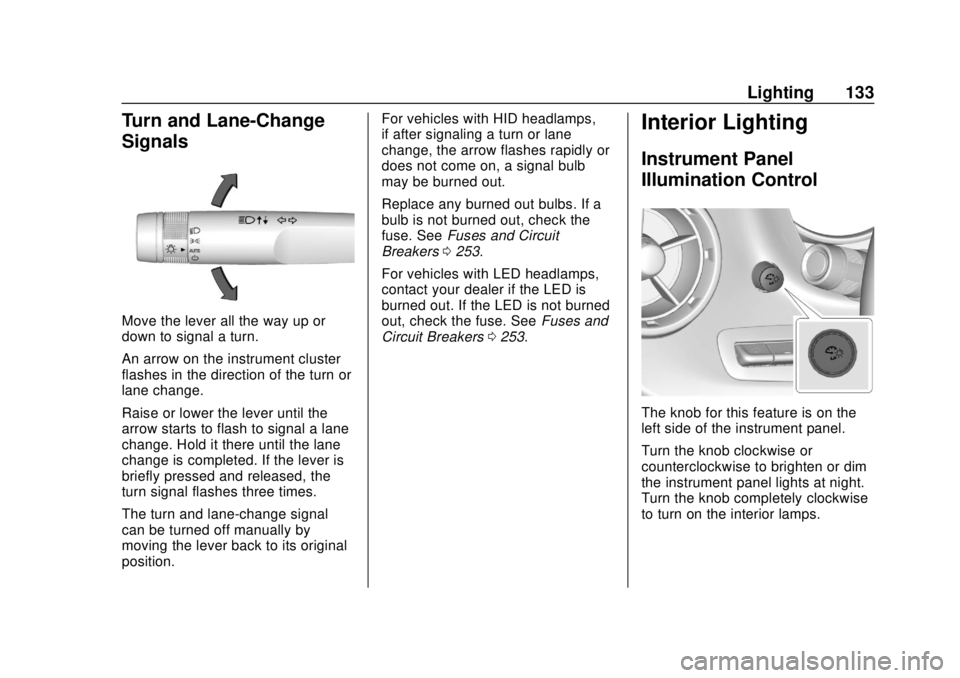
Move the lever all the way up or
down to signal a turn.
An arrow on the instrument cluster
flashes in the direction of the turn or
lane change.
Raise or lower the lever until the
arrow starts to flash to signal a lane
change. Hold it there until the lane
change is completed. If the lever is
briefly pressed and released, the
turn signal flashes three times.
The turn and lane-change signal
can be turned off manually by
moving the lever back to its original
position.For vehicles with HID headlamps,
if after signaling a turn or lane
change, the arrow flashes rapidly or
does not come on, a signal bulb
may be burned out.
Replace any burned out bulbs. If a
bulb is not burned out, check the
fuse. See
Fuses and Circuit
Breakers 0253.
For vehicles with LED headlamps,
contact your dealer if the LED is
burned out. If the LED is not burned
out, check the fuse. See Fuses and
Circuit Breakers 0253.
Interior Lighting
Instrument Panel
Illumination Control
The knob for this feature is on the
left side of the instrument panel.
Turn the knob clockwise or
counterclockwise to brighten or dim
the instrument panel lights at night.
Turn the knob completely clockwise
to turn on the interior lamps.
Page 191 of 362
Chevrolet Camaro Owner Manual (GMNA-Localizing-U.S./Canada/Mexico-
13556304) - 2020 - CRC - 5/10/19
190 Driving and Operating
Caution
Forcing the shift lever into any
gear except 4 (Fourth) when the
1-4 SHIFT message comes on
may damage the transmission.
Shift only from 1 (First) to
4 (Fourth) when the message
comes on.
This message will come on when:
. The engine coolant temperature
is higher than 76 °C (169 °F).
. The vehicle is accelerating from
a stop and going 24 to 31 km/h
(15 to 19 mph).
. The vehicle is at 33% throttle
or less.
Once displayed, the message will
remain in the DIC for two seconds,
even if the conditions for skip shift
are no longer satisfied.
Vehicles equipped with a Head-Up
Display (HUD) may also have
performance shift timing lights
across the top of the display. The rows of lights get closer
together as the maximum shift point
gets closer. Shift the transmission
before the lights come together in
the display. Shift immediately if the
lights are flashing.
See
Head-Up Display (HUD) 0120.
Active Rev Match
Vehicles equipped with a V8 engine
and a manual transmission have
Active Rev Match (ARM). ARM aids
in smoother shifting by matching the
engine speed to the next selected
gear. By monitoring shift lever and
clutch operation, ARM adjusts
engine speed to match a calibrated
value based on gear selection. On
upshifts and downshifts, engine
speed will be decreased and
increased to match vehicle road
speed and transmission gear
position. ARM is maintained while
the clutch pedal is pressed, but will
deactivate if the shift lever is left in
the Neutral position.
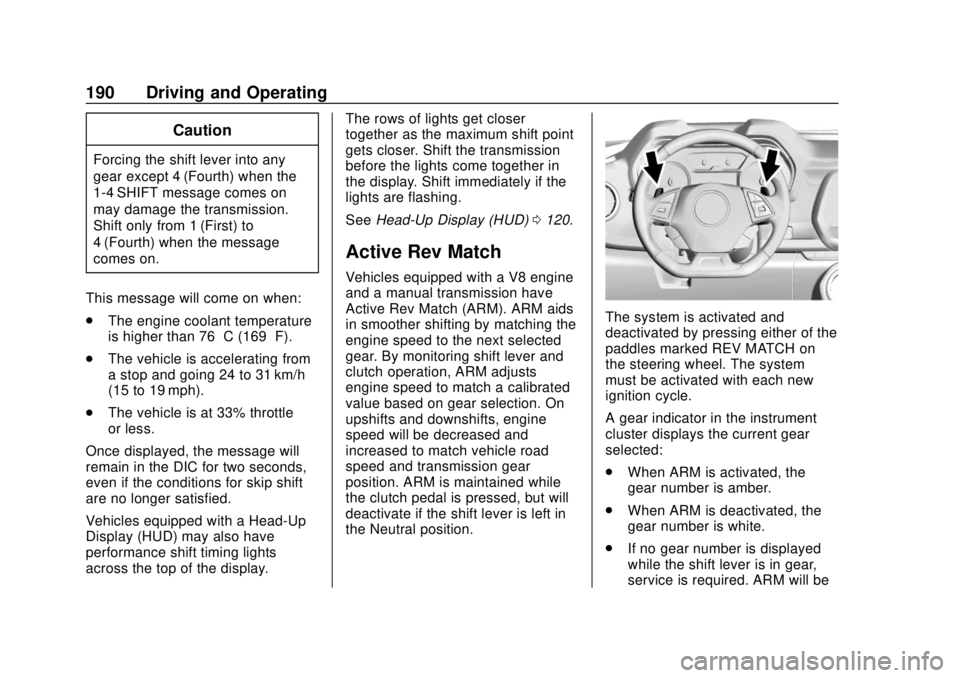
The system is activated and
deactivated by pressing either of the
paddles marked REV MATCH on
the steering wheel. The system
must be activated with each new
ignition cycle.
A gear indicator in the instrument
cluster displays the current gear
selected:
.
When ARM is activated, the
gear number is amber.
. When ARM is deactivated, the
gear number is white.
. If no gear number is displayed
while the shift lever is in gear,
service is required. ARM will be
Page 196 of 362

Chevrolet Camaro Owner Manual (GMNA-Localizing-U.S./Canada/Mexico-
13556304) - 2020 - CRC - 5/10/19
Driving and Operating 195
The indicator light for both systems
is in the instrument cluster. This
light will:
.Flash when TCS is limiting
wheel spin
. Flash when StabiliTrak/ESC is
activated
. Turn on and stay on when either
system is not working
If either system fails to turn on or to
activate, a message displays in the
Driver Information Center (DIC), and
dcomes on and stays on to
indicate that the system is inactive
and is not assisting the driver in
maintaining control. The vehicle is
safe to drive, but driving should be
adjusted accordingly.
If
dcomes on and stays on:
1. Stop the vehicle. 2. Turn the engine off and wait
15 seconds.
3. Start the engine.
Drive the vehicle. If
dcomes on
and stays on, the vehicle may need
more time to diagnose the problem.
If the condition persists, see your
dealer.
Turning the Systems Off
and On
Caution
Do not repeatedly brake or
accelerate heavily when TCS is
off. The vehicle driveline could be
damaged.
To turn off only TCS, press and
release
Y. The traction off lighti
displays in the instrument cluster.
To turn TCS on again, press
Y.
The traction off light
idisplayed in
the instrument cluster will turn off.
If TCS is limiting wheel spin when
Yis pressed, the system will not
turn off until the wheels stop
spinning.
To turn off both TCS and StabiliTrak/
ESC, press and hold
Yuntil the
traction off light
iand StabiliTrak/
ESC OFF light
gcome on and stay
on in the instrument cluster.
Page 197 of 362
Chevrolet Camaro Owner Manual (GMNA-Localizing-U.S./Canada/Mexico-
13556304) - 2020 - CRC - 5/10/19
196 Driving and Operating
To turn TCS and StabiliTrak/ESC on
again, press
Y. The traction off
light
iand StabiliTrak/ESC OFF
light
gin the instrument cluster
turn off.
Adding accessories can affect the
vehicle performance. See
Accessories and Modifications
0 221.
Engine Drag Control (EDC)
EDC improves vehicle stability by
sensing if there is a difference in
speed between the free rolling front
wheels and the rear drive wheels
that often occurs when the driver
takes their foot off the accelerator
pedal on slippery surfaces (snow,
ice, etc.). When this is detected,
EDC sends more torque to the rear
wheels to make sure all four wheels
are spinning at similar speeds,
making the vehicle more stable.
Driver Mode Control
Driver Mode Control adds a sportier
feel, provide a more comfortable
ride, or assist in different weather
conditions or terrain. This system
simultaneously changes the
software calibration of various
sub-systems to optimize driving
performance. Depending on the
option package, available features,
and mode selected, the exhaust,
suspension, steering, and
powertrain will change calibrations
to achieve the desired mode
characteristics. If the vehicle is
equipped with Magnetic Ride
Control, selecting the various Driver
Modes adjusts the ride of the
vehicle to enhance the ride
performance for the road conditions
and the selected mode.
While in the Sport and/or Track
Modes, the vehicle monitors driving
behavior and automatically enables
Performance Shift Features in the
automatic transmission when
spirited driving is detected. These
features maintain lower
transmission gears to increase available engine braking and
improve acceleration response. The
vehicle will exit these features and
return to normal operation after a
short period when no spirited driving
is detected.
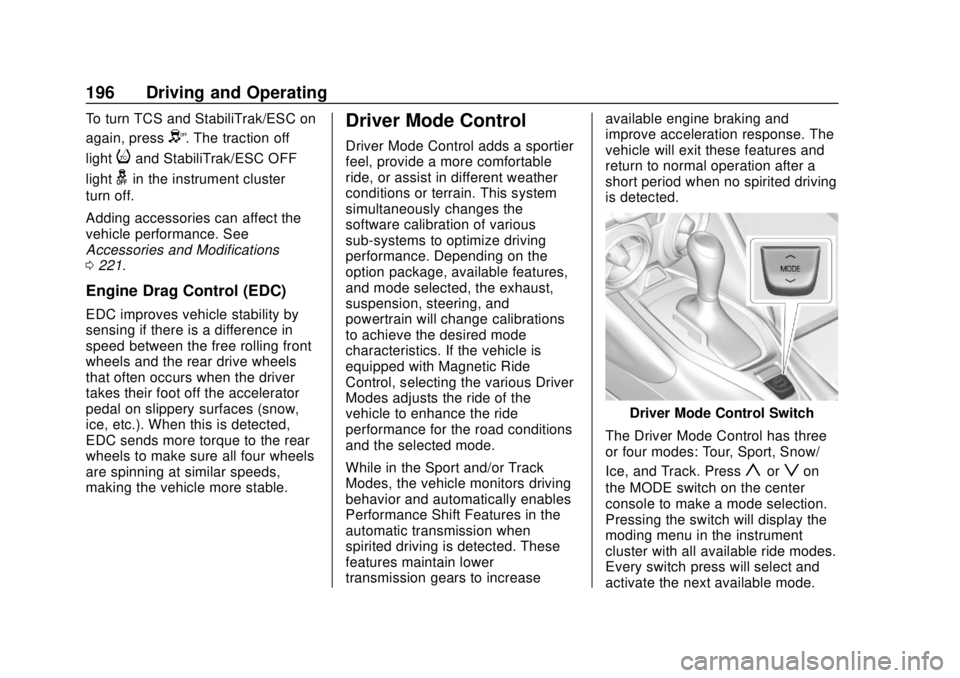
Driver Mode Control Switch
The Driver Mode Control has three
or four modes: Tour, Sport, Snow/
Ice, and Track. Press
yorzon
the MODE switch on the center
console to make a mode selection.
Pressing the switch will display the
moding menu in the instrument
cluster with all available ride modes.
Every switch press will select and
activate the next available mode.
Page 198 of 362
Chevrolet Camaro Owner Manual (GMNA-Localizing-U.S./Canada/Mexico-
13556304) - 2020 - CRC - 5/10/19
Driving and Operating 197
When Sport, Snow/Ice, or Track
Mode is selected, a unique and
persistent indicator will be displayed
in the instrument cluster.
Tour Mode
Use for normal city and highway
driving to provide a smooth, soft
ride. This setting provides a
balanced setting between comfort
and handling. This is the
standard mode.
Sport Mode
Use where road conditions or
personal preference demand a more
controlled response.
When Sport Mode is selected, the
transmission may downshift to a
lower gear for better performance.
The transmission will continue to
shift automatically but can hold a
lower gear longer than it would in
the Tour Mode based on braking,
throttle input, and vehicle lateral
acceleration. SeeAutomatic
Transmission 0183. The steering
will change to provide more precise
control. If the vehicle has Magnetic Ride Control, the suspension will
change to provide better cornering
performance. If the vehicle is
equipped with Active Exhaust, the
exhaust valves will open earlier and
more often. Competitive Driving
Mode can be accessed through this
mode by pressing
Yon the
console twice.
This Competitive Driving Mode is
only on SS, 1LE, and ZL1 vehicles.
For example, a vehicle with a
V6 engine and automatic
transmission will have Sport Mode,
but will not be able to access
Competitive Driving Mode.
Snow/Ice Mode
If equipped, use when more traction
is needed during slippery
conditions. The automatic
transmission will upshift normally
when the vehicle is moving. The
acceleration will adjust to help
provide a smoother launch. The
automatic transmission will also shift
differently to assist in maintaining
traction. This feature is not intended for use
when the vehicle is stuck in sand,
mud, ice, snow, or gravel. If the
vehicle becomes stuck, see
If the
Vehicle Is Stuck 0169.
Track Mode
If equipped, use when maximum
vehicle handling is desired.
When Track Mode is selected, the
transmission may downshift to a
lower gear for better performance.
The automatic transmission and
steering will function similar to
Sport Mode.
Page 204 of 362
Chevrolet Camaro Owner Manual (GMNA-Localizing-U.S./Canada/Mexico-
13556304) - 2020 - CRC - 5/10/19
Driving and Operating 203
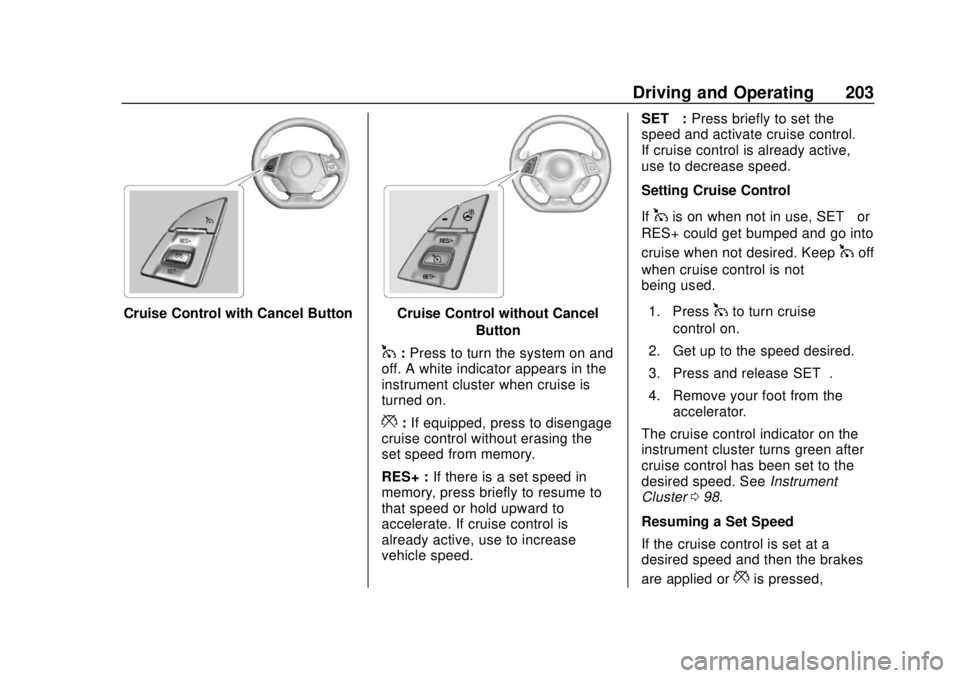
Cruise Control with Cancel ButtonCruise Control without CancelButton
1:Press to turn the system on and
off. A white indicator appears in the
instrument cluster when cruise is
turned on.
*: If equipped, press to disengage
cruise control without erasing the
set speed from memory.
RES+ : If there is a set speed in
memory, press briefly to resume to
that speed or hold upward to
accelerate. If cruise control is
already active, use to increase
vehicle speed. SET−
:Press briefly to set the
speed and activate cruise control.
If cruise control is already active,
use to decrease speed.
Setting Cruise Control
If
1is on when not in use, SET− or
RES+ could get bumped and go into
cruise when not desired. Keep
1off
when cruise control is not
being used.
1. Press
1to turn cruise
control on.
2. Get up to the speed desired.
3. Press and release SET−.
4. Remove your foot from the accelerator.
The cruise control indicator on the
instrument cluster turns green after
cruise control has been set to the
desired speed. See Instrument
Cluster 098.
Resuming a Set Speed
If the cruise control is set at a
desired speed and then the brakes
are applied or
*is pressed,
Page 205 of 362
Chevrolet Camaro Owner Manual (GMNA-Localizing-U.S./Canada/Mexico-
13556304) - 2020 - CRC - 5/10/19
204 Driving and Operating
if equipped, the cruise control is
disengaged without erasing the set
speed from memory.
Once the vehicle speed reaches
about 40 km/h (25 mph) or more,
briefly press RES+. The vehicle
returns to the previous set speed.
Increasing Speed While Using
Cruise Control
If the cruise control system is
already activated:
.Press and hold RES+ until the
desired speed is reached, and
then release it.
. To increase the vehicle speed in
small increments, briefly press
RES+. For each press, the
vehicle goes about 1 km/h
(1 mph) faster.
The speedometer reading can be
displayed in either English or metric
units. See “Options”under
Instrument Cluster 098. The
increment value used depends on
the units displayed. Reducing Speed While Using
Cruise Control
If the cruise control system is
already activated:
.
Press and hold SET− until the
desired lower speed is reached,
then release it.
. To decrease the vehicle speed in
small increments, briefly press
SET−. For each press, the
vehicle goes about 1 km/h
(1 mph) slower.
The speedometer reading can be
displayed in either English or metric
units. See “Options”under
Instrument Cluster 098. The
increment value used depends on
the units displayed.
Passing Another Vehicle While
Using Cruise Control
Use the accelerator pedal to
increase the vehicle speed. When
you take your foot off the pedal, the
vehicle slows down to the previously
set cruise control speed. While
pressing the accelerator pedal or
shortly following the release to override cruise control, briefly
pressing SET–
will result in cruise
control set to the current vehicle
speed.
Using Cruise Control on Hills
How well the cruise control works
on hills depends upon the vehicle
speed, load, and the steepness of
the hills. When going up steep hills,
you might have to step on the
accelerator pedal to maintain the
vehicle speed. When going
downhill, you might have to brake or
shift to a lower gear to keep your
speed down. If the brake pedal is
applied, cruise control will
disengage.
Ending Cruise Control
There are five ways to end cruise
control:
. Step lightly on the brake pedal
(manual and automatic
transmissions).
. Press the clutch pedal for
several seconds or shift to
Neutral (manual transmissions).
Page 209 of 362
Chevrolet Camaro Owner Manual (GMNA-Localizing-U.S./Canada/Mexico-
13556304) - 2020 - CRC - 5/10/19
208 Driving and Operating
Blocked sensors will not detect
objects and can also cause false
detections. Keep the sensors clean
of mud, dirt, snow, ice, and slush;
and clean sensors after a car wash
in freezing temperatures.
{Warning
The Park Assist system does not
detect children, pedestrians,
bicyclists, animals, or objects
located below the bumper or that
are too close or too far from the
vehicle. It is not available at
speeds greater than 8 km/h
(5 mph). To prevent injury, death,
or vehicle damage, even with
Park Assist, always check the
area around the vehicle and
check all mirrors before moving
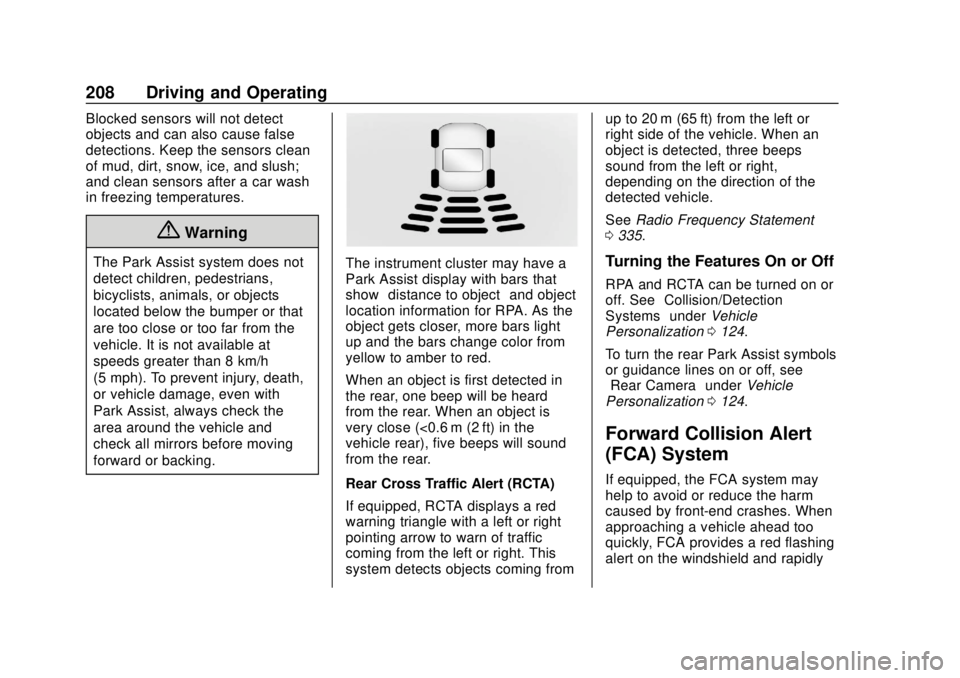
forward or backing.The instrument cluster may have a
Park Assist display with bars that
show“distance to object” and object
location information for RPA. As the
object gets closer, more bars light
up and the bars change color from
yellow to amber to red.
When an object is first detected in
the rear, one beep will be heard
from the rear. When an object is
very close (<0.6 m (2 ft) in the
vehicle rear), five beeps will sound
from the rear.
Rear Cross Traffic Alert (RCTA)
If equipped, RCTA displays a red
warning triangle with a left or right
pointing arrow to warn of traffic
coming from the left or right. This
system detects objects coming from up to 20 m (65 ft) from the left or
right side of the vehicle. When an
object is detected, three beeps
sound from the left or right,
depending on the direction of the
detected vehicle.
See
Radio Frequency Statement
0 335.Turning the Features On or Off
RPA and RCTA can be turned on or
off. See “Collision/Detection
Systems” underVehicle
Personalization 0124.
To turn the rear Park Assist symbols
or guidance lines on or off, see
“Rear Camera” underVehicle
Personalization 0124.
Forward Collision Alert
(FCA) System
If equipped, the FCA system may
help to avoid or reduce the harm
caused by front-end crashes. When
approaching a vehicle ahead too
quickly, FCA provides a red flashing
alert on the windshield and rapidly
Page 242 of 362

Chevrolet Camaro Owner Manual (GMNA-Localizing-U.S./Canada/Mexico-
13556304) - 2020 - CRC - 5/10/19
Vehicle Care 241
3. Fill the surge tank top chamberwith the proper mixture to the
bottom of the fill neck. The top
chamber needs to be
completely full. Fill the surge
tank bottom chamber through
the service port to
approximately half.
4. With the coolant surge tank pressure cap off and the surge
tank service port cap open,
start the engine and let it run
until you can feel the upper
radiator hose getting hot.
Watch out for the engine
cooling fan. By this time, the coolant level
inside the coolant surge tank
top chamber may be lower.
If the level is lower, add more
of the proper mixture to the
surge tank top chamber until
the level reaches the bottom of
the fill neck.
5. Replace the surge tank pressure cap tightly and close
the surge tank service port cap.Caution
If the pressure cap is not tightly
installed, coolant loss and engine
damage may occur. Be sure the
cap is properly and tightly
secured.
Check the level in the surge tank
top and bottom chambers when the
cooling system has cooled down.
If the coolant is not at the proper
levels, repeat Steps 1–3 and
reinstall the pressure cap and close
the service port. If the coolant still is not at the proper levels when the
system cools down again, see your
dealer.
Engine Overheating
The vehicle has several indicators
to warn of the engine overheating.
There is an engine coolant
temperature gauge on the
instrument cluster. See
Engine
Coolant Temperature Gauge 0105.
The vehicle may also display a
message on the Driver Information
Center (DIC).
If the decision is made not to lift the
hood when this warning appears,
get service help right away. See
Roadside Assistance Program
0 329.
If the decision is made to lift the
hood, make sure the vehicle is
parked on a level surface.
Then check to see if the engine
cooling fan is running. If the engine
is overheating, the fan should be
running. If it is not, do not continue
to run the engine. Have the vehicle
serviced.
Page 262 of 362
Chevrolet Camaro Owner Manual (GMNA-Localizing-U.S./Canada/Mexico-
13556304) - 2020 - CRC - 5/10/19
Vehicle Care 261
Winter Tires
This vehicle was not originally
equipped with winter tires. Winter
tires are designed for increased
traction on snow and ice-covered
roads. Consider installing winter
tires on the vehicle if frequent
driving on ice or snow covered
roads is expected. See your dealer
for details regarding winter tire
availability and proper tire selection.
Also, seeBuying New Tires 0276.
With winter tires, there may be
decreased dry road traction,
increased road noise, and shorter
tread life. After changing to winter
tires, be alert for changes in vehicle
handling and braking.
If using winter tires:
. Use tires of the same brand and
tread type on all four wheel
positions.
. Use only radial ply tires of the
same size, load range, and
speed rating as the original
equipment tires. Winter tires with the same speed
rating as the original equipment tires
may not be available for H, V, W, Y,
and ZR speed rated tires. If winter
tires with a lower speed rating are
chosen, never exceed the tire's
maximum speed capability.
Run-Flat Tires
This vehicle, when new, may have
had run-flat tires. There is no spare
tire, no tire changing equipment,
and no place to store a tire in the
vehicle.
The vehicle also has a Tire
Pressure Monitor System (TPMS)
that indicates a loss of tire pressure
in any of the tires.
{Warning
If the low tire warning light
displays on the instrument cluster,
the handling capabilities will be
reduced during severe
maneuvers. Driving too fast could
cause loss of control and you or
(Continued)
Warning (Continued)
others could be injured. Do not
drive over 90 km/h (55 mph) when
the low tire warning light is
displayed. Drive cautiously and
check the tire pressures as soon
as possible.
Run-flat tires can be driven on with
no air pressure. There is no need to
stop on the side of the road to
change the tire. Continue driving;
however, do not drive too far or too
fast. Driving on the tire may not be
possible if there is permanent
damage. To prevent permanent
damage, keep speed below 80 km/h
(50 mph). With a light load the
vehicle can be driven up to 100 km
(60 mi); with a moderate load 80 km
(50 mi); and a heavy load 45 km
(25 mi). As soon as possible,
contact the nearest authorized GM
or run-flat servicing facility for
inspection and repair or
replacement.