ECU CHEVROLET CAMARO SS 2020 Owner's Guide
[x] Cancel search | Manufacturer: CHEVROLET, Model Year: 2020, Model line: CAMARO SS, Model: CHEVROLET CAMARO SS 2020Pages: 362, PDF Size: 6.08 MB
Page 91 of 362

Chevrolet Camaro Owner Manual (GMNA-Localizing-U.S./Canada/Mexico-
13556304) - 2020 - CRC - 5/10/19
90 Storage
The trunk partition can be attached
or detached to upper trunk brackets.
With the convertible top up, the
trunk partition can be unsnapped
and laid flat.
Pull the partition up and snap it into
place on both sides and the bottom
of the trunk.
Center Console Storage
Press to open. There are two USB
ports and an auxiliary jack inside.
See the infotainment manual.
Additional Storage
Features
Convenience Net
For vehicles with a convenience net
inside the trunk, it can be used to
secure loose items.
Page 92 of 362
Chevrolet Camaro Owner Manual (GMNA-Localizing-U.S./Canada/Mexico-
13556304) - 2020 - CRC - 5/10/19
Instruments and Controls 91
Instruments and
Controls
Controls
Steering Wheel Adjustment . . . . 92
Steering Wheel Controls . . . . . . . 92
Heated Steering Wheel . . . . . . . . 92
Horn . . . . . . . . . . . . . . . . . . . . . . . . . . . 92
Windshield Wiper/Washer . . . . . . 92
Compass . . . . . . . . . . . . . . . . . . . . . . 94
Clock . . . . . . . . . . . . . . . . . . . . . . . . . . 94
Power Outlets . . . . . . . . . . . . . . . . . 94
Wireless Charging . . . . . . . . . . . . . 95
Warning Lights, Gauges, and
Indicators
Warning Lights, Gauges, andIndicators . . . . . . . . . . . . . . . . . . . . 97
Instrument Cluster . . . . . . . . . . . . . 98
Speedometer . . . . . . . . . . . . . . . . . 102
Odometer . . . . . . . . . . . . . . . . . . . . . 102
Trip Odometer . . . . . . . . . . . . . . . . 102
Tachometer . . . . . . . . . . . . . . . . . . . 102
Fuel Gauge . . . . . . . . . . . . . . . . . . . 103
Boost Gauge (Uplevel Cluster Only) . . . . . . . . . . . . . . . . 103
Engine Oil Pressure Gauge (Uplevel Cluster Only) . . . . . . . 104 Engine Coolant Temperature
Gauge . . . . . . . . . . . . . . . . . . . . . . 105
Voltmeter Gauge (Uplevel Cluster Only) . . . . . . . . . . . . . . . . 106
Seat Belt Reminders . . . . . . . . . 107
Airbag Readiness Light . . . . . . . 108
Passenger Airbag Status
Indicator . . . . . . . . . . . . . . . . . . . . 108
Charging System Light . . . . . . . 109
Malfunction Indicator Lamp . . . 109
Brake System Warning Light . . . . . . . . . . . . . . . . . . . . . . . . . 111
Electric Parking Brake Light . . . . . . . . . . . . . . . . . . . . . . . . 112
Service Electric Parking Brake Light . . . . . . . . . . . . . . . . . . . . . . . . 112
Antilock Brake System (ABS) Warning Light . . . . . . . . . . . . . . . 113
Vehicle Ahead Indicator . . . . . . . 113
Traction Off Light . . . . . . . . . . . . . 113
StabiliTrak OFF Light . . . . . . . . . 114
Traction Control System (TCS)/ StabiliTrak Light . . . . . . . . . . . . . 114
Tire Pressure Light . . . . . . . . . . . 114
Engine Oil Pressure Light . . . . . 115
Low Fuel Warning Light . . . . . . . 115
Security Light . . . . . . . . . . . . . . . . . 115
High-Beam On Light . . . . . . . . . . 116
Lamps On Reminder . . . . . . . . . . 116
Cruise Control Light . . . . . . . . . . 116 Door Ajar Light . . . . . . . . . . . . . . . 116
Information Displays
Driver Information
Center (DIC) . . . . . . . . . . . . . . . . 116
Head-Up Display (HUD) . . . . . . 120
Vehicle Messages
Vehicle Messages . . . . . . . . . . . . 123
Engine Power Messages . . . . . 124
Vehicle Speed Messages . . . . . 124
Vehicle Personalization
Vehicle Personalization . . . . . . . 124
Page 116 of 362

Chevrolet Camaro Owner Manual (GMNA-Localizing-U.S./Canada/Mexico-
13556304) - 2020 - CRC - 5/10/19
Instruments and Controls 115
When the Light Flashes First and
Then Is On Steady
If the light flashes for about a minute
and then stays on, there may be a
problem with the TPMS. If the
problem is not corrected, the light
will come on at every ignition cycle.
SeeTire Pressure Monitor
Operation 0270.
Engine Oil Pressure Light
Caution
Lack of proper engine oil
maintenance can damage the
engine. Driving with the engine oil
low can also damage the engine.
The repairs would not be covered
by the vehicle warranty. Check
the oil level as soon as possible.
Add oil if required, but if the oil
level is within the operating range
and the oil pressure is still low,
have the vehicle serviced. Always
follow the maintenance schedule
for changing engine oil.
This light should come on briefly as
the engine is started. If it does not
come on, have the vehicle serviced
by your dealer.
If the light comes on and stays on, it
means that oil is not flowing through
the engine properly. The vehicle
could be low on oil and might have
some other system problem. See
your dealer.
Low Fuel Warning Light
This light is near the fuel gauge and
comes on briefly when the ignition is
turned on as a check to show it is
working. It also comes on when the fuel tank
is low on fuel. The light turns off
when fuel is added. If it does not,
have the vehicle serviced.
Security Light
The security light should come on
briefly as the engine is started. If it
does not come on, have the vehicle
serviced by your dealer. If the
system is working normally, the
indicator light turns off.
If the light stays on and the engine
does not start, there could be a
problem with the theft-deterrent
system. See
Immobilizer Operation
0 25.
Page 117 of 362
Chevrolet Camaro Owner Manual (GMNA-Localizing-U.S./Canada/Mexico-
13556304) - 2020 - CRC - 5/10/19
116 Instruments and Controls
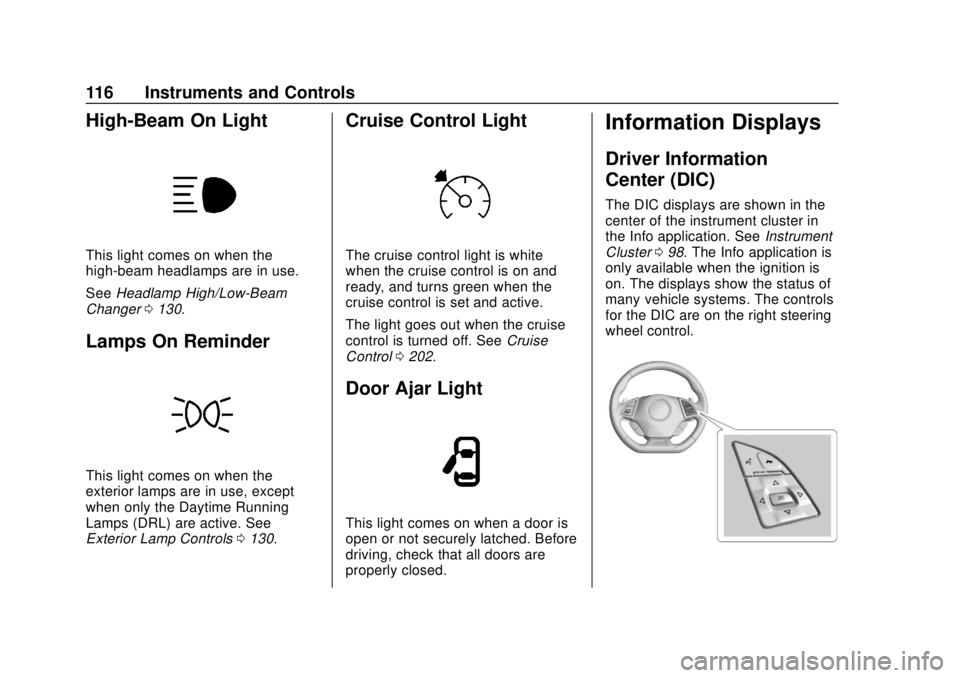
High-Beam On Light
This light comes on when the
high-beam headlamps are in use.
SeeHeadlamp High/Low-Beam
Changer 0130.
Lamps On Reminder
This light comes on when the
exterior lamps are in use, except
when only the Daytime Running
Lamps (DRL) are active. See
Exterior Lamp Controls 0130.
Cruise Control Light
The cruise control light is white
when the cruise control is on and
ready, and turns green when the
cruise control is set and active.
The light goes out when the cruise
control is turned off. See Cruise
Control 0202.
Door Ajar Light
This light comes on when a door is
open or not securely latched. Before
driving, check that all doors are
properly closed.
Information Displays
Driver Information
Center (DIC)
The DIC displays are shown in the
center of the instrument cluster in
the Info application. See Instrument
Cluster 098. The Info application is
only available when the ignition is
on. The displays show the status of
many vehicle systems. The controls
for the DIC are on the right steering
wheel control.
Page 124 of 362
Chevrolet Camaro Owner Manual (GMNA-Localizing-U.S./Canada/Mexico-
13556304) - 2020 - CRC - 5/10/19
Instruments and Controls 123
immediately if the lights are flashing.
SeeManual Mode 0185 or
Manual Transmission 0187.
Care of the HUD
Clean the inside of the windshield
as needed to remove any dirt or film
that could reduce the sharpness or
clarity of the HUD image.
Clean the HUD lens with a soft cloth
sprayed with glass cleaner. Wipe
the lens gently, then dry it.
HUD Troubleshooting
If you cannot see the HUD image
when the ignition is on, check that:
.
Nothing Is covering the
HUD lens.
. The HUD brightness is not too
dim or too bright.
. The HUD is adjusted to the
proper height.
. Polarized sunglasses are
not worn.
. Windshield and HUD lens are
clean. If the HUD image is not correct,
contact your dealer.
The windshield is part of the HUD
system. See
Windshield
Replacement 0249.
Vehicle Messages
Messages displayed on the DIC
indicate the status of the vehicle or
some action that may be needed to
correct a condition. Multiple
messages may appear one after
another.
The messages that do not require
immediate action can be
acknowledged and cleared by
pressing SEL. The messages that
require immediate action cannot be
cleared until that action is
performed.
All messages should be taken
seriously; clearing the message
does not correct the problem.
If a SERVICE message appears,
see your dealer.
Follow the instructions given in the
messages. The system displays
messages regarding the following
topics:
.
Service Messages
. Fluid Levels
. Vehicle Security
Page 138 of 362
Chevrolet Camaro Owner Manual (GMNA-Localizing-U.S./Canada/Mexico-
13556304) - 2020 - CRC - 5/10/19
Infotainment System 137
Infotainment
System
Introduction
Infotainment . . . . . . . . . . . . . . . . . . 137
Performance Data
Recorder (PDR)
Performance DataRecorder (PDR) . . . . . . . . . . . . . 137
Introduction
Infotainment
See the infotainment manual for
information on the radio, audio
players, phone, navigation system,
and voice or speech recognition.
It also includes information on
settings.
Active Noise Cancellation (ANC)
If equipped, ANC reduces engine
noise in the vehicle’s interior. ANC
requires the factory-installed audio
system, radio, speakers, amplifier (if
equipped), induction system, and
exhaust system to work properly.
Deactivation is required by your
dealer if related aftermarket
equipment is installed.
Performance Data
Recorder (PDR)
If equipped, the PDR icon displays
on the Home Page.
Important Information
Use of the PDR may be prohibited
or legally restricted in certain
countries and situations. Ensure
compliance with applicable laws and
regulations, including, but not
limited to: privacy laws, laws related
to camera surveillance and
recordings, road traffic and security
laws, and laws on the protection of
publicity and personality rights.
. Do not use the PDR if it causes
distraction.
. Do not rely on camera footage to
steer the vehicle.
. Comply with any notice and
consent requirements before
capturing and/or recording the
voices or images of other
persons or before collecting
other personal data.
Page 174 of 362

Chevrolet Camaro Owner Manual (GMNA-Localizing-U.S./Canada/Mexico-
13556304) - 2020 - CRC - 5/10/19
Driving and Operating 173
{Warning
Things inside the vehicle can
strike and injure people in a
sudden stop or turn, or in a
crash.
.Put things in the cargo
area of the vehicle. In the
cargo area, put them as
far forward as possible.
Try to spread the weight
evenly.
.Never stack heavier
things, like suitcases,
inside the vehicle so that
some of them are above
the tops of the seats.
.Do not leave an
unsecured child restraint
in the vehicle.
.Secure loose items in the
vehicle.
(Continued)
Warning (Continued)
.Do not leave a seat
folded down unless
needed.
Starting and
Operating
New Vehicle Break-In
Caution
Follow these recommended
guidelines during the first
2 414 km (1,500 mi) of driving this
vehicle. Parts have a break-in
period and performance will be
better in the long run. . Avoid full throttle starts and
abrupt stops.
. Do not exceed 4000
engine rpm.
. Avoid driving at any one
constant speed, fast or slow.
. Do not drive above
129 km/h (80 mph).
. Avoid downshifting to brake
or slow the vehicle when the
engine speed will exceed
4000 rpm.
(Continued)
Page 180 of 362
Chevrolet Camaro Owner Manual (GMNA-Localizing-U.S./Canada/Mexico-
13556304) - 2020 - CRC - 5/10/19
Driving and Operating 179
Warning (Continued)
condition, or using a
damaged heater or
extension cord, could make
it overheat and cause a fire,
property damage, electric
shock, and injury.
. Do not operate the vehicle
with the heater cord
permanently attached to the
vehicle. Possible heater
cord and thermostat
damage could occur.
. While in use, do not let the
heater cord touch vehicle
parts or sharp edges. Never
close the hood on the
heater cord.
. Before starting the vehicle,
unplug the cord, reattach
the cover to the plug, and
securely fasten the cord.
Keep the cord away from
any moving parts. 4. Before starting the engine, be
sure to unplug and store the
cord as it was before to keep it
away from moving engine
parts. If you do not it could be
damaged.
The length of time the heater should
remain plugged in depends on
several factors. Ask a dealer in the
area where you will be parking the
vehicle for the best advice on this.
Retained Accessory
Power (RAP)
When the ignition is turned from on
to off, the following features (if
equipped) will continue to function
for up to 10 minutes, or until the
driver door is opened. These
features will also work when the
ignition is in RUN or ACC/
ACCESSORY:
. Infotainment System
. Power Windows (during RAP
this functionality will be lost
when any door is opened) .
Sunroof (during RAP this
functionality will be lost when
any door is opened)
. Auxiliary Power Outlet
. Audio System
. OnStar System
Shifting Into Park
To shift into P (Park):
1. Hold the brake pedal down and set the parking brake.
See Electric Parking Brake
0 192.
2. Hold the button on the shift lever and push the shift lever
toward the front of the vehicle
into P (Park).
3. Turn the ignition off.
Page 242 of 362

Chevrolet Camaro Owner Manual (GMNA-Localizing-U.S./Canada/Mexico-
13556304) - 2020 - CRC - 5/10/19
Vehicle Care 241
3. Fill the surge tank top chamberwith the proper mixture to the
bottom of the fill neck. The top
chamber needs to be
completely full. Fill the surge
tank bottom chamber through
the service port to
approximately half.
4. With the coolant surge tank pressure cap off and the surge
tank service port cap open,
start the engine and let it run
until you can feel the upper
radiator hose getting hot.
Watch out for the engine
cooling fan. By this time, the coolant level
inside the coolant surge tank
top chamber may be lower.
If the level is lower, add more
of the proper mixture to the
surge tank top chamber until
the level reaches the bottom of
the fill neck.
5. Replace the surge tank pressure cap tightly and close
the surge tank service port cap.Caution
If the pressure cap is not tightly
installed, coolant loss and engine
damage may occur. Be sure the
cap is properly and tightly
secured.
Check the level in the surge tank
top and bottom chambers when the
cooling system has cooled down.
If the coolant is not at the proper
levels, repeat Steps 1–3 and
reinstall the pressure cap and close
the service port. If the coolant still is not at the proper levels when the
system cools down again, see your
dealer.
Engine Overheating
The vehicle has several indicators
to warn of the engine overheating.
There is an engine coolant
temperature gauge on the
instrument cluster. See
Engine
Coolant Temperature Gauge 0105.
The vehicle may also display a
message on the Driver Information
Center (DIC).
If the decision is made not to lift the
hood when this warning appears,
get service help right away. See
Roadside Assistance Program
0 329.
If the decision is made to lift the
hood, make sure the vehicle is
parked on a level surface.
Then check to see if the engine
cooling fan is running. If the engine
is overheating, the fan should be
running. If it is not, do not continue
to run the engine. Have the vehicle
serviced.
Page 293 of 362
Chevrolet Camaro Owner Manual (GMNA-Localizing-U.S./Canada/Mexico-
13556304) - 2020 - CRC - 5/10/19
292 Vehicle Care
9. Start the engine in the vehiclewith the good battery and run
the engine at idle speed for at
least four minutes.
10. Try to start the vehicle that had the dead battery. If it will not
start after a few tries, it
probably needs service.
Caution
If the jumper cables are
connected or removed in the
wrong order, electrical shorting
may occur and damage the
vehicle. The repairs would not be
covered by the vehicle warranty.
Always connect and remove the
jumper cables in the correct order,
making sure that the cables do
not touch each other or other
metal.
Jumper Cable Removal
Reverse the sequence exactly when
removing the jumper cables. After starting the disabled vehicle
and removing the jumper cables,
allow it to idle for several minutes.
Towing the Vehicle
Caution
Incorrectly towing a disabled
vehicle may cause damage. The
damage would not be covered by
the vehicle warranty. Do not lash
or hook to suspension
components. Use the proper
straps around the tires to secure
the vehicle. Do not drag a locked
wheel/tire. Use tire skates or
dollies under any locked wheel/
tire while loading the vehicle. Do
not use a sling type lift to tow the
vehicle. This could damage the
vehicle.
Caution
If the vehicle cannot be shifted
into Neutral (N), do not use the
tow eye to tow the vehicle.
Vehicle damage may occur.