turn signal CHEVROLET CAMARO ZL1 2017 Owner's Manual
[x] Cancel search | Manufacturer: CHEVROLET, Model Year: 2017, Model line: CAMARO ZL1, Model: CHEVROLET CAMARO ZL1 2017Pages: 391, PDF Size: 6.65 MB
Page 256 of 391
Chevrolet Camaro Owner Manual (GMNA-Localizing-U.S./Canada/Mexico-
9804281) - 2017 - crc - 4/25/16
Vehicle Care 255
Vehicle Care
General Information
General Information . . . . . . . . . . 256
California Proposition65 Warning . . . . . . . . . . . . . . . . . 256
California Perchlorate Materials Requirements . . . . . 256
Accessories and Modifications . . . . . . . . . . . . . . . . 256
Vehicle Checks
Doing Your OwnService Work . . . . . . . . . . . . . . . 257
Hood . . . . . . . . . . . . . . . . . . . . . . . . . 258
Engine Compartment Overview . . . . . . . . . . . . . . . . . . . . 259
Engine Oil . . . . . . . . . . . . . . . . . . . . 264
Engine Oil Life System . . . . . . . 266
Automatic Transmission Fluid . . . . . . . . . . . . . . . . . . . . . . . . 267
Manual Transmission Fluid . . . 267
Hydraulic Clutch . . . . . . . . . . . . . . 268
Engine Air Cleaner/Filter . . . . . . 268
Cooling System . . . . . . . . . . . . . . 270
Engine Coolant . . . . . . . . . . . . . . . 271
Engine Overheating . . . . . . . . . . 274
Washer Fluid . . . . . . . . . . . . . . . . . 276
Brakes . . . . . . . . . . . . . . . . . . . . . . . 277
Brake Fluid . . . . . . . . . . . . . . . . . . . 278 Battery - North America . . . . . . 279
Rear Axle . . . . . . . . . . . . . . . . . . . . 280
Starter Switch Check . . . . . . . . . 280
Automatic Transmission Shift
Lock Control Function
Check . . . . . . . . . . . . . . . . . . . . . . . 280
Park Brake and P (Park) Mechanism Check . . . . . . . . . . 281
Wiper Blade Replacement . . . . 281
Windshield Replacement . . . . . 282
Headlamp Aiming
Headlamp Aiming . . . . . . . . . . . . 282
Bulb Replacement
Bulb Replacement . . . . . . . . . . . . 282
Halogen Bulbs . . . . . . . . . . . . . . . . 282
High Intensity Discharge (HID) Lighting . . . . . . . . . . . . . . . . . . . . . 283
Front Turn Signal Lamps (Passenger Side Only) . . . . . . 283
Taillamps, Turn Signal, Sidemarker, Stoplamps, and
Back-Up Lamps . . . . . . . . . . . . . 283
License Plate Lamp . . . . . . . . . . 284
Replacement Bulbs . . . . . . . . . . . 285
Electrical System
Electrical System Overload . . . 285
Fuses and Circuit Breakers . . . 286
Engine Compartment Fuse Block . . . . . . . . . . . . . . . . . . . . . . . . 286 Rear Compartment Fuse
Block . . . . . . . . . . . . . . . . . . . . . . . . 289
Wheels and Tires
Tires . . . . . . . . . . . . . . . . . . . . . . . . . . 292
All-Season Tires . . . . . . . . . . . . . . 293
Winter Tires . . . . . . . . . . . . . . . . . . 293
Run-Flat Tires . . . . . . . . . . . . . . . . 293
Low-Profile Tires . . . . . . . . . . . . . 294
Summer Tires . . . . . . . . . . . . . . . . 295
Tire Sidewall Labeling . . . . . . . . 295
Tire Designations . . . . . . . . . . . . . 296
Tire Terminology andDefinitions . . . . . . . . . . . . . . . . . . 297
Tire Pressure . . . . . . . . . . . . . . . . . 300
Tire Pressure for High-Speed Operation . . . . . . . . . . . . . . . . . . . 301
Tire Pressure Monitor System . . . . . . . . . . . . . . . . . . . . . . 301
Tire Pressure Monitor Operation . . . . . . . . . . . . . . . . . . . 302
Tire Inspection . . . . . . . . . . . . . . . . 305
Tire Rotation . . . . . . . . . . . . . . . . . 305
When It Is Time for New Tires . . . . . . . . . . . . . . . . . . . . . . . . 307
Buying New Tires . . . . . . . . . . . . . 308
Different Size Tires and Wheels . . . . . . . . . . . . . . . . . . . . . . 309
Uniform Tire Quality Grading . . . . . . . . . . . . . . . . . . . . . 309
Page 284 of 391
Chevrolet Camaro Owner Manual (GMNA-Localizing-U.S./Canada/Mexico-
9804281) - 2017 - crc - 4/25/16
Vehicle Care 283
High Intensity Discharge
(HID) Lighting
{Warning
The High Intensity Discharge
(HID) lighting system operates at
a very high voltage. If you try to
service any of the system
components, you could be
seriously injured. Have your
dealer or a qualified technician
service them.
After an HID headlamp bulb has
been replaced, the beam might be a
slightly different shade than it was
originally. This is normal.
Front Turn Signal Lamps
(Passenger Side Only)
For driver side turn signal lamp
replacement, contact your dealer.
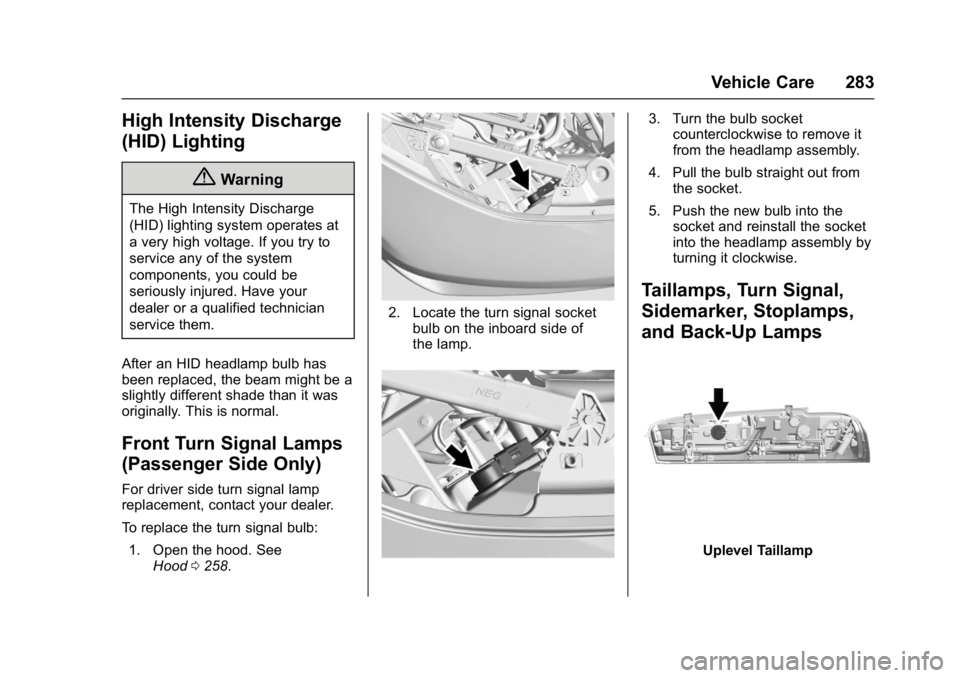
To replace the turn signal bulb: 1. Open the hood. See Hood 0258.
2. Locate the turn signal socket
bulb on the inboard side of
the lamp.
3. Turn the bulb socketcounterclockwise to remove it
from the headlamp assembly.
4. Pull the bulb straight out from the socket.
5. Push the new bulb into the socket and reinstall the socket
into the headlamp assembly by
turning it clockwise.
Taillamps, Turn Signal,
Sidemarker, Stoplamps,
and Back-Up Lamps
Uplevel Taillamp
Page 285 of 391
Chevrolet Camaro Owner Manual (GMNA-Localizing-U.S./Canada/Mexico-
9804281) - 2017 - crc - 4/25/16
284 Vehicle Care
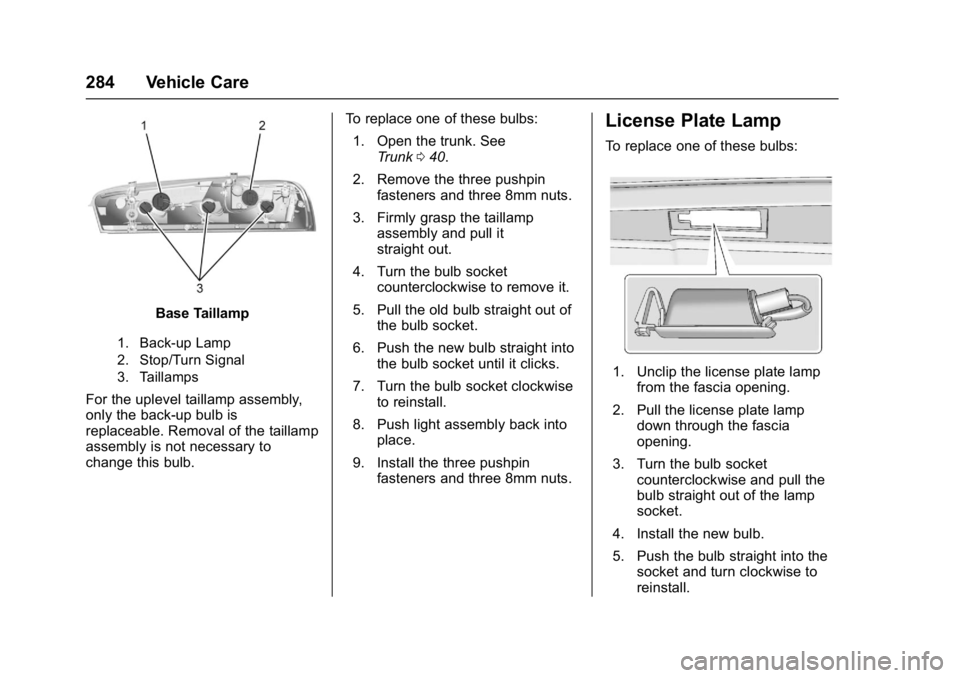
Base Taillamp
1. Back-up Lamp
2. Stop/Turn Signal
3. Taillamps
For the uplevel taillamp assembly,
only the back-up bulb is
replaceable. Removal of the taillamp
assembly is not necessary to
change this bulb.To replace one of these bulbs:
1. Open the trunk. See Trunk 040.
2. Remove the three pushpin fasteners and three 8mm nuts.
3. Firmly grasp the taillamp assembly and pull it
straight out.
4. Turn the bulb socket counterclockwise to remove it.
5. Pull the old bulb straight out of the bulb socket.
6. Push the new bulb straight into the bulb socket until it clicks.
7. Turn the bulb socket clockwise to reinstall.
8. Push light assembly back into place.
9. Install the three pushpin fasteners and three 8mm nuts.
License Plate Lamp
To replace one of these bulbs:
1. Unclip the license plate lamp
from the fascia opening.
2. Pull the license plate lamp down through the fascia
opening.
3. Turn the bulb socket counterclockwise and pull the
bulb straight out of the lamp
socket.
4. Install the new bulb.
5. Push the bulb straight into the socket and turn clockwise to
reinstall.
Page 286 of 391
Chevrolet Camaro Owner Manual (GMNA-Localizing-U.S./Canada/Mexico-
9804281) - 2017 - crc - 4/25/16
Vehicle Care 285
6. Reinstall the license plate lampby lifting it through the fascia
opening until the clip is in
place.
Replacement Bulbs
Exterior Lamp Bulb
Number
Front Turn Signal WY21W
License Plate W5WLL
Back-up W21W
Stop/Turn Signal W21W
Taillamps W5W
For replacement bulbs not listed
here, contact your dealer.
Electrical System
Electrical System
Overload
The vehicle has fuses and circuit
breakers to protect against an
electrical system overload.
When the current electrical load is
too heavy, the circuit breaker opens
and closes, protecting the circuit
until the current load returns to
normal or the problem is fixed. This
greatly reduces the chance of circuit
overload and fire caused by
electrical problems.
Fuses and circuit breakers protect
power devices in the vehicle.
Replace a bad fuse with a new one
of the identical size and rating.
If there is a problem on the road and
a fuse needs to be replaced, the
same amperage fuse can be
borrowed. Choose some feature of
the vehicle that is not needed to use
and replace it as soon as possible.
Headlamp Wiring
An electrical overload may cause
the lamps to go on and off, or in
some cases to remain off. Have the
headlamp wiring checked right away
if the lamps go on and off or
remain off.
Windshield Wipers
If the wiper motor overheats due to
heavy snow or ice, the windshield
wipers will stop until the motor cools
and will then restart.
Although the circuit is protected
from electrical overload, overload
due to heavy snow or ice may
cause wiper linkage damage.
Always clear ice and heavy snow
from the windshield before using the
windshield wipers.
If the overload is caused by an
electrical problem and not snow or
ice, be sure to get it fixed.
Page 305 of 391
Chevrolet Camaro Owner Manual (GMNA-Localizing-U.S./Canada/Mexico-
9804281) - 2017 - crc - 4/25/16
304 Vehicle Care
go off after the road tire is
replaced and the sensor
matching process is performed
successfully. See“TPMS Sensor
Matching Process” later in this
section.
. The TPMS sensor matching
process was not done or not
completed successfully after
rotating the tires. The
malfunction light and the DIC
message should go off after
successfully completing the
sensor matching process. See
"TPMS Sensor Matching
Process" later in this section.
. One or more TPMS sensors are
missing or damaged. The
malfunction light and the DIC
message should go off when the
TPMS sensors are installed and
the sensor matching process is
performed successfully. See
your dealer for service.
. Replacement tires or wheels do
not match the original equipment
tires or wheels. Tires and wheels
other than those recommended could prevent the TPMS from
functioning properly. See
Buying
New Tires 0308.
. Operating electronic devices or
being near facilities using radio
wave frequencies similar to the
TPMS could cause the TPMS
sensors to malfunction.
If the TPMS is not functioning
properly it cannot detect or signal a
low tire condition. See your dealer
for service if the TPMS malfunction
light and DIC message comes on
and stays on.
TPMS Sensor Matching
Process
Each TPMS sensor has a unique
identification code. The identification
code needs to be matched to a new
tire/wheel position after rotating the
vehicle’s tires or replacing one or
more of the TPMS sensors. The
TPMS sensor matching process
should also be performed after
replacing a spare tire with a road
tire containing the TPMS sensor.
The malfunction light and the DIC
message should go off at the next
ignition cycle. The sensors are matched to the tire/wheel positions,
using a TPMS relearn tool, in the
following order: driver side front tire,
passenger side front tire, passenger
side rear tire, and driver side rear.
See your dealer for service or to
purchase a relearn tool. A TPMS
relearn tool can also be purchased.
See Tire Pressure Monitor Sensor
Activation Tool at
www.gmtoolsandequipment.com or
call 1-800-GM TOOLS
(1-800-468-6657).
There are two minutes to match the
first tire/wheel position, and
five minutes overall to match all four
tire/wheel positions. If it takes
longer, the matching process stops
and must be restarted.
The TPMS sensor matching
process is:
1. Set the parking brake.
2. Place the vehicle power mode in ON/RUN/START. See
Ignition Positions 0216.
3. Make sure the Tire Pressure info display option is turned on.
The info displays on the DIC
Page 306 of 391
Chevrolet Camaro Owner Manual (GMNA-Localizing-U.S./Canada/Mexico-
9804281) - 2017 - crc - 4/25/16
Vehicle Care 305
can be turned on and off
through the Settings menu.
SeeDriver Information Center
(DIC) 0128.
4. Use the five-way DIC control on the right side of the steering
wheel to scroll to the Tire
Pressure screen under the DIC
info page. See Driver
Information Center (DIC) 0128.
5. Press and hold SEL in the center of the five-way DIC
control.
The horn sounds twice to
signal the receiver is in relearn
mode and the TIRE
LEARNING ACTIVE message
displays on the DIC screen.
6. Start with the driver side front tire.
7. Place the relearn tool against the tire sidewall, near the valve
stem. Then press the button to
activate the TPMS sensor.
A horn chirp confirms that the
sensor identification code has
been matched to this tire and
wheel position. 8. Proceed to the passenger side
front tire, and repeat Step 7.
9. Proceed to the passenger side rear tire, and repeat Step 7.
10. Proceed to the driver side rear tire, and repeat Step 7. The
horn sounds two times to
indicate the sensor
identification code has been
matched to the driver side rear
tire, and the TPMS sensor
matching process is no longer
active. The TIRE LEARNING
ACTIVE message on the DIC
display screen goes off.
11. Shut the ignition off.
12. Set all four tires to the recommended air pressure
level as indicated on the Tire
and Loading Information label.
Tire Inspection
We recommend that the tires,
including the spare tire, if the
vehicle has one, be inspected
for signs of wear or damage at
least once a month. Replace the tire if:
.The indicators at three or
more places around the tire
can be seen.
.There is cord or fabric
showing through the tire's
rubber.
.The tread or sidewall is
cracked, cut, or snagged
deep enough to show cord or
fabric.
.The tire has a bump, bulge,
or split.
.The tire has a puncture, cut,
or other damage that cannot
be repaired well because of
the size or location of the
damage.
Tire Rotation
If the vehicle has non-directional
tires, they should be rotated
every 12 000 km/7,500 mi. See
Maintenance Schedule
0336.
Page 373 of 391
Chevrolet Camaro Owner Manual (GMNA-Localizing-U.S./Canada/Mexico-
9804281) - 2017 - crc - 4/25/16
372 OnStar
2. The Wi-Fi settings will displaythe Wi-Fi hotspot name (SSID),
password, and on some
vehicles, the connection type
(no Internet connection, 3G,
4G, 4G LTE), and signal quality
(poor, good, excellent).
3. To change the SSID or password, press
|or call
1-888-4ONSTAR to connect
with an Advisor.
After initial set-up, your vehicles’ s
Wi-Fi hotspot will connect
automatically to your mobile
devices. Manage data usage by
turning Wi-Fi on or off on your
mobile device, using the
RemoteLink mobil app, or by
contacting an OnStar Advisor.
OnStar RemoteLink
®Mobile App
(If Equipped)
Download the OnStar RemoteLink
mobile app to select Apple
®iOS,
Android™, BlackBerry®,
or Windows®mobile devices.
OnStar Subscribers can access the
following services from a mobile
device: .
Remotely start/stop the vehicle,
if factory-equipped.
. Lock/unlock doors, if equipped
with automatic locks.
. Activate the horn and lamps
. Check the vehicles’s fuel level,
oil life, or tire pressure,
if factory-equipped with the Tire
Pressure Monitor System.
. Send directions to the vehicle.
. Locate the vehicle on a map
(U.S. market only).
. Turn the vehicle’ s Wi-Fi hotspot
on/off, manage settings, and
monitor data consumption,
if equipped.
For OnStar RemoteLink information
and compatibility, see
www.onstar.com (U.S.) or
www.onstar.ca (Canada).
Remote Services
Contact an OnStar Advisor to
unlock the doors or sound the horn
and flash the lamps.
OnStar AtYourService
OnStar Advisors can provide offers
from restaurants and retailers on
your route, help locate hotels,
or book a room. These services
vary by market.
OnStar Hands-Free Calling
Make and receive calls with the
built-in wireless calling service
which requires available minutes.
To Make a Call
1. Press
Q. System responds:
“OnStar ready.”
2. Say “Call.”System responds:
“Call. Please say the name or
number to call.”
3. Say the entire number without pausing, including a “1”and the
area code. System responds:
“OK, calling.”
Calling 911 Emergency
1. PressQ. System responds:
“OnStar ready.”
Page 375 of 391
Chevrolet Camaro Owner Manual (GMNA-Localizing-U.S./Canada/Mexico-
9804281) - 2017 - crc - 4/25/16
374 OnStar
Reactivation for Subsequent
Owners
Press|and follow the prompts to
speak to an Advisor as soon as
possible. The Advisor will update
vehicle records and explain OnStar
service options.
How OnStar Service Works
Automatic Crash Response,
Emergency Services, Crisis Assist,
Stolen Vehicle Assistance,
Advanced Diagnostics, Remote
Services, Roadside Assistance,
Turn-by-Turn Navigation, and
Hands-Free Calling are available on
most vehicles. Not all OnStar
services are available everywhere
or on all vehicles. For more
information, a full description of
OnStar services, system limitations,
and OnStar User Terms, Privacy
Statement and Software Terms :
. Call 1-888-4ONSTAR
(1-888-466-7827).
. See www.onstar.com (U.S.).
. See www.onstar.ca (Canada).
. Call TTY 1-877-248-2080. .
Press
|to speak with an
Advisor.
OnStar services cannot work unless
the vehicle is in a place where
OnStar has an agreement with a
wireless service provider for service
in that area. The wireless service
provider must also have coverage,
network capacity, reception, and
technology compatible with OnStar
services. Service involving location
information about the vehicle cannot
work unless GPS signals are
available, unobstructed, and
compatible with the OnStar
hardware. OnStar services may not
work if the OnStar equipment is not
properly installed or it has not been
properly maintained. If equipment or
software is added, connected,
or modified, OnStar services may
not work. Other problems beyond
the control of OnStar —such as
hills, tall buildings, tunnels, weather,
electrical system design and
architecture of the vehicle, damage
to the vehicle in a crash, or wireless
phone network congestion or
jamming —may prevent service. See
Radio Frequency
Statement 0364.
Services for People with
Disabilities
Advisors provide services to help
Subscribers with physical disabilities
and medical conditions.
Press
|to help:
. Locate a gas station with an
attendant to pump gas.
. Find a hotel, restaurant, etc.,
that meets accessibility needs.
. Provide directions to the closest
hospital or pharmacy in urgent
situations.
TTY Users
OnStar has the ability to
communicate to deaf,
hard-of-hearing, or speech-impaired
customers while in the vehicle. The
available dealer-installed TTY
system can provide in-vehicle
access to all OnStar services,
except Virtual Advisor and OnStar
Turn-by-Turn Navigation.
Page 376 of 391
Chevrolet Camaro Owner Manual (GMNA-Localizing-U.S./Canada/Mexico-
9804281) - 2017 - crc - 4/25/16
OnStar 375
OnStar Personal Identification
Number (PIN)
A PIN is needed to access some
OnStar services. The PIN will need
to be changed the first time when
speaking with an Advisor. To
change the OnStar PIN, contact an
OnStar Advisor by pressing
|or
calling 1-888-4ONSTAR.
Warranty
OnStar equipment may be
warranted as part of the vehicle
warranty.
Languages
The vehicle can be programmed to
respond in multiple languages.
Press
|and ask for an Advisor.
Advisors are available in English,
Spanish, and French. Available
languages may vary by country.
Potential Issues
OnStar cannot perform Remote
Door Unlock or Stolen Vehicle
Assistance after the vehicle has
been off continuously for 10 days
without an ignition cycle. If the vehicle has not been started for
five days, OnStar can contact
Roadside Assistance or a locksmith
to help gain access to the vehicle.
Global Positioning
System (GPS)
.
Obstruction of the GPS can
occur in a large city with tall
buildings; in parking garages;
around airports; in tunnels and
underpasses; or in an area with
very dense trees. If GPS signals
are not available, the OnStar
system should still operate to
call OnStar. However, OnStar
could have difficulty identifying
the exact location.
. In emergency situations, OnStar
can use the last stored GPS
location to send to emergency
responders.
A temporary loss of GPS can cause
loss of the ability to send a
Turn-by-Turn Navigation route. The
Advisor may give a verbal route or
may ask for a call back after the
vehicle is driven into an open area.
Cellular and GPS Antennas
Cellular reception is required for
OnStar to send remote signals to
the vehicle. Do not place items over
or near the antenna to prevent
blocking cellular and GPS signal
reception.
Unable to Connect to OnStar
Message
If there is limited cellular coverage
or the cellular network has reached
maximum capacity, this message
may come on. Press
|to try the
call again or try again after driving a
few miles into another cellular area.
Vehicle and Power Issues
OnStar services require a vehicle
electrical system, wireless service,
and GPS satellite technologies to be
available and operating for features
to function properly. These systems
may not operate if the battery is
discharged or disconnected.
Page 381 of 391

Chevrolet Camaro Owner Manual (GMNA-Localizing-U.S./Canada/Mexico-
9804281) - 2017 - crc - 4/25/16
380 Index
Apple CarPlay andAndroid Auto . . . . . . . . . . . . . . . . . . 188
Assistance Program, Roadside . . . . . . . . . . . . . . . . . . . . . . 358
Assistance Systems for Parking and Backing . . . . . . . . . . 246
Audio
Theft-Deterrent Feature . . . . . . . 163
Automatic Climate Control System . . . . . . . 193
Dimming Mirrors . . . . . . . . . . . . . . . . 45
Door Locks . . . . . . . . . . . . . . . . . . . . . 39
Headlamp System . . . . . . . . . . . . 156
Transmission . . . . . . . . . . . . . . . . . 225
Transmission Fluid . . . . . . . . . . . 267
Automatic Transmission
Manual Mode . . . . . . . . . . . . . . . . . 227
Shift Lock Control FunctionCheck . . . . . . . . . . . . . . . . . . . . . . . 280
Auxiliary Devices . . . . . . . . . . . . . . . . . . . . . . . 176
Avoiding Untrusted Media Devices . . . . . . . . . . . . . . . . . . . . . . . 170
Axle, Rear . . . . . . . . . . . . . . . . . . . . . . 280B
Backglass Antenna . . . . . . . . . . . . . 169
Battery Exterior Lighting BatterySaver . . . . . . . . . . . . . . . . . . . . . . . 160
Load Management . . . . . . . . . . . . 160
Power Protection . . . . . . . . . . . . . 160
Voltage and Charging Messages . . . . . . . . . . . . . . . . . . . 135
Battery - North America . . . . 279, 320
Blade Replacement, Wiper . . . . . 281
Bluetooth
Overview . . . . . . . . . . . . . . . . 182, 184
Boost Gauge . . . . . . . . . . . . . . . . . . . 115
Brake
Parking, Electric . . . . . . . . . . . . . . 232
System Warning Light . . . . . . . . 123
Brakes . . . . . . . . . . . . . . . . . . . . . . . . . . 277 Antilock . . . . . . . . . . . . . . . . . . . . . . . 232
Assist . . . . . . . . . . . . . . . . . . . . . . . . . 234
Fluid . . . . . . . . . . . . . . . . . . . . . . . . . . 278
System Messages . . . . . . . . . . . . 135
Braking . . . . . . . . . . . . . . . . . . . . . . . . . 202
Break-In, New Vehicle . . . . . . . . . . 215
Bulb Replacement . . . . . . . . . . . . . . 285 Front Turn Signal Lamps . . . . . 283
Halogen Bulbs . . . . . . . . . . . . . . . . 282
Headlamp Aiming . . . . . . . . . . . . . 282 Bulb Replacement (cont'd)
Headlamps . . . . . . . . . . . . . . . . . . . 282
High Intensity Discharge
(HID) Lighting . . . . . . . . . . . . . . . 283
License Plate Lamps . . . . . . . . . 284
Taillamps, Turn Signal, Sidemarker, Stoplamps,
and Backup Lamps . . . . . . . . . . 283
Buying New Tires . . . . . . . . . . . . . . . 308
C
Calibration . . . . . . . . . . . . . . . . . . . . . . 105
California Fuel Requirements . . . . . . . . . . . 251
Perchlorate Materials
Requirements . . . . . . . . . . . . . . . 256
California Proposition
65 Warning . . . . . . . . . .256, 279, 320
Canadian Vehicle Owners . . . . . . . . 2
Capacities and Specifications . . . . . . . . . . . . . . . . . 351
Carbon Monoxide Engine Exhaust . . . . . . . . . . . . . . . 224
Trunk . . . . . . . . . . . . . . . . . . . . . . . . . . . 40
Winter Driving . . . . . . . . . . . . . . . . 210
Caution, Danger, and Warning . . . . 2
Center Console Storage . . . . . . . . 100
Chains, Tire . . . . . . . . . . . . . . . . . . . . 312