steering CHEVROLET CAMARO ZL1 2018 Owners Manual
[x] Cancel search | Manufacturer: CHEVROLET, Model Year: 2018, Model line: CAMARO ZL1, Model: CHEVROLET CAMARO ZL1 2018Pages: 53, PDF Size: 1.44 MB
Page 7 of 53
Chevrolet Camaro High Performance Owner Manual Supplemen (GMNA-
Localizing-U.S./Canada/Mexico-11348335) - 2018 - CRC - 4/5/17
6 Instruments and Controls
Cluster Menu
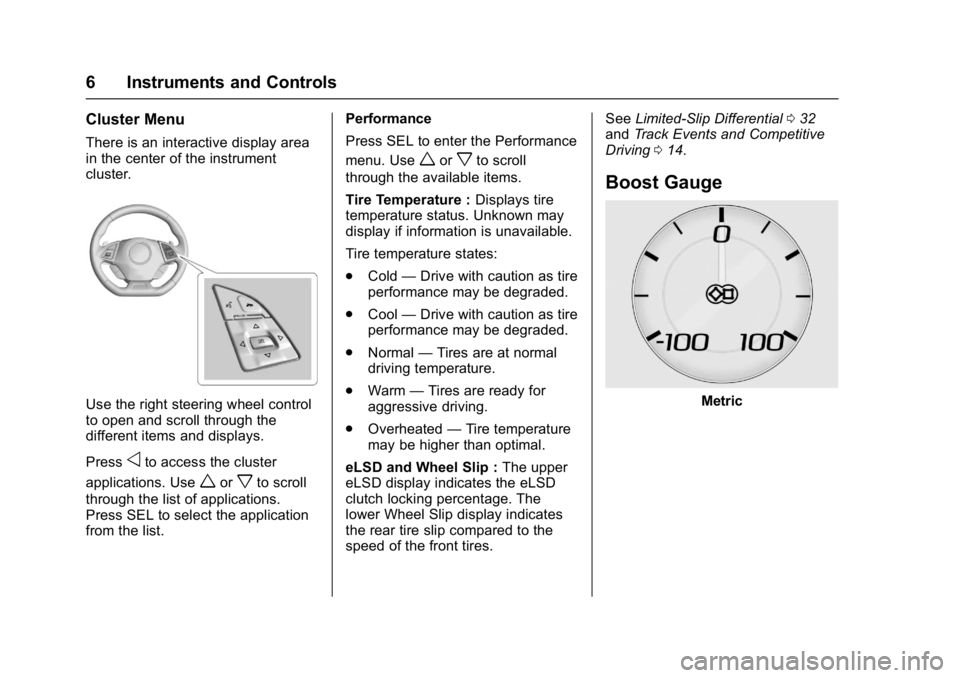
There is an interactive display area
in the center of the instrument
cluster.
Use the right steering wheel control
to open and scroll through the
different items and displays.
Press
oto access the cluster
applications. Use
worxto scroll
through the list of applications.
Press SEL to select the application
from the list. Performance
Press SEL to enter the Performance
menu. Use
worxto scroll
through the available items.
Tire Temperature : Displays tire
temperature status. Unknown may
display if information is unavailable.
Tire temperature states:
. Cold —Drive with caution as tire
performance may be degraded.
. Cool —Drive with caution as tire
performance may be degraded.
. Normal —Tires are at normal
driving temperature.
. Warm —Tires are ready for
aggressive driving.
. Overheated —Tire temperature
may be higher than optimal.
eLSD and Wheel Slip : The upper
eLSD display indicates the eLSD
clutch locking percentage. The
lower Wheel Slip display indicates
the rear tire slip compared to the
speed of the front tires. See
Limited-Slip Differential 032
and Track Events and Competitive
Driving 014.
Boost Gauge
Metric
Page 9 of 53
Chevrolet Camaro High Performance Owner Manual Supplemen (GMNA-
Localizing-U.S./Canada/Mexico-11348335) - 2018 - CRC - 4/5/17
8 Infotainment System
Infotainment
System
Performance Data
Recorder (PDR)
Performance DataRecorder (PDR) . . . . . . . . . . . . . . . 8
Performance Data
Recorder (PDR)
If equipped, the PDR icon displays
on the Home Page.
Important Information
Use of the PDR may be prohibited
or legally restricted in certain
countries and situations. Ensure
compliance with applicable laws and
regulations, including, but not
limited to: privacy laws, laws related
to camera surveillance and
recordings, road traffic and security
laws, and laws on the protection of
publicity and personality rights.
. Do not use the PDR if it causes
distraction.
. Do not rely on camera footage to
steer the vehicle.
. Comply with any notice and
consent requirements before
capturing and/or recording the
voices or images of other
persons or before collecting
other personal data. .
Notify other drivers of your
vehicle of the above rules and
require them to comply.
. General Motors does not accept
any responsibility or liability in
connection with use that is not
permitted.
. Law enforcement authorities
may have the right to seize
video recordings and use them
as evidence of criminal/driving
offenses against you or third
parties.
The PDR records video, audio, and
vehicle data. This data is stored on
a removable SD card. The SD card
reader is below the instrument panel
to the left of the steering wheel and
just above the hood release.
The recorded data is not stored
anywhere else and is only
accessible from the SD card.
To begin, insert a FAT32 formatted
SD card, Class 10 required, 8, 16,
or 32 GB recommended, into the SD
card reader.
Page 12 of 53
Chevrolet Camaro High Performance Owner Manual Supplemen (GMNA-
Localizing-U.S./Canada/Mexico-11348335) - 2018 - CRC - 4/5/17
Infotainment System 11
.Track
. Performance Timing
No Overlay:
No vehicle data displays on top of
the recorded video. Vehicle data is
still available with the video when
accessed in the toolbox software.
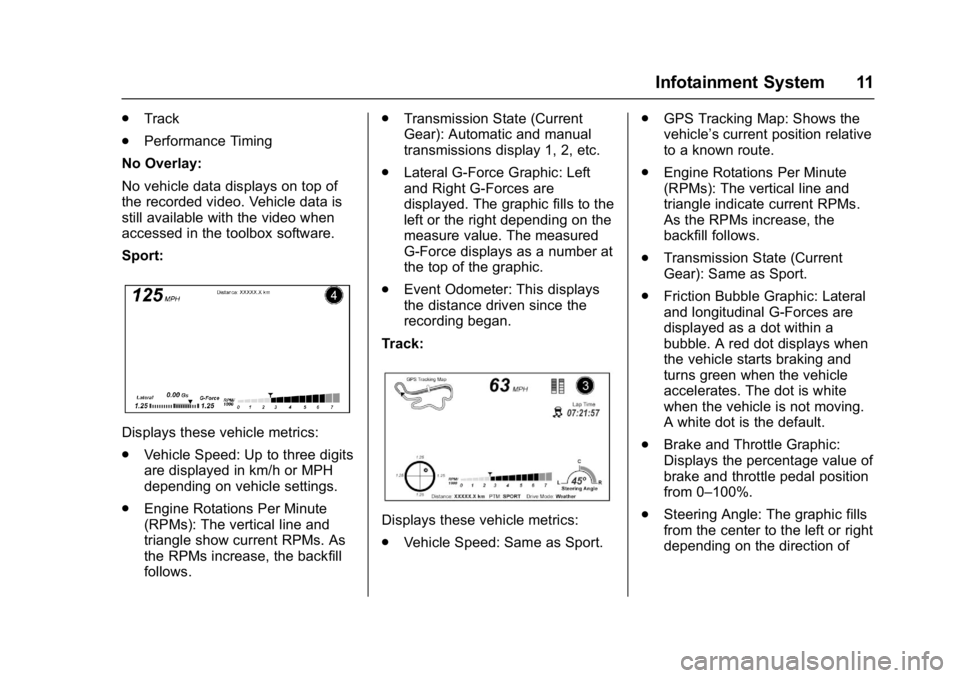
Sport:
Displays these vehicle metrics:
. Vehicle Speed: Up to three digits
are displayed in km/h or MPH
depending on vehicle settings.
. Engine Rotations Per Minute
(RPMs): The vertical line and
triangle show current RPMs. As
the RPMs increase, the backfill
follows. .
Transmission State (Current
Gear): Automatic and manual
transmissions display 1, 2, etc.
. Lateral G-Force Graphic: Left
and Right G-Forces are
displayed. The graphic fills to the
left or the right depending on the
measure value. The measured
G-Force displays as a number at
the top of the graphic.
. Event Odometer: This displays
the distance driven since the
recording began.
Track:
Displays these vehicle metrics:
. Vehicle Speed: Same as Sport. .
GPS Tracking Map: Shows the
vehicle’s current position relative
to a known route.
. Engine Rotations Per Minute
(RPMs): The vertical line and
triangle indicate current RPMs.
As the RPMs increase, the
backfill follows.
. Transmission State (Current
Gear): Same as Sport.
. Friction Bubble Graphic: Lateral
and longitudinal G-Forces are
displayed as a dot within a
bubble. A red dot displays when
the vehicle starts braking and
turns green when the vehicle
accelerates. The dot is white
when the vehicle is not moving.
A white dot is the default.
. Brake and Throttle Graphic:
Displays the percentage value of
brake and throttle pedal position
from 0–100%.
. Steering Angle: The graphic fills
from the center to the left or right
depending on the direction of
Page 13 of 53
Chevrolet Camaro High Performance Owner Manual Supplemen (GMNA-
Localizing-U.S./Canada/Mexico-11348335) - 2018 - CRC - 4/5/17
12 Infotainment System
steering. The numerical steering
angle displays below the
graphic.
. StabiliTrak Active Indicator: The
graphic only displays if the
active handling systems are
activated.
. Performance Traction
Management (PTM) Mode:
Displays the current PTM mode.
The options are Wet, Dry, Sport
1, Sport 2, or Race.
. Current Lap Time: Displays the
elapsed lap time if the finish line
is defined and the vehicle has
crossed the defined finish line at
least once.
. Event Odometer: Displays the
distance driven since the
recording began.
. Drive Mode: Displays the
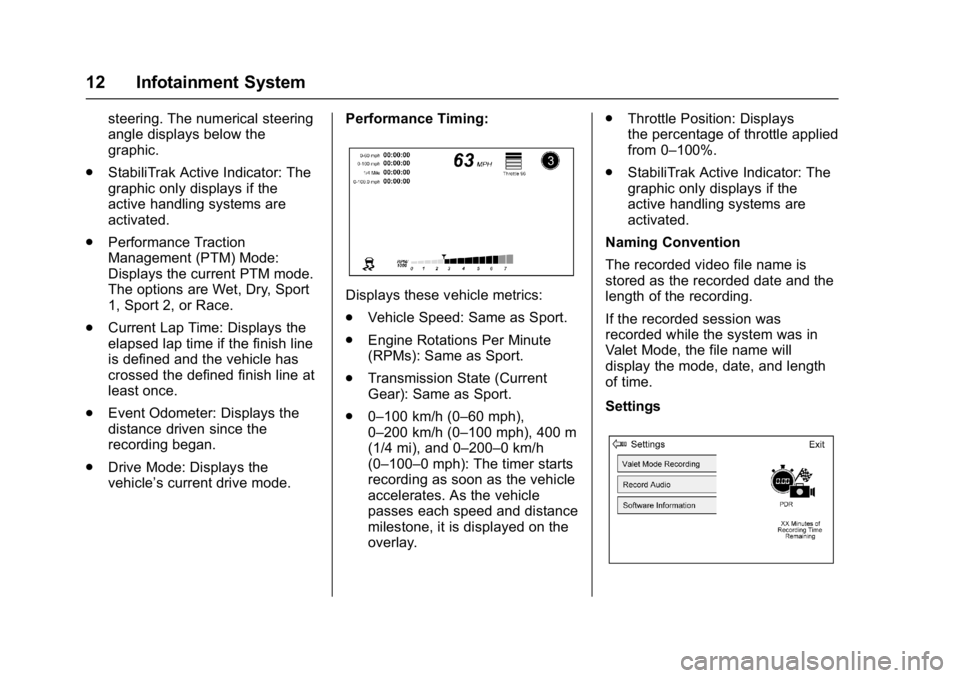
vehicle’s current drive mode. Performance Timing:
Displays these vehicle metrics:
.
Vehicle Speed: Same as Sport.
. Engine Rotations Per Minute
(RPMs): Same as Sport.
. Transmission State (Current
Gear): Same as Sport.
. 0–100 km/h (0–60 mph),
0–200 km/h (0–100 mph), 400 m
(1/4 mi), and 0–200–0 km/h
(0–100–0 mph): The timer starts
recording as soon as the vehicle
accelerates. As the vehicle
passes each speed and distance
milestone, it is displayed on the
overlay. .
Throttle Position: Displays
the percentage of throttle applied
from 0–100%.
. StabiliTrak Active Indicator: The
graphic only displays if the
active handling systems are
activated.
Naming Convention
The recorded video file name is
stored as the recorded date and the
length of the recording.
If the recorded session was
recorded while the system was in
Valet Mode, the file name will
display the mode, date, and length
of time.
Settings
Page 22 of 53
Chevrolet Camaro High Performance Owner Manual Supplemen (GMNA-
Localizing-U.S./Canada/Mexico-11348335) - 2018 - CRC - 4/5/17
Driving and Operating 21
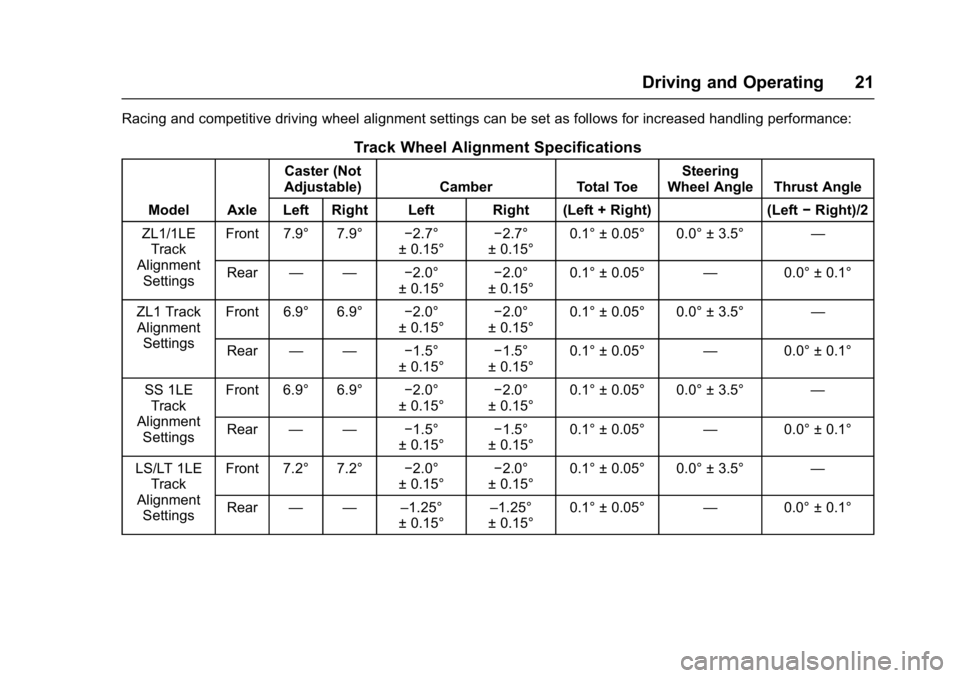
Racing and competitive driving wheel alignment settings can be set as follows for increased handling performance:
Track Wheel Alignment Specifications
Model AxleCaster (Not
Adjustable) Camber Total Toe Steering
Wheel Angle Thrust Angle
Left Right Left Right (Left + Right) (Left −Right)/2
ZL1/1LE Track
Alignment Settings Front 7.9° 7.9°
−2.7°
± 0.15° −2.7°
± 0.15° 0.1° ± 0.05° 0.0° ± 3.5°
—
Rear — — −2.0°
± 0.15° −2.0°
± 0.15° 0.1° ± 0.05°
—0.0° ± 0.1°
ZL1 Track Alignment Settings Front 6.9° 6.9°
−2.0°
± 0.15° −2.0°
± 0.15° 0.1° ± 0.05° 0.0° ± 3.5°
—
Rear — — −1.5°
± 0.15° −1.5°
± 0.15° 0.1° ± 0.05°
—0.0° ± 0.1°
SS 1LE Track
Alignment Settings Front 6.9° 6.9°
−2.0°
± 0.15° −2.0°
± 0.15° 0.1° ± 0.05° 0.0° ± 3.5°
—
Rear — — −1.5°
± 0.15° −1.5°
± 0.15° 0.1° ± 0.05°
—0.0° ± 0.1°
LS/LT 1LE Track
Alignment Settings Front 7.2° 7.2°
−2.0°
± 0.15° −2.0°
± 0.15° 0.1° ± 0.05° 0.0° ± 3.5°
—
Rear — — –1.25°
± 0.15°–1.25°
± 0.15° 0.1° ± 0.05°
—0.0° ± 0.1°
Page 23 of 53
Chevrolet Camaro High Performance Owner Manual Supplemen (GMNA-
Localizing-U.S./Canada/Mexico-11348335) - 2018 - CRC - 4/5/17
22 Driving and Operating
Caution
Using these wheel alignment
settings may cause excessive tire
wear. Only use these wheel
alignment settings for racing or
competitive driving. Excessive tire
wear is not covered under the
vehicle warranty.
Custom Launch Control
(ZL1 Only)
Custom Launch Control allows the
following parameters for Launch
Control to be modified:
.Launch RPM
. Slip Target (5%–15%)
. Surface Type
To adjust the Launch RPM, all of
these conditions must be met:
. The vehicle must be in Track
Mode. See “Track Mode” under
“Driver Mode Control” in the
owner ’s manual. .
Performance Traction
Management (PTM) Mode must
be enabled. For convertibles,
Competitive Driving Mode must
be enabled. See “Driver Mode
Control” in the owner ’s manual.
. The steering wheel must be
straight.
. The driver door must be closed.
. The transmission must be in a
gear other than R (Reverse).
It will work in P (Park) or
N (Neutral).
. The parking brake must not be
engaged.
For more information on
Competitive Driving Mode, see
Competitive Driving Mode 028.
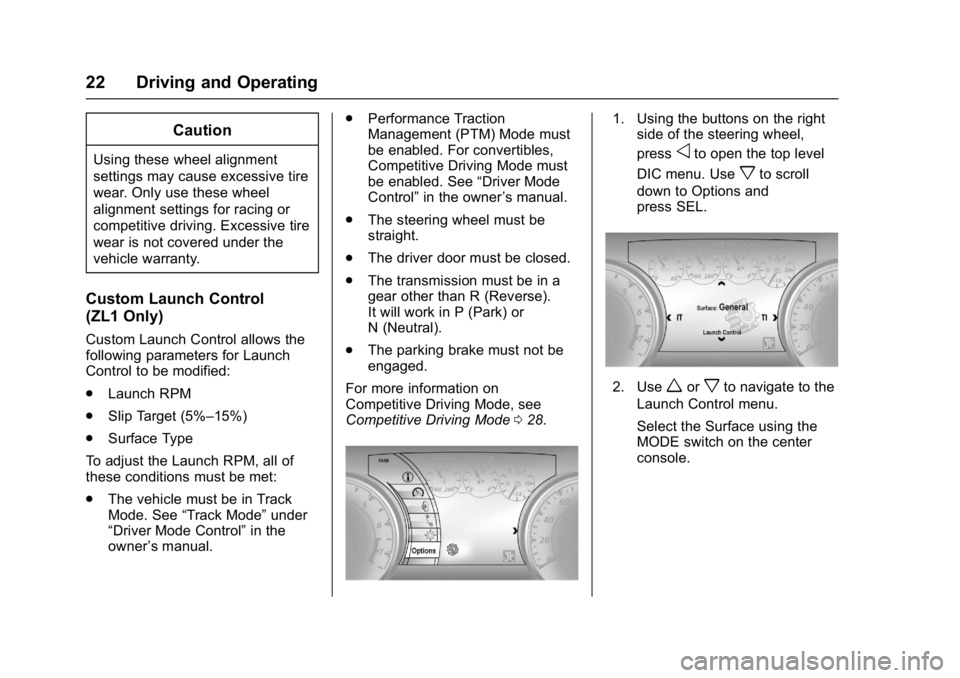
1. Using the buttons on the right
side of the steering wheel,
press
oto open the top level
DIC menu. Use
xto scroll
down to Options and
press SEL.
2. Useworxto navigate to the
Launch Control menu.
Select the Surface using the
MODE switch on the center
console.
Page 25 of 53
Chevrolet Camaro High Performance Owner Manual Supplemen (GMNA-
Localizing-U.S./Canada/Mexico-11348335) - 2018 - CRC - 4/5/17
24 Driving and Operating
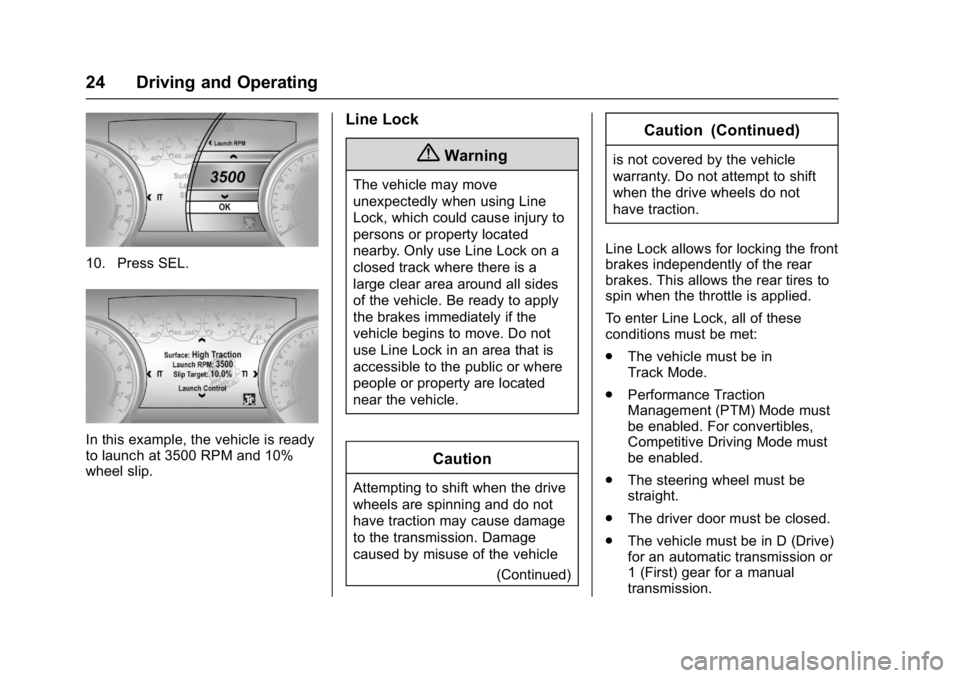
10. Press SEL.
In this example, the vehicle is ready
to launch at 3500 RPM and 10%
wheel slip.
Line Lock
{Warning
The vehicle may move
unexpectedly when using Line
Lock, which could cause injury to
persons or property located
nearby. Only use Line Lock on a
closed track where there is a
large clear area around all sides
of the vehicle. Be ready to apply
the brakes immediately if the
vehicle begins to move. Do not
use Line Lock in an area that is
accessible to the public or where
people or property are located
near the vehicle.
Caution
Attempting to shift when the drive
wheels are spinning and do not
have traction may cause damage
to the transmission. Damage
caused by misuse of the vehicle(Continued)
Caution (Continued)
is not covered by the vehicle
warranty. Do not attempt to shift
when the drive wheels do not
have traction.
Line Lock allows for locking the front
brakes independently of the rear
brakes. This allows the rear tires to
spin when the throttle is applied.
To enter Line Lock, all of these
conditions must be met:
. The vehicle must be in
Track Mode.
. Performance Traction
Management (PTM) Mode must
be enabled. For convertibles,
Competitive Driving Mode must
be enabled.
. The steering wheel must be
straight.
. The driver door must be closed.
. The vehicle must be in D (Drive)
for an automatic transmission or
1 (First) gear for a manual
transmission.
Page 26 of 53
Chevrolet Camaro High Performance Owner Manual Supplemen (GMNA-
Localizing-U.S./Canada/Mexico-11348335) - 2018 - CRC - 4/5/17
Driving and Operating 25
.The parking brake must not be
engaged.
. The vehicle must be stopped on
level ground. The accelerator
pedal must not be applied.
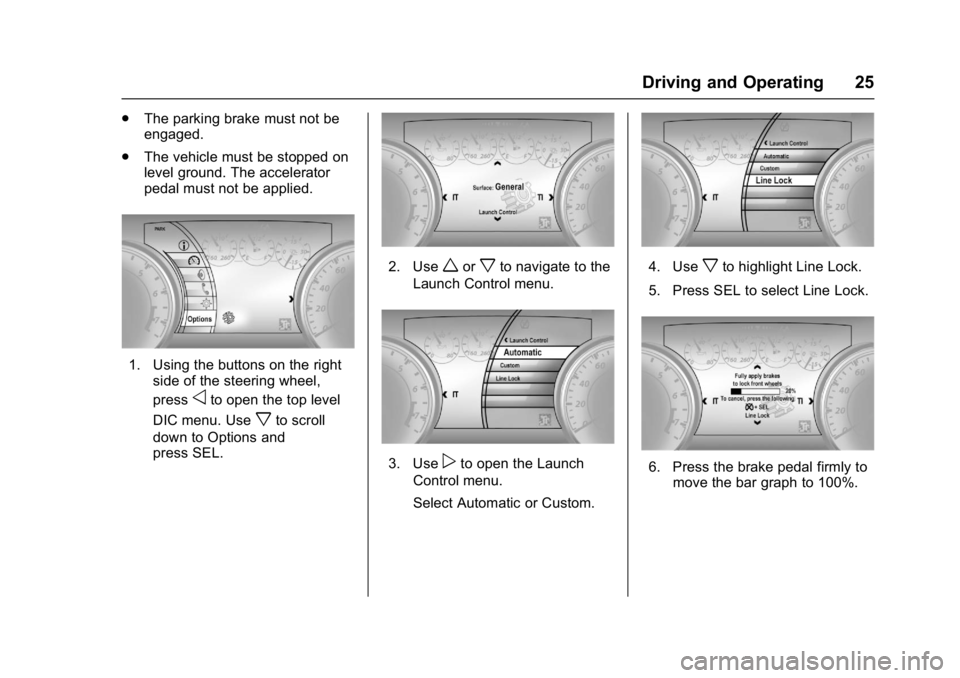
1. Using the buttons on the right
side of the steering wheel,
press
oto open the top level
DIC menu. Use
xto scroll
down to Options and
press SEL.
2. Useworxto navigate to the
Launch Control menu.
3. Usepto open the Launch
Control menu.
Select Automatic or Custom.
4. Usexto highlight Line Lock.
5. Press SEL to select Line Lock.
6. Press the brake pedal firmly to move the bar graph to 100%.
Page 30 of 53
Chevrolet Camaro High Performance Owner Manual Supplemen (GMNA-
Localizing-U.S./Canada/Mexico-11348335) - 2018 - CRC - 4/5/17
Driving and Operating 29
Caution
Attempting to shift when the drive
wheels are spinning and do not
have traction may cause damage
to the transmission. Damage
caused by misuse of the vehicle
is not covered by the vehicle
warranty. Do not attempt to shift
when the drive wheels do not
have traction.
Competitive Driving Mode allows full
engine power while StabiliTrak
helps maintain directional control of
the vehicle by selective brake
application. In this mode, TCS is off
and Launch Control is available.
Adjust your driving style to account
for the available engine power. See
“Launch Control” later in this
section.
Do not use cruise control in
performance driving situations.
When StabiliTrak is in a
performance driving state by
pressing
Ytwice for Competitive
Driving Mode or Performance Traction Management Mode, or by
pressing and holding
Yfor
five seconds to turn StabiliTrak Off,
the cruise control buttons on the left
side of the steering wheel will be
inoperative.
To regain cruise control capability,
press
Yonce to return to regular
StabiliTrak operation.
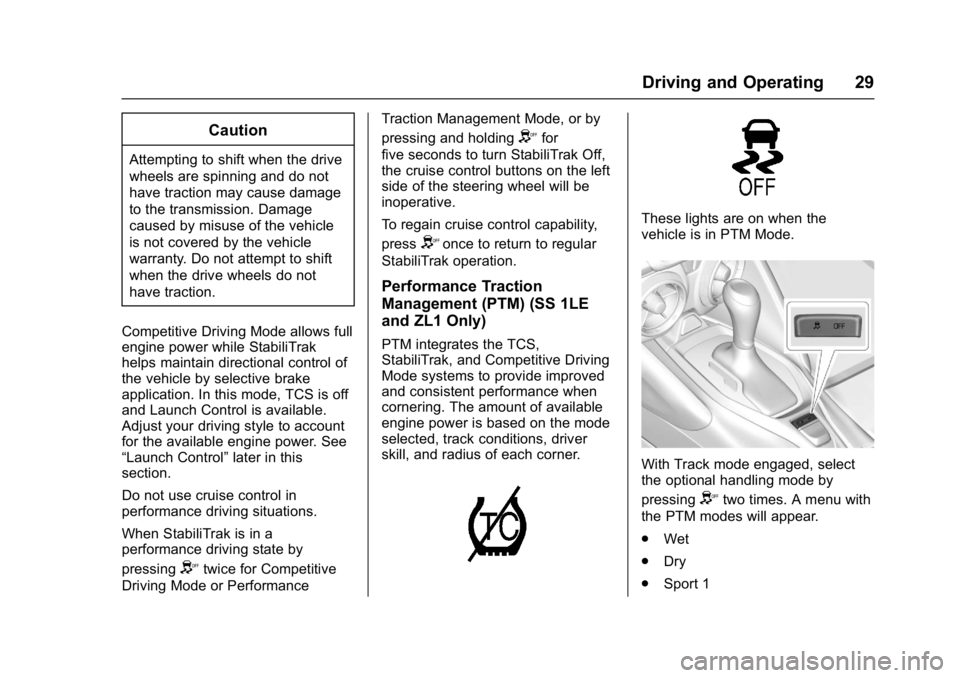
Performance Traction
Management (PTM) (SS 1LE
and ZL1 Only)
PTM integrates the TCS,
StabiliTrak, and Competitive Driving
Mode systems to provide improved
and consistent performance when
cornering. The amount of available
engine power is based on the mode
selected, track conditions, driver
skill, and radius of each corner.
These lights are on when the
vehicle is in PTM Mode.
With Track mode engaged, select
the optional handling mode by
pressing
Ytwo times. A menu with
the PTM modes will appear.
. Wet
. Dry
. Sport 1
Page 32 of 53
Chevrolet Camaro High Performance Owner Manual Supplemen (GMNA-
Localizing-U.S./Canada/Mexico-11348335) - 2018 - CRC - 4/5/17
Driving and Operating 31
Launch Control
If equipped, Launch Control is
available within Competitive Driving
Mode and Performance Traction
Management (PTM) to allow high
levels of vehicle acceleration in a
straight line. Launch Control is a
form of traction control that
manages tire spin while launching
the vehicle. This feature is intended
for use during closed course race
events where consistent zero to
60 and quarter mile times are
desirable.
Launch Control is only available
when the following criteria are met:
.Competitive Driving Mode is
selected or any of the
Performance Traction
Management modes are
selected. The TCS light comes
on in the instrument cluster and
the appropriate Driver
Information Center (DIC)
message displays.
. The vehicle is not moving.
. The steering wheel is pointing
straight. Manual Transmissions
.
The clutch is fully pressed and
the transmission is in
1 (First) gear.
. The accelerator pedal is rapidly
applied and held to wide open
throttle.
Launch Control will initially limit
engine speed as you rapidly apply
the accelerator pedal to wide open
throttle. Allow the engine rpm to
stabilize. A smooth, quick release of
the clutch, while maintaining the
fully pressed accelerator pedal, will
manage wheel slip.
Automatic Transmissions
. The brake pedal is firmly
pressed to the floor, equivalent
to a panic brake event.
. The accelerator pedal is rapidly
applied to wide open throttle.
If the vehicle rolls due to wide
open throttle, release the
throttle, press the brake pedal
more firmly, and re-apply the
accelerator to wide open throttle. Launch Control will initially limit
engine speed as you rapidly apply
the accelerator pedal to wide open
throttle. Allow the engine rpm to
stabilize. A smooth, quick release of
the brake pedal, while maintaining
the fully pressed accelerator pedal,
will manage wheel slip.
After the vehicle is launched, the
system continues in Competitive
Driving Mode or PTM.
Competitive Driving Mode, PTM,
and Launch Control are systems
designed for a closed course race
track and not intended for use on
public roads. The systems are not
intended to compensate for lack of
driver experience or familiarity with
the race track.
Custom Launch Control may be
available through the Settings
menu, if equipped. See
“Custom
Launch Control” inTrack Events and
Competitive Driving 014.