lock CHEVROLET CAPTIVA SPORT 2013 User Guide
[x] Cancel search | Manufacturer: CHEVROLET, Model Year: 2013, Model line: CAPTIVA SPORT, Model: CHEVROLET CAPTIVA SPORT 2013Pages: 374, PDF Size: 6.66 MB
Page 20 of 374
Black plate (16,1)Chevrolet Captiva Sport Owner Manual - 2013 - crc - 11/12/12
1-16 In Brief
Vehicle Features Radio(s)
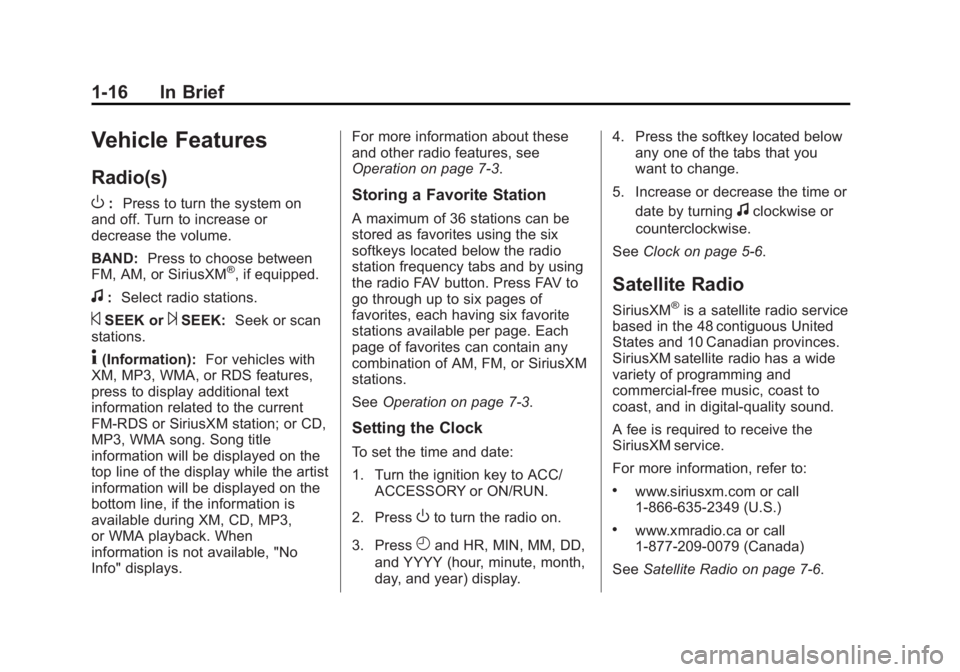
O : Press to turn the system on
and off. Turn to increase or
decrease the volume.
BAND: Press to choose between
FM, AM, or SiriusXM ®
, if equipped.
f : Select radio stations.
© SEEK or
¨ SEEK: Seek or scan
stations.
4 (Information): For vehicles with
XM, MP3, WMA, or RDS features,
press to display additional text
information related to the current
FM-RDS or SiriusXM station; or CD,
MP3, WMA song. Song title
information will be displayed on the
top line of the display while the artist
information will be displayed on the
bottom line, if the information is
available during XM, CD, MP3,
or WMA playback. When
information is not available, "No
Info" displays. For more information about these
and other radio features, see
Operation on page 7 ‑ 3 .
Storing a Favorite Station A maximum of 36 stations can be
stored as favorites using the six
softkeys located below the radio
station frequency tabs and by using
the radio FAV button. Press FAV to
go through up to six pages of
favorites, each having six favorite
stations available per page. Each
page of favorites can contain any
combination of AM, FM, or SiriusXM
stations.
See Operation on page 7 ‑ 3 .
Setting the Clock To set the time and date:
1. Turn the ignition key to ACC/
ACCESSORY or ON/RUN.
2. Press
O to turn the radio on.
3. Press
H and HR, MIN, MM, DD,
and YYYY (hour, minute, month,
day, and year) display. 4. Press the softkey located below
any one of the tabs that you
want to change.
5. Increase or decrease the time or
date by turning
f clockwise or
counterclockwise.
See Clock on page 5 ‑ 6 .
Satellite Radio SiriusXM ®
is a satellite radio service
based in the 48 contiguous United
States and 10 Canadian provinces.
SiriusXM satellite radio has a wide
variety of programming and
commercial-free music, coast to
coast, and in digital-quality sound.
A fee is required to receive the
SiriusXM service.
For more information, refer to: .
www.siriusxm.com or call
1-866-635-2349 (U.S.) .
www.xmradio.ca or call
1-877-209-0079 (Canada)
See Satellite Radio on page 7 ‑ 6 .
Page 22 of 374
Black plate (18,1)Chevrolet Captiva Sport Owner Manual - 2013 - crc - 11/12/12
1-18 In Brief RES+: Move the thumbwheel up to
resume a set speed or to accelerate
to a higher speed.
− SET: Press the thumbwheel to set
a speed or move the thumbwheel
down to decrease the speed.
See Cruise Control on page 9 ‑ 29 .
Driver Information
Center (DIC) The DIC has different displays in the
instrument cluster which can be
accessed by pressing the DIC
buttons on the instrument panel,
below the exterior lamps control.
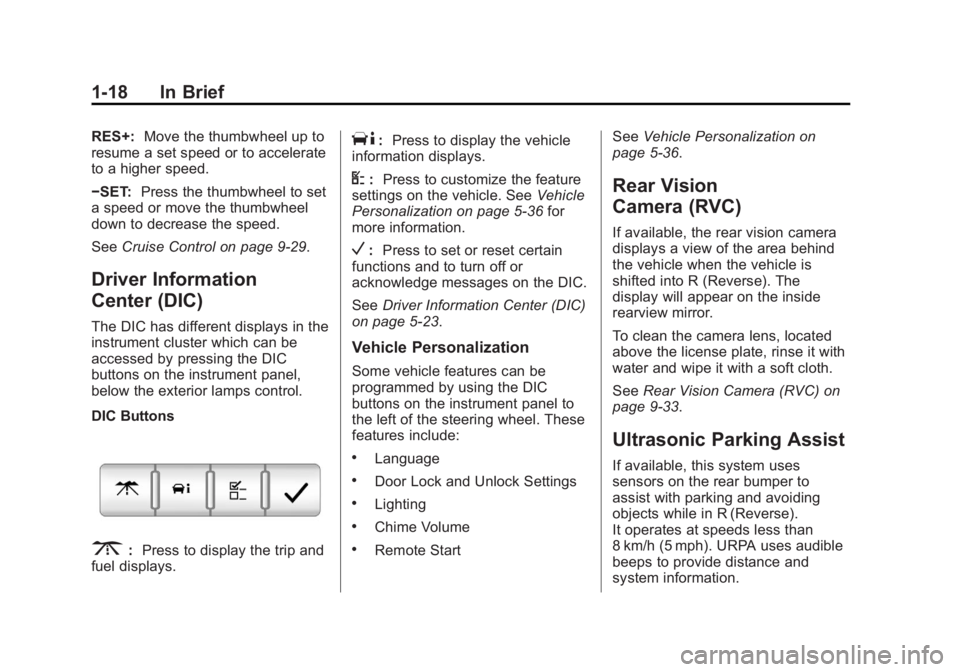
DIC Buttons
3 : Press to display the trip and
fuel displays. T : Press to display the vehicle
information displays.
U : Press to customize the feature
settings on the vehicle. See Vehicle
Personalization on page 5 ‑ 36 for
more information.
V : Press to set or reset certain
functions and to turn off or
acknowledge messages on the DIC.
See Driver Information Center (DIC)
on page 5 ‑ 23 .
Vehicle Personalization Some vehicle features can be
programmed by using the DIC
buttons on the instrument panel to
the left of the steering wheel. These
features include: .
Language .
Door Lock and Unlock Settings .
Lighting .
Chime Volume .
Remote Start See Vehicle Personalization on
page 5 ‑ 36 .
Rear Vision
Camera (RVC) If available, the rear vision camera
displays a view of the area behind
the vehicle when the vehicle is
shifted into R (Reverse). The
display will appear on the inside
rearview mirror.
To clean the camera lens, located
above the license plate, rinse it with
water and wipe it with a soft cloth.
See Rear Vision Camera (RVC) on
page 9 ‑ 33 .
Ultrasonic Parking Assist If available, this system uses
sensors on the rear bumper to
assist with parking and avoiding
objects while in R (Reverse).
It operates at speeds less than
8 km/h (5 mph). URPA uses audible
beeps to provide distance and
system information.
Page 27 of 374
Black plate (1,1)Chevrolet Captiva Sport Owner Manual - 2013 - crc - 11/12/12
Keys, Doors, and Windows 2-1
Keys, Doors, and
Windows Keys and Locks Keys . . . . . . . . . . . . . . . . . . . . . . . . . . 2-1
Remote Keyless Entry (RKE)
System . . . . . . . . . . . . . . . . . . . . . . 2-2
Remote Keyless Entry (RKE)
System Operation . . . . . . . . . . . 2-2
Remote Vehicle Start . . . . . . . . . 2-4
Door Locks . . . . . . . . . . . . . . . . . . . 2-6
Power Door Locks . . . . . . . . . . . . 2-6
Delayed Locking . . . . . . . . . . . . . . 2-6
Automatic Door Locks . . . . . . . . . 2-6
Lockout Protection . . . . . . . . . . . . 2-7
Safety Locks . . . . . . . . . . . . . . . . . . 2-7
Doors Liftgate . . . . . . . . . . . . . . . . . . . . . . . . 2-8 Vehicle Security Vehicle Security . . . . . . . . . . . . . . . 2-9
Vehicle Alarm System . . . . . . . . . 2-9
Immobilizer . . . . . . . . . . . . . . . . . . 2-10
Immobilizer Operation . . . . . . . 2-10
Exterior Mirrors Convex Mirrors . . . . . . . . . . . . . . 2-12
Power Mirrors . . . . . . . . . . . . . . . . 2-12
Folding Mirrors . . . . . . . . . . . . . . . 2-12
Heated Mirrors . . . . . . . . . . . . . . . 2-13
Interior Mirrors Manual Rearview Mirror . . . . . . 2-13
Automatic Dimming Rearview
Mirror . . . . . . . . . . . . . . . . . . . . . . . 2-13
Windows Windows . . . . . . . . . . . . . . . . . . . . . 2-14
Power Windows . . . . . . . . . . . . . 2-14
Sun Visors . . . . . . . . . . . . . . . . . . . 2-15
Roof Sunroof . . . . . . . . . . . . . . . . . . . . . . 2-15 Keys and Locks Keys
{ WARNINGLeaving children in a vehicle with
the ignition key is dangerous and
children or others could be
seriously injured or killed. They
could operate the power windows
or other controls or make the
vehicle move. The windows will
function with the keys in the
ignition, and children or others
could be caught in the path of a
closing window. Do not leave
children in a vehicle with the
ignition key.
Page 28 of 374
Black plate (2,1)Chevrolet Captiva Sport Owner Manual - 2013 - crc - 11/12/12
2-2 Keys, Doors, and Windows
The two keys can be used for the
ignition and all locks.
The key code is stamped on the key
number plate and can be used to
make new keys at any dealer. Store
this information in a safe place
outside the vehicle.
If it becomes difficult to turn a key,
inspect the key blade for debris.
Periodically clean with a brush
or pick.
With an active OnStar subscription,
an OnStar Advisor may remotely
unlock the vehicle. See OnStar
Overview on page 14 ‑ 1 . Remote Keyless Entry
(RKE) System See Radio Frequency Statement on
page 13 ‑ 20 for information
regarding Part 15 of the Federal
Communications Commission (FCC)
rules and Industry Canada
Standards RSS-GEN/210/220/310.
If there is a decrease in the RKE
operating range: .
Check the distance. The
transmitter may be too far from
the vehicle. .
Check the location. Other
vehicles or objects may be
blocking the signal. .
Check the transmitter's battery.
See “ Battery Replacement ” later
in this section. .
If the transmitter is still not
working correctly, see your
dealer or a qualified technician
for service. Remote Keyless Entry
(RKE) System Operation The Remote Keyless Entry (RKE)
transmitter functions work up to
20 m (65 ft) away from the vehicle.
Some conditions can affect the
performance of the transmitter. See
Remote Keyless Entry (RKE)
System on page 2 ‑ 2 .
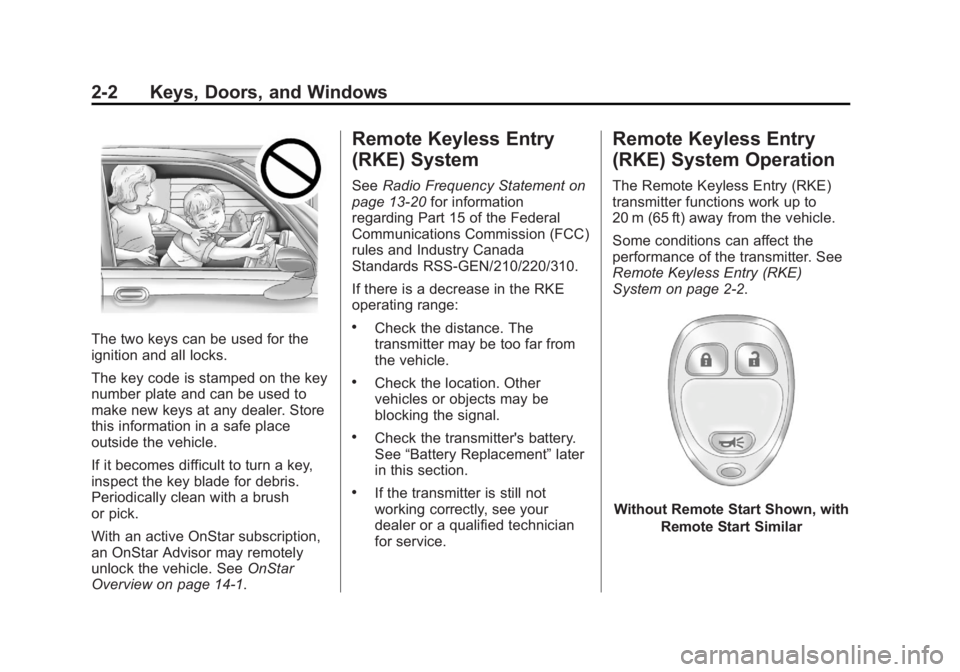
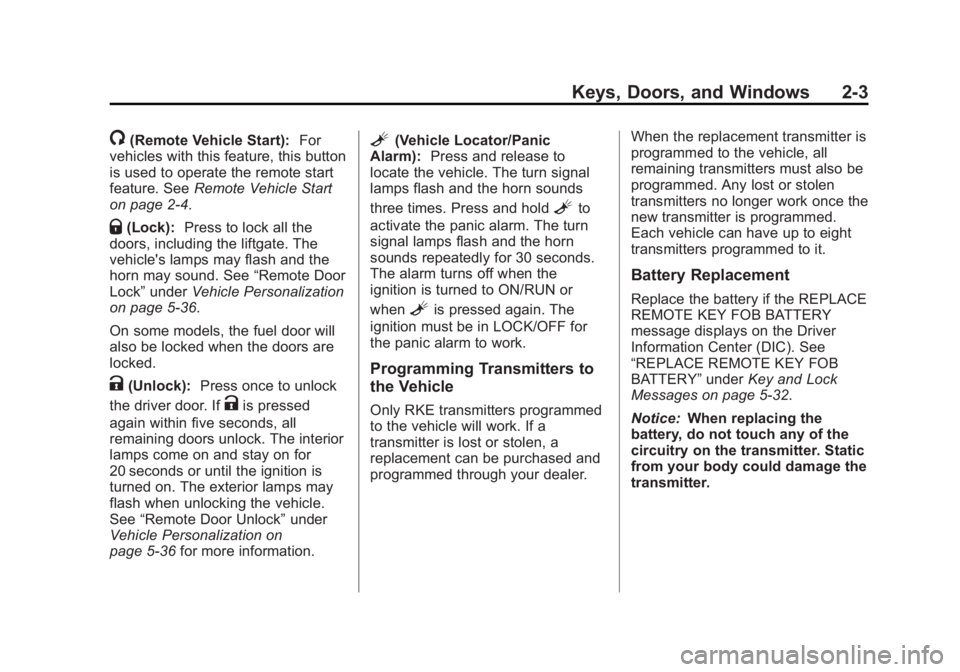
Without Remote Start Shown, with
Remote Start Similar
Page 29 of 374
Black plate (3,1)Chevrolet Captiva Sport Owner Manual - 2013 - crc - 11/12/12
Keys, Doors, and Windows 2-3
/ (Remote Vehicle Start): For
vehicles with this feature, this button
is used to operate the remote start
feature. See Remote Vehicle Start
on page 2 ‑ 4 .
Q (Lock): Press to lock all the
doors, including the liftgate. The
vehicle's lamps may flash and the
horn may sound. See “ Remote Door
Lock ” under Vehicle Personalization
on page 5 ‑ 36 .
On some models, the fuel door will
also be locked when the doors are
locked.
K (Unlock): Press once to unlock
the driver door. If
K is pressed
again within five seconds, all
remaining doors unlock. The interior
lamps come on and stay on for
20 seconds or until the ignition is
turned on. The exterior lamps may
flash when unlocking the vehicle.
See “ Remote Door Unlock ” under
Vehicle Personalization on
page 5 ‑ 36 for more information. L (Vehicle Locator/Panic
Alarm): Press and release to
locate the vehicle. The turn signal
lamps flash and the horn sounds
three times. Press and hold
L to
activate the panic alarm. The turn
signal lamps flash and the horn
sounds repeatedly for 30 seconds.
The alarm turns off when the
ignition is turned to ON/RUN or
when
L is pressed again. The
ignition must be in LOCK/OFF for
the panic alarm to work.
Programming Transmitters to
the Vehicle Only RKE transmitters programmed
to the vehicle will work. If a
transmitter is lost or stolen, a
replacement can be purchased and
programmed through your dealer. When the replacement transmitter is
programmed to the vehicle, all
remaining transmitters must also be
programmed. Any lost or stolen
transmitters no longer work once the
new transmitter is programmed.
Each vehicle can have up to eight
transmitters programmed to it.
Battery Replacement Replace the battery if the REPLACE
REMOTE KEY FOB BATTERY
message displays on the Driver
Information Center (DIC). See
“ REPLACE REMOTE KEY FOB
BATTERY ” under Key and Lock
Messages on page 5 ‑ 32 .
Notice: When replacing the
battery, do not touch any of the
circuitry on the transmitter. Static
from your body could damage the
transmitter.
Page 30 of 374
Black plate (4,1)Chevrolet Captiva Sport Owner Manual - 2013 - crc - 11/12/12
2-4 Keys, Doors, and Windows
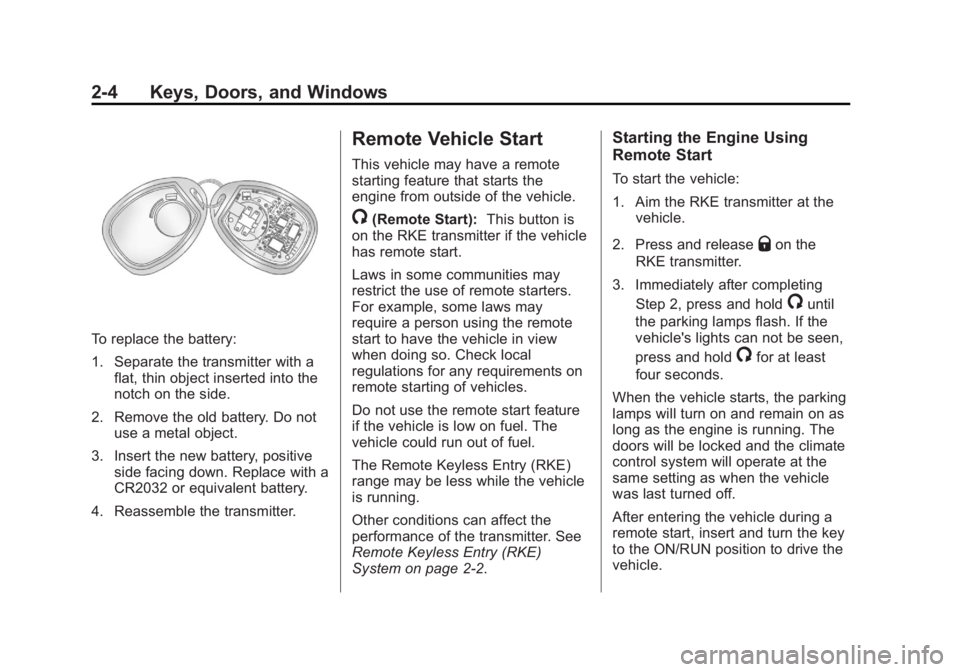
To replace the battery:
1. Separate the transmitter with a
flat, thin object inserted into the
notch on the side.
2. Remove the old battery. Do not
use a metal object.
3. Insert the new battery, positive
side facing down. Replace with a
CR2032 or equivalent battery.
4. Reassemble the transmitter. Remote Vehicle Start This vehicle may have a remote
starting feature that starts the
engine from outside of the vehicle.
/ (Remote Start): This button is
on the RKE transmitter if the vehicle
has remote start.
Laws in some communities may
restrict the use of remote starters.
For example, some laws may
require a person using the remote
start to have the vehicle in view
when doing so. Check local
regulations for any requirements on
remote starting of vehicles.
Do not use the remote start feature
if the vehicle is low on fuel. The
vehicle could run out of fuel.
The Remote Keyless Entry (RKE)
range may be less while the vehicle
is running.
Other conditions can affect the
performance of the transmitter. See
Remote Keyless Entry (RKE)
System on page 2 ‑ 2 . Starting the Engine Using
Remote Start To start the vehicle:
1. Aim the RKE transmitter at the
vehicle.
2. Press and release
Q on the
RKE transmitter.
3. Immediately after completing
Step 2, press and hold
/ until
the parking lamps flash. If the
vehicle's lights can not be seen,
press and hold
/ for at least
four seconds.
When the vehicle starts, the parking
lamps will turn on and remain on as
long as the engine is running. The
doors will be locked and the climate
control system will operate at the
same setting as when the vehicle
was last turned off.
After entering the vehicle during a
remote start, insert and turn the key
to the ON/RUN position to drive the
vehicle.
Page 32 of 374
Black plate (6,1)Chevrolet Captiva Sport Owner Manual - 2013 - crc - 11/12/12
2-6 Keys, Doors, and Windows
Door Locks
{ WARNINGUnlocked doors can be
dangerous. .
Passengers, especially
children, can easily open the
doors and fall out of a moving
vehicle. When a door is
locked, the handle will not
open it. The chance of being
thrown out of the vehicle in a
crash is increased if the
doors are not locked. So, all
passengers should wear
safety belts properly and the
doors should be locked
whenever the vehicle is
driven. .
Young children who get into
unlocked vehicles may be
unable to get out. A child can
be overcome by extreme heat
and can suffer permanent
(Continued) WARNING (Continued) injuries or even death from
heat stroke. Always lock the
vehicle whenever leaving it. .
Outsiders can easily enter
through an unlocked door
when you slow down or stop
the vehicle. Locking the doors
can help prevent this from
happening.
To lock or unlock a door, use the
key from the outside or the door
lock from the inside.
Power Door Locks Use the power door lock switch on
the front doors.
Q : Press to lock the doors.
K : Press to unlock the doors. Delayed Locking A chime will sound to indicate a
door or the liftgate is open when you
try to lock the doors with the power
door lock switch. The doors will not
lock, and the theft ‐ deterrent system
will not arm until all the doors are
closed and five seconds have
passed.
Automatic Door Locks Automatic Door Lock The doors are programmed to
automatically lock when the shift
lever is moved out of P (Park).
This feature can be programmed
through the Driver Information
Center (DIC). See “ Auto Door Lock ”
in Vehicle Personalization on
page 5 ‑ 36 .
Page 33 of 374
Black plate (7,1)Chevrolet Captiva Sport Owner Manual - 2013 - crc - 11/12/12
Keys, Doors, and Windows 2-7Automatic Door Unlock The doors can be programmed to
automatically unlock when the shift
lever is moved into P (Park). See
“ Auto Door Unlock ” in Vehicle
Personalization on page 5 ‑ 36 .
Lockout Protection When the power door lock switch is
pressed with the key in the ignition,
and any door is open, all the doors
lock and the driver door unlocks.
When doors are closed with the key
in the ignition, the horn will sound
as a reminder.
If the doors are locked with the
Remote Keyless Entry (RKE)
transmitter, and the key is in the
ignition, a chime sounds and all
except the driver door lock.
The lockout protection feature can
be overridden by holding the power
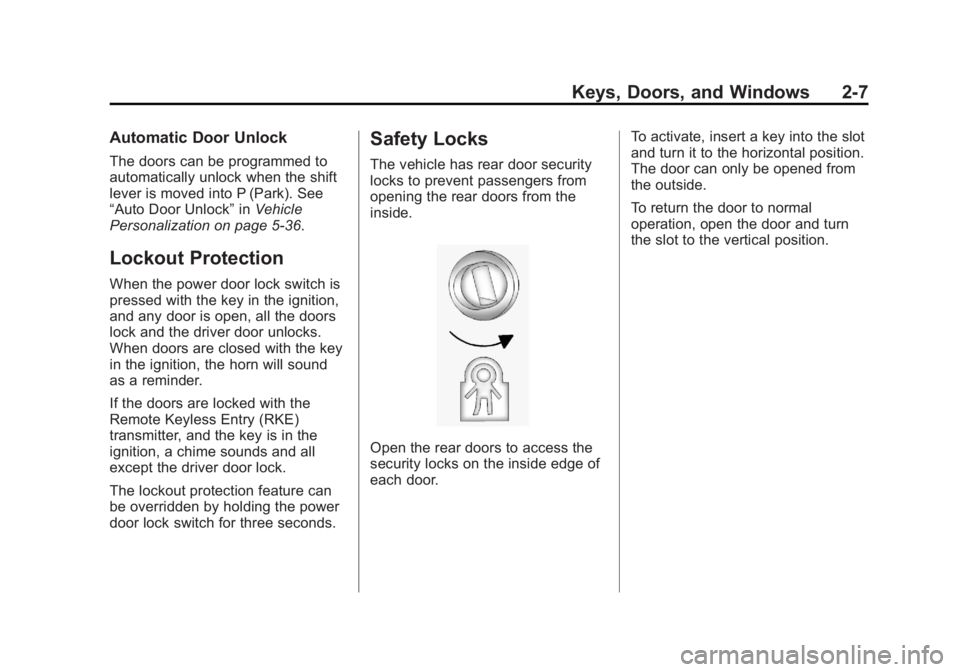
door lock switch for three seconds. Safety Locks The vehicle has rear door security
locks to prevent passengers from
opening the rear doors from the
inside.
Open the rear doors to access the
security locks on the inside edge of
each door. To activate, insert a key into the slot
and turn it to the horizontal position.
The door can only be opened from
the outside.
To return the door to normal
operation, open the door and turn
the slot to the vertical position.
Page 34 of 374
Black plate (8,1)Chevrolet Captiva Sport Owner Manual - 2013 - crc - 11/12/12
2-8 Keys, Doors, and Windows
Doors Liftgate
{ WARNINGExhaust gases can enter the
vehicle if it is driven with the
liftgate, trunk/hatch open, or with
any objects that pass through the
seal between the body and the
trunk/hatch or liftgate. Engine
exhaust contains Carbon
Monoxide (CO) which cannot be
seen or smelled. It can cause
unconsciousness and even death.
If the vehicle must be driven with
the liftgate, or trunk/hatch open: .
Close all of the windows. .
Fully open the air outlets on
or under the instrument
panel.
(Continued) WARNING (Continued) .
Adjust the Climate Control
system to a setting that
brings in only outside air and
set the fan speed to the
highest setting. See Climate
Control System in the Index. .
If the vehicle is equipped with
a power liftgate, disable the
power liftgate function.
For more information about
carbon monoxide, see Engine
Exhaust on page 9 ‑ 19 .
Notice: To avoid damage to the
liftgate or liftgate glass, make
sure the area above and behind
the liftgate is clear before
opening it. To lock or unlock the liftgate from
outside the vehicle, press
Q or
Ktwice on the Remote Keyless
Entry (RKE) transmitter. See
Remote Keyless Entry (RKE)
System Operation on page 2 ‑ 2 .
To lock or unlock the liftgate from
inside the vehicle, press
Q or
K on
the power door lock switch. See
Power Door Locks on page 2 ‑ 6 .
To open the liftgate, press the touch
pad on the underside of the liftgate
handle and pull up.
To close the liftgate, pull down using
the handle and close until it latches.
Page 35 of 374
Black plate (9,1)Chevrolet Captiva Sport Owner Manual - 2013 - crc - 11/12/12
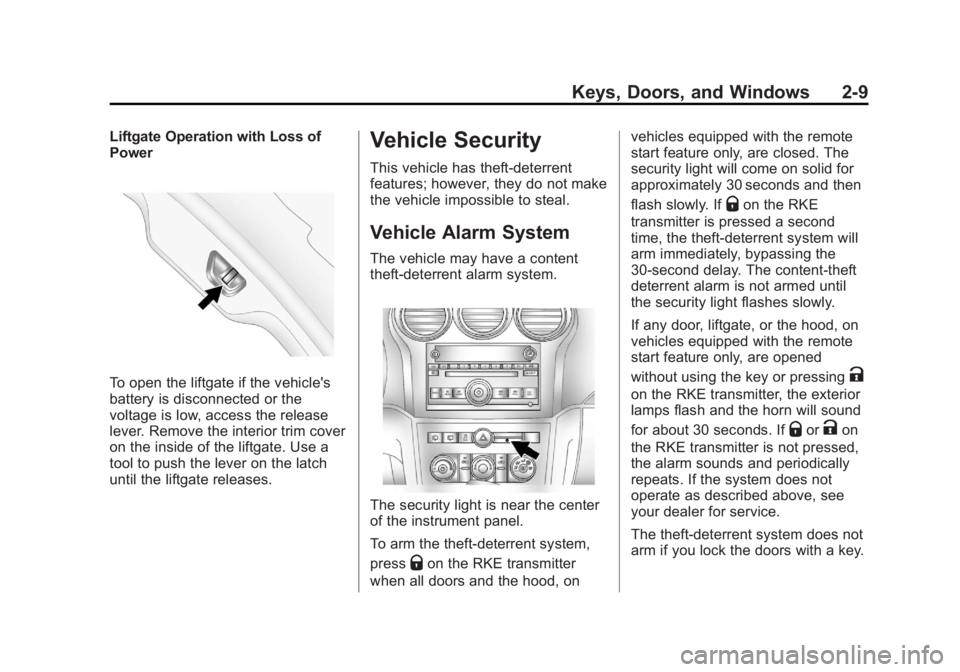
Keys, Doors, and Windows 2-9Liftgate Operation with Loss of
Power
To open the liftgate if the vehicle's
battery is disconnected or the
voltage is low, access the release
lever. Remove the interior trim cover
on the inside of the liftgate. Use a
tool to push the lever on the latch
until the liftgate releases. Vehicle Security This vehicle has theft-deterrent
features; however, they do not make
the vehicle impossible to steal.
Vehicle Alarm System The vehicle may have a content
theft-deterrent alarm system.
The security light is near the center
of the instrument panel.
To arm the theft-deterrent system,
press
Q on the RKE transmitter
when all doors and the hood, on vehicles equipped with the remote
start feature only, are closed. The
security light will come on solid for
approximately 30 seconds and then
flash slowly. If
Q on the RKE
transmitter is pressed a second
time, the theft-deterrent system will
arm immediately, bypassing the
30-second delay. The content-theft
deterrent alarm is not armed until
the security light flashes slowly.
If any door, liftgate, or the hood, on
vehicles equipped with the remote
start feature only, are opened
without using the key or pressing
Kon the RKE transmitter, the exterior
lamps flash and the horn will sound
for about 30 seconds. If
Q or
K on
the RKE transmitter is not pressed,
the alarm sounds and periodically
repeats. If the system does not
operate as described above, see
your dealer for service.
The theft-deterrent system does not
arm if you lock the doors with a key.