sport mode CHEVROLET CAPTIVA SPORT 2013 Owner's Manual
[x] Cancel search | Manufacturer: CHEVROLET, Model Year: 2013, Model line: CAPTIVA SPORT, Model: CHEVROLET CAPTIVA SPORT 2013Pages: 374, PDF Size: 6.66 MB
Page 168 of 374
Black plate (20,1)Chevrolet Captiva Sport Owner Manual - 2013 - crc - 11/12/12
7-20 Infotainment System .
Portable USB Hard Drives .
Fifth generation or later iPod .
iPod nano ®
.
iPod touch ®
.
iPod classic ®
Not all iPods and USB drives are
compatible with the USB port.
Make sure the iPod has the latest
firmware from Apple ®
for proper
operation. iPod firmware can be
updated using the latest iTunes ®
application. See www.apple.com/
itunes.
For help with identifying your iPod,
go to www.apple.com/support.
Radios that have a USB port can
play .mp3 and .wma files stored on a
USB storage device as well as AAC
files stored on an iPod.
USB Supported File and Folder
Structure
The radio supports: .
Up to 700 folders. .
Up to eight folders in depth. .
Up to 65,535 files. .
Folder and file names up to
64 bytes. .
Files with an .mp3 or .wma file
extension. .
AAC files stored on an iPod. .
FAT16. .
FAT32.
Connecting a USB Storage
Device or iPod The USB port can be used to
control an iPod or a USB storage
device.
To connect a USB storage device,
connect the device to the USB port
in the center console or on the
instrument panel.
To connect an iPod, connect one
end of the USB cable that came
with the iPod to the iPod ’ s dock
connector and connect the other
end to the USB port in the center
console. If the vehicle is on and the
USB connection works, OK to
disconnect and a GM logo may appear on the iPod and iPod
appears on the radio display. The
iPod music appears on the radio ’ s
display and begins playing.
The iPod charges while it is
connected to the vehicle if the
vehicle is in the ACC/ACCESSORY
or ON/RUN position. When the
vehicle is turned off, the iPod
automatically powers off and will not
charge or draw power from the
vehicle's battery.
If you have an older iPod model that
is not supported, it can still be used
by connecting it to the auxiliary
input jack using a standard 3.5 mm
(1/8 in) stereo cable. See “ Using the
Auxiliary Input Jack ” earlier for more
information.
Using the Radio to Control a
USB Storage Device or iPod
The radio can control a USB
storage device or an iPod using the
radio buttons and knobs, and
display song information on the
radio ’ s display.
Page 170 of 374
Black plate (22,1)Chevrolet Captiva Sport Owner Manual - 2013 - crc - 11/12/12
7-22 Infotainment System .
Third softkey, 5% through the list
each time the softkey is pressed. .
Fourth softkey, 10% through the
list each time the softkey is
pressed. .
Fifth softkey, end of the list.
h (Music Navigator): Press the
softkey below
h to view and
select a file on an iPod, using the
iPod's menu system. Files are
sorted by: .
Playlists .
Artists .
Albums .
Genres .
Songs .
Composers
To select files:
1. Press the softkey below
h .
2. Turn
f to scroll through the list
of menus. 3. Press
f to select the
desired menu.
4. Turn
f to scroll through the
folders or files in the
selected menu.
5. Press
f to select the desired file
to be played.
To skip through large lists, the five
softkeys can be used to navigate in
the following order: .
First softkey, first item in the list. .
Second softkey, 1% through the
list each time the softkey is
pressed. .
Third softkey, 5% through the list
each time the softkey is pressed. .
Fourth softkey, 10% through the
list each time the softkey is
pressed. .
Fifth softkey, end of the list. Repeat Functionality
To use Repeat:
Press the softkey below
" or
' to select between Repeat All and
Repeat Track.
" (Repeat All): Press the softkey
below
" to repeat all tracks. The
tab appears lowered when Repeat
All is being used. This is the default
mode when a USB storage device
or iPod is first connected.
' (Repeat Track): Press the
softkey below
' to repeat one
track. The tab appears raised when
Repeat Track is being used.
Shuffle Functionality
To use Shuffle:
Press the softkey below
> ,
2 ,
C , or
= to select between
Shuffle Off, Shuffle All Songs/
Shuffle Songs, Shuffle Album,
or Shuffle Folder.
Page 171 of 374
Black plate (23,1)Chevrolet Captiva Sport Owner Manual - 2013 - crc - 11/12/12
Infotainment System 7-23
> (Shuffle Off): Press the
softkey below
2 to turn shuffle
off. This is the default mode when a
USB storage device or iPod is first
connected.
2 (Shuffle All Songs/Shuffle
Songs): Press the softkey below
= or
C to shuffle all songs on
the USB storage device or iPod.
C (Shuffle Album): Press the
softkey below
> to shuffle all
songs in the current album on
an iPod.
= (Shuffle Folder): Press the
softkey below
> to shuffle all
songs in the current folder on a USB
storage device. Phone Bluetooth For vehicles equipped with
Bluetooth capability, the system can
interact with many cell phones,
allowing: .
Placement and receipt of calls in
a hands-free mode. .
Sharing of the cell phone ’ s
address book or contact list with
the vehicle.
To minimize driver distraction,
before driving, and with the vehicle
parked: .
Become familiar with the
features of the cell phone.
Organize the phone book and
contact lists clearly and delete
duplicate or rarely used entries.
If possible, program speed dial
or other shortcuts. .
Review the controls and
operation of the infotainment
system. .
Pair cell phone(s) to the vehicle.
The system may not work with
all cell phones. See “ Pairing ” in
this section for more information. .
If the cell phone has voice
dialing capability, learn to use
that feature to access the
address book or contact list. See
“ Voice Pass-Thru ” in this section
for more information. .
See “ Storing and Deleting Phone
Numbers ” in this section for
more information.
{ WARNING
When using a cell phone, it can
be distracting to look too long or
too often at the screen of the
phone or the infotainment
(navigation) system. Taking your
eyes off the road too long or too
often could cause a crash
resulting in injury or death. Focus
your attention on driving.
Page 179 of 374
Black plate (1,1)Chevrolet Captiva Sport Owner Manual - 2013 - crc - 11/12/12
Climate Controls 8-1
Climate Controls Climate Control Systems Climate Control Systems . . . . . . 8-1
Automatic Climate Control
System . . . . . . . . . . . . . . . . . . . . . . 8-4
Air Vents Air Vents . . . . . . . . . . . . . . . . . . . . . . 8-8
Maintenance Passenger Compartment Air
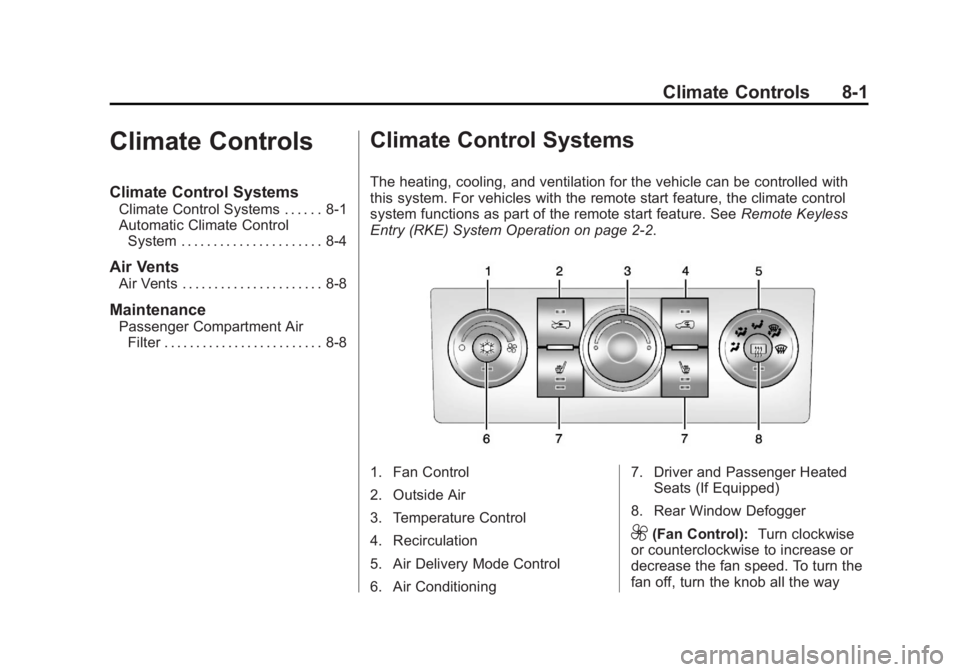
Filter . . . . . . . . . . . . . . . . . . . . . . . . . 8-8 Climate Control Systems The heating, cooling, and ventilation for the vehicle can be controlled with
this system. For vehicles with the remote start feature, the climate control
system functions as part of the remote start feature. See Remote Keyless
Entry (RKE) System Operation on page 2 ‑ 2 .
1. Fan Control
2. Outside Air
3. Temperature Control
4. Recirculation
5. Air Delivery Mode Control
6. Air Conditioning 7. Driver and Passenger Heated
Seats (If Equipped)
8. Rear Window Defogger
9 (Fan Control): Turn clockwise
or counterclockwise to increase or
decrease the fan speed. To turn the
fan off, turn the knob all the way
Page 180 of 374
Black plate (2,1)Chevrolet Captiva Sport Owner Manual - 2013 - crc - 11/12/12
8-2 Climate Controls counterclockwise. In any setting
other than off, the fan runs
continuously with the ignition on.
There will be some airflow
noticeable from the various outlets
when driving, even with the fan in
the off position. To turn off the air
completely, turn the fan to
9 and
select the @ button.
Temperature Control: Turn
clockwise or counterclockwise to
increase or decrease the
temperature inside the vehicle.
Air Delivery Mode Control: Turn
clockwise or counterclockwise to
change the current airflow mode.
Select from the following air delivery
modes:
H (Vent): Air is directed to the
instrument panel outlets.
) (Bi-Level): Air is divided
between the instrument panel and
the floor outlets.
6 (Floor): Air is directed to the
floor outlets with some air directed
to the windshield. When this mode is selected, the
system turns the recirculation mode
off. Recirculation mode cannot be
selected while in floor mode. This
helps prevent window fogging.
- (Defog): Clears the windows of
fog or moisture. Air is directed to the
floor outlets, with some air directed
to the windshield and side window
outlets. In this mode, the system
turns the recirculation mode off and
runs the air conditioning compressor
unless the outside air is at or below
freezing. Recirculation mode cannot
be selected while in defog mode.
This helps prevent window fogging.
0 (Defrost): Removes fog or frost
from the windshield more quickly.
Air is directed to the windshield and
the side window outlets. In this
mode, the system turns the
recirculation mode off automatically
and runs the air conditioning
compressor unless the outside air is
at or below freezing. Recirculation
mode cannot be selected while in
defrost mode. This helps prevent
window fogging. For best results, clear all snow and
ice from the windshield before
defrosting.
# (Air Conditioning): Press to
turn the air conditioning system on
or off. An indicator light comes on to
show that the air conditioning is on.
The air conditioning can be selected
in any mode as long as the fan is on
and the outside temperature is
above freezing. A flashing indicator
light indicates that the air
conditioning compressor is currently
not available.
On hot days, open the windows to
let hot inside air escape; then close
them. This helps reduce the time it
takes for the vehicle to cool down
and helps the system to operate
more efficiently.
For quick cool down on hot days,
select the following settings
together:
1. Select
H mode.
2. Select
8 .
Page 181 of 374
Black plate (3,1)Chevrolet Captiva Sport Owner Manual - 2013 - crc - 11/12/12
Climate Controls 8-33. Turn the
# on.
4. Select the coolest temperature
and highest fan speed.
5. Once the vehicle's interior
temperature is below the outside
temperature, select recirculation
mode for enhanced cooling.
Using these settings together for
long periods of time may cause the
air inside the vehicle to become too
dry. To prevent this from happening,
after the air inside of the vehicle has
cooled, turn the recirculation
mode off.
The air conditioning system
removes moisture from the air, so a
small amount of water might drip
under the vehicle while idling or
after turning off the engine. This is
normal.
8 (Outside Air): Press to turn
the outside air mode on. An
indicator light comes on to show
that outside air is on. Air from
outside the vehicle will circulate
throughout the vehicle. The outside air mode can be used with all
modes, but it cannot be used with
the recirculation mode. Pressing this
button will cancel the
recirculation mode.
@ (Recirculation): Press to turn
on the recirculation mode. An
indicator light comes on to show
that recirculation is on. This mode
recirculates and helps to quickly
cool or heat the air inside the
vehicle. It can be used to prevent
outside air and odors from entering
the vehicle. Avoid using the
recirculation mode during high
periods of humidity and cool outside
temperatures since this may result
in increased window fogging.
If window fogging is experienced,
select the defrost mode.
Recirculation mode is not available
in floor, defog, or defrost modes and
will shut off automatically and
change to outside air. The indicator
will flash if the button is selected in
any of these modes. This helps prevent window fogging and
moisture building up inside the
vehicle.
Rear Window Defogger The rear window defogger uses a
warming grid to remove fog from the
rear window.
The rear window defogger only
works when the ignition is in
ON/RUN.
1 (Rear Window Defogger):
Press to turn the rear window
defogger on or off. An indicator light
on the button comes on to show that
the rear window is activated.
The rear window defogger stays on
for approximately 10 minutes after
the button is pressed, unless the
ignition is turned to ACC/
ACCESSORY or LOCK/OFF.
If turned on again, the defogger only
runs for approximately five minutes
before turning off again. At higher
vehicle speeds, the defogger may
Page 182 of 374
Black plate (4,1)Chevrolet Captiva Sport Owner Manual - 2013 - crc - 11/12/12
8-4 Climate Controls stay on continuously. The defogger
can also be turned off by turning off
the engine.
Notice: Do not use anything
sharp on the inside of the rear
window. If you do, you could cut
or damage the warming grid, and
the repairs would not be covered
by the vehicle warranty. Do not
attach a temporary vehicle
license, tape, a decal, or anything
similar to the defogger grid.
Heated Front Seats (If Equipped)
L or
M : Press to heat the driver
or passenger seat cushion and
seatback. To turn off, press the
button until the indicator lights turn
off. See Heated Front Seats on
page 3 ‑ 6 .
Remote Start Climate Control
Operation
For vehicles with the remote start
feature, when it is activated, the
climate control system heats and
cools the inside of the vehicle using
the modes that were set before the
vehicle was turned off. Automatic Climate Control System The heating, cooling, and ventilation for the vehicle can be controlled with
this system. For vehicles with the remote start feature, the climate control
system functions as part of the remote start feature. See Remote Keyless
Entry (RKE) System Operation on page 2 ‑ 2 .
1. Fan Control
2. Outside Air
3. Temperature Control
4. Recirculation
5. Air Delivery Mode Control
6. Air Conditioning 7. Driver and Passenger Heated
Seats (If Equipped)
8. Rear Window Defogger
Automatic Operation
This climate control system
automatically maintains the desired
temperature inside the vehicle. Do
Page 183 of 374
Black plate (5,1)Chevrolet Captiva Sport Owner Manual - 2013 - crc - 11/12/12
Climate Controls 8-5not cover the sensor on the top of
the instrument panel near the
windshield, or the sensor grille
below the climate control faceplate.
These two sensors help regulate the
inside air temperature.
AUTO (Automatic Fan): Turn the
fan knob to AUTO for the system to
automatically adjust the fan speed
to reach the desired inside
temperature.
Temperature Control: Select the
desired cabin air temperature
between 16-32°C (60-90°F).
Choosing the coldest or warmest
temperature setting does not cause
the system to heat or cool any
faster.
AUTO (Automatic Air Delivery
Mode): Turn the air delivery mode
knob to AUTO for the system to
automatically control the direction of
the airflow to help reach the desired
inside temperature.
The system automatically controls
the air inlet to supply the outside air
or recirculated inside air needed to heat or cool the vehicle faster. The
@ button indicator light is lit
whenever the recirculation mode
is on.
Press the
8 button to change to
outside air. However, the
recirculation mode may turn back on
automatically.
In cold weather, if the fan and air
delivery modes are in automatic, the
system starts at lower fan speeds to
avoid directing cold air into the
vehicle until warmer air is available.
The climate control system directs
air to the floor, but may
automatically change modes as the
vehicle warms up to maintain the
chosen temperature setting. The
length of time needed to warm the
interior depends on the outside
temperature and inside temperature
of the vehicle.
Manual Operation
9 (Fan Control): Turn clockwise
or counterclockwise to increase or
decrease the fan speed. To turn the fan off, turn the left knob to the
9 position. In any setting other than
off, the fan runs continuously with
the ignition on. The fan must be
turned on to run the air conditioning
compressor. There will be some
airflow noticeable from the various
outlets when driving, even with the
fan in the off position. To turn off the
air completely, turn the fan to
9 and select the @ button.
Temperature Control: Turn
clockwise or counterclockwise to
increase or decrease the
temperature. Select the desired
cabin air temperature between
16-32°C (60-90°F). Typically, the
best setting is near 23°C (75°F).
Choosing the coldest or warmest
temperature setting does not cause
the system to heat or cool any
faster.
Air Delivery Mode Control: Turn
clockwise or counterclockwise to
change the current airflow mode.
Page 184 of 374
Black plate (6,1)Chevrolet Captiva Sport Owner Manual - 2013 - crc - 11/12/12
8-6 Climate Controls Select from the following air delivery
modes:
H (Vent): Air is directed to the
instrument panel outlets.
) (Bi-Level): Air is divided
between the instrument panel
outlets and the floor outlets.
6 (Floor): Air is directed to the
floor outlets with some air directed
to the windshield.
When this mode is selected, the
system turns the recirculation mode
off. Recirculation mode cannot be
selected while in floor mode. This is
to help prevent window fogging.
- (Defog): Clears the windows of
fog or moisture. Air is directed to the
floor outlets, with some air directed
to the windshield and side window
outlets. In this mode, the system
turns the recirculation mode off and
runs the air conditioning compressor
unless the outside air is at or below
freezing. Recirculation mode cannot
be selected while in defog mode.
This helps prevent window fogging. 0 (Defrost): Removes fog or frost
from the windshield more quickly.
Air is directed to the windshield and
the side window outlets. In this
mode, the system turns the
recirculation mode off automatically
and runs the air conditioning
compressor unless the outside air is
at or below freezing. Recirculation
mode cannot be selected while in
defrost mode. This helps prevent
window fogging.
For best results, clear all snow and
ice from the windshield before
defrosting.
# (Air Conditioning): Press to
turn the air conditioning system on
or off. An indicator light comes on to
show that the air conditioning is on.
The air conditioning can be selected
in any mode as long as the fan is on
and the outside temperature is
above freezing. A flashing indicator
light indicates that the air
conditioning compressor is currently
not available. On hot days, use the automatic fan
and automatic air delivery mode
settings and the vehicle will reach
the desired temperature more
quickly. The desired fan and air
delivery mode settings can still be
adjusted manually. Open the
windows to let the hot inside air
escape, then close them. This helps
reduce the time it takes for the
vehicle to cool down and helps the
system to operate more efficiently.
The air conditioning system
removes moisture from the air, so a
small amount of water might drip
under the vehicle while idling or
after turning off the engine.
8 (Outside Air): Press to turn
the outside air mode on. An
indicator light comes on to show
that outside air is on. Air from
outside the vehicle will circulate
throughout the vehicle. The outside
air mode can be used with all
modes, but it cannot be used with
the recirculation mode. Pressing this
button will cancel the
recirculation mode.
Page 185 of 374
Black plate (7,1)Chevrolet Captiva Sport Owner Manual - 2013 - crc - 11/12/12
Climate Controls 8-7@ (Recirculation): Press to turn
on the recirculation mode. An
indicator light comes on to show
that recirculation is on. This mode
recirculates and helps to quickly
cool or heat the air inside the
vehicle. It can be used to prevent
outside air and odors from entering
the vehicle. Avoid using the
recirculation mode during high
periods of humidity and cool outside
temperatures since this may result
in increased window fogging.
If window fogging is experienced,
select the defrost mode.
Recirculation mode is not available
in floor, defog, or defrost modes and
will shut off automatically and
change to outside air. If the button is
selected in any of these modes, the
indicator will flash. This helps
prevent window fogging and
moisture building up inside the
vehicle. Rear Window Defogger The rear window defogger uses a
warming grid to remove fog from the
rear window.
The rear window defogger only
works when the ignition is in
ON/RUN.
1 (Rear Window Defogger):
Press to turn the rear window
defogger on or off. An indicator light
on the button comes on to show that
it is activated.
The rear window defogger stays on
for approximately 10 minutes after
the button is pressed, unless the
ignition is turned to ACC/
ACCESSORY or LOCK/OFF.
If turned on again, the defogger only
runs for approximately five minutes
before turning off. At higher vehicle
speeds, the defogger may stay on
continuously. The defogger can also
be turned off by turning off the
engine. Notice: Do not use anything
sharp on the inside of the rear
window. If you do, you could cut
or damage the warming grid, and
the repairs would not be covered
by the vehicle warranty. Do not
attach a temporary vehicle
license, tape, a decal, or anything
similar to the defogger grid.
L or
M Heated Front Seats (If
Equipped): Press to heat the driver
or passenger seat cushion and
seatback. To turn off, press the
button until the indicator lights turn
off. See Heated Front Seats on
page 3 ‑ 6 .
Remote Start Climate Control
Operation
For vehicles with the remote start
feature, when it is activated, the
climate control system heats and
cools the inside of the vehicle using
the modes that were set before the
vehicle was turned off.