air conditioning CHEVROLET CAPTIVA SPORT 2013 Owners Manual
[x] Cancel search | Manufacturer: CHEVROLET, Model Year: 2013, Model line: CAPTIVA SPORT, Model: CHEVROLET CAPTIVA SPORT 2013Pages: 374, PDF Size: 6.66 MB
Page 4 of 374
Black plate (4,1)Chevrolet Captiva Sport Owner Manual - 2013 - crc - 11/12/12
iv Introduction Notice: This means there is
something that could result in
property or vehicle damage. This
would not be covered by the
vehicle's warranty.
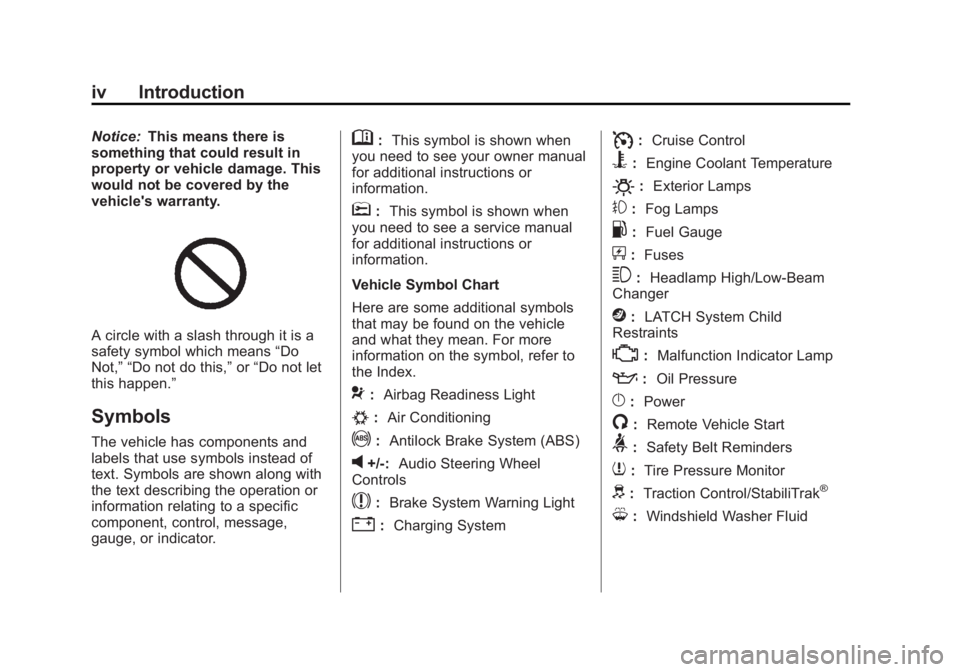
A circle with a slash through it is a
safety symbol which means “ Do
Not, ” “ Do not do this, ” or “ Do not let
this happen. ”
Symbols The vehicle has components and
labels that use symbols instead of
text. Symbols are shown along with
the text describing the operation or
information relating to a specific
component, control, message,
gauge, or indicator. M : This symbol is shown when
you need to see your owner manual
for additional instructions or
information.
* : This symbol is shown when
you need to see a service manual
for additional instructions or
information.
Vehicle Symbol Chart
Here are some additional symbols
that may be found on the vehicle
and what they mean. For more
information on the symbol, refer to
the Index.
9 : Airbag Readiness Light
# : Air Conditioning
! : Antilock Brake System (ABS)
v +/-: Audio Steering Wheel
Controls
$ : Brake System Warning Light
" : Charging System I : Cruise Control
B : Engine Coolant Temperature
O : Exterior Lamps
# : Fog Lamps
. : Fuel Gauge
+ : Fuses
3 : Headlamp High/Low-Beam
Changer
j : LATCH System Child
Restraints
* : Malfunction Indicator Lamp
: : Oil Pressure
} : Power
/ : Remote Vehicle Start
> : Safety Belt Reminders
7 : Tire Pressure Monitor
d : Traction Control/StabiliTrak ®
M : Windshield Washer Fluid
Page 18 of 374
Black plate (14,1)Chevrolet Captiva Sport Owner Manual - 2013 - crc - 11/12/12
1-14 In Brief 3 : Sets a delay between wipes.
Move the switch on top of the lever
left for less frequent wipes or right
for more frequent wipes.
a : Slow wipes.
1 : Fast wipes.
Windshield Washer
Pull the windshield wiper lever to
spray windshield washer fluid and
activate the wipers. The wipers will
continue until the lever is released
or the maximum wash time is
reached.
Rear Window Wiper/Washer
The rear wiper and rear wash button
is on the instrument panel above the
climate control system.
= : Press to wash and wipe the
rear window.
5 : Press to turn the delayed
wiping on or off.
See Windshield Wiper/Washer on
page 5 ‑ 3 and Rear Window Wiper/
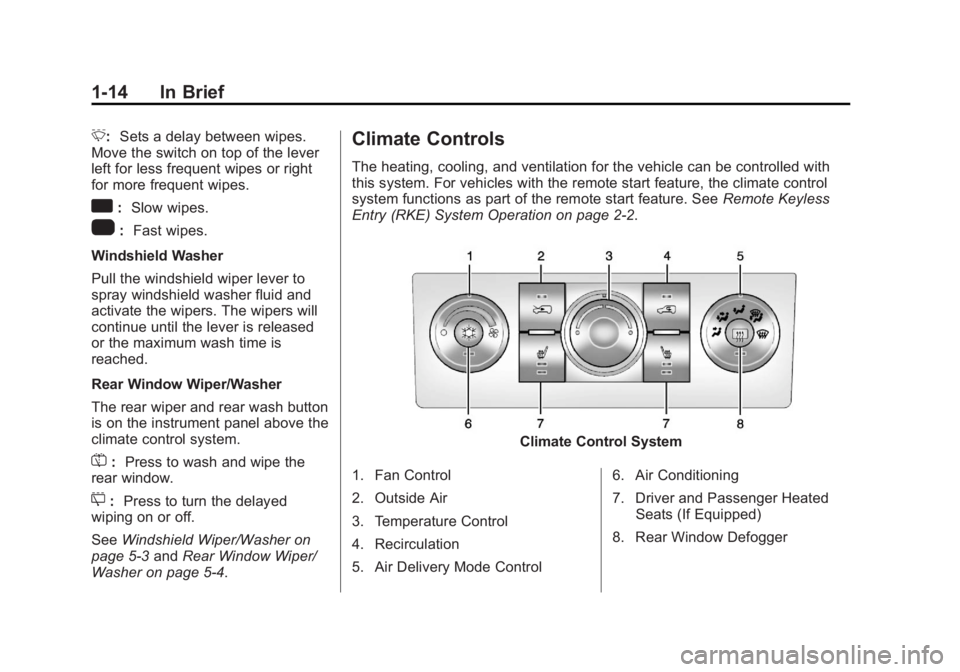
Washer on page 5 ‑ 4 . Climate Controls The heating, cooling, and ventilation for the vehicle can be controlled with
this system. For vehicles with the remote start feature, the climate control
system functions as part of the remote start feature. See Remote Keyless
Entry (RKE) System Operation on page 2 ‑ 2 .
Climate Control System
1. Fan Control
2. Outside Air
3. Temperature Control
4. Recirculation
5. Air Delivery Mode Control 6. Air Conditioning
7. Driver and Passenger Heated
Seats (If Equipped)
8. Rear Window Defogger
Page 19 of 374
Black plate (15,1)Chevrolet Captiva Sport Owner Manual - 2013 - crc - 11/12/12
In Brief 1-15
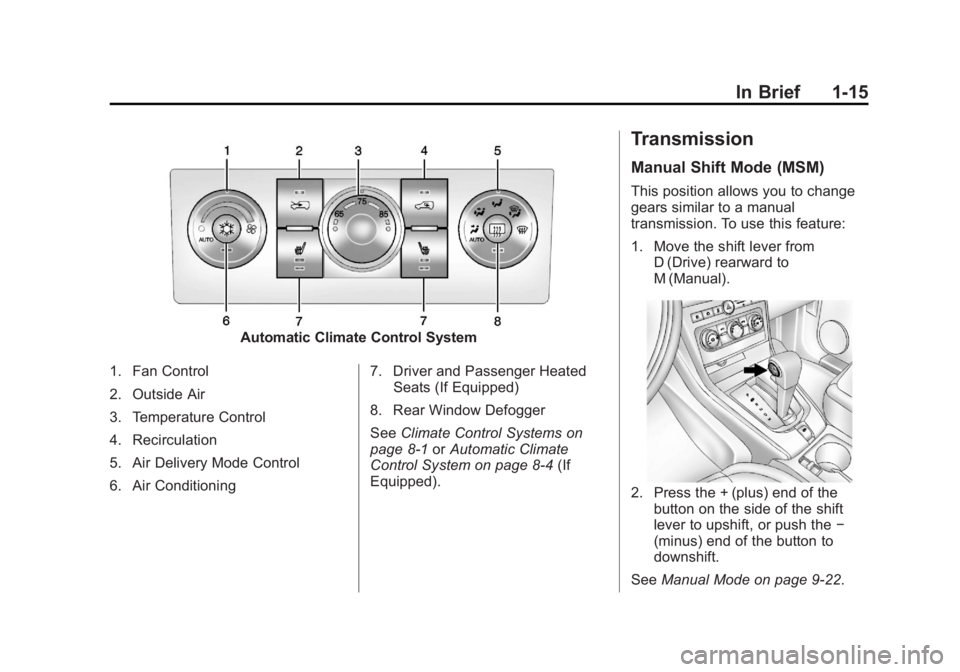
Automatic Climate Control System
1. Fan Control
2. Outside Air
3. Temperature Control
4. Recirculation
5. Air Delivery Mode Control
6. Air Conditioning 7. Driver and Passenger Heated
Seats (If Equipped)
8. Rear Window Defogger
See Climate Control Systems on
page 8 ‑ 1 or Automatic Climate
Control System on page 8 ‑ 4 (If
Equipped). Transmission Manual Shift Mode (MSM) This position allows you to change
gears similar to a manual
transmission. To use this feature:
1. Move the shift lever from
D (Drive) rearward to
M (Manual).
2. Press the + (plus) end of the
button on the side of the shift
lever to upshift, or push the −
(minus) end of the button to
downshift.
See Manual Mode on page 9 ‑ 22 .
Page 126 of 374
Black plate (30,1)Chevrolet Captiva Sport Owner Manual - 2013 - crc - 11/12/12
5-30 Instruments and Controls
Engine Cooling System
Messages ENGINE HOT A/C (Air
Conditioning) OFF This message displays when the
engine coolant becomes hotter than
the normal operating temperature.
To avoid added strain on a hot
engine, the air conditioning
compressor is automatically turned
off. When the coolant temperature
returns to normal, the A/C operation
automatically resumes. You can
continue to drive the vehicle.
ENGINE OVERHEATED IDLE
ENGINE Notice: If you drive the vehicle
while the engine is overheating,
severe engine damage may
occur. If an overheat warning
appears on the instrument cluster
and/or DIC, stop the vehicle as
soon as possible. Do not increase
the engine speed above normal idling speed. See Engine
Overheating on page 10 ‑ 18 for
more information.
This message displays when the
engine coolant temperature is too
hot. Stop and allow the vehicle to
idle until it cools down.
ENGINE OVERHEATED STOP
ENGINE Notice: If you drive the vehicle
while the engine is overheating,
severe engine damage may
occur. If an overheat warning
appears on the instrument cluster
and/or DIC, stop the vehicle as
soon as possible. Do not increase
the engine speed above normal
idling speed. See Engine
Overheating on page 10 ‑ 18 for
more information.
This message displays along with a
continuous chime when the engine
has overheated. Stop and turn the
engine off immediately to avoid
severe engine damage. See Engine
Overheating on page 10 ‑ 18 .Engine Oil Messages CHANGE ENGINE OIL NOW This message displays when
service is urgently required. This
indicates that the oil life remaining is
less than one percent and the oil
cannot work correctly to avoid
engine wear or damage. See your
dealer. See Engine Oil on page 10 ‑ 8
and Maintenance Schedule on
page 11 ‑ 3 .
Acknowledging this message will
not reset the OIL LIFE REMAINING
display. That must be done at the
OIL LIFE screen. See “ Oil Life ”
under Driver Information Center
(DIC) on page 5 ‑ 23 and Engine Oil
Life System on page 10 ‑ 10 .
CHANGE ENGINE OIL SOON
This message displays when oil life
remaining is between one and
five percent and service is required
for the vehicle. See your dealer. See
Engine Oil on page 10 ‑ 8 and
Maintenance Schedule on
page 11 ‑ 3 .
Page 130 of 374
Black plate (34,1)Chevrolet Captiva Sport Owner Manual - 2013 - crc - 11/12/12
5-34 Instruments and Controls
Service Vehicle Messages SERVICE A/C (Air
Conditioning) SYSTEM This message displays when there
is a problem detected in the air
conditioning system. Have the
vehicle serviced by your dealer.
SERVICE VEHICLE SOON This message displays when a
non-emissions-related malfunction
occurs. Have the vehicle serviced
by your dealer as soon as possible.
Tire Messages CHECK TIRE PRESSURE On vehicles with the Tire Pressure
Monitor System (TPMS), this
message displays when the
pressure in one or more of the
vehicle's tires needs to be checked.
This message also displays LEFT
FRONT, RIGHT FRONT, LEFT
REAR, or RIGHT REAR to indicate
which tire needs to be checked. You
can receive more than one tire pressure message at a time. To
read the other messages that may
have been sent at the same time,
press the set/reset button. If a tire
pressure message appears on the
DIC, stop as soon as you can. Have
the tire pressures checked and set
to those shown on the Tire and
Loading Information label. See Tires
on page 10 ‑ 36 , Vehicle Load Limits
on page 9 ‑ 10 , and Tire Pressure on
page 10 ‑ 43 . The DIC also shows
the tire pressure values. See Driver
Information Center (DIC) on
page 5 ‑ 23 . If the tire pressure is low,
the low tire pressure warning light
comes on. See Tire Pressure Light
on page 5 ‑ 20 .
SERVICE TIRE MONITORING
SYSTEM
On vehicles with the Tire Pressure
Monitor System (TPMS), this
message displays if a part on the
TPMS is not working properly. The
tire pressure light also flashes and
then remains on during the same
ignition cycle. See Tire Pressure Light on page 5 ‑ 20 . Several
conditions may cause this message
to appear. See Tire Pressure
Monitor Operation on page 10 ‑ 46 for
more information. If the warning
comes on and stays on, there may
be a problem with the TPMS. See
your dealer.
TIRE LEARNING ACTIVE On vehicles with the Tire Pressure
Monitor System (TPMS), this
message displays when the TPMS
is re-learning the tire positions on
the vehicle. The tire positions must
be re-learned after rotating the tires
or after replacing a tire or sensor.
See Tire Rotation on page 10 ‑ 49 ,
Tire Pressure Monitor System on
page 10 ‑ 45 , and Tire Pressure on
page 10 ‑ 43 for more information.
Page 179 of 374
Black plate (1,1)Chevrolet Captiva Sport Owner Manual - 2013 - crc - 11/12/12
Climate Controls 8-1
Climate Controls Climate Control Systems Climate Control Systems . . . . . . 8-1
Automatic Climate Control
System . . . . . . . . . . . . . . . . . . . . . . 8-4
Air Vents Air Vents . . . . . . . . . . . . . . . . . . . . . . 8-8
Maintenance Passenger Compartment Air
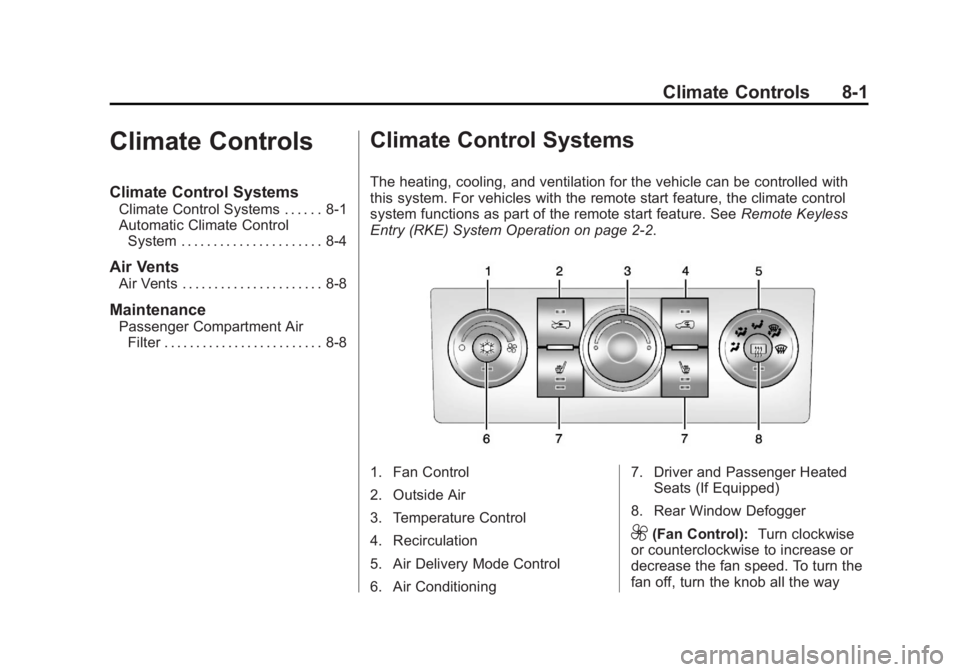
Filter . . . . . . . . . . . . . . . . . . . . . . . . . 8-8 Climate Control Systems The heating, cooling, and ventilation for the vehicle can be controlled with
this system. For vehicles with the remote start feature, the climate control
system functions as part of the remote start feature. See Remote Keyless
Entry (RKE) System Operation on page 2 ‑ 2 .
1. Fan Control
2. Outside Air
3. Temperature Control
4. Recirculation
5. Air Delivery Mode Control
6. Air Conditioning 7. Driver and Passenger Heated
Seats (If Equipped)
8. Rear Window Defogger
9 (Fan Control): Turn clockwise
or counterclockwise to increase or
decrease the fan speed. To turn the
fan off, turn the knob all the way
Page 180 of 374
Black plate (2,1)Chevrolet Captiva Sport Owner Manual - 2013 - crc - 11/12/12
8-2 Climate Controls counterclockwise. In any setting
other than off, the fan runs
continuously with the ignition on.
There will be some airflow
noticeable from the various outlets
when driving, even with the fan in
the off position. To turn off the air
completely, turn the fan to
9 and
select the @ button.
Temperature Control: Turn
clockwise or counterclockwise to
increase or decrease the
temperature inside the vehicle.
Air Delivery Mode Control: Turn
clockwise or counterclockwise to
change the current airflow mode.
Select from the following air delivery
modes:
H (Vent): Air is directed to the
instrument panel outlets.
) (Bi-Level): Air is divided
between the instrument panel and
the floor outlets.
6 (Floor): Air is directed to the
floor outlets with some air directed
to the windshield. When this mode is selected, the
system turns the recirculation mode
off. Recirculation mode cannot be
selected while in floor mode. This
helps prevent window fogging.
- (Defog): Clears the windows of
fog or moisture. Air is directed to the
floor outlets, with some air directed
to the windshield and side window
outlets. In this mode, the system
turns the recirculation mode off and
runs the air conditioning compressor
unless the outside air is at or below
freezing. Recirculation mode cannot
be selected while in defog mode.
This helps prevent window fogging.
0 (Defrost): Removes fog or frost
from the windshield more quickly.
Air is directed to the windshield and
the side window outlets. In this
mode, the system turns the
recirculation mode off automatically
and runs the air conditioning
compressor unless the outside air is
at or below freezing. Recirculation
mode cannot be selected while in
defrost mode. This helps prevent
window fogging. For best results, clear all snow and
ice from the windshield before
defrosting.
# (Air Conditioning): Press to
turn the air conditioning system on
or off. An indicator light comes on to
show that the air conditioning is on.
The air conditioning can be selected
in any mode as long as the fan is on
and the outside temperature is
above freezing. A flashing indicator
light indicates that the air
conditioning compressor is currently
not available.
On hot days, open the windows to
let hot inside air escape; then close
them. This helps reduce the time it
takes for the vehicle to cool down
and helps the system to operate
more efficiently.
For quick cool down on hot days,
select the following settings
together:
1. Select
H mode.
2. Select
8 .
Page 181 of 374
Black plate (3,1)Chevrolet Captiva Sport Owner Manual - 2013 - crc - 11/12/12
Climate Controls 8-33. Turn the
# on.
4. Select the coolest temperature
and highest fan speed.
5. Once the vehicle's interior
temperature is below the outside
temperature, select recirculation
mode for enhanced cooling.
Using these settings together for
long periods of time may cause the
air inside the vehicle to become too
dry. To prevent this from happening,
after the air inside of the vehicle has
cooled, turn the recirculation
mode off.
The air conditioning system
removes moisture from the air, so a
small amount of water might drip
under the vehicle while idling or
after turning off the engine. This is
normal.
8 (Outside Air): Press to turn
the outside air mode on. An
indicator light comes on to show
that outside air is on. Air from
outside the vehicle will circulate
throughout the vehicle. The outside air mode can be used with all
modes, but it cannot be used with
the recirculation mode. Pressing this
button will cancel the
recirculation mode.
@ (Recirculation): Press to turn
on the recirculation mode. An
indicator light comes on to show
that recirculation is on. This mode
recirculates and helps to quickly
cool or heat the air inside the
vehicle. It can be used to prevent
outside air and odors from entering
the vehicle. Avoid using the
recirculation mode during high
periods of humidity and cool outside
temperatures since this may result
in increased window fogging.
If window fogging is experienced,
select the defrost mode.
Recirculation mode is not available
in floor, defog, or defrost modes and
will shut off automatically and
change to outside air. The indicator
will flash if the button is selected in
any of these modes. This helps prevent window fogging and
moisture building up inside the
vehicle.
Rear Window Defogger The rear window defogger uses a
warming grid to remove fog from the
rear window.
The rear window defogger only
works when the ignition is in
ON/RUN.
1 (Rear Window Defogger):
Press to turn the rear window
defogger on or off. An indicator light
on the button comes on to show that
the rear window is activated.
The rear window defogger stays on
for approximately 10 minutes after
the button is pressed, unless the
ignition is turned to ACC/
ACCESSORY or LOCK/OFF.
If turned on again, the defogger only
runs for approximately five minutes
before turning off again. At higher
vehicle speeds, the defogger may
Page 182 of 374
Black plate (4,1)Chevrolet Captiva Sport Owner Manual - 2013 - crc - 11/12/12
8-4 Climate Controls stay on continuously. The defogger
can also be turned off by turning off
the engine.
Notice: Do not use anything
sharp on the inside of the rear
window. If you do, you could cut
or damage the warming grid, and
the repairs would not be covered
by the vehicle warranty. Do not
attach a temporary vehicle
license, tape, a decal, or anything
similar to the defogger grid.
Heated Front Seats (If Equipped)
L or
M : Press to heat the driver
or passenger seat cushion and
seatback. To turn off, press the
button until the indicator lights turn
off. See Heated Front Seats on
page 3 ‑ 6 .
Remote Start Climate Control
Operation
For vehicles with the remote start
feature, when it is activated, the
climate control system heats and
cools the inside of the vehicle using
the modes that were set before the
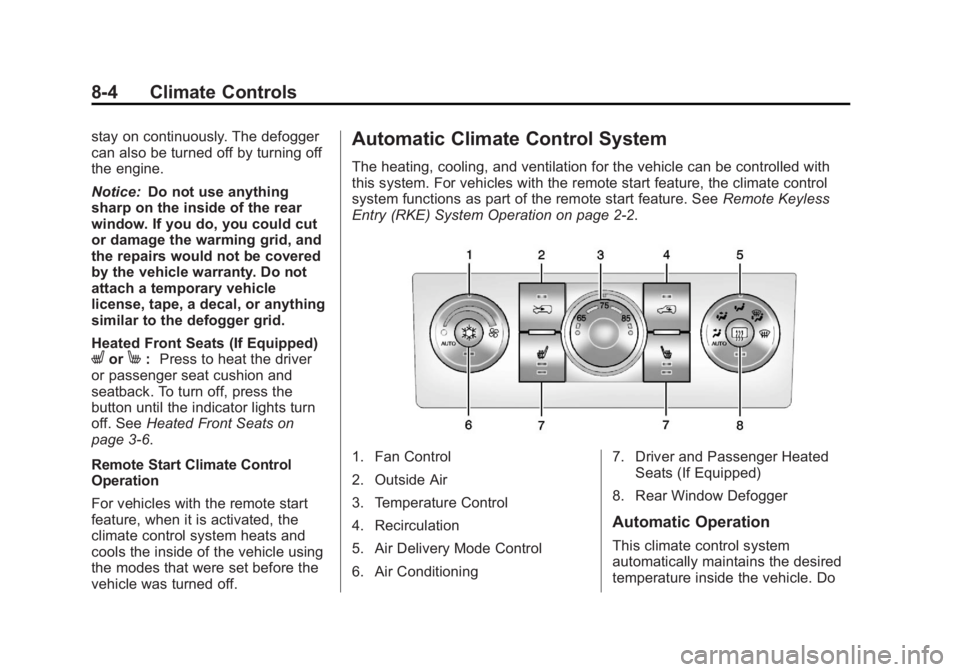
vehicle was turned off. Automatic Climate Control System The heating, cooling, and ventilation for the vehicle can be controlled with
this system. For vehicles with the remote start feature, the climate control
system functions as part of the remote start feature. See Remote Keyless
Entry (RKE) System Operation on page 2 ‑ 2 .
1. Fan Control
2. Outside Air
3. Temperature Control
4. Recirculation
5. Air Delivery Mode Control
6. Air Conditioning 7. Driver and Passenger Heated
Seats (If Equipped)
8. Rear Window Defogger
Automatic Operation
This climate control system
automatically maintains the desired
temperature inside the vehicle. Do
Page 183 of 374
Black plate (5,1)Chevrolet Captiva Sport Owner Manual - 2013 - crc - 11/12/12
Climate Controls 8-5not cover the sensor on the top of
the instrument panel near the
windshield, or the sensor grille
below the climate control faceplate.
These two sensors help regulate the
inside air temperature.
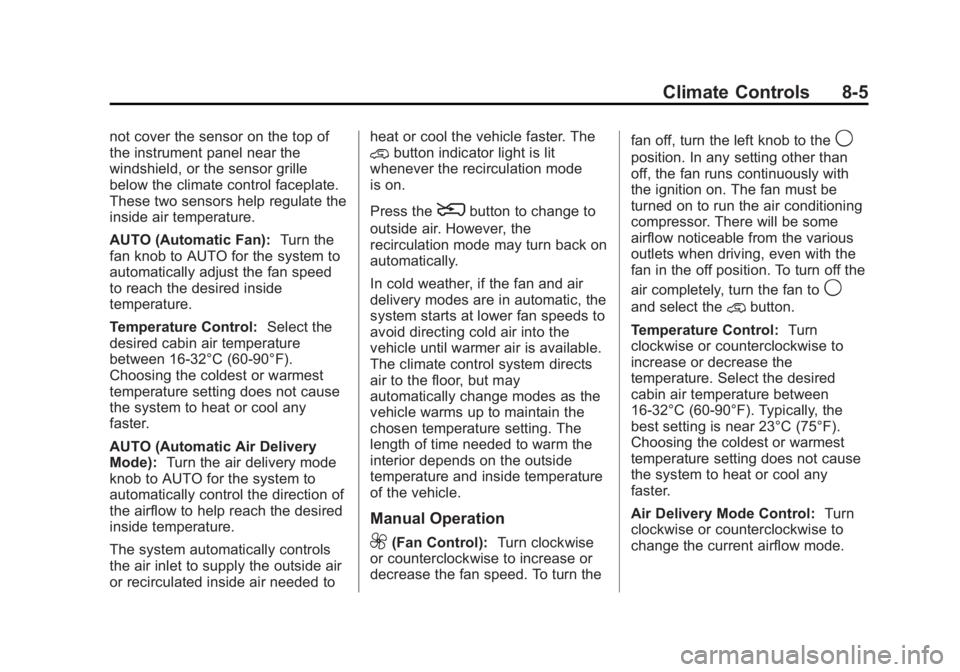
AUTO (Automatic Fan): Turn the
fan knob to AUTO for the system to
automatically adjust the fan speed
to reach the desired inside
temperature.
Temperature Control: Select the
desired cabin air temperature
between 16-32°C (60-90°F).
Choosing the coldest or warmest
temperature setting does not cause
the system to heat or cool any
faster.
AUTO (Automatic Air Delivery
Mode): Turn the air delivery mode
knob to AUTO for the system to
automatically control the direction of
the airflow to help reach the desired
inside temperature.
The system automatically controls
the air inlet to supply the outside air
or recirculated inside air needed to heat or cool the vehicle faster. The
@ button indicator light is lit
whenever the recirculation mode
is on.
Press the
8 button to change to
outside air. However, the
recirculation mode may turn back on
automatically.
In cold weather, if the fan and air
delivery modes are in automatic, the
system starts at lower fan speeds to
avoid directing cold air into the
vehicle until warmer air is available.
The climate control system directs
air to the floor, but may
automatically change modes as the
vehicle warms up to maintain the
chosen temperature setting. The
length of time needed to warm the
interior depends on the outside
temperature and inside temperature
of the vehicle.
Manual Operation
9 (Fan Control): Turn clockwise
or counterclockwise to increase or
decrease the fan speed. To turn the fan off, turn the left knob to the
9 position. In any setting other than
off, the fan runs continuously with
the ignition on. The fan must be
turned on to run the air conditioning
compressor. There will be some
airflow noticeable from the various
outlets when driving, even with the
fan in the off position. To turn off the
air completely, turn the fan to
9 and select the @ button.
Temperature Control: Turn
clockwise or counterclockwise to
increase or decrease the
temperature. Select the desired
cabin air temperature between
16-32°C (60-90°F). Typically, the
best setting is near 23°C (75°F).
Choosing the coldest or warmest
temperature setting does not cause
the system to heat or cool any
faster.
Air Delivery Mode Control: Turn
clockwise or counterclockwise to
change the current airflow mode.