coolant temperature CHEVROLET CAPTIVA SPORT 2013 Owners Manual
[x] Cancel search | Manufacturer: CHEVROLET, Model Year: 2013, Model line: CAPTIVA SPORT, Model: CHEVROLET CAPTIVA SPORT 2013Pages: 374, PDF Size: 6.66 MB
Page 4 of 374
Black plate (4,1)Chevrolet Captiva Sport Owner Manual - 2013 - crc - 11/12/12
iv Introduction Notice: This means there is
something that could result in
property or vehicle damage. This
would not be covered by the
vehicle's warranty.
A circle with a slash through it is a
safety symbol which means “ Do
Not, ” “ Do not do this, ” or “ Do not let
this happen. ”
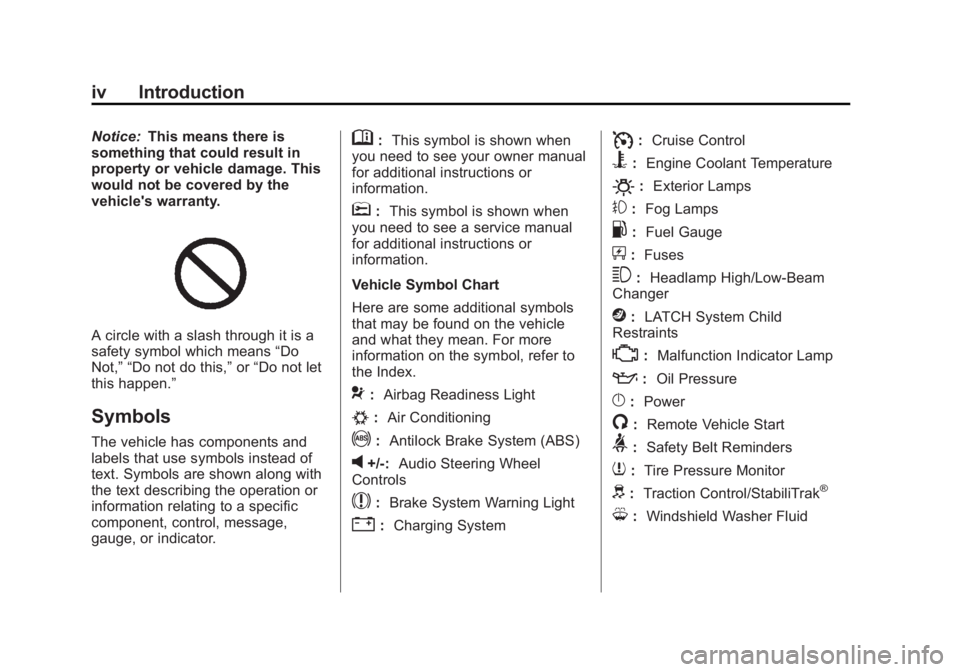
Symbols The vehicle has components and
labels that use symbols instead of
text. Symbols are shown along with
the text describing the operation or
information relating to a specific
component, control, message,
gauge, or indicator. M : This symbol is shown when
you need to see your owner manual
for additional instructions or
information.
* : This symbol is shown when
you need to see a service manual
for additional instructions or
information.
Vehicle Symbol Chart
Here are some additional symbols
that may be found on the vehicle
and what they mean. For more
information on the symbol, refer to
the Index.
9 : Airbag Readiness Light
# : Air Conditioning
! : Antilock Brake System (ABS)
v +/-: Audio Steering Wheel
Controls
$ : Brake System Warning Light
" : Charging System I : Cruise Control
B : Engine Coolant Temperature
O : Exterior Lamps
# : Fog Lamps
. : Fuel Gauge
+ : Fuses
3 : Headlamp High/Low-Beam
Changer
j : LATCH System Child
Restraints
* : Malfunction Indicator Lamp
: : Oil Pressure
} : Power
/ : Remote Vehicle Start
> : Safety Belt Reminders
7 : Tire Pressure Monitor
d : Traction Control/StabiliTrak ®
M : Windshield Washer Fluid
Page 31 of 374
Black plate (5,1)Chevrolet Captiva Sport Owner Manual - 2013 - crc - 11/12/12
Keys, Doors, and Windows 2-5If the vehicle is left running, it
automatically shuts off after
10 minutes unless a time extension
has been done.
Extending Engine Run Time To extend the engine run time by
10 minutes, repeat Steps 1 – 3 while
the engine is still running. The
engine run time can only be
extended if it is the first remote start
since the vehicle has been driven.
Remote start can be extended
one time.
If the remote start procedure is used
again before the first 10-minute time
frame has ended, the first
10 minutes will immediately expire
and the second 10-minute time
frame will start.
For example, if
Q and then
/ are
pressed again after the vehicle has
been running for five minutes,
10 minutes are added, allowing the
engine to run for a total of
15 minutes. A maximum of two remote starts or
remote start attempts are allowed
between ignition cycles.
After the vehicle's engine has been
started two times using the remote
start button, the ignition must be
turned on and then back off before
the remote start procedure can be
used again.
Shutting the Engine Off After a
Remote Start To manually shut off a remote start: .
Aim the RKE transmitter at the
vehicle and press
/ until the
parking lamps turn off. .
Turn on the hazard warning
flashers. .
Turn the ignition switch on and
then off. Conditions in Which the
Remote Start Will Not Work The vehicle cannot be started using
the remote start feature if the key is
in the ignition, the hood is open, or if
there is an emission control system
malfunction.
The engine turns off during a remote
start if the coolant temperature gets
too high or if the oil pressure
gets low.
Remote Start Ready If the vehicle does not have the
remote vehicle start feature, it may
have the remote start ready feature.
This feature allows your dealer to
add the manufacturer's remote
vehicle start feature.
To add the manufacturer's remote
vehicle start feature to the vehicle,
see your dealer.
Page 97 of 374
Black plate (1,1)Chevrolet Captiva Sport Owner Manual - 2013 - crc - 11/12/12
Instruments and Controls 5-1
Instruments and
Controls Controls Steering Wheel Adjustment . . . 5-2
Steering Wheel Controls . . . . . . 5-2
Horn . . . . . . . . . . . . . . . . . . . . . . . . . . 5-3
Windshield Wiper/Washer . . . . . 5-3
Rear Window Wiper/
Washer . . . . . . . . . . . . . . . . . . . . . . 5-4
Compass . . . . . . . . . . . . . . . . . . . . . 5-4
Clock . . . . . . . . . . . . . . . . . . . . . . . . . 5-6
Power Outlets . . . . . . . . . . . . . . . . . 5-7
Warning Lights, Gauges, and
Indicators Warning Lights, Gauges, and
Indicators . . . . . . . . . . . . . . . . . . . . 5-8
Instrument Cluster . . . . . . . . . . . . 5-9
Speedometer . . . . . . . . . . . . . . . . 5-10
Odometer . . . . . . . . . . . . . . . . . . . . 5-10
Trip Odometer . . . . . . . . . . . . . . . 5-10
Tachometer . . . . . . . . . . . . . . . . . . 5-10
Fuel Gauge . . . . . . . . . . . . . . . . . . 5-10
Safety Belt Reminders . . . . . . . 5-11 Airbag Readiness Light . . . . . . 5-12
Passenger Airbag Status
Indicator (United States) . . . . 5-12
Charging System Light . . . . . . 5-13
Malfunction
Indicator Lamp . . . . . . . . . . . . . 5-14
Service Vehicle Soon
Light . . . . . . . . . . . . . . . . . . . . . . . 5-16
Brake System Warning
Light . . . . . . . . . . . . . . . . . . . . . . . 5-16
Electric Parking Brake
Light . . . . . . . . . . . . . . . . . . . . . . . 5-17
Antilock Brake System (ABS)
Warning Light . . . . . . . . . . . . . . 5-18
All-Wheel-Drive Light . . . . . . . . 5-18
Power Steering Warning
Light . . . . . . . . . . . . . . . . . . . . . . . 5-19
StabiliTrak ®
Indicator Light . . . 5-19
Traction Control System
(TCS) Warning Light . . . . . . . 5-19
Engine Coolant Temperature
Warning Light . . . . . . . . . . . . . . 5-20
Tire Pressure Light . . . . . . . . . . 5-20
Fuel Economy Light . . . . . . . . . 5-20
Low Fuel Warning Light . . . . . . 5-21
Security Light . . . . . . . . . . . . . . . . 5-21 Reduced Engine Power
Light . . . . . . . . . . . . . . . . . . . . . . . 5-21
High-Beam On Light . . . . . . . . . 5-22
Front Fog Lamp Light . . . . . . . . 5-22
Low Washer Fluid Warning
Light . . . . . . . . . . . . . . . . . . . . . . . 5-22
Cruise Control Light . . . . . . . . . 5-22
Door Ajar Light . . . . . . . . . . . . . . 5-22
Gate Ajar Light . . . . . . . . . . . . . . 5-23
Information Displays Driver Information
Center (DIC) . . . . . . . . . . . . . . . 5-23
Vehicle Messages Vehicle Messages . . . . . . . . . . . 5-28
Brake System Messages . . . . 5-28
Compass Messages . . . . . . . . . 5-29
Cruise Control Messages . . . . 5-29
Door Ajar Messages . . . . . . . . . 5-29
Engine Cooling System
Messages . . . . . . . . . . . . . . . . . . 5-30
Engine Oil Messages . . . . . . . . 5-30
Engine Power Messages . . . . 5-31
Fuel System Messages . . . . . . 5-31
Key and Lock Messages . . . . . 5-32
Lamp Messages . . . . . . . . . . . . . 5-32
Page 116 of 374
Black plate (20,1)Chevrolet Captiva Sport Owner Manual - 2013 - crc - 11/12/12
5-20 Instruments and Controls
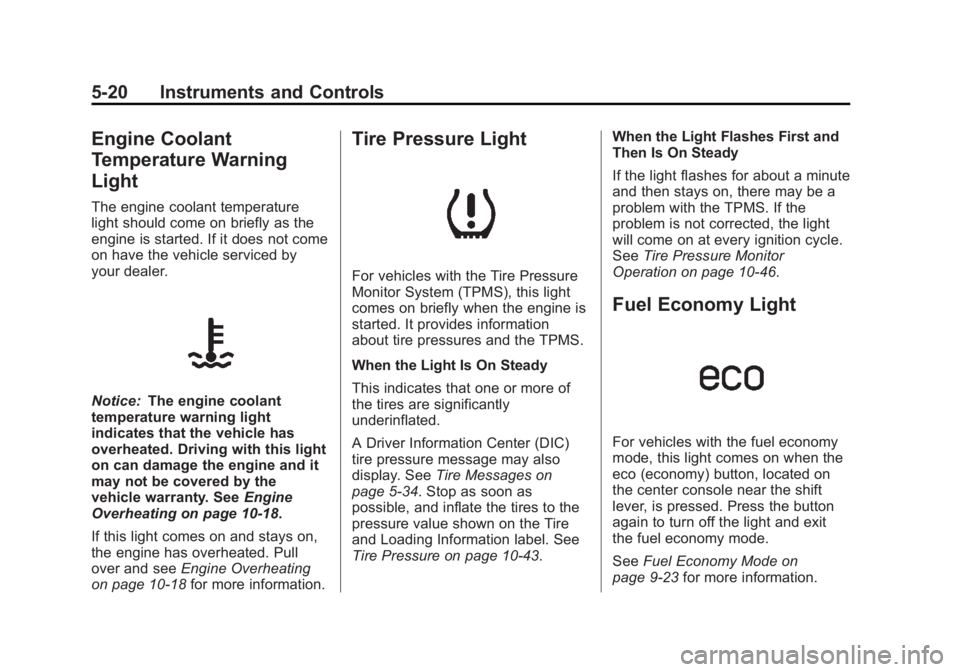
Engine Coolant
Temperature Warning
Light The engine coolant temperature
light should come on briefly as the
engine is started. If it does not come
on have the vehicle serviced by
your dealer.
Notice: The engine coolant
temperature warning light
indicates that the vehicle has
overheated. Driving with this light
on can damage the engine and it
may not be covered by the
vehicle warranty. See Engine
Overheating on page 10 ‑ 18 .
If this light comes on and stays on,
the engine has overheated. Pull
over and see Engine Overheating
on page 10 ‑ 18 for more information. Tire Pressure Light
For vehicles with the Tire Pressure
Monitor System (TPMS), this light
comes on briefly when the engine is
started. It provides information
about tire pressures and the TPMS.
When the Light Is On Steady
This indicates that one or more of
the tires are significantly
underinflated.
A Driver Information Center (DIC)
tire pressure message may also
display. See Tire Messages on
page 5 ‑ 34 . Stop as soon as
possible, and inflate the tires to the
pressure value shown on the Tire
and Loading Information label. See
Tire Pressure on page 10 ‑ 43 . When the Light Flashes First and
Then Is On Steady
If the light flashes for about a minute
and then stays on, there may be a
problem with the TPMS. If the
problem is not corrected, the light
will come on at every ignition cycle.
See Tire Pressure Monitor
Operation on page 10 ‑ 46 .
Fuel Economy Light
For vehicles with the fuel economy
mode, this light comes on when the
eco (economy) button, located on
the center console near the shift
lever, is pressed. Press the button
again to turn off the light and exit
the fuel economy mode.
See Fuel Economy Mode on
page 9 ‑ 23 for more information.
Page 120 of 374
Black plate (24,1)Chevrolet Captiva Sport Owner Manual - 2013 - crc - 11/12/12
5-24 Instruments and Controls The buttons are the trip/fuel, vehicle
information, customization, and set/
reset buttons. The button functions
are detailed in the following pages.
3 (Trip/Fuel): Press this button
to display the odometer, trip
odometer, fuel range, average
economy, fuel used, and elapsed
time. Some vehicles also display
instantaneous economy. The
compass and outside temperature
will also be shown in the display.
The temperature will be shown
in °C or °F depending on the units
selected.
T (Vehicle Information): Press
this button to display the oil life, rear
park assist, units, tire pressure
readings and tire pressure sensor
learning for vehicles with the Tire
Pressure Monitor System (TPMS),
compass zone setting, compass
recalibration on vehicles with this
feature, coolant temperature, and
battery voltage. U (Customization): Press this
button to customize the feature
settings on the vehicle. See Vehicle
Personalization on page 5 ‑ 36 for
more information.
V (Set/Reset): Press this button to
set or reset certain functions and to
turn off or acknowledge messages
on the DIC.
Trip/Fuel Menu Items
3 (Trip/Fuel): Press this button
to scroll through the following menu
items:
Odometer
Press
3 until ODOMETER
displays. This display shows the
distance the vehicle has been
driven in either kilometers (km) or
miles (mi). Pressing the trip
odometer reset stem will also
display the odometer.
To switch between metric and
English measurements, see “ Units ”
later in this section. Trip Odometer
Press
3 until TRIP A or TRIP B
displays. This display shows the
current distance traveled in either
kilometers (km) or miles (mi) since
the last reset for the trip odometer.
Pressing the trip odometer reset
stem will also display the trip
odometer.
Each trip odometer can be reset to
zero separately by pressing
V while
the trip odometer is displayed. You
can also reset the trip odometer
while it is displayed by pressing and
holding the trip odometer
reset stem.
Fuel Range
Press
3 until RANGE displays.
This display shows the approximate
number of remaining kilometers (km)
or miles (mi) the vehicle can be
driven without refueling. This display
will show LOW if the fuel level
is low.
Page 123 of 374
Black plate (27,1)Chevrolet Captiva Sport Owner Manual - 2013 - crc - 11/12/12
Instruments and Controls 5-27measurement. Once in this display,
press
V to select between METRIC
or ENGLISH units. All of the vehicle
information will then be displayed in
the unit of measurement selected.
Coolant Temperature
Press
T until the coolant
temperature is displayed. The
temperature will be shown in °C
or °F depending on the units
selected.
If the coolant temperature display
shows dashes instead of a value,
there may be a problem with the
vehicle. If this happens often, see
your dealer for service.
Battery Voltage
Press
T until the battery voltage is
displayed.
If the battery voltage display shows
dashes instead of a value, there
may be a problem with the vehicle.
If this happens often, see your
dealer for service. Tire Pressure
If the vehicle has the Tire Pressure
Monitor System (TPMS), the
pressure for each tire can be viewed
in the DIC. The tire pressure will be
shown in either kilopascals (kPa) or
pounds per square inch (psi). Press
T until the DIC displays FRONT
TIRES kPa (PSI) LEFT ##
RIGHT ##. Press
T again until the
DIC displays REAR TIRES kPa
(PSI) LEFT ## RIGHT ##.
If a low or high tire pressure
condition is detected by the system
while driving, a message advising
you to check the pressure in a
specific tire will appear in the
display. See Tire Pressure on
page 10 ‑ 43 and Tire Messages on
page 5 ‑ 34 for more information.
If the tire pressure display shows
dashes instead of a value, there
may be a problem with the vehicle.
If this consistently occurs, see your
dealer for service. For information on relearning tire
positions see “ TPMS Sensor
Matching Process ” under Tire
Pressure Monitor Operation on
page 10 ‑ 46 .
Compass Zone Setting
This display allows for setting the
compass zone. See Compass on
page 5 ‑ 4 for more information.
Compass Recalibration
This display allows for calibrating
the compass. See Compass on
page 5 ‑ 4 for more information.
Blank Display
This display shows no information.
Page 126 of 374
Black plate (30,1)Chevrolet Captiva Sport Owner Manual - 2013 - crc - 11/12/12
5-30 Instruments and Controls
Engine Cooling System
Messages ENGINE HOT A/C (Air
Conditioning) OFF This message displays when the
engine coolant becomes hotter than
the normal operating temperature.
To avoid added strain on a hot
engine, the air conditioning
compressor is automatically turned
off. When the coolant temperature
returns to normal, the A/C operation
automatically resumes. You can
continue to drive the vehicle.
ENGINE OVERHEATED IDLE
ENGINE Notice: If you drive the vehicle
while the engine is overheating,
severe engine damage may
occur. If an overheat warning
appears on the instrument cluster
and/or DIC, stop the vehicle as
soon as possible. Do not increase
the engine speed above normal idling speed. See Engine
Overheating on page 10 ‑ 18 for
more information.
This message displays when the
engine coolant temperature is too
hot. Stop and allow the vehicle to
idle until it cools down.
ENGINE OVERHEATED STOP
ENGINE Notice: If you drive the vehicle
while the engine is overheating,
severe engine damage may
occur. If an overheat warning
appears on the instrument cluster
and/or DIC, stop the vehicle as
soon as possible. Do not increase
the engine speed above normal
idling speed. See Engine
Overheating on page 10 ‑ 18 for
more information.
This message displays along with a
continuous chime when the engine
has overheated. Stop and turn the
engine off immediately to avoid
severe engine damage. See Engine
Overheating on page 10 ‑ 18 .Engine Oil Messages CHANGE ENGINE OIL NOW This message displays when
service is urgently required. This
indicates that the oil life remaining is
less than one percent and the oil
cannot work correctly to avoid
engine wear or damage. See your
dealer. See Engine Oil on page 10 ‑ 8
and Maintenance Schedule on
page 11 ‑ 3 .
Acknowledging this message will
not reset the OIL LIFE REMAINING
display. That must be done at the
OIL LIFE screen. See “ Oil Life ”
under Driver Information Center
(DIC) on page 5 ‑ 23 and Engine Oil
Life System on page 10 ‑ 10 .
CHANGE ENGINE OIL SOON
This message displays when oil life
remaining is between one and
five percent and service is required
for the vehicle. See your dealer. See
Engine Oil on page 10 ‑ 8 and
Maintenance Schedule on
page 11 ‑ 3 .
Page 229 of 374
Black plate (41,1)Chevrolet Captiva Sport Owner Manual - 2013 - crc - 11/12/12
Driving and Operating 9-41When turning with a trailer, make
wider turns than normal so the
trailer will not strike soft shoulders,
curbs, road signs, trees or other
objects. Use the turn signal well in
advance and avoid jerky or sudden
maneuvers.
Turn Signals When Towing a
Trailer The turn signal indicators on the
instrument cluster flash whenever
signaling a turn or lane change.
Properly hooked up, the trailer
lamps also flash, telling other
drivers the vehicle is turning,
changing lanes or stopping.
When towing a trailer, the arrows on
the instrument cluster flash for turns
even if the bulbs on the trailer are
burned out. Check occasionally to
be sure the trailer bulbs are still
working. Driving on Grades Reduce speed and shift to a lower
gear before starting down a long or
steep downgrade. If the
transmission is not shifted down, the
brakes might have to be used so
much that they would get hot and no
longer work well.
The vehicle can tow in D (Drive).
Use a lower gear if the transmission
shifts too often.
When towing at high altitude on
steep uphill grades, engine coolant
boils at a lower temperature than at
normal altitudes. If the engine is
turned off immediately after towing
at high altitude on steep uphill
grades, the vehicle could show
signs similar to engine overheating.
To avoid this, let the engine run
while parked, preferably on level
ground, with the transmission in
P (Park) for a few minutes before
turning the engine off. If the
overheat warning comes on, see
Engine Overheating on page 10 ‑ 18 .Parking on Hills
{ WARNINGParking the vehicle on a hill with
the trailer attached can be
dangerous. If something goes
wrong, the rig could start to move.
People can be injured, and both
the vehicle and the trailer can be
damaged. When possible, always
park the rig on a flat surface.
If parking the rig on a hill:
1. Press the brake pedal, but do
not shift into P (Park) yet. Turn
the wheels into the curb if facing
downhill or into traffic if facing
uphill.
2. Have someone place chocks
under the trailer wheels.
3. When the wheel chocks are in
place, release the brake pedal
until the chocks absorb the load.
Page 248 of 374
Black plate (14,1)Chevrolet Captiva Sport Owner Manual - 2013 - crc - 11/12/12
10-14 Vehicle Care If the coolant inside the coolant
surge tank is hot, do not do anything
else until it cools down. The vehicle
should be parked on a level surface.
The coolant level should be
between the MIN and MAX lines.
If it is not, you may have a leak at
the radiator hoses, heater hoses,
radiator, water pump, or somewhere
else in the cooling system.
{ WARNINGHeater and radiator hoses, and
other engine parts, can be very
hot. Do not touch them. If you do,
you can be burned.
Do not run the engine if there is a
leak. If you run the engine, it
could lose all coolant. That could
cause an engine fire, and you
could be burned. Get any leak
fixed before you drive the vehicle.
If there seems to be no leak, with
the engine on, check to see if the
engine cooling fan(s) is running. If the engine is overheating, the fan
should be running. If it is not, the
vehicle needs service. Turn off the
engine.
Notice: Engine damage from
running the engine without
coolant is not covered by the
warranty.
Notice: Using coolant other than
DEX-COOL ®
can cause premature
engine, heater core, or radiator
corrosion. In addition, the engine
coolant could require changing
sooner, at 50 000 km (30,000 mi)
or 24 months, whichever occurs
first. Any repairs would not be
covered by the vehicle warranty.
Always use DEX-COOL
(silicate-free) coolant in the
vehicle.
Engine Coolant The cooling system in the vehicle is
filled with DEX-COOL ®
engine
coolant. This coolant is designed to
remain in the vehicle for 5 years or 240 000 km (150,000 mi), whichever
occurs first, if only DEX-COOL
extended life coolant is added.
The following explains the cooling
system and how to add coolant
when it is low. If there is a problem
with engine overheating, see Engine
Overheating on page 10 ‑ 18 .
A 50/50 mixture of clean, drinkable
water and DEX-COOL coolant will: .
Give freezing protection down to
− 37°C ( − 34°F). .
Give boiling protection up to
129°C (265°F). .
Protect against rust and
corrosion. .
Help keep the proper engine
temperature. .
Let the warning lights and
gauges work as they should.
Notice: Using coolant other than
DEX-COOL ®
can cause premature
engine, heater core, or radiator
corrosion. In addition, the engine
coolant could require changing
Page 252 of 374
Black plate (18,1)Chevrolet Captiva Sport Owner Manual - 2013 - crc - 11/12/12
10-18 Vehicle Care 4. With the coolant surge tank
pressure cap off, start the
engine and let it run until the
upper radiator hose can be felt
getting hot. Watch out for the
engine cooling fan.
By this time, the coolant level
inside the coolant surge tank
may be lower. If the level is
lower, add more of the proper
DEX-COOL coolant mixture to
the coolant surge tank until the
level reaches between the MIN
and MAX lines.
5. Replace the pressure cap. Be
sure the pressure cap is
hand-tight.
Check the level in the surge tank
when the cooling system has cooled
down. If the coolant is not at the
proper level, repeat Steps 1 – 3 and
reinstall the pressure cap. If the
coolant still is not at the proper level
when the system cools down again,
see the dealer. Engine Overheating There is a coolant temperature
warning light on the instrument
panel. See Engine Coolant
Temperature Warning Light on
page 5 ‑ 20 .
If Steam is Coming from the
Engine
{ WARNINGSteam from an overheated engine
can cause serious injury, even if
the hood is opened just a little.
Stay away from the engine if
steam is seen or heard coming
from it. Just turn it off and get
everyone away from the vehicle
until it cools down. Wait until there
is no sign of steam or coolant
before opening the hood.
If driving continues when the
engine is overheated, the liquids
in it can catch fire. Someone
(Continued) WARNING (Continued) could get badly burned. Stop the
engine if it overheats, and get out
of the vehicle until the engine has
cooled.
Notice: Driving the vehicle when
there is no coolant in the coolant
overflow recovery bottle, can
badly damage the engine. The
costly repairs would not be
covered by the vehicle warranty.
If No Steam is Coming from
the Engine If there is an engine overheat
warning, but no steam can be seen
or heard, the problem may not be
too serious. Sometimes the engine
can get a little too hot when the
vehicle: .
Climbs a long hill on a hot day. .
Stops after high-speed driving.