service CHEVROLET CAPTIVA SPORT 2014 Infotainment System Guide
[x] Cancel search | Manufacturer: CHEVROLET, Model Year: 2014, Model line: CAPTIVA SPORT, Model: CHEVROLET CAPTIVA SPORT 2014Pages: 92, PDF Size: 0.7 MB
Page 62 of 92
Black plate (62,1)Chevrolet Captiva Sport Infotainment System (GMNA-Localizing-US/Canada-
6225549) - 2014 - 2nd crc - 9/16/13
62 Infotainment System
.The route prohibits the entry of a
vehicle due to a regulation by
time or season or any other
regulation that may be given.
.Some routes might not be
searched.
.The route to the destination
might not be shown if there are
new roads, if roads have
recently changed, or if certain
roads are not listed in the map
data. SeeMaps on page 42.
To recalibrate the vehicle's position
on the map, park with the vehicle
running for two to five minutes, until
the vehicle position updates.
If the System Needs
Service
If the navigation system needs
service and the steps listed here
have been followed but there are
still problems, see your dealer for
assistance.
Map Data Updates
The map data in the vehicle is the
most up-to-date information
available when the vehicle was
produced. The map data is updated
periodically, provided that the map
information has changed.
For questions about the operation of
the navigation system or the update
process, contact the GM Nav Disc
Center toll-free phone number,
1-877-NAV-DISC (1-877-628-3472)
or go to the center's website,
www.gmnavdisc.com. If updates are
needed, call the GM Nav Disc
Center or order a new SD memory
stick online. To order map data,
have the vehicle's Vehicle
Identification Number (VIN)
available. See “Vehicle Identification
Number (VIN)” in the owner manual.
After receiving the updated map
data, see Maps on page 42.
Database Coverage
Explanations
Coverage areas vary with respect to
the level of map detail available for
any given area. Some areas feature
greater levels of detail than others.
If this happens, it does not mean
there is a problem with the system.
As the map data is updated, more
detail can become available for
areas that previously had limited
detail. See Map Data Updates on
page 62.
Page 79 of 92
Black plate (79,1)Chevrolet Captiva Sport Infotainment System (GMNA-Localizing-US/Canada-
6225549) - 2014 - 2nd crc - 9/16/13
Infotainment System 79
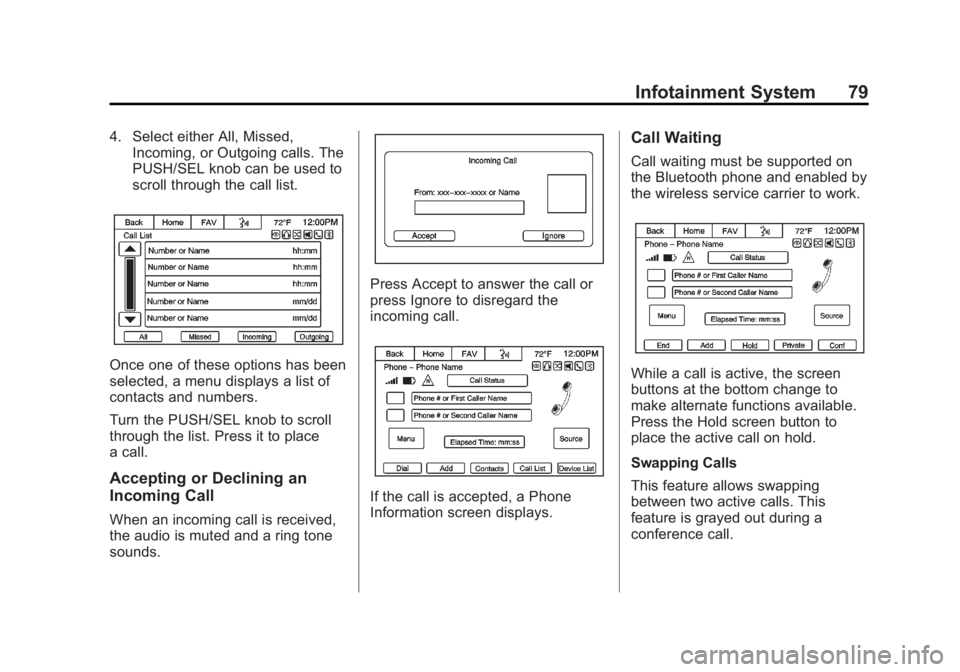
4. Select either All, Missed,Incoming, or Outgoing calls. The
PUSH/SEL knob can be used to
scroll through the call list.
Once one of these options has been
selected, a menu displays a list of
contacts and numbers.
Turn the PUSH/SEL knob to scroll
through the list. Press it to place
a call.
Accepting or Declining an
Incoming Call
When an incoming call is received,
the audio is muted and a ring tone
sounds.
Press Accept to answer the call or
press Ignore to disregard the
incoming call.
If the call is accepted, a Phone
Information screen displays.
Call Waiting
Call waiting must be supported on
the Bluetooth phone and enabled by
the wireless service carrier to work.
While a call is active, the screen
buttons at the bottom change to
make alternate functions available.
Press the Hold screen button to
place the active call on hold.
Swapping Calls
This feature allows swapping
between two active calls. This
feature is grayed out during a
conference call.
Page 80 of 92
Black plate (80,1)Chevrolet Captiva Sport Infotainment System (GMNA-Localizing-US/Canada-
6225549) - 2014 - 2nd crc - 9/16/13
80 Infotainment System
Conference Calling
Conference and three-way calling
must be supported on the Bluetooth
phone and enabled by the wireless
service carrier to work.
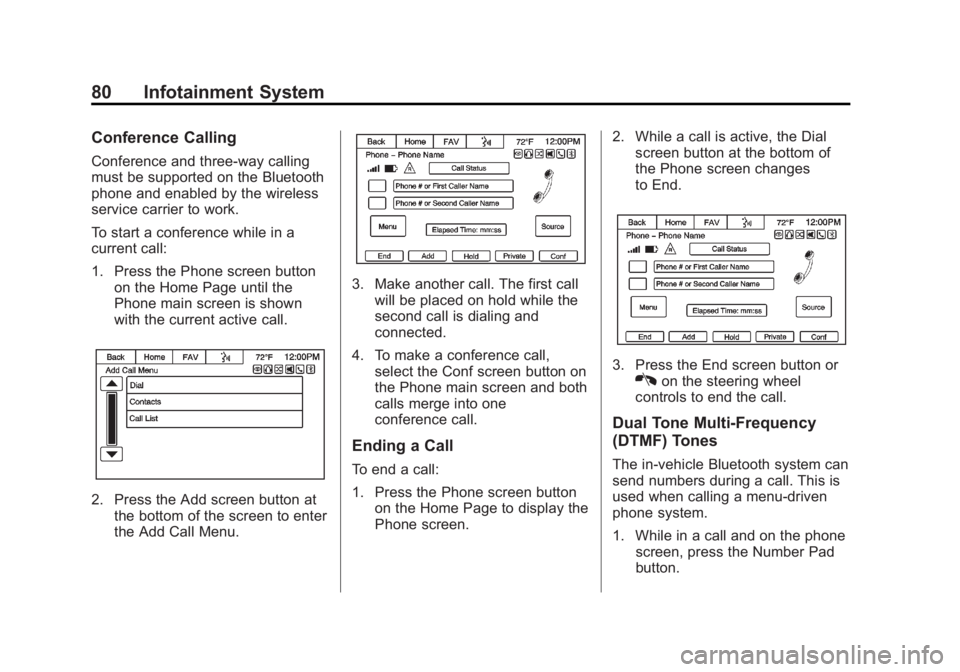
To start a conference while in a
current call:
1. Press the Phone screen buttonon the Home Page until the
Phone main screen is shown
with the current active call.
2. Press the Add screen button atthe bottom of the screen to enter
the Add Call Menu.
3. Make another call. The first callwill be placed on hold while the
second call is dialing and
connected.
4. To make a conference call, select the Conf screen button on
the Phone main screen and both
calls merge into one
conference call.
Ending a Call
To end a call:
1. Press the Phone screen button
on the Home Page to display the
Phone screen. 2. While a call is active, the Dial
screen button at the bottom of
the Phone screen changes
to End.
3. Press the End screen button orKon the steering wheel
controls to end the call.
Dual Tone Multi-Frequency
(DTMF) Tones
The in-vehicle Bluetooth system can
send numbers during a call. This is
used when calling a menu-driven
phone system.
1. While in a call and on the phone screen, press the Number Pad
button.
Page 86 of 92
Black plate (86,1)Chevrolet Captiva Sport Infotainment System (GMNA-Localizing-US/Canada-
6225549) - 2014 - 2nd crc - 9/16/13
86 Infotainment System
Text Messaging Settings
Text Messaging settings are
available from the Settings Home
Page icon.
.Select Text Message Options
from the Settings menu list.
.Select Incoming Text Alert from
the Text Message Options menu
list to enable/disable the new
incoming message display
pop-up and alert sound.
.Select Append Text Signature
from the Text Message Options
menu list to enable/disable the
vehicle signature appended to
messages sent from the radio
("Sent from my
Trademarks and
License Agreements
FCC Information
See“Radio Frequency Statement”
in the owner manual.
“Made for iPod” and“Made for
iPhone” mean that an electronic
accessory has been designed to
connect specifically to iPod or
iPhone and has been certified by
the developer to meet Apple
performance standards.
iPod and iPhone are trademarks of
Apple Computer, Inc., registered in
the U.S. and other countries.
Fees and Taxes: Subscription fee,
taxes, one time activation fee, and
other fees may apply. Subscription
fee is consumer only. All fees and
programming subject to change.
Subscriptions subject to Customer
Agreement available at
www.siriusxm.com. SiriusXM
®
service only available in the
48 contiguous United States.
Explicit Language Notice: Channels
with frequent explicit language are
indicated with an “XL”preceding the
channel name. Channel blocking is
available for SiriusXM Satellite
Radio receivers by notifying
SiriusXM:
.USA Customers: See
www.siriusxm.com or call
1-866-635-2349.
Page 87 of 92
Black plate (87,1)Chevrolet Captiva Sport Infotainment System (GMNA-Localizing-US/Canada-
6225549) - 2014 - 2nd crc - 9/16/13
Infotainment System 87
It is prohibited to copy, decompile,
disassemble, reverse engineer,
hack, manipulate, or otherwise
make available any technology or
software incorporated in receivers
compatible with the SiriusXM
Satellite Radio System or that
support the SiriusXM website, the
Online Service, or any of its content.
Furthermore, the AMBER voice
compression software included in
this product is protected by
intellectual property rights including
patent rights, copyrights, and trade
secrets of Digital Voice
Systems, Inc.
General Requirements:
.A License Agreement from
SiriusXM is required for any
product that incorporates
SiriusXM Technology and/or for
use of any of the SiriusXM
marks to be manufactured,
distributed, or marketed in the
SiriusXM Service Area.
Bluetooth
The Bluetooth®word mark and
logos are owned by the Bluetooth®
SIG, Inc. and any use of such marks
by General Motors is under license.
Other trademarks and trade names
are those of their respective owners.
Pandora (If Equipped)
Pandora is a registered trademark
of Pandora Media, Inc., used under
license.
Map End User License
Agreement
TERMS AND CONDITIONS
Please read the terms and
conditions at www.telenav.com
carefully before you use the
TeleNav Software (if equipped).
Your use of the TeleNav Software
indicates that you accept these
terms and conditions. In brief, you
use this service at your own choice
and risk. TeleNav and its suppliers
assume no responsibility for any
damage or loss to you or a third party resulting from such use.
Please drive responsibly, obey all
traffic laws, and enter destinations,
POIs or other data only while your
vehicle is parked.
Disclaimer of Warranty
TELENAV EXPRESSLY
DISCLAIMS AND EXCLUDES ALL
WARRANTIES IN CONNECTION
WITH THE TELENAV SOFTWARE,
WHETHER STATUTORY,
EXPRESS OR IMPLIED,
INCLUDING ALL WARRANTIES
WHICH MAY ARISE FROM
COURSE OF DEALING, CUSTOM
OR TRADE AND INCLUDING, BUT
NOT LIMITED TO, THE IMPLIED
WARRANTIES OF
MERCHANTABILITY, FITNESS
FOR A PARTICULAR PURPOSE
AND NON-INFRINGEMENT OF
THIRD PARTY RIGHTS WITH
RESPECT TO THE TELENAV
SOFTWARE.
Page 90 of 92
Black plate (2,1)Chevrolet Captiva Sport Infotainment System (GMNA-Localizing-US/Canada-
6225549) - 2014 - 2nd crc - 9/16/13
i-2 INDEX
H
HD Radio Technology . . . . . . . . . . . 18
Help Commands . . . . . . . . . . . . . . . . . 70
Helpful Hints for SpeakingCommands . . . . . . . . . . . . . . . . . . . . . 64
Home Page . . . . . . . . . . . . . . . . . . . . . . . 8
Home Page Customization . . . . . . . 9
Home Page Features . . . . . . . . . . . . . 9
I
If the System Needs Service . . . . . 62
Infotainment . . . . . . . . . . . . . . . . . . . . . . 3
Infotainment Controls . . . . . . . . . . . . . 6
Infotainment System Settings . . . . 14
Internet Radio Pandora . . . . . . . . . . . . . . . . . . . . . . . . 19
L
Language . . . . . . . . . . . . . . . . . . . . . . . . . 7
Launching Pandora . . . . . . . . . . . . . . 20
Launching Stitcher . . . . . . . . . . . . . . . 24
Loading and Ejecting Discs . . . . . . 29
Low Fuel Alert (If Equipped) . . . . . 60
M
Making a Call . . . . . . . . . . . . . . . . . . . . 77
Making a Call Using thePhone Book Contacts and
Call List . . . . . . . . . . . . . . . . . . . . . . . . 75
Map Adjustments . . . . . . . . . . . . . . . . 41
Map Data Updates . . . . . . . . . . . . . . . 62
Map End User License Agreement . . . . . . . . . . . . . . . . . . . . . 87
Map Scales . . . . . . . . . . . . . . . . . . . . . . 41
Maps . . . . . . . . . . . . . . . . . . . . . . . . . . . . 42
Messaging Text . . . . . . . . . . . . . . . . . . . . . . . . . . . . . 83
Mixed-Band Presets . . . . . . . . . . . . . 17
MP3 . . . . . . . . . . . . . . . . . . . . . . . . . . . . . 30
Music Navigator . . . . . . . . . . . . . . . . . 32
N
Navigation Destination . . . . . . . . . . . . . . . . . . . . . 44
Symbols . . . . . . . . . . . . . . . . . . . . . . . . 43
Using the System . . . . . . . . . . . . . . . 40
O
OnStar Command (IfEquipped) . . . . . . . . . . . . . . . . . . . . . . 70
OnStar
®System . . . . . . . . . . . . . . . . . 53
Other Information . . . . . . . . . . . . . . . . 72
Overview, Infotainment System . . . 4
P
Pairing . . . . . . . . . . . . . . . . . . . . . . . . . . . 74
Pairing a Phone Using the Infotainment System . . . . . . . . . . . 72
Pandora (If Equipped) . . . . . . . . . . . 87
Pandora Commands . . . . . . . . . . . . . 65
Pandora Internet Radio . . . . . . . . . . 19
Pandora Troubleshooting . . . . . . . . 22
Pandora
®. . . . . . . . . . . . . . . . . . . . . . . . 19
Phone Bluetooth . . . . . . . . . . . . . . . . . . . . . . . 70
Pictures . . . . . . . . . . . . . . . . . . . . . . . . . 27
Playing an Audio CD . . . . . . . . . . . . 29
Playing an MP3 CD . . . . . . . . . . . . . . 30
Playing from a USB . . . . . . . . . . . . . . 34
Playing from an iPhone or iPad . . . . . . . . . . . . . . . . . . . . . . . . . 38
Page 91 of 92
Black plate (3,1)Chevrolet Captiva Sport Infotainment System (GMNA-Localizing-US/Canada-
6225549) - 2014 - 2nd crc - 9/16/13
INDEX i-3
Playing from an iPod . . . . . . . . . . . . 36
Playing the Radio . . . . . . . . . . . . . . . . 14
PortUSB . . . . . . . . . . . . . . . . . . . . . . . . . . . . 34
Problems with Route Guidance . . . . . . . . . . . . . . . . . . . . . . 61
R
RadioHD Radio Technology . . . . . . . . . . 18
Radios AM-FM Radio . . . . . . . . . . . . . . . . . . . 14
Satellite . . . . . . . . . . . . . . . . . . . . . . . . . 19
Ringtones . . . . . . . . . . . . . . . . . . . . . . . 81
S
Satellite Radio . . . . . . . . . . . . . . . . . . . 19
Scroll Features . . . . . . . . . . . . . . . . . . 42
Settings . . . . . . . . . . . . . . . . . . . . . . . . . 54
SiriusXM Categories . . . . . . . . . . . . . 19
Software Updates . . . . . . . . . . . . . . . 13
Steering Wheel Controls . . . . . . . . . . 8
Stitcher . . . . . . . . . . . . . . . . . . . . . . . . . . 24
Stitcher Commands . . . . . . . . . . . . . . 66 Stitcher Troubleshooting . . . . . . . . . 26
Storing Radio Station Presets . . . 17
Symbols, Navigation . . . . . . . . . . . . . 43
System
Infotainment . . . . . . . . . . . . . . . . . . . . . 3
System Needs Service . . . . . . . . . . 62
T
Text . . . . . . . . . . . . . . . . . . . . . . . . . . . . . . 83
Text Messaging Commands . . . . . 70
U
Updates Map Data . . . . . . . . . . . . . . . . . . . . . . . 62
Software . . . . . . . . . . . . . . . . . . . . . . . . 13
USB MP3 Player and USB
Drives . . . . . . . . . . . . . . . . . . . . . . . . . . 34
USB Port . . . . . . . . . . . . . . . . . . . . . . . . 34
Using the System . . . . . . . . . . . . . . . . . 8
Using Voice Recognition . . . . . 63, 71
V
Vehicle Positioning . . . . . . . . . . . . . . . . . . . . . 61
Viewing Pictures . . . . . . . . . . . . . . . . . . . . . . . . 27
Voice Recognition . . . . . . . . . . . . . . . 63
Voice Recognition for My Media . . . . . . . . . . . . . . . . . . . . . . . . . . 67
Voice Recognition for Navigation . . . . . . . . . . . . . . . . . . . . . 68
Voice Recognition for Phone . . . . . 67
Voice Recognition for the
Radio . . . . . . . . . . . . . . . . . . . . . . . . . . 65
W
Website Information . . . . . . . . . . . . . 13