steering CHEVROLET CAPTIVA SPORT 2014 Infotainment System Guide
[x] Cancel search | Manufacturer: CHEVROLET, Model Year: 2014, Model line: CAPTIVA SPORT, Model: CHEVROLET CAPTIVA SPORT 2014Pages: 92, PDF Size: 0.7 MB
Page 71 of 92
Black plate (71,1)Chevrolet Captiva Sport Infotainment System (GMNA-Localizing-US/Canada-
6225549) - 2014 - 2nd crc - 9/16/13
Infotainment System 71
To minimize driver distraction,
before driving, and with the vehicle
parked:
.Become familiar with the
features of the cell phone.
Organize the phone book and
contact lists clearly and delete
duplicate or rarely used entries.
If possible, program speed dial
or other shortcuts.
.Review the controls and
operation of the infotainment
system.
.Pair cell phone(s) to the vehicle.
The system may not work with
all cell phones. See“Pairing”in
this section.
.See “Deleting a Paired Phone”
in this section.
{Warning
When using a cell phone, it can
be distracting to look too long or
too often at the screen of the
phone or the infotainment system.
Taking your eyes off the road too
long or too often could cause a
crash resulting in injury or death.
Focus your attention on driving.
Vehicles with a Bluetooth system
can use a Bluetooth-capable cell
phone with a Hands-Free Profile to
make and receive phone calls. The
infotainment system and voice
recognition are used to control the
system. The system can be used
while in ON/RUN or ACC/
ACCESSORY. The range of the
Bluetooth system can be up to 9.1 m
(30 ft). Not all phones support all
functions and not all phones work
with the Bluetooth system. See
www.gm.com/bluetooth for more
information about compatible
phones.
Bluetooth Controls
Use the buttons on the infotainment
system and the steering wheel to
operate the Bluetooth system.
Steering Wheel Controls
b/g(Mute/Push to Talk):
.Press to answer incoming calls,
confirm system information, and
start voice recognition.
.Press and hold to mute the
radio.
Infotainment System Controls
For information about how to
navigate the menu system using the
infotainment controls, see Overview
on page 4.
Using Voice Recognition
The voice recognition system uses
commands to control the system
and dial phone numbers.
To use voice recognition, press
b
/gon the steering wheel.
Page 80 of 92
Black plate (80,1)Chevrolet Captiva Sport Infotainment System (GMNA-Localizing-US/Canada-
6225549) - 2014 - 2nd crc - 9/16/13
80 Infotainment System
Conference Calling
Conference and three-way calling
must be supported on the Bluetooth
phone and enabled by the wireless
service carrier to work.
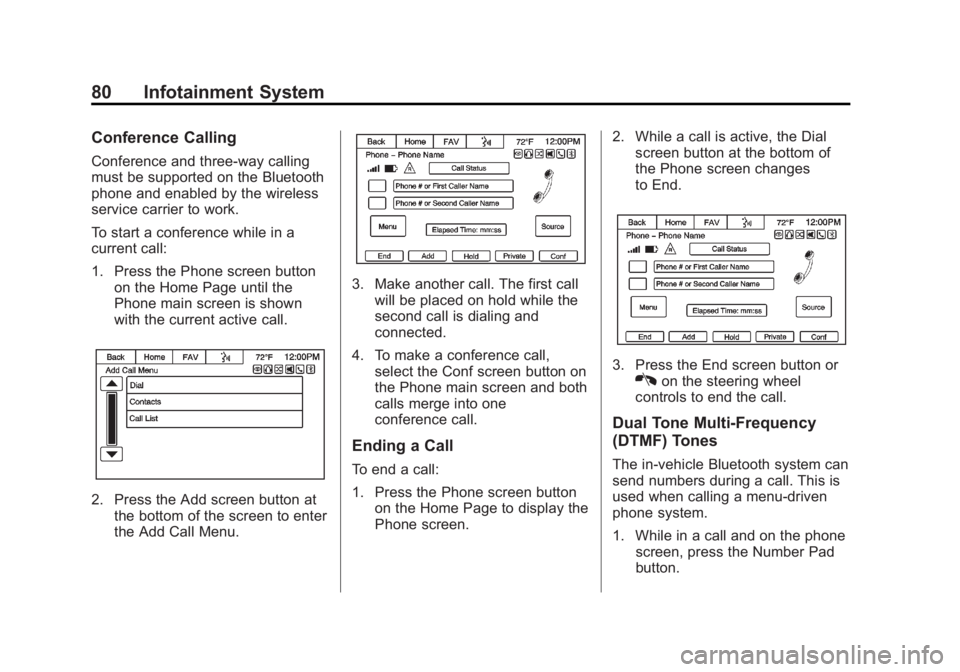
To start a conference while in a
current call:
1. Press the Phone screen buttonon the Home Page until the
Phone main screen is shown
with the current active call.
2. Press the Add screen button atthe bottom of the screen to enter
the Add Call Menu.
3. Make another call. The first callwill be placed on hold while the
second call is dialing and
connected.
4. To make a conference call, select the Conf screen button on
the Phone main screen and both
calls merge into one
conference call.
Ending a Call
To end a call:
1. Press the Phone screen button
on the Home Page to display the
Phone screen. 2. While a call is active, the Dial
screen button at the bottom of
the Phone screen changes
to End.
3. Press the End screen button orKon the steering wheel
controls to end the call.
Dual Tone Multi-Frequency
(DTMF) Tones
The in-vehicle Bluetooth system can
send numbers during a call. This is
used when calling a menu-driven
phone system.
1. While in a call and on the phone screen, press the Number Pad
button.
Page 89 of 92
Black plate (1,1)Chevrolet Captiva Sport Infotainment System (GMNA-Localizing-US/Canada-
6225549) - 2014 - 2nd crc - 9/16/13
INDEX i-1
A
Accepting or Declining anIncoming Call . . . . . . . . . . . . . . . . . . 79
Adding or Removing SiriusXM Categories . . . . . . . . . . . . . . . . . . . . . 19
AM-FM Radio . . . . . . . . . . . . . . . . . . . . 14
Audio Bluetooth . . . . . . . . . . . . . . . . . . . . . . . 39
Audio Players . . . . . . . . . . . . . . . . . . . 28 CD . . . . . . . . . . . . . . . . . . . . . . . . . . . . . 28
MP3 . . . . . . . . . . . . . . . . . . . . . . . . . . . . 30
Audio System . . . . . . . . . . . . . . . . . . . . 72
Auxiliary Devices . . . . . . . . . . . . . . . . . . . . . . . . . 39
B
Bluetooth . . . . . . . . . . . . . . . . . . . . 70, 87
Bluetooth Audio . . . . . . . . . . . . . . . . . 39
Bluetooth Audio and VoiceRecognition . . . . . . . . . . . . . . . . . . . . 38
Bluetooth Controls . . . . . . . . . . . . . . . 71
C
Call Waiting . . . . . . . . . . . . . . . . . . . . . . 79
Canceling Voice Recognition . . . . 64
CD Player . . . . . . . . . . . . . . . . . . . . . . . 28
Cleaning High Gloss Surfaces and Vehicle Information and
Radio Displays . . . . . . . . . . . . . . . . . 13
Conference Calling . . . . . . . . . . . . . . 80
Controls Steering Wheel . . . . . . . . . . . . . . . . . . 8
Customer Assistance Offices . . . . 13
D
Database Coverage
Explanations . . . . . . . . . . . . . . . . . . . 62
Destination and Guidance Commands . . . . . . . . . . . . . . . . . . . . . 69
Destination Menu with Route
Guidance Active . . . . . . . . . . . . . . . 50
Destination, Navigation . . . . . . . . . . 44
Detailed Areas . . . . . . . . . . . . . . . . . . . 42
Device List . . . . . . . . . . . . . . . . . . . . . . 81 Devices
Auxiliary . . . . . . . . . . . . . . . . . . . . . . . . 39
Driving on a Route . . . . . . . . . . . . . . . 53
Dual Tone Multi-Frequency (DTMF) Tones . . . . . . . . . . . . . . . . . . 80
E
Ending a Call . . . . . . . . . . . . . . . . . . . . 80
English or Metric Units . . . . . . . . . . . . 7
Error Messages . . . . . . . . . . . . . . . . . 30
F
Finding a Station . . . . . . . . . . . . . . . . 15
G
General Commands . . . . . . . . . . . . . 68
Global PositioningSystem (GPS) . . . . . . . . . . . . . . . . . . 60
Page 91 of 92
Black plate (3,1)Chevrolet Captiva Sport Infotainment System (GMNA-Localizing-US/Canada-
6225549) - 2014 - 2nd crc - 9/16/13
INDEX i-3
Playing from an iPod . . . . . . . . . . . . 36
Playing the Radio . . . . . . . . . . . . . . . . 14
PortUSB . . . . . . . . . . . . . . . . . . . . . . . . . . . . 34
Problems with Route Guidance . . . . . . . . . . . . . . . . . . . . . . 61
R
RadioHD Radio Technology . . . . . . . . . . 18
Radios AM-FM Radio . . . . . . . . . . . . . . . . . . . 14
Satellite . . . . . . . . . . . . . . . . . . . . . . . . . 19
Ringtones . . . . . . . . . . . . . . . . . . . . . . . 81
S
Satellite Radio . . . . . . . . . . . . . . . . . . . 19
Scroll Features . . . . . . . . . . . . . . . . . . 42
Settings . . . . . . . . . . . . . . . . . . . . . . . . . 54
SiriusXM Categories . . . . . . . . . . . . . 19
Software Updates . . . . . . . . . . . . . . . 13
Steering Wheel Controls . . . . . . . . . . 8
Stitcher . . . . . . . . . . . . . . . . . . . . . . . . . . 24
Stitcher Commands . . . . . . . . . . . . . . 66 Stitcher Troubleshooting . . . . . . . . . 26
Storing Radio Station Presets . . . 17
Symbols, Navigation . . . . . . . . . . . . . 43
System
Infotainment . . . . . . . . . . . . . . . . . . . . . 3
System Needs Service . . . . . . . . . . 62
T
Text . . . . . . . . . . . . . . . . . . . . . . . . . . . . . . 83
Text Messaging Commands . . . . . 70
U
Updates Map Data . . . . . . . . . . . . . . . . . . . . . . . 62
Software . . . . . . . . . . . . . . . . . . . . . . . . 13
USB MP3 Player and USB
Drives . . . . . . . . . . . . . . . . . . . . . . . . . . 34
USB Port . . . . . . . . . . . . . . . . . . . . . . . . 34
Using the System . . . . . . . . . . . . . . . . . 8
Using Voice Recognition . . . . . 63, 71
V
Vehicle Positioning . . . . . . . . . . . . . . . . . . . . . 61
Viewing Pictures . . . . . . . . . . . . . . . . . . . . . . . . 27
Voice Recognition . . . . . . . . . . . . . . . 63
Voice Recognition for My Media . . . . . . . . . . . . . . . . . . . . . . . . . . 67
Voice Recognition for Navigation . . . . . . . . . . . . . . . . . . . . . 68
Voice Recognition for Phone . . . . . 67
Voice Recognition for the
Radio . . . . . . . . . . . . . . . . . . . . . . . . . . 65
W
Website Information . . . . . . . . . . . . . 13