set clock CHEVROLET CAVALIER 2000 3.G Owners Manual
[x] Cancel search | Manufacturer: CHEVROLET, Model Year: 2000, Model line: CAVALIER, Model: CHEVROLET CAVALIER 2000 3.GPages: 364, PDF Size: 2.6 MB
Page 4 of 364
iii
Table of Contents (cont'd)
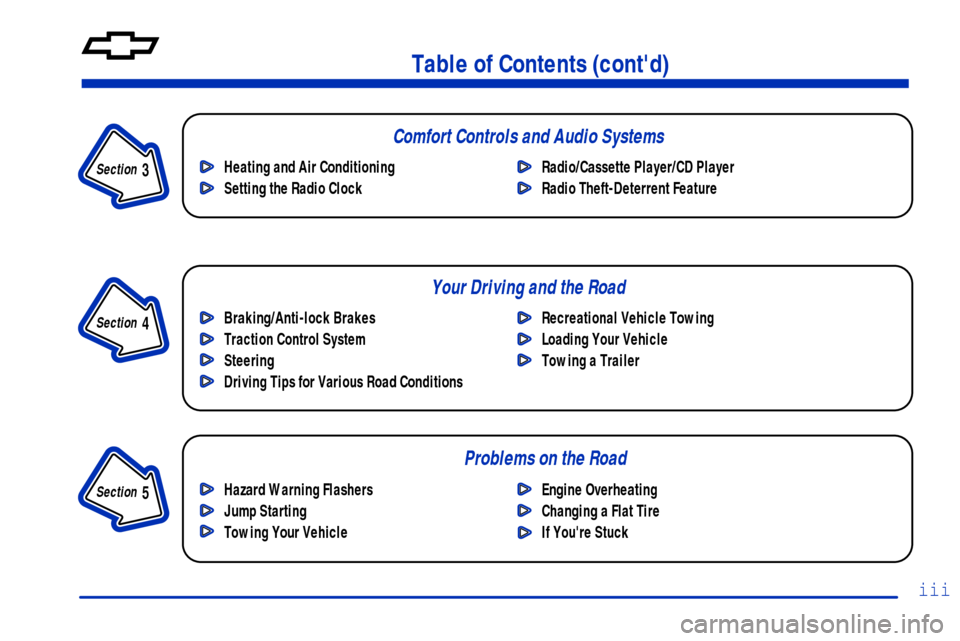
Braking/Anti-lock Brakes
Traction Control System
Steering
Driving Tips for Various Road ConditionsRecreational Vehicle Towing
Loading Your Vehicle
Towing a Trailer Heating and Air Conditioning
Setting the Radio ClockRadio/Cassette Player/CD Player
Radio Theft-Deterrent Feature
Hazard Warning Flashers
Jump Starting
Towing Your VehicleEngine Overheating
Changing a Flat Tire
If You're Stuck
Problems on the Road
Section
3
Section
4
Section
5
Comfort Controls and Audio Systems
Your Driving and the Road
Page 142 of 364
3-
3-1
Section 3 Comfort Controls and Audio Systems
In this section, you'll find out how to operate the comfort control and audio systems offered with your vehicle.
Be sure to read about the particular systems supplied with your vehicle.
3
- 2 Comfort Controls
3
-4 Air Conditioning (If Equipped)
3
- 5 Heating
3
- 5 Defogging and Defrosting
3
- 5 Rear Window Defogger (If Equipped)
3
- 6 Ventilation System
3
- 7 Audio Systems
3
- 7 Setting the Clock for Systems without
Radio Data System
3
- 7 Setting the Clock for Systems with
Radio Data System
3
- 8AM-FM Stereo
3
- 11 AM-FM Stereo with Cassette Tape Player
(If Equipped)
3
- 16 AM-FM Stereo with Compact Disc Player
(If Equipped)3
- 20 AM-FM Stereo with Cassette Tape and
Compact Disc Player with Radio Data System
(RDS) and Automatic Tone Control
(If Equipped)
3
- 30 Theft-Deterrent Feature RDS Radios
(If Equipped)
3
- 30 Theft-Deterrent Feature Non-RDS Radios
(If Equipped)
3
- 30 Understanding Radio Reception
3
- 30 Tips About Your Audio System
3
- 31 Care of Your Cassette Tape Player
3
- 33 Care of Your Compact Discs
3
- 33 Care of Your Compact Disc Player
3
- 33 Fixed Mast Antenna
Page 143 of 364
3-2
Comfort Controls
This section tells you how to make your air system
work for you. With these systems, you can control the
ventilation and heating in your vehicle. Your vehicle
also has the flow
-through ventilation system described
later in this section.
Standard Climate Control System
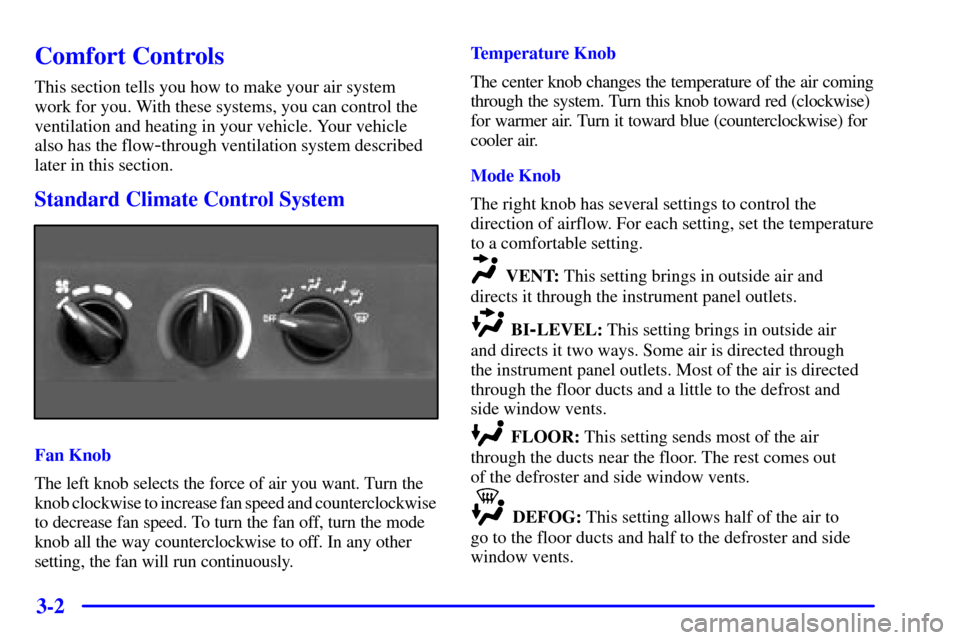
Fan Knob
The left knob selects the force of air you want. Turn the
knob clockwise to increase fan speed and counterclockwise
to decrease fan speed. To turn the fan off, turn the mode
knob all the way counterclockwise to off. In any other
setting, the fan will run continuously.Temperature Knob
The center knob changes the temperature of the air coming
through the system. Turn this knob toward red (clockwise)
for warmer air. Turn it toward blue (counterclockwise) for
cooler air.
Mode Knob
The right knob has several settings to control the
direction of airflow. For each setting, set the temperature
to a comfortable setting.
VENT: This setting brings in outside air and
directs it through the instrument panel outlets.
BI-LEVEL: This setting brings in outside air
and directs it two ways. Some air is directed through
the instrument panel outlets. Most of the air is directed
through the floor ducts and a little to the defrost and
side window vents.
FLOOR: This setting sends most of the air
through the ducts near the floor. The rest comes out
of the defroster and side window vents.
DEFOG: This setting allows half of the air to
go to the floor ducts and half to the defroster and side
window vents.
Page 144 of 364
3-3
DEFROST: This setting directs most of the air
through the defroster and side window vents. Some of
the air goes to the floor ducts.
Climate Control System with Air
Conditioning (If Equipped)
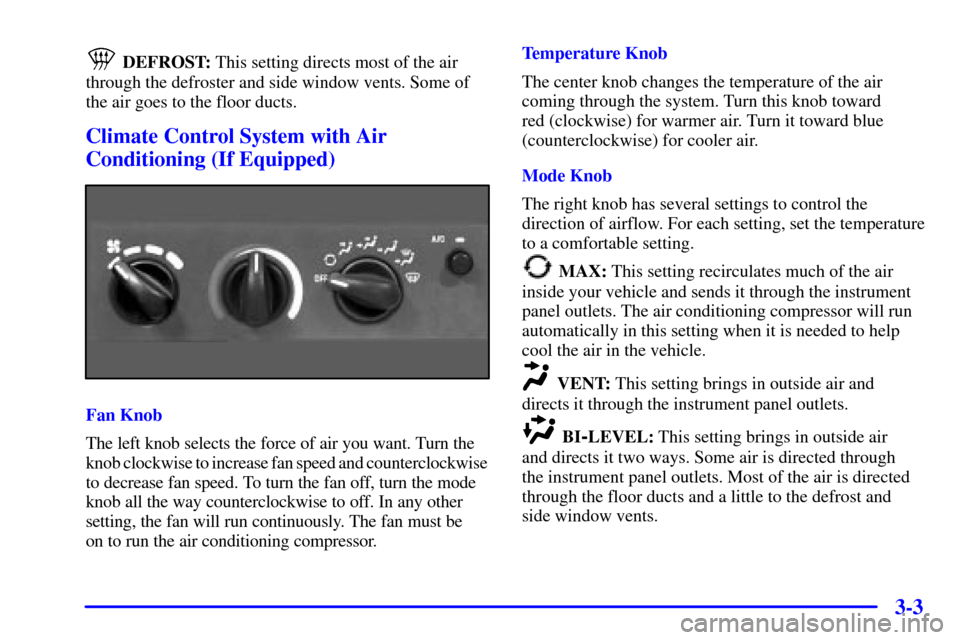
Fan Knob
The left knob selects the force of air you want. Turn the
knob clockwise to increase fan speed and counterclockwise
to decrease fan speed. To turn the fan off, turn the mode
knob all the way counterclockwise to off. In any other
setting, the fan will run continuously. The fan must be
on to run the air conditioning compressor.Temperature Knob
The center knob changes the temperature of the air
coming through the system. Turn this knob toward
red (clockwise) for warmer air. Turn it toward blue
(counterclockwise) for cooler air.
Mode Knob
The right knob has several settings to control the
direction of airflow. For each setting, set the temperature
to a comfortable setting.
MAX: This setting recirculates much of the air
inside your vehicle and sends it through the instrument
panel outlets. The air conditioning compressor will run
automatically in this setting when it is needed to help
cool the air in the vehicle.
VENT: This setting brings in outside air and
directs it through the instrument panel outlets.
BI-LEVEL: This setting brings in outside air
and directs it two ways. Some air is directed through
the instrument panel outlets. Most of the air is directed
through the floor ducts and a little to the defrost and
side window vents.
Page 148 of 364
3-7
Audio Systems
Your audio system has been designed to operate easily
and give years of listening pleasure. You will get the
most enjoyment out of it if you acquaint yourself with it
first. Find out what your audio system can do and how
to operate all its controls, to be sure you're getting the
most out of the advanced engineering that went into it.
Your vehicle has a feature called Retained Accessory
Power (RAP). With RAP, you can play your audio
system even after the ignition is off. See ªRetained
Accessory Powerº in the Index.
Setting the Clock for Systems without
Radio Data System
Setting the Clock
Press and hold the HR or MIN arrow for two seconds.
Then press the HR (down) arrow until the correct hour
appears. Press and hold the MIN (up) arrow until the
correct minute appears. The clock may be set with the
ignition on or off.
Setting the Clock for Systems with
Radio Data System
Press and hold HR or MN for two seconds. Then press
and hold HR until the correct hour appears. AM or PM
will appear on the display. Press and hold MN until the
correct minute appears. The clock may be set with the
ignition on or off. The clock symbol will appear on the
display in time
-set mode.
To set the clock to the time of an FM station
broadcasting Radio Data System (RDS) information,
press and hold HR and MN at the same time for two
seconds until UPDATED and the clock symbol appear
on the display. If the time is not available from the
station, NO UPDAT will appear on the display instead.
Page 149 of 364
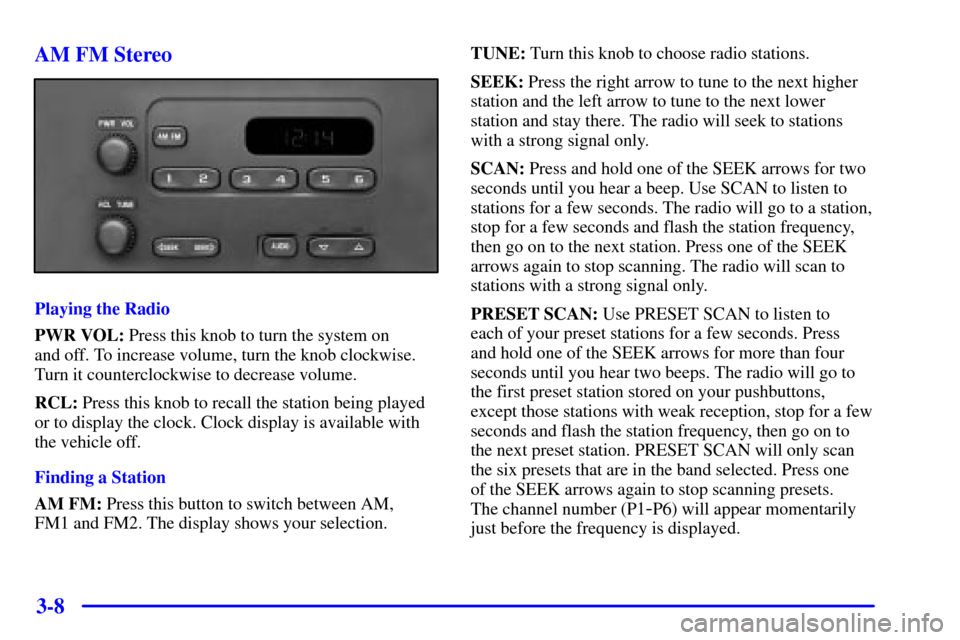
3-8 AM FM Stereo
Playing the Radio
PWR VOL: Press this knob to turn the system on
and off. To increase volume, turn the knob clockwise.
Turn it counterclockwise to decrease volume.
RCL: Press this knob to recall the station being played
or to display the clock. Clock display is available with
the vehicle off.
Finding a Station
AM FM: Press this button to switch between AM,
FM1 and FM2. The display shows your selection.TUNE: Turn this knob to choose radio stations.
SEEK: Press the right arrow to tune to the next higher
station and the left arrow to tune to the next lower
station and stay there. The radio will seek to stations
with a strong signal only.
SCAN: Press and hold one of the SEEK arrows for two
seconds until you hear a beep. Use SCAN to listen to
stations for a few seconds. The radio will go to a station,
stop for a few seconds and flash the station frequency,
then go on to the next station. Press one of the SEEK
arrows again to stop scanning. The radio will scan to
stations with a strong signal only.
PRESET SCAN: Use PRESET SCAN to listen to
each of your preset stations for a few seconds. Press
and hold one of the SEEK arrows for more than four
seconds until you hear two beeps. The radio will go to
the first preset station stored on your pushbuttons,
except those stations with weak reception, stop for a few
seconds and flash the station frequency, then go on to
the next preset station. PRESET SCAN will only scan
the six presets that are in the band selected. Press one
of the SEEK arrows again to stop scanning presets.
The channel number (P1
-P6) will appear momentarily
just before the frequency is displayed.
Page 152 of 364
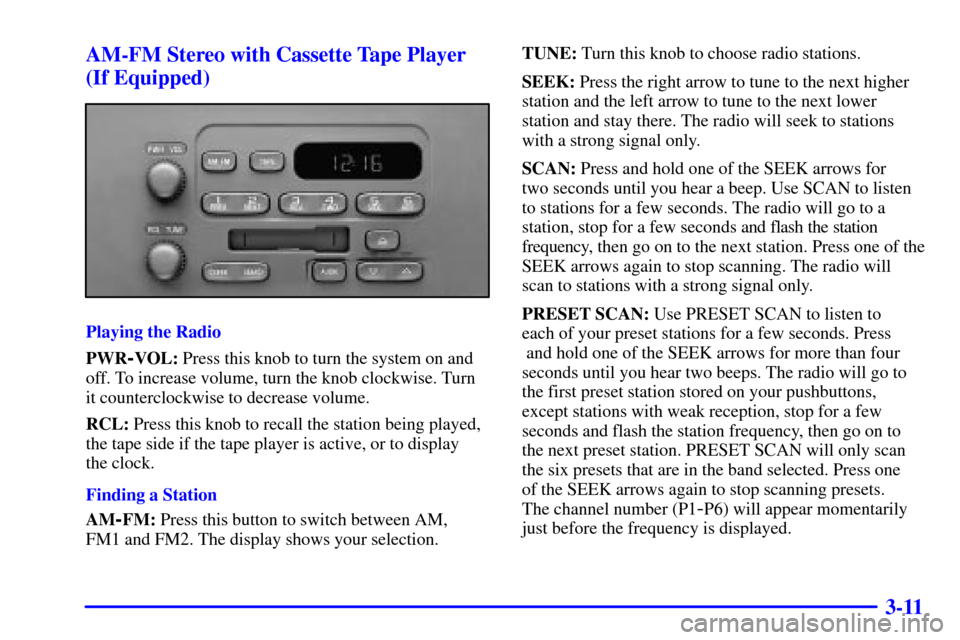
3-11 AM-FM Stereo with Cassette Tape Player
(If Equipped)
Playing the Radio
PWR
-VOL: Press this knob to turn the system on and
off. To increase volume, turn the knob clockwise. Turn
it counterclockwise to decrease volume.
RCL: Press this knob to recall the station being played,
the tape side if the tape player is active, or to display
the clock.
Finding a Station
AM
-FM: Press this button to switch between AM,
FM1 and FM2. The display shows your selection.TUNE: Turn this knob to choose radio stations.
SEEK: Press the right arrow to tune to the next higher
station and the left arrow to tune to the next lower
station and stay there. The radio will seek to stations
with a strong signal only.
SCAN: Press and hold one of the SEEK arrows for
two seconds until you hear a beep. Use SCAN to listen
to stations for a few seconds. The radio will go to a
station, stop for a few seconds and flash the station
frequency, then go on to the next station. Press one of the
SEEK arrows again to stop scanning. The radio will
scan to stations with a strong signal only.
PRESET SCAN: Use PRESET SCAN to listen to
each of your preset stations for a few seconds. Press
and hold one of the SEEK arrows for more than four
seconds until you hear two beeps. The radio will go to
the first preset station stored on your pushbuttons,
except stations with weak reception, stop for a few
seconds and flash the station frequency, then go on to
the next preset station. PRESET SCAN will only scan
the six presets that are in the band selected. Press one
of the SEEK arrows again to stop scanning presets.
The channel number (P1-P6) will appear momentarily
just before the frequency is displayed.
Page 157 of 364

3-16 AM-FM Stereo with Compact Disc Player
(If Equipped)
Playing the Radio
PWR
-VOL: Press this knob to turn the system on
and off. To increase volume, turn the knob clockwise.
Turn it counterclockwise to decrease volume.
RCL: Press this knob to recall the station being played
or to display the clock. Pressing RCL while playing a
CD will also display the CD track number or elapsed
time of CD track.
Finding a Station
AM
-FM: Press this button to switch between AM,
FM1 and FM2. The display shows your selection.TUNE: Turn this knob to choose radio stations.
SEEK: Press the right arrow to tune to the next higher
station and the left arrow to tune to the next lower
station and stay there. The radio will seek to stations
with a strong signal only.
SCAN: Press and hold one of the SEEK arrows for two
seconds until you hear a beep. Use SCAN to listen to
stations for a few seconds. The radio will go to a station,
stop for a few seconds and flash the station frequency,
then go on to the next station. Press one of the SEEK
arrows again to stop scanning. The radio will scan to
stations with a strong signal only.
PRESET SCAN: Press and hold one of the SEEK
arrows for more than four seconds until you will hear a
double beep. Use PRESET SCAN to listen to each of
your preset stations for a few seconds. The radio will go
to the first preset station stored on your pushbuttons,
except those stations with weak reception, stop for a few
seconds and flash the station frequency, then go on to
the next preset station. Press one of the SEEK arrows
again to stop scanning presets. The channel number
(P1
-P6) will appear momentarily just before the
frequency is displayed.
Page 161 of 364
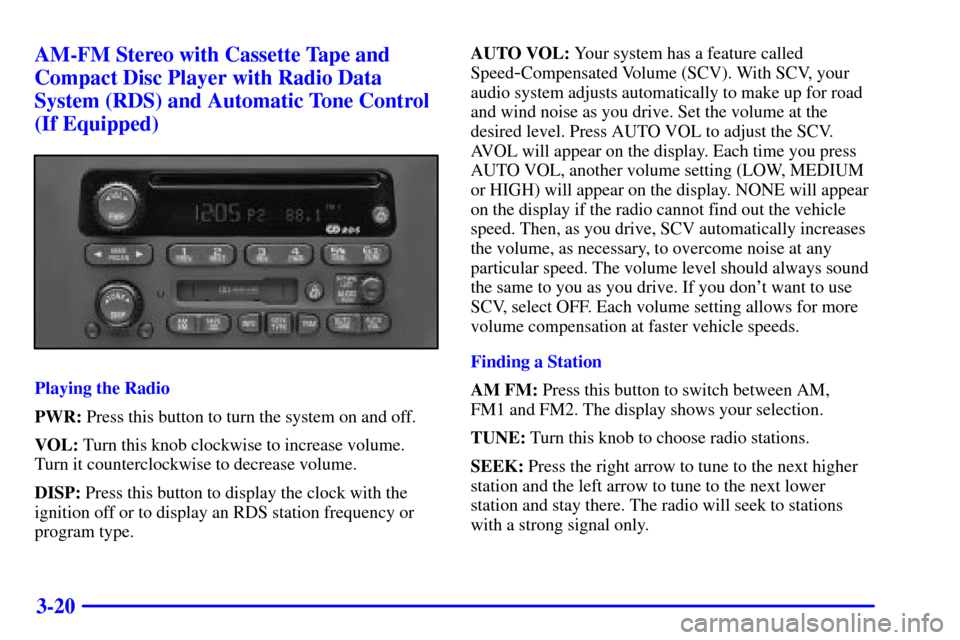
3-20 AM-FM Stereo with Cassette Tape and
Compact Disc Player with Radio Data
System (RDS) and Automatic Tone Control
(If Equipped)
Playing the Radio
PWR: Press this button to turn the system on and off.
VOL: Turn this knob clockwise to increase volume.
Turn it counterclockwise to decrease volume.
DISP: Press this button to display the clock with the
ignition off or to display an RDS station frequency or
program type.AUTO VOL: Your system has a feature called
Speed
-Compensated Volume (SCV). With SCV, your
audio system adjusts automatically to make up for road
and wind noise as you drive. Set the volume at the
desired level. Press AUTO VOL to adjust the SCV.
AVOL will appear on the display. Each time you press
AUTO VOL, another volume setting (LOW, MEDIUM
or HIGH) will appear on the display. NONE will appear
on the display if the radio cannot find out the vehicle
speed. Then, as you drive, SCV automatically increases
the volume, as necessary, to overcome noise at any
particular speed. The volume level should always sound
the same to you as you drive. If you don't want to use
SCV, select OFF. Each volume setting allows for more
volume compensation at faster vehicle speeds.
Finding a Station
AM FM: Press this button to switch between AM,
FM1 and FM2. The display shows your selection.
TUNE: Turn this knob to choose radio stations.
SEEK: Press the right arrow to tune to the next higher
station and the left arrow to tune to the next lower
station and stay there. The radio will seek to stations
with a strong signal only.
Page 162 of 364
3-21
PUSHBUTTONS: The six numbered pushbuttons let
you return to your favorite stations. You can set up to
18 stations (six AM, six FM1 and six FM2). Just:
1. Turn the radio on.
2. Press AM FM to select the band.
3. Tune in the desired station.
4. Press AUTO TONE to select the equalization that
best suits the type of station selected.
5. Press and hold one of the six numbered buttons.
The radio will beep once to confirm. Whenever you
press that numbered button, the station you set
will return and the AUTO TONE equalization that
you selected will also be automatically selected for
that button.
6. Repeat the steps for each pushbutton.
P SCAN: Press and hold one of the arrows for
more than two seconds. The radio will beep once to
confirm. Use P SCAN to listen to each of your favorite
stations stored on your pushbuttons for a few seconds. The radio will scan through each of the stations stored
on your pushbuttons, except those stations with weak
reception. The AUTO TONE setting stored for that
pushbutton will be automatically chosen. Press P SCAN
or one of the pushbuttons again to stop scanning. SCAN
will be displayed whenever the tuner is in the P SCAN
mode. The channel number (P1
-P6) will appear with the
frequency. In FM mode, this function will scan through
the current band such as FM1 or FM2.
Setting the Tone
BASS: Press and release the P
-TYPE LIST/AUDIO
knob until BASS appears on the display. Then turn the
knob clockwise to increase bass and counterclockwise
to decrease bass. The display will show the bass level.
When you use this control, the radio's AUTO TONE
setting will switch to manual. To set bass to the middle
position, select the control and press and hold the
P
-TYPE LIST/AUDIO knob. The radio will produce
one beep and set the display level to the middle position.
To set all tone and speaker controls to the middle
position, press and hold the P
-TYPE LIST/AUDIO
knob when no tone or speaker control is active. The
radio will produce one beep and display ALL with the
level display in the middle position.