audio CHEVROLET CAVALIER 2003 3.G Owner's Manual
[x] Cancel search | Manufacturer: CHEVROLET, Model Year: 2003, Model line: CAVALIER, Model: CHEVROLET CAVALIER 2003 3.GPages: 364, PDF Size: 2.44 MB
Page 173 of 364

Playing a Cassette Tape
Your tape player is built to work best with tapes that are
up to 30 to 45 minutes long on each side. Tapes
longer than that are so thin they may not work well in
this player. The longer side with the tape visible should
face to the right. If the ignition is on, but the radio is
off, the tape can be inserted and will begin playing. A
tape symbol is shown on the display whenever a tape is
inserted. If you hear nothing but a garbled sound, the
tape may not be in squarely. Press EJT to remove
the tape and start over.
While the tape is playing, use the VOL, AUDIO and
SEEK controls just as you do for the radio. The display
will show TAPE and an arrow showing which side of
the tape is playing.
If you want to insert a tape while the ignition is off, ®rst
press EJT or DISPL.
If an error appears on the display, see ªCassette Tape
Messagesº later in this section.
1 PREV (Previous):Your tape must have at least three
seconds of silence between each selection for previous
to work. Press this pushbutton to go to the previous
selection on the tape if the current selection has been
playing for less than three seconds. If pressed when the
current selection has been playing from 3 to 13 seconds,it will go to the beginning of the previous selection or
the beginning of the current selection, depending upon
the position on the tape. If pressed when the current
selection has been playing for more than 13 seconds, it
will go to the beginning of the current selection.
SEEK and a negative number will appear on the display
while the cassette player is in the previous mode.
Pressing this pushbutton multiple times or holding it will
increase the number of selections to be searched
back, up to -9.
2 NEXT:Your tape must have at least three seconds of
silence between each selection for next to work.
Press this pushbutton to go to the next selection on the
tape. If you press the pushbutton more than once,
the player will continue moving forward through the tape.
SEEK and a positive number will appear on the
display.
3 REV (Reverse):Press this pushbutton to reverse the
tape rapidly. Press it again to return to playing speed.
The radio will play while the tape reverses. The
station frequency and REV will appear on the display.
You may select stations during reverse operation
using TUNE, SEEK or PSCAN.
3-71
Page 177 of 364

Compact Disc Messages
If the disc comes out, it could be for one of the following
reasons:
·You're driving on a very rough road. When the road
becomes smoother, the disc should play.
·It's very hot. When the temperature returns to
normal, the disc should play.
·The disc is dirty, scratched, wet or upside down.
·It is very humid. If so, wait about an hour and
try again.
·There may have been a problem while burning
the CD.
·The label may be caught in the CD player.
If any error occurs repeatedly or if an error can't be
corrected, contact your dealer.
Personal Choice Radio Controls
This feature enables two drivers to store and recall
personal settings for radio presets, last tuned station,
volume, tone and audio source (radio, or CD).
The numbers (1 or 2) found on the back of the
remote keyless entry transmitter correspond to the
drivers (1 or 2).
To recall audio sources, press the UNLOCK button on
the remote keyless entry transmitter and turn the ignition
on. The radio settings will automatically adjust to
where they were last set by the identi®ed driver (1 or 2).
To program this feature, do the following:
1. Press the UNLOCK button on the remote keyless
entry transmitter for the identi®ed driver (1 or 2).
2. Turn the ignition on.
3. Set all radio preferences. For more information see
ªSetting Preset Stationsº and ªSetting the Toneº
listed for your particular radio.
Follow these steps each time you want to change the
stored settings.
All vehicles are shipped with this feature on. This
feature can be disabled by your dealer if desired.
3-75
Page 261 of 364
Battery
Your new vehicle comes with a maintenance free
ACDelcožbattery. When it's time for a new battery, get
one that has the replacement number shown on the
original battery's label. We recommend an ACDelco
ž
battery. SeeEngine Compartment Overview on
page 5-12for battery location.
Warning:Battery posts, terminals and related
accessories contain lead and lead compounds,
chemicals known to the State of California to cause
cancer and reproductive harm. Wash hands after
handling.
Vehicle Storage
If you're not going to drive your vehicle for 25 days or
more, remove the black, negative (-) cable from
the battery. This will help keep your battery from
running down.
{CAUTION:
Batteries have acid that can burn you and gas
that can explode. You can be badly hurt if you
aren't careful. See ªJump Startingº next for
tips on working around a battery without
getting hurt.
Contact your dealer to learn how to prepare your
vehicle for longer storage periods.
Also, for your audio system, see
Theft-Deterrent
Feature (Non RDS Radios) on page 3-76orTheft-Deterrent Feature (RDS Radios) on page 3-76.
5-39
Page 305 of 364
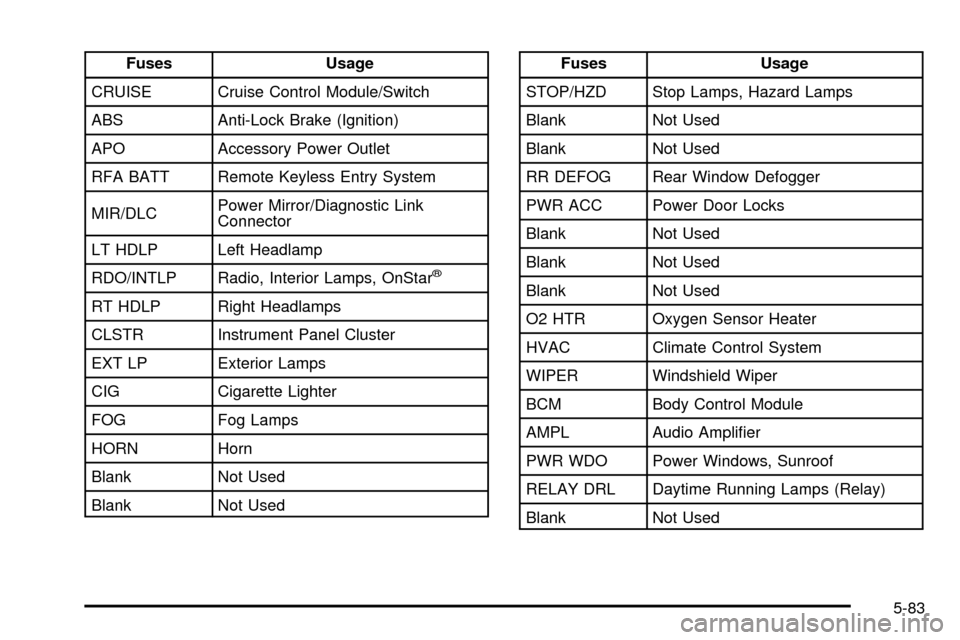
Fuses Usage
CRUISE Cruise Control Module/Switch
ABS Anti-Lock Brake (Ignition)
APO Accessory Power Outlet
RFA BATT Remote Keyless Entry System
MIR/DLCPower Mirror/Diagnostic Link
Connector
LT HDLP Left Headlamp
RDO/INTLP Radio, Interior Lamps, OnStar
ž
RT HDLP Right Headlamps
CLSTR Instrument Panel Cluster
EXT LP Exterior Lamps
CIG Cigarette Lighter
FOG Fog Lamps
HORN Horn
Blank Not Used
Blank Not Used
Fuses Usage
STOP/HZD Stop Lamps, Hazard Lamps
Blank Not Used
Blank Not Used
RR DEFOG Rear Window Defogger
PWR ACC Power Door Locks
Blank Not Used
Blank Not Used
Blank Not Used
O2 HTR Oxygen Sensor Heater
HVAC Climate Control System
WIPER Windshield Wiper
BCM Body Control Module
AMPL Audio Ampli®er
PWR WDO Power Windows, Sunroof
RELAY DRL Daytime Running Lamps (Relay)
Blank Not Used
5-83
Page 306 of 364
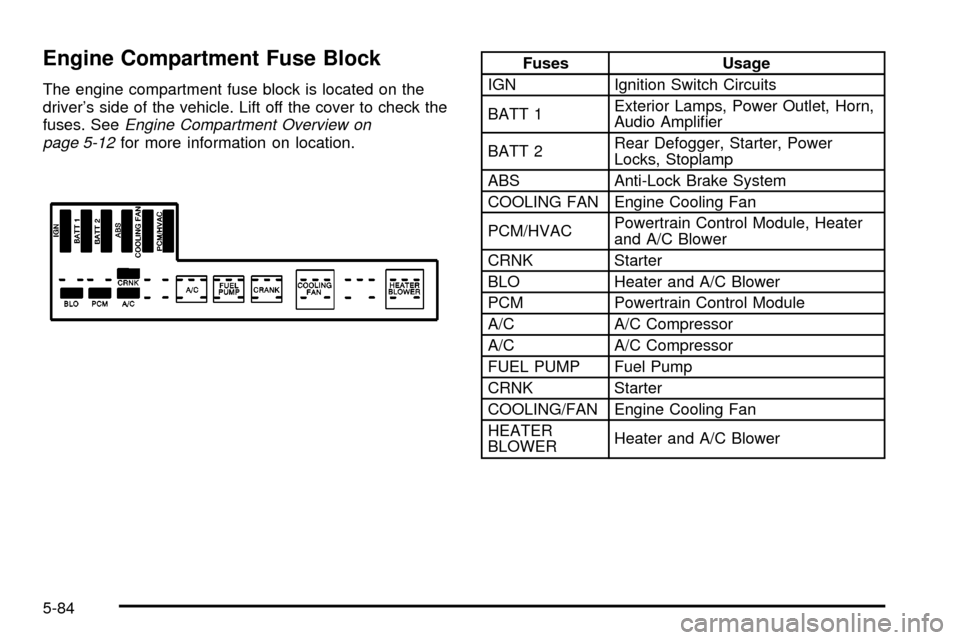
Engine Compartment Fuse Block
The engine compartment fuse block is located on the
driver's side of the vehicle. Lift off the cover to check the
fuses. See
Engine Compartment Overview on
page 5-12for more information on location.
Fuses Usage
IGN Ignition Switch Circuits
BATT 1Exterior Lamps, Power Outlet, Horn,
Audio Ampli®er
BATT 2Rear Defogger, Starter, Power
Locks, Stoplamp
ABS Anti-Lock Brake System
COOLING FAN Engine Cooling Fan
PCM/HVACPowertrain Control Module, Heater
and A/C Blower
CRNK Starter
BLO Heater and A/C Blower
PCM Powertrain Control Module
A/C A/C Compressor
A/C A/C Compressor
FUEL PUMP Fuel Pump
CRNK Starter
COOLING/FAN Engine Cooling Fan
HEATER
BLOWERHeater and A/C Blower
5-84
Page 327 of 364

Part B: Owner Checks and Services
Listed in this part are owner checks and services
which should be performed at the intervals speci®ed to
help ensure the safety, dependability and emission
control performance of your vehicle.
Be sure any necessary repairs are completed at once.
Whenever any ¯uids or lubricants are added to your
vehicle, make sure they are the proper ones, as shown
in Part D.
At Each Fuel Fill
It is important for you or a service station attendant to
perform these underhood checks at each fuel ®ll.
Engine Oil Level Check
Check the engine oil level and add the proper oil if
necessary. SeeEngine Oil on page 5-14for further
details.
Engine Coolant Level Check
Check the engine coolant level and add DEX-COOLž
coolant mixture if necessary. SeeEngine Coolant
on page 5-22for further details.
Windshield Washer Fluid Level Check
Check the windshield washer ¯uid level in the windshield
washer tank and add the proper ¯uid if necessary. See
Windshield Washer Fluid on page 5-34for further details.
At Least Once a Month
Tire In¯ation Check
Make sure tires are in¯ated to the correct pressures.
Don't forget to check your spare tire. SeeTires on
page 5-51for further details.
Cassette Tape Player Service
Clean cassette tape player. Cleaning should be done
every 50 hours of tape play. SeeAudio System(s)
on page 3-36for further details.
At Least Twice a Year
Restraint System Check
Make sure the safety belt reminder light and all your
belts, buckles, latch plates, retractors and anchorages
are working properly. Look for any other loose or
damaged safety belt system parts. If you see anything
that might keep a safety belt system from doing its
job, have it repaired. Have any torn or frayed safety belts
replaced.
Also look for any opened or broken air bag coverings,
and have them repaired or replaced. (The air bag
system does not need regular maintenance.)
6-19
Page 349 of 364

A
Accessory Power Outlets.................................3-16
Adding Washer Fluid.......................................5-34
Additional Program Information........................... 7-9
Additives, Fuel................................................. 5-5
Add-On Electrical Equipment............................5-80
Adjusting the Speakers
(Balance/Fade)....................3-38, 3-42, 3-52, 3-66
Air Bag Systems.............................................1-49
How Does an Air Bag Restrain?....................1-56
Servicing Your Air Bag-Equipped Vehicle.........1-58
What Makes an Air Bag In¯ate?....................1-55
What Will You See After an Air
Bag In¯ates?...........................................1-56
When Should an Air Bag In¯ate?...................1-55
Where Are the Air Bags?..............................1-52
Air Bag .........................................................3-24
Readiness Light..........................................3-24
Air Cleaner/Filter, Engine.................................5-18
AM-FM Radio.................................................3-37
AM ...............................................................3-76
Antenna, Fixed Mast.......................................3-78
Antenna, XMŸ Satellite Radio Antenna System . . 3-79
Anti-lock Brake System (ABS)............................ 4-6
Anti-Lock Brake, System Warning Light..............3-27
Appearance Care............................................5-71
Care of Safety Belts....................................5-74
Chemical Paint Spotting...............................5-77
Cleaning the Inside of Your Vehicle................5-71Appearance Care (cont.)
Cleaning the Outside of Your Vehicle..............5-74
Finish Damage............................................5-77
Sheet Metal Damage...................................5-77
Underbody Maintenance...............................5-77
Vehicle Care/Appearance Materials................5-78
Weatherstrips..............................................5-74
Arming the System.........................................2-15
Ashtrays........................................................3-16
Audio System(s).............................................3-36
AM-FM Radio.............................................3-37
Care of Your Cassette Tape Player................3-77
Care of Your CD Player...............................3-78
Care of Your CDs........................................3-78
Chime Level Adjustment...............................3-79
Fixed Mast Antenna.....................................3-78
Personal Choice Radio Controls....................3-75
Radio with Cassette and CD.........................3-63
Radio with CD....................................3-39, 3-49
Setting the Time for Radios with Radio
Data Systems (RDS)................................3-36
Setting the Time for Radios without
Radio Data Systems (RDS).......................3-36
Theft-Deterrent Feature................................3-76
Understanding Radio Reception.....................3-76
XMŸ Satellite Radio Antenna System............3-79
Automatic Transaxle Inspection.........................6-20
Automatic Transaxle Shift Lock Control
System Check.............................................6-21
1