ignition CHEVROLET CAVALIER 2003 3.G Workshop Manual
[x] Cancel search | Manufacturer: CHEVROLET, Model Year: 2003, Model line: CAVALIER, Model: CHEVROLET CAVALIER 2003 3.GPages: 364, PDF Size: 2.44 MB
Page 177 of 364

Compact Disc Messages
If the disc comes out, it could be for one of the following
reasons:
·You're driving on a very rough road. When the road
becomes smoother, the disc should play.
·It's very hot. When the temperature returns to
normal, the disc should play.
·The disc is dirty, scratched, wet or upside down.
·It is very humid. If so, wait about an hour and
try again.
·There may have been a problem while burning
the CD.
·The label may be caught in the CD player.
If any error occurs repeatedly or if an error can't be
corrected, contact your dealer.
Personal Choice Radio Controls
This feature enables two drivers to store and recall
personal settings for radio presets, last tuned station,
volume, tone and audio source (radio, or CD).
The numbers (1 or 2) found on the back of the
remote keyless entry transmitter correspond to the
drivers (1 or 2).
To recall audio sources, press the UNLOCK button on
the remote keyless entry transmitter and turn the ignition
on. The radio settings will automatically adjust to
where they were last set by the identi®ed driver (1 or 2).
To program this feature, do the following:
1. Press the UNLOCK button on the remote keyless
entry transmitter for the identi®ed driver (1 or 2).
2. Turn the ignition on.
3. Set all radio preferences. For more information see
ªSetting Preset Stationsº and ªSetting the Toneº
listed for your particular radio.
Follow these steps each time you want to change the
stored settings.
All vehicles are shipped with this feature on. This
feature can be disabled by your dealer if desired.
3-75
Page 178 of 364

Theft-Deterrent Feature
(Non RDS Radios)
THEFTLOCKžis designed to discourage theft of your
radio. The feature works automatically by learning
a portion of the Vehicle Identi®cation Number (VIN). If
the radio is moved to a different vehicle, it will not
operate and LOC will be displayed.
When the radio and vehicle are turned off, the blinking
red light indicates that THEFTLOCK is armed.
With THEFTLOCK activated, your radio will not operate
if stolen.
Theft-Deterrent Feature
(RDS Radios)
THEFTLOCKžis designed to discourage theft of your
radio. The feature works automatically by learning
a portion of the Vehicle Identi®cation Number (VIN). If
the radio is moved to a different vehicle, it will not
operate and LOCKED will be displayed.
When the ignition is off and RAP is not active, the
blinking red light indicates that THEFTLOCK is armed.
With THEFTLOCK activated, your radio will not
operate if stolen.
Understanding Radio Reception
AM
The range for most AM stations is greater than for FM,
especially at night. The longer range, however, can
cause stations to interfere with each other. AM can pick
up noise from things like storms and power lines. Try
reducing the treble to reduce this noise if you ever get it.
FM Stereo
FM stereo will give you the best sound, but FM signals
will reach only about 10 to 40 miles (16 to 65 km).
Tall buildings or hills can interfere with FM signals,
causing the sound to come and go.
XMŸ Satellite Radio Service
(USA Only)
XMŸ Satellite Radio gives you digital radio reception
from coast to coast. Just as with FM, tall buildings
or hills can interfere with satellite radio signals, causing
the sound to come and go. Your radio may display
NO SIGNAL to indicate interference.
3-76
Page 179 of 364

Care of Your Cassette Tape Player
A tape player that is not cleaned regularly can cause
reduced sound quality, ruined cassettes or a damaged
mechanism. Cassette tapes should be stored in their
cases away from contaminants, direct sunlight and
extreme heat. If they aren't, they may not operate
properly or may cause failure of the tape player.
Your tape player should be cleaned regularly after every
50 hours of use. Your radio may display CLEAN to
indicate that you have used your tape player for
50 hours without resetting the tape clean timer. If this
message appears on the display, your cassette
tape player needs to be cleaned. It will still play tapes,
but you should clean it as soon as possible to
prevent damage to your tapes and player. If you notice
a reduction in sound quality, try a known good
cassette to see if the tape or the tape player is at fault.
If this other cassette has no improvement in sound
quality, clean the tape player.
For best results, use a scrubbing action, non-abrasive
cleaning cassette with pads which scrub the tape
head as the hubs of the cleaner cassette turn. The
recommended cleaning cassette is available through
your dealership.The broken tape detection feature of your cassette tape
player may identify the cleaning cassette as a
damaged tape, in error. To prevent the cleaning cassette
from being ejected, use the following steps:
1. Turn the ignition on.
2. Turn the radio off.
3. Press and hold the TAPE CD button for ®ve
seconds. READY will appear on the display and a
cassette symbol will ¯ash for ®ve seconds.
4. Insert the scrubbing action cleaning cassette.
5. Eject the cleaning cassette after the manufacturer's
recommended cleaning time.
After the cleaning cassette is ejected, the broken tape
detection feature will be active again.
You may also choose a non-scrubbing action, wet-type
cleaner which uses a cassette with a fabric belt to
clean the tape head. This type of cleaning cassette will
not eject on its own. A non-scrubbing action cleaner
may not clean as thoroughly as the scrubbing type
cleaner. The use of a non-scrubbing action, dry-type
cleaning cassette is not recommended.
3-77
Page 181 of 364

XMŸ Satellite Radio Antenna
System (United States Only)
Your XMŸ Satellite Radio antenna is located on the
roof of your vehicle. Keep this antenna clear of
snow and ice build up for clear radio reception.
The performance of your XM system may be affected if
your sunroof is open.
Chime Level Adjustment
Chime level adjustment is only available on RDS radios.
The radio is the vehicle chime producer. The chime is
produced from the driver's side front door speakers.
To change the volume level, press and hold
pushbutton 6 with the ignition on and the radio power
off. The chime volume level will change from the normal
level to loud, and LOUD will be displayed on the
radio. To change back to the default or normal setting,
press and hold pushbutton 6 again. The chime level
will change from the loud level to normal, and NORMAL
will be displayed. Each time the chime volume is
changed, three chimes will sound as an example of the
new volume selected. Removing the radio and not
replacing it with a factory radio or chime module will
disable vehicle chimes.
3-79
Page 205 of 364
If you drive regularly in steep country, or if you're
planning to visit there, here are some tips that can make
your trips safer and more enjoyable.
·Keep your vehicle in good shape. Check all ¯uid
levels and also the brakes, tires, cooling system
and transaxle. These parts can work hard on
mountain roads.
·Know how to go down hills. The most important
thing to know is this: let your engine do some of
the slowing down. Shift to a lower gear when you go
down a steep or long hill.
{CAUTION:
If you don't shift down, your brakes could get
so hot that they wouldn't work well. You would
then have poor braking or even none going
down a hill. You could crash. Shift down to let
your engine assist your brakes on a steep
downhill slope.
{CAUTION:
Coasting downhill in NEUTRAL (N) or with the
ignition off is dangerous. Your brakes will have
to do all the work of slowing down. They could
get so hot that they wouldn't work well. You
would then have poor braking or even none
going down a hill. You could crash. Always
have your engine running and your vehicle in
gear when you go downhill.
·Know how to go uphill. You may want to shift down to
a lower gear. The lower gears help cool your engine
and transaxle, and you can climb the hill better.
·Stay in your own lane when driving on two-lane
roads in hills or mountains. Don't swing wide or
cut across the center of the road. Drive at speeds
that let you stay in your own lane.
·As you go over the top of a hill, be alert. There
could be something in your lane, like a stalled car or
an accident.
·You may see highway signs on mountains that
warn of special problems. Examples are long
grades, passing or no-passing zones, a falling rocks
area or winding roads. Be alert to these and take
appropriate action.
4-23
Page 213 of 364

Dinghy Towing
You may dinghy tow your vehicle from the front following
these steps:
1. Set the parking brake.
2. Turn the ignition key to OFF to unlock the steering
wheel.
3. Shift your transaxle to NEUTRAL (N).
4. Release the parking brake.
Notice:Make sure that the towing speed does not
exceed 65 mph (110 km/h), or your vehicle could
be badly damaged.
Notice:Do not tow your vehicle from the rear. Your
vehicle could be badly damaged and the repairs
would not be covered by your warranty.
Dolly Towing
Your vehicle cannot be dolly towed, but can be dinghy
towed. See ªDinghy Towingº earlier in this section.
Notice:Dolly towing with one end of the vehicle
elevated may cause damage to occur because
of reduced ground clearance.
4-31
Page 262 of 364

Jump Starting
If your battery has run down, you may want to use
another vehicle and some jumper cables to start your
vehicle. Be sure to follow the steps below to do it safely.
{CAUTION:
Batteries can hurt you. They can be dangerous
because:
·They contain acid that can burn you.
·They contain gas that can explode or
ignite.
·They contain enough electricity to
burn you.
If you don't follow these steps exactly, some
or all of these things can hurt you.
Notice:Ignoring these steps could result in costly
damage to your vehicle that wouldn't be covered
by your warranty.
Trying to start your vehicle by pushing or pulling it
won't work, and it could damage your vehicle.1. Check the other vehicle. It must have a 12-volt
battery with a negative ground system.
Notice:If the other system isn't a 12-volt system
with a negative ground, both vehicles can be
damaged.
2. Get the vehicles close enough so the jumper cables
can reach, but be sure the vehicles aren't touching
each other. If they are, it could cause a ground
connection you don't want. You wouldn't be able to
start your vehicle, and the bad grounding could
damage the electrical systems.
To avoid the possibility of the vehicles rolling, set
the parking brake ®rmly on both vehicles involved in
the jump start procedure. Put an automatic
transaxle in PARK (P) or a manual transaxle in
NEUTRAL before setting the parking brake.
Notice:If you leave your radio on, it could be badly
damaged. The repairs wouldn't be covered by
your warranty.
3. Turn off the ignition on both vehicles. Unplug
unnecessary accessories plugged into the cigarette
lighter or in the accessory power outlet. Turn off
the radio and all lamps that aren't needed. This will
avoid sparks and help save both batteries. And it
could save your radio!
5-40
Page 304 of 364
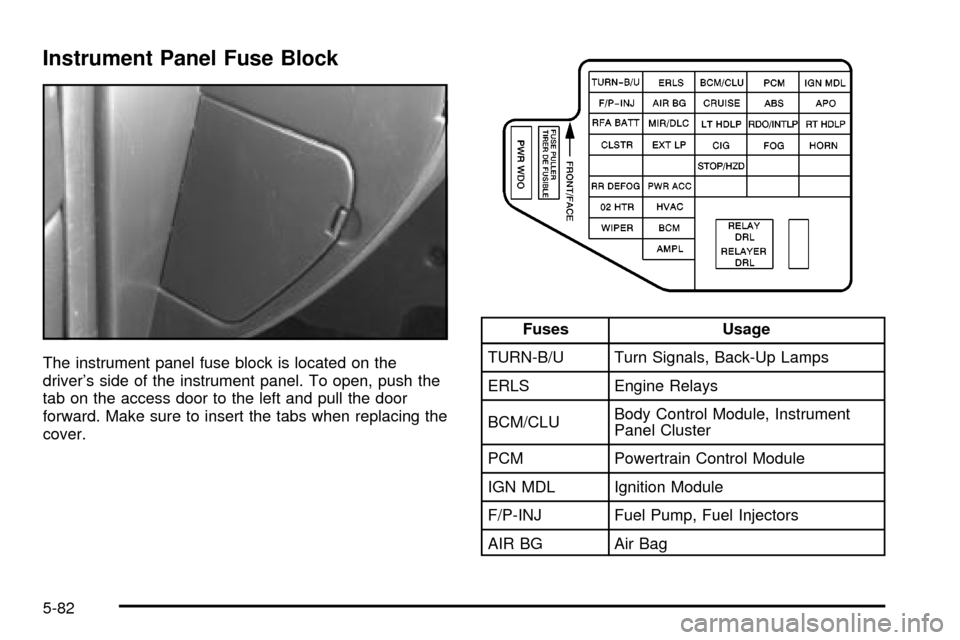
Instrument Panel Fuse Block
The instrument panel fuse block is located on the
driver's side of the instrument panel. To open, push the
tab on the access door to the left and pull the door
forward. Make sure to insert the tabs when replacing the
cover.
Fuses Usage
TURN-B/U Turn Signals, Back-Up Lamps
ERLS Engine Relays
BCM/CLUBody Control Module, Instrument
Panel Cluster
PCM Powertrain Control Module
IGN MDL Ignition Module
F/P-INJ Fuel Pump, Fuel Injectors
AIR BG Air Bag
5-82
Page 305 of 364
Fuses Usage
CRUISE Cruise Control Module/Switch
ABS Anti-Lock Brake (Ignition)
APO Accessory Power Outlet
RFA BATT Remote Keyless Entry System
MIR/DLCPower Mirror/Diagnostic Link
Connector
LT HDLP Left Headlamp
RDO/INTLP Radio, Interior Lamps, OnStar
ž
RT HDLP Right Headlamps
CLSTR Instrument Panel Cluster
EXT LP Exterior Lamps
CIG Cigarette Lighter
FOG Fog Lamps
HORN Horn
Blank Not Used
Blank Not Used
Fuses Usage
STOP/HZD Stop Lamps, Hazard Lamps
Blank Not Used
Blank Not Used
RR DEFOG Rear Window Defogger
PWR ACC Power Door Locks
Blank Not Used
Blank Not Used
Blank Not Used
O2 HTR Oxygen Sensor Heater
HVAC Climate Control System
WIPER Windshield Wiper
BCM Body Control Module
AMPL Audio Ampli®er
PWR WDO Power Windows, Sunroof
RELAY DRL Daytime Running Lamps (Relay)
Blank Not Used
5-83
Page 306 of 364
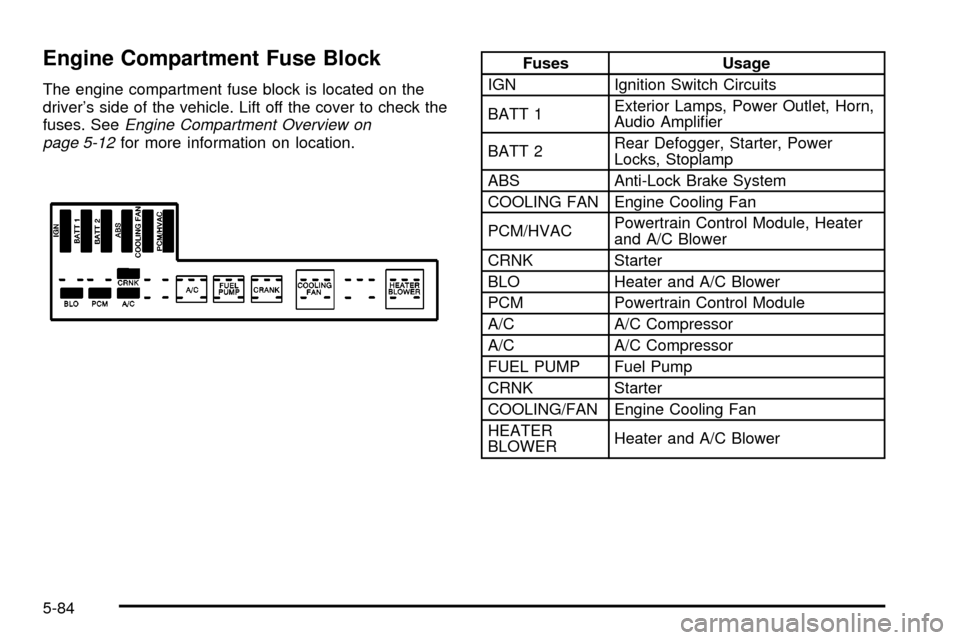
Engine Compartment Fuse Block
The engine compartment fuse block is located on the
driver's side of the vehicle. Lift off the cover to check the
fuses. See
Engine Compartment Overview on
page 5-12for more information on location.
Fuses Usage
IGN Ignition Switch Circuits
BATT 1Exterior Lamps, Power Outlet, Horn,
Audio Ampli®er
BATT 2Rear Defogger, Starter, Power
Locks, Stoplamp
ABS Anti-Lock Brake System
COOLING FAN Engine Cooling Fan
PCM/HVACPowertrain Control Module, Heater
and A/C Blower
CRNK Starter
BLO Heater and A/C Blower
PCM Powertrain Control Module
A/C A/C Compressor
A/C A/C Compressor
FUEL PUMP Fuel Pump
CRNK Starter
COOLING/FAN Engine Cooling Fan
HEATER
BLOWERHeater and A/C Blower
5-84