lights CHEVROLET CAVALIER 2003 3.G Owners Manual
[x] Cancel search | Manufacturer: CHEVROLET, Model Year: 2003, Model line: CAVALIER, Model: CHEVROLET CAVALIER 2003 3.GPages: 364, PDF Size: 2.44 MB
Page 1 of 364

Seats and Restraint Systems........................... 1-1
Front Seats
............................................... 1-2
Rear Seats
............................................... 1-8
Safety Belts
.............................................. 1-9
Child Restraints
.......................................1-29
Air Bag Systems
......................................1-49
Restraint System Check
............................1-58
Features and Controls..................................... 2-1
Keys
........................................................ 2-2
Doors and Locks
....................................... 2-7
Windows
.................................................2-13
Theft-Deterrent Systems
............................2-15
Starting and Operating Your Vehicle
...........2-17
Mirrors
....................................................2-32
OnStar
žSystem
......................................2-34
Storage Areas
.........................................2-35
Sunroof
..................................................2-36
Instrument Panel............................................. 3-1
Instrument Panel Overview
.......................... 3-2
Climate Controls
......................................3-17
Warning Lights, Gages and Indicators
.........3-21
Audio System(s)
.......................................3-36Driving Your Vehicle....................................... 4-1
Your Driving, the Road, and Your Vehicle
..... 4-2
Towing
...................................................4-30
Service and Appearance Care.......................... 5-1
Service
..................................................... 5-3
Fuel
......................................................... 5-4
Checking Things Under
the Hood
.............................................5-10
Bulb Replacement
....................................5-45
Windshield Wiper Blade Replacement
.........5-50
Tires
......................................................5-51
Appearance Care
.....................................5-71
Vehicle Identi®cation
.................................5-79
Electrical System
......................................5-80
Capacities and Speci®cations
.....................5-85
Normal Maintenance Replacement Parts
......5-86
Maintenance Schedule..................................... 6-1
Maintenance Schedule
................................ 6-2
Customer Assistance Information.................... 7-1
Customer Assistance Information
.................. 7-2
Reporting Safety Defects
............................ 7-9
INDEX................................................................1
2003 Chevrolet Cavalier Owner ManualM
Page 4 of 364

Vehicle Damage Warnings
Also, in this book you will ®nd these notices:
Notice:These mean there is something that could
damage your vehicle.
A notice will tell you about something that can damage
your vehicle. Many times, this damage would not be
covered by your warranty, and it could be costly. But the
notice will tell you what to do to help avoid the
damage.
When you read other manuals, you might see CAUTION
and NOTICE warnings in different colors or in different
words.
You'll also see warning labels on your vehicle. They use
the same words, CAUTION or NOTICE.
Vehicle Symbols
Your vehicle has components and labels that use
symbols instead of text. Symbols, used on your vehicle,
are shown along with the text describing the operation
or information relating to a speci®c component, control,
message, gage or indicator.
If you need help ®guring out a speci®c name of a
component, gage or indicator, reference the following
topics:
·Seats and Restraint Systems in Section 1
·Features and Controls in Section 2
·Instrument Panel Overview in Section 3
·Climate Controls in Section 3
·Warning Lights, Gages and Indicators in Section 3
·Audio System(s) in Section 3
·Engine Compartment Overview in Section 5
iv
Page 81 of 364

Theft-Deterrent Systems
Vehicle theft is big business, especially in some cities.
Although your vehicle has a number of theft-deterrent
features, we know that nothing we put on it can make it
impossible to steal.
Content Theft-Deterrent
Arming the System
With the ignition off, pressing the remote keyless entry
transmitter LOCK button will arm the system
immediately after all doors and the trunk are closed. If
the transmitter LOCK button is pressed again within ®ve
seconds, the horn will chirp to con®rm that the system
has been armed.
Once the system is armed, the THEFT SYSTEM light
on your instrument panel will ¯ash and remain ¯ashing.
This con®rms the system is armed and monitoring
the doors and trunk. If the light is on solid, the system is
not properly activated due to either a door or the
trunk being ajar.
If you don't want to arm the system, lock the car with
the lock levers on the doors or with the power door lock
switch.
Disarming the System
If the system is armed, pressing the UNLOCK button on
the transmitter will disarm the system. The THEFT
SYSTEM light will stop ¯ashing.
If the system is armed, turning the key to START will
also disarm the system.
If the system is armed and the trunk is opened using
the trunk release button on the transmitter, the system
will temporarily disarm itself and re-arm when the
trunk has been closed. This allows the customer to exit
the vehicle, lock the doors using the transmitter, and
open the trunk using the transmitter without having
to disarm and subsequently re-arm the system.
How the System Alarm is Activated
If the system is armed, opening any door or trunk, or
using a wrong key to start the vehicle will cause a
pre-alarm chirp for 10 seconds and then a full alarm of
horn and headlights for two minutes.
If an alarm event has ®nished and all doors and trunk
are closed, the content theft security system will re-arm
itself.
2-15
Page 84 of 364
B (LOCK):This position locks your steering wheel,
ignition, shift lever and transaxle. This is the only
position from which you can remove the key. A warning
chime will sound if you open the driver's door when
the ignition is in LOCK and the key is in the ignition.
{CAUTION:
On manual transaxle vehicles, turning the key
to LOCK will lock the steering column and
result in a loss of ability to steer the vehicle.
This could cause a collision. If you need to
turn the engine off while the vehicle is moving,
turn the key only to OFF. Don't press the key
release button while the vehicle is moving.
Notice:If your key seems stuck in LOCK and you
can't turn it, be sure you are using the correct key; if
so, is it all the way in? If it is, then turn the steering
wheel left and right while you turn the key hard.
Turn the key only with your hand. Using a tool
to force it could break the key or the ignition switch.
If none of these works, then your vehicle needs
service.C (OFF):This position unlocks the steering wheel,
ignition and transaxle, but does not send power to any
accessories. Use this position if your vehicle must
be pushed or towed, but never try to push-start your
vehicle. A warning chime will sound if you open
the driver's door when the ignition is in OFF and the key
is in the ignition.
D (RUN):This is the position to which the switch
returns after you start your engine and release the
switch. The switch stays in RUN when the engine
is running. But even when the engine is not running,
you can use RUN to operate your electrical accessories,
and to display some instrument panel warning lights.
E (START):This position starts the engine. When
the engine starts, release the key. The ignition switch
will return to RUN for normal driving.
Even if the engine is not running, ACCESSORY and
RUN allow you to operate electrical accessories,
such as the radio.
2-18
Page 103 of 364

Instrument Panel Overview...............................3-2
Hazard Warning Flashers................................3-3
Other Warning Devices...................................3-4
Horn.............................................................3-4
Tilt Wheel.....................................................3-5
Turn Signal/Multifunction Lever.........................3-5
Exterior Lamps.............................................3-12
Interior Lamps..............................................3-14
Accessory Power Outlets...............................3-16
Ashtrays and Cigarette Lighter........................3-16
Climate Controls............................................3-17
Climate Control System.................................3-17
Outlet Adjustment.........................................3-20
Warning Lights, Gages and Indicators.............3-21
Instrument Panel Cluster................................3-22
Speedometer and Odometer...........................3-23
Tachometer.................................................3-23
Safety Belt Reminder Light.............................3-24
Air Bag Readiness Light................................3-24
Charging System Light..................................3-25
Up-Shift Light...............................................3-26
Brake System Warning Light..........................3-26
Anti-Lock Brake System Warning Light.............3-27
Enhanced Traction System Warning Light.........3-28
Enhanced Traction System Active Light............3-29
Engine Coolant Temperature Gage..................3-29
Low Coolant Warning Light............................3-30Malfunction Indicator Lamp.............................3-30
Oil Pressure Light.........................................3-33
Passlock
žWarning Light................................3-34
Check Gages Warning Light...........................3-34
Service Vehicle Soon Light............................3-35
Fuel Gage...................................................3-35
Audio System(s).............................................3-36
Setting the Time for Radios without Radio
Data Systems (RDS)..................................3-36
Setting the Time for Radios with Radio Data
Systems (RDS).........................................3-36
AM-FM Radio...............................................3-37
Radio with CD (Base Level)...........................3-39
Radio with CD (MP3)....................................3-49
Radio with Cassette and CD..........................3-63
Personal Choice Radio Controls......................3-75
Theft-Deterrent Feature (Non RDS Radios).......3-76
Theft-Deterrent Feature (RDS Radios).............3-76
Understanding Radio Reception......................3-76
Care of Your Cassette Tape Player.................3-77
Care of Your CDs.........................................3-78
Care of Your CD Player................................3-78
Fixed Mast Antenna......................................3-78
XMŸ Satellite Radio Antenna System
(United States Only)..................................3-79
Chime Level Adjustment................................3-79
Section 3 Instrument Panel
3-1
Page 114 of 364
Exterior Lamps
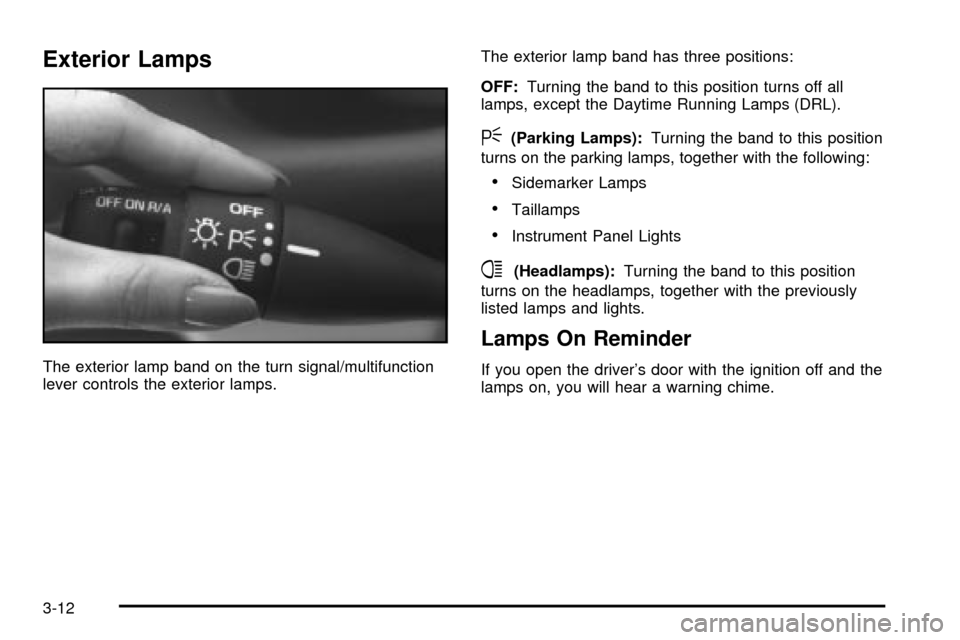
The exterior lamp band on the turn signal/multifunction
lever controls the exterior lamps.The exterior lamp band has three positions:
OFF:Turning the band to this position turns off all
lamps, except the Daytime Running Lamps (DRL).
<(Parking Lamps):Turning the band to this position
turns on the parking lamps, together with the following:
·Sidemarker Lamps
·Taillamps
·Instrument Panel Lights
4(Headlamps):Turning the band to this position
turns on the headlamps, together with the previously
listed lamps and lights.
Lamps On Reminder
If you open the driver's door with the ignition off and the
lamps on, you will hear a warning chime.
3-12
Page 116 of 364
Fog Lamps
If your vehicle has this feature, use your fog lamps for
better visibility in foggy or misty conditions.
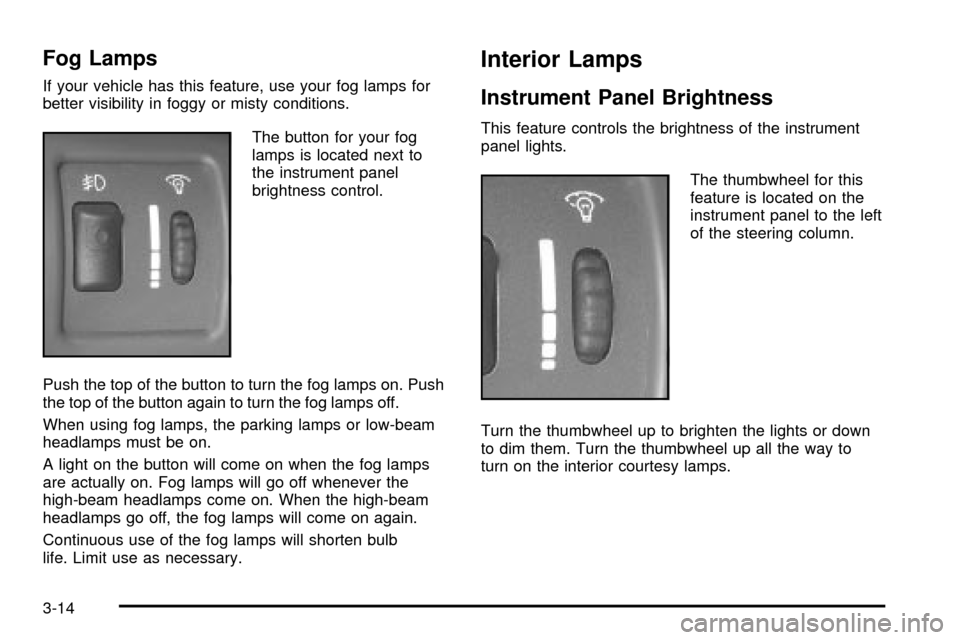
The button for your fog
lamps is located next to
the instrument panel
brightness control.
Push the top of the button to turn the fog lamps on. Push
the top of the button again to turn the fog lamps off.
When using fog lamps, the parking lamps or low-beam
headlamps must be on.
A light on the button will come on when the fog lamps
are actually on. Fog lamps will go off whenever the
high-beam headlamps come on. When the high-beam
headlamps go off, the fog lamps will come on again.
Continuous use of the fog lamps will shorten bulb
life. Limit use as necessary.
Interior Lamps
Instrument Panel Brightness
This feature controls the brightness of the instrument
panel lights.
The thumbwheel for this
feature is located on the
instrument panel to the left
of the steering column.
Turn the thumbwheel up to brighten the lights or down
to dim them. Turn the thumbwheel up all the way to
turn on the interior courtesy lamps.
3-14
Page 123 of 364

Warning Lights, Gages and
Indicators
This part describes the warning lights and gages that
may be on your vehicle. The pictures will help you locate
them.
Warning lights and gages can signal that something is
wrong before it becomes serious enough to cause
an expensive repair or replacement. Paying attention to
your warning lights and gages could also save you
or others from injury.
Warning lights come on when there may be or is a
problem with one of your vehicle's functions. As you will
see in the details on the next few pages, some
warning lights come on brie¯y when you start the
engine just to let you know they're working. If you are
familiar with this section, you should not be alarmed
when this happens.Gages can indicate when there may be or is a problem
with one of your vehicle's functions. Often gages
and warning lights work together to let you know when
there's a problem with your vehicle.
When one of the warning lights comes on and stays on
when you are driving, or when one of the gages
shows there may be a problem, check the section that
tells you what to do about it. Please follow this
manual's advice. Waiting to do repairs can be
costly Ð and even dangerous. So please get to know
your warning lights and gages. They're a big help.
3-21
Page 198 of 364

You can be temporarily blinded by approaching
headlamps. It can take a second or two, or even several
seconds, for your eyes to readjust to the dark. When
you are faced with severe glare (as from a driver
who doesn't lower the high beams, or a vehicle with
misaimed headlamps), slow down a little. Avoid staring
directly into the approaching headlamps.
Keep your windshield and all the glass on your vehicle
clean Ð inside and out. Glare at night is made much
worse by dirt on the glass. Even the inside of the glass
can build up a ®lm caused by dust. Dirty glass makes
lights dazzle and ¯ash more than clean glass would,
making the pupils of your eyes contract repeatedly.
Remember that your headlamps light up far less of a
roadway when you are in a turn or curve. Keep
your eyes moving; that way, it's easier to pick out dimly
lighted objects. Just as your headlamps should be
checked regularly for proper aim, so should your eyes
be examined regularly. Some drivers suffer from
night blindness Ð the inability to see in dim light Ð and
aren't even aware of it.Driving in Rain and on Wet Roads
Rain and wet roads can mean driving trouble. On a wet
road, you can't stop, accelerate or turn as well
because your tire-to-road traction isn't as good as on
dry roads. And, if your tires don't have much tread left,
you'll get even less traction. It's always wise to go
slower and be cautious if rain starts to fall while you are
driving. The surface may get wet suddenly when your
re¯exes are tuned for driving on dry pavement.
4-16
Page 244 of 364
Engine Coolant
The cooling system in your vehicle is ®lled with
DEX-COOLžengine coolant. This coolant is designed
to remain in your vehicle for 5 years or 150,000 miles
(240 000 km), whichever occurs ®rst, if you add
only DEX-COOL
žextended life coolant.
The following explains your cooling system and how to
add coolant when it is low. If you have a problem
with engine overheating, see
Engine Overheating on
page 5-25.
A 50/50 mixture of clean, drinkable water and
DEX-COOL
žcoolant will:
·Give freezing protection down to-34ÉF (-37ÉC).
·Give boiling protection up to 265ÉF (129ÉC).
·Protect against rust and corrosion.
·Help keep the proper engine temperature.
·Let the warning lights and gages work as they
should.
Notice:When adding coolant, it is important that
you use only DEX-COOLž(silicate-free) coolant.
If coolant other than DEX-COOLžis added to
the system, premature engine, heater core or
radiator corrosion may result. In addition, the engine
coolant will require change sooner Ð at 30,000 miles
(50,000 km) or 24 months, whichever occurs ®rst.
Damage caused by the use of coolant other
than DEX-COOL
žis not covered by your new vehicle
warranty.
What to Use
Use a mixture of one-halfclean, drinkable waterand
one-half DEX-COOLžcoolant which won't damage
aluminum parts. If you use this coolant mixture,
you don't need to add anything else.
{CAUTION:
Adding only plain water to your cooling
system can be dangerous. Plain water, or
some other liquid such as alcohol, can boil
before the proper coolant mixture will.
CAUTION: (Continued)
5-22