audio CHEVROLET CAVALIER 2004 3.G Owner's Manual
[x] Cancel search | Manufacturer: CHEVROLET, Model Year: 2004, Model line: CAVALIER, Model: CHEVROLET CAVALIER 2004 3.GPages: 354, PDF Size: 2.42 MB
Page 156 of 354
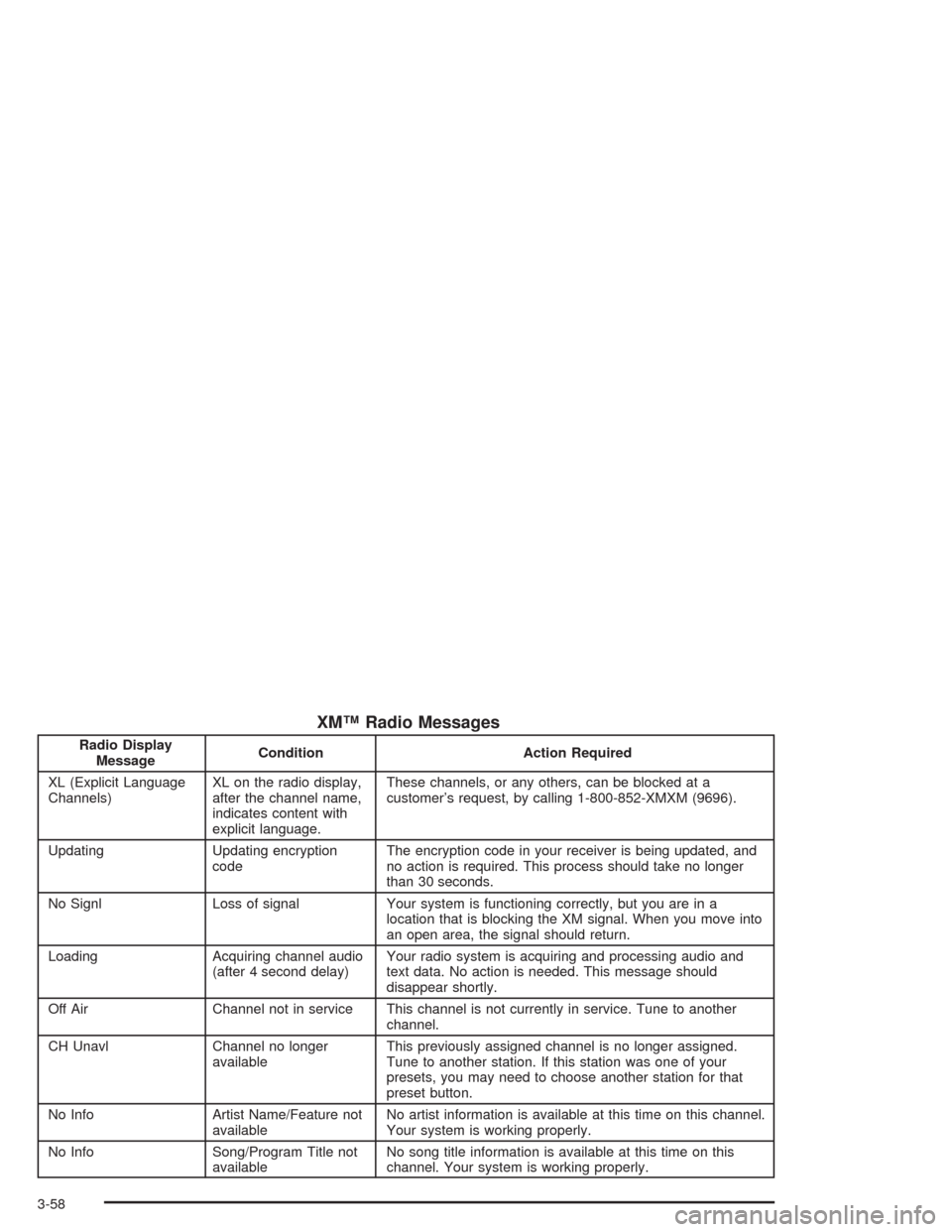
XM™ Radio Messages
Radio Display
MessageCondition Action Required
XL (Explicit Language
Channels)XL on the radio display,
after the channel name,
indicates content with
explicit language.These channels, or any others, can be blocked at a
customer’s request, by calling 1-800-852-XMXM (9696).
Updating Updating encryption
codeThe encryption code in your receiver is being updated, and
no action is required. This process should take no longer
than 30 seconds.
No Signl Loss of signal Your system is functioning correctly, but you are in a
location that is blocking the XM signal. When you move into
an open area, the signal should return.
Loading Acquiring channel audio
(after 4 second delay)Your radio system is acquiring and processing audio and
text data. No action is needed. This message should
disappear shortly.
Off Air Channel not in service This channel is not currently in service. Tune to another
channel.
CH Unavl Channel no longer
availableThis previously assigned channel is no longer assigned.
Tune to another station. If this station was one of your
presets, you may need to choose another station for that
preset button.
No Info Artist Name/Feature not
availableNo artist information is available at this time on this channel.
Your system is working properly.
No Info Song/Program Title not
availableNo song title information is available at this time on this
channel. Your system is working properly.
3-58
Page 158 of 354
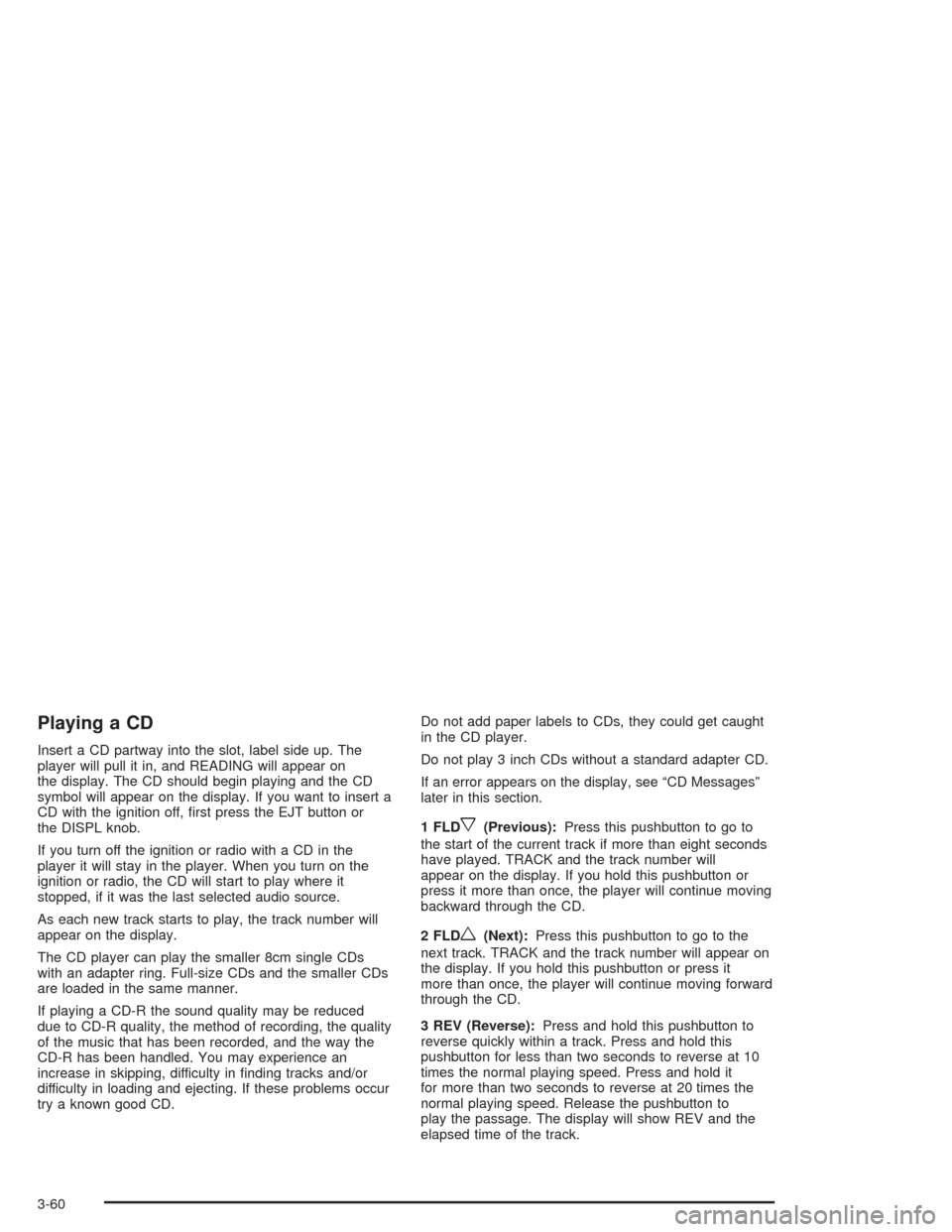
Playing a CD
Insert a CD partway into the slot, label side up. The
player will pull it in, and READING will appear on
the display. The CD should begin playing and the CD
symbol will appear on the display. If you want to insert a
CD with the ignition off, rst press the EJT button or
the DISPL knob.
If you turn off the ignition or radio with a CD in the
player it will stay in the player. When you turn on the
ignition or radio, the CD will start to play where it
stopped, if it was the last selected audio source.
As each new track starts to play, the track number will
appear on the display.
The CD player can play the smaller 8cm single CDs
with an adapter ring. Full-size CDs and the smaller CDs
are loaded in the same manner.
If playing a CD-R the sound quality may be reduced
due to CD-R quality, the method of recording, the quality
of the music that has been recorded, and the way the
CD-R has been handled. You may experience an
increase in skipping, difficulty in nding tracks and/or
difficulty in loading and ejecting. If these problems occur
try a known good CD.Do not add paper labels to CDs, they could get caught
in the CD player.
Do not play 3 inch CDs without a standard adapter CD.
If an error appears on the display, see “CD Messages”
later in this section.
1 FLD
x(Previous):Press this pushbutton to go to
the start of the current track if more than eight seconds
have played. TRACK and the track number will
appear on the display. If you hold this pushbutton or
press it more than once, the player will continue moving
backward through the CD.
2 FLD
w(Next):Press this pushbutton to go to the
next track. TRACK and the track number will appear on
the display. If you hold this pushbutton or press it
more than once, the player will continue moving forward
through the CD.
3 REV (Reverse):Press and hold this pushbutton to
reverse quickly within a track. Press and hold this
pushbutton for less than two seconds to reverse at 10
times the normal playing speed. Press and hold it
for more than two seconds to reverse at 20 times the
normal playing speed. Release the pushbutton to
play the passage. The display will show REV and the
elapsed time of the track.
3-60
Page 160 of 354
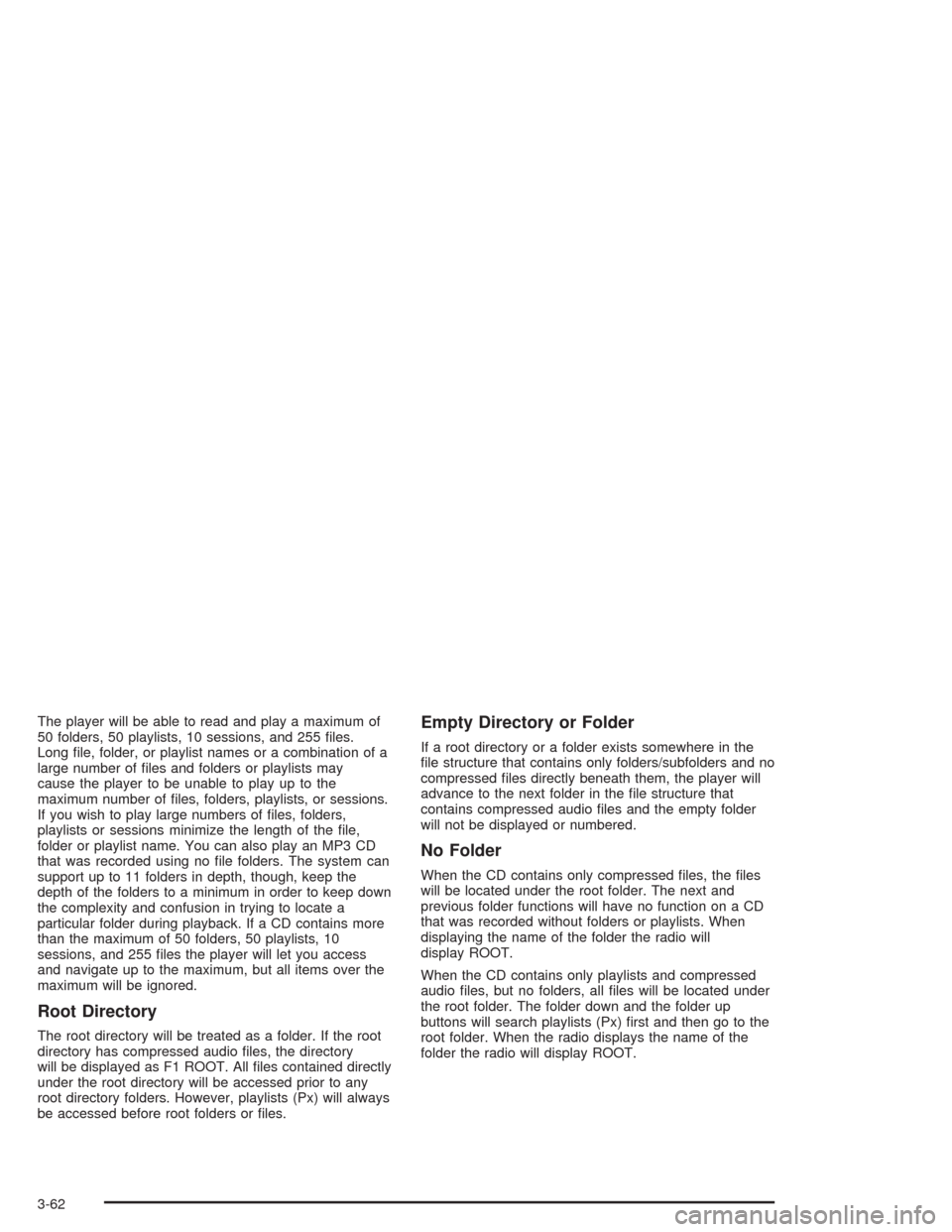
The player will be able to read and play a maximum of
50 folders, 50 playlists, 10 sessions, and 255 les.
Long le, folder, or playlist names or a combination of a
large number of les and folders or playlists may
cause the player to be unable to play up to the
maximum number of les, folders, playlists, or sessions.
If you wish to play large numbers of les, folders,
playlists or sessions minimize the length of the le,
folder or playlist name. You can also play an MP3 CD
that was recorded using no le folders. The system can
support up to 11 folders in depth, though, keep the
depth of the folders to a minimum in order to keep down
the complexity and confusion in trying to locate a
particular folder during playback. If a CD contains more
than the maximum of 50 folders, 50 playlists, 10
sessions, and 255 les the player will let you access
and navigate up to the maximum, but all items over the
maximum will be ignored.
Root Directory
The root directory will be treated as a folder. If the root
directory has compressed audio les, the directory
will be displayed as F1 ROOT. All les contained directly
under the root directory will be accessed prior to any
root directory folders. However, playlists (Px) will always
be accessed before root folders or les.
Empty Directory or Folder
If a root directory or a folder exists somewhere in the
le structure that contains only folders/subfolders and no
compressed les directly beneath them, the player will
advance to the next folder in the le structure that
contains compressed audio les and the empty folder
will not be displayed or numbered.
No Folder
When the CD contains only compressed les, the les
will be located under the root folder. The next and
previous folder functions will have no function on a CD
that was recorded without folders or playlists. When
displaying the name of the folder the radio will
display ROOT.
When the CD contains only playlists and compressed
audio les, but no folders, all les will be located under
the root folder. The folder down and the folder up
buttons will search playlists (Px) rst and then go to the
root folder. When the radio displays the name of the
folder the radio will display ROOT.
3-62
Page 161 of 354
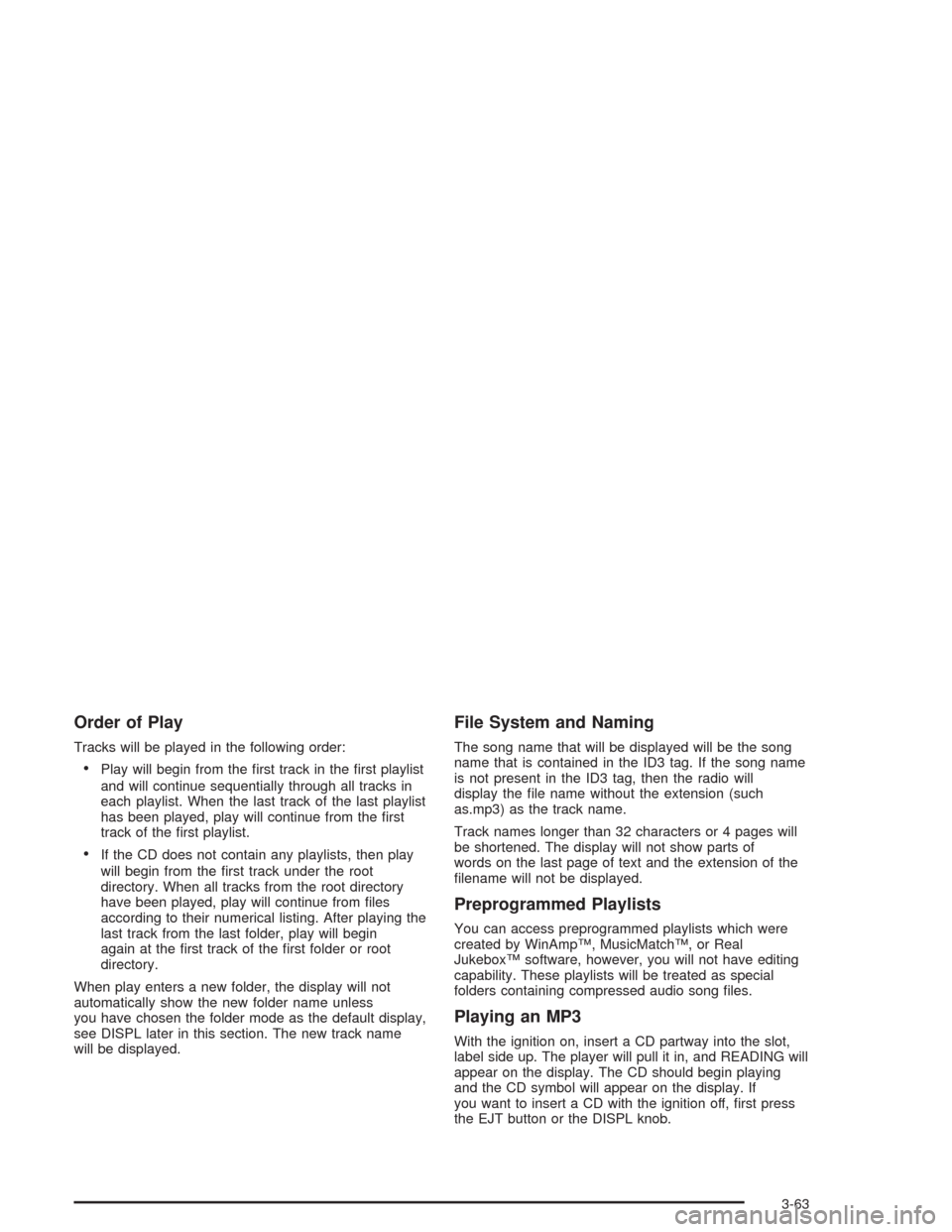
Order of Play
Tracks will be played in the following order:
Play will begin from the rst track in the rst playlist
and will continue sequentially through all tracks in
each playlist. When the last track of the last playlist
has been played, play will continue from the rst
track of the rst playlist.
If the CD does not contain any playlists, then play
will begin from the rst track under the root
directory. When all tracks from the root directory
have been played, play will continue from les
according to their numerical listing. After playing the
last track from the last folder, play will begin
again at the rst track of the rst folder or root
directory.
When play enters a new folder, the display will not
automatically show the new folder name unless
you have chosen the folder mode as the default display,
see DISPL later in this section. The new track name
will be displayed.
File System and Naming
The song name that will be displayed will be the song
name that is contained in the ID3 tag. If the song name
is not present in the ID3 tag, then the radio will
display the le name without the extension (such
as.mp3) as the track name.
Track names longer than 32 characters or 4 pages will
be shortened. The display will not show parts of
words on the last page of text and the extension of the
lename will not be displayed.
Preprogrammed Playlists
You can access preprogrammed playlists which were
created by WinAmp™, MusicMatch™, or Real
Jukebox™ software, however, you will not have editing
capability. These playlists will be treated as special
folders containing compressed audio song les.
Playing an MP3
With the ignition on, insert a CD partway into the slot,
label side up. The player will pull it in, and READING will
appear on the display. The CD should begin playing
and the CD symbol will appear on the display. If
you want to insert a CD with the ignition off, rst press
the EJT button or the DISPL knob.
3-63
Page 162 of 354
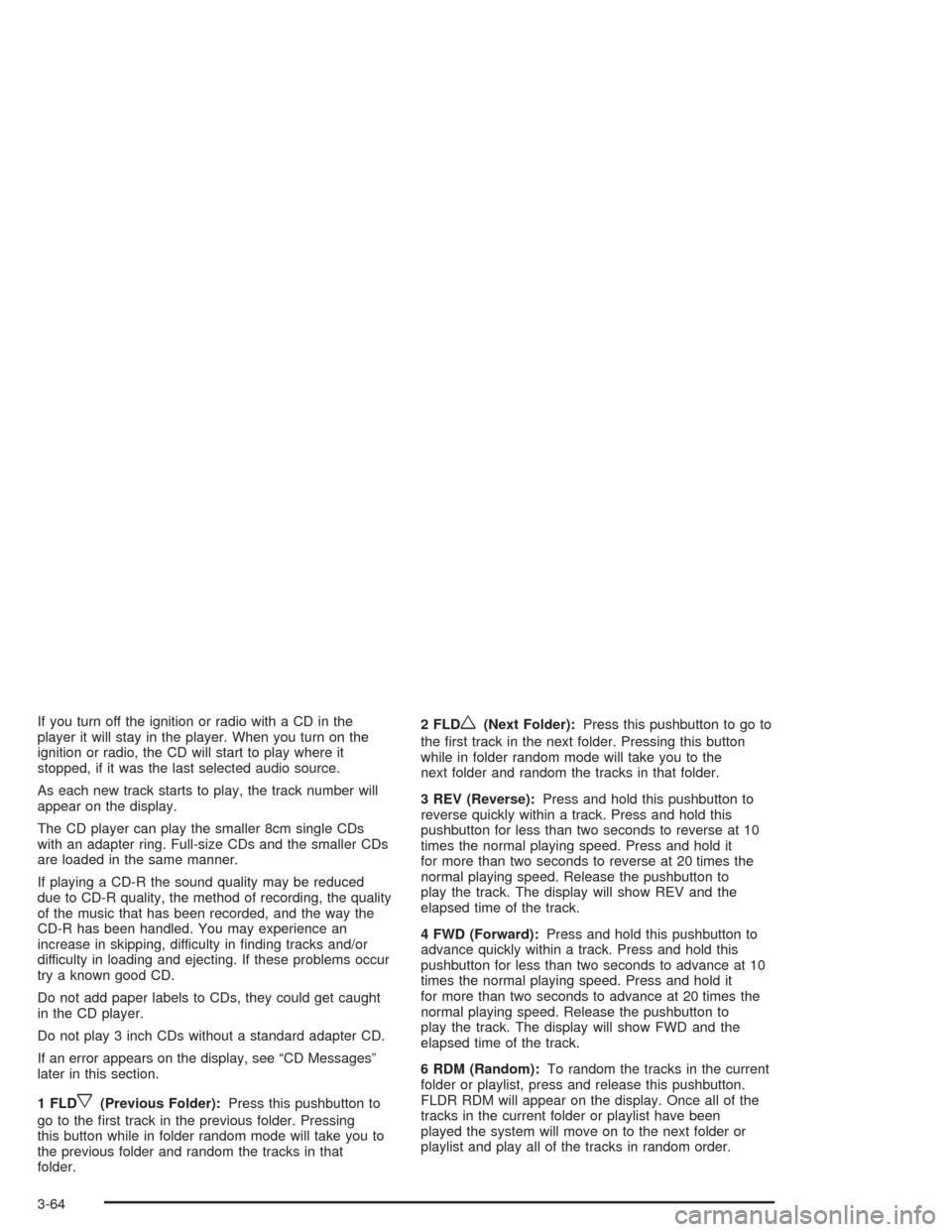
If you turn off the ignition or radio with a CD in the
player it will stay in the player. When you turn on the
ignition or radio, the CD will start to play where it
stopped, if it was the last selected audio source.
As each new track starts to play, the track number will
appear on the display.
The CD player can play the smaller 8cm single CDs
with an adapter ring. Full-size CDs and the smaller CDs
are loaded in the same manner.
If playing a CD-R the sound quality may be reduced
due to CD-R quality, the method of recording, the quality
of the music that has been recorded, and the way the
CD-R has been handled. You may experience an
increase in skipping, difficulty in nding tracks and/or
difficulty in loading and ejecting. If these problems occur
try a known good CD.
Do not add paper labels to CDs, they could get caught
in the CD player.
Do not play 3 inch CDs without a standard adapter CD.
If an error appears on the display, see “CD Messages”
later in this section.
1 FLD
x(Previous Folder):Press this pushbutton to
go to the rst track in the previous folder. Pressing
this button while in folder random mode will take you to
the previous folder and random the tracks in that
folder.2 FLD
w(Next Folder):Press this pushbutton to go to
the rst track in the next folder. Pressing this button
while in folder random mode will take you to the
next folder and random the tracks in that folder.
3 REV (Reverse):Press and hold this pushbutton to
reverse quickly within a track. Press and hold this
pushbutton for less than two seconds to reverse at 10
times the normal playing speed. Press and hold it
for more than two seconds to reverse at 20 times the
normal playing speed. Release the pushbutton to
play the track. The display will show REV and the
elapsed time of the track.
4 FWD (Forward):Press and hold this pushbutton to
advance quickly within a track. Press and hold this
pushbutton for less than two seconds to advance at 10
times the normal playing speed. Press and hold it
for more than two seconds to advance at 20 times the
normal playing speed. Release the pushbutton to
play the track. The display will show FWD and the
elapsed time of the track.
6 RDM (Random):To random the tracks in the current
folder or playlist, press and release this pushbutton.
FLDR RDM will appear on the display. Once all of the
tracks in the current folder or playlist have been
played the system will move on to the next folder or
playlist and play all of the tracks in random order.
3-64
Page 164 of 354
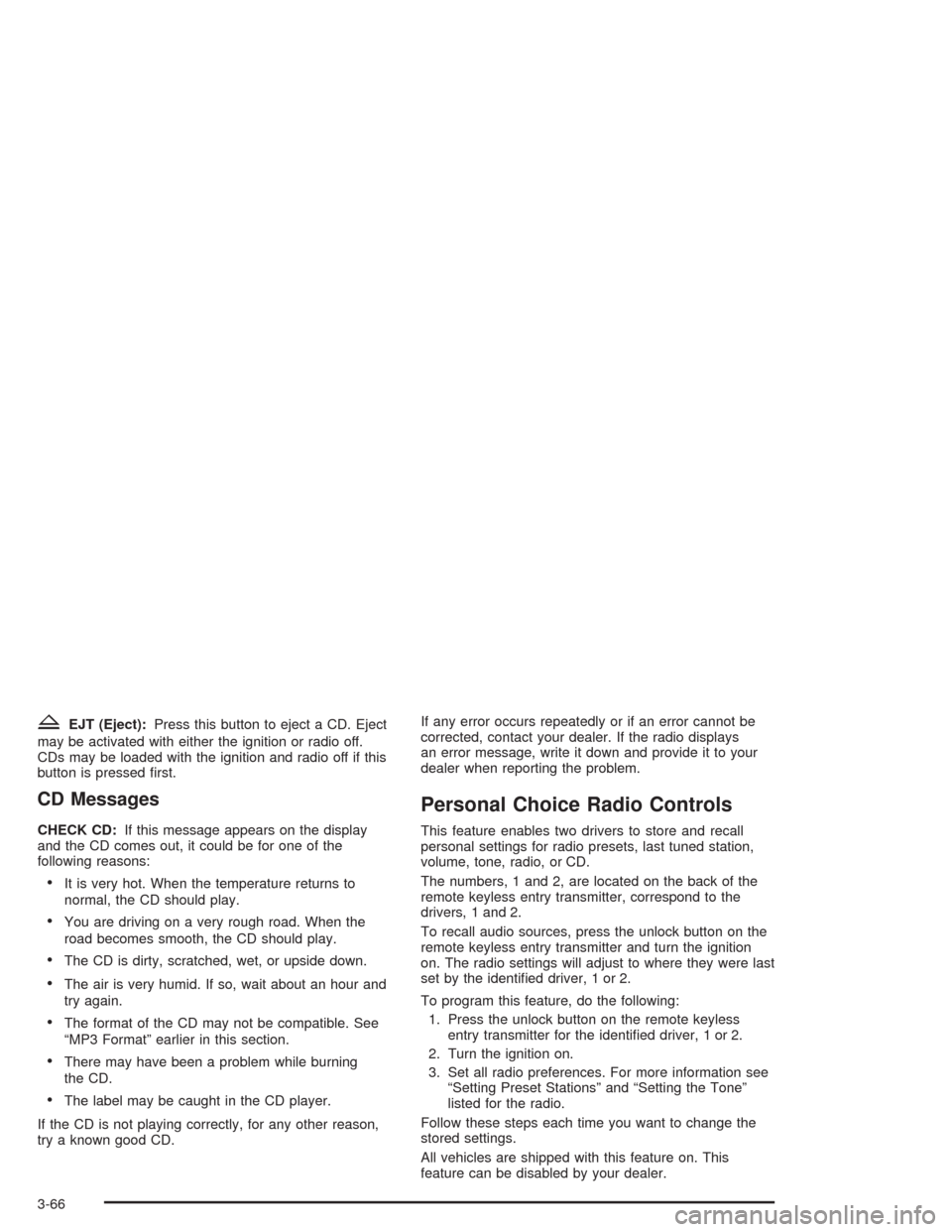
ZEJT (Eject):Press this button to eject a CD. Eject
may be activated with either the ignition or radio off.
CDs may be loaded with the ignition and radio off if this
button is pressed rst.
CD Messages
CHECK CD:If this message appears on the display
and the CD comes out, it could be for one of the
following reasons:
It is very hot. When the temperature returns to
normal, the CD should play.
You are driving on a very rough road. When the
road becomes smooth, the CD should play.
The CD is dirty, scratched, wet, or upside down.
The air is very humid. If so, wait about an hour and
try again.
The format of the CD may not be compatible. See
“MP3 Format” earlier in this section.
There may have been a problem while burning
the CD.
The label may be caught in the CD player.
If the CD is not playing correctly, for any other reason,
try a known good CD.If any error occurs repeatedly or if an error cannot be
corrected, contact your dealer. If the radio displays
an error message, write it down and provide it to your
dealer when reporting the problem.
Personal Choice Radio Controls
This feature enables two drivers to store and recall
personal settings for radio presets, last tuned station,
volume, tone, radio, or CD.
The numbers, 1 and 2, are located on the back of the
remote keyless entry transmitter, correspond to the
drivers, 1 and 2.
To recall audio sources, press the unlock button on the
remote keyless entry transmitter and turn the ignition
on. The radio settings will adjust to where they were last
set by the identied driver, 1 or 2.
To program this feature, do the following:
1. Press the unlock button on the remote keyless
entry transmitter for the identied driver, 1 or 2.
2. Turn the ignition on.
3. Set all radio preferences. For more information see
“Setting Preset Stations” and “Setting the Tone”
listed for the radio.
Follow these steps each time you want to change the
stored settings.
All vehicles are shipped with this feature on. This
feature can be disabled by your dealer.
3-66
Page 246 of 354
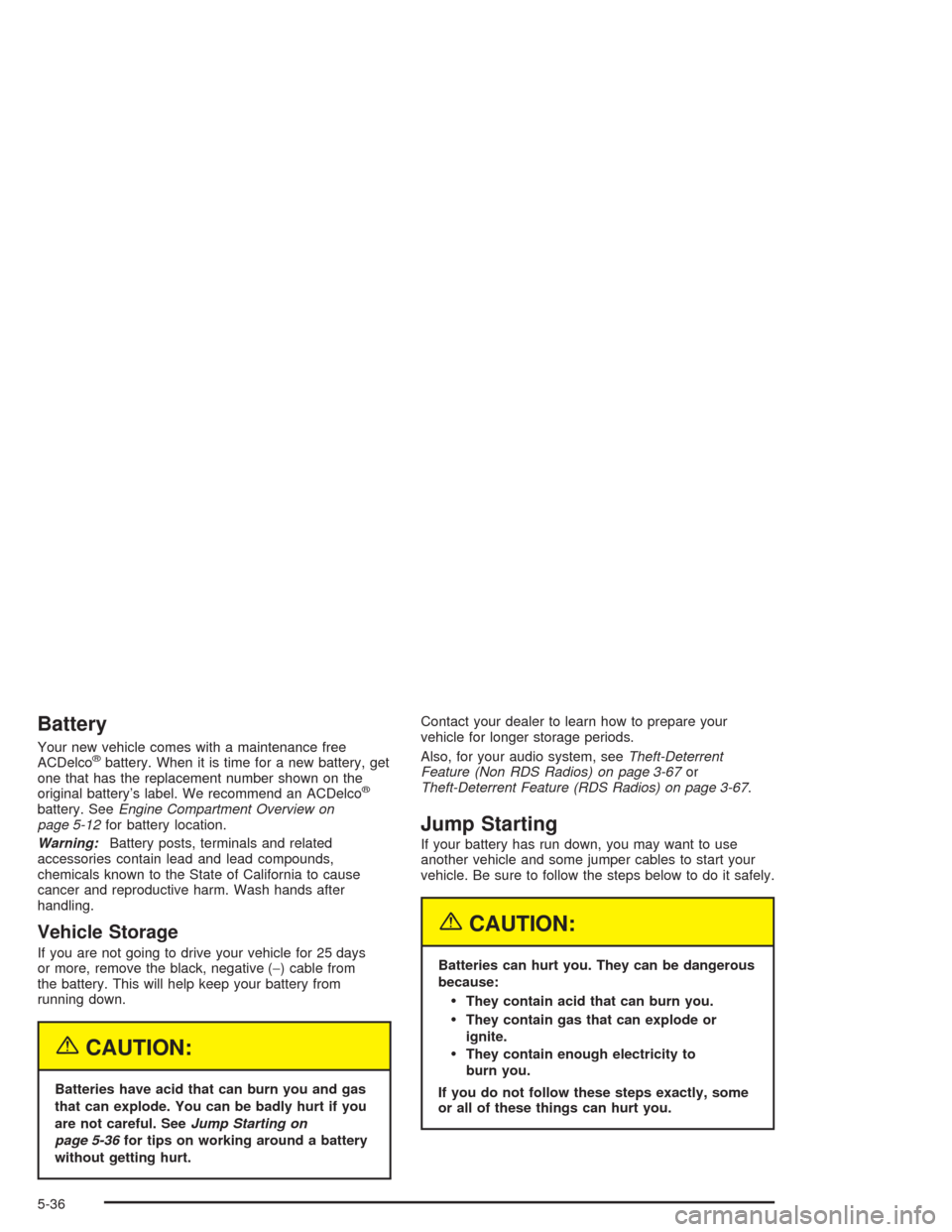
Battery
Your new vehicle comes with a maintenance free
ACDelco®battery. When it is time for a new battery, get
one that has the replacement number shown on the
original battery’s label. We recommend an ACDelco
®
battery. SeeEngine Compartment Overview on
page 5-12for battery location.
Warning:Battery posts, terminals and related
accessories contain lead and lead compounds,
chemicals known to the State of California to cause
cancer and reproductive harm. Wash hands after
handling.
Vehicle Storage
If you are not going to drive your vehicle for 25 days
or more, remove the black, negative (−) cable from
the battery. This will help keep your battery from
running down.
{CAUTION:
Batteries have acid that can burn you and gas
that can explode. You can be badly hurt if you
are not careful. SeeJump Starting on
page 5-36for tips on working around a battery
without getting hurt.Contact your dealer to learn how to prepare your
vehicle for longer storage periods.
Also, for your audio system, seeTheft-Deterrent
Feature (Non RDS Radios) on page 3-67or
Theft-Deterrent Feature (RDS Radios) on page 3-67.
Jump Starting
If your battery has run down, you may want to use
another vehicle and some jumper cables to start your
vehicle. Be sure to follow the steps below to do it safely.
{CAUTION:
Batteries can hurt you. They can be dangerous
because:
They contain acid that can burn you.
They contain gas that can explode or
ignite.
They contain enough electricity to
burn you.
If you do not follow these steps exactly, some
or all of these things can hurt you.
5-36
Page 293 of 354
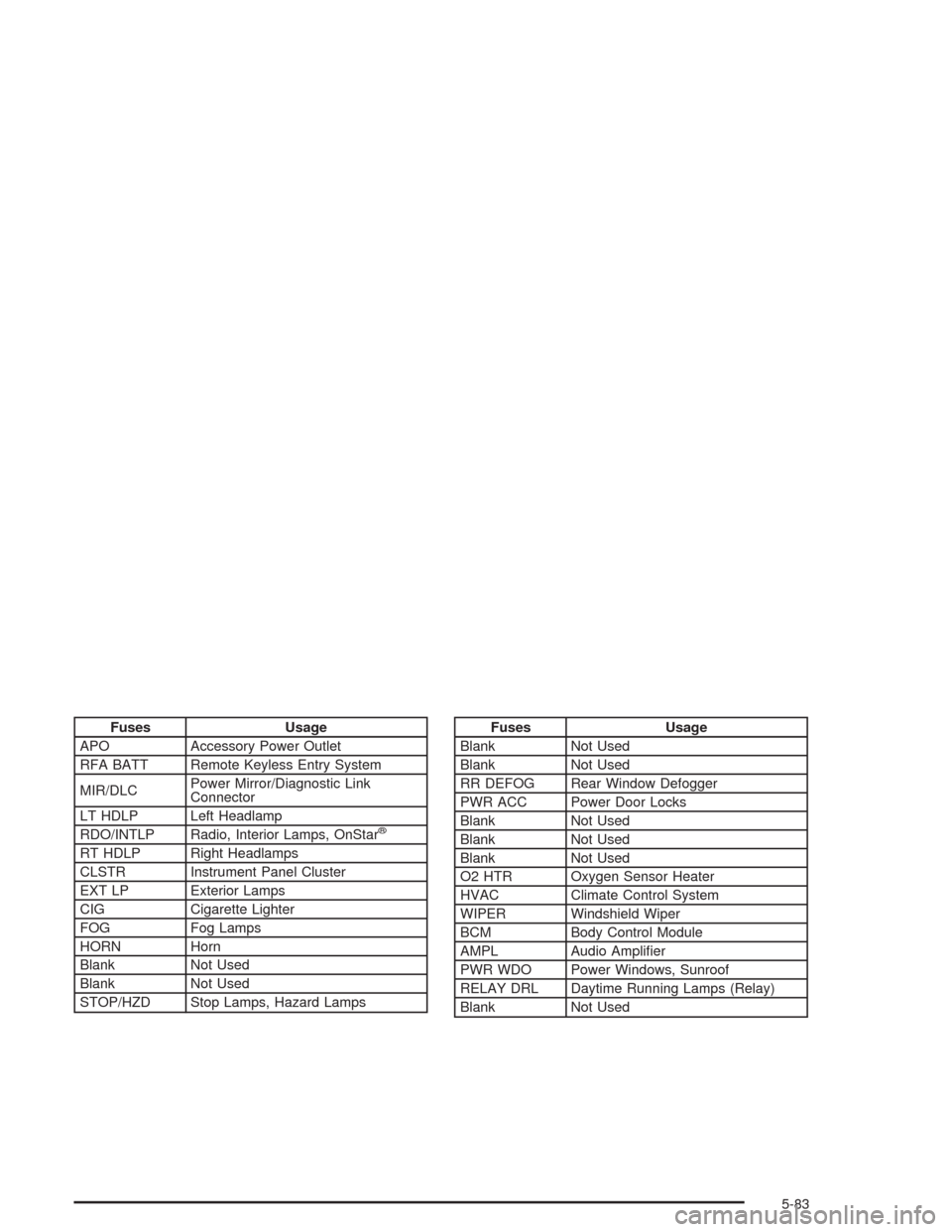
Fuses Usage
APO Accessory Power Outlet
RFA BATT Remote Keyless Entry System
MIR/DLCPower Mirror/Diagnostic Link
Connector
LT HDLP Left Headlamp
RDO/INTLP Radio, Interior Lamps, OnStar
®
RT HDLP Right Headlamps
CLSTR Instrument Panel Cluster
EXT LP Exterior Lamps
CIG Cigarette Lighter
FOG Fog Lamps
HORN Horn
Blank Not Used
Blank Not Used
STOP/HZD Stop Lamps, Hazard Lamps
Fuses Usage
Blank Not Used
Blank Not Used
RR DEFOG Rear Window Defogger
PWR ACC Power Door Locks
Blank Not Used
Blank Not Used
Blank Not Used
O2 HTR Oxygen Sensor Heater
HVAC Climate Control System
WIPER Windshield Wiper
BCM Body Control Module
AMPL Audio Amplier
PWR WDO Power Windows, Sunroof
RELAY DRL Daytime Running Lamps (Relay)
Blank Not Used
5-83
Page 294 of 354
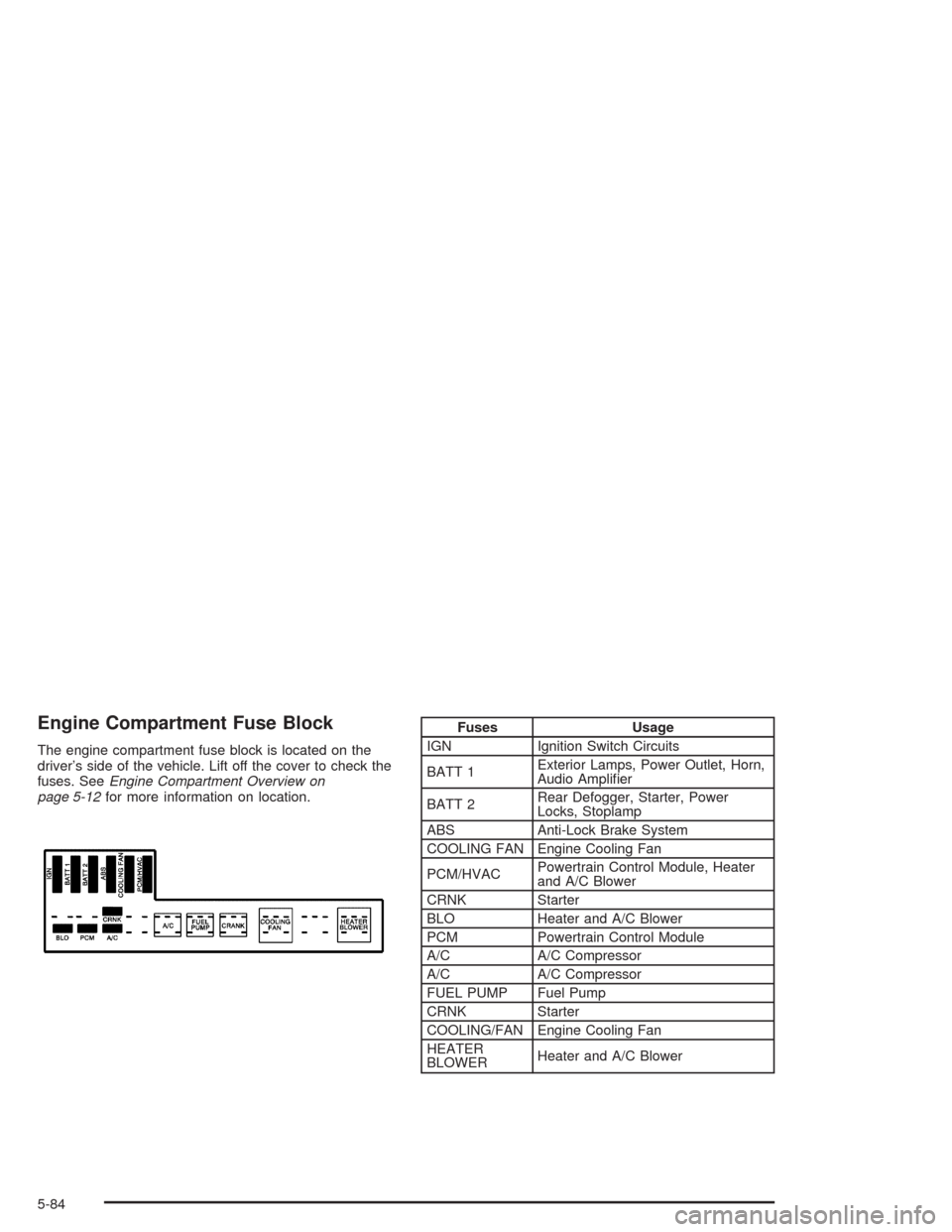
Engine Compartment Fuse Block
The engine compartment fuse block is located on the
driver’s side of the vehicle. Lift off the cover to check the
fuses. SeeEngine Compartment Overview on
page 5-12for more information on location.
Fuses Usage
IGN Ignition Switch Circuits
BATT 1Exterior Lamps, Power Outlet, Horn,
Audio Amplier
BATT 2Rear Defogger, Starter, Power
Locks, Stoplamp
ABS Anti-Lock Brake System
COOLING FAN Engine Cooling Fan
PCM/HVACPowertrain Control Module, Heater
and A/C Blower
CRNK Starter
BLO Heater and A/C Blower
PCM Powertrain Control Module
A/C A/C Compressor
A/C A/C Compressor
FUEL PUMP Fuel Pump
CRNK Starter
COOLING/FAN Engine Cooling Fan
HEATER
BLOWERHeater and A/C Blower
5-84
Page 316 of 354
Part B: Owner Checks and Services
Listed in this part are owner checks and services
which should be performed at the intervals specied to
help ensure the safety, dependability and emission
control performance of your vehicle.
Be sure any necessary repairs are completed at once.
Whenever any uids or lubricants are added to your
vehicle, make sure they are the proper ones, as shown
in Part D.
At Each Fuel Fill
It is important for you or a service station attendant to
perform these underhood checks at each fuel ll.
Engine Oil Level Check
Check the engine oil level and add the proper oil if
necessary. SeeEngine Oil on page 5-13for further
details.
Engine Coolant Level Check
Check the engine coolant level and add DEX-COOL®
coolant mixture if necessary. SeeEngine Coolant
on page 5-20for further details.
Windshield Washer Fluid Level Check
Check the windshield washer uid level in the windshield
washer tank and add the proper uid if necessary. See
Windshield Washer Fluid on page 5-31for further details.
At Least Once a Month
Tire Ination Check
Visually inspect your tires and make sure tires are
inated to the correct pressures. Do not forget to check
your spare tire. SeeTires on page 5-46for further details.
Cassette Tape Player Service
Clean cassette tape player. Cleaning should be done
every 50 hours of tape play. SeeAudio System(s)
on page 3-35for further details.
At Least Twice a Year
Restraint System Check
Make sure the safety belt reminder light and all your
belts, buckles, latch plates, retractors and anchorages
are working properly. Look for any other loose or
damaged safety belt system parts. If you see anything
that might keep a safety belt system from doing its
job, have it repaired. Have any torn or frayed safety belts
replaced.
6-18