display CHEVROLET CITY EXPRESS 2016 Owner's Manual
[x] Cancel search | Manufacturer: CHEVROLET, Model Year: 2016, Model line: CITY EXPRESS, Model: CHEVROLET CITY EXPRESS 2016Pages: 297, PDF Size: 4.52 MB
Page 173 of 297
Black plate (32,1)Chevrolet City Express Owner Manual (GMNA-Localizing-U.S./Canada-
7707496) - 2015 - CRC - 11/26/14
9-32 Driving and Operating Warning (Continued) directly behind the vehicle, to
help avoid damaging the
vehicle. .
The system cannot
completely eliminate blind
spots and may not show
every object. .
Underneath the bumper and
the corner areas of the
bumper cannot be viewed on
the RVC display because of
its monitoring range limitation.
The system will not show
small objects below the
bumper, and may not show
objects close to the bumper
or on the ground. .
Objects viewed on the RVC
display differ from actual
distance because a
wide-angle lens is used.
(Continued) Warning (Continued) .
Objects on the RVC display
will appear visually opposite
than when viewed in the
rearview and outside mirrors. .
Make sure that the back
doors are securely closed
when backing up. .
Do no put anything on the
rearview camera. The
rearview camera is installed
on the back door. .
When washing the vehicle
with high pressure water, be
sure not to spray it around
the camera. Otherwise, water
may enter the camera unit
causing water condensation
on the lens, a malfunction,
fire, or an electric shock. .
Do not strike the camera. It is
a precision instrument.
Otherwise, it may malfunction
or cause damage resulting in
a fire or an electric shock. { CautionThere is a plastic cover over the
camera. Do not scratch the cover
when cleaning dirt or snow from
the cover.
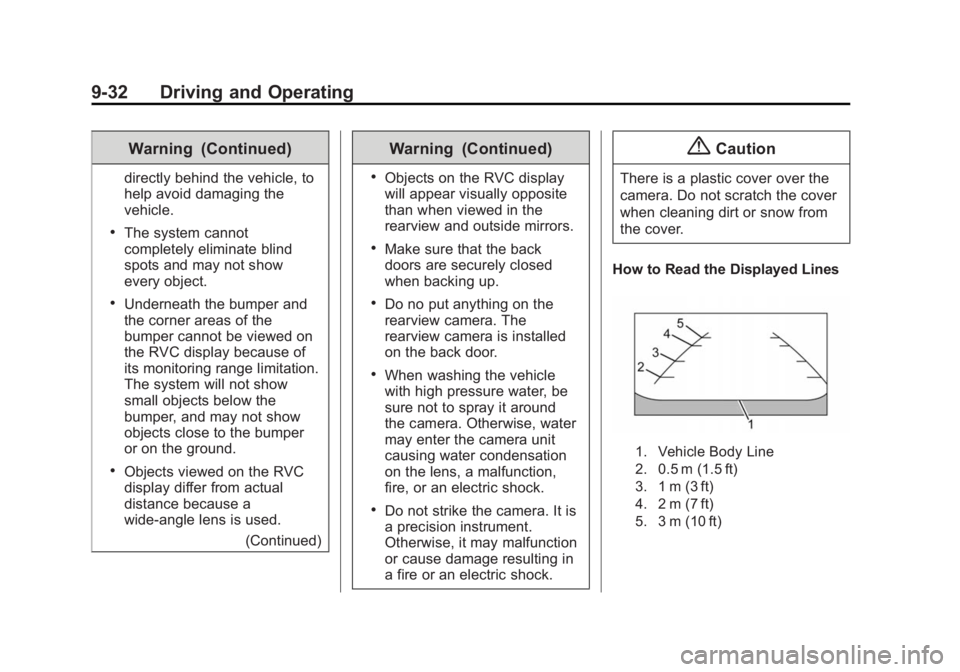
How to Read the Displayed Lines
1. Vehicle Body Line
2. 0.5 m (1.5 ft)
3. 1 m (3 ft)
4. 2 m (7 ft)
5. 3 m (10 ft)
Page 174 of 297
Black plate (33,1)Chevrolet City Express Owner Manual (GMNA-Localizing-U.S./Canada-
7707496) - 2015 - CRC - 11/26/14
Driving and Operating 9-33Guidelines indicating the vehicle
width and distance to objects with
reference to the vehicle body line
are shown on the RVC display.
The guidelines can be turned on or
off. When the shift lever is in
R (Reverse), press the CAMERA
button to switch the guidelines on
and off. When the shift lever is in
any other position, press the
CAMERA button and then touch the
Show Guidelines key to switch the
guidelines on and off.
Difference Between Predicted
and Actual Distances The distance guideline and the
vehicle width guideline should be
used as a reference only when the
vehicle is on a level, paved surface.
The distance viewed on the display
is for reference only and may be
different than the actual distance
between the vehicle and displayed
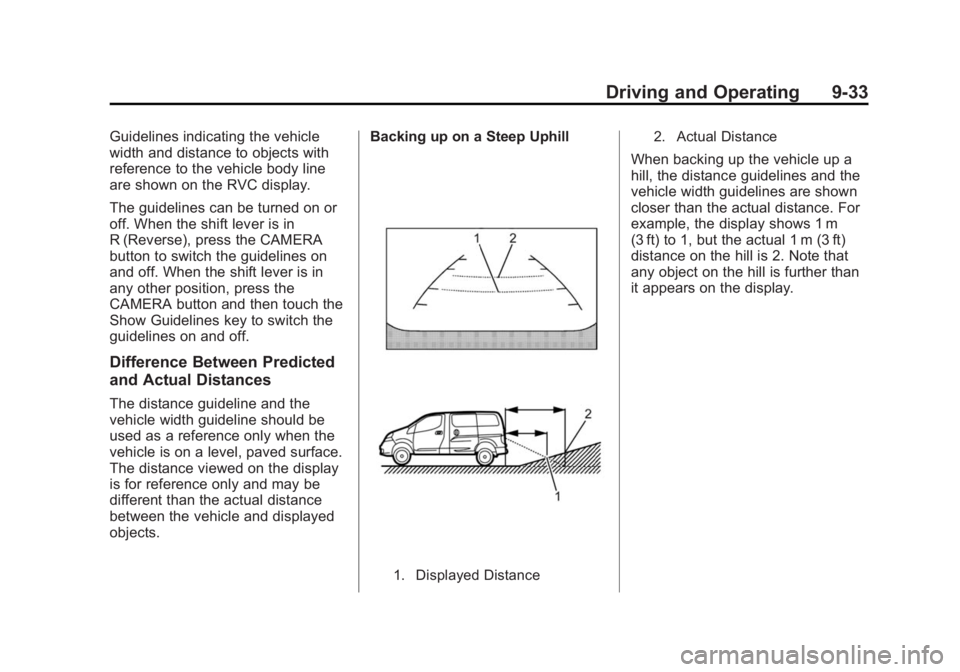
objects. Backing up on a Steep Uphill
1. Displayed Distance 2. Actual Distance
When backing up the vehicle up a
hill, the distance guidelines and the
vehicle width guidelines are shown
closer than the actual distance. For
example, the display shows 1 m
(3 ft) to 1, but the actual 1 m (3 ft)
distance on the hill is 2. Note that
any object on the hill is further than
it appears on the display.
Page 175 of 297
Black plate (34,1)Chevrolet City Express Owner Manual (GMNA-Localizing-U.S./Canada-
7707496) - 2015 - CRC - 11/26/14
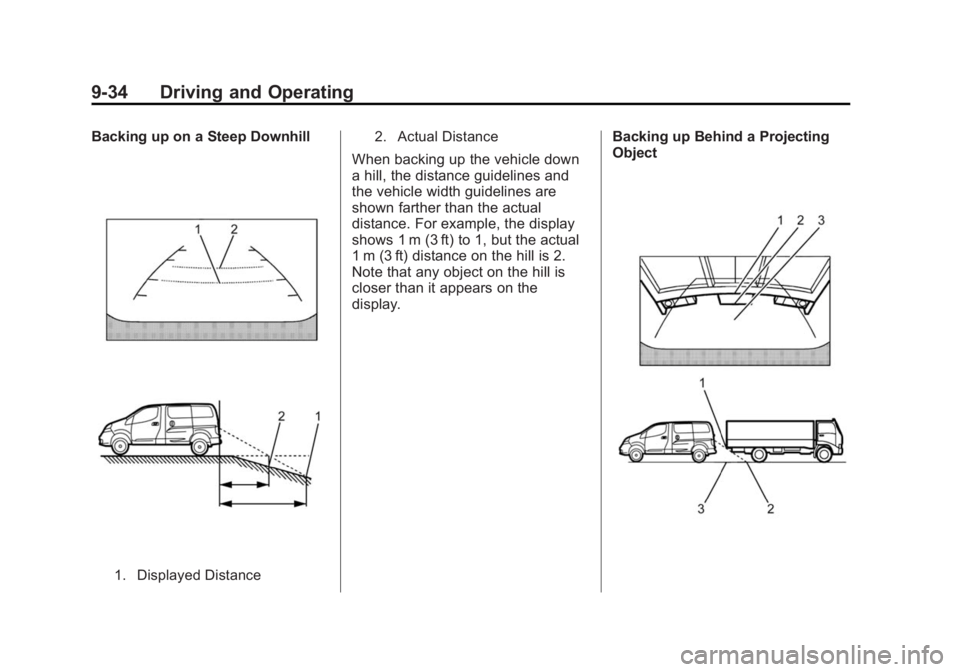
9-34 Driving and Operating Backing up on a Steep Downhill
1. Displayed Distance 2. Actual Distance
When backing up the vehicle down
a hill, the distance guidelines and
the vehicle width guidelines are
shown farther than the actual
distance. For example, the display
shows 1 m (3 ft) to 1, but the actual
1 m (3 ft) distance on the hill is 2.
Note that any object on the hill is
closer than it appears on the
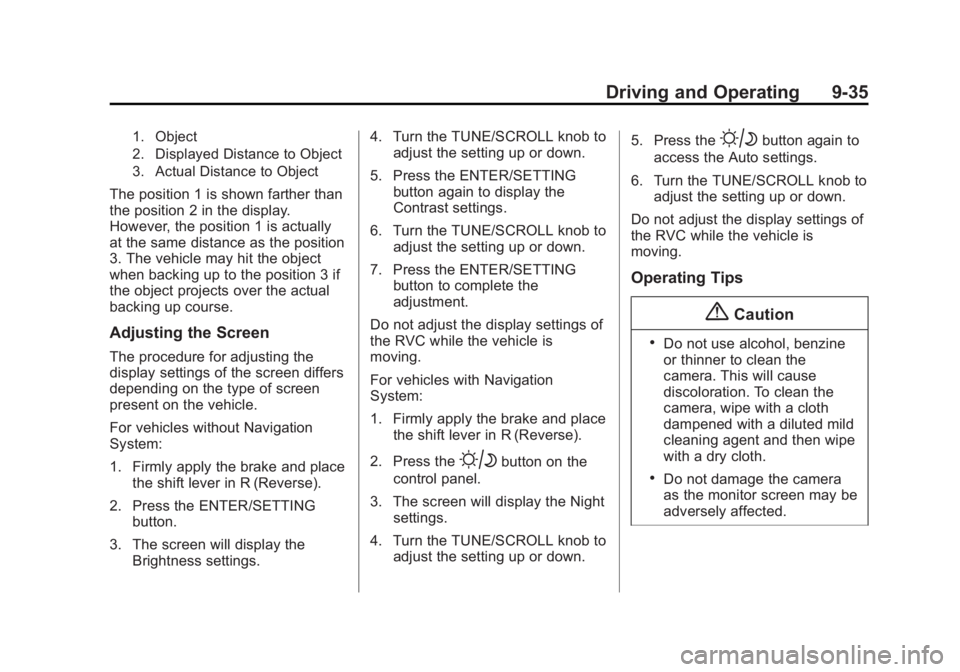
display. Backing up Behind a Projecting
Object
Page 176 of 297
Black plate (35,1)Chevrolet City Express Owner Manual (GMNA-Localizing-U.S./Canada-
7707496) - 2015 - CRC - 11/26/14
Driving and Operating 9-351. Object
2. Displayed Distance to Object
3. Actual Distance to Object
The position 1 is shown farther than
the position 2 in the display.
However, the position 1 is actually
at the same distance as the position
3. The vehicle may hit the object
when backing up to the position 3 if
the object projects over the actual
backing up course.
Adjusting the Screen The procedure for adjusting the
display settings of the screen differs
depending on the type of screen
present on the vehicle.
For vehicles without Navigation
System:
1. Firmly apply the brake and place
the shift lever in R (Reverse).
2. Press the ENTER/SETTING
button.
3. The screen will display the
Brightness settings. 4. Turn the TUNE/SCROLL knob to
adjust the setting up or down.
5. Press the ENTER/SETTING
button again to display the
Contrast settings.
6. Turn the TUNE/SCROLL knob to
adjust the setting up or down.
7. Press the ENTER/SETTING
button to complete the
adjustment.
Do not adjust the display settings of
the RVC while the vehicle is
moving.
For vehicles with Navigation
System:
1. Firmly apply the brake and place
the shift lever in R (Reverse).
2. Press the
B button on the
control panel.
3. The screen will display the Night
settings.
4. Turn the TUNE/SCROLL knob to
adjust the setting up or down. 5. Press the
B button again to
access the Auto settings.
6. Turn the TUNE/SCROLL knob to
adjust the setting up or down.
Do not adjust the display settings of
the RVC while the vehicle is
moving.
Operating Tips
{ Caution .
Do not use alcohol, benzine
or thinner to clean the
camera. This will cause
discoloration. To clean the
camera, wipe with a cloth
dampened with a diluted mild
cleaning agent and then wipe
with a dry cloth. .
Do not damage the camera
as the monitor screen may be
adversely affected.
Page 177 of 297
Black plate (36,1)Chevrolet City Express Owner Manual (GMNA-Localizing-U.S./Canada-
7707496) - 2015 - CRC - 11/26/14
9-36 Driving and Operating .
When the shift lever is shifted to
R (Reverse), the screen
automatically changes to the
RVC mode. However, the radio
can be heard. .
It may take some time until the
RVC is displayed after the shift
lever has been shifted to
R (Reverse). Objects may be
distorted momentarily until the
RVC screen is displayed
completely. When the shift lever
is returned to a position other
than R (Reverse), it may take
some time until the screen
changes. Objects on the screen
may be distorted until they are
completely displayed. .
When the temperature is
extremely high or low, the
screen may not clearly display
objects. This is not a
malfunction. .
When strong light directly enters
the camera, objects may not be
displayed clearly. .
Vertical lines may be seen in
objects on the screen. This is
due to strong reflected light from
the bumper. This is not a
malfunction. .
The screen may flicker under
fluorescent light. This is not a
malfunction. .
The colors of objects on the
display may differ somewhat
from those of the actual object. .
When the contrast of objects is
low at night, pressing the
SETTING button or MENU
button may not change the
brightness. .
Objects on the display may not
be clear in a dark place or at
night. .
If dirt, rain or snow attaches to
the camera, the RVC may not
display objects. Clean the
camera. .
Do not use body wax on the
camera window. If body wax
does get on the camera window,
wipe off the wax with a clean
cloth dampened with mild
detergent diluted with water.
Page 181 of 297
Black plate (40,1)Chevrolet City Express Owner Manual (GMNA-Localizing-U.S./Canada-
7707496) - 2015 - CRC - 11/26/14
9-40 Driving and Operating Be careful not to spill fuel. Do not
top off or overfill the tank and wait a
few seconds after you have finished
pumping before removing the
nozzle. Clean fuel from painted
surfaces as soon as possible. See
Exterior Care on page 10-61 .
When replacing the fuel cap, turn it
clockwise until it clicks. Make sure
the cap is fully installed.
{ WarningIf a fire starts while you are
refueling, do not remove the
nozzle. Shut off the flow of fuel by
shutting off the pump or by
notifying the station attendant.
Leave the area immediately. { CautionIf a new fuel cap is needed, be
sure to get the right type of cap
from your dealer. The wrong type
of fuel cap may not fit properly,
may cause the malfunction
indicator lamp to light, and could
damage the fuel tank and
emissions system. See
Malfunction Indicator Lamp on
page 5-11 .
LOOSE FUEL CAP Warning
Message
The LOOSE FUEL CAP message
displays in the odometer when the
fuel cap is not tightened correctly
after the vehicle has been refueled.
See Fuel System Messages on
page 5-20 .
Failure to tighten the fuel cap
properly after the LOOSE FUEL
CAP warning message is displayed
may cause the malfunction indicator light (MIL) to turn on. See
Malfunction Indicator Lamp on
page 5-11 .
Filling a Portable Fuel
Container
{ WarningFilling a portable fuel container
while it is in the vehicle can cause
fuel vapors that can ignite either
by static electricity or other
means. You or others could be
badly burned and the vehicle
could be damaged. Always: .
Use approved fuel
containers. .
Remove the container from
the vehicle, trunk, or pickup
bed before filling. .
Place the container on the
ground.
(Continued)
Page 220 of 297
Black plate (37,1)Chevrolet City Express Owner Manual (GMNA-Localizing-U.S./Canada-
7707496) - 2015 - CRC - 11/26/14
Vehicle Care 10-37The TPMS malfunction indicator is
combined with the low tire pressure
telltale. When the system detects a
malfunction, the telltale will flash for
approximately one minute and then
remain continuously illuminated.
This sequence will continue upon
subsequent vehicle start-ups as
long as the malfunction exists.
When the malfunction indicator is
illuminated, the system may not be
able to detect or signal low tire
pressure as intended. TPMS
malfunctions may occur for a variety
of reasons, including the installation
of replacement or alternate tires or
wheels on the vehicle that prevent
the TPMS from functioning properly.
Always check the TPMS malfunction
telltale after replacing one or more
tires or wheels on your vehicle to
ensure that the replacement or
alternate tires and wheels allow the
TPMS to continue to function
properly.
See Tire Pressure Monitor
Operation on page 10-37 . See Radio Frequency Statement on
page 13-12 .
Tire Pressure Monitor
Operation This vehicle may have a Tire
Pressure Monitor System (TPMS).
The TPMS is designed to warn the
driver when a low tire pressure
condition exists. TPMS sensors are
mounted onto each tire and wheel
assembly, excluding the spare tire
and wheel assembly. The TPMS
sensors monitor the air pressure in
the tires and transmit the tire
pressure readings to a receiver
located in the vehicle.
When a low tire pressure condition
is detected, the TPMS illuminates
the low tire pressure warning light located on the instrument cluster.
If the warning light comes on, stop
as soon as possible and inflate the
tires to the recommended pressure
shown on the Tire and Loading
Information label. See Vehicle Load
Limits on page 9-9 .
A message displays when the low
tire pressure warning light comes on
and low tire pressure is detected.
See Tire Messages on page 5-20 .
The message and low tire pressure
warning light come on at each
ignition cycle until the tires are
inflated to the correct inflation
pressure. The vehicle must be
driven at speeds above 25 km/h
(16 mph) to activate the TPMS and
turn off the low tire pressure
warning light.
The low tire pressure warning light
may come on in cool weather when
the vehicle is first started, and then
turn off as the vehicle is driven. This
could be an early indicator that the
Page 250 of 297
Black plate (67,1)Chevrolet City Express Owner Manual (GMNA-Localizing-U.S./Canada-
7707496) - 2015 - CRC - 11/26/14
Vehicle Care 10-67Speaker Covers Vacuum around a speaker cover
gently, so that the speaker will not
be damaged. Clean spots with just
water and mild soap.
Coated Moldings Coated moldings should be cleaned. .
When lightly soiled, wipe with a
sponge or soft lint-free cloth
dampened with water. .
When heavily soiled, use warm
soapy water.
Fabric/Carpet/Suede Start by vacuuming the surface
using a soft brush attachment. If a
rotating brush attachment is being
used during vacuuming, only use it
on the floor carpet. Before cleaning,
gently remove as much of the soil
as possible using one of the
following techniques: .
Gently blot liquids with a paper
towel. Continue blotting until no
more soil can be removed. .
For solid soils, remove as much
as possible prior to vacuuming.
To clean:
1. Saturate a clean lint-free
colorfast cloth with water.
Microfiber cloth is recommended
to prevent lint transfer to the
fabric or carpet.
2. Remove excess moisture by
gently wringing until water does
not drip from the cleaning cloth.
3. Start on the outside edge of the
soil and gently rub toward the
center. Rotate the cleaning cloth
to a clean area frequently to
prevent forcing the soil in to the
fabric.
4. Continue gently rubbing the
soiled area until there is no
longer any color transfer from
the soil to the cleaning cloth.
5. If the soil is not completely
removed, use a mild soap
solution followed only by plain
water. If the soil is not completely
removed, it may be necessary to
use a commercial upholstery
cleaner or spot lifter. Test a small
hidden area for colorfastness before
using a commercial upholstery
cleaner or spot lifter. If ring
formation occurs, clean the entire
fabric or carpet.
Following the cleaning process, a
paper towel can be used to blot
excess moisture.
Cleaning High Gloss Surfaces
and Vehicle Information and
Radio Displays For vehicles with high gloss
surfaces or vehicle displays, use a
microfiber cloth to wipe surfaces.
Before wiping the surface with the
microfiber cloth, use a soft bristle
brush to remove dirt that could
scratch the surface. Then use the
microfiber cloth by gently rubbing to
clean. Never use window cleaners
or solvents. Periodically hand wash
the microfiber cloth separately,
Page 251 of 297
Black plate (68,1)Chevrolet City Express Owner Manual (GMNA-Localizing-U.S./Canada-
7707496) - 2015 - CRC - 11/26/14
10-68 Vehicle Care using mild soap. Do not use bleach
or fabric softener. Rinse thoroughly
and air dry before next use.
{ CautionDo not attach a device with a
suction cup to the display. This
may cause damage and would
not be covered by the vehicle
warranty.
Use a cloth dampened only with
water to clean the meter and
gauge lens.
Instrument Panel, Leather,
Vinyl, Other Plastic Surfaces,
Low Gloss Paint Surfaces and
Natural Open Pore Wood
Surfaces
Use a soft microfiber cloth
dampened with water to remove
dust and loose dirt. For a more
thorough cleaning, use a soft
microfiber cloth dampened with a
mild soap solution. { CautionSoaking or saturating leather,
especially perforated leather, as
well as other interior surfaces,
may cause permanent damage.
Wipe excess moisture from these
surfaces after cleaning and allow
them to dry naturally. Never use
heat, steam, or spot removers. Do
not use cleaners that contain
silicone or wax-based products.
Cleaners containing these
solvents can permanently change
the appearance and feel of
leather or soft trim, and are not
recommended.
Do not use cleaners that increase
gloss, especially on the instrument
panel. Reflected glare can decrease
visibility through the windshield
under certain conditions. { CautionUse of air fresheners may cause
permanent damage to plastics
and painted surfaces. If an air
freshener comes in contact with
any plastic or painted surface in
the vehicle, blot immediately and
clean with a soft cloth dampened
with a mild soap solution.
Damage caused by air fresheners
would not be covered by the
vehicle warranty.
Care of Safety Belts Keep belts clean and dry.
{ Warning
Do not bleach or dye safety belts.
It may severely weaken them. In
a crash, they might not be able to
provide adequate protection.
Clean safety belts only with mild
soap and lukewarm water.