key CHEVROLET CITY EXPRESS 2016 Owner's Manual
[x] Cancel search | Manufacturer: CHEVROLET, Model Year: 2016, Model line: CITY EXPRESS, Model: CHEVROLET CITY EXPRESS 2016Pages: 297, PDF Size: 4.52 MB
Page 52 of 297
Black plate (13,1)Chevrolet City Express Owner Manual (GMNA-Localizing-U.S./Canada-
7707496) - 2015 - CRC - 11/26/14
Seats and Restraints 3-13This could cause breathing
problems for people with a history of
asthma or other breathing trouble.
Pretensioners work only once. If the
pretensioners activate in a crash,
they will need to be replaced, and
the vehicle's safety belt system will
probably need other new parts. See
Replacing Safety Belt System Parts
after a Crash on page 3-14 .
Safety Belt Use During
Pregnancy Safety belts work for everyone,
including pregnant women. Like all
occupants, they are more likely to
be seriously injured if they do not
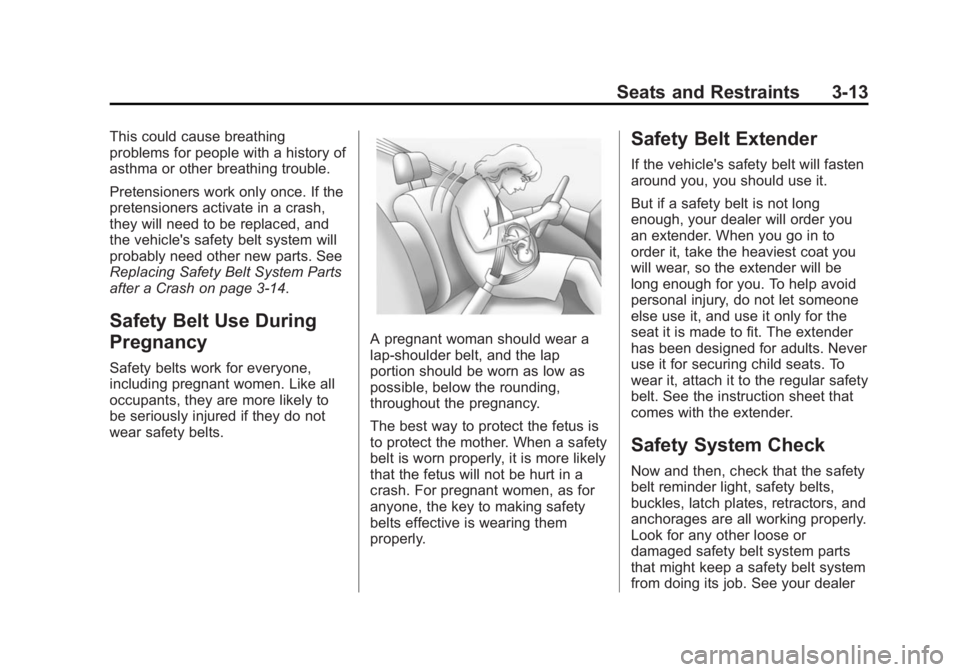
wear safety belts. A pregnant woman should wear a
lap-shoulder belt, and the lap
portion should be worn as low as
possible, below the rounding,
throughout the pregnancy.
The best way to protect the fetus is
to protect the mother. When a safety
belt is worn properly, it is more likely
that the fetus will not be hurt in a
crash. For pregnant women, as for
anyone, the key to making safety
belts effective is wearing them
properly. Safety Belt Extender If the vehicle's safety belt will fasten
around you, you should use it.
But if a safety belt is not long
enough, your dealer will order you
an extender. When you go in to
order it, take the heaviest coat you
will wear, so the extender will be
long enough for you. To help avoid
personal injury, do not let someone
else use it, and use it only for the
seat it is made to fit. The extender
has been designed for adults. Never
use it for securing child seats. To
wear it, attach it to the regular safety
belt. See the instruction sheet that
comes with the extender.
Safety System Check Now and then, check that the safety
belt reminder light, safety belts,
buckles, latch plates, retractors, and
anchorages are all working properly.
Look for any other loose or
damaged safety belt system parts
that might keep a safety belt system
from doing its job. See your dealer
Page 101 of 297
Black plate (14,1)Chevrolet City Express Owner Manual (GMNA-Localizing-U.S./Canada-
7707496) - 2015 - CRC - 11/26/14
5-14 Instruments and Controls happen if the 12-volt battery has
recently been replaced or run
down. The diagnostic system is
designed to evaluate critical
emission control systems during
normal driving. This can take
several days of routine driving.
If this has been done and the
vehicle still does not pass the
inspection for lack of OBD II
system readiness, your dealer
can prepare the vehicle for
inspection.
Brake System Warning
Light The vehicle brake system consists
of two hydraulic circuits. If one
circuit is not working, the remaining
circuit can still work to stop the
vehicle. For normal braking
performance, both circuits need to
be working.
If the warning light comes on, there
could be a brake problem. Have the
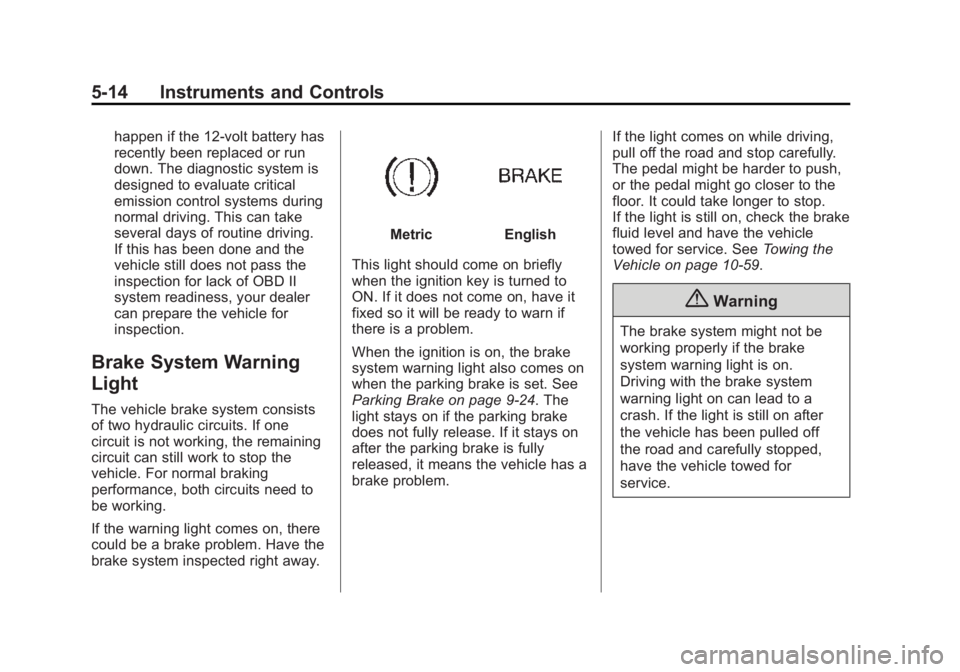
brake system inspected right away. Metric English
This light should come on briefly
when the ignition key is turned to
ON. If it does not come on, have it
fixed so it will be ready to warn if
there is a problem.
When the ignition is on, the brake
system warning light also comes on
when the parking brake is set. See
Parking Brake on page 9-24 . The
light stays on if the parking brake
does not fully release. If it stays on
after the parking brake is fully
released, it means the vehicle has a
brake problem. If the light comes on while driving,
pull off the road and stop carefully.
The pedal might be harder to push,
or the pedal might go closer to the
floor. It could take longer to stop.
If the light is still on, check the brake
fluid level and have the vehicle
towed for service. See Towing the
Vehicle on page 10-59 .
{ WarningThe brake system might not be
working properly if the brake
system warning light is on.
Driving with the brake system
warning light on can lead to a
crash. If the light is still on after
the vehicle has been pulled off
the road and carefully stopped,
have the vehicle towed for
service.
Page 110 of 297
Black plate (23,1)Chevrolet City Express Owner Manual (GMNA-Localizing-U.S./Canada-
7707496) - 2015 - CRC - 11/26/14
Instruments and Controls 5-23Brightness
This feature adjusts the brightness
of the display.
Select − or + to change the setting.
Contrast
This feature adjusts the contrast of
the display.
Select − or + to change the setting.
Color
This feature adjusts the color of the
display.
Select − or + to change the setting.
Temperature Unit
Select to change the temperature
unit reading between celsius and
fahrenheit. Touchscreen Click
When on, a click sound will be
heard when a key on the screen is
touched.
Select ON or OFF.
System Beeps
When on, a beep sound will be
heard when a pop-up message
appears on the screen or a
faceplate button is pressed and held
for two seconds.
Select ON or OFF.
Return to Factory Settings/Clear
Memory
Select to return all settings to
default and to clear the memory.
Select Yes or No. Software Licenses
Select to view software license
information.
n Navigation
See “ Navigation ” in the infotainment
manual.
H Traffic
See “
H Traffic ” in the
infotainment manual.
G Phone & Bluetooth
See “ Bluetooth ” in the infotainment
manual.
J SXM
See “ SXM Settings ” in “ AM-FM
Radio ” in the infotainment manual.
Page 115 of 297
Black plate (4,1)Chevrolet City Express Owner Manual (GMNA-Localizing-U.S./Canada-
7707496) - 2015 - CRC - 11/26/14
6-4 Lighting
Cargo Lamp
The interior light switch has two
positions and operates in any
ignition switch position.
ON: Turns the interior light on in
any door position. The light turns off
automatically after a period of time
unless the ignition switch is turned
to ACC/ACCESSORY or ON.
OFF: Turns the interior light off and
it will not come on regardless of the
door position. Dome Lamps
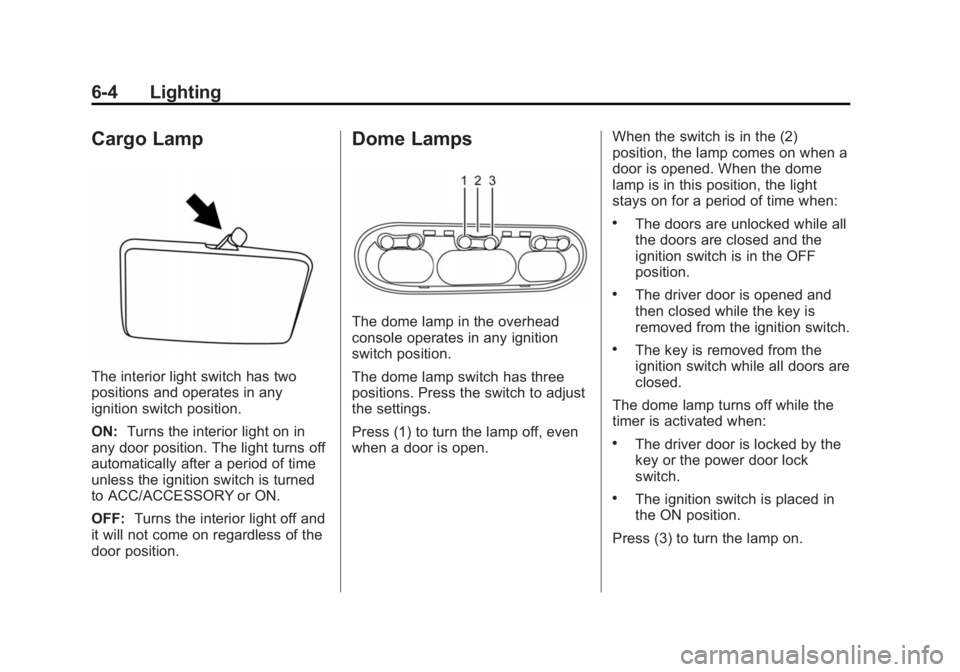
The dome lamp in the overhead
console operates in any ignition
switch position.
The dome lamp switch has three
positions. Press the switch to adjust
the settings.
Press (1) to turn the lamp off, even
when a door is open. When the switch is in the (2)
position, the lamp comes on when a
door is opened. When the dome
lamp is in this position, the light
stays on for a period of time when: .
The doors are unlocked while all
the doors are closed and the
ignition switch is in the OFF
position. .
The driver door is opened and
then closed while the key is
removed from the ignition switch. .
The key is removed from the
ignition switch while all doors are
closed.
The dome lamp turns off while the
timer is activated when: .
The driver door is locked by the
key or the power door lock
switch. .
The ignition switch is placed in
the ON position.
Press (3) to turn the lamp on.
Page 122 of 297
Black plate (5,1)Chevrolet City Express Owner Manual (GMNA-Localizing-U.S./Canada-
7707496) - 2015 - CRC - 11/26/14
Infotainment System 7-5To adjust the fade or balance:
1. Press AUDIO until Fade or
Balance displays.
2. Press
Q TUNE/FF-REW/
FOLDER
R or
r SEEK/TRACK
q to adjust the selected mode
to the desired setting.
Menu Selection Sound (Beep) To turn the menu selection sound on
or off:
1. Press AUDIO until Beep ON/
OFF displays.
2. Press
Q TUNE/FF-REW/
FOLDER
R or
r SEEK/TRACK
q to select ON or OFF. Radio AM-FM Radio Finding a Station AM: Press to change to AM
stations.
FM: Press to change to FM
stations and press to change
between FM1 and FM2. The FM
stereo indicator (ST) illuminates
during FM stereo reception. When
the stereo broadcast signal is weak,
the radio automatically changes
from stereo to monaural reception.
r SEEK/TRACK
q : Press
rSEEK to fast seek or scan the next
station.
Press TRACK
q to fast seek or
scan the previous station.
Q TUNE/FF-REW/FOLDER
R :
Press to change to the next or
previous radio stations one at
a time. SCAN: Press to scan the next
radio station for five seconds. Press
the button again within the
five seconds and the radio will stay
on that station.
Storing a Favorite Station Set up radio station favorites while
the vehicle is parked.
Up to 18 stations (six FM1, six FM2,
and six AM), can be programmed on
the six numbered buttons.
To store a station as a favorite:
1. Select the desired radio band
AM, FM1, or FM2.
2. Tune to the desired radio station.
3. Press and hold one of the
six keys until a beep sounds.
When that key is pressed and
released, the station that was
set returns.
4. Repeat the steps for each radio
station to be stored as a favorite.
Page 128 of 297
Black plate (11,1)Chevrolet City Express Owner Manual (GMNA-Localizing-U.S./Canada-
7707496) - 2015 - CRC - 11/26/14
Infotainment System 7-11.
When the vehicle is in motion,
some commands may not be
available so full attention may be
given to operating the vehicle. .
Pair cell phone(s) to the vehicle.
The system may not work with
all cell phones. See “ Pairing ” in
this section later. .
If the cell phone has voice
dialing capability, learn to use
that feature to access the
address book or contact list.
{ WarningWhen using a cell phone, it can
be distracting to look too long or
too often at the screen of the
phone or the infotainment system.
Taking your eyes off the road too
long or too often could cause a
crash resulting in injury or death.
Focus your attention on driving. Bluetooth Controls Use the buttons on the steering
wheel to operate the in-vehicle
Bluetooth system. See Steering
Wheel Controls on page 5-2 .
g V (Press to Talk): Press to
answer incoming calls and start
speech recognition.
V (End): Press and hold to end a
call or reject a call.
A Bluetooth system can use a
Bluetooth-capable cell phone with a
Hands-Free Profile to make and
receive phone calls. The system
can be used while the key is in the
ON or ACC/ACCESSORY position.
If the
g V button on the steering
wheel is pressed before the
initialization completes, the system
will announce “ Hands-free phone
system not ready ” and will not react
to voice commands. Not all phones
support all functions, and not all
phones work with the in-vehicle Bluetooth system. See
www.gm.com/bluetooth for more
information on compatible phones.
Choosing a Language The available languages are
English, Spanish, and French.
To change the language:
1. Press and hold
g V for more
than fivecseconds.
2. The system responds with,
“ Press the PHONE/SEND (
g V )
button for the hands-free phone
system to enter the voice
adaptation mode or press the
PHONE/END (
V ) button to
select a different language. ”
3. Press
V .
4. The system responds with the
current language and gives the
option to change to another
language. Do nothing and the
session will end after
five seconds and the current
language will remain.
Page 130 of 297
Black plate (13,1)Chevrolet City Express Owner Manual (GMNA-Localizing-U.S./Canada-
7707496) - 2015 - CRC - 11/26/14
Infotainment System 7-13“ Listing All Paired and
Connected Phones ” later in this
section.
Pairing a Phone
1. Press
g V .
2. Say “ Connect Phone. ” The
system acknowledges the
command and announces the
next set of available commands.
3. Say “ Add Phone. ” The system
acknowledges the command and
asks you to initiate connecting
from the phone handset.
The connecting procedure of the
cell phone varies according to
each cell phone model. See the
cell phone Owner ’ s Manual for
details.
When prompted for a Passkey
code, enter “ 1234 ” from the
handset. 4. The system asks you to say a
name for the phone.
If the name is too long or too
short, the system tells you, then
prompts you for a name again.
If more than one phone is
connected and the name sounds
too much like a name already
used, the system tells you, then
prompts you for a name again.
Listing All Paired and Connected
Phones
The system can list all cell phones
paired to it. If a paired cell phone is
also connected to the vehicle, the
system responds with “ is connected ”
after that phone name:
1. Press
g V .
2. Say “ Select Phone. ” Deleting a Paired Phone
The system will list the names
assigned to each phone and then
prompt you for the phone you wish
to delete. Deleting a phone from the
vehicle will also delete the phone
book for that phone:
1. Press
g V .
2. Say “ Delete Phone. ”
Replace Phone
The system will replace an existing
phone pairing with a new phone.
The system will keep all voice tags
assigned to your phone book.
1. Press
g V .
2. Say “ Replace Phone. ”
Bluetooth Off
Use the Bluetooth Off command to
prevent a wireless connection to
your phone.
1. Press
g V .
2. Say “ Bluetooth Off. ”
Page 155 of 297
Black plate (14,1)Chevrolet City Express Owner Manual (GMNA-Localizing-U.S./Canada-
7707496) - 2015 - CRC - 11/26/14
9-14 Driving and Operating Caution (Continued) new linings can mean
premature wear and earlier
replacement. Follow this
breaking-in guideline every
time you get new brake
linings.
Following break-in, engine speed
and load can be gradually
increased.
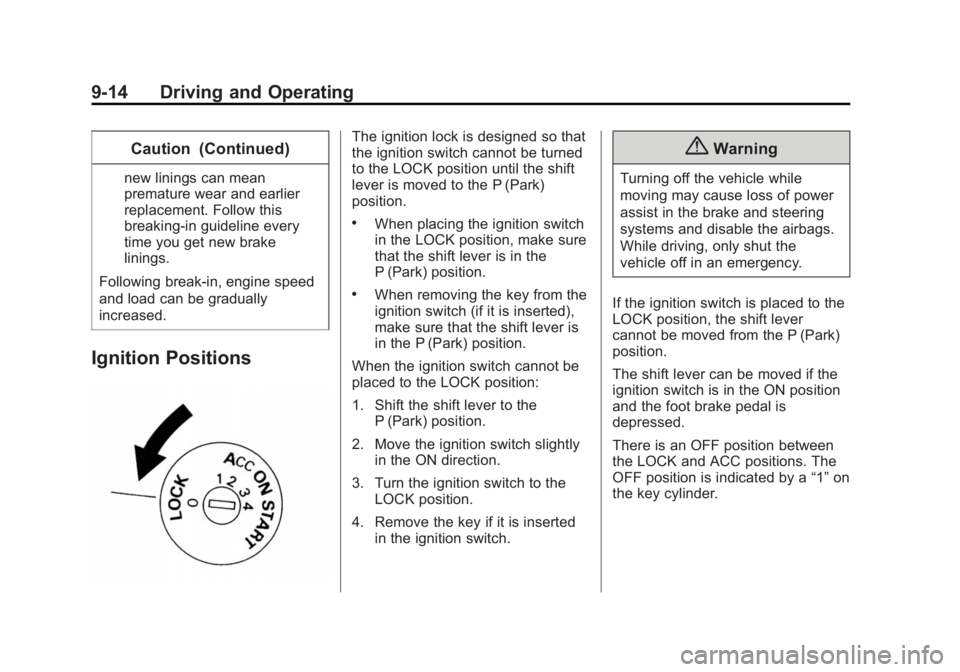
Ignition Positions The ignition lock is designed so that
the ignition switch cannot be turned
to the LOCK position until the shift
lever is moved to the P (Park)
position. .
When placing the ignition switch
in the LOCK position, make sure
that the shift lever is in the
P (Park) position. .
When removing the key from the
ignition switch (if it is inserted),
make sure that the shift lever is
in the P (Park) position.
When the ignition switch cannot be
placed to the LOCK position:
1. Shift the shift lever to the
P (Park) position.
2. Move the ignition switch slightly
in the ON direction.
3. Turn the ignition switch to the
LOCK position.
4. Remove the key if it is inserted
in the ignition switch. { WarningTurning off the vehicle while
moving may cause loss of power
assist in the brake and steering
systems and disable the airbags.
While driving, only shut the
vehicle off in an emergency.
If the ignition switch is placed to the
LOCK position, the shift lever
cannot be moved from the P (Park)
position.
The shift lever can be moved if the
ignition switch is in the ON position
and the foot brake pedal is
depressed.
There is an OFF position between
the LOCK and ACC positions. The
OFF position is indicated by a “ 1 ” on
the key cylinder.
Page 156 of 297
Black plate (15,1)Chevrolet City Express Owner Manual (GMNA-Localizing-U.S./Canada-
7707496) - 2015 - CRC - 11/26/14
Driving and Operating 9-15
{ CautionUsing a tool to force the key to
turn in the ignition could cause
damage to the switch or break the
key. Use the correct key, make
sure it is all the way in, and turn it
only with your hand. If the key
cannot be turned by hand, see
your dealer.
Ignition Switch Positions
LOCK (0): Normal parking position.
OFF (1): The engine can be turned
off without locking the steering
wheel.
ACC (2): Accessories. This position
activates electrical accessories such
as the radio when the engine is not
running.
ON (3): Normal operating position.
This position turns on the ignition
system and the electrical
accessories. START (4): This position starts the
engine. As soon as the engine has
started, release the key.
It automatically returns to the ON
position.
Starting the Engine To place the transmission in the
proper gear:
Move the shift lever to P (Park) or
N (Neutral). The engine will not start
in any other position. To restart the
engine when the vehicle is already
moving, use N (Neutral) only.
{ Caution
If you add electrical parts or
accessories, you could change
the way the engine operates. Any
resulting damage would not be
covered by the vehicle warranty.
See Add-On Electrical Equipment
on page 9-41 .{ CautionDo not try to shift to P (Park) if the
vehicle is moving. If you do, you
could damage the transmission.
Shift to P (Park) only when the
vehicle is stopped.
Starting Procedure
1. Apply the parking brake.
2. Move the shift lever to P (Park)
or N (Neutral). P (Park) is
recommended.
The shift lever cannot be moved
out of P (Park) and into any of
the other gear positions if the
ignition switch is turned to the
OFF position or if the key is
removed from the ignition switch.
The starter is designed not to
operate if the shift lever is in any
of the driving positions.
3. Crank the engine with your foot
off the accelerator pedalby
placing the ignition switch in the
Page 157 of 297
Black plate (16,1)Chevrolet City Express Owner Manual (GMNA-Localizing-U.S./Canada-
7707496) - 2015 - CRC - 11/26/14
9-16 Driving and Operating START position. Release the
key when the engine starts.
If the engine starts, but fails to
run, repeat the above procedure. .
If the engine is very hard to
start in extremely cold
weather or when restarting,
depress the accelerator
pedal a little (approximately
1/3 to the floor) and hold it
and then crank the engine.
Release the key and the
accelerator pedal when the
engine starts. .
If the engine is very hard to
start because it is flooded,
depress the accelerator
pedal all the way to the floor
and hold it. Crank the engine
for five to six seconds.
After cranking the engine,
release the accelerator
pedal. Crank the engine with
your foot off the accelerator
pedal by turning the ignition
key to START. Release the
key when the engine starts. If the engine starts, but fails
to run, repeat the above
procedure.
{ CautionDo not operate the starter for
more than 15 seconds at a time.
If the engine does not start, turn
the key off and wait 10 seconds
before cranking again, otherwise
the starter could be damaged.
4. Allow the engine to idle for at
least 30 seconds after starting.
Do not race the engine while
warming it up. Drive at moderate
speed for a short distance first,
especially in cold weather.
In cold weather, keep the engine
running for a minimum of two to
three minutes before shutting it
off. Starting and stopping the
engine over a short period of
time may make the vehicle more
difficult to start. Note: Care should be taken to
avoid situations that can lead to
potential battery discharge and
potential no-start conditions
such as:
1. Installation or extended use of
electronic accessories that
consume battery power when
the engine is not running (Phone
chargers, GPS, DVD
players, etc.).
2. Vehicle is not driven regularly
and/or only driven short
distances. In these cases, the
battery may need to be charged
to maintain battery health.