steering CHEVROLET CITY EXPRESS 2016 Owner's Manual
[x] Cancel search | Manufacturer: CHEVROLET, Model Year: 2016, Model line: CITY EXPRESS, Model: CHEVROLET CITY EXPRESS 2016Pages: 297, PDF Size: 4.52 MB
Page 128 of 297
Black plate (11,1)Chevrolet City Express Owner Manual (GMNA-Localizing-U.S./Canada-
7707496) - 2015 - CRC - 11/26/14
Infotainment System 7-11.
When the vehicle is in motion,
some commands may not be
available so full attention may be
given to operating the vehicle. .
Pair cell phone(s) to the vehicle.
The system may not work with
all cell phones. See “ Pairing ” in
this section later. .
If the cell phone has voice
dialing capability, learn to use
that feature to access the
address book or contact list.
{ WarningWhen using a cell phone, it can
be distracting to look too long or
too often at the screen of the
phone or the infotainment system.
Taking your eyes off the road too
long or too often could cause a
crash resulting in injury or death.
Focus your attention on driving. Bluetooth Controls Use the buttons on the steering
wheel to operate the in-vehicle
Bluetooth system. See Steering
Wheel Controls on page 5-2 .
g V (Press to Talk): Press to
answer incoming calls and start
speech recognition.
V (End): Press and hold to end a
call or reject a call.
A Bluetooth system can use a
Bluetooth-capable cell phone with a
Hands-Free Profile to make and
receive phone calls. The system
can be used while the key is in the
ON or ACC/ACCESSORY position.
If the
g V button on the steering
wheel is pressed before the
initialization completes, the system
will announce “ Hands-free phone
system not ready ” and will not react
to voice commands. Not all phones
support all functions, and not all
phones work with the in-vehicle Bluetooth system. See
www.gm.com/bluetooth for more
information on compatible phones.
Choosing a Language The available languages are
English, Spanish, and French.
To change the language:
1. Press and hold
g V for more
than fivecseconds.
2. The system responds with,
“ Press the PHONE/SEND (
g V )
button for the hands-free phone
system to enter the voice
adaptation mode or press the
PHONE/END (
V ) button to
select a different language. ”
3. Press
V .
4. The system responds with the
current language and gives the
option to change to another
language. Do nothing and the
session will end after
five seconds and the current
language will remain.
Page 129 of 297
Black plate (12,1)Chevrolet City Express Owner Manual (GMNA-Localizing-U.S./Canada-
7707496) - 2015 - CRC - 11/26/14
7-12 Infotainment System 5. To select a different language,
press
g or
d on the steering
wheel.
6. To select the language,
press
g V within five seconds.
Voice Recognition The Bluetooth system uses voice
recognition to interpret voice
commands to dial phone numbers
and name tags.
For available commands for the
current menu again, say “ Help ” and
the system will repeat them.
Noise: Keep interior noise levels to
a minimum. The system may not
recognize voice commands if there
is too much background noise.
When to Speak: A tone sounds
after the system responds indicating
when it is waiting for a voice
command. Wait until the tone and
then speak. Start speaking a
command within 5 seconds after the
tone sounds. How to Speak: Speak clearly in a
calm and natural voice without
pausing between words.
Mute: Say to mute the call. Say
mute again to unmute the call.
Audio System When using the in-vehicle Bluetooth
system, sound comes through the
vehicle's audio system speakers
and overrides the audio system.
Use the audio system volume knob
or press
x − or
x + on the steering
wheel, during a call, to change the
volume level.
Pairing A Bluetooth-enabled cell phone
must be paired to the Bluetooth
system and then connected to the
vehicle before it can be used. See
the cell phone manufacturer's user
guide for Bluetooth functions before
pairing the cell phone. Pairing Information .
A Bluetooth phone with MP3
capability cannot be paired to
the vehicle as a phone and an
MP3 player at the same time. .
Up to five cell phones can be
paired to the Bluetooth system. .
The pairing process is disabled
when the vehicle is moving. .
Pairing only needs to be
completed once, unless the
pairing information on the cell
phone changes or the cell phone
is deleted from the system. .
Only one paired cell phone can
be connected to the Bluetooth
system at a time. .
If multiple paired cell phones are
within range of the system, the
system connects to the first
available paired cell phone in the
order that they were first paired
to the system. To connect to a
different paired phone, see
Page 131 of 297
Black plate (14,1)Chevrolet City Express Owner Manual (GMNA-Localizing-U.S./Canada-
7707496) - 2015 - CRC - 11/26/14
7-14 Infotainment System Making a Call Calls can be made using the
following commands:
Call: This command is used to dial
a stored name.
Phone Number: This command
allows a phone number to be dialed
by entering the digits one at a time.
Special Number: This command
allows special characters in a phone
number.
Re-dial: This command is used to
dial the last number used on the cell
phone.
Call Back: This command is used
to call the last incoming phone
number.
During a Call
During a call there are several
command options available. Press
g V on the steering wheel to mute
the receiving voice and enter
commands. Help: The system announces the
available commands.
Cancel or Quit: The system
announces “ Cancel, ” ends the
session, and returns to the call.
Send: Use the Send command to
enter numbers, “ * ” or “ # ” during a
call. For example, if you were
directed to dial an extension by an
automated system, say “ Send one
two three four. ”
The system acknowledges the
command and sends the tones
associated with the numbers. The
system then ends the session and
returns to the call. Say “ star ” for “ * ”
and say “ pound ” for “ # ” .
Transfer call: Use the Transfer
Call command to transfer the call
from the Bluetooth ®
Hands-Free
Phone System to the cell phone
when privacy is desired.
The system announces, “ Transfer
call. Call transferred to privacy
mode. ” The system then ends the
session. To reconnect the call from the cell
phone to the Bluetooth Hands-Free
System, press the
g V button.
Mute: Use this command to mute
your voice so the other party cannot
hear it. Use the mute command
again to unmute your voice.
Using the “ Call ” Command
1. Press
g V .
2. Say “ Call. ”
3. Say the name you want to call.
4. The system repeats it back.
If there are multiple numbers
associated with the name, the
system asks you to choose the
correct number.
5. Once you have confirmed the
name and location, the system
begins the call.
Page 135 of 297
Black plate (18,1)Chevrolet City Express Owner Manual (GMNA-Localizing-U.S./Canada-
7707496) - 2015 - CRC - 11/26/14
7-18 Infotainment System 2. Sit in the driver seat with the
engine running and the parking
brake on.
3. Press and hold
g V for more
than five seconds.
4. The system responds with,
“ Press the PHONE/SEND (
g V )
button for the hands-free phone
system to enter the voice
adaptation mode or press the
PHONE/END (
V ) button to
select a different language. ” See
“ Language ” previously in this
section.
5. Voice memory A or B is
automatically selected. If both
memory locations are already
used, the system will prompt you
to overwrite one. Follow the
instructions provided by the
system. 6. When the preparation is
complete and you are ready to
begin, press
g V .
7. The VA mode will be explained.
Follow the instructions provided
by the system.
8. When the training is finished, the
system will tell you that an
adequate number of phrases
have been recorded.
9. The system will announce that
VA has been completed and the
system is ready.
The VA mode will stop if: .
The
g V button is pressed for
more than five seconds in
VA mode. .
The vehicle begins moving
during VA mode. .
The ignition switch is placed in
the OFF or LOCK position. Manual Control While using the voice recognition
system, it is possible to select menu
options to use the steering wheel
controls instead of speaking voice
commands. This can be especially
helpful if the noise of driving makes
it difficult for the voice recognition
system to accurately interpret
commands. The manual control
mode does not allow dialing a
phone number by digits. The user
may select an entry from the
Phonebook or Recent Calls lists. To
re-activate voice recognition, exit
the manual control mode by
pressing and holding
V , then press
g V to start the Hands Free Phone
System.
To start Manual Control Mode:
1. From an active Phone book or
Recent Call list, press
Q TUNE/
FF-REW FOLDER
R up
or down.
Page 142 of 297
Black plate (1,1)Chevrolet City Express Owner Manual (GMNA-Localizing-U.S./Canada-
7707496) - 2015 - CRC - 11/26/14
Driving and Operating 9-1
Driving and
Operating Driving Information Distracted Driving . . . . . . . . . . . . . 9-2
Defensive Driving . . . . . . . . . . . . . 9-2
Drunk Driving . . . . . . . . . . . . . . . . . 9-3
Control of a Vehicle . . . . . . . . . . . 9-3
Braking . . . . . . . . . . . . . . . . . . . . . . . 9-3
Steering . . . . . . . . . . . . . . . . . . . . . . . 9-3
Off-Road Recovery . . . . . . . . . . . . 9-4
Loss of Control . . . . . . . . . . . . . . . . 9-5
Driving on Wet Roads . . . . . . . . . 9-5
Hill and Mountain Roads . . . . . . 9-6
Winter Driving . . . . . . . . . . . . . . . . . 9-7
If the Vehicle Is Stuck . . . . . . . . . 9-8
Vehicle Load Limits . . . . . . . . . . . 9-9 Starting and Operating New Vehicle Break-In . . . . . . . . 9-13
Ignition Positions . . . . . . . . . . . . 9-14
Starting the Engine . . . . . . . . . . 9-15
Parking over Things
That Burn . . . . . . . . . . . . . . . . . . 9-17
Engine Exhaust Engine Exhaust . . . . . . . . . . . . . . 9-17
Running the Vehicle While
Parked . . . . . . . . . . . . . . . . . . . . . 9-18
Automatic Transmission Continuously Variable
Transmission (CVT) . . . . . . . . 9-18
Brakes Antilock Brake
System (ABS) . . . . . . . . . . . . . . 9-22
Parking Brake . . . . . . . . . . . . . . . 9-24
Ride Control Systems Traction Control/Electronic
Stability Control . . . . . . . . . . . . 9-25 Cruise Control Cruise Control . . . . . . . . . . . . . . . 9-28
Driver Assistance Systems Parking Assist . . . . . . . . . . . . . . . 9-30
Rear Vision
Camera (RVC) . . . . . . . . . . . . . 9-31
Fuel Fuel . . . . . . . . . . . . . . . . . . . . . . . . . 9-37
California Fuel
Requirements . . . . . . . . . . . . . . 9-38
Fuels in Foreign Countries . . . 9-38
Fuel Additives . . . . . . . . . . . . . . . 9-38
Filling the Tank . . . . . . . . . . . . . . 9-39
Filling a Portable Fuel
Container . . . . . . . . . . . . . . . . . . . 9-40
Trailer Towing General Towing
Information . . . . . . . . . . . . . . . . . 9-41
Conversions and Add-Ons Add-On Electrical
Equipment . . . . . . . . . . . . . . . . . 9-41
Page 144 of 297
Black plate (3,1)Chevrolet City Express Owner Manual (GMNA-Localizing-U.S./Canada-
7707496) - 2015 - CRC - 11/26/14
Driving and Operating 9-3.
Allow enough following distance
between you and the driver in
front of you. .
Focus on the task of driving.
Drunk Driving Death and injury associated with
drinking and driving is a global
tragedy.
{ WarningDrinking and then driving is very
dangerous. Your reflexes,
perceptions, attentiveness, and
judgment can be affected by even
a small amount of alcohol. You
can have a serious — or even
fatal — collision if you drive after
drinking.
Do not drink and drive or ride with
a driver who has been drinking.
Ride home in a cab; or if you are
with a group, designate a driver
who will not drink. Control of a Vehicle Braking, steering, and accelerating
are important factors in helping to
control a vehicle while driving.
Braking Braking action involves perception
time and reaction time. Deciding to
push the brake pedal is perception
time. Actually doing it is
reaction time.
Average driver reaction time is
about three-quarters of a second. In
that time, a vehicle moving at
100 km/h (60 mph) travels 20 m
(66 ft), which could be a lot of
distance in an emergency.
Helpful braking tips to keep in mind
include: .
Keep enough distance between
you and the vehicle in front
of you. .
Avoid needless heavy braking. .
Keep pace with traffic. Vacuum Assisted Brakes
The brake booster aids braking by
using engine vacuum. If the engine
stops, you can stop the vehicle by
depressing the brake pedal.
However, greater foot pressure on
the brake pedal will be required to
stop the vehicle and stopping
distance will be longer.
{ WarningIf the engine is not running or is
turned off while driving, the power
assist for the brakes will not work.
Braking will be harder.
Steering Electric Power Steering
The vehicle has electric power
steering. It does not have power
steering fluid. Regular maintenance
is not required.
Page 145 of 297
Black plate (4,1)Chevrolet City Express Owner Manual (GMNA-Localizing-U.S./Canada-
7707496) - 2015 - CRC - 11/26/14
9-4 Driving and Operating If power steering assist is lost due
to a system malfunction, the vehicle
can be steered, but may require
increased effort.
See your dealer if there is a
problem.
If the steering wheel is turned until it
reaches the end of its travel and is
held against that position for an
extended period of time, power
steering assist may be reduced.
If the steering assist is used for an
extended period of time, power
assist may be reduced.
Normal use of the power steering
assist should return when the
system cools down.
Curve Tips .
Take curves at a reasonable
speed. .
Reduce speed before entering a
curve. .
Maintain a reasonable steady
speed through the curve. .
Wait until the vehicle is out of
the curve before accelerating
gently into the straightaway.
Steering in Emergencies .
There are some situations when
steering around a problem may
be more effective than braking. .
Holding both sides of the
steering wheel allows you to turn
180 degrees without removing
a hand. .
The Antilock Brake System
(ABS) allows steering while
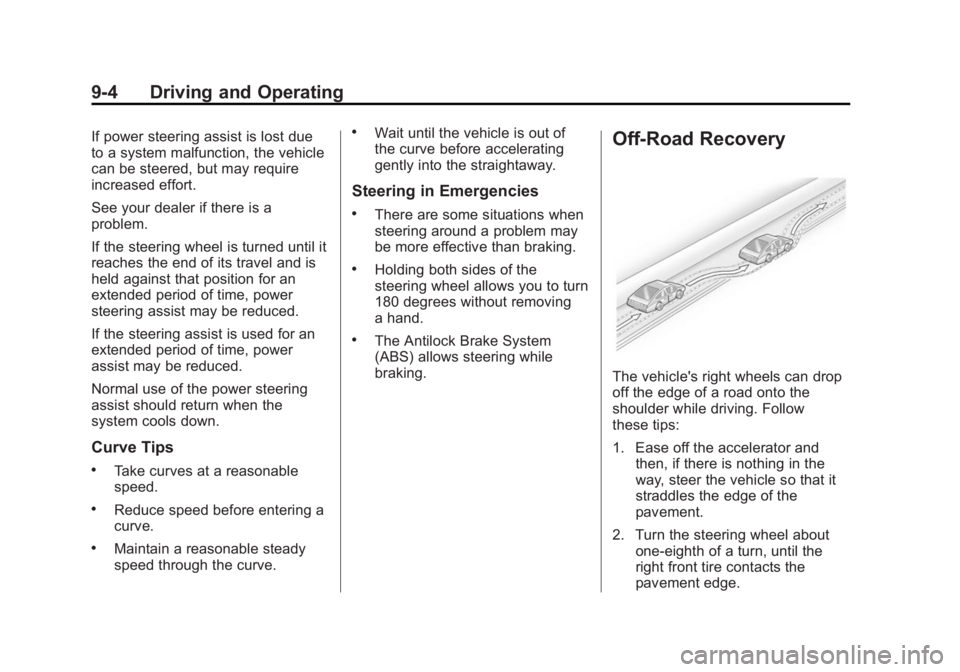
braking. Off-Road Recovery
The vehicle's right wheels can drop
off the edge of a road onto the
shoulder while driving. Follow
these tips:
1. Ease off the accelerator and
then, if there is nothing in the
way, steer the vehicle so that it
straddles the edge of the
pavement.
2. Turn the steering wheel about
one-eighth of a turn, until the
right front tire contacts the
pavement edge.
Page 146 of 297
Black plate (5,1)Chevrolet City Express Owner Manual (GMNA-Localizing-U.S./Canada-
7707496) - 2015 - CRC - 11/26/14
Driving and Operating 9-53. Turn the steering wheel to go
straight down the roadway.
Loss of Control Skidding There are three types of skids that
correspond to the vehicle's three
control systems: .
Braking Skid — wheels are not
rolling. .
Steering or Cornering Skid —
too much speed or steering in a
curve causes tires to slip and
lose cornering force. .
Acceleration Skid — too much
throttle causes the driving
wheels to spin.
Defensive drivers avoid most skids
by taking reasonable care suited to
existing conditions, and by not
overdriving those conditions. But
skids are always possible. If the vehicle starts to slide, follow
these suggestions: .
Ease your foot off the
accelerator pedal and steer the
way you want the vehicle to go.
The vehicle may straighten out.
Be ready for a second skid if it
occurs. .
Slow down and adjust your
driving according to weather
conditions. Stopping distance
can be longer and vehicle
control can be affected when
traction is reduced by water,
snow, ice, gravel, or other
material on the road. Learn to
recognize warning clues — such
as enough water, ice, or packed
snow on the road to make a
mirrored surface — and slow
down when you have any doubt. .
Try to avoid sudden steering,
acceleration, or braking,
including reducing vehicle speed
by shifting to a lower gear. Any
sudden changes could cause
the tires to slide. Remember: Antilock brakes help
avoid only the braking skid.
Driving on Wet Roads Rain and wet roads can reduce
vehicle traction and affect your
ability to stop and accelerate.
Always drive slower in these types
of driving conditions and avoid
driving through large puddles and
deep ‐ standing or flowing water.
{ WarningWet brakes can cause crashes.
They might not work as well in a
quick stop and could cause
pulling to one side. You could
lose control of the vehicle.
After driving through a large
puddle of water or a car/vehicle
wash, lightly apply the brake
pedal until the brakes work
normally.
(Continued)
Page 147 of 297
Black plate (6,1)Chevrolet City Express Owner Manual (GMNA-Localizing-U.S./Canada-
7707496) - 2015 - CRC - 11/26/14
9-6 Driving and Operating Warning (Continued)Flowing or rushing water creates
strong forces. Driving through
flowing water could cause the
vehicle to be carried away. If this
happens, you and other vehicle
occupants could drown. Do not
ignore police warnings and be
very cautious about trying to drive
through flowing water.
Hydroplaning Hydroplaning is dangerous. Water
can build up under the vehicle's
tires so they actually ride on the
water. This can happen if the road is
wet enough and you are going fast
enough. When the vehicle is
hydroplaning, it has little or no
contact with the road.
There is no hard and fast rule about
hydroplaning. The best advice is to
slow down when the road is wet. Other Rainy Weather Tips Besides slowing down, other wet
weather driving tips include: .
Allow extra following distance. .
Pass with caution. .
Keep windshield wiping
equipment in good shape. .
Keep the windshield washer fluid
reservoir filled. .
Have good tires with proper
tread depth. See Tires on
page 10-26 . .
Turn off cruise control.
Hill and Mountain Roads Driving on steep hills or through
mountains is different than driving
on flat or rolling terrain. Tips for
driving in these conditions include: .
Keep the vehicle serviced and in
good shape. .
Check all fluid levels and brakes,
tires, cooling system, and
transmission. .
Shift to a lower gear when going
down steep or long hills.
{ WarningUsing the brakes to slow the
vehicle on a long downhill slope
can cause brake overheating, can
reduce brake performance, and
could result in a loss of braking.
Shift the transmission to a lower
gear to let the engine assist the
brakes on a steep downhill slope.
{ Warning
Coasting downhill in N (Neutral)
or with the ignition off is
dangerous. This can cause
overheating of the brakes and
loss of steering. Always have the
engine running and the vehicle
in gear.
Page 148 of 297
Black plate (7,1)Chevrolet City Express Owner Manual (GMNA-Localizing-U.S./Canada-
7707496) - 2015 - CRC - 11/26/14
Driving and Operating 9-7.
Stay in your own lane. Do not
swing wide or cut across the
center of the road. Drive at
speeds that let you stay in your
own lane. .
Be alert on top of hills;
something could be in your lane
(stalled car, accident). .
Pay attention to special road
signs (falling rocks area, winding
roads, long grades, passing or
no-passing zones) and take
appropriate action.
Winter Driving Driving on Snow or Ice Drive carefully when there is snow
or ice between the tires and the
road, creating less traction or grip.
Wet ice can occur at about 0°C (32°
F) when freezing rain begins to fall,
resulting in even less traction. Avoid
driving on wet ice or in freezing rain
until roads can be treated with salt
or sand. Drive with caution, whatever the
condition. Accelerate gently so
traction is not lost. Accelerating too
quickly causes the wheels to spin
and makes the surface under the
tires slick, so there is even less
traction.
Traction Control should be turned
on. See Traction Control/Electronic
Stability Control on page 9-25 .
The Antilock Brake System (ABS)
improves vehicle stability during
hard stops on slippery roads, but
apply the brakes sooner than when
on dry pavement. See Antilock
Brake System (ABS) on page 9-22 .
Allow greater following distance on
any slippery road and watch for
slippery spots. Icy patches can
occur on otherwise clear roads in
shaded areas. The surface of a
curve or an overpass can remain icy
when the surrounding roads are
clear. Avoid sudden steering
maneuvers and braking while
on ice. Turn off cruise control on slippery
surfaces.
Blizzard Conditions Being stuck in snow can be a
serious situation. Stay with the
vehicle unless there is help nearby.
If possible, use Roadside
Assistance. See Roadside
Assistance Program on page 13-5 .
To get help and keep everyone in
the vehicle safe: .
Turn on the hazard warning
flashers. .
Tie a red cloth to an outside
mirror.
{ Warning
Snow can trap engine exhaust
under the vehicle. This may
cause exhaust gases to get
inside. Engine exhaust contains
carbon monoxide (CO) which
(Continued)