cruise control CHEVROLET CITY EXPRESS 2017 User Guide
[x] Cancel search | Manufacturer: CHEVROLET, Model Year: 2017, Model line: CITY EXPRESS, Model: CHEVROLET CITY EXPRESS 2017Pages: 348, PDF Size: 4.84 MB
Page 120 of 348
Chevrolet Express Owner Manual (GMNA-Localizing-U.S./Canada/Mexico-
9967827) - 2017 - crc - 9/26/16
Instruments and Controls 119
GRADE BRAKING ON
This message displays when the
grade braking has been activated
while driving on downhill grades.
This message will only appear the
first time the feature is activated in
an ignition cycle. SeeTow/Haul
Mode 0187, Automatic
Transmission 0183, and Cruise
Control 0192.
SERVICE TRANSMISSION
This message displays when there
is a problem with the transmission.
See your dealer for service.
TRANSMISSION HOT IDLE
ENGINE
Caution
Do not drive the vehicle while the
transmission fluid is overheating,
or the transmission can be
damaged. This could lead to
costly repairs that would not be
covered by the warranty. This message displays along with a
chime if the transmission fluid in the
vehicle gets hot. Driving with the
transmission fluid temperature high
can cause damage to the vehicle.
Stop the vehicle and let it idle to
allow the transmission to cool. This
message clears and the chime
stops when the fluid temperature
reaches a safe level.
Vehicle Reminder
Messages
ICE POSSIBLE DRIVE
WITH CARE
This message displays when the
outside air temperature is cold
enough to create icy road
conditions. Adjust your driving
accordingly.
Vehicle
Personalization
This vehicle may have
customization capabilities that allow
you to program certain features to
one preferred setting. Customization
features can only be programmed to
one setting on the vehicle and
cannot be programmed to a
preferred setting for two different
drivers.
All of the customization options may
not be available on your vehicle.
Only the options available will be
displayed on the DIC.
The default settings for the
customization features were set
when the vehicle left the factory, but
may have been changed from their
default state since then.
The customization preferences are
automatically recalled.
To change customization
preferences, use the following
procedure.
Page 165 of 348
Chevrolet Express Owner Manual (GMNA-Localizing-U.S./Canada/Mexico-
9967827) - 2017 - crc - 9/26/16
164 Driving and Operating
Driving and
Operating
Driving Information
Distracted Driving . . . . . . . . . . . . 165
Defensive Driving . . . . . . . . . . . . . 165
Drunk Driving . . . . . . . . . . . . . . . . . 166
Control of a Vehicle . . . . . . . . . . . 166
Braking . . . . . . . . . . . . . . . . . . . . . . . 166
Steering . . . . . . . . . . . . . . . . . . . . . . 166
Off-Road Recovery . . . . . . . . . . . 167
Loss of Control . . . . . . . . . . . . . . . 167
Driving on Wet Roads . . . . . . . . 168
Hill and Mountain Roads . . . . . 169
Winter Driving . . . . . . . . . . . . . . . . 169
If the Vehicle Is Stuck . . . . . . . . 171
Vehicle Load Limits . . . . . . . . . . . 171
Starting and Operating
New Vehicle Break-In . . . . . . . . . 175
Ignition Positions . . . . . . . . . . . . . 175
Starting the Engine . . . . . . . . . . . 177
Fast Idle System . . . . . . . . . . . . . 178
Retained AccessoryPower (RAP) . . . . . . . . . . . . . . . . 179
Engine Coolant Heater . . . . . . . 179
Shifting Into Park . . . . . . . . . . . . . 180
Shifting out of Park . . . . . . . . . . . 181 Parking over Things
That Burn . . . . . . . . . . . . . . . . . . . 182
Engine Exhaust
Engine Exhaust . . . . . . . . . . . . . . 182
Running the Vehicle WhileParked . . . . . . . . . . . . . . . . . . . . . . 183
Automatic Transmission
Automatic Transmission . . . . . . 183
Manual Mode . . . . . . . . . . . . . . . . . 186
Tow/Haul Mode . . . . . . . . . . . . . . . 187
Brakes
Antilock BrakeSystem (ABS) . . . . . . . . . . . . . . . 188
Parking Brake . . . . . . . . . . . . . . . . 189
Ride Control Systems
Traction Control/Electronic Stability Control . . . . . . . . . . . . . 190
Locking Rear Axle . . . . . . . . . . . . 191
Cruise Control
Cruise Control . . . . . . . . . . . . . . . . 192
Driver Assistance Systems
Rear Vision Camera (RVC) . . . 194
Parking Assist . . . . . . . . . . . . . . . . 197
Fuel
Fuel . . . . . . . . . . . . . . . . . . . . . . . . . . 198 California Fuel
Requirements . . . . . . . . . . . . . . . 199
Fuels in Foreign Countries . . . 199
Fuel Additives . . . . . . . . . . . . . . . . 199
E85 or FlexFuel . . . . . . . . . . . . . . 199
Filling the Tank . . . . . . . . . . . . . . . 200
Filling a Portable Fuel Container . . . . . . . . . . . . . . . . . . . 202
Trailer Towing
General TowingInformation . . . . . . . . . . . . . . . . . . 202
Driving Characteristics and Towing Tips . . . . . . . . . . . . . . . . . 202
Trailer Towing . . . . . . . . . . . . . . . . 205
Towing Equipment . . . . . . . . . . . . 210
Conversions and Add-Ons
Add-On Electrical Equipment . . . . . . . . . . . . . . . . . . 212
Page 169 of 348
Chevrolet Express Owner Manual (GMNA-Localizing-U.S./Canada/Mexico-
9967827) - 2017 - crc - 9/26/16
168 Driving and Operating
The vehicle may straighten out.
Be ready for a second skid if it
occurs.
. Slow down and adjust your
driving according to weather
conditions. Stopping distance
can be longer and vehicle
control can be affected when
traction is reduced by water,
snow, ice, gravel, or other
material on the road. Learn to
recognize warning clues —such
as enough water, ice, or packed
snow on the road to make a
mirrored surface —and slow
down when you have any doubt.
. Try to avoid sudden steering,
acceleration, or braking,
including reducing vehicle speed
by shifting to a lower gear. Any
sudden changes could cause
the tires to slide.
Remember: Antilock brakes help
avoid only the braking skid.
Driving on Wet Roads
Rain and wet roads can reduce
vehicle traction and affect your
ability to stop and accelerate. Always drive slower in these types
of driving conditions and avoid
driving through large puddles and
deep-standing or flowing water.
{Warning
Wet brakes can cause crashes.
They might not work as well in a
quick stop and could cause
pulling to one side. You could
lose control of the vehicle.
After driving through a large
puddle of water or a car/vehicle
wash, lightly apply the brake
pedal until the brakes work
normally.
Flowing or rushing water creates
strong forces. Driving through
flowing water could cause the
vehicle to be carried away. If this
happens, you and other vehicle
occupants could drown. Do not
ignore police warnings and be
very cautious about trying to drive
through flowing water.
Hydroplaning
Hydroplaning is dangerous. Water
can build up under the vehicle's
tires so they actually ride on the
water. This can happen if the road is
wet enough and you are going fast
enough. When the vehicle is
hydroplaning, it has little or no
contact with the road.
There is no hard and fast rule about
hydroplaning. The best advice is to
slow down when the road is wet.
Other Rainy Weather Tips
Besides slowing down, other wet
weather driving tips include:
.
Allow extra following distance.
. Pass with caution.
. Keep windshield wiping
equipment in good shape.
. Keep the windshield washer fluid
reservoir filled.
. Have good tires with proper
tread depth. See Tires0252.
. Turn off cruise control.
Page 171 of 348
Chevrolet Express Owner Manual (GMNA-Localizing-U.S./Canada/Mexico-
9967827) - 2017 - crc - 9/26/16
170 Driving and Operating
clear roads in shaded areas.
The surface of a curve or an
overpass can remain icy when
the surrounding roads are clear.
Avoid sudden steering
maneuvers and braking while
on ice.
. Turn off cruise control.
Blizzard Conditions
Stop the vehicle in a safe place and
signal for help. Stay with the vehicle
unless there is help nearby.
If possible, use Roadside
Assistance. See Roadside
Assistance Program 0317. To get
help and keep everyone in the
vehicle safe:
. Turn on the hazard warning
flashers.
. Tie a red cloth to an outside
mirror.
{Warning
Snow can trap engine exhaust
under the vehicle. This may
cause exhaust gases to get
inside. Engine exhaust contains
carbon monoxide (CO), which
cannot be seen or smelled. It can
cause unconsciousness and even
death.
If the vehicle is stuck in snow:
. Clear snow from the base of
the vehicle, especially any
blocking the exhaust pipe.
. Open a window about 5 cm
(2 in) on the vehicle side
that is away from the wind,
to bring in fresh air.
. Fully open the air outlets on
or under the instrument
panel.
. Adjust the climate control
system to circulate the air
inside the vehicle and set
(Continued)
Warning (Continued)
the fan speed to the highest
setting. See“Climate
Control Systems.”
For more information about CO,
see Engine Exhaust 0182.
To save fuel, run the engine for
short periods to warm the vehicle
and then shut the engine off and
partially close the window. Moving
about to keep warm also helps.
If it takes time for help to arrive,
when running the engine, push the
accelerator pedal slightly so the
engine runs faster than the idle
speed. This keeps the battery
charged to restart the vehicle and to
signal for help with the headlamps.
Do this as little as possible, to
save fuel.
Page 179 of 348
Chevrolet Express Owner Manual (GMNA-Localizing-U.S./Canada/Mexico-
9967827) - 2017 - crc - 9/26/16
178 Driving and Operating
2. If the engine does not startafter 5-10 seconds, especially
in very cold weather (below
−18 °C or 0 °F), it could be
flooded with too much
gasoline. Try pushing the
accelerator pedal all the way to
the floor and holding it there as
you hold the key in START for
up to 15 seconds. Wait at least
15 seconds between each try,
to allow the cranking motor to
cool down. When the engine
starts, let go of the key and
accelerator. If the vehicle starts
briefly but then stops again, do
the same thing. This clears the
extra gasoline from the engine.
Do not race the engine
immediately after starting it.
Operate the engine and
transmission gently until the oil
warms up and lubricates all
moving parts.Fast Idle System
If equipped, this feature is available
only with cruise control. The manual
fast idle switch is operated using the
cruise control buttons on the left
side of the steering wheel.
This system can be used to
increase engine idle speed
whenever the following conditions
are met:
.The parking brake is set.
. The brake pedal is not pressed.
. The vehicle must not be moving
and the accelerator must not be
pressed.
To control the fast idle:
. To enable the Fast Idle System,
press and release the cruise
control on/off button and ensure
that the switch indicator light
is lit.
. Press and release the cruise
control SET- button. Engine
speed will be held at
approximately 1200 rpm. When the fast idle is active, the
Driver Information Center (DIC) will
display FAST IDLE ON.
One of the following actions will turn
off the fast idle:
.
Pressing the brake.
. Selecting the cruise control
cancel button.
. Releasing the parking brake.
. Moving the transmission shift
lever out of P (Park) or
N (Neutral).
. Selecting the cruise control on/
off button when it was
previously on.
. Pressing the cruise control SET-
button a second time.
. Pressing the accelerator more
than one-quarter of the
way down.
. Turning the ignition switch to the
LOCK/OFF position.
Page 187 of 348
Chevrolet Express Owner Manual (GMNA-Localizing-U.S./Canada/Mexico-
9967827) - 2017 - crc - 9/26/16
186 Driving and Operating
brakes off and on. See“Range
Selection Mode” underManual
Mode 0186.
If you manually select 2 (Second) in
an automatic transmission, the
transmission will start in
second gear. You can use this
feature for reducing the speed of the
rear wheels when trying to start the
vehicle from a stop on slippery road
surfaces.
1 : This position reduces vehicle
speed without using the brakes.
You can use it for major/severe
downgrades where the vehicle
would otherwise accelerate due to
steepness of grade. When you shift
to 1 (First) it provides the lowest
gear appropriate to current road
speed and continues to downshift
as the vehicle slows, eventually
downshifting to 1 (First) gear. The
transmission can be held in 1 (First)
gear using Range Selection Mode
or the shift lever. See “Range
Selection Mode” underManual
Mode 0186.Caution
Spinning the tires or holding the
vehicle in one place on a hill
using only the accelerator pedal
may damage the transmission.
The repair will not be covered by
the vehicle warranty. If the vehicle
is stuck, do not spin the tires.
When stopping on a hill, use the
brakes to hold the vehicle in
place.
Normal Mode Grade Braking
This mode is enabled when the
vehicle is started, but is not enabled
in Range Selection Mode. It assists
in maintaining desired vehicle
speeds when driving on downhill
grades by using the engine and
transmission to slow the vehicle.
The first time the system activates
for each ignition key cycle, a DIC
message will be displayed. See
Transmission Messages 0118.
To disable or enable Normal Mode
Grade Braking within the current
ignition key cycle, press and hold the Tow/Haul button for
three seconds. A DIC message
displays. See
Transmission
Messages 0118.
For other forms of grade braking,
see Tow/Haul Mode 0187 and
Cruise Control 0192.
Manual Mode
Range Selection Mode
If equipped, Range Selection Mode
helps control the vehicle's
transmission and vehicle speed
while driving downhill or towing a
trailer by letting you select a desired
range of gears.
To use this feature:
1. Move the shift lever to M (Manual Mode).
Page 188 of 348
Chevrolet Express Owner Manual (GMNA-Localizing-U.S./Canada/Mexico-
9967827) - 2017 - crc - 9/26/16
Driving and Operating 187
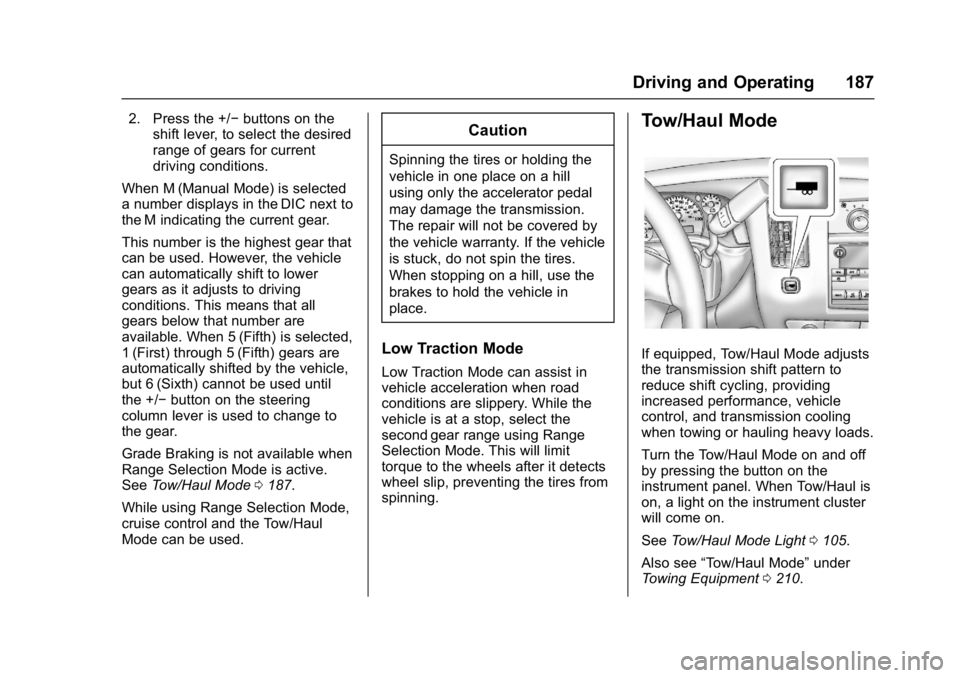
2. Press the +/−buttons on the
shift lever, to select the desired
range of gears for current
driving conditions.
When M (Manual Mode) is selected
a number displays in the DIC next to
the M indicating the current gear.
This number is the highest gear that
can be used. However, the vehicle
can automatically shift to lower
gears as it adjusts to driving
conditions. This means that all
gears below that number are
available. When 5 (Fifth) is selected,
1 (First) through 5 (Fifth) gears are
automatically shifted by the vehicle,
but 6 (Sixth) cannot be used until
the +/− button on the steering
column lever is used to change to
the gear.
Grade Braking is not available when
Range Selection Mode is active.
See Tow/Haul Mode 0187.
While using Range Selection Mode,
cruise control and the Tow/Haul
Mode can be used.Caution
Spinning the tires or holding the
vehicle in one place on a hill
using only the accelerator pedal
may damage the transmission.
The repair will not be covered by
the vehicle warranty. If the vehicle
is stuck, do not spin the tires.
When stopping on a hill, use the
brakes to hold the vehicle in
place.
Low Traction Mode
Low Traction Mode can assist in
vehicle acceleration when road
conditions are slippery. While the
vehicle is at a stop, select the
second gear range using Range
Selection Mode. This will limit
torque to the wheels after it detects
wheel slip, preventing the tires from
spinning.
Tow/Haul Mode
If equipped, Tow/Haul Mode adjusts
the transmission shift pattern to
reduce shift cycling, providing
increased performance, vehicle
control, and transmission cooling
when towing or hauling heavy loads.
Turn the Tow/Haul Mode on and off
by pressing the button on the
instrument panel. When Tow/Haul is
on, a light on the instrument cluster
will come on.
See Tow/Haul Mode Light 0105.
Also see “Tow/Haul Mode” under
Towing Equipment 0210.
Page 189 of 348
Chevrolet Express Owner Manual (GMNA-Localizing-U.S./Canada/Mexico-
9967827) - 2017 - crc - 9/26/16
188 Driving and Operating
Tow/Haul Mode Grade Braking
Tow/Haul Mode Grade Braking is
only enabled while the Tow/Haul
Mode is selected and the vehicle is
not in the Range Selection Mode.
See“Tow/Haul Mode” listed
previously and Manual Mode0186.
Tow/Haul Mode Grade Braking
assists in maintaining desired
vehicle speeds when driving on
downhill grades by using the engine
and transmission to slow the
vehicle.
To disable or enable Tow/Haul Mode
Grade Braking within the current
ignition key cycle, press and hold
the Tow/Haul button for
three seconds. A DIC message will
be displayed. See Transmission
Messages 0118.
See Towing Equipment 0210.
For other forms of grade braking,
see Automatic Transmission 0183
and Cruise Control 0192.
Brakes
Antilock Brake
System (ABS)
This vehicle has an Antilock Brake
System (ABS), an advanced
electronic braking system that helps
prevent a braking skid.
When the vehicle begins to drive
away, ABS checks itself.
A momentary motor or clicking noise
may be heard while this test is going
on, and it may even be noticed that
the brake pedal moves a little. This
is normal.
If there is a problem with ABS, this
warning light stays on. See Antilock
Brake System (ABS) Warning Light
0 104. If driving safely on a wet road and it
becomes necessary to slam on the
brakes and continue braking to
avoid a sudden obstacle, a
computer senses the wheels are
slowing down. If one of the wheels
is about to stop rolling, the computer
will separately work the brakes at
each wheel.
ABS can change the brake pressure
to each wheel, as required, faster
than any driver could. This can help
you steer around the obstacle while
braking hard.
As the brakes are applied, the
computer keeps receiving updates
on wheel speed and controls
braking pressure accordingly.
Remember: ABS does not change
the time needed to get a foot up to
the brake pedal or always decrease
stopping distance. If you get too
close to the vehicle in front of you,
there will not be enough time to
apply the brakes if that vehicle
suddenly slows or stops. Always
leave enough room up ahead to
stop, even with ABS.
Page 192 of 348
Chevrolet Express Owner Manual (GMNA-Localizing-U.S./Canada/Mexico-
9967827) - 2017 - crc - 9/26/16
Driving and Operating 191
appropriate messages will be
displayed in the DIC. SeeRide
Control System Messages 0116.
To turn StabiliTrak and TCS back
on, press
gagain. StabiliTrak will
automatically turn back on when the
vehicle speed exceeds 40 km/h
(25 mph).
When the StabiliTrak system has
been turned off, system noises may
still be heard as a result of the
brake-traction control coming on.
It is recommended to leave the
system on for normal driving
conditions, but it may be necessary
to turn the system off if the vehicle
is stuck in sand, mud, ice, or snow,
and you want to “rock”the vehicle to
attempt to free it. See If the Vehicle
Is Stuck 0171.
StabiliTrak System Operation
The StabiliTrak system is normally
on, except when the system is
initializing or has been disabled with
the StabiliTrak button. The
StabiliTrak system will automatically
activate to assist the driver in
maintaining vehicle directional control in most driving conditions.
When activated, the StabiliTrak
system may reduce engine power to
the wheels and apply braking to
individual wheels as necessary to
assist the driver with vehicle
directional control. If cruise control
is being used when StabiliTrak
activates, the cruise control
automatically disengages. The
cruise control can be re-engaged
when road conditions allow. See
Cruise Control
0192.
The StabiliTrak system may also
turn off automatically if it determines
that a problem exists with the
system. If the problem does not
clear itself after restarting the
vehicle, see your dealer for service.
Traction Control Operation
TCS is part of the StabiliTrak
system. TCS limits wheel spin by
reducing engine power to the
wheels and by applying brakes to
each individual wheel as necessary.
If the brake-traction control system
activates constantly or if the brakes
have heated up due to high speed
braking, the brake-traction control will be automatically disabled. The
system will come back on after the
brakes have cooled. This can take
up to two minutes or longer
depending on brake usage.
TCS may activate on dry or rough
roads or under conditions such as
heavy acceleration while turning or
abrupt upshifts/downshifts of the
transmission. When this reduction in
acceleration occurs, it may be
noticed, or a noise or vibration may
be heard. This is normal.
Adding non-dealer accessories can
affect the vehicle's performance.
See
Accessories and Modifications
0 216.
Locking Rear Axle
Vehicles with a locking rear axle can
give more traction on snow, mud,
ice, sand, or gravel. It works like a
standard axle most of the time, but
when traction is low, this feature will
allow the rear wheel with the most
traction to move the vehicle.
Page 193 of 348
Chevrolet Express Owner Manual (GMNA-Localizing-U.S./Canada/Mexico-
9967827) - 2017 - crc - 9/26/16
192 Driving and Operating
Cruise Control
{Warning
Cruise control can be dangerous
where you cannot drive safely at
a steady speed. Do not use
cruise control on winding roads or
in heavy traffic.
Cruise control can be dangerous
on slippery roads. On such roads,
fast changes in tire traction can
cause excessive wheel slip, and
you could lose control. Do not use
cruise control on slippery roads.
If equipped with cruise control, a
speed of about 40 km/h (25 mph) or
more can be maintained without
keeping your foot on the
accelerator. Cruise control does not
work at speeds below about 40 km/h
(25 mph).
If the vehicle has StabiliTrak and the
system begins to limit wheel spin,
cruise control will automatically
disengage. See Traction Control/
Electronic Stability Control 0190. When road conditions allow cruise
control to be safely used again,
cruise control can be turned
back on.
If the brakes are applied, cruise
control disengages.
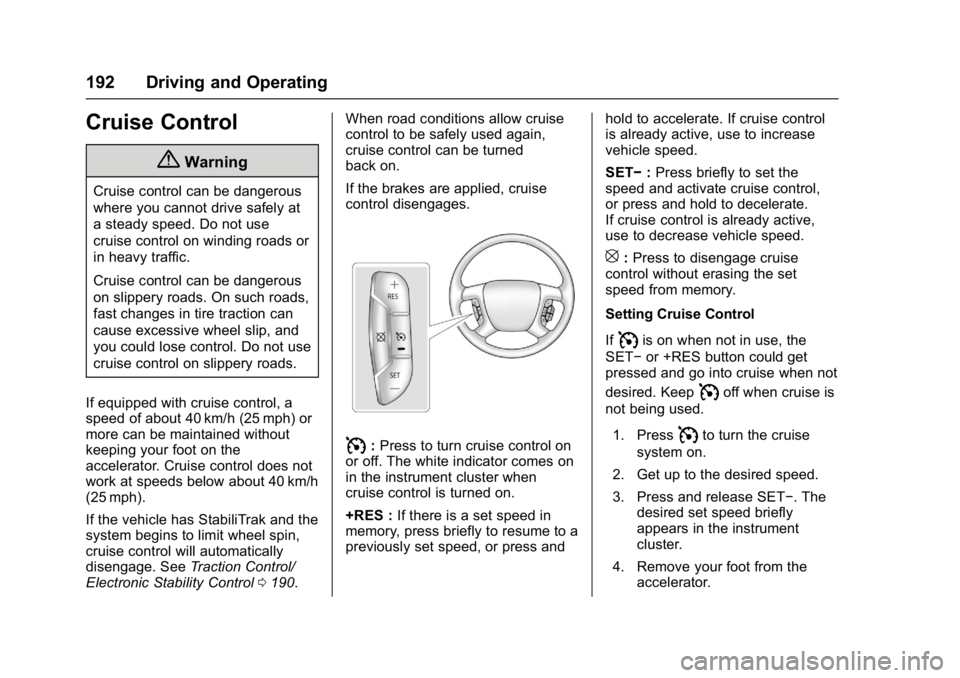
I:
Press to turn cruise control on
or off. The white indicator comes on
in the instrument cluster when
cruise control is turned on.
+RES : If there is a set speed in
memory, press briefly to resume to a
previously set speed, or press and hold to accelerate. If cruise control
is already active, use to increase
vehicle speed.
SET−
:Press briefly to set the
speed and activate cruise control,
or press and hold to decelerate.
If cruise control is already active,
use to decrease vehicle speed.
[: Press to disengage cruise
control without erasing the set
speed from memory.
Setting Cruise Control
If
Iis on when not in use, the
SET− or +RES button could get
pressed and go into cruise when not
desired. Keep
Ioff when cruise is
not being used.
1. Press
Ito turn the cruise
system on.
2. Get up to the desired speed.
3. Press and release SET−. The desired set speed briefly
appears in the instrument
cluster.
4. Remove your foot from the accelerator.