rear view mirror CHEVROLET CITY EXPRESS 2017 Owners Manual
[x] Cancel search | Manufacturer: CHEVROLET, Model Year: 2017, Model line: CITY EXPRESS, Model: CHEVROLET CITY EXPRESS 2017Pages: 348, PDF Size: 4.84 MB
Page 13 of 348
Chevrolet Express Owner Manual (GMNA-Localizing-U.S./Canada/Mexico-
9967827) - 2017 - crc - 9/26/16
12 In Brief
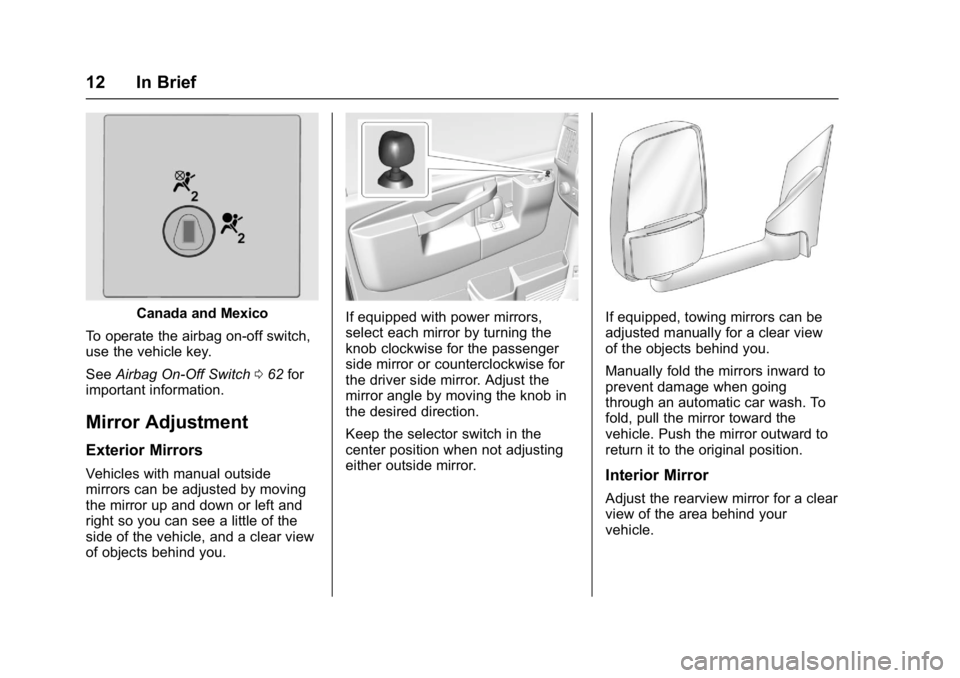
Canada and Mexico
To operate the airbag on-off switch,
use the vehicle key.
See Airbag On-Off Switch 062 for
important information.
Mirror Adjustment
Exterior Mirrors
Vehicles with manual outside
mirrors can be adjusted by moving
the mirror up and down or left and
right so you can see a little of the
side of the vehicle, and a clear view
of objects behind you.
If equipped with power mirrors,
select each mirror by turning the
knob clockwise for the passenger
side mirror or counterclockwise for
the driver side mirror. Adjust the
mirror angle by moving the knob in
the desired direction.
Keep the selector switch in the
center position when not adjusting
either outside mirror.If equipped, towing mirrors can be
adjusted manually for a clear view
of the objects behind you.
Manually fold the mirrors inward to
prevent damage when going
through an automatic car wash. To
fold, pull the mirror toward the
vehicle. Push the mirror outward to
return it to the original position.
Interior Mirror
Adjust the rearview mirror for a clear
view of the area behind your
vehicle.
Page 14 of 348
Chevrolet Express Owner Manual (GMNA-Localizing-U.S./Canada/Mexico-
9967827) - 2017 - crc - 9/26/16
In Brief 13
Push the tab forward for daytime
use and pull it rearward for
nighttime use to avoid glare of the
headlamps from behind.
SeeManual Rearview Mirror 036.
Steering Wheel
Adjustment
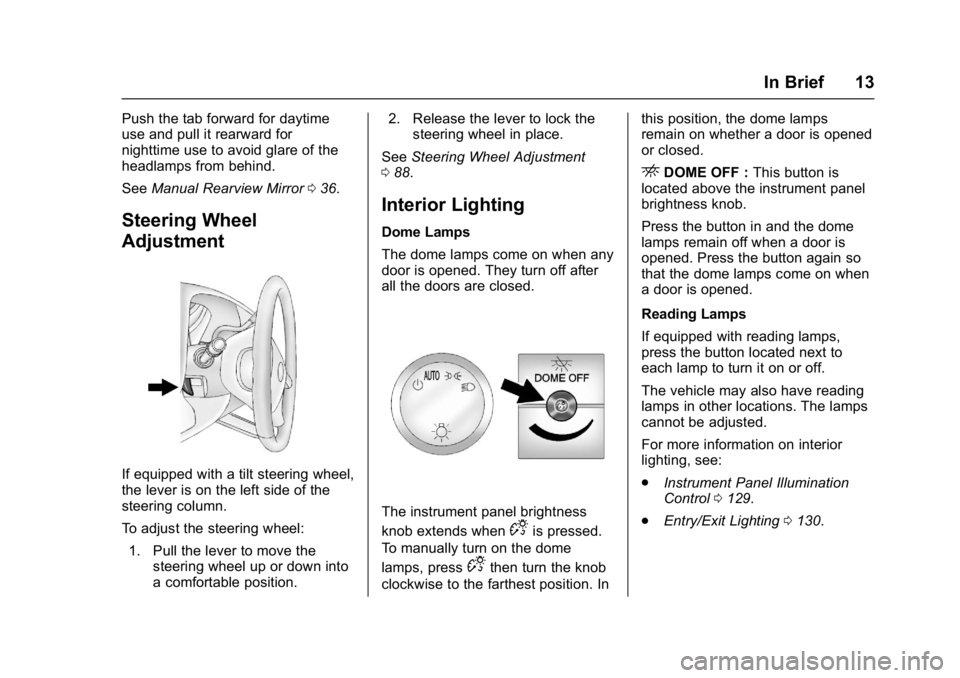
If equipped with a tilt steering wheel,
the lever is on the left side of the
steering column.
To adjust the steering wheel:
1. Pull the lever to move the steering wheel up or down into
a comfortable position. 2. Release the lever to lock the
steering wheel in place.
See Steering Wheel Adjustment
0 88.
Interior Lighting
Dome Lamps
The dome lamps come on when any
door is opened. They turn off after
all the doors are closed.
The instrument panel brightness
knob extends when
Dis pressed.
To manually turn on the dome
lamps, press
Dthen turn the knob
clockwise to the farthest position. In this position, the dome lamps
remain on whether a door is opened
or closed.
EDOME OFF :
This button is
located above the instrument panel
brightness knob.
Press the button in and the dome
lamps remain off when a door is
opened. Press the button again so
that the dome lamps come on when
a door is opened.
Reading Lamps
If equipped with reading lamps,
press the button located next to
each lamp to turn it on or off.
The vehicle may also have reading
lamps in other locations. The lamps
cannot be adjusted.
For more information on interior
lighting, see:
. Instrument Panel Illumination
Control 0129.
. Entry/Exit Lighting 0130.
Page 21 of 348
Chevrolet Express Owner Manual (GMNA-Localizing-U.S./Canada/Mexico-
9967827) - 2017 - crc - 9/26/16
20 In Brief
hold to accelerate. If cruise control
is already active, use to increase
vehicle speed.
SET−:Press briefly to set the
speed and activate cruise control,
or press and hold to decelerate.
If cruise control is already active,
use to decrease vehicle speed.
[: Press to disengage cruise
control without erasing the set
speed from memory.
See Cruise Control 0192 (if
equipped).
Rear Vision
Camera (RVC)
If equipped, the RVC displays a
view of the area behind the vehicle
when the vehicle is shifted into
R (Reverse). The display will appear
on either the inside rearview mirror
or navigation screen, if equipped.
To clean the camera lens, located
above the license plate, rinse it with
water and wipe it with a soft cloth.
See Rear Vision Camera (RVC)
0 194.
Parking Assist
If equipped, Rear Parking Assist
(RPA) uses sensors on the rear
bumper to assist with parking and
avoiding objects while in
R (Reverse). It operates at speeds
less than 8 km/h (5 mph) and uses
audible beeps to provide distance
and system information.
Keep the sensors on the vehicle's
rear bumper clean to ensure proper
operation.
See Parking Assist 0197.
Power Outlets
The accessory power outlets can be
used to plug in electrical equipment,
such as a cell phone or an MP3
player.
The vehicle may have two
accessory power outlets on the
instrument panel.
Remove the cover to access and
replace when not in use.
See Power Outlets 092.
Performance and
Maintenance
Traction Control/
Electronic Stability
Control
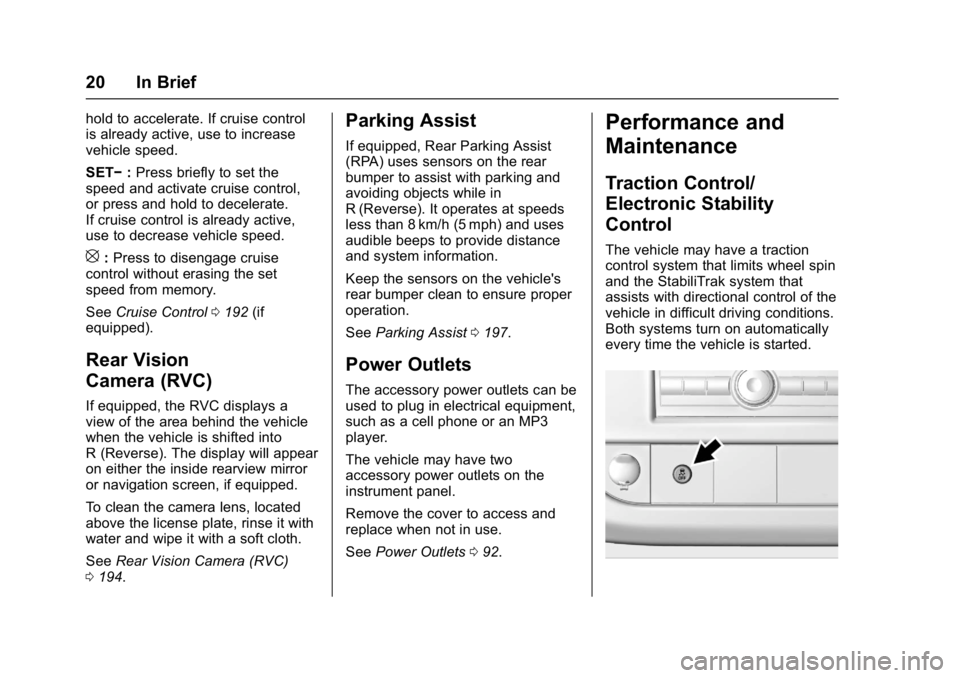
The vehicle may have a traction
control system that limits wheel spin
and the StabiliTrak system that
assists with directional control of the
vehicle in difficult driving conditions.
Both systems turn on automatically
every time the vehicle is started.
Page 24 of 348
Chevrolet Express Owner Manual (GMNA-Localizing-U.S./Canada/Mexico-
9967827) - 2017 - crc - 9/26/16
Keys, Doors, and Windows 23
Keys, Doors, and
Windows
Keys and Locks
Keys . . . . . . . . . . . . . . . . . . . . . . . . . . . 23
Remote Keyless Entry (RKE)System . . . . . . . . . . . . . . . . . . . . . . . 25
Remote Keyless Entry (RKE) System Operation . . . . . . . . . . . . 25
Remote Vehicle Start . . . . . . . . . . 27
Door Locks . . . . . . . . . . . . . . . . . . . . 28
Power Door Locks . . . . . . . . . . . . . 29
Cargo Door Relocking . . . . . . . . . 29
Delayed Locking . . . . . . . . . . . . . . . 29
Automatic Door Locks . . . . . . . . . 30
Lockout Protection . . . . . . . . . . . . . 30
Safety Locks . . . . . . . . . . . . . . . . . . . 30
Doors
Side Door (60/40 Swing-Out) . . . . . . . . . . . . . . . . . . . 31
Sliding Door . . . . . . . . . . . . . . . . . . . 32
Rear Doors . . . . . . . . . . . . . . . . . . . . 32
Vehicle Security
Vehicle Security . . . . . . . . . . . . . . . . 33
Immobilizer . . . . . . . . . . . . . . . . . . . . 33
Immobilizer Operation . . . . . . . . . 33
Exterior Mirrors
Convex Mirrors . . . . . . . . . . . . . . . . 35
Manual Mirrors . . . . . . . . . . . . . . . . . 35
Trailer-Tow Mirrors . . . . . . . . . . . . . 35
Power Mirrors . . . . . . . . . . . . . . . . . . 35
Heated Mirrors . . . . . . . . . . . . . . . . . 36
Interior Mirrors
Interior Rearview Mirrors . . . . . . . 36
Manual Rearview Mirror . . . . . . . . 36
Windows
Windows . . . . . . . . . . . . . . . . . . . . . . . 36
Manual Windows . . . . . . . . . . . . . . 37
Power Windows . . . . . . . . . . . . . . . 37
Swing-Out Windows . . . . . . . . . . . 37
Enhanced Technology Glass . . . 38
Sun Visors . . . . . . . . . . . . . . . . . . . . . 39
Keys and Locks
Keys
{Warning
Leaving children in a vehicle with
the ignition key is dangerous and
children or others could be
seriously injured or killed. They
could operate the power windows
or other controls or make the
vehicle move. The windows will
function with the keys in the
ignition, and children or others
could be caught in the path of a
closing window. Do not leave
children in a vehicle with the
ignition key.
Page 37 of 348
Chevrolet Express Owner Manual (GMNA-Localizing-U.S./Canada/Mexico-
9967827) - 2017 - crc - 9/26/16
36 Keys, Doors, and Windows
Heated Mirrors
For vehicles with heated mirrors:
1:Press to heat the mirrors.
An indicator light in the button lights
when the outside heated mirrors are
activated.
See “Rear Window Defogger” under
Climate Control Systems 0158.
Interior Mirrors
Interior Rearview Mirrors
Adjust the rearview mirror for a clear
view of the area behind the vehicle.
Do not spray glass cleaner directly
on the mirror. Use a soft towel
dampened with water.
Manual Rearview Mirror
Push the tab forward for daytime
use and pull it rearward for
nighttime use to avoid glare of the
headlamps from behind.
Cargo vans without rear door glass
may not have an inside rearview
mirror.
Windows
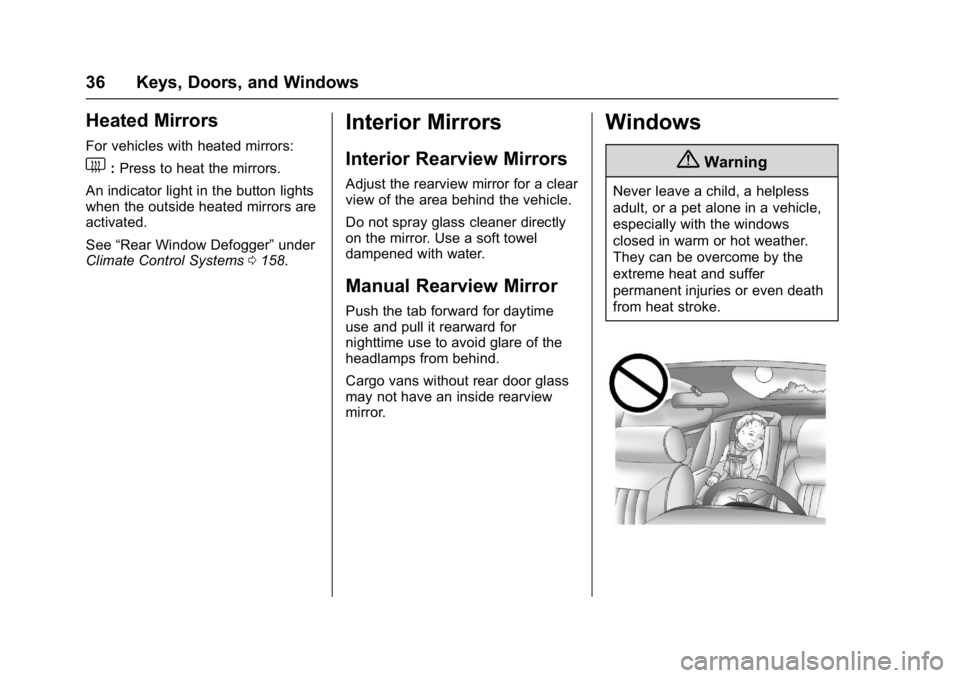
{Warning
Never leave a child, a helpless
adult, or a pet alone in a vehicle,
especially with the windows
closed in warm or hot weather.
They can be overcome by the
extreme heat and suffer
permanent injuries or even death
from heat stroke.
Page 196 of 348
Chevrolet Express Owner Manual (GMNA-Localizing-U.S./Canada/Mexico-
9967827) - 2017 - crc - 9/26/16
Driving and Operating 195
Vehicles without Navigation
System
When the vehicle is on and shifted
into R (Reverse), the video image
appears on the inside rearview
mirror. The video image disappears
after the vehicle is shifted out of
R (Reverse).
Vehicles with Navigation
System
When the vehicle is shifted into
R (Reverse), the video image
appears on the navigation screen.
After a delay, the navigation screen
displays the previous screen after
the vehicle is shifted out of
R (Reverse).
The delay that is received after
shifting out of R (Reverse) is
approximately 10 seconds. Return to
the previous screen sooner by
performing one of the following:
.Press a hard key on the
navigation system.
. Shift into P (Park).
. Reach a vehicle speed of
8 km/h (5 mph). Symbols and Guidelines
The navigation system may have a
feature that allows for viewing
parking assist symbols and/or
guidelines on the navigation screen
while using the RVC. The Rear
Parking Assist (RPA) system must
not be disabled to use the caution
symbols. If RPA has been disabled
and the symbols have been turned
on, the Rear Parking Assist
Symbols Unavailable error message
may display. See
Parking Assist
0 197.
The symbols appear near objects
detected by the RPA system. The
symbol may cover the object when
viewing the navigation screen. The
guideline overlay can help the driver
align the vehicle when backing into
a parking spot.
To turn the symbols or guidelines on
or off:
1. Shift into P (Park).
2. Press MENU to enter the configure menu options. Turn
the Multifunction knob until the
Display feature is highlighted and press the Multifunction
knob; or press the Display
screen button.
3. Select the Rear Camera Options screen button. The
Rear Camera Options screen
displays.
4. Touch the Symbols or Guidelines screen button. The
screen button will be
highlighted when the feature
is on.
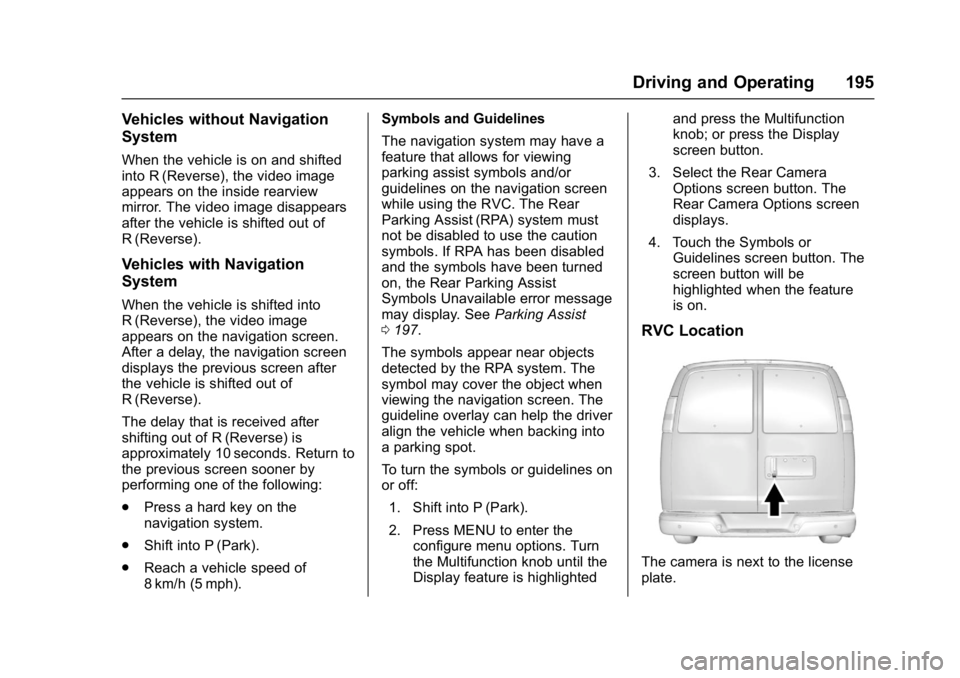
RVC Location
The camera is next to the license
plate.
Page 197 of 348
Chevrolet Express Owner Manual (GMNA-Localizing-U.S./Canada/Mexico-
9967827) - 2017 - crc - 9/26/16
196 Driving and Operating
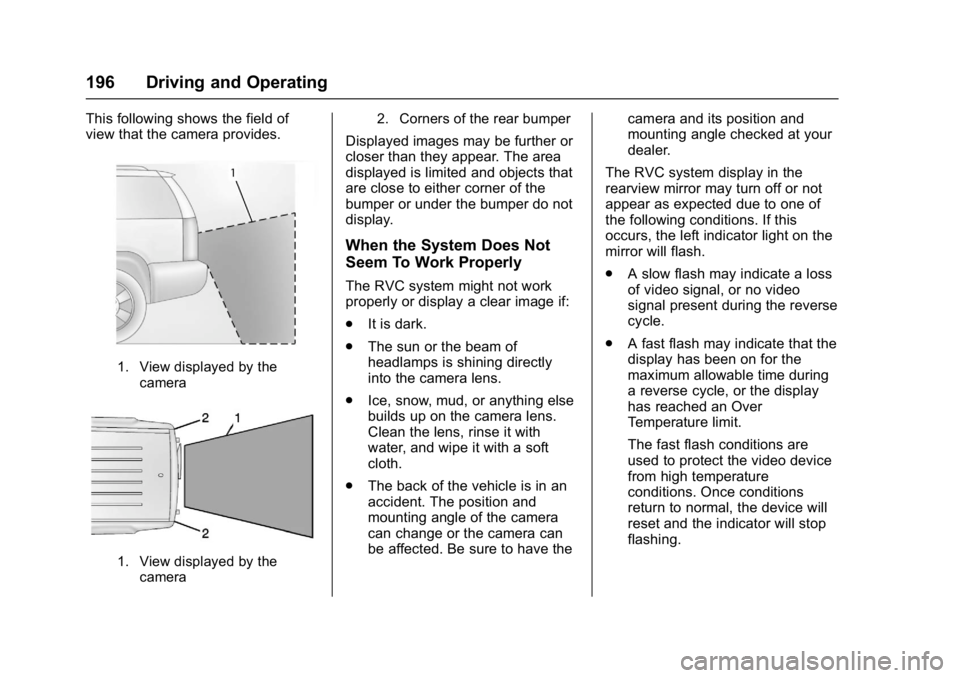
This following shows the field of
view that the camera provides.
1. View displayed by thecamera
1. View displayed by thecamera 2. Corners of the rear bumper
Displayed images may be further or
closer than they appear. The area
displayed is limited and objects that
are close to either corner of the
bumper or under the bumper do not
display.
When the System Does Not
Seem To Work Properly
The RVC system might not work
properly or display a clear image if:
.
It is dark.
. The sun or the beam of
headlamps is shining directly
into the camera lens.
. Ice, snow, mud, or anything else
builds up on the camera lens.
Clean the lens, rinse it with
water, and wipe it with a soft
cloth.
. The back of the vehicle is in an
accident. The position and
mounting angle of the camera
can change or the camera can
be affected. Be sure to have the camera and its position and
mounting angle checked at your
dealer.
The RVC system display in the
rearview mirror may turn off or not
appear as expected due to one of
the following conditions. If this
occurs, the left indicator light on the
mirror will flash.
. A slow flash may indicate a loss
of video signal, or no video
signal present during the reverse
cycle.
. A fast flash may indicate that the
display has been on for the
maximum allowable time during
a reverse cycle, or the display
has reached an Over
Temperature limit.
The fast flash conditions are
used to protect the video device
from high temperature
conditions. Once conditions
return to normal, the device will
reset and the indicator will stop
flashing.
Page 251 of 348
Chevrolet Express Owner Manual (GMNA-Localizing-U.S./Canada/Mexico-
9967827) - 2017 - crc - 9/26/16
250 Vehicle Care
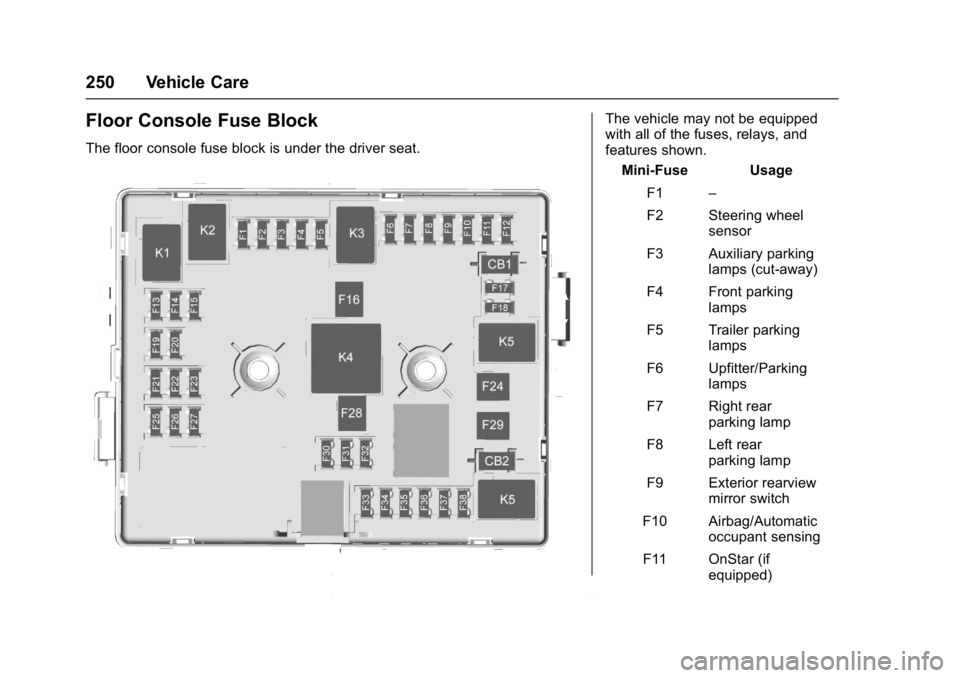
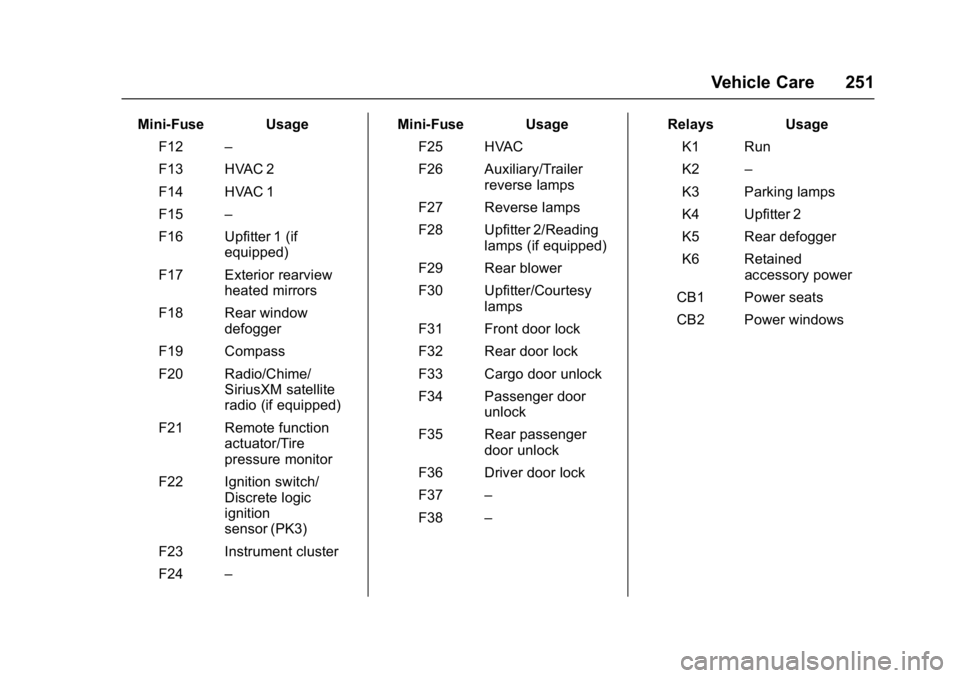
Floor Console Fuse Block
The floor console fuse block is under the driver seat.
The vehicle may not be equipped
with all of the fuses, relays, and
features shown.Mini-Fuse Usage
F1 –
F2 Steering wheel sensor
F3 Auxiliary parking lamps (cut-away)
F4 Front parking lamps
F5 Trailer parking lamps
F6 Upfitter/Parking lamps
F7 Right rear parking lamp
F8 Left rear parking lamp
F9 Exterior rearview mirror switch
F10 Airbag/Automatic occupant sensing
F11 OnStar (if equipped)
Page 252 of 348
Chevrolet Express Owner Manual (GMNA-Localizing-U.S./Canada/Mexico-
9967827) - 2017 - crc - 9/26/16
Vehicle Care 251
Mini-Fuse UsageF12 –
F13 HVAC 2
F14 HVAC 1
F15 –
F16 Upfitter 1 (if equipped)
F17 Exterior rearview heated mirrors
F18 Rear window defogger
F19 Compass
F20 Radio/Chime/ SiriusXM satellite
radio (if equipped)
F21 Remote function actuator/Tire
pressure monitor
F22 Ignition switch/ Discrete logic
ignition
sensor (PK3)
F23 Instrument cluster
F24 – Mini-Fuse Usage
F25 HVAC
F26 Auxiliary/Trailer reverse lamps
F27 Reverse lamps
F28 Upfitter 2/Reading lamps (if equipped)
F29 Rear blower
F30 Upfitter/Courtesy lamps
F31 Front door lock
F32 Rear door lock
F33 Cargo door unlock
F34 Passenger door unlock
F35 Rear passenger door unlock
F36 Driver door lock
F37 –
F38 – Relays Usage
K1 Run
K2 –
K3 Parking lamps
K4 Upfitter 2
K5 Rear defogger
K6 Retained accessory power
CB1 Power seats
CB2 Power windows
Page 342 of 348

Chevrolet Express Owner Manual (GMNA-Localizing-U.S./Canada/Mexico-
9967827) - 2017 - crc - 9/26/16
Index 341
G
GaugesEngine Coolant Temperature . . . 98
Engine Oil Pressure . . . . . . . . . . . . 97
Fuel . . . . . . . . . . . . . . . . . . . . . . . . . . . . 96
Odometer . . . . . . . . . . . . . . . . . . . . . . . 96
Speedometer . . . . . . . . . . . . . . . . . . . 96
Trip Odometer . . . . . . . . . . . . . . . . . . 96
Voltmeter . . . . . . . . . . . . . . . . . . . . . . . 99
Warning Lights andIndicators . . . . . . . . . . . . . . . . . . . . . 94
General Information Service and Maintenance . . . . . 297
Towing . . . . . . . . . . . . . . . . . . . . . . . . 202
Vehicle Care . . . . . . . . . . . . . . . . . . 215
Glass, Enhanced Technology . . . . 38
GM Mobility Reimbursement Program . . . . . . . . . . . . . . . . . . . . . . . 317
H
Halogen Bulbs . . . . . . . . . . . . . . . . . . 240
Hazard Warning Flashers . . . . . . . 128
Head Restraints . . . . . . . . . . . . . . . . . 41
Headlamps . . . . . . . . . . . . . . . . . . . . . 241Aiming . . . . . . . . . . . . . . . . . . . . . . . . 240
Automatic . . . . . . . . . . . . . . . . . . . . . 127
Bulb Replacement . . . . . . . . . . . . 240
Daytime RunningLamps (DRL) . . . . . . . . . . . . . . . . 126 Headlamps (cont'd)
Flash-to-Pass . . . . . . . . . . . . . . . . . 126
High-Beam On Light . . . . . . . . . . 107
High/Low Beam Changer . . . . . 126
Heated Mirrors . . . . . . . . . . . . . . . . . . . 36
Heater Engine Coolant . . . . . . . . . . . . . . . 179
Heating . . . . . . . . . . . . . . . . . . . . 158, 160 Rear . . . . . . . . . . . . . . . . . . . . . . . . . . 160
High-Beam On Light . . . . . . . . . . . . 107
Hill and Mountain Roads . . . . . . . . 169
Hood . . . . . . . . . . . . . . . . . . . . . . . . . . . 217
Horn . . . . . . . . . . . . . . . . . . . . . . . . . . . . . 89
How to Wear Safety Belts Properly . . . . . . . . . . . . . . . . . . . . . . . . 47
HVAC . . . . . . . . . . . . . . . . . . . . . . 158, 160
I
Idle System Fast . . . . . . . . . . . . . . . . . . . . . . . . . . 178
Ignition Positions . . . . . . . . . . . . . . . 175
Ignition Transmission Lock Check . . . . . . . . . . . . . . . . . . . . . . . . . 239
Immobilizer . . . . . . . . . . . . . . . . . . . . . . 33
Infants and Young Children,
Restraints . . . . . . . . . . . . . . . . . . . . . . 68
Infotainment . . . . . . . . . . . . . . . . . . . . 132
Infotainment System . . . . . . . . . . . . 326
Instrument Cluster . . . . . . . . . . . . . . . 95 Interior Rearview Mirrors . . . . . . . . . 36
Introduction . . . . . . . . . . . . . . . . . . . . . . . 2
J
Jump Starting - North
America . . . . . . . . . . . . . . . . . . . . . . . 282
K
Key and Lock Messages . . . . . . . . 115
Keyless EntryRemote (RKE) System . . . . . . . . . 25
Keys . . . . . . . . . . . . . . . . . . . . . . . . . . . . . 23
L
Labeling, Tire Sidewall . . . . . . . . . . 254
Lamps Daytime Running (DRL) . . . . . . 126
Dome . . . . . . . . . . . . . . . . . . . . . . . . . 129
Exterior Controls . . . . . . . . . . . . . . 125
Exterior Lamps OffReminder . . . . . . . . . . . . . . . . . . . 126
License Plate . . . . . . . . . . . . . . . . . 244
Malfunction Indicator . . . . . . . . . 102
Messages . . . . . . . . . . . . . . . . . . . . .115
Reading . . . . . . . . . . . . . . . . . . . . . . 130
Taillamps . . . . . . . . . . . . . . . . . . . . . 243
Lamps, Bulb Replacement . . . . . . 242
Lap-Shoulder Belt . . . . . . . . . . . . . . . 48