door lock CHEVROLET CLASSIC 2005 User Guide
[x] Cancel search | Manufacturer: CHEVROLET, Model Year: 2005, Model line: CLASSIC, Model: CHEVROLET CLASSIC 2005Pages: 320, PDF Size: 4.86 MB
Page 71 of 320
Lockout Protection
Lockout protection is intended to provide additional
security and convenience. While any door is open and
the key is in the ignition, the doors cannot be locked
by using the power door locks.
To override this feature, while the key is in the ignition
and any door is open, press and hold down the
power door lock switch for three seconds.
This feature cannot guarantee that you will never be
locked out of your vehicle. If the key is not in the ignition,
or if you use the manual door lock or the remote
keyless entry transmitter, you could still lock your key
inside your vehicle. Always remember to take your
key with you.
Trunk
To unlock the trunk from the outside, insert the key
and turn the trunk lock cylinder. When closing the trunk
lid, push the truck lid in the center to ensure that the
lock fully latches.
{CAUTION:
It can be dangerous to drive with the trunk lid
open because carbon monoxide (CO) gas can
come into your vehicle. You cannot see or
smell CO. It can cause unconsciousness and
even death. If you must drive with the trunk lid
open or if electrical wiring or other cable
connections must pass through the seal
between the body and the trunk lid:
Make sure all other windows are shut.
Turn the fan on your heating or cooling
system to its highest speed and select the
control setting that will force outside air
into your vehicle. See Climate Control
System in the Index.
If you have air outlets on or under the
instrument panel, open them all the way.
SeeEngine Exhaust on page 2-25.
2-11
Page 74 of 320
Power Windows
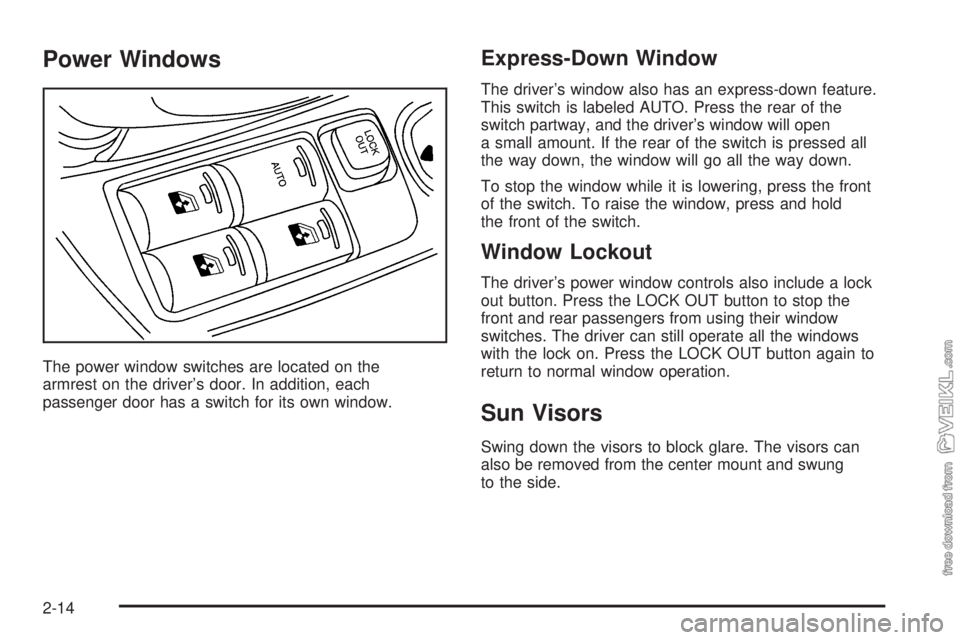
The power window switches are located on the
armrest on the driver’s door. In addition, each
passenger door has a switch for its own window.
Express-Down Window
The driver’s window also has an express-down feature.
This switch is labeled AUTO. Press the rear of the
switch partway, and the driver’s window will open
a small amount. If the rear of the switch is pressed all
the way down, the window will go all the way down.
To stop the window while it is lowering, press the front
of the switch. To raise the window, press and hold
the front of the switch.
Window Lockout
The driver’s power window controls also include a lock
out button. Press the LOCK OUT button to stop the
front and rear passengers from using their window
switches. The driver can still operate all the windows
with the lock on. Press the LOCK OUT button again to
return to normal window operation.
Sun Visors
Swing down the visors to block glare. The visors can
also be removed from the center mount and swung
to the side.
2-14
Page 76 of 320
Ignition Positions
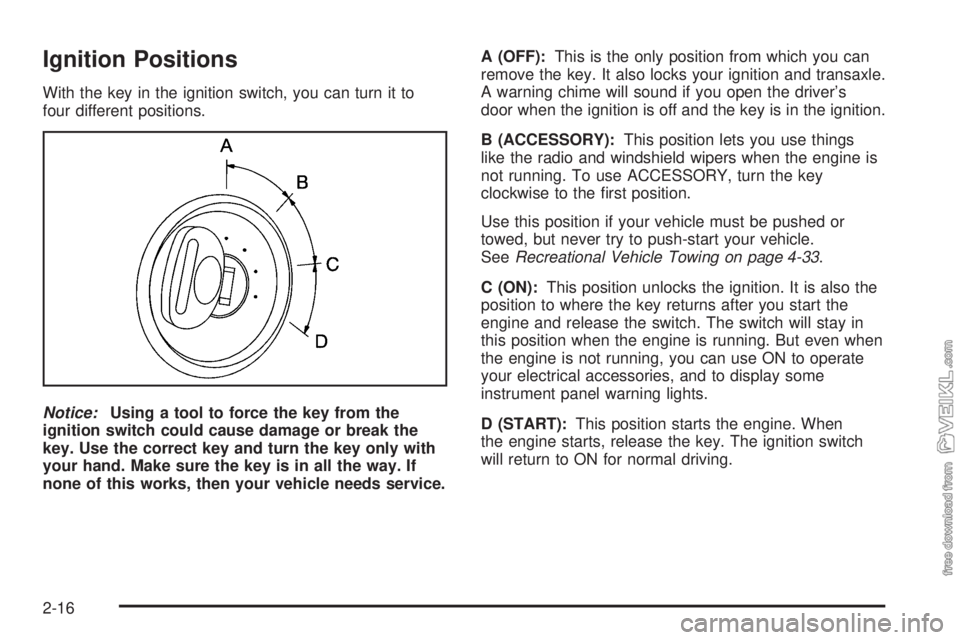
With the key in the ignition switch, you can turn it to
four different positions.
Notice:Using a tool to force the key from the
ignition switch could cause damage or break the
key. Use the correct key and turn the key only with
your hand. Make sure the key is in all the way. If
none of this works, then your vehicle needs service.A (OFF):This is the only position from which you can
remove the key. It also locks your ignition and transaxle.
A warning chime will sound if you open the driver’s
door when the ignition is off and the key is in the ignition.
B (ACCESSORY):This position lets you use things
like the radio and windshield wipers when the engine is
not running. To use ACCESSORY, turn the key
clockwise to the first position.
Use this position if your vehicle must be pushed or
towed, but never try to push-start your vehicle.
SeeRecreational Vehicle Towing on page 4-33.
C (ON):This position unlocks the ignition. It is also the
position to where the key returns after you start the
engine and release the switch. The switch will stay in
this position when the engine is running. But even when
the engine is not running, you can use ON to operate
your electrical accessories, and to display some
instrument panel warning lights.
D (START):This position starts the engine. When
the engine starts, release the key. The ignition switch
will return to ON for normal driving.
2-16
Page 89 of 320
Instrument Panel Overview...............................3-4
Hazard Warning Flashers................................3-6
Other Warning Devices...................................3-6
Horn.............................................................3-6
Tilt Wheel.....................................................3-6
Turn Signal/Multifunction Lever.........................3-7
Turn and Lane-Change Signals........................3-8
Headlamp High/Low-Beam Changer..................3-8
Flash-to-Pass.................................................3-8
Windshield Washer.........................................3-9
Windshield Wiper Lever...................................3-9
Cruise Control..............................................3-10
Headlamps..................................................3-13
Headlamps on Reminder................................3-14
Headlamps Off in PARK (P)...........................3-14
Delayed Headlamps......................................3-14
Daytime Running Lamps (DRL).......................3-14
Automatic Headlamp System..........................3-15
Instrument Panel Brightness...........................3-16
Dome Lamp.................................................3-16
Entry/Exit Lighting.........................................3-16
Trunk Lamp.................................................3-16
Battery Run-Down Protection..........................3-16
Accessory Power Outlets...............................3-17
Ashtrays and Cigarette Lighter........................3-18Climate Controls............................................3-18
Climate Control System.................................3-18
Outlet Adjustment.........................................3-21
Warning Lights, Gages, and Indicators............3-22
Instrument Panel Cluster................................3-23
Speedometer and Odometer...........................3-24
Trip Odometer..............................................3-24
Tachometer.................................................3-25
Safety Belt Reminder Light.............................3-25
Airbag Readiness Light..................................3-26
Charging System Light..................................3-27
Brake System Warning Light..........................3-27
Anti-Lock Brake System Warning Light.............3-28
Engine Coolant Temperature Gage..................3-29
Low Coolant Warning Light............................3-29
Malfunction Indicator Lamp.............................3-30
Oil Pressure Light.........................................3-32
Passlock
®Warning Light................................3-33
Highbeam On Light.......................................3-34
Low Washer Fluid Warning Light.....................3-34
Door Ajar Light.............................................3-34
Service Vehicle Soon Light............................3-34
Fuel Gage...................................................3-35
Section 3 Instrument Panel
3-1
Page 104 of 320
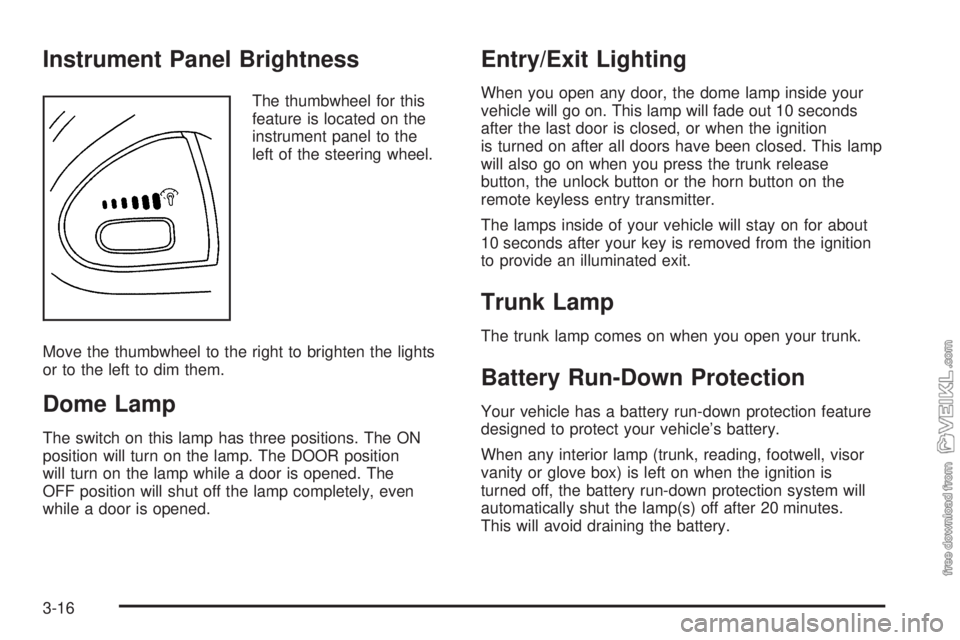
Instrument Panel Brightness
The thumbwheel for this
feature is located on the
instrument panel to the
left of the steering wheel.
Move the thumbwheel to the right to brighten the lights
or to the left to dim them.
Dome Lamp
The switch on this lamp has three positions. The ON
position will turn on the lamp. The DOOR position
will turn on the lamp while a door is opened. The
OFF position will shut off the lamp completely, even
while a door is opened.
Entry/Exit Lighting
When you open any door, the dome lamp inside your
vehicle will go on. This lamp will fade out 10 seconds
after the last door is closed, or when the ignition
is turned on after all doors have been closed. This lamp
will also go on when you press the trunk release
button, the unlock button or the horn button on the
remote keyless entry transmitter.
The lamps inside of your vehicle will stay on for about
10 seconds after your key is removed from the ignition
to provide an illuminated exit.
Trunk Lamp
The trunk lamp comes on when you open your trunk.
Battery Run-Down Protection
Your vehicle has a battery run-down protection feature
designed to protect your vehicle’s battery.
When any interior lamp (trunk, reading, footwell, visor
vanity or glove box) is left on when the ignition is
turned off, the battery run-down protection system will
automatically shut the lamp(s) off after 20 minutes.
This will avoid draining the battery.
3-16
Page 105 of 320
To reactivate the interior lamps, do one of the following:
•Turn on the ignition,
•turn the exterior lamp control off and then on,
•open a door,
•press any remote keyless entry transmitter button
(if equipped),
•press the remote trunk release button, or
•press the power door lock switch.
The battery run-down feature will also be activated
when any door on the vehicle is left open and the
ignition is in OFF.
Accessory Power Outlets
With accessory power outlets you can plug in auxiliary
electrical equipment such as a cellular telephone or
CB radio.
The accessory power outlet is located to the right of
the ashtray.
Notice:Leaving electrical equipment on for
extended periods will drain the battery. Always turn
off electrical equipment when not in use and do
not plug in equipment that exceeds the maximum
amperage rating.Certain electrical accessories may not be compatible
with the accessory power outlet and could result
in blown vehicle or adapter fuses. If you experience a
problem see your dealer for additional information
on accessory power outlets.
Notice:Adding any electrical equipment to your
vehicle may damage it or keep other components
from working as they should. The repairs would not
be covered by your warranty. Do not use equipment
exceeding maximum amperage rating. Check
with your dealer before adding electrical equipment.
When adding electrical equipment, be sure to follow
the proper installation instructions included with
the equipment.
Notice:Improper use of the power outlet can cause
damage not covered by your warranty. Do not
hang any type of accessory or accessory bracket
from the plug because the power outlets are
designed for accessory power plugs only.
3-17
Page 170 of 320
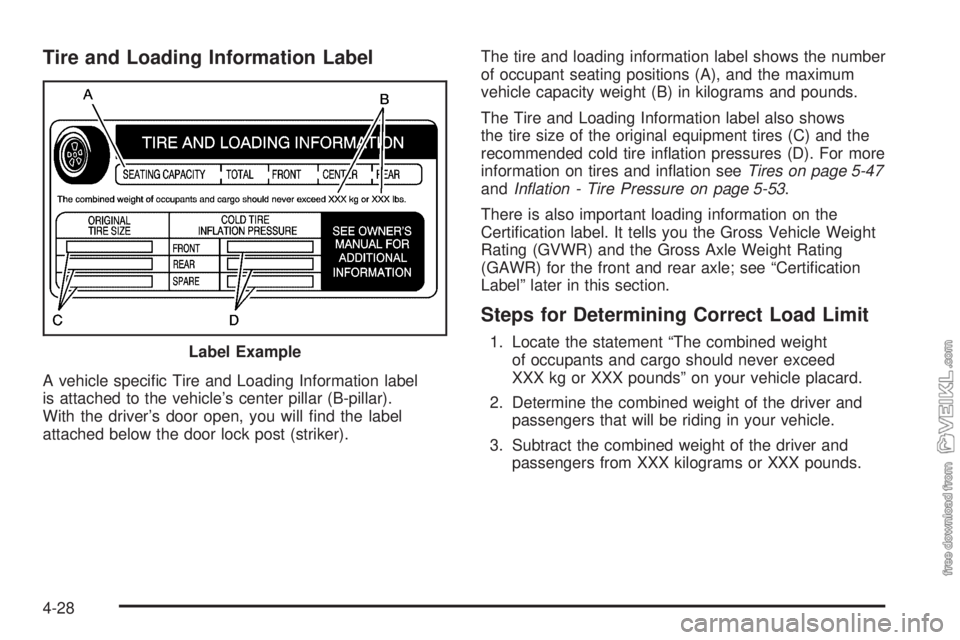
Tire and Loading Information Label
A vehicle specific Tire and Loading Information label
is attached to the vehicle’s center pillar (B-pillar).
With the driver’s door open, you will find the label
attached below the door lock post (striker).The tire and loading information label shows the number
of occupant seating positions (A), and the maximum
vehicle capacity weight (B) in kilograms and pounds.
The Tire and Loading Information label also shows
the tire size of the original equipment tires (C) and the
recommended cold tire inflation pressures (D). For more
information on tires and inflation seeTires on page 5-47
andInation - Tire Pressure on page 5-53.
There is also important loading information on the
Certification label. It tells you the Gross Vehicle Weight
Rating (GVWR) and the Gross Axle Weight Rating
(GAWR) for the front and rear axle; see “Certification
Label” later in this section.
Steps for Determining Correct Load Limit
1. Locate the statement “The combined weight
of occupants and cargo should never exceed
XXX kg or XXX pounds” on your vehicle placard.
2. Determine the combined weight of the driver and
passengers that will be riding in your vehicle.
3. Subtract the combined weight of the driver and
passengers from XXX kilograms or XXX pounds. Label Example
4-28
Page 180 of 320
Total Weight on Your Vehicle’s Tires
Be sure your vehicle’s tires are inflated to the upper limit
for cold tires. You will find these numbers on the
Tire-Loading Information label at the rear edge of the
driver’s door or seeLoading Your Vehicle on page 4-27.
Then be sure you don’t go over the GVW limit for
your vehicle, including the weight of the trailer tongue.
Hitches
It is important to have the correct hitch equipment.
Crosswinds, large trucks going by and rough roads
are a few reasons why you will need the right hitch.
Here are some rules to follow:
•The rear bumper on your vehicle is not intended
for hitches. Do not attach rental hitches or
other bumper-type hitches to it. Use only a
frame-mounted hitch that does not attach to
the bumper.
•Will you have to make any holes in the body of
your vehicle when you install a trailer hitch? If
you do, then be sure to seal the holes later when
you remove the hitch. If you do not seal them,
deadly carbon monoxide (CO) from your exhaust
can get into your vehicle. SeeEngine Exhaust
on page 2-25. Dirt and water can, too.
Safety Chains
You should always attach chains between your vehicle
and your trailer. Cross the safety chains under the
tongue of the trailer so that the tongue will not drop
to the road if it becomes separated from the hitch.
Instructions about safety chains may be provided by
the hitch manufacturer or by the trailer manufacturer.
Follow the manufacturer’s recommendation for attaching
safety chains and do not attach them to the bumper.
Always leave just enough slack so you can turn
with your rig. And, never allow safety chains to drag
on the ground.
Trailer Brakes
Does your trailer have its own brakes?
Be sure to read and follow the instructions for the trailer
brakes so you’ll be able to install, adjust and maintain
them properly. And because you may have anti-lock
brakes, do not try to tap into your vehicle’s brake system.
If you do, both systems won’t work well, or at all.
Driving with a Trailer
Towing a trailer requires a certain amount of experience.
Before setting out for the open road, you’ll want to get
to know your rig. Acquaint yourself with the feel of
handling and braking with the added weight of the trailer.
4-38
Page 191 of 320
Filling the Tank
{CAUTION:
Fuel vapor burns violently and a fuel re can
cause bad injuries. To help avoid injuries to
you and others, read and follow all the
instructions on the pump island. Turn off
your engine when you are refueling. Do not
smoke if you are near fuel or refueling your
vehicle. Keep sparks, ames, and smoking
materials away from fuel. Do not leave the
fuel pump unattended when refueling your
vehicle — this is against the law in some
places. Keep children away from the fuel
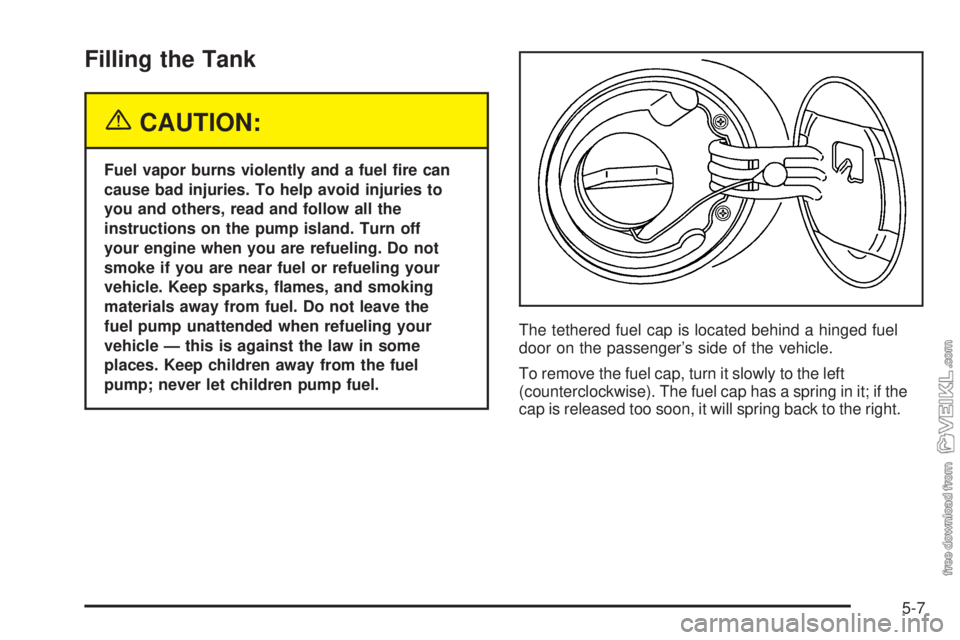
pump; never let children pump fuel.The tethered fuel cap is located behind a hinged fuel
door on the passenger’s side of the vehicle.
To remove the fuel cap, turn it slowly to the left
(counterclockwise). The fuel cap has a spring in it; if the
cap is released too soon, it will spring back to the right.
5-7
Page 192 of 320
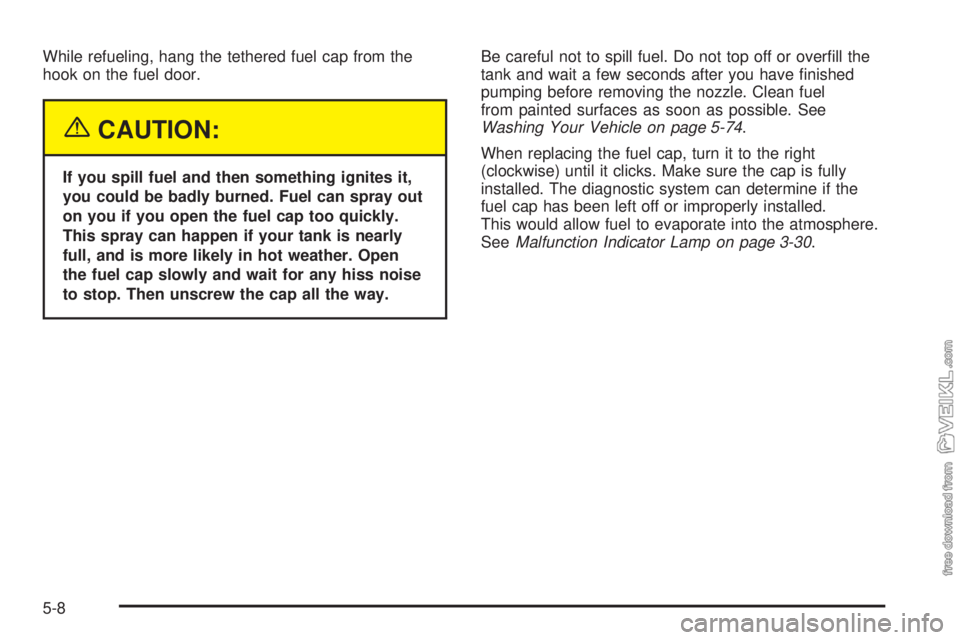
While refueling, hang the tethered fuel cap from the
hook on the fuel door.
{CAUTION:
If you spill fuel and then something ignites it,
you could be badly burned. Fuel can spray out
on you if you open the fuel cap too quickly.
This spray can happen if your tank is nearly
full, and is more likely in hot weather. Open
the fuel cap slowly and wait for any hiss noise
to stop. Then unscrew the cap all the way.Be careful not to spill fuel. Do not top off or overfill the
tank and wait a few seconds after you have finished
pumping before removing the nozzle. Clean fuel
from painted surfaces as soon as possible. See
Washing Your Vehicle on page 5-74.
When replacing the fuel cap, turn it to the right
(clockwise) until it clicks. Make sure the cap is fully
installed. The diagnostic system can determine if the
fuel cap has been left off or improperly installed.
This would allow fuel to evaporate into the atmosphere.
SeeMalfunction Indicator Lamp on page 3-30.
5-8