light CHEVROLET COBALT 2008 1.G Owner's Manual
[x] Cancel search | Manufacturer: CHEVROLET, Model Year: 2008, Model line: COBALT, Model: CHEVROLET COBALT 2008 1.GPages: 402, PDF Size: 2.15 MB
Page 105 of 402
THIRD (3), FOURTH (4) and FIFTH (5):Shift into
THIRD (3), FOURTH (4) and FIFTH (5) the same way
you do for SECOND (2). Slowly let up on the clutch
pedal as you press the accelerator pedal.
To stop, let up on the accelerator pedal and press
the brake pedal. Just before the vehicle stops, press
the clutch pedal and the brake pedal, and shift to
NEUTRAL.
NEUTRAL:Use this position when you start or idle
your engine.
REVERSE (R):To back up, press down the clutch
pedal and shift into REVERSE (R). Let up on the clutch
pedal slowly while pressing the accelerator pedal.
Notice:Shifting to REVERSE (R) while your vehicle
is moving forward could damage the transmission.
The repairs would not be covered by your warranty.
Shift to REVERSE (R) only after your vehicle is
stopped.
Also, use REVERSE (R), along with the parking brake,
for parking your vehicle.Shift Speeds
{CAUTION:
If you skip a gear when you downshift, you could
lose control of your vehicle. You could injure
yourself or others. Do not shift down more than
one gear at a time when you downshift.
Up-Shift Light
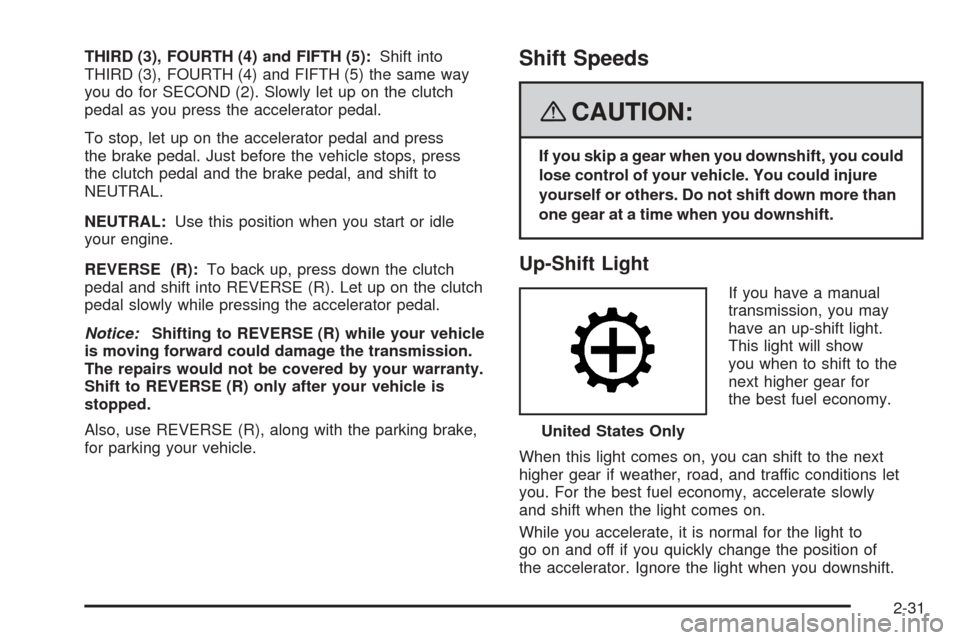
If you have a manual
transmission, you may
have an up-shift light.
This light will show
you when to shift to the
next higher gear for
the best fuel economy.
When this light comes on, you can shift to the next
higher gear if weather, road, and traffic conditions let
you. For the best fuel economy, accelerate slowly
and shift when the light comes on.
While you accelerate, it is normal for the light to
go on and off if you quickly change the position of
the accelerator. Ignore the light when you downshift.United States Only
2-31
Page 106 of 402
Parking Brake
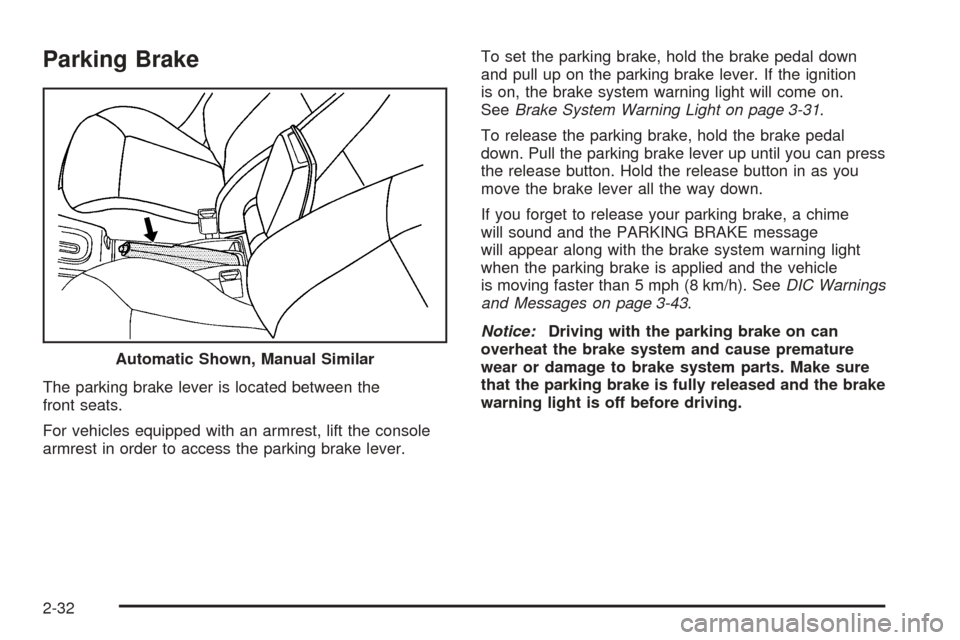
The parking brake lever is located between the
front seats.
For vehicles equipped with an armrest, lift the console
armrest in order to access the parking brake lever.To set the parking brake, hold the brake pedal down
and pull up on the parking brake lever. If the ignition
is on, the brake system warning light will come on.
SeeBrake System Warning Light on page 3-31.
To release the parking brake, hold the brake pedal
down. Pull the parking brake lever up until you can press
the release button. Hold the release button in as you
move the brake lever all the way down.
If you forget to release your parking brake, a chime
will sound and the PARKING BRAKE message
will appear along with the brake system warning light
when the parking brake is applied and the vehicle
is moving faster than 5 mph (8 km/h). SeeDIC Warnings
and Messages on page 3-43.
Notice:Driving with the parking brake on can
overheat the brake system and cause premature
wear or damage to brake system parts. Make sure
that the parking brake is fully released and the brake
warning light is off before driving. Automatic Shown, Manual Similar
2-32
Page 112 of 402

Mirrors
Manual Rearview Mirror
When you are sitting in a comfortable driving position,
adjust the mirror so you can see clearly behind your
vehicle. Grip the mirror in the center to move it up
or down and side to side. The day/night adjustment
allows you to adjust the mirror to avoid glare from the
lamps behind you. Push the tab forward for daytime use
and pull it for nighttime use.
The mirror may have lights located on the bottom of the
mirror. Press the button next to each light to turn it
on or off.
Manual Rearview Mirror
with OnStar
®
If your vehicle has this mirror, it has a lever located at
the bottom of the mirror. The lever is used to change the
mirror from the day to the night position. To reduce
glare from headlamps behind you while driving at night,
pull the lever toward you. To return the mirror to the
day position, return the lever to its original position.
There may be two reading lamps located on the bottom
of the mirror. Press the button next to each lamp to
turn it on and off.There are also OnStar
®buttons located at the bottom
of the mirror face. See your dealer/retailer for more
information on the system and how to subscribe
to OnStar
®. SeeOnStar®System on page 2-40for
more information about the services OnStar®provides.
Outside Manual Mirror
Adjust your outside mirror so you can just see the side of
your vehicle and have a clear view of objects behind you.
The mirror can be folded in to enter narrow areas.
Outside Remote Control Mirror
Adjust the driver’s outside mirror with the control
lever located on the driver’s door. Adjust the outside
mirrors so that the side of the vehicle can be seen
while sitting in a comfortable driving position.
To adjust the passenger’s outside mirror, sit in the
driver’s seat and have a passenger adjust the mirror
for you. The mirror is a manual fold design.
2-38
Page 117 of 402
Your Responsibility
Increase the radio volume if you cannot hear the
OnStar advisor. If the light next to the OnStar buttons
is red, this means that your system is not functioning
properly and should be checked by your dealer/retailer.
If the light appears clear (no light is appearing), your
OnStar subscription has expired. You can always
press the OnStar button to conrm that your
OnStar equipment is active.
Storage Areas
Glove Box
To open the glove box, lift up on the lever.
Cupholder(s)
There are two cupholders located at the front of
the center console, in front of the shift lever. These
cupholders have a black rubber liner that can be
removed for cleaning or to accommodate larger cup
sizes. There are also cupholders for the rear seat
passengers located at the rear of the center console.
Center Console Storage
Your vehicle may have a center console armrest with
storage area. Use the lever on the front of the console
to open it.
Driver’s Storage Compartment
The driver’s storage compartment is located near
the left side of the steering column on the bottom of
the instrument panel. Pull the cover down to open.
Convenience Net
Your vehicle may have a convenience net in the
rear of the vehicle. Store small loads as far forward
as possible. The net should not be used to store
heavy loads.
2-43
Page 119 of 402
Instrument Panel Overview...............................3-4
Hazard Warning Flashers................................3-6
Other Warning Devices...................................3-6
Horn.............................................................3-6
Tilt Wheel.....................................................3-6
Turn Signal/Multifunction Lever.........................3-7
Turn and Lane-Change Signals........................3-7
Headlamp High/Low-Beam Changer..................3-8
Flash-to-Pass.................................................3-8
Windshield Wipers..........................................3-8
Windshield Washer.........................................3-9
Cruise Control..............................................3-10
Headlamps..................................................3-12
Wiper Activated Headlamps............................3-13
Headlamps on Reminder................................3-13
Daytime Running Lamps (DRL).......................3-13
Fog Lamps..................................................3-14
Instrument Panel Brightness...........................3-14
Dome Lamp.................................................3-15Entry/Exit Lighting.........................................3-15
Mirror Reading Lamps...................................3-15
Electric Power Management...........................3-15
Battery Run-Down Protection..........................3-16
Accessory Power Outlet(s).............................3-16
Ashtray(s) and Cigarette Lighter......................3-17
Climate Controls............................................3-18
Climate Control System.................................3-18
Outlet Adjustment.........................................3-21
Passenger Compartment Air Filter...................3-21
Warning Lights, Gages, and Indicators............3-23
Instrument Panel Cluster................................3-24
Speedometer and Odometer...........................3-25
Tachometer.................................................3-25
Safety Belt Reminders...................................3-26
Airbag Readiness Light..................................3-27
Passenger Airbag Status Indicator...................3-28
Charging System Light..................................3-30
Up-Shift Light...............................................3-30
Section 3 Instrument Panel
3-1
Page 120 of 402
Brake System Warning Light..........................3-31
Anti-lock Brake System (ABS) Warning Light. . . .3-32
Enhanced Traction System Indicator/
Warning Light...........................................3-32
Electronic Stability Control (ESC)/Traction
Control System (TCS) Indicator/
Warning Light...........................................3-33
Engine Coolant Temperature Warning Light......3-34
Tire Pressure Light.......................................3-34
Malfunction Indicator Lamp.............................3-35
Oil Pressure Light.........................................3-38
Security Light...............................................3-38
Fog Lamp Light............................................3-39
Highbeam On Light.......................................3-39
Fuel Gage...................................................3-39Driver Information Center (DIC).......................3-40
DIC Operation and Displays...........................3-40
DIC Warnings and Messages.........................3-43
DIC Vehicle Personalization............................3-48
Audio System(s).............................................3-54
Setting the Clock..........................................3-55
Radio(s)......................................................3-58
Using an MP3..............................................3-69
XM Radio Messages.....................................3-74
Theft-Deterrent Feature..................................3-75
Audio Steering Wheel Controls.......................3-76
Radio Reception...........................................3-76
Fixed Mast Antenna......................................3-77
XM™ Satellite Radio Antenna System.............3-77
Section 3 Instrument Panel
3-2
Page 123 of 402
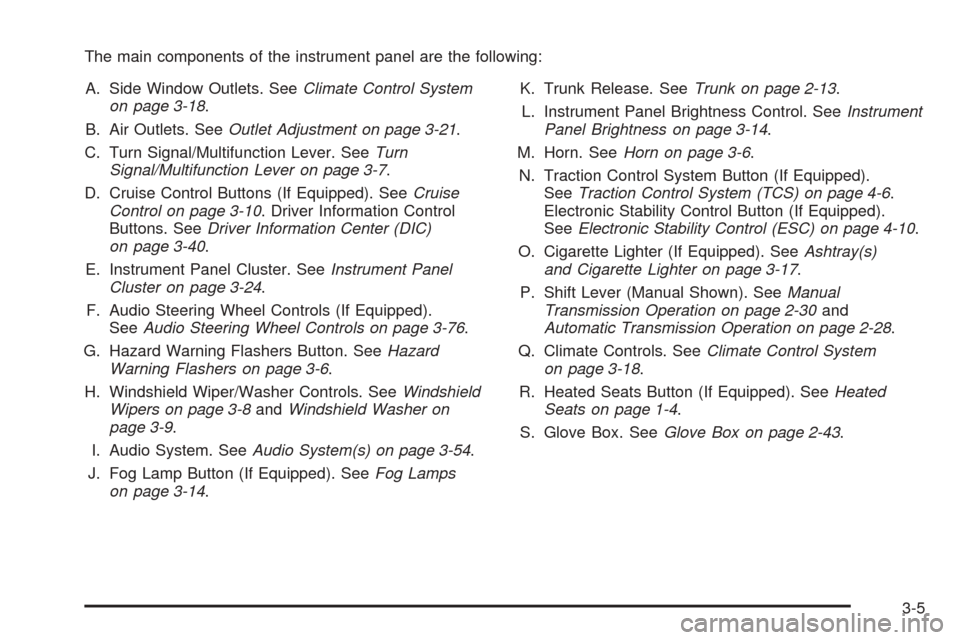
The main components of the instrument panel are the following:
A. Side Window Outlets. SeeClimate Control System
on page 3-18.
B. Air Outlets. SeeOutlet Adjustment on page 3-21.
C. Turn Signal/Multifunction Lever. SeeTurn
Signal/Multifunction Lever on page 3-7.
D. Cruise Control Buttons (If Equipped). SeeCruise
Control on page 3-10. Driver Information Control
Buttons. SeeDriver Information Center (DIC)
on page 3-40.
E. Instrument Panel Cluster. SeeInstrument Panel
Cluster on page 3-24.
F. Audio Steering Wheel Controls (If Equipped).
SeeAudio Steering Wheel Controls on page 3-76.
G. Hazard Warning Flashers Button. SeeHazard
Warning Flashers on page 3-6.
H. Windshield Wiper/Washer Controls. SeeWindshield
Wipers on page 3-8andWindshield Washer on
page 3-9.
I. Audio System. SeeAudio System(s) on page 3-54.
J. Fog Lamp Button (If Equipped). SeeFog Lamps
on page 3-14.K. Trunk Release. SeeTrunk on page 2-13.
L. Instrument Panel Brightness Control. SeeInstrument
Panel Brightness on page 3-14.
M. Horn. SeeHorn on page 3-6.
N. Traction Control System Button (If Equipped).
SeeTraction Control System (TCS) on page 4-6.
Electronic Stability Control Button (If Equipped).
SeeElectronic Stability Control (ESC) on page 4-10.
O. Cigarette Lighter (If Equipped). SeeAshtray(s)
and Cigarette Lighter on page 3-17.
P. Shift Lever (Manual Shown). SeeManual
Transmission Operation on page 2-30and
Automatic Transmission Operation on page 2-28.
Q. Climate Controls. SeeClimate Control System
on page 3-18.
R. Heated Seats Button (If Equipped). SeeHeated
Seats on page 1-4.
S. Glove Box. SeeGlove Box on page 2-43.
3-5
Page 126 of 402
Headlamp High/Low-Beam Changer
To change the headlamps from low beam to high
beam, push the turn signal lever away from you.
When the high beams are
on, this light on the
instrument panel cluster
will also be on.
To change the headlamps from high beam to low beam,
pull the turn signal lever toward you.
Flash-to-Pass
This feature lets you use your high-beam headlamps to
signal a driver in front of you that you want to pass.
To use it, pull the turn signal/multifunction lever toward
you until the high-beam headlamps come on, then
release the lever to turn them off.
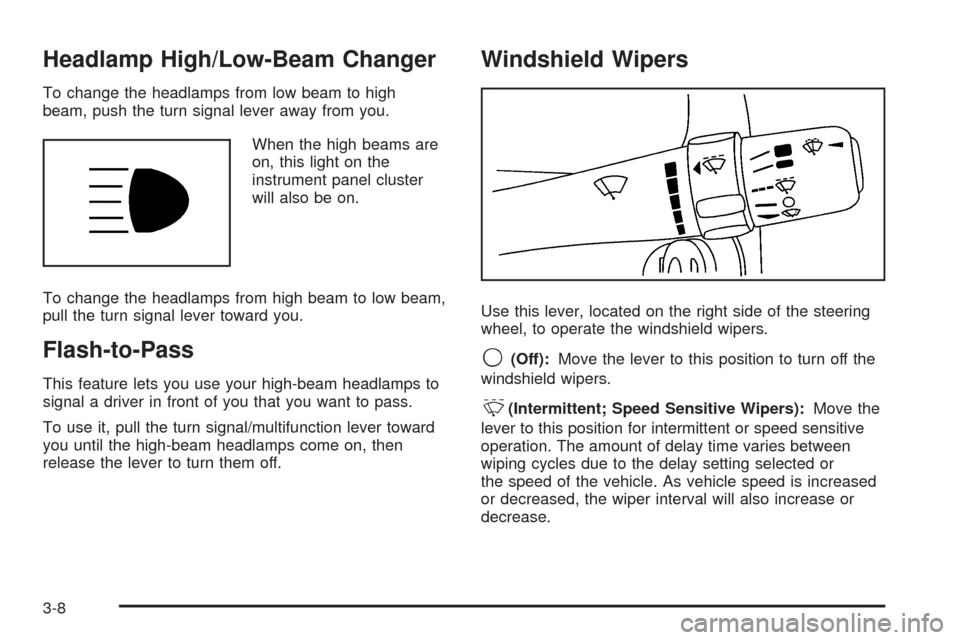
Windshield Wipers
Use this lever, located on the right side of the steering
wheel, to operate the windshield wipers.
9(Off):Move the lever to this position to turn off the
windshield wipers.
&(Intermittent; Speed Sensitive Wipers):Move the
lever to this position for intermittent or speed sensitive
operation. The amount of delay time varies between
wiping cycles due to the delay setting selected or
the speed of the vehicle. As vehicle speed is increased
or decreased, the wiper interval will also increase or
decrease.
3-8
Page 129 of 402
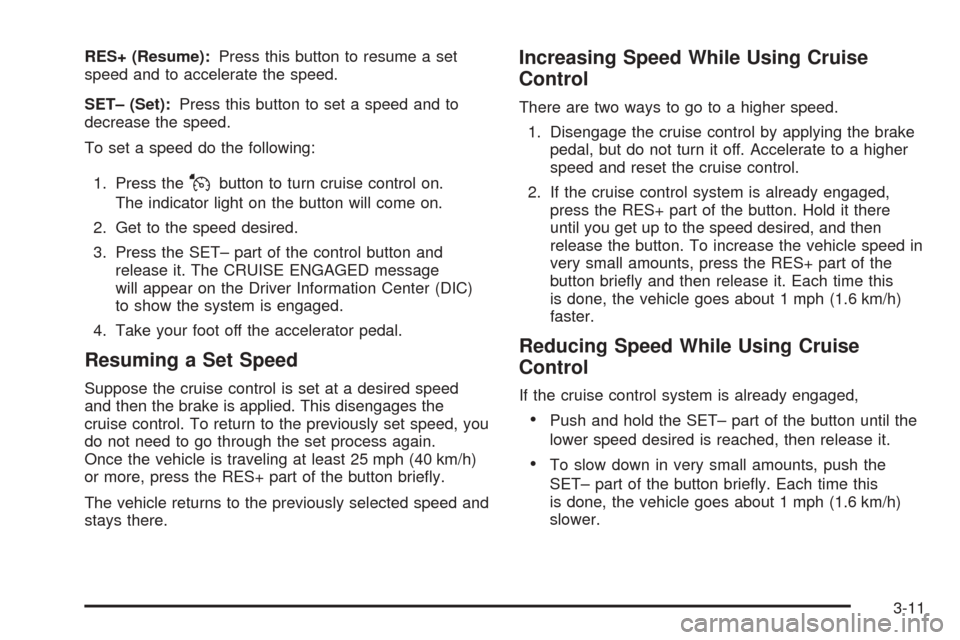
RES+ (Resume):Press this button to resume a set
speed and to accelerate the speed.
SET– (Set):Press this button to set a speed and to
decrease the speed.
To set a speed do the following:
1. Press the
Jbutton to turn cruise control on.
The indicator light on the button will come on.
2. Get to the speed desired.
3. Press the SET– part of the control button and
release it. The CRUISE ENGAGED message
will appear on the Driver Information Center (DIC)
to show the system is engaged.
4. Take your foot off the accelerator pedal.
Resuming a Set Speed
Suppose the cruise control is set at a desired speed
and then the brake is applied. This disengages the
cruise control. To return to the previously set speed, you
do not need to go through the set process again.
Once the vehicle is traveling at least 25 mph (40 km/h)
or more, press the RES+ part of the button briey.
The vehicle returns to the previously selected speed and
stays there.
Increasing Speed While Using Cruise
Control
There are two ways to go to a higher speed.
1. Disengage the cruise control by applying the brake
pedal, but do not turn it off. Accelerate to a higher
speed and reset the cruise control.
2. If the cruise control system is already engaged,
press the RES+ part of the button. Hold it there
until you get up to the speed desired, and then
release the button. To increase the vehicle speed in
very small amounts, press the RES+ part of the
button briey and then release it. Each time this
is done, the vehicle goes about 1 mph (1.6 km/h)
faster.
Reducing Speed While Using Cruise
Control
If the cruise control system is already engaged,
Push and hold the SET– part of the button until the
lower speed desired is reached, then release it.
To slow down in very small amounts, push the
SET– part of the button briey. Each time this
is done, the vehicle goes about 1 mph (1.6 km/h)
slower.
3-11
Page 130 of 402

Passing Another Vehicle While Using
Cruise Control
Use the accelerator pedal to increase the vehicle’s speed.
When you take your foot off the pedal, the vehicle will slow
down to the cruise control speed you set earlier.
Using Cruise Control on Hills
How well the cruise control will work on hills depends
upon the vehicle speed, load, and the steepness of the
hills. When going up steep hills, you might have to
step on the accelerator pedal to maintain the vehicle’s
speed. When going downhill, you might have to brake or
shift to a lower gear to keep the vehicle’s speed
down. Applying the brake will turn off the cruise control.
Many drivers nd this to be too much trouble and do
not use cruise control on steep hills.
Ending Cruise Control
There are two ways to end cruise control:
Step lightly on the brake pedal or the clutch pedal if
the vehicle has a manual transmission. This will
only end the current cruise control session.
Press the cruise controlJon/off button to turn the
system completely off.
Erasing Speed Memory
The cruise control set speed memory is erased when
the cruise control or the ignition is turned off.
Headlamps
The lever on the left side of the steering column
operates the exterior lamps.
The exterior lamp switch has the following four positions:
2(Headlamps):Turn the switch to this position to
turn on the headlamps, parking lamps, and taillamps.
;(Parking Lamps):Turn the switch to this position to
turn on the parking lamps and taillamps only.
AUTO (Automatic Headlamp System):Turn the
switch to this position to automatically turn on the
Daytime Running Lamps (DRL) during daytime, and
the headlamps, parking lamps, and taillamps at night.
3-12