automatic transmission CHEVROLET COBALT 2009 1.G User Guide
[x] Cancel search | Manufacturer: CHEVROLET, Model Year: 2009, Model line: COBALT, Model: CHEVROLET COBALT 2009 1.GPages: 402, PDF Size: 2.15 MB
Page 108 of 402
Leaving Your Vehicle
With the Engine Running
(Automatic Transmission)
{CAUTION:
It can be dangerous to leave your vehicle
with the engine running. Your vehicle could
move suddenly if the shift lever is not fully in
PARK (P) with the parking brake rmly set.
And, if you leave the vehicle with the engine
running, it could overheat and even catch re.
You or others could be injured. Do not leave
your vehicle with the engine running.
If you have to leave your automatic transmission vehicle
with the engine running, be sure your vehicle is in
PARK (P) and your parking brake is rmly set before
you leave it. After you have moved the shift lever
into PARK (P), hold the regular brake pedal down.Then, see if you can move the shift lever away from
PARK (P) without rst pulling it toward you. If you can,
it means that the shift lever was not fully locked into
PARK (P).
Torque Lock (Automatic Transmission)
If you are parking on a hill and you do not shift into
PARK (P) properly, the weight of the vehicle may put
too much force on the parking pawl in the transmission.
You may nd it difficult to pull the shift lever out of
PARK (P). This is called “torque lock.” To prevent torque
lock, set the parking brake and then shift into PARK (P)
properly before you leave the driver’s seat. To nd
out how, seeShifting Into PARK (P) (Automatic
Transmission) on page 2-33.
When you are ready to drive, move the shift lever out
of PARK (P) before you release the parking brake.
If torque lock does occur, you may need to have another
vehicle push yours a little uphill to take some of the
pressure from the parking pawl in the transmission,
so you can pull the shift lever out of PARK (P).
2-34
Page 109 of 402
Shifting Out of PARK (P)
(Automatic Transmission)
This vehicle is equipped with an electronic shift lock
release system. The shift lock release is designed to:
Prevent ignition key removal unless the shift
lever is in PARK (P) with the shift lever button
fully released, and
Prevent movement of the shift lever out of
PARK (P) unless the ignition is in ON/RUN or
ACC/ACCESSORY and the regular brake pedal
is applied.
The shift lock release is always functional except in the
case of a an uncharged or low voltage (less than 9 volt)
battery.
If your vehicle has an uncharged battery or a battery
with low voltage, try charging or jump starting the
battery. SeeJump Starting on page 5-34for more
information.To shift out of PARK (P):
1. Apply the brake pedal.
2. Then press the shift lever button.
3. Move the shift lever to the desired position.
If you still are unable to shift out of PARK (P):
1. Fully release the shift lever button.
2. While holding down the brake pedal, press the
shift lever button again.
3. Move the shift lever to the desired position.
If you still cannot move the shift lever from PARK (P),
consult your dealer/retailer or a professional towing
service.
Parking Your Vehicle
Before leaving your vehicle, fully press the clutch pedal
down, move the shift lever into REVERSE (R), and
rmly apply the parking brake. Once the shift lever has
been placed in REVERSE (R) with the clutch pedal
pressed down, you can turn the ignition key to OFF/
LOCK, remove the key and release the clutch pedal.
SeeManual Transmission Operation on page 2-30.
2-35
Page 111 of 402
Running the Vehicle While Parked
It is better not to park with the engine running. But if you
ever have to, here are some things to know.
{CAUTION:
Idling the engine with the climate control
system off could allow dangerous exhaust
into your vehicle. See the earlier caution
underEngine Exhaust on page 2-36.
Also, idling in a closed-in place can let deadly
carbon monoxide (CO) into your vehicle
even if the climate control fan is at the highest
setting. One place this can happen is a garage.
Exhaust — with CO — can come in easily.
NEVER park in a garage with the engine
running.
Another closed-in place can be a blizzard.
SeeWinter Driving on page 4-21.
{CAUTION:
It can be dangerous to get out of your vehicle
if the shift lever is not fully in PARK (P) with
the parking brake rmly set. Your vehicle can
roll. Do not leave your vehicle when the engine
is running unless you have to. If you have
left the engine running, the vehicle can move
suddenly. You or others could be injured.
To be sure your vehicle will not move, even
when you are on fairly level ground, always
set the parking brake and move the shift lever
to PARK (P).
Follow the proper steps to be sure your vehicle will
not move. SeeShifting Into PARK (P) (Automatic
Transmission) on page 2-33.
If you are parking on a hill and if you are pulling a
trailer, also seeTowing a Trailer (Manual Transmission)
on page 4-34orTowing a Trailer (Automatic
Transmission) on page 4-34.
2-37
Page 123 of 402
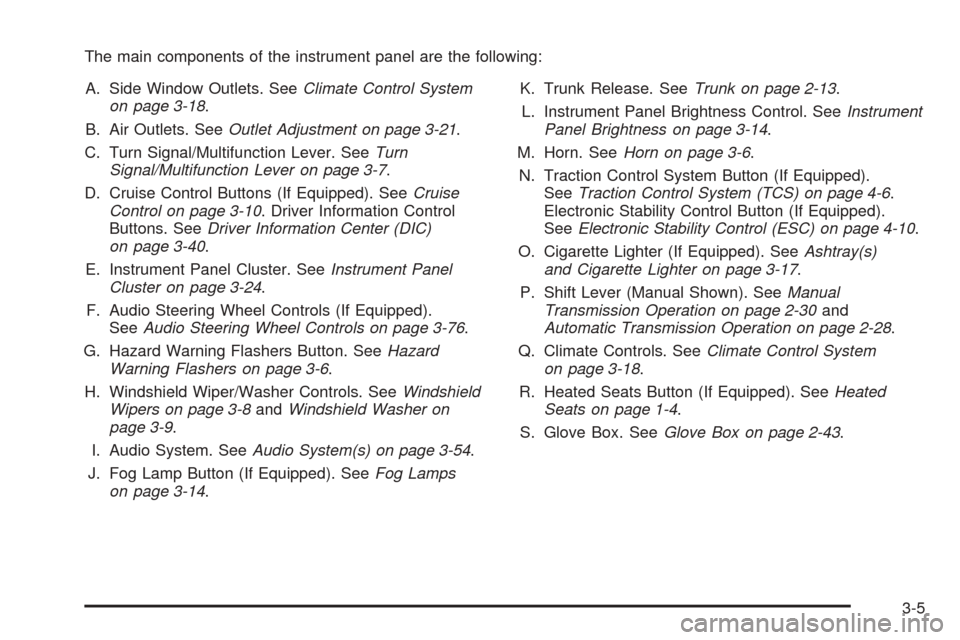
The main components of the instrument panel are the following:
A. Side Window Outlets. SeeClimate Control System
on page 3-18.
B. Air Outlets. SeeOutlet Adjustment on page 3-21.
C. Turn Signal/Multifunction Lever. SeeTurn
Signal/Multifunction Lever on page 3-7.
D. Cruise Control Buttons (If Equipped). SeeCruise
Control on page 3-10. Driver Information Control
Buttons. SeeDriver Information Center (DIC)
on page 3-40.
E. Instrument Panel Cluster. SeeInstrument Panel
Cluster on page 3-24.
F. Audio Steering Wheel Controls (If Equipped).
SeeAudio Steering Wheel Controls on page 3-76.
G. Hazard Warning Flashers Button. SeeHazard
Warning Flashers on page 3-6.
H. Windshield Wiper/Washer Controls. SeeWindshield
Wipers on page 3-8andWindshield Washer on
page 3-9.
I. Audio System. SeeAudio System(s) on page 3-54.
J. Fog Lamp Button (If Equipped). SeeFog Lamps
on page 3-14.K. Trunk Release. SeeTrunk on page 2-13.
L. Instrument Panel Brightness Control. SeeInstrument
Panel Brightness on page 3-14.
M. Horn. SeeHorn on page 3-6.
N. Traction Control System Button (If Equipped).
SeeTraction Control System (TCS) on page 4-6.
Electronic Stability Control Button (If Equipped).
SeeElectronic Stability Control (ESC) on page 4-10.
O. Cigarette Lighter (If Equipped). SeeAshtray(s)
and Cigarette Lighter on page 3-17.
P. Shift Lever (Manual Shown). SeeManual
Transmission Operation on page 2-30and
Automatic Transmission Operation on page 2-28.
Q. Climate Controls. SeeClimate Control System
on page 3-18.
R. Heated Seats Button (If Equipped). SeeHeated
Seats on page 1-4.
S. Glove Box. SeeGlove Box on page 2-43.
3-5
Page 130 of 402
Passing Another Vehicle While Using
Cruise Control
Use the accelerator pedal to increase the vehicle’s speed.
When you take your foot off the pedal, the vehicle will slow
down to the cruise control speed you set earlier.
Using Cruise Control on Hills
How well the cruise control will work on hills depends
upon the vehicle speed, load, and the steepness of the
hills. When going up steep hills, you might have to
step on the accelerator pedal to maintain the vehicle’s
speed. When going downhill, you might have to brake or
shift to a lower gear to keep the vehicle’s speed
down. Applying the brake will turn off the cruise control.
Many drivers nd this to be too much trouble and do
not use cruise control on steep hills.
Ending Cruise Control
There are two ways to end cruise control:
Step lightly on the brake pedal or the clutch pedal if
the vehicle has a manual transmission. This will
only end the current cruise control session.
Press the cruise controlJon/off button to turn the
system completely off.
Erasing Speed Memory
The cruise control set speed memory is erased when
the cruise control or the ignition is turned off.
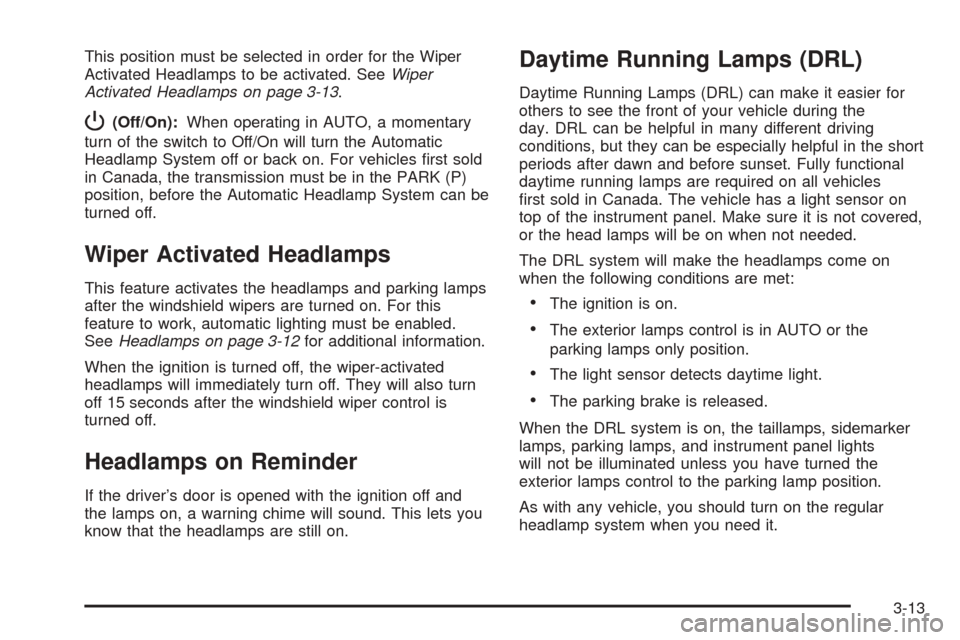
Headlamps
The lever on the left side of the steering column
operates the exterior lamps.
The exterior lamp switch has the following four positions:
2(Headlamps):Turn the switch to this position to
turn on the headlamps, parking lamps, and taillamps.
;(Parking Lamps):Turn the switch to this position to
turn on the parking lamps and taillamps only.
AUTO (Automatic Headlamp System):Turn the
switch to this position to automatically turn on the
Daytime Running Lamps (DRL) during daytime, and
the headlamps, parking lamps, and taillamps at night.
3-12
Page 131 of 402
This position must be selected in order for the Wiper
Activated Headlamps to be activated. SeeWiper
Activated Headlamps on page 3-13.
P(Off/On):When operating in AUTO, a momentary
turn of the switch to Off/On will turn the Automatic
Headlamp System off or back on. For vehicles rst sold
in Canada, the transmission must be in the PARK (P)
position, before the Automatic Headlamp System can be
turned off.
Wiper Activated Headlamps
This feature activates the headlamps and parking lamps
after the windshield wipers are turned on. For this
feature to work, automatic lighting must be enabled.
SeeHeadlamps on page 3-12for additional information.
When the ignition is turned off, the wiper-activated
headlamps will immediately turn off. They will also turn
off 15 seconds after the windshield wiper control is
turned off.
Headlamps on Reminder
If the driver’s door is opened with the ignition off and
the lamps on, a warning chime will sound. This lets you
know that the headlamps are still on.
Daytime Running Lamps (DRL)
Daytime Running Lamps (DRL) can make it easier for
others to see the front of your vehicle during the
day. DRL can be helpful in many different driving
conditions, but they can be especially helpful in the short
periods after dawn and before sunset. Fully functional
daytime running lamps are required on all vehicles
rst sold in Canada. The vehicle has a light sensor on
top of the instrument panel. Make sure it is not covered,
or the head lamps will be on when not needed.
The DRL system will make the headlamps come on
when the following conditions are met:
The ignition is on.
The exterior lamps control is in AUTO or the
parking lamps only position.
The light sensor detects daytime light.
The parking brake is released.
When the DRL system is on, the taillamps, sidemarker
lamps, parking lamps, and instrument panel lights
will not be illuminated unless you have turned the
exterior lamps control to the parking lamp position.
As with any vehicle, you should turn on the regular
headlamp system when you need it.
3-13
Page 142 of 402
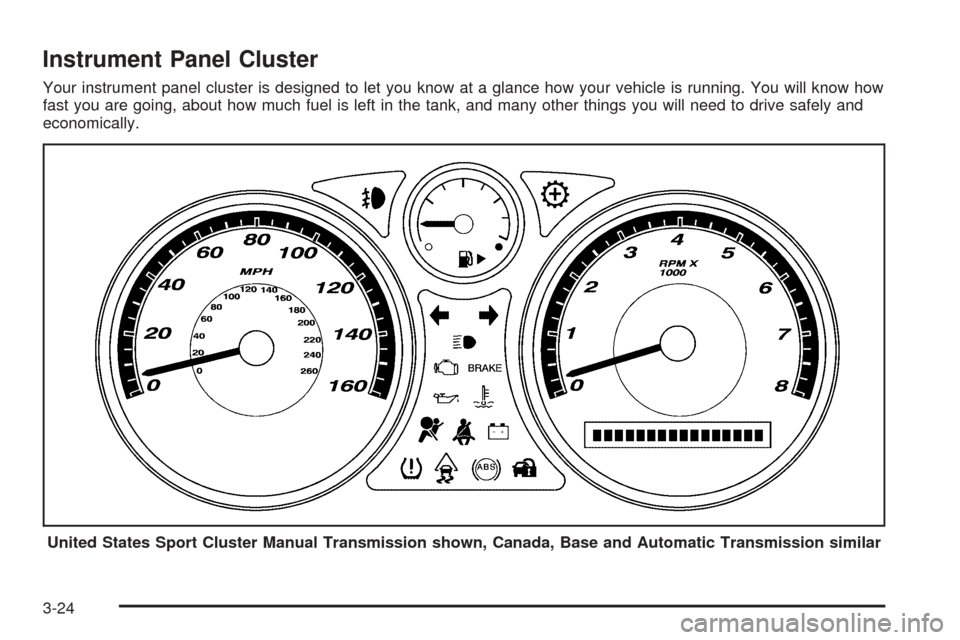
Instrument Panel Cluster
Your instrument panel cluster is designed to let you know at a glance how your vehicle is running. You will know how
fast you are going, about how much fuel is left in the tank, and many other things you will need to drive safely and
economically.
United States Sport Cluster Manual Transmission shown, Canada, Base and Automatic Transmission similar
3-24
Page 170 of 402

AUTO UNLK (Unlock)
This feature, which allows the vehicle to automatically
unlock certain doors, can be enabled or disabled.
When AUTO UNLK appears on the display, press and
hold the reset button for at least one second to
scroll through the available settings:
ALL (default):All of the doors will automatically unlock.
DRIVER:The driver’s door will automatically unlock.
NONE:None of the doors will automatically unlock.
You will need to manually unlock the doors.
If you have a manual transmission vehicle, the door(s)
will automatically unlock when the ignition is turned off.
If you have an automatic transmission vehicle, you can
select when the automatic unlocking will occur.
See “UNLK (Unlock) (Automatic Transmission Only)”
following.
SeeProgrammable Automatic Door Unlock on page 2-11
for more information.
To select a setting and move on to the next feature,
press the information button while the desired setting is
displayed on the DIC.
UNLK (Unlock)
(Automatic Transmission Only)
This screen displays only if your vehicle has an
automatic transmission and DRIVER or ALL is selected
for the AUTO UNLK feature. This feature determines
when the automatic door unlocking will occur. When
UNLK appears on the display, press and hold the reset
button for at least one second to scroll through the
available settings:
KEY OFF:The door(s) will unlock when the key is
turned off.
SHIFT TO P (Park) (default):The door(s) will unlock
when the vehicle is shifted into PARK (P).
SeeProgrammable Automatic Door Unlock on
page 2-11for more information.
To select a setting and move on to the next feature,
press the information button while the desired setting is
displayed on the DIC.
3-52
Page 197 of 402
Your Driving, the Road, and Your Vehicle..........4-2
Defensive Driving...........................................4-2
Drunk Driving.................................................4-2
Control of a Vehicle........................................4-3
Braking.........................................................4-4
Antilock Brake System (ABS)...........................4-5
Braking in Emergencies...................................4-6
Traction Control System (TCS).........................4-6
Enhanced Traction System (ETS).....................4-9
Electronic Stability Control (ESC)....................4-10
Steering......................................................4-12
Off-Road Recovery.......................................4-15
Passing.......................................................4-15
Loss of Control.............................................4-15
Racing or Other Competitive Driving................4-17Driving at Night............................................4-17
Driving in Rain and on Wet Roads..................4-18
Before Leaving on a Long Trip.......................4-19
Highway Hypnosis........................................4-20
Hill and Mountain Roads................................4-20
Winter Driving..............................................4-21
If Your Vehicle is Stuck in Sand, Mud,
Ice, or Snow.............................................4-26
Rocking Your Vehicle to Get It Out.................4-26
Loading Your Vehicle....................................4-27
Towing..........................................................4-32
Towing Your Vehicle.....................................4-32
Recreational Vehicle Towing...........................4-32
Towing a Trailer (Manual Transmission)...........4-34
Towing a Trailer (Automatic Transmission)........4-34
Section 4 Driving Your Vehicle
4-1
Page 204 of 402

Traction Control Operation
Traction control limits wheel spin by reducing engine
power to the wheels (engine speed management)
and by applying brakes to each individual wheel
(brake-traction control) as necessary.
The traction control system is enabled automatically
when you start your vehicle, and it will activate and ash
the ESC/TCS light and display the LOW TRACTION
message if it senses that any of the wheels are spinning
or beginning to lose traction while driving. For more
information on the LOW TRACTION message,
seeDriver Information Center (DIC) on page 3-40.
Notice:If you allow the wheel(s) of one axle to spin
excessively while the ESC/TCS, ABS and Brake
warning lights and the SERVICE ESC and/or
SERVICE TRACTION messages are displayed, you
could damage the differential. The repairs would not
be covered by your warranty. Reduce engine
power and do not spin the wheel(s) excessively
while these lights and this message are displayed.Notice:When traction control is turned off, or
Competitive Driving Mode is active, it is possible to
lose traction. If you attempt to shift with the front
wheels spinning with a loss of traction, it is possible
to cause damage to the transmission. Do not
attempt to shift when the front wheels do not have
traction. Damage caused by misuse of the vehicle
is not covered. See your warranty book for
additional information.
The traction control system may activate on dry or
rough roads or under conditions such as heavy
acceleration while turning or abrupt upshifts/downshifts
of the transmission. When this happens, you may notice
a reduction in acceleration, or may hear a noise or
vibration. This is normal.
If your vehicle is in cruise control while the system
activates, the ESC/TCS light ashes and the cruise
control automatically disengages. When road conditions
allow you to use cruise control again, you may
re-engage the cruise control. SeeCruise Control on
page 3-10.
Adding non-dealer/non-retailer accessories can affect
your vehicle’s performance. SeeAccessories and
Modifications on page 5-3for more information.
4-8