wheel CHEVROLET COBALT 2009 1.G Owner's Manual
[x] Cancel search | Manufacturer: CHEVROLET, Model Year: 2009, Model line: COBALT, Model: CHEVROLET COBALT 2009 1.GPages: 402, PDF Size: 2.15 MB
Page 151 of 402
Electronic Stability Control (ESC)/
Traction Control System (TCS)
Indicator/Warning Light
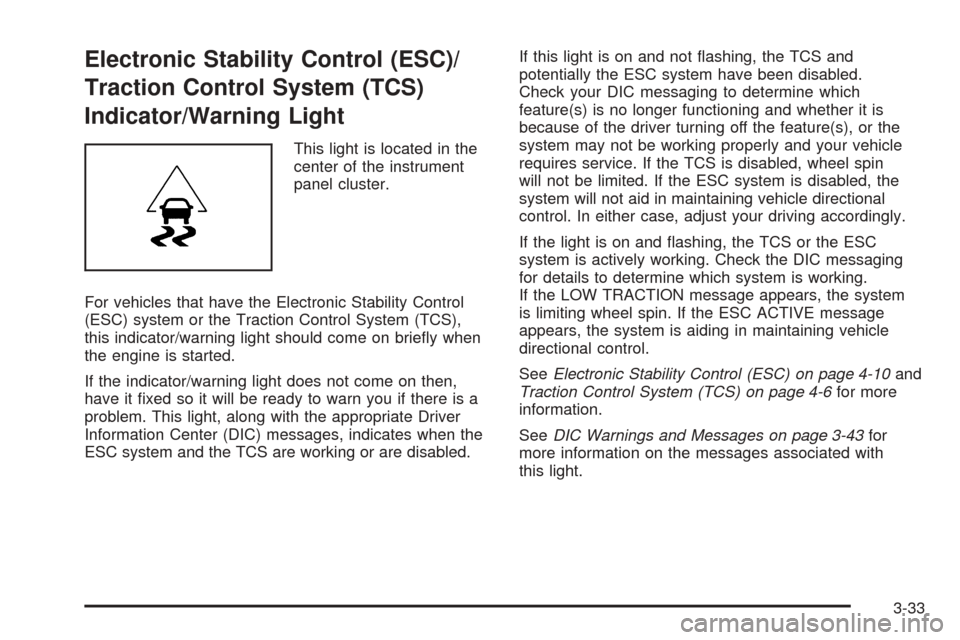
This light is located in the
center of the instrument
panel cluster.
For vehicles that have the Electronic Stability Control
(ESC) system or the Traction Control System (TCS),
this indicator/warning light should come on briey when
the engine is started.
If the indicator/warning light does not come on then,
have it xed so it will be ready to warn you if there is a
problem. This light, along with the appropriate Driver
Information Center (DIC) messages, indicates when the
ESC system and the TCS are working or are disabled.If this light is on and not ashing, the TCS and
potentially the ESC system have been disabled.
Check your DIC messaging to determine which
feature(s) is no longer functioning and whether it is
because of the driver turning off the feature(s), or the
system may not be working properly and your vehicle
requires service. If the TCS is disabled, wheel spin
will not be limited. If the ESC system is disabled, the
system will not aid in maintaining vehicle directional
control. In either case, adjust your driving accordingly.
If the light is on and ashing, the TCS or the ESC
system is actively working. Check the DIC messaging
for details to determine which system is working.
If the LOW TRACTION message appears, the system
is limiting wheel spin. If the ESC ACTIVE message
appears, the system is aiding in maintaining vehicle
directional control.
SeeElectronic Stability Control (ESC) on page 4-10and
Traction Control System (TCS) on page 4-6for more
information.
SeeDIC Warnings and Messages on page 3-43for
more information on the messages associated with
this light.
3-33
Page 158 of 402

Driver Information Center (DIC)
Your vehicle has a Driver Information Center (DIC).
The DIC display gives you the status of many of your
vehicle’s systems. The DIC is also used to display driver
personalization menu modes and warning/status
messages. All messages will appear in the DIC display,
located at the bottom of the instrument panel cluster.
The DIC buttons are
located on the left side of
the steering wheel.
INFO (Information):Press this button to scroll through
the vehicle information mode displays.
r(Reset):Press this button to reset some vehicle
information mode displays, select a personalization menu
mode setting, or acknowledge a warning message.
Press and hold the information and reset buttons at the
same time for one second, then release the buttons
to enter the personalization menu. SeeDIC Vehicle
Personalization on page 3-48for more information.
DIC Operation and Displays
The DIC comes on when the ignition is on. The DIC has
different modes which can be accessed by pressing
the DIC buttons. The button functions are detailed in
the following.
Information Modes
INFO (Information):Press this button to scroll through
the following vehicle information modes:
Outside Air Temperature and Odometer
Press the information button until the outside air
temperature and the odometer display. This mode shows
the temperature outside of the vehicle in either degrees
Fahrenheit (°F) or degrees Celsius (°C) and the total
distance the vehicle has been driven in either miles (mi)
or kilometers (km). The outside air temperature appears
on the left side of the DIC display and the odometer
appears on the right side of the display.
To change the DIC display to English or metric units,
see “UNITS” underDIC Vehicle Personalization on
page 3-48.
3-40
Page 164 of 402
LOW TRACTION
If your vehicle has the Enhanced Traction System (ETS)
or Traction Control System (TCS), this message
displays and the ETS light or the ESC/TCS light on the
instrument panel cluster ashes when the system is
actively limiting wheel spin. Slippery road conditions
may exist if this message is displayed, so adjust
your driving accordingly. This message stays on for a
few seconds after the system stops limiting wheel spin.
SeeEnhanced Traction System (ETS) on page 4-9
orTraction Control System (TCS) on page 4-6
andEnhanced Traction System Warning Light on
page 3-32orElectronic Stability Control (ESC)/Traction
Control System (TCS) Indicator/Warning Light on
page 3-33for more information.
PARKING BRAKE
This message displays if the parking brake is left
engaged. SeeParking Brake on page 2-32for more
information.
POWER STEERING
This message displays if a problem has been detected
with the electric power steering. Have your vehicle
serviced by your dealer/retailer immediately.
SERVICE AIR BAG
This message displays when there is a problem with the
airbag system. Have your vehicle serviced by your
dealer/retailer immediately.
SERVICE ESC (ELECTRONIC STABILITY
CONTROL)
If your vehicle has Electronic Stability Control (ESC),
this message displays and a chime sounds if there has
been a problem detected with ESC. The ESC/TCS
light also appears on the instrument panel cluster.
This light stays on solid as long as the detected problem
remains present. When this message displays, the
system is not working. Adjust your driving accordingly.
SeeElectronic Stability Control (ESC) on page 4-10
andElectronic Stability Control (ESC)/Traction Control
System (TCS) Indicator/Warning Light on page 3-33
for more information.
If this message turns on while you are driving, pull off
the road as soon as possible and stop carefully.
Try resetting the system by turning the ignition off and
then back on. If this message still stays on or turns back
on again while you are driving, your vehicle needs
service. Have the ESC inspected by your dealer/retailer
as soon as possible.
3-46
Page 172 of 402
Audio System(s)
Determine which radio your vehicle has and then read the
pages following to familiarize yourself with its features.
{CAUTION:
This system provides you with far greater
access to audio stations and song listings.
Giving extended attention to entertainment
tasks while driving can cause a crash and you
or others can be injured or killed. Always keep
your eyes on the road and your mind on the
drive — avoid engaging in extended searching
while driving.
Keeping your mind on the drive is important for
safe driving. SeeDefensive Driving on page 4-2.
Here are some ways in which you can help avoid
distraction while driving.While your vehicle is parked:
Familiarize yourself with all of its controls.
Familiarize yourself with its operation.
Set up your audio system by presetting your
favorite radio stations, setting the tone, and
adjusting the speakers. Then, when driving
conditions permit, you can tune to your favorite
radio stations using the presets and steering wheel
controls if the vehicle has them.
Notice:Before adding any sound equipment to
your vehicle, such as an audio system, CD player,
CB radio, mobile telephone, or two-way radio, make
sure that it can be added by checking with your
dealer/retailer. Also, check federal rules covering
mobile radio and telephone units. If sound
equipment can be added, it is very important to do
it properly. Added sound equipment may interfere
with the operation of your vehicle’s engine, radio,
or other systems, and even damage them.
Your vehicle’s systems may interfere with the
operation of sound equipment that has been added.
3-54
Page 179 of 402
Storing a Radio Station as a Favorite
Drivers are encouraged to set up their radio station
favorites while the vehicle is parked. Tune to your
favorite stations using the presets, favorites button, and
steering wheel controls if the vehicle has this feature.
SeeDefensive Driving on page 4-2.
FAV (Favorites):A maximum of 36 stations can be
programmed as favorites using the six pushbuttons
positioned below the radio station frequency labels and
by using the radio favorites page button (FAV button).
Press the FAV button to go through up to six pages
of favorites, each having six favorite stations available
per page. Each page of favorites can contain any
combination of AM, FM, or XM™ (if equipped) stations.
To store a station as a favorite, perform the following
steps:
1. Tune to the desired radio station.
2. Press the FAV button to display the page where
you want the station stored.
3. Press and hold one of the six pushbuttons until a
beep sounds. When that pushbutton is pressed
and released, the station that was set, returns.
4. Repeat the steps for each pushbutton radio station
you want stored as a favorite.The number of favorites pages can be setup using
the MENU button. To setup the number of favorites
pages, perform the following steps:
1. Press the MENU button to display the radio
setup menu.
2. Press the pushbutton located below the FAV 1
through 6 label.
3. Select the desired number of favorites pages by
pressing the pushbutton located below the
displayed page numbers.
4. Press the FAV button, or let the menu time out,
to return to the original main radio screen showing
the radio station frequency labels and to begin
the process of programming your favorites for the
chosen amount of numbered pages.
3-61
Page 194 of 402
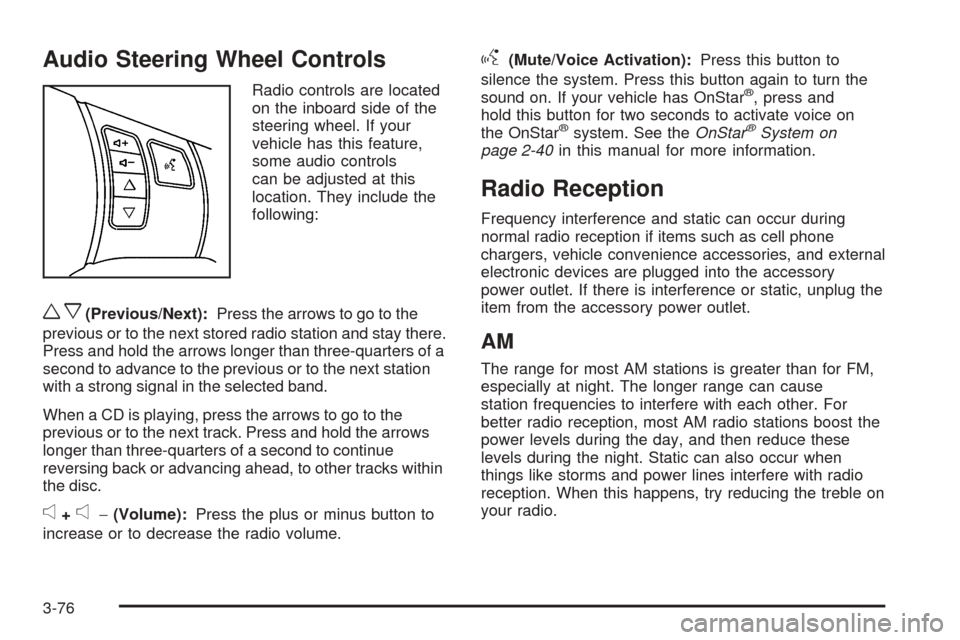
Audio Steering Wheel Controls
Radio controls are located
on the inboard side of the
steering wheel. If your
vehicle has this feature,
some audio controls
can be adjusted at this
location. They include the
following:
wx(Previous/Next):Press the arrows to go to the
previous or to the next stored radio station and stay there.
Press and hold the arrows longer than three-quarters of a
second to advance to the previous or to the next station
with a strong signal in the selected band.
When a CD is playing, press the arrows to go to the
previous or to the next track. Press and hold the arrows
longer than three-quarters of a second to continue
reversing back or advancing ahead, to other tracks within
the disc.
e+e−(Volume):Press the plus or minus button to
increase or to decrease the radio volume.
g(Mute/Voice Activation):Press this button to
silence the system. Press this button again to turn the
sound on. If your vehicle has OnStar
®, press and
hold this button for two seconds to activate voice on
the OnStar
®system. See theOnStar®System on
page 2-40in this manual for more information.
Radio Reception
Frequency interference and static can occur during
normal radio reception if items such as cell phone
chargers, vehicle convenience accessories, and external
electronic devices are plugged into the accessory
power outlet. If there is interference or static, unplug the
item from the accessory power outlet.
AM
The range for most AM stations is greater than for FM,
especially at night. The longer range can cause
station frequencies to interfere with each other. For
better radio reception, most AM radio stations boost the
power levels during the day, and then reduce these
levels during the night. Static can also occur when
things like storms and power lines interfere with radio
reception. When this happens, try reducing the treble on
your radio.
3-76
Page 201 of 402
Antilock Brake System (ABS)
Your vehicle might have the Antilock Brake System
(ABS), an advanced electronic braking system that will
help prevent a braking skid.
If your vehicle has ABS,
this warning light on the
instrument panel will come
on briey when you
start your vehicle.
When you start the engine, or when you begin to drive
away, ABS will check itself. You might hear a
momentary motor or clicking noise while this test is
going on, and you might even notice that the brake
pedal moves or pulses a little. This is normal.
Let us say the road is wet and you are driving safely.
Suddenly, an animal jumps out in front of you. You slam
on the brakes and continue braking. Here is what
happens with ABS:
A computer senses that wheels are slowing down.
If one of the wheels is about to stop rolling, the computer
will separately work the brakes at each wheel.ABS can change the brake pressure faster than any
driver could. The computer is programmed to make the
most of available tire and road conditions. This can
help you steer around the obstacle while braking hard.
As you brake, the computer keeps receiving updates
on wheel speed and controls braking pressure
accordingly.
Remember: ABS does not change the time you need to
get your foot up to the brake pedal or always decrease
stopping distance. If you get too close to the vehicle in
front of you, you will not have time to apply the brakes if
that vehicle suddenly slows or stops. Always leave
enough room up ahead to stop, even though you
have ABS.
Using ABS
Do not pump the brakes. Just hold the brake pedal
down rmly and let antilock work for you. You might feel
a slight brake pedal pulsation or notice some noise, but
this is normal.
4-5
Page 202 of 402
Braking in Emergencies
At some time, nearly every driver gets into a situation
that requires hard braking.
If you have ABS, you can steer and brake at the same
time. However, if you do not have ABS, your rst
reaction — to hit the brake pedal hard and hold it
down — might be the wrong thing to do. Your wheels
can stop rolling. Once they do, the vehicle cannot
respond to your steering. Momentum will carry it in
whatever direction it was headed when the wheels
stopped rolling. That could be off the road, into the very
thing you were trying to avoid, or into traffic.
If you do not have ABS, use a “squeeze” braking
technique. This will give you maximum braking while
maintaining steering control. You can do this by pushing
on the brake pedal with steadily increasing pressure.
In an emergency, you will probably want to squeeze the
brakes hard without locking the wheels. If you hear or
feel the wheels sliding, ease off the brake pedal.
This will help you retain steering control. If you do have
ABS, it is different. SeeAntilock Brake System (ABS)
on page 4-5.
In many emergencies, steering can help you more than
even the very best braking.
Brake Assist
If your vehicle has ESC with ABS, it also has a brake
assist feature that responds to emergency braking
by generating additional pressure and engaging
the ABS. When this happens, the brake pedal will feel
easier to push. Just hold the brake pedal down rmly
and let the system work for you. You might feel the
brakes vibrate or notice some noise, but this is normal.
The brakes will return to normal operation after the brake
pedal is released.
Brake assist cannot compensate for unsafe driving
practices and braking effectiveness, itself, depends on
the condition of the road, tires, and brakes and
vehicle mass.
Traction Control System (TCS)
Your vehicle may have a Traction Control System (TCS)
that limits wheel spin. This is especially useful in
slippery road conditions. The system operates only if it
senses that the wheels are spinning too much or are
beginning to lose traction. When this happens, the
system works the front brakes and reduces engine power
by closing the throttle and managing engine spark to limit
wheel spin.
If your vehicle has TCS, there is a ESC/TCS button
located on the instrument panel.
4-6
Page 203 of 402
This light ashes while the
traction control system is
limiting wheel spin.
You may feel or hear the system working, but this is
normal.
SeeElectronic Stability Control (ESC)/Traction Control
System (TCS) Indicator/Warning Light on page 3-33
for more information.
If your vehicle is in cruise control while TCS begins to
limit wheel spin, the cruise control will automatically
disengage. When road conditions allow you to safely
use it again, the cruise control can be re-engaged. See
Turn Signal/Multifunction Lever on page 3-7.
When this light is on and
either the SERVICE
TRACTION or TRACTION
OFF message is displayed,
the system will not limit
wheel spin.Adjust your driving accordingly. SeeDIC Warnings and
Messages on page 3-43for more information.
The Traction Control System is automatically enabled
whenever you start your vehicle. To limit wheel spin,
especially in slippery road conditions, you should always
leave the system enabled. You can turn TCS off if you
ever need to.
It is recommended to leave the system on for normal
driving conditions, but it may be necessary to turn the
system off if your vehicle is stuck in sand, mud, ice or
snow, and you want to “rock” your vehicle to attempt to
free it. It may also be necessary to turn off the system
when driving in extreme off-road conditions where high
wheel spin is required. SeeIf Your Vehicle is Stuck in
Sand, Mud, Ice, or Snow on page 4-26.
To turn the system off or
on, press and release the
ESC/TCS button located
on the instrument panel.
The DIC displays the appropriate message as described
previously when the button is pressed.
4-7
Page 204 of 402

Traction Control Operation
Traction control limits wheel spin by reducing engine
power to the wheels (engine speed management)
and by applying brakes to each individual wheel
(brake-traction control) as necessary.
The traction control system is enabled automatically
when you start your vehicle, and it will activate and ash
the ESC/TCS light and display the LOW TRACTION
message if it senses that any of the wheels are spinning
or beginning to lose traction while driving. For more
information on the LOW TRACTION message,
seeDriver Information Center (DIC) on page 3-40.
Notice:If you allow the wheel(s) of one axle to spin
excessively while the ESC/TCS, ABS and Brake
warning lights and the SERVICE ESC and/or
SERVICE TRACTION messages are displayed, you
could damage the differential. The repairs would not
be covered by your warranty. Reduce engine
power and do not spin the wheel(s) excessively
while these lights and this message are displayed.Notice:When traction control is turned off, or
Competitive Driving Mode is active, it is possible to
lose traction. If you attempt to shift with the front
wheels spinning with a loss of traction, it is possible
to cause damage to the transmission. Do not
attempt to shift when the front wheels do not have
traction. Damage caused by misuse of the vehicle
is not covered. See your warranty book for
additional information.
The traction control system may activate on dry or
rough roads or under conditions such as heavy
acceleration while turning or abrupt upshifts/downshifts
of the transmission. When this happens, you may notice
a reduction in acceleration, or may hear a noise or
vibration. This is normal.
If your vehicle is in cruise control while the system
activates, the ESC/TCS light ashes and the cruise
control automatically disengages. When road conditions
allow you to use cruise control again, you may
re-engage the cruise control. SeeCruise Control on
page 3-10.
Adding non-dealer/non-retailer accessories can affect
your vehicle’s performance. SeeAccessories and
Modifications on page 5-3for more information.
4-8