ABS CHEVROLET COLORADO 2004 1.G Owners Manual
[x] Cancel search | Manufacturer: CHEVROLET, Model Year: 2004, Model line: COLORADO, Model: CHEVROLET COLORADO 2004 1.GPages: 414, PDF Size: 2.71 MB
Page 161 of 414
AC (Air Conditioning) OFF
This message will be displayed when the engine coolant
temperature is too high and the air conditioning in
your vehicle needs to be turned off. See andEngine
Overheating on page 5-28andClimate Control System
on page 3-12for more information. It will be displayed
along with the ENG HOT message.
ABS (Anti-Lock Brake System)
This message will be displayed on the DIC if there is a
problem with your antilock brake system. Check
your antilock brake system as soon as possible and
have your vehicle serviced by your GM dealer.
SeeBrakes on page 5-39andAnti-Lock Brake System
Warning Light on page 3-23for more information.
Pressing the reset stem to acknowledge this message
and clear it from the DIC display.
BATTERY
This message will be displayed when there is a problem
with your vehicle’s battery. SeeBattery on page 5-42
andBattery Warning Light on page 3-21for
more information.
BRAKES
This message will be displayed on the DIC if there is a
problem with your brakes. Check your brakes as
soon as possible and have your vehicle serviced by
your GM dealer. SeeBrakes on page 5-39andBrake
System Warning Light on page 3-22for more
information. Press and release the reset stem to
acknowledge the message and clear it from the
DIC display.
CHANGE OIL
This message will be displayed on your DIC when the
oil needs to be changed. Check the oil in your vehicle as
soon as possible and have your vehicle serviced by
your GM dealer. SeeEngine Oil on page 5-13and
Scheduled Maintenance on page 6-4for more
information. Press the reset stem to acknowledge the
message and clear it from the display.
DOORS
This message will be displayed on your DIC when one
of your doors is ajar. You should check all the doors
on your vehicle to make sure they are closed. The
message will clear from the display after all of the doors
are closed.
3-33
Page 194 of 414
Braking
Braking action involvesperception timeand
reaction time.
First, you have to decide to push on the brake pedal.
That isperception time.Then you have to bring up your
foot and do it. That isreaction time.
Averagereaction timeis about 3/4 of a second. But that is
only an average. It might be less with one driver and as
long as two or three seconds or more with another. Age,
physical condition, alertness, coordination and eyesight
all play a part. So do alcohol, drugs and frustration. But
even in 3/4 of a second, a vehicle moving at 60 mph
(100 km/h) travels 66 feet (20 m). That could be a lot of
distance in an emergency, so keeping enough space
between your vehicle and others is important.
And, of course, actual stopping distances vary greatly
with the surface of the road (whether it is pavement
or gravel); the condition of the road (wet, dry, icy); tire
tread; the condition of your brakes; the weight of
the vehicle and the amount of brake force applied.
Avoid needless heavy braking. Some people drive in
spurts — heavy acceleration followed by heavy
braking — rather than keeping pace with traffic. This is
a mistake. Your brakes may not have time to cool
between hard stops. Your brakes will wear out much
faster if you do a lot of heavy braking.If you keep pace with the traffic and allow realistic
following distances, you will eliminate a lot of
unnecessary braking. That means better braking and
longer brake life.
If your engine ever stops while you are driving, brake
normally but do not pump your brakes. If you do, the
pedal may get harder to push down. If your engine stops,
you will still have some power brake assist. But you will
use it when you brake. Once the power assist is used up,
it may take longer to stop and the brake pedal will be
harder to push.
Anti-lock Brake System
Your vehicle has anti-lock brakes. ABS is an advanced
electronic braking system that will help prevent a
braking skid.
When you start your engine and begin to drive away,
your anti-lock brake system will check itself. You
may hear a momentary motor or clicking noise while
this test is going on. This is normal.
If there is a problem with
the anti-lock brake system,
this warning light will
stay on. SeeAnti-Lock
Brake System Warning
Light on page 3-23.
4-6
Page 195 of 414
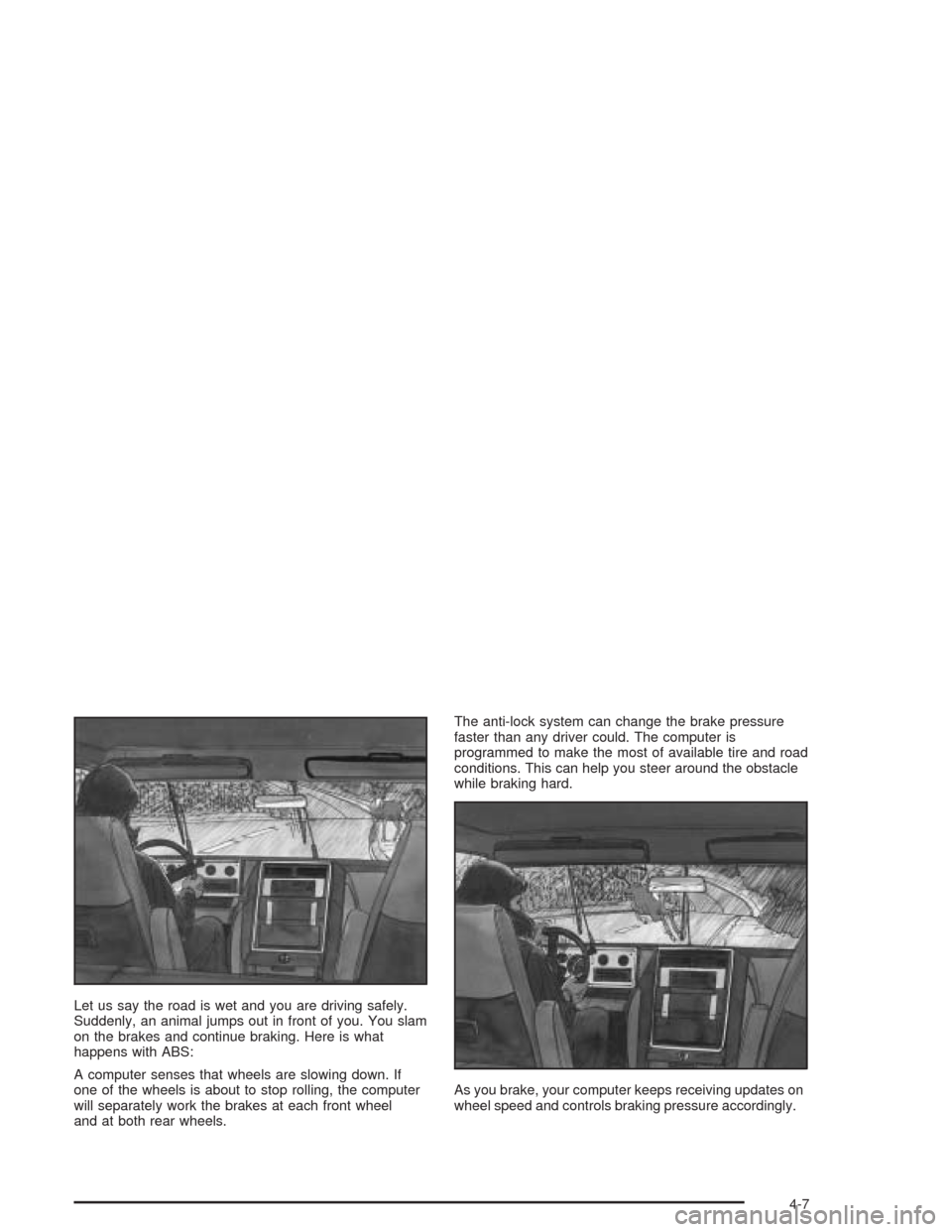
Let us say the road is wet and you are driving safely.
Suddenly, an animal jumps out in front of you. You slam
on the brakes and continue braking. Here is what
happens with ABS:
A computer senses that wheels are slowing down. If
one of the wheels is about to stop rolling, the computer
will separately work the brakes at each front wheel
and at both rear wheels.The anti-lock system can change the brake pressure
faster than any driver could. The computer is
programmed to make the most of available tire and road
conditions. This can help you steer around the obstacle
while braking hard.
As you brake, your computer keeps receiving updates on
wheel speed and controls braking pressure accordingly.
4-7
Page 202 of 414
If your vehicle starts to slide, ease your foot off the
accelerator pedal and quickly steer the way you want
the vehicle to go. If you start steering quickly enough,
your vehicle may straighten out. Always be ready
for a second skid if it occurs.
Of course, traction is reduced when water, snow, ice,
gravel or other material is on the road. For safety,
you will want to slow down and adjust your driving to
these conditions. It is important to slow down on slippery
surfaces because stopping distance will be longer and
vehicle control more limited.
While driving on a surface with reduced traction, try
your best to avoid sudden steering, acceleration
or braking (including engine braking by shifting to a
lower gear). Any sudden changes could cause the tires
to slide. You may not realize the surface is slippery
until your vehicle is skidding. Learn to recognize warning
clues — such as enough water, ice or packed snow
on the road to make a “mirrored surface” — and slow
down when you have any doubt.
Remember: Any anti-lock brake system (ABS) helps
avoid only the braking skid.Off-Road Driving with Your
Four-Wheel-Drive Vehicle
This off-road guide is for vehicles that have
four-wheel drive.
Also, seeAnti-Lock BrakesunderBraking on page 4-6.
If your vehicle does not have four-wheel drive, you
should not drive off-road unless you are on a level,
solid surface.
Off-road driving can be great fun. But it does have
some denite hazards. The greatest of these is
the terrain itself.
“Off-roading” means you have left the great North
American road system behind. Traffic lanes are not
marked. Curves are not banked. There are no
road signs. Surfaces can be slippery, rough, uphill or
downhill. In short, you have gone right back to nature.
Off-road driving involves some new skills. And that is why
it is very important that you read this guide. You will nd
many driving tips and suggestions. These will help make
your off-road driving safer and more enjoyable.
4-14
Page 256 of 414
Parking on Hills
{CAUTION:
You really should not park your vehicle, with a
trailer attached, on a hill. If something goes
wrong, your rig could start to move. People
can be injured, and both your vehicle and the
trailer can be damaged.
But if you ever have to park your rig on a hill, here’s
how to do it:
1. Apply your regular brakes, but don’t shift into
PARK (P) yet, or into gear for a manual transmission.
When parking uphill, turn your wheels away from the
curb. When parking downhill, turn your wheels into
the curb.2. Have someone place chocks under the
trailer wheels.
3. When the wheel chocks are in place, release the
regular brakes until the chocks absorb the load.
4. Reapply the regular brakes. Then apply your
parking brake, and then shift into PARK (P), or
REVERSE (R) for a manual transmission. See
Parking Brake on page 2-31for more information.
5. If you have a four-wheel-drive vehicle, be sure the
transfer case is in a drive gear and not in
NEUTRAL. SeeFour-Wheel Drive on page 2-27for
more information.
6. Release the regular brakes.
4-68
Page 333 of 414
Removing the Spare Tire and Tools
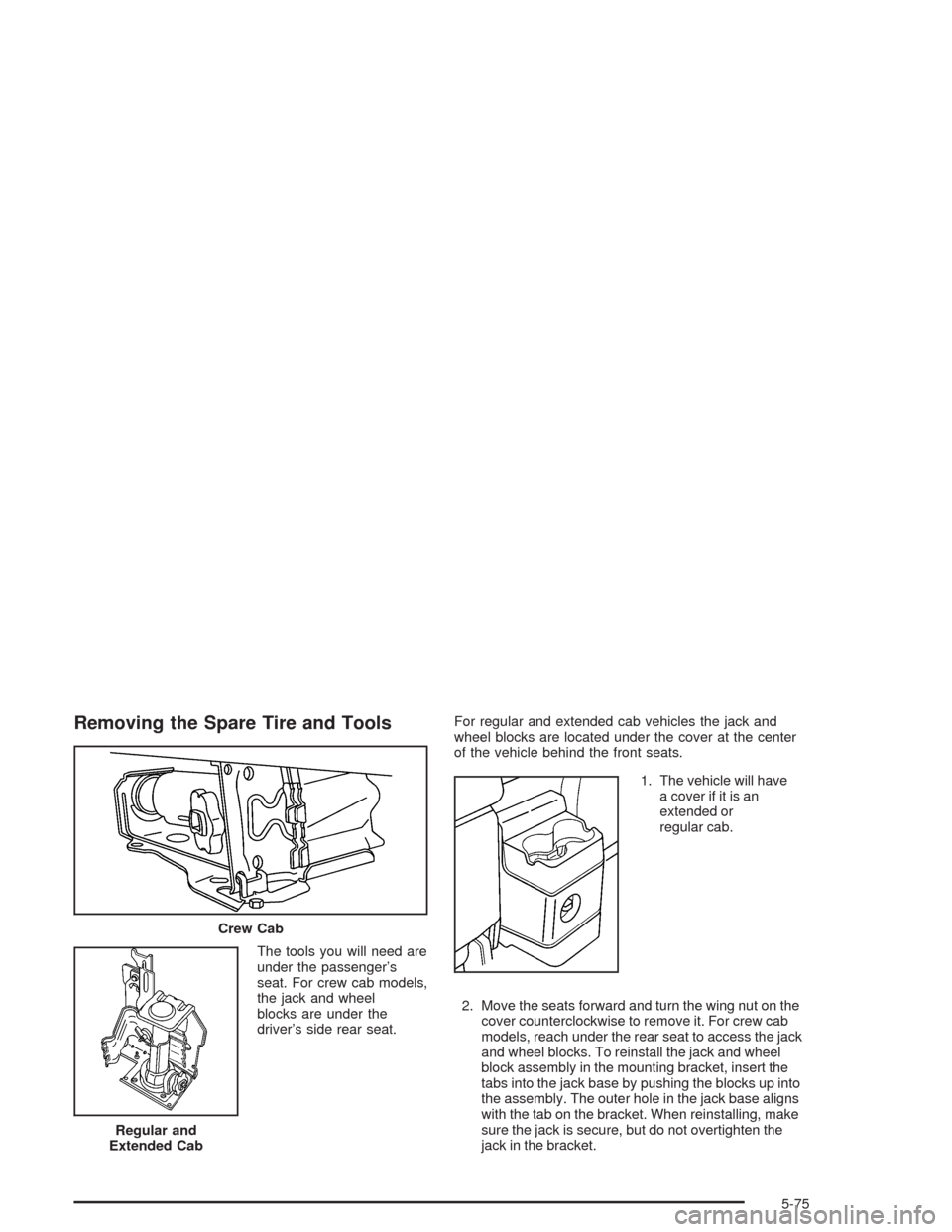
The tools you will need are
under the passenger’s
seat. For crew cab models,
the jack and wheel
blocks are under the
driver’s side rear seat.For regular and extended cab vehicles the jack and
wheel blocks are located under the cover at the center
of the vehicle behind the front seats.
1. The vehicle will have
a cover if it is an
extended or
regular cab.
2. Move the seats forward and turn the wing nut on the
cover counterclockwise to remove it. For crew cab
models, reach under the rear seat to access the jack
and wheel blocks. To reinstall the jack and wheel
block assembly in the mounting bracket, insert the
tabs into the jack base by pushing the blocks up into
the assembly. The outer hole in the jack base aligns
with the tab on the bracket. When reinstalling, make
sure the jack is secure, but do not overtighten the
jack in the bracket. Crew Cab
Regular and
Extended Cab
5-75
Page 339 of 414
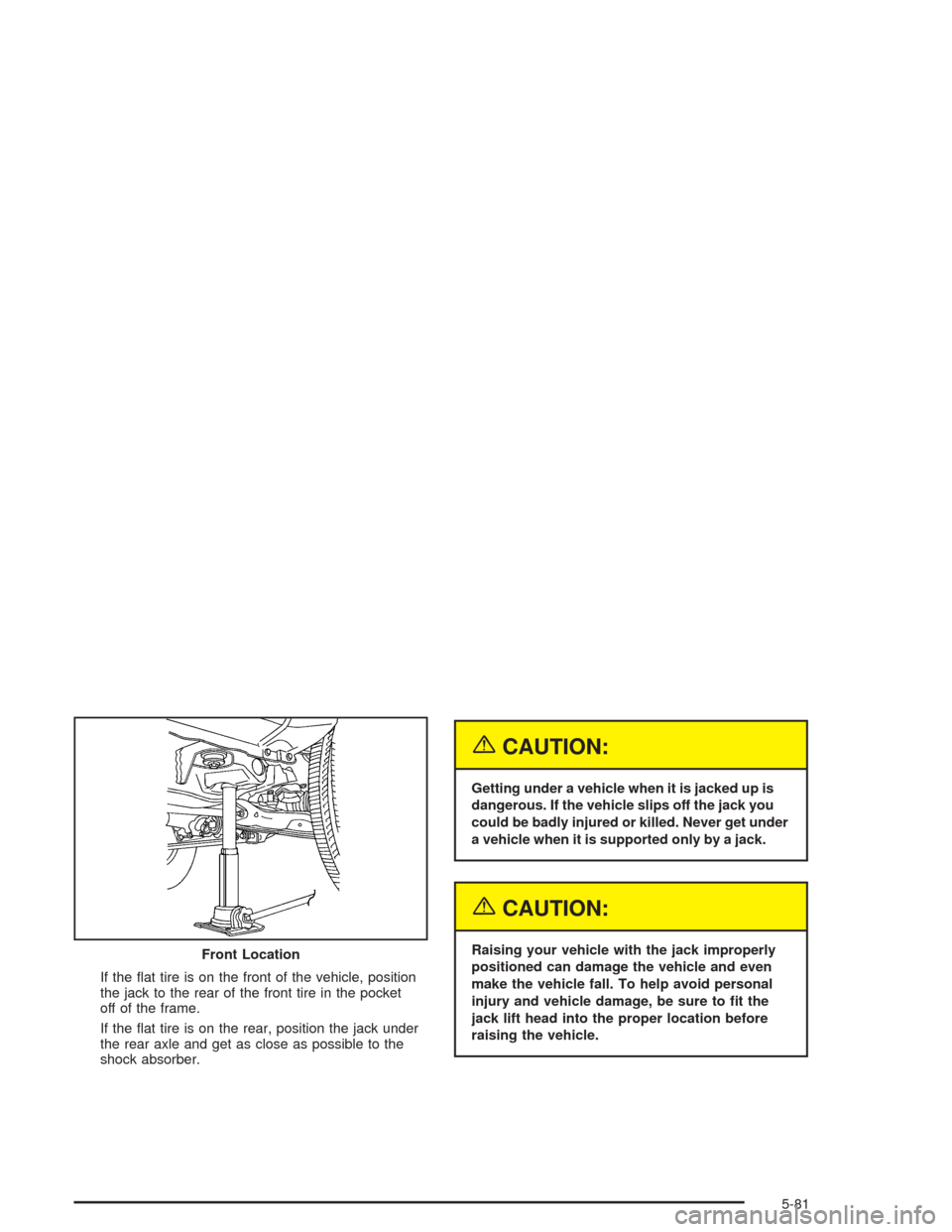
If the at tire is on the front of the vehicle, position
the jack to the rear of the front tire in the pocket
off of the frame.
If the at tire is on the rear, position the jack under
the rear axle and get as close as possible to the
shock absorber.
{CAUTION:
Getting under a vehicle when it is jacked up is
dangerous. If the vehicle slips off the jack you
could be badly injured or killed. Never get under
a vehicle when it is supported only by a jack.
{CAUTION:
Raising your vehicle with the jack improperly
positioned can damage the vehicle and even
make the vehicle fall. To help avoid personal
injury and vehicle damage, be sure to t the
jack lift head into the proper location before
raising the vehicle. Front Location
5-81
Page 363 of 414
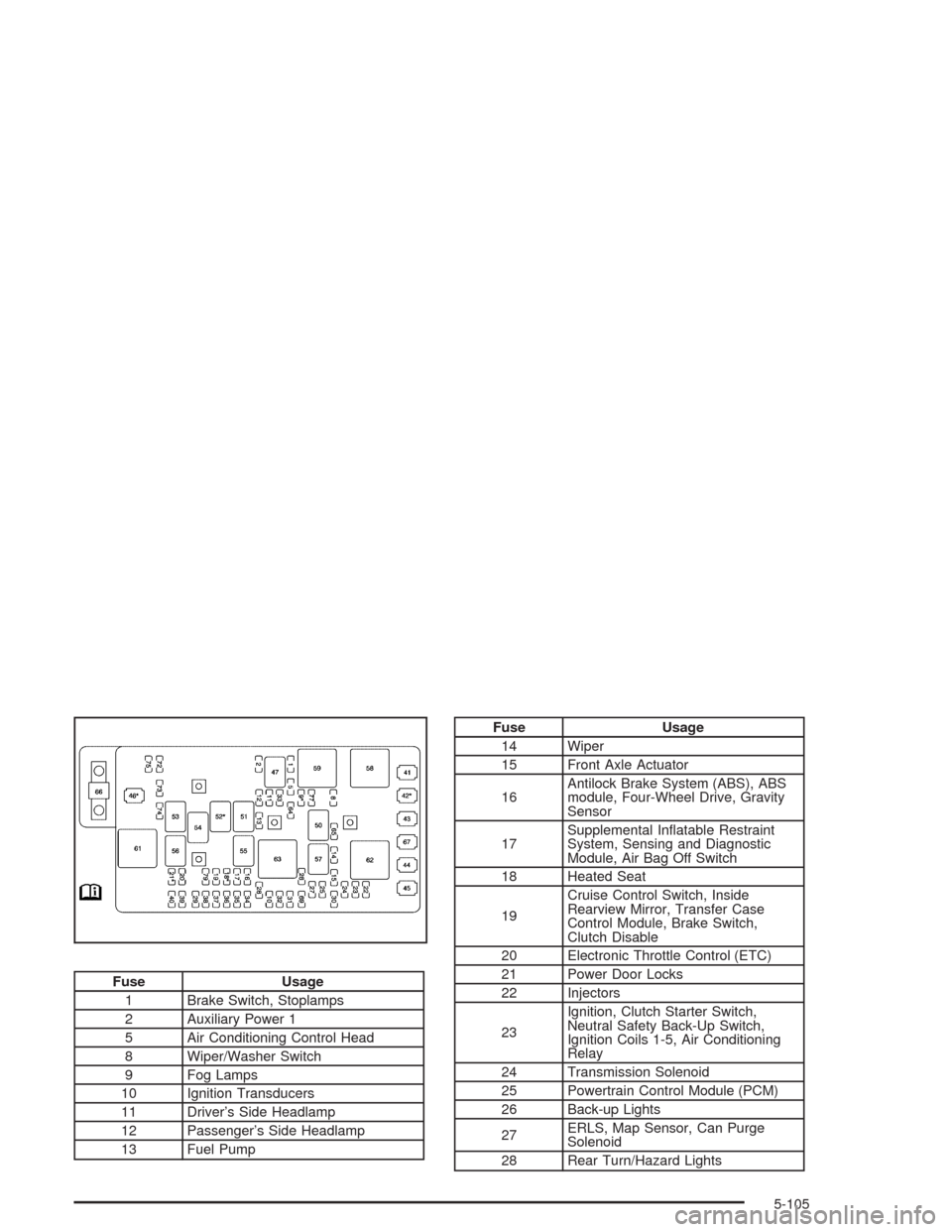
Fuse Usage
1 Brake Switch, Stoplamps
2 Auxiliary Power 1
5 Air Conditioning Control Head
8 Wiper/Washer Switch
9 Fog Lamps
10 Ignition Transducers
11 Driver’s Side Headlamp
12 Passenger’s Side Headlamp
13 Fuel Pump
Fuse Usage
14 Wiper
15 Front Axle Actuator
16Antilock Brake System (ABS), ABS
module, Four-Wheel Drive, Gravity
Sensor
17Supplemental Inatable Restraint
System, Sensing and Diagnostic
Module, Air Bag Off Switch
18 Heated Seat
19Cruise Control Switch, Inside
Rearview Mirror, Transfer Case
Control Module, Brake Switch,
Clutch Disable
20 Electronic Throttle Control (ETC)
21 Power Door Locks
22 Injectors
23Ignition, Clutch Starter Switch,
Neutral Safety Back-Up Switch,
Ignition Coils 1-5, Air Conditioning
Relay
24 Transmission Solenoid
25 Powertrain Control Module (PCM)
26 Back-up Lights
27ERLS, Map Sensor, Can Purge
Solenoid
28 Rear Turn/Hazard Lights
5-105
Page 364 of 414
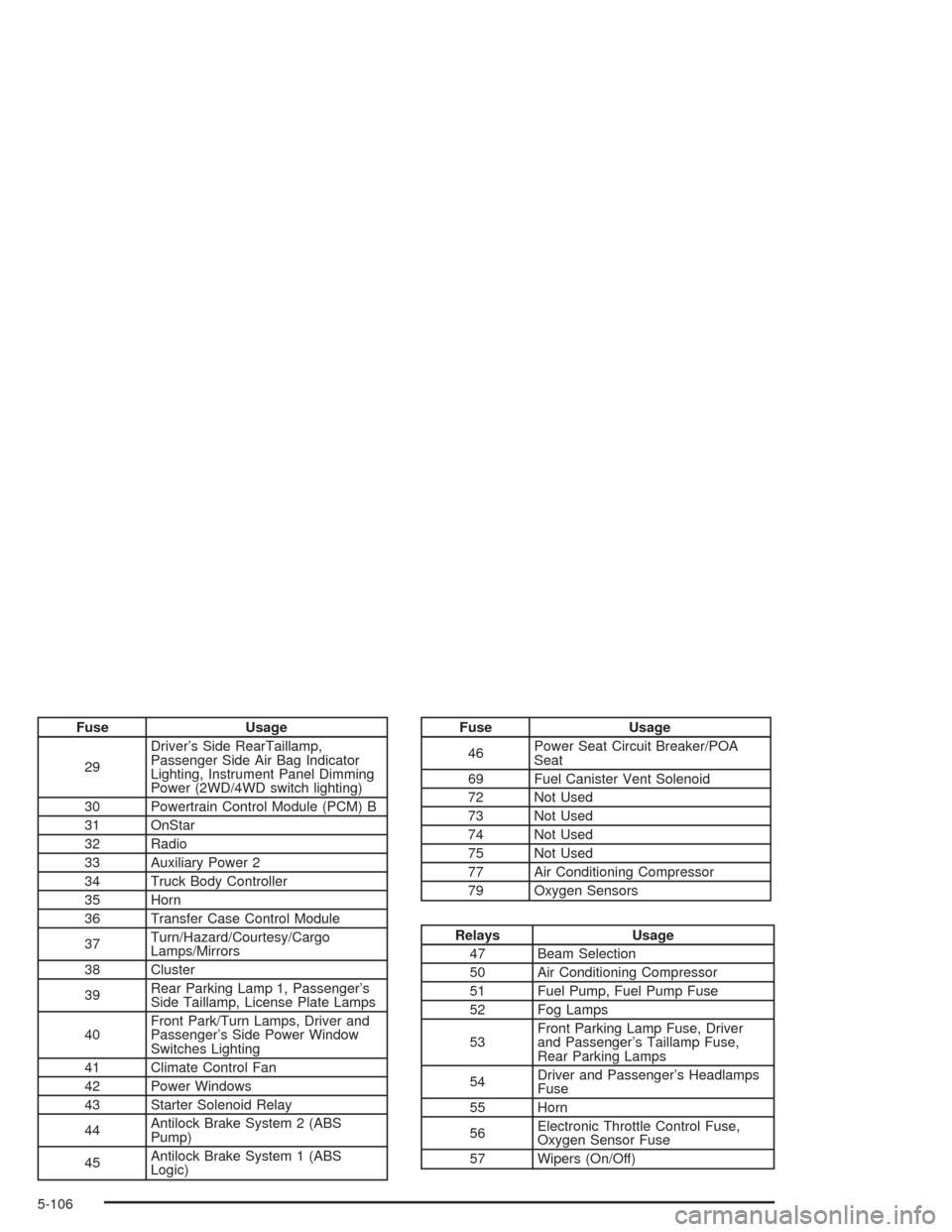
Fuse Usage
29Driver’s Side RearTaillamp,
Passenger Side Air Bag Indicator
Lighting, Instrument Panel Dimming
Power (2WD/4WD switch lighting)
30 Powertrain Control Module (PCM) B
31 OnStar
32 Radio
33 Auxiliary Power 2
34 Truck Body Controller
35 Horn
36 Transfer Case Control Module
37Turn/Hazard/Courtesy/Cargo
Lamps/Mirrors
38 Cluster
39Rear Parking Lamp 1, Passenger’s
Side Taillamp, License Plate Lamps
40Front Park/Turn Lamps, Driver and
Passenger’s Side Power Window
Switches Lighting
41 Climate Control Fan
42 Power Windows
43 Starter Solenoid Relay
44Antilock Brake System 2 (ABS
Pump)
45Antilock Brake System 1 (ABS
Logic)Fuse Usage
46Power Seat Circuit Breaker/POA
Seat
69 Fuel Canister Vent Solenoid
72 Not Used
73 Not Used
74 Not Used
75 Not Used
77 Air Conditioning Compressor
79 Oxygen Sensors
Relays Usage
47 Beam Selection
50 Air Conditioning Compressor
51 Fuel Pump, Fuel Pump Fuse
52 Fog Lamps
53Front Parking Lamp Fuse, Driver
and Passenger’s Taillamp Fuse,
Rear Parking Lamps
54Driver and Passenger’s Headlamps
Fuse
55 Horn
56Electronic Throttle Control Fuse,
Oxygen Sensor Fuse
57 Wipers (On/Off)
5-106
Page 365 of 414
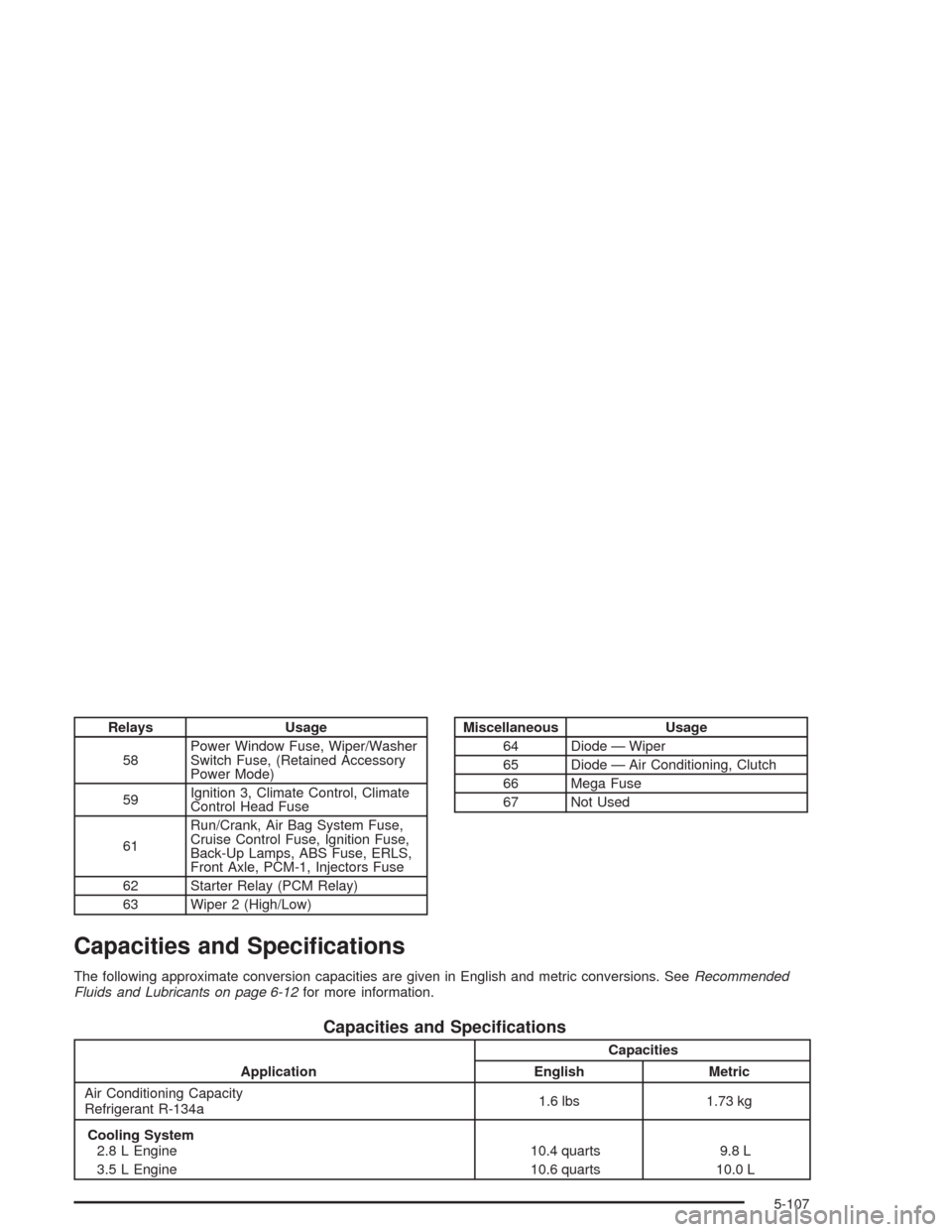
Relays Usage
58Power Window Fuse, Wiper/Washer
Switch Fuse, (Retained Accessory
Power Mode)
59Ignition 3, Climate Control, Climate
Control Head Fuse
61Run/Crank, Air Bag System Fuse,
Cruise Control Fuse, Ignition Fuse,
Back-Up Lamps, ABS Fuse, ERLS,
Front Axle, PCM-1, Injectors Fuse
62 Starter Relay (PCM Relay)
63 Wiper 2 (High/Low)Miscellaneous Usage
64 Diode — Wiper
65 Diode — Air Conditioning, Clutch
66 Mega Fuse
67 Not Used
Capacities and Specications
The following approximate conversion capacities are given in English and metric conversions. SeeRecommended
Fluids and Lubricants on page 6-12for more information.
Capacities and Specications
ApplicationCapacities
English Metric
Air Conditioning Capacity
Refrigerant R-134a1.6 lbs 1.73 kg
Cooling System
2.8 L Engine
3.5 L Engine10.4 quarts
10.6 quarts9.8 L
10.0 L
5-107