engine CHEVROLET COLORADO 2009 1.G Owners Manual
[x] Cancel search | Manufacturer: CHEVROLET, Model Year: 2009, Model line: COLORADO, Model: CHEVROLET COLORADO 2009 1.GPages: 420, PDF Size: 2.49 MB
Page 297 of 420
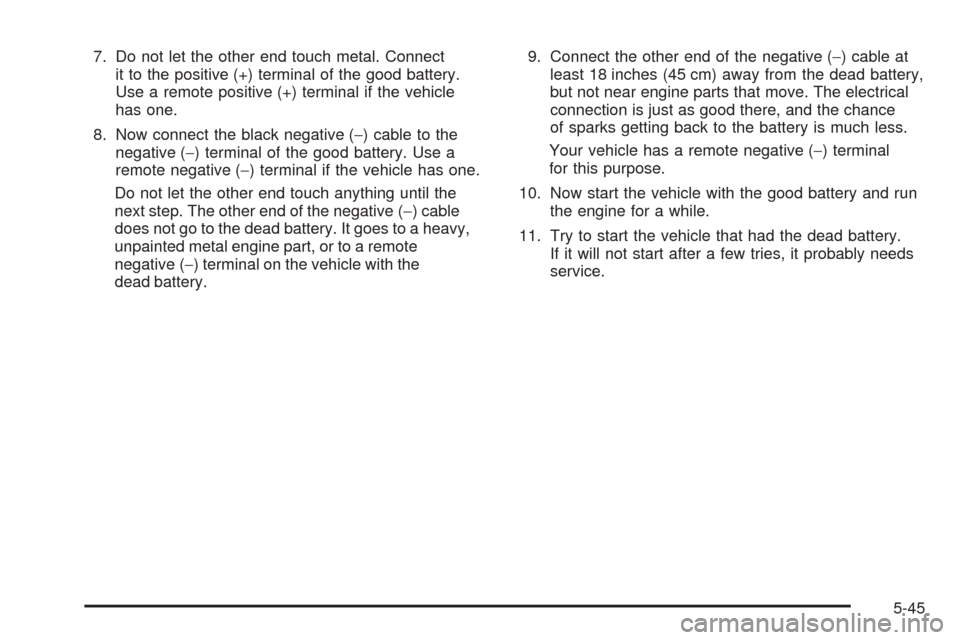
7. Do not let the other end touch metal. Connect
it to the positive (+) terminal of the good battery.
Use a remote positive (+) terminal if the vehicle
has one.
8. Now connect the black negative (−) cable to the
negative (−) terminal of the good battery. Use a
remote negative (−) terminal if the vehicle has one.
Do not let the other end touch anything until the
next step. The other end of the negative (−) cable
does not go to the dead battery. It goes to a heavy,
unpainted metal engine part, or to a remote
negative (−) terminal on the vehicle with the
dead battery.9. Connect the other end of the negative (−) cable at
least 18 inches (45 cm) away from the dead battery,
but not near engine parts that move. The electrical
connection is just as good there, and the chance
of sparks getting back to the battery is much less.
Your vehicle has a remote negative (−) terminal
for this purpose.
10. Now start the vehicle with the good battery and run
the engine for a while.
11. Try to start the vehicle that had the dead battery.
If it will not start after a few tries, it probably needs
service.
5-45
Page 298 of 420
Notice:If the jumper cables are connected or
removed in the wrong order, electrical shorting may
occur and damage the vehicle. The repairs would
not be covered by your warranty. Always connect
and remove the jumper cables in the correct
order, making sure that the cables do not touch
each other or other metal.
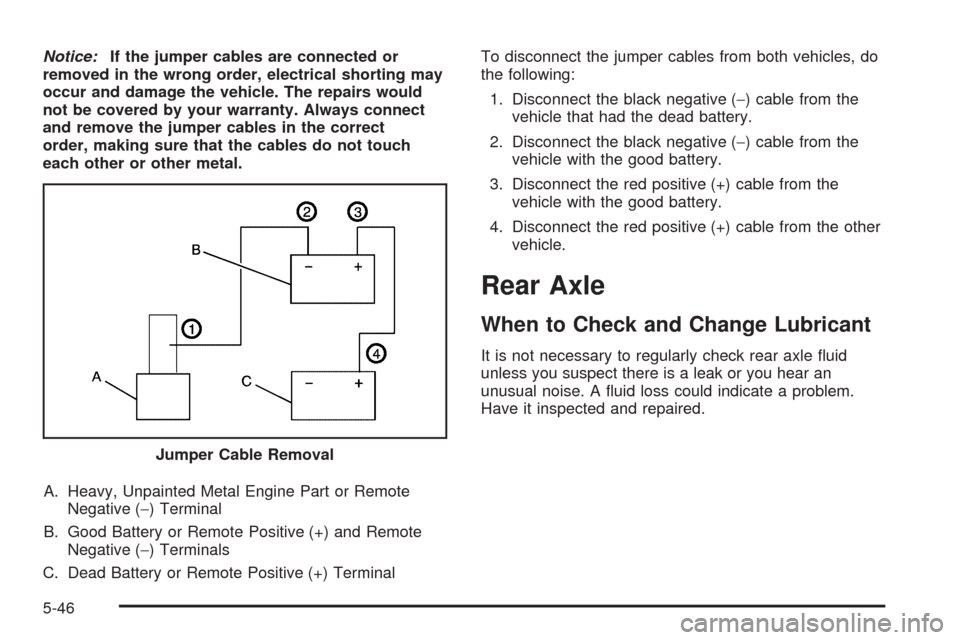
A. Heavy, Unpainted Metal Engine Part or Remote
Negative (−) Terminal
B. Good Battery or Remote Positive (+) and Remote
Negative (−) Terminals
C. Dead Battery or Remote Positive (+) TerminalTo disconnect the jumper cables from both vehicles, do
the following:
1. Disconnect the black negative (−) cable from the
vehicle that had the dead battery.
2. Disconnect the black negative (−) cable from the
vehicle with the good battery.
3. Disconnect the red positive (+) cable from the
vehicle with the good battery.
4. Disconnect the red positive (+) cable from the other
vehicle.
Rear Axle
When to Check and Change Lubricant
It is not necessary to regularly check rear axle uid
unless you suspect there is a leak or you hear an
unusual noise. A uid loss could indicate a problem.
Have it inspected and repaired.
Jumper Cable Removal
5-46
Page 302 of 420
Headlamps
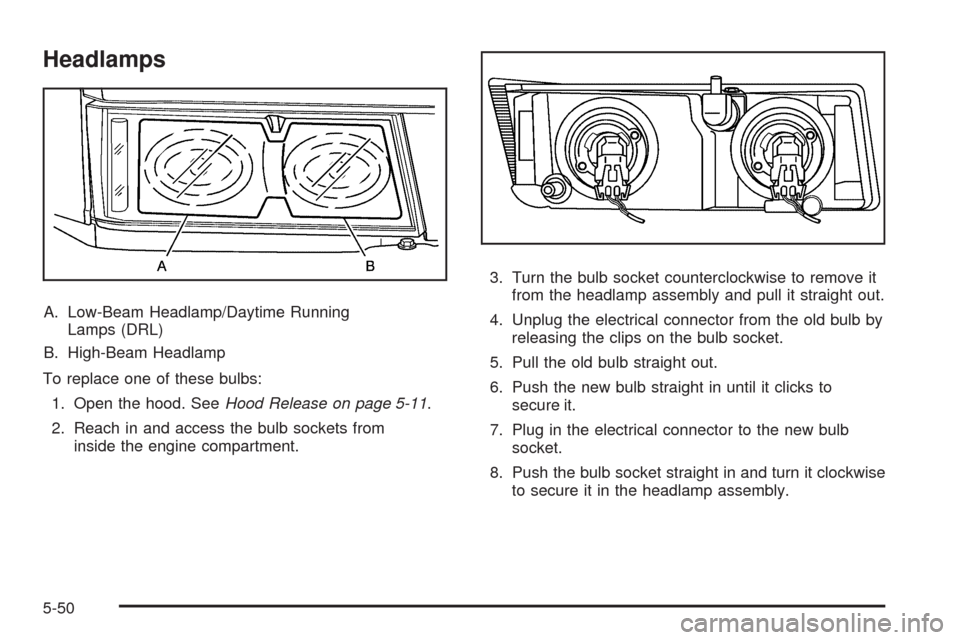
A. Low-Beam Headlamp/Daytime Running
Lamps (DRL)
B. High-Beam Headlamp
To replace one of these bulbs:
1. Open the hood. SeeHood Release on page 5-11.
2. Reach in and access the bulb sockets from
inside the engine compartment.3. Turn the bulb socket counterclockwise to remove it
from the headlamp assembly and pull it straight out.
4. Unplug the electrical connector from the old bulb by
releasing the clips on the bulb socket.
5. Pull the old bulb straight out.
6. Push the new bulb straight in until it clicks to
secure it.
7. Plug in the electrical connector to the new bulb
socket.
8. Push the bulb socket straight in and turn it clockwise
to secure it in the headlamp assembly.
5-50
Page 303 of 420
Front Turn Signal, Parking and
Daytime Running Lamps (DRL)
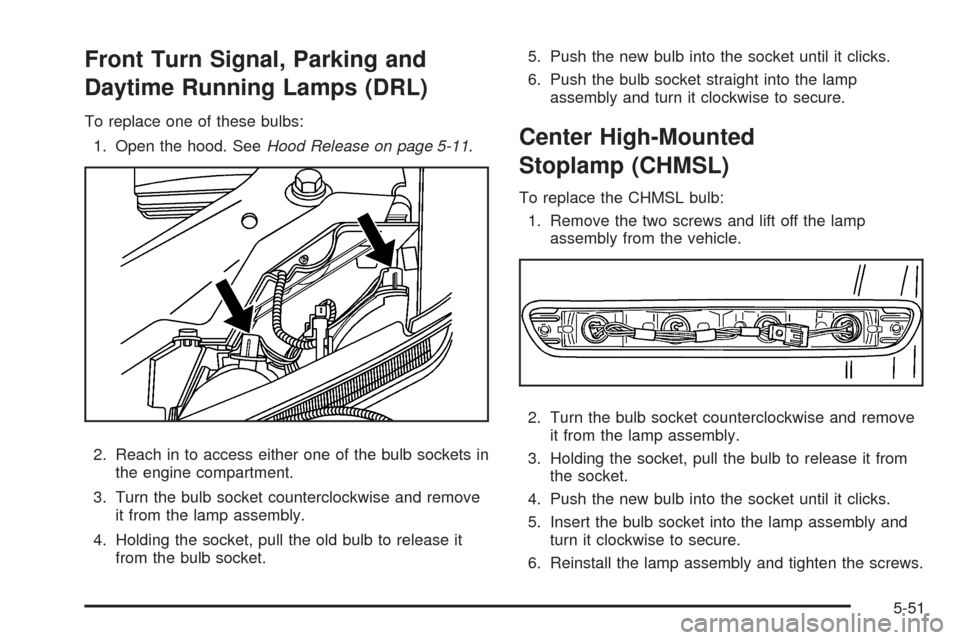
To replace one of these bulbs:
1. Open the hood. SeeHood Release on page 5-11.
2. Reach in to access either one of the bulb sockets in
the engine compartment.
3. Turn the bulb socket counterclockwise and remove
it from the lamp assembly.
4. Holding the socket, pull the old bulb to release it
from the bulb socket.5. Push the new bulb into the socket until it clicks.
6. Push the bulb socket straight into the lamp
assembly and turn it clockwise to secure.
Center High-Mounted
Stoplamp (CHMSL)
To replace the CHMSL bulb:
1. Remove the two screws and lift off the lamp
assembly from the vehicle.
2. Turn the bulb socket counterclockwise and remove
it from the lamp assembly.
3. Holding the socket, pull the bulb to release it from
the socket.
4. Push the new bulb into the socket until it clicks.
5. Insert the bulb socket into the lamp assembly and
turn it clockwise to secure.
6. Reinstall the lamp assembly and tighten the screws.
5-51
Page 311 of 420
(F) Tire Size:A combination of letters and
numbers dene a tire’s width, height, aspect
ratio, construction type and service description.
The letter T as the rst character in the tire size
means the tire is for temporary use only.
(G) TPC Spec (Tire Performance Criteria
Specication)
:Original equipment tires designed
to GM’s specic tire performance criteria have
a TPC specication code molded onto the sidewall.
GM’s TPC specications meet or exceed all
federal safety guidelines.
Tire Size
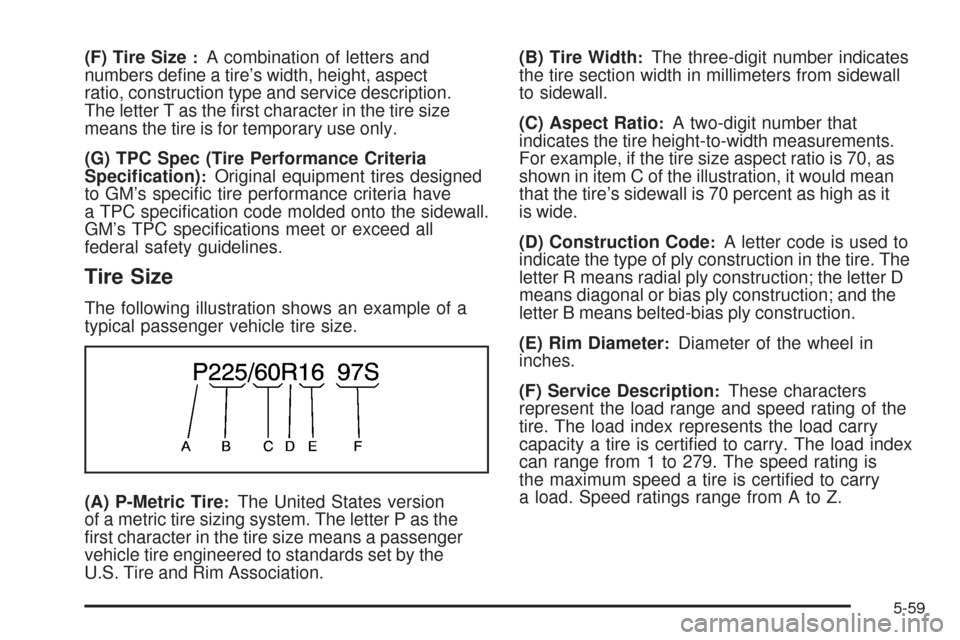
The following illustration shows an example of a
typical passenger vehicle tire size.
(A) P-Metric Tire
:The United States version
of a metric tire sizing system. The letter P as the
rst character in the tire size means a passenger
vehicle tire engineered to standards set by the
U.S. Tire and Rim Association.(B) Tire Width
:The three-digit number indicates
the tire section width in millimeters from sidewall
to sidewall.
(C) Aspect Ratio
:A two-digit number that
indicates the tire height-to-width measurements.
For example, if the tire size aspect ratio is 70, as
shown in item C of the illustration, it would mean
that the tire’s sidewall is 70 percent as high as it
is wide.
(D) Construction Code
:A letter code is used to
indicate the type of ply construction in the tire. The
letter R means radial ply construction; the letter D
means diagonal or bias ply construction; and the
letter B means belted-bias ply construction.
(E) Rim Diameter
:Diameter of the wheel in
inches.
(F) Service Description
:These characters
represent the load range and speed rating of the
tire. The load index represents the load carry
capacity a tire is certied to carry. The load index
can range from 1 to 279. The speed rating is
the maximum speed a tire is certied to carry
a load. Speed ratings range from A to Z.
5-59
Page 321 of 420
TPMS Sensor Matching Process
Each TPMS sensor has a unique identication code.
Any time you replace one or more of the TPMS sensors
or rotate your vehicle’s tires, the identication codes
need to be matched to the new tire/wheel position.
The sensors are matched to the tire/wheel positions
in the following order: driver side front tire, passenger
side front tire, passenger side rear tire, and driver
side rear tire using a TPMS diagnostic tool. See your
dealer/retailer for service.
The TPMS sensors can also be matched to each
tire/wheel position by increasing or decreasing the tire’s
air pressure. If increasing the tire’s air pressure, do
not exceed the maximum ination pressure indicated on
the tire’s sidewall. To let air-pressure out of a tire you
can use the pointed end of the valve cap, a pencil-style
air pressure gage, or a key.
You have one minute to match the rst tire/wheel
position, and ve minutes overall, to match all four
tire/wheel positions. If it takes longer than one minute, to
match the rst tire and wheel, or more than ve minutes
to match all four tire and wheel positions, the matching
process stops and you need to start over.The TPMS sensor matching procedure is outlined
below:
1. Set the parking brake.
2. Turn the ignition switch to ON/RUN with the
engine off.
3. Turn the exterior lamp switch from AUTO to OFF
four times within three seconds. A double horn chirp
will sound and the TPMS low tire warning light starts
ashing. The double horn chirp and ashing TPMS
warning light indicates the TPMS matching process
has started. The TPMS warning light should continue
ashing throughout the matching procedure.
The LOW TIRE message displays on the Driver
Information Center (DIC).
4. Start with the driver side front tire.
5. Remove the valve cap from the valve cap stem.
Activate the TPMS sensor by increasing or
decreasing the tire’s air pressure for 10 seconds,
then stop and listen for a single horn chirp. The
single horn chirp should sound within 15 seconds,
conrming that the sensor identication code has
been matched to this tire and wheel position. If you
do not hear the conrming single horn chirp, turn the
ignition switch to LOCK and start over beginning with
Step 2.
5-69
Page 332 of 420
Changing a Flat Tire
If a tire goes at, avoid further tire and wheel damage
by driving slowly to a level place. Turn on the hazard
warning ashers. SeeHazard Warning Flashers
on page 3-6.
{CAUTION:
Changing a tire can be dangerous. The vehicle
can slip off the jack and roll over or fall on you or
other people. You and they could be badly injured
or even killed. Find a level place to change your
tire. To help prevent the vehicle from moving:
1. Set the parking brake rmly.
2. Put an automatic transmission shift lever in
P (Park), or shift a manual transmission
to 1 (First) or R (Reverse).
CAUTION: (Continued)
CAUTION: (Continued)
3. If you have a four-wheel-drive vehicle,
be sure the transfer case is in a drive
gear – not in Neutral.
4. Turn off the engine and do not restart while
the vehicle is raised.
5. Do not allow passengers to remain in the
vehicle.
To be even more certain the vehicle will not move,
put blocks at the front and rear of the tire farthest
away from the one being changed. That would be
the tire on the other side, at the opposite end of
the vehicle.
5-80
Page 361 of 420
Vehicle Identication
Vehicle Identication Number (VIN)
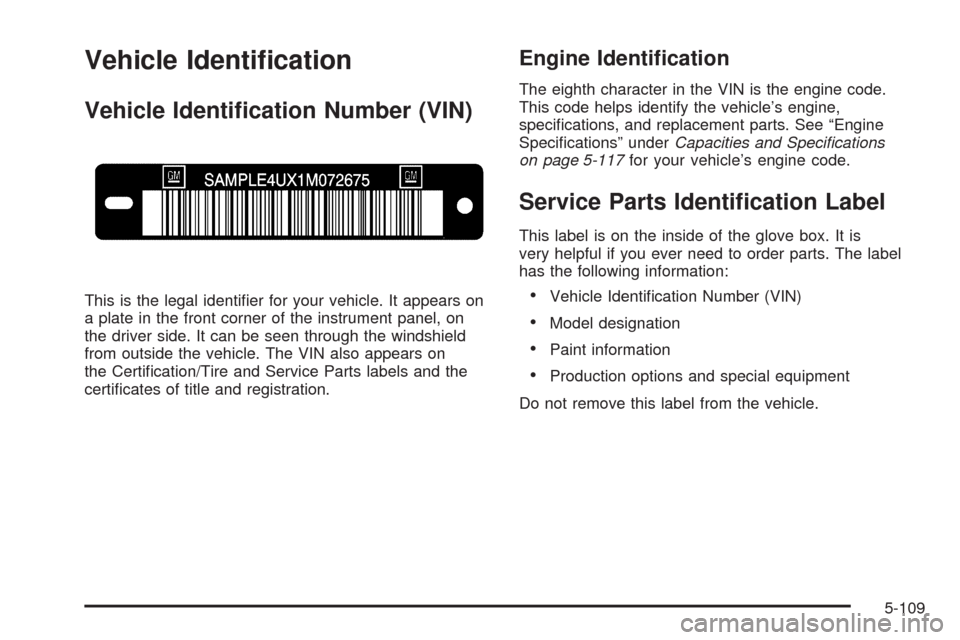
This is the legal identier for your vehicle. It appears on
a plate in the front corner of the instrument panel, on
the driver side. It can be seen through the windshield
from outside the vehicle. The VIN also appears on
the Certication/Tire and Service Parts labels and the
certicates of title and registration.
Engine Identication
The eighth character in the VIN is the engine code.
This code helps identify the vehicle’s engine,
specications, and replacement parts. See “Engine
Specications” underCapacities and Specifications
on page 5-117for your vehicle’s engine code.
Service Parts Identication Label
This label is on the inside of the glove box. It is
very helpful if you ever need to order parts. The label
has the following information:
Vehicle Identication Number (VIN)
Model designation
Paint information
Production options and special equipment
Do not remove this label from the vehicle.
5-109
Page 363 of 420
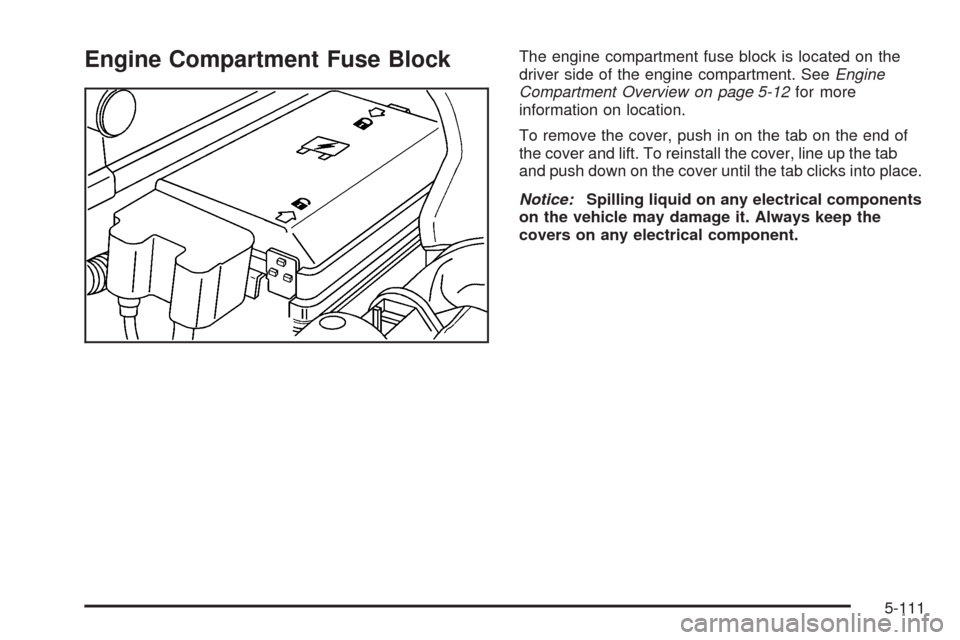
Engine Compartment Fuse BlockThe engine compartment fuse block is located on the
driver side of the engine compartment. SeeEngine
Compartment Overview on page 5-12for more
information on location.
To remove the cover, push in on the tab on the end of
the cover and lift. To reinstall the cover, line up the tab
and push down on the cover until the tab clicks into place.
Notice:Spilling liquid on any electrical components
on the vehicle may damage it. Always keep the
covers on any electrical component.
5-111
Page 369 of 420
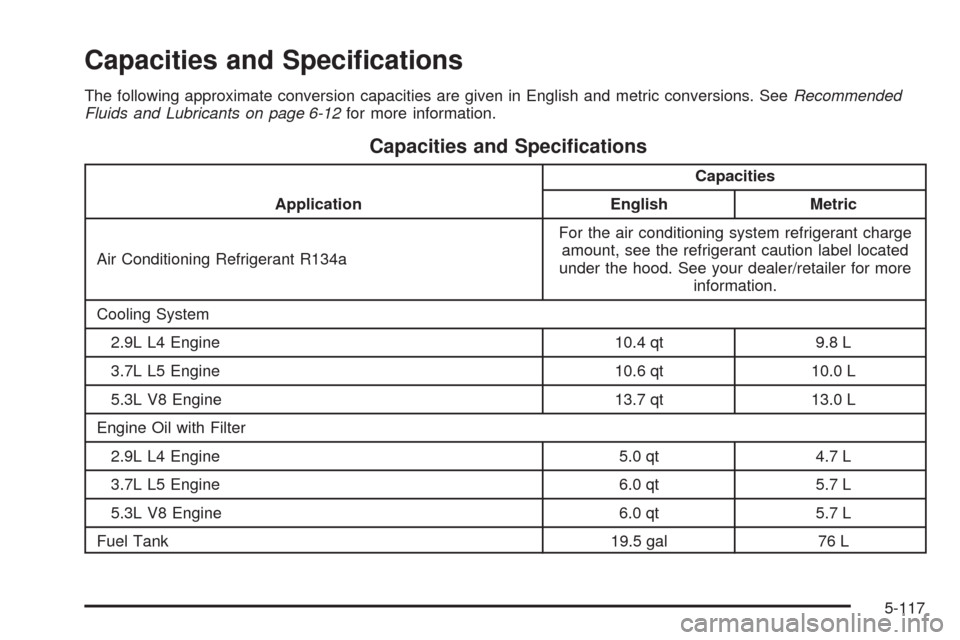
Capacities and Specications
The following approximate conversion capacities are given in English and metric conversions. SeeRecommended
Fluids and Lubricants on page 6-12for more information.
Capacities and Specications
ApplicationCapacities
English Metric
Air Conditioning Refrigerant R134aFor the air conditioning system refrigerant charge
amount, see the refrigerant caution label located
under the hood. See your dealer/retailer for more
information.
Cooling System
2.9L L4 Engine 10.4 qt 9.8 L
3.7L L5 Engine 10.6 qt 10.0 L
5.3L V8 Engine 13.7 qt 13.0 L
Engine Oil with Filter
2.9L L4 Engine 5.0 qt 4.7 L
3.7L L5 Engine 6.0 qt 5.7 L
5.3L V8 Engine 6.0 qt 5.7 L
Fuel Tank 19.5 gal 76 L
5-117