engine CHEVROLET COLORADO 2011 1.G Owners Manual
[x] Cancel search | Manufacturer: CHEVROLET, Model Year: 2011, Model line: COLORADO, Model: CHEVROLET COLORADO 2011 1.GPages: 392, PDF Size: 6.37 MB
Page 269 of 392
Black plate (29,1)Chevrolet Colorado Owner Manual - 2011
Vehicle Care 10-29
Checking Brake Fluid
Check brake fluid by looking at the
brake fluid reservoir. SeeEngine
Compartment Overview on
page 10‑6.
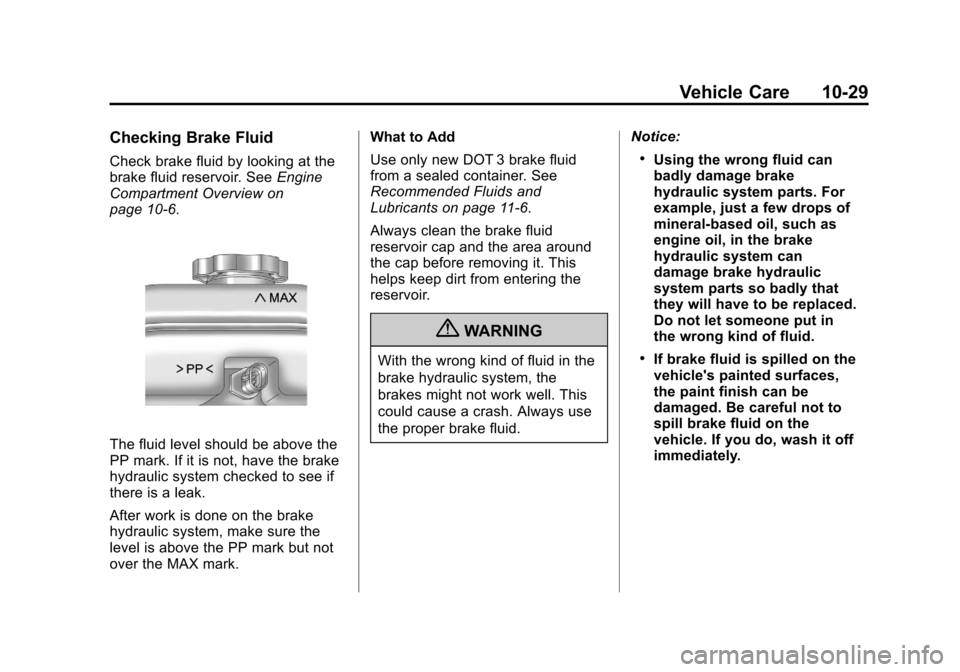
The fluid level should be above the
PP mark. If it is not, have the brake
hydraulic system checked to see if
there is a leak.
After work is done on the brake
hydraulic system, make sure the
level is above the PP mark but not
over the MAX mark. What to Add
Use only new DOT 3 brake fluid
from a sealed container. See
Recommended Fluids and
Lubricants on page 11‑6.
Always clean the brake fluid
reservoir cap and the area around
the cap before removing it. This
helps keep dirt from entering the
reservoir.
{WARNING
With the wrong kind of fluid in the
brake hydraulic system, the
brakes might not work well. This
could cause a crash. Always use
the proper brake fluid.
Notice:
.Using the wrong fluid can
badly damage brake
hydraulic system parts. For
example, just a few drops of
mineral-based oil, such as
engine oil, in the brake
hydraulic system can
damage brake hydraulic
system parts so badly that
they will have to be replaced.
Do not let someone put in
the wrong kind of fluid.
.If brake fluid is spilled on the
vehicle's painted surfaces,
the paint finish can be
damaged. Be careful not to
spill brake fluid on the
vehicle. If you do, wash it off
immediately.
Page 270 of 392
Black plate (30,1)Chevrolet Colorado Owner Manual - 2011
10-30 Vehicle Care
Battery
Refer to the replacement number
shown on the original battery label
when a new battery is needed. See
Engine Compartment Overview on
page 10‑6for battery location.
{DANGER
Battery posts, terminals, and
related accessories contain lead
and lead compounds, chemicals
known to the State of California to
cause cancer and reproductive
harm. Wash hands after handling.
Vehicle Storage
{WARNING
Batteries have acid that can burn
you and gas that can explode.
You can be badly hurt if you are
not careful. See Jump Starting on
(Continued)
WARNING (Continued)
page 10‑86 for tips on working
around a battery without
getting hurt.
Infrequent Usage: Remove the
black, negative (−) cable from the
battery to keep the battery from
running down.
Extended Storage: Remove the
black, negative (−) cable from the
battery or use a battery trickle
charger.
Four-Wheel Drive
Transfer Case
When to Check Lubricant
Refer to the Maintenance Schedule
to determine how often to check the
lubricant. See Scheduled
Maintenance on page 11‑2. How to Check Lubricant
To get an accurate reading, the
vehicle should be on a level
surface.
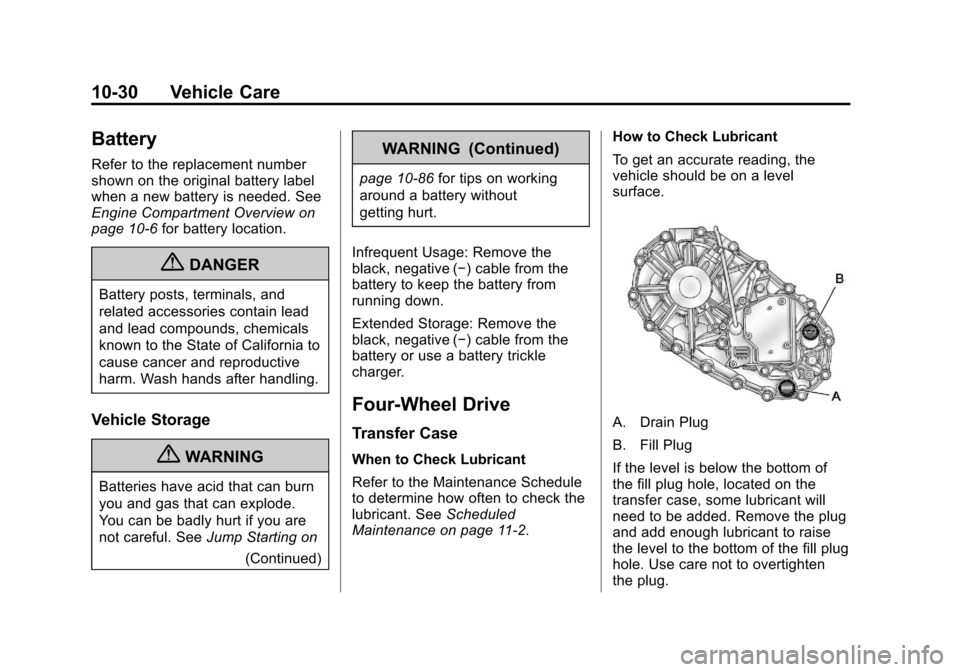
A. Drain Plug
B. Fill Plug
If the level is below the bottom of
the fill plug hole, located on the
transfer case, some lubricant will
need to be added. Remove the plug
and add enough lubricant to raise
the level to the bottom of the fill plug
hole. Use care not to overtighten
the plug.
Page 272 of 392
Black plate (32,1)Chevrolet Colorado Owner Manual - 2011
10-32 Vehicle Care
How to Check Lubricant
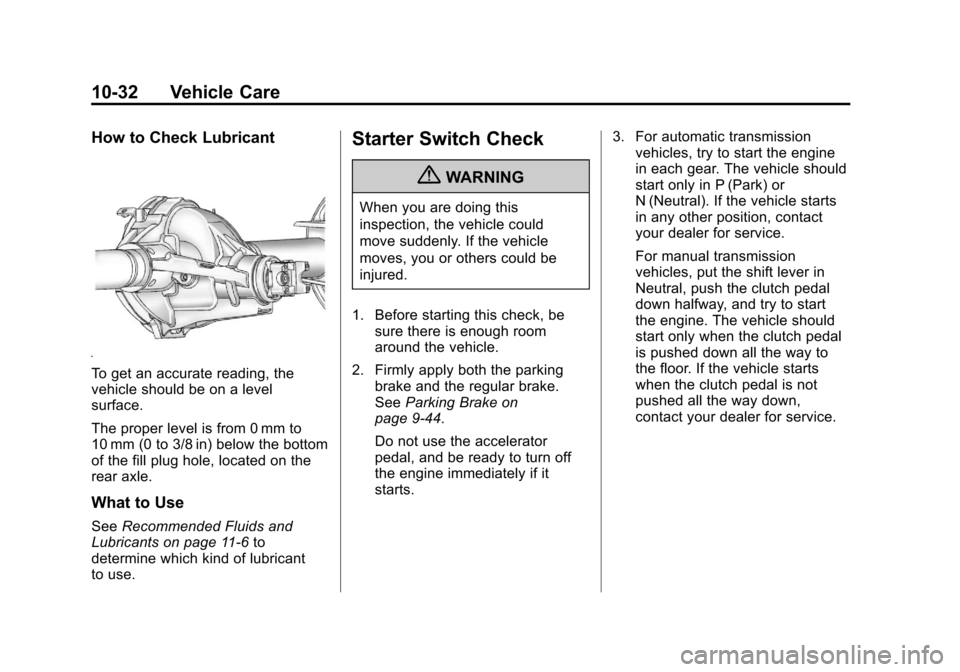
To get an accurate reading, the
vehicle should be on a level
surface.
The proper level is from 0 mm to
10 mm (0 to 3/8 in) below the bottom
of the fill plug hole, located on the
rear axle.
What to Use
SeeRecommended Fluids and
Lubricants on page 11‑6 to
determine which kind of lubricant
to use.
Starter Switch Check
{WARNING
When you are doing this
inspection, the vehicle could
move suddenly. If the vehicle
moves, you or others could be
injured.
1. Before starting this check, be sure there is enough room
around the vehicle.
2. Firmly apply both the parking brake and the regular brake.
See Parking Brake on
page 9‑44.
Do not use the accelerator
pedal, and be ready to turn off
the engine immediately if it
starts. 3. For automatic transmission
vehicles, try to start the engine
in each gear. The vehicle should
start only in P (Park) or
N (Neutral). If the vehicle starts
in any other position, contact
your dealer for service.
For manual transmission
vehicles, put the shift lever in
Neutral, push the clutch pedal
down halfway, and try to start
the engine. The vehicle should
start only when the clutch pedal
is pushed down all the way to
the floor. If the vehicle starts
when the clutch pedal is not
pushed all the way down,
contact your dealer for service.
Page 273 of 392
Black plate (33,1)Chevrolet Colorado Owner Manual - 2011
Vehicle Care 10-33
Automatic Transmission
Shift Lock Control
Function Check
{WARNING
When you are doing this
inspection, the vehicle could
move suddenly. If the vehicle
moves, you or others could be
injured.
1. Before starting this check, be sure there is enough room
around the vehicle. It should be
parked on a level surface.
2. Firmly apply the parking brake. See Parking Brake on
page 9‑44.
Be ready to apply the regular
brake immediately if the vehicle
begins to move.
3. With the engine off, turn the ignition on, but do not start the
engine. Without applying the
regular brake, try to move the shift lever out of P (Park) with
normal effort. If the shift lever
moves out of P (Park), contact
your dealer for service.
Ignition Transmission
Lock Check
While parked, and with the parking
brake set, try to turn the ignition to
LOCK/OFF in each shift lever
position.
.For automatic transmission
vehicles, the ignition should turn
to LOCK/OFF only when the
shift lever is in P (Park).
.For manual transmission
vehicles, the ignition should turn
to LOCK/OFF only when you
press the key release button.
On all vehicles, the ignition key
should come out only in LOCK/OFF.
Contact your dealer if service is
required.
Park Brake and P (Park)
Mechanism Check
{WARNING
When you are doing this check,
the vehicle could begin to move.
You or others could be injured
and property could be damaged.
Make sure there is room in front
of the vehicle in case it begins to
roll. Be ready to apply the regular
brake at once should the vehicle
begin to move.
Park on a fairly steep hill, with the
vehicle facing downhill. Keeping
your foot on the regular brake, set
the parking brake.
.To check the parking brake's
holding ability: With the engine
running and the transmission in
N (Neutral), slowly remove foot
pressure from the regular brake
pedal. Do this until the vehicle is
held by the parking brake only.
Page 274 of 392
Black plate (34,1)Chevrolet Colorado Owner Manual - 2011
10-34 Vehicle Care
.To check the P (Park)
mechanism's holding ability:
With the engine running, shift to
P (Park). Then release the
parking brake followed by the
regular brake.
Contact your dealer if service is
required.
Wiper Blade Replacement
Windshield wiper blades should be
inspected for wear and cracking.
See Scheduled Maintenance on
page 11‑2 for more information.
Replacement blades come in
different types and are removed in
different ways. For proper type and
length, see Maintenance
Replacement Parts on page 11‑9.
Allowing the wiper blade arm to
touch the windshield when no wiper
blade is installed could damage the
windshield. Any damage that occurs would not be covered by the vehicle
warranty. Do not allow the wiper
blade arm to touch the windshield.
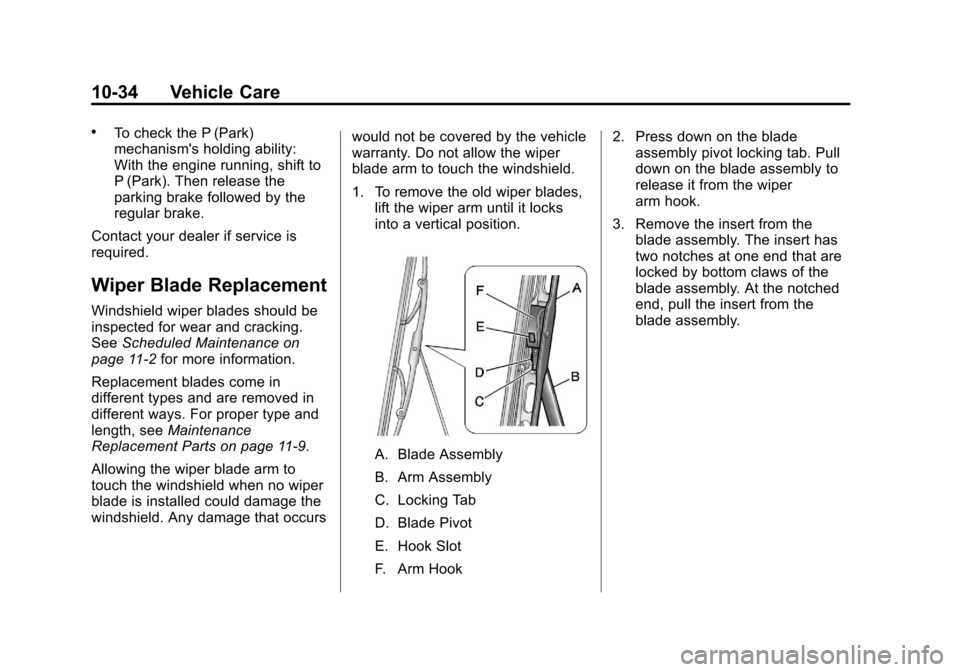
1. To remove the old wiper blades,
lift the wiper arm until it locks
into a vertical position.
A. Blade Assembly
B. Arm Assembly
C. Locking Tab
D. Blade Pivot
E. Hook Slot
F. Arm Hook 2. Press down on the blade
assembly pivot locking tab. Pull
down on the blade assembly to
release it from the wiper
arm hook.
3. Remove the insert from the blade assembly. The insert has
two notches at one end that are
locked by bottom claws of the
blade assembly. At the notched
end, pull the insert from the
blade assembly.
Page 276 of 392
Black plate (36,1)Chevrolet Colorado Owner Manual - 2011
10-36 Vehicle Care
Bulb Replacement
For the proper type of replacement
bulbs, seeReplacement Bulbs on
page 10‑39.
For any bulb‐changing procedure
not listed in this section, contact
your dealer.
Halogen Bulbs
{WARNING
Halogen bulbs have pressurized
gas inside and can burst if you
drop or scratch the bulb. You or
others could be injured. Be sure
to read and follow the instructions
on the bulb package.
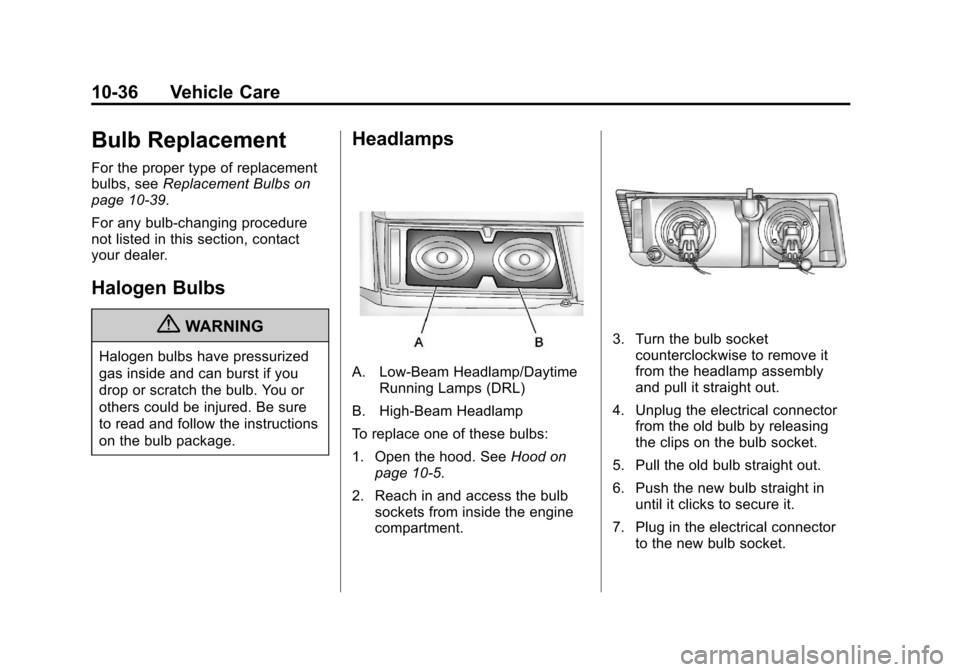
Headlamps
A. Low-Beam Headlamp/Daytime Running Lamps (DRL)
B. High-Beam Headlamp
To replace one of these bulbs:
1. Open the hood. See Hood on
page 10‑5.
2. Reach in and access the bulb sockets from inside the engine
compartment.
3. Turn the bulb socketcounterclockwise to remove it
from the headlamp assembly
and pull it straight out.
4. Unplug the electrical connector from the old bulb by releasing
the clips on the bulb socket.
5. Pull the old bulb straight out.
6. Push the new bulb straight in until it clicks to secure it.
7. Plug in the electrical connector to the new bulb socket.
Page 277 of 392
Black plate (37,1)Chevrolet Colorado Owner Manual - 2011
Vehicle Care 10-37
8. Push the bulb socket straight inand turn it clockwise to secure it
in the headlamp assembly.
Front Turn Signal,
Parking, and Daytime
Running Lamps (DRL)
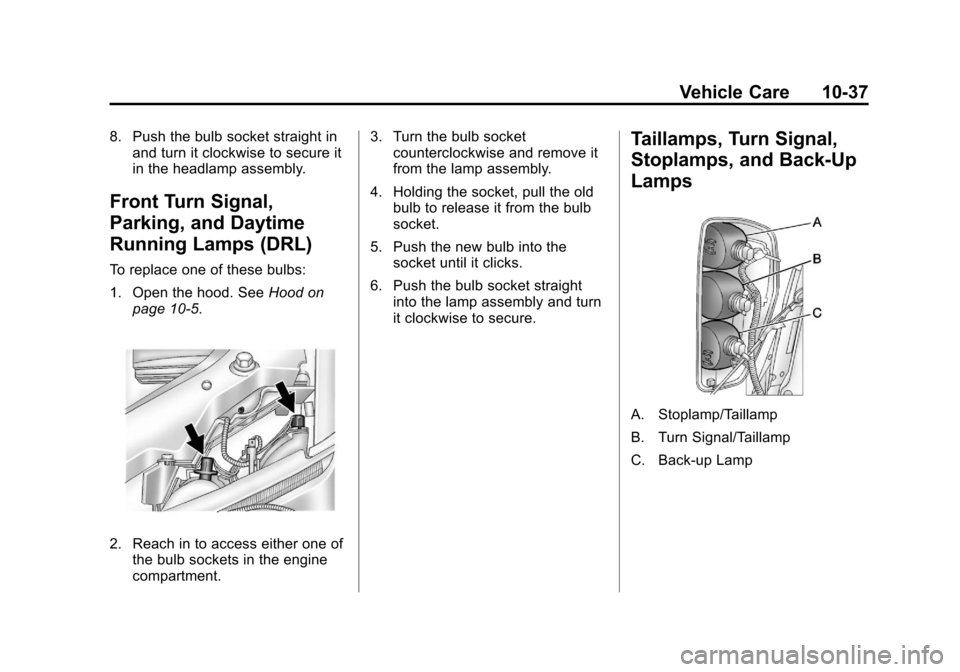
To replace one of these bulbs:
1. Open the hood. See Hood on
page 10‑5.
2. Reach in to access either one of the bulb sockets in the engine
compartment. 3. Turn the bulb socket
counterclockwise and remove it
from the lamp assembly.
4. Holding the socket, pull the old bulb to release it from the bulb
socket.
5. Push the new bulb into the socket until it clicks.
6. Push the bulb socket straight into the lamp assembly and turn
it clockwise to secure.
Taillamps, Turn Signal,
Stoplamps, and Back-Up
Lamps
A. Stoplamp/Taillamp
B. Turn Signal/Taillamp
C. Back‐up Lamp
Page 281 of 392
Black plate (41,1)Chevrolet Colorado Owner Manual - 2011
Vehicle Care 10-41
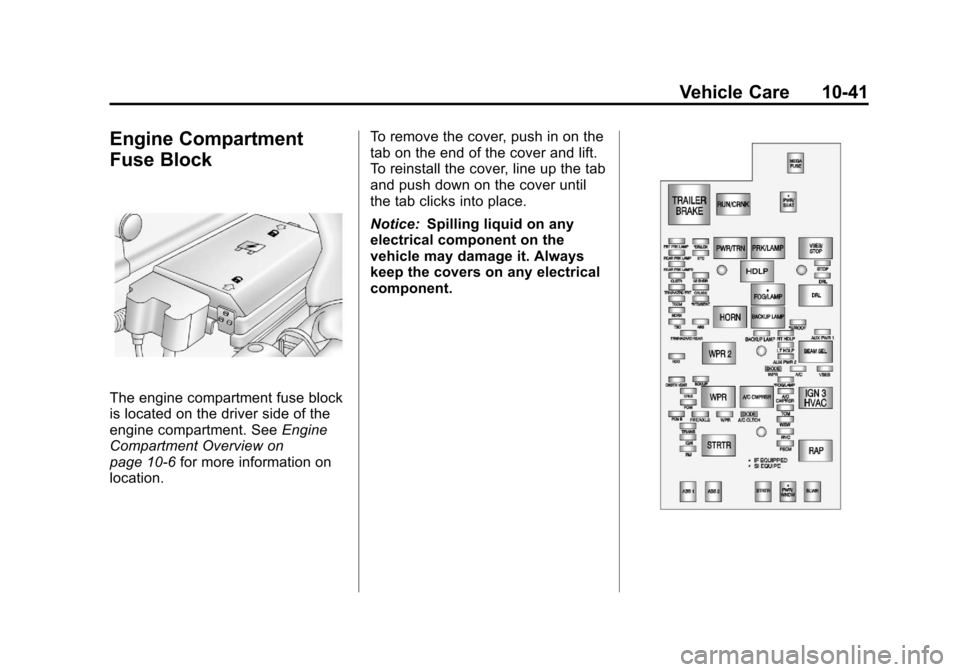
Engine Compartment
Fuse Block
The engine compartment fuse block
is located on the driver side of the
engine compartment. SeeEngine
Compartment Overview on
page 10‑6 for more information on
location. To remove the cover, push in on the
tab on the end of the cover and lift.
To reinstall the cover, line up the tab
and push down on the cover until
the tab clicks into place.
Notice:
Spilling liquid on any
electrical component on the
vehicle may damage it. Always
keep the covers on any electrical
component.
Page 289 of 392
Black plate (49,1)Chevrolet Colorado Owner Manual - 2011
Vehicle Care 10-49
compact spare tire, see
Compact Spare Tire on
page 10‑84andIf a Tire Goes
Flat on page 10‑69.
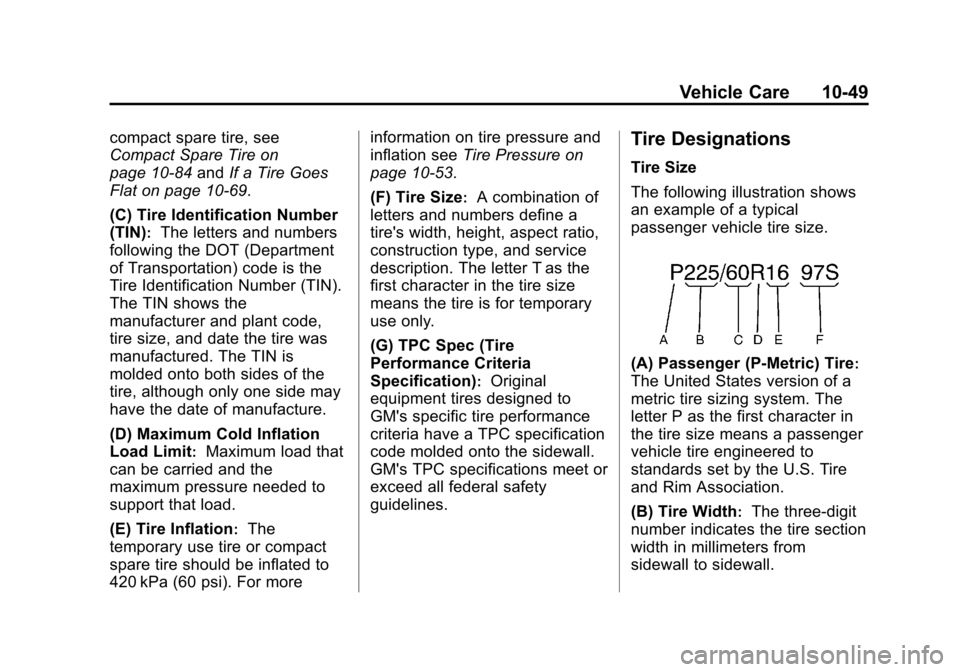
(C) Tire Identification Number
(TIN)
:The letters and numbers
following the DOT (Department
of Transportation) code is the
Tire Identification Number (TIN).
The TIN shows the
manufacturer and plant code,
tire size, and date the tire was
manufactured. The TIN is
molded onto both sides of the
tire, although only one side may
have the date of manufacture.
(D) Maximum Cold Inflation
Load Limit
:Maximum load that
can be carried and the
maximum pressure needed to
support that load.
(E) Tire Inflation
:The
temporary use tire or compact
spare tire should be inflated to
420 kPa (60 psi). For more information on tire pressure and
inflation see
Tire Pressure on
page 10‑53.
(F) Tire Size
:A combination of
letters and numbers define a
tire's width, height, aspect ratio,
construction type, and service
description. The letter T as the
first character in the tire size
means the tire is for temporary
use only.
(G) TPC Spec (Tire
Performance Criteria
Specification)
:Original
equipment tires designed to
GM's specific tire performance
criteria have a TPC specification
code molded onto the sidewall.
GM's TPC specifications meet or
exceed all federal safety
guidelines.
Tire Designations
Tire Size
The following illustration shows
an example of a typical
passenger vehicle tire size.
(A) Passenger (P‐Metric) Tire:
The United States version of a
metric tire sizing system. The
letter P as the first character in
the tire size means a passenger
vehicle tire engineered to
standards set by the U.S. Tire
and Rim Association.
(B) Tire Width
:The three‐digit
number indicates the tire section
width in millimeters from
sidewall to sidewall.
Page 298 of 392
Black plate (58,1)Chevrolet Colorado Owner Manual - 2011
10-58 Vehicle Care
recommended for your vehicle
could prevent the TPMS from
functioning properly. SeeBuying
New Tires on page 10‑62.
.Operating electronic devices or
being near facilities using radio
wave frequencies similar to the
TPMS could cause the TPMS
sensors to malfunction.
If the TPMS is not functioning it
cannot detect or signal a low tire
condition. See your dealer for
service if the TPMS malfunction
light and DIC message comes on
and stays on.
TPMS Sensor Matching
Process
Each TPMS sensor has a unique
identification code. Any time you
replace one or more of the TPMS
sensors or rotate your vehicle's
tires, the identification codes need
to be matched to the new tire/wheel
position. The sensors are matched
to the tire/wheel positions in the
following order: driver side front tire,
passenger side front tire, passenger side rear tire, and driver side rear
tire using a TPMS diagnostic tool.
See your dealer for service.
The TPMS sensors can also be
matched to each tire/wheel position
by increasing or decreasing the
tire's air pressure. If increasing the
tire's air pressure, do not exceed
the maximum inflation pressure
indicated on the tire's sidewall. To
let air-pressure out of a tire you can
use the pointed end of the valve
cap, a pencil-style air pressure
gauge, or a key.
You have one minute to match the
first tire/wheel position, and
five minutes overall, to match all
four tire/wheel positions. If it takes
longer than one minute, to match
the first tire and wheel, or more than
five minutes to match all four tire
and wheel positions, the matching
process stops and you need to
start over.
The TPMS sensor matching
procedure is outlined below:
1. Set the parking brake.
2. Turn the ignition switch to ON/
RUN with the engine off.
3. Turn the exterior lamp switch from AUTO to OFF four times
within three seconds. A double
horn chirp will sound and the
TPMS low tire warning light
starts flashing. The double horn
chirp and flashing TPMS
warning light indicates the TPMS
matching process has started.
The TPMS warning light should
continue flashing throughout the
matching procedure. The LOW
TIRE message displays on the
Driver Information Center (DIC).
4. Start with the driver side front tire.
5. Remove the valve cap from the valve cap stem. Activate the
TPMS sensor by increasing or
decreasing the tire's air pressure
for 10 seconds, then stop and