change wheel CHEVROLET COLORADO 2011 1.G Owners Manual
[x] Cancel search | Manufacturer: CHEVROLET, Model Year: 2011, Model line: COLORADO, Model: CHEVROLET COLORADO 2011 1.GPages: 392, PDF Size: 6.37 MB
Page 5 of 392

Black plate (5,1)Chevrolet Colorado Owner Manual - 2011
Introduction v
Vehicle Symbol Chart
Here are some additional symbols
that may be found on the vehicle
and what they mean. For more
information on the symbol, refer to
the Index.
9:Airbag Readiness Light
#:Air Conditioning
!:Antilock Brake System (ABS)
g:Audio Steering Wheel Controls
or OnStar®
$: Brake System Warning Light
":Charging System
I:Cruise Control
B: Engine Coolant Temperature
O:Exterior Lamps
#:Fog Lamps
.: Fuel Gauge
+:Fuses
3: Headlamp High/Low-Beam
Changer
j: LATCH System Child
Restraints
*: Malfunction Indicator Lamp
::Oil Pressure
}:Power
/:Remote Vehicle Start
>:Safety Belt Reminders
7:Tire Pressure Monitor
d:Traction Control
M:Windshield Washer Fluid
Page 9 of 392
Black plate (3,1)Chevrolet Colorado Owner Manual - 2011
In Brief 1-3
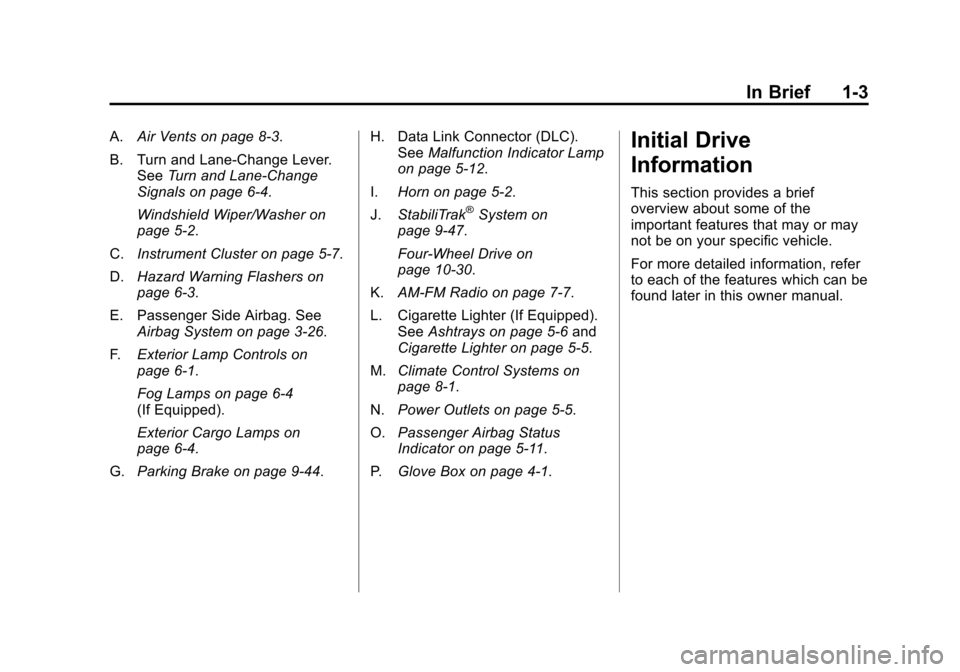
A.Air Vents on page 8‑3.
B. Turn and Lane‐Change Lever. See Turn and Lane-Change
Signals on page 6‑4.
Windshield Wiper/Washer on
page 5‑2.
C. Instrument Cluster on page 5‑7.
D. Hazard Warning Flashers on
page 6‑3.
E. Passenger Side Airbag. See Airbag System on page 3‑26.
F. Exterior Lamp Controls on
page 6‑1.
Fog Lamps on page 6‑4
(If Equipped).
Exterior Cargo Lamps on
page 6‑4.
G. Parking Brake on page 9‑44. H. Data Link Connector (DLC).
See Malfunction Indicator Lamp
on page 5‑12.
I. Horn on page 5‑2.
J. StabiliTrak
®System on
page 9‑47.
Four-Wheel Drive on
page 10‑30.
K. AM-FM Radio on page 7‑7.
L. Cigarette Lighter (If Equipped). See Ashtrays on page 5‑6 and
Cigarette Lighter on page 5‑5.
M. Climate Control Systems on
page 8‑1.
N. Power Outlets on page 5‑5.
O. Passenger Airbag Status
Indicator on page 5‑11.
P. Glove Box on page 4‑1.
Initial Drive
Information
This section provides a brief
overview about some of the
important features that may or may
not be on your specific vehicle.
For more detailed information, refer
to each of the features which can be
found later in this owner manual.
Page 81 of 392
Black plate (37,1)Chevrolet Colorado Owner Manual - 2011
Seats and Restraints 3-37
{WARNING
For up to 10 seconds after the
ignition is turned off and the
battery is disconnected, an airbag
can still inflate during improper
service. You can be injured if you
are close to an airbag when it
inflates. Avoid yellow connectors.
They are probably part of the
airbag system. Be sure to follow
proper service procedures, and
make sure the person performing
work for you is qualified to do so.
Adding Equipment to the
Airbag-Equipped Vehicle
Q: Is there anything I might addto or change about the vehicle
that could keep the airbags
from working properly?
A: Yes. If you add things that
change the vehicle's frame,
bumper system, height, front end
or side sheet metal, they may keep the airbag system from
working properly. Changing or
moving any parts of the front
seats, safety belts, the airbag
sensing and diagnostic module,
steering wheel, instrument
panel, roof-rail airbag modules,
ceiling headliner or pillar garnish
trim, front sensors, or airbag
wiring can affect the operation of
the airbag system.
In addition, the vehicle may have
a passenger sensing system for
the right front passenger
position, which includes sensors
that are part of the passenger
seat. The passenger sensing
system may not operate properly
if the original seat trim is
replaced with non-GM covers,
upholstery or trim, or with
GM covers, upholstery or trim
designed for a different vehicle.
Any object, such as an
aftermarket seat heater or a
comfort enhancing pad or
device, installed under or on top
of the seat fabric, could alsointerfere with the operation of
the passenger sensing system.
This could either prevent proper
deployment of the passenger
airbag(s) or prevent the
passenger sensing system from
properly turning off the
passenger airbag(s). See
Passenger Sensing System on
page 3‑32.
If you have any questions, call
Customer Assistance. The
phone numbers and addresses
for Customer Assistance are in
Step Two of the Customer
Satisfaction Procedure in this
manual. See
Customer
Satisfaction Procedure (U.S. and
Canada) on page 13‑1 or
Customer Satisfaction
Procedure (Mexico) on
page 13‑3.
Page 126 of 392
Black plate (14,1)Chevrolet Colorado Owner Manual - 2011
5-14 Instruments and Controls
Light On Steady:An emission
control system malfunction has
been detected on the vehicle.
Diagnosis and service might be
required.
The following may correct an
emissions system malfunction:
.Make sure the fuel cap is fully
installed. See Filling the Tank on
page 9‑54. The diagnostic
system can determine if the fuel
cap has been left off or
improperly installed. A loose or
missing fuel cap allows fuel to
evaporate into the atmosphere.
A few driving trips with the cap
properly installed should turn the
light off.
.Make sure the electrical system
is not wet. The system could be
wet if the vehicle was driven
through a deep puddle of water.
The condition is usually
corrected when the electrical
system dries out. A few driving
trips should turn the light off.
.Make sure to fuel the vehicle
with quality fuel. Poor fuel quality
causes the engine not to run as
efficiently as designed and can
cause: stalling after start-up,
stalling when the vehicle is
changed into gear, misfiring,
hesitation on acceleration,
or stumbling on acceleration.
These conditions might go away
once the engine is warmed up.
If one or more of these
conditions occurs, change the
fuel brand used. It will require at
least one full tank of the proper
fuel to turn the light off.
See Recommended Fuel on
page 9‑51.
If none of the above have made the
light turn off, your dealer can check
the vehicle. The dealer has the
proper test equipment and
diagnostic tools to fix any
mechanical or electrical problems
that might have developed.Emissions Inspection and
Maintenance Programs
Some state/provincial and local
governments may have programs to
inspect the on-vehicle emission
control equipment. For the
inspection, the emission system test
equipment is connected to the
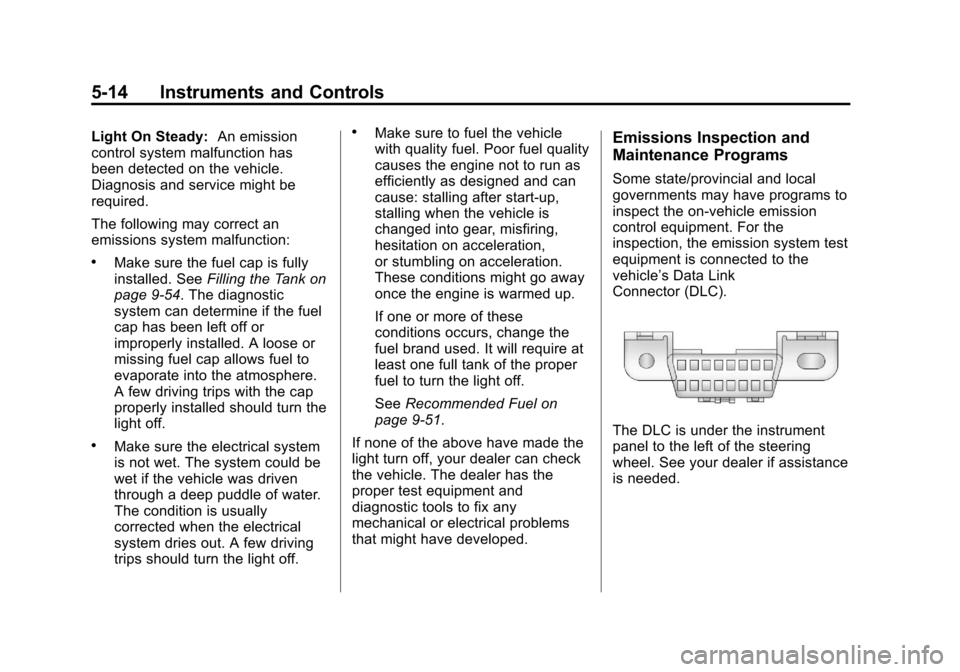
vehicle’s Data Link
Connector (DLC).
The DLC is under the instrument
panel to the left of the steering
wheel. See your dealer if assistance
is needed.
Page 139 of 392
Black plate (1,1)Chevrolet Colorado Owner Manual - 2011
Lighting 6-1
Lighting
Exterior Lighting
Exterior Lamp Controls . . . . . . . . 6-1
Exterior Lamps OffReminder . . . . . . . . . . . . . . . . . . . . 6-2
Headlamp High/Low-Beam Changer . . . . . . . . . . . . . . . . . . . . . 6-2
Flash-to-Pass . . . . . . . . . . . . . . . . . 6-2
Daytime Running Lamps (DRL) . . . . . . . . . . . . . . . . 6-2
Automatic Headlamp System . . . . . . . . . . . . . . . . . . . . . . 6-3
Hazard Warning Flashers . . . . . 6-3
Turn and Lane-Change Signals . . . . . . . . . . . . . . . . . . . . . . 6-4
Fog Lamps . . . . . . . . . . . . . . . . . . . . 6-4
Exterior Cargo Lamps . . . . . . . . . 6-4
Interior Lighting
Instrument Panel Illumination Control . . . . . . . . . . . . . . . . . . . . . . 6-5
Dome Lamps . . . . . . . . . . . . . . . . . 6-5
Lighting Features
Exit Lighting . . . . . . . . . . . . . . . . . . . 6-6
Battery Load Management . . . . 6-6
Battery Power Protection . . . . . . 6-6
Exterior Lighting
Exterior Lamp Controls
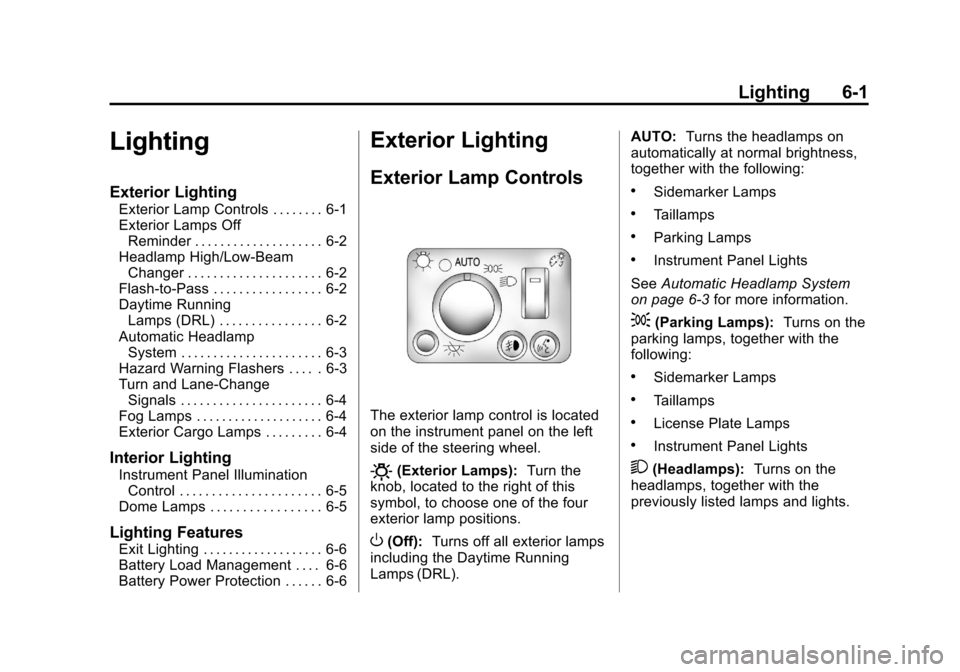
The exterior lamp control is located
on the instrument panel on the left
side of the steering wheel.
O(Exterior Lamps): Turn the
knob, located to the right of this
symbol, to choose one of the four
exterior lamp positions.
O(Off): Turns off all exterior lamps
including the Daytime Running
Lamps (DRL). AUTO:
Turns the headlamps on
automatically at normal brightness,
together with the following:
.Sidemarker Lamps
.Taillamps
.Parking Lamps
.Instrument Panel Lights
See Automatic Headlamp System
on page 6‑3 for more information.
;(Parking Lamps): Turns on the
parking lamps, together with the
following:
.Sidemarker Lamps
.Taillamps
.License Plate Lamps
.Instrument Panel Lights
2(Headlamps): Turns on the
headlamps, together with the
previously listed lamps and lights.
Page 173 of 392
Black plate (3,1)Chevrolet Colorado Owner Manual - 2011
Climate Controls 8-3
@(Recirculation):Press to turn
the recirculation mode on or off. An
indicator light on the button comes
on to show that the recirculation
mode is on. This mode recirculates
and helps to quickly cool the air
inside the vehicle. It can be used to
prevent outside air and odors from
entering the vehicle.
The recirculation mode cannot be
used with floor/defog, defrost,
or defogging modes. If recirculation
is selected in these modes, the
indicator will flash or not come on.Air Vents
Use the thumbwheel on the outlets
to change the direction of the
air flow.
Lift up or push down on the
thumbwheel located in the center of
the outlet to direct the air up or
down, or slide the thumbwheel to
the left or right to direct the airflow
from side‐to‐side. Operation Tips.Clear away any ice, snow or
leaves from the air inlets at the
base of the windshield that may
block the flow of air into the
vehicle.
.Use of non-GM approved hood
deflectors may adversely affect
the performance of the system.
.Keep the path under the front
seats clear of objects to help
circulate the air inside of the
vehicle more effectively.
Page 180 of 392
Black plate (6,1)Chevrolet Colorado Owner Manual - 2011
9-6 Driving and Operating
and by not overdriving those
conditions. But skids are always
possible.
The three types of skids correspond
to the vehicle's three control
systems. In the braking skid, the
wheels are not rolling. In the
steering or cornering skid, too much
speed or steering in a curve causes
tires to slip and lose cornering force.
And in the acceleration skid, too
much throttle causes the driving
wheels to spin.
If the vehicle starts to slide, ease
your foot off the accelerator pedal
and quickly steer the way you want
the vehicle to go. If you start
steering quickly enough, the vehicle
may straighten out. Always be ready
for a second skid if it occurs.
Of course, traction is reduced when
water, snow, ice, gravel, or other
material is on the road. For safety,
slow down and adjust your driving to
these conditions. It is important toslow down on slippery surfaces
because stopping distance is longer
and vehicle control more limited.
While driving on a surface with
reduced traction, try to avoid
sudden steering, acceleration,
or braking, including reducing
vehicle speed by shifting to a lower
gear. Any sudden changes could
cause the tires to slide. You might
not realize the surface is slippery
until the vehicle is skidding. Learn to
recognize warning clues
—such as
enough water, ice, or packed snow
on the road to make a mirrored
surface —and slow down when you
have any doubt.
Remember: Antilock brakes help
avoid only the braking skid.
Off-Road Driving
Vehicles with four-wheel drive can
be used for off-road driving.
Vehicles without four-wheel drive
should not be driven off-road except
on a level, solid surface. The airbag system is designed to
work properly under a wide range of
conditions, including off‐road usage.
Always wear your safety belt and
observe safe driving speeds,
especially on rough terrain.
Drinking and driving can be very
dangerous on any road and this is
certainly true for off-road driving. At
the very time you need special
alertness and driving skills, your
reflexes, perceptions, and judgment
can be affected by even a small
amount of alcohol. You could have a
serious
—or even fatal —accident
if you drink and drive or ride with a
driver who has been drinking.
Off-roading can be great fun but has
some definite hazards. The greatest
of these is the terrain itself. When
off-road driving, traffic lanes are not
marked, curves are not banked, and
there are no road signs. Surfaces
can be slippery, rough, uphill,
or downhill.
Page 183 of 392
Black plate (9,1)Chevrolet Colorado Owner Manual - 2011
Driving and Operating 9-9
Controlling the vehicle is the key to
successful off-road driving. One of
the best ways to control the vehicle
is to control the speed. At higher
speeds:
.You approach things faster and
have less time to react.
.There is less time to scan the
terrain for obstacles.
.The vehicle has more bounce
when driving over obstacles.
.More braking distance is
needed, especially on an
unpaved surface.
{WARNING
When you are driving off-road,
bouncing and quick changes in
direction can easily throw you out
of position. This could cause you
to lose control and crash. So,
whether you are driving on or
off the road, you and your
passengers should wear safety
belts.
Scanning the Terrain
Off-road driving can take you over
many different kinds of terrain. Be
familiar with the terrain and its many
different features.
Surface Conditions:Off-roading
surfaces can be hard-packed dirt,
gravel, rocks, grass, sand, mud,
snow, or ice. Each of these surfaces
affects the vehicle's steering,
acceleration, and braking in different
ways. Depending on the surface,
slipping, sliding, wheel spinning,
delayed acceleration, poor traction,
and longer braking distances can
occur.
Surface Obstacles: Unseen or
hidden obstacles can be hazardous.
A rock, log, hole, rut, or bump can
startle you if you are not prepared
for them. Often these obstacles are
hidden by grass, bushes, snow,
or even the rise and fall of the
terrain itself. Some things to consider:.Is the path ahead clear?
.Will the surface texture change
abruptly up ahead?
.Does the travel take you uphill or
downhill?
.Will you have to stop suddenly
or change direction quickly?
When driving over obstacles or
rough terrain, keep a firm grip on
the steering wheel. Ruts, troughs,
or other surface features can jerk
the wheel out of your hands.
When driving over bumps, rocks,
or other obstacles, the wheels can
leave the ground. If this happens,
even with one or two wheels, you
cannot control the vehicle as well or
at all.
Because you will be on an unpaved
surface, it is especially important to
avoid sudden acceleration, sudden
turns, or sudden braking.
Page 188 of 392
Black plate (14,1)Chevrolet Colorado Owner Manual - 2011
9-14 Driving and Operating
between the left and right
wheels—might not prevent the
vehicle from tilting and rolling
over. Driving across an incline
puts more weight on the downhill
wheels which could cause a
downhill slide or a rollover.
.Surface conditions can be a
problem. Loose gravel, muddy
spots, or even wet grass can
cause the tires to slip sideways,
downhill. If the vehicle slips
sideways, it can hit something
that will trip it —a rock, a rut,
etc. —and roll over.
.Hidden obstacles can make the
steepness of the incline even
worse. If you drive across a rock
with the uphill wheels, or if the
downhill wheels drop into a rut
or depression, the vehicle can tilt
even more.
For these reasons, carefully
consider whether to try to drive
across an incline. Just because the
trail goes across the incline does not mean you have to drive it. The
last vehicle to try it might have
rolled over.
If you feel the vehicle starting to
slide sideways, turn downhill. This
should help straighten out the
vehicle and prevent the side
slipping. The best way to prevent
this is to
“walk the course” first, so
you know what the surface is like
before driving it.
Stalling on an Incline
{WARNING
Getting out on the downhill (low)
side of a vehicle stopped across
an incline is dangerous. If the
vehicle rolls over, you could be
crushed or killed. Always get out
on the uphill (high) side of the
vehicle and stay well clear of the
rollover path.
If the vehicle stalls when crossing
an incline, be sure you, and any
passengers, get out on the uphill side, even if the door there is harder
to open. If you get out on the
downhill side and the vehicle starts
to roll over, you will be right in
its path.
If you have to walk down the slope,
stay out of the path the vehicle will
take if it does roll over.
Driving in Mud, Sand, Snow,
or Ice
When you drive in mud, snow,
or sand, the wheels do not get good
traction. Acceleration is not as
quick, turning is more difficult, and
braking distances are longer.
It is best to use a low gear when in
mud
—the deeper the mud, the
lower the gear. In really deep mud,
keep the vehicle moving so it does
not get stuck.
When driving on sand, wheel
traction changes. On loosely packed
sand, such as on beaches or sand
dunes, the tires will tend to sink into
the sand. This affects steering,
Page 212 of 392
Black plate (38,1)Chevrolet Colorado Owner Manual - 2011
9-38 Driving and Operating
R (Reverse):To back up, press the
clutch pedal. After the vehicle stops,
shift into R (Reverse). Slowly let up
on the clutch pedal as you press the
accelerator pedal. If it is hard to
shift, let the shift lever return to
Neutral and release the clutch
pedal. Then press the clutch again
and shift into R (Reverse). Do not
attempt to shift into 5 (Fifth) prior to
shifting into R (Reverse). The
transmission has a lock out feature
which prevents a 5 (Fifth) gear to
R (Reverse) gear shift.
Notice: Shifting to R (Reverse)
while the vehicle is moving
forward could damage the
transmission. The repairs would
not be covered by the vehicle
warranty. Shift to R (Reverse) only
after the vehicle is stopped.
Use R (Reverse), along with the
parking brake, for parking the
vehicle.Up-Shift Light
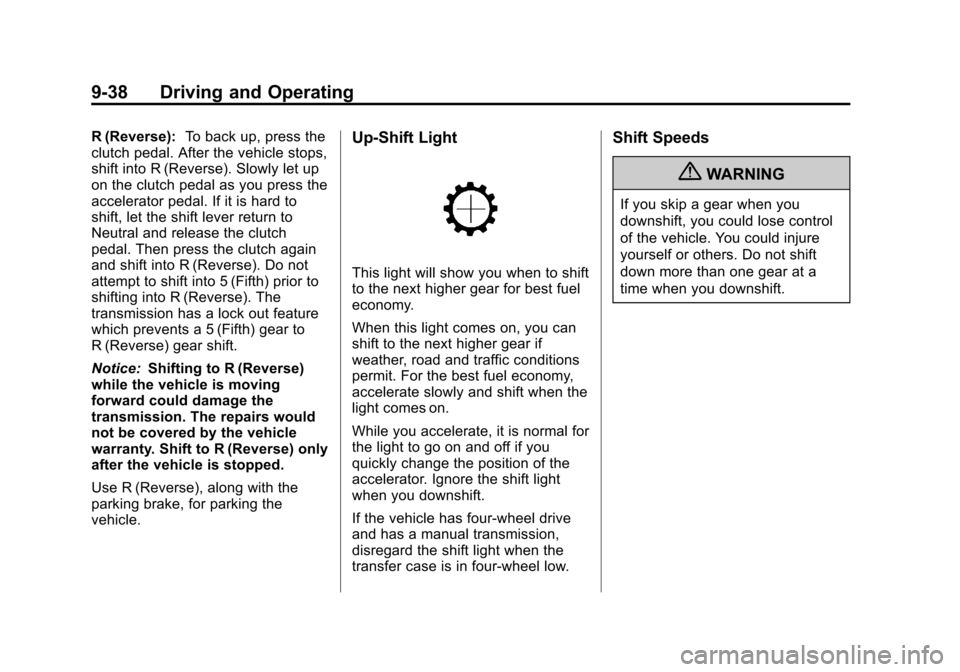
This light will show you when to shift
to the next higher gear for best fuel
economy.
When this light comes on, you can
shift to the next higher gear if
weather, road and traffic conditions
permit. For the best fuel economy,
accelerate slowly and shift when the
light comes on.
While you accelerate, it is normal for
the light to go on and off if you
quickly change the position of the
accelerator. Ignore the shift light
when you downshift.
If the vehicle has four-wheel drive
and has a manual transmission,
disregard the shift light when the
transfer case is in four-wheel low.
Shift Speeds
{WARNING
If you skip a gear when you
downshift, you could lose control
of the vehicle. You could injure
yourself or others. Do not shift
down more than one gear at a
time when you downshift.