load CHEVROLET COLORADO 2011 1.G Owners Manual
[x] Cancel search | Manufacturer: CHEVROLET, Model Year: 2011, Model line: COLORADO, Model: CHEVROLET COLORADO 2011 1.GPages: 392, PDF Size: 6.37 MB
Page 22 of 392
Black plate (16,1)Chevrolet Colorado Owner Manual - 2011
1-16 In Brief
Performance and
Maintenance
Traction Control
System (TCS)
The traction control system limits
wheel spin. The system turns on
automatically every time the vehicle
is started.
.To turn off traction control, press
and release
don the instrument
panel.
dilluminates and the
appropriate DIC message is
displayed. See Ride Control
System Messages on page 5‑25.
.Press and release the button
again to turn on traction control.
For more information, see Traction
Control System (TCS) on
page 9‑46.
StabiliTrak®System
The Electronic Stability Control
system assists with directional
control of the vehicle in difficult
driving conditions. The system turns
on automatically every time the
vehicle is started.
.To turn off both traction control
and Electronic Stability Control,
press and hold
duntild
illuminates and the appropriate
DIC message is displayed. See
Ride Control System Messages
on page 5‑25.
.Press and release the button
again to turn on both systems.
For more information, see
StabiliTrak
®System on page 9‑47.
Tire Pressure Monitor
This vehicle may have a Tire
Pressure Monitor System (TPMS).
The TPMS warning light alerts you
to a significant loss in pressure of
one of the vehicle's tires. If the
warning light comes on, stop as
soon as possible and inflate the
tires to the recommended pressure
shown on the Tire and Loading
Information label. See Vehicle Load
Limits on page 9‑20. The warning
light will remain on until the tire
pressure is corrected.
During cooler conditions, the low tire
pressure warning light may appear
when the vehicle is first started and
then turn off. This may be an early
Page 117 of 392
Black plate (5,1)Chevrolet Colorado Owner Manual - 2011
Instruments and Controls 5-5
RDS time is broadcast once
a minute. After tuning to an RDS
broadcast station, it could take a
few minutes for the time to update.
Power Outlets
The accessory power outlets can be
used to plug in electrical equipment,
such as a cell phone or MP3 player.
The vehicle may have an accessory
power outlet located below the
climate control system and on the
rear of the center console. Remove
the cover to access and replace
when not in use.
{WARNING
Power is always supplied to the
outlets. Do not leave electrical
equipment plugged in when the
vehicle is not in use because the
vehicle could catch fire and cause
injury or death.Notice:
Leaving electrical
equipment plugged in for an
extended period of time while the
vehicle is off will drain the
battery. Always unplug electrical
equipment when not in use and
do not plug in equipment that
exceeds the maximum 20 ampere
rating.
Certain electrical accessories may
not be compatible with the
accessory power outlet and could
overload vehicle and adapter fuses.
If a problem is experienced, see
your dealer.
When adding electrical equipment,
be sure to follow the proper
installation instructions included with
the equipment. See Add-On
Electrical Equipment on page 9‑66. Notice:
Hanging heavy
equipment from the power outlet
can cause damage not covered
by the vehicle warranty. The
power outlets are designed for
accessory power plugs only, such
as cell phone charge cords.
Cigarette Lighter
To use the lighter, press it in all the
way, and let go. When it is ready, it
will pop back out by itself.
Notice: Holding a cigarette lighter
in while it is heating does not let
the lighter back away from the
heating element when it is hot.
Damage from overheating can
occur to the lighter or heating
element, or a fuse could be
blown. Do not hold a cigarette
lighter in while it is heating.
Page 129 of 392
Black plate (17,1)Chevrolet Colorado Owner Manual - 2011
Instruments and Controls 5-17
Traction Control System
(TCS)/StabiliTrak®Light
The StabiliTrak and Traction Control
System (TCS) indicator/warning light
comes on briefly while starting the
engine.
If it does not, have the vehicle
serviced by your dealer. If the
system is working normally the
indicator light then goes off.
The light flashes while the
StabiliTrak system and TCS are
working to assist the driver with
directional control of the vehicle in
difficult driving conditions.If the StabiliTrak system and TCS
light comes on and stays on while
driving and a TRACTION FAULT or
SERVICE STAB SYS message
displays on the DIC, the vehicle
needs service.
The light also comes on steady
when the StabiliTrak system and/or
TCS are turned off. The DIC also
displays a TRAC OFF and/or STAB
SYS OFF message. If the TCS is
off, wheel spin is not limited. If the
StabiliTrak system is off, the system
does not assist the driver with
directional control of the vehicle.
The light turns off when the TCS
and StabiliTrak system are turned
back on.
See
StabiliTrak
®System on
page 9‑47, Traction Control System
(TCS) on page 9‑46 andRide
Control System Messages on
page 5‑25 for more information.
Tire Pressure Light
For vehicles with a Tire Pressure
Monitor System (TPMS), this light
comes on briefly when the engine is
started. It provides information
about tire pressures and the TPMS.
When the Light is On Steady
This indicates that one or more of
the tires are significantly
underinflated.
A tire pressure message can
accompany the light. See Tire
Messages on page 5‑26 for more
information. Stop as soon as
possible, and inflate the tires to the
pressure value shown on the Tire
and Loading Information Label. See
Tire Pressure on page 10‑53 for
more information.
Page 139 of 392
Black plate (1,1)Chevrolet Colorado Owner Manual - 2011
Lighting 6-1
Lighting
Exterior Lighting
Exterior Lamp Controls . . . . . . . . 6-1
Exterior Lamps OffReminder . . . . . . . . . . . . . . . . . . . . 6-2
Headlamp High/Low-Beam Changer . . . . . . . . . . . . . . . . . . . . . 6-2
Flash-to-Pass . . . . . . . . . . . . . . . . . 6-2
Daytime Running Lamps (DRL) . . . . . . . . . . . . . . . . 6-2
Automatic Headlamp System . . . . . . . . . . . . . . . . . . . . . . 6-3
Hazard Warning Flashers . . . . . 6-3
Turn and Lane-Change Signals . . . . . . . . . . . . . . . . . . . . . . 6-4
Fog Lamps . . . . . . . . . . . . . . . . . . . . 6-4
Exterior Cargo Lamps . . . . . . . . . 6-4
Interior Lighting
Instrument Panel Illumination Control . . . . . . . . . . . . . . . . . . . . . . 6-5
Dome Lamps . . . . . . . . . . . . . . . . . 6-5
Lighting Features
Exit Lighting . . . . . . . . . . . . . . . . . . . 6-6
Battery Load Management . . . . 6-6
Battery Power Protection . . . . . . 6-6
Exterior Lighting
Exterior Lamp Controls
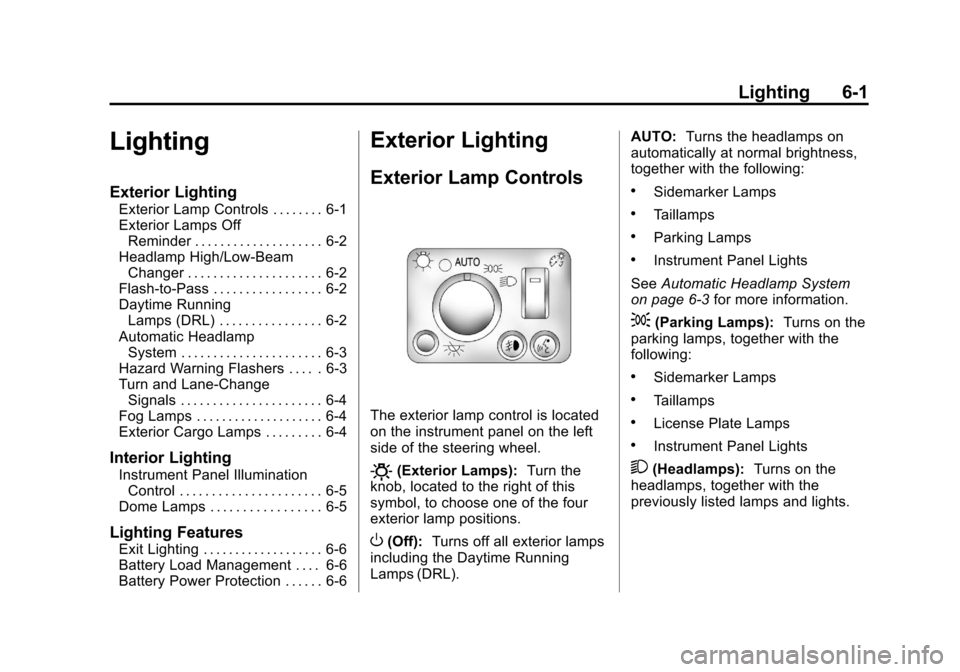
The exterior lamp control is located
on the instrument panel on the left
side of the steering wheel.
O(Exterior Lamps): Turn the
knob, located to the right of this
symbol, to choose one of the four
exterior lamp positions.
O(Off): Turns off all exterior lamps
including the Daytime Running
Lamps (DRL). AUTO:
Turns the headlamps on
automatically at normal brightness,
together with the following:
.Sidemarker Lamps
.Taillamps
.Parking Lamps
.Instrument Panel Lights
See Automatic Headlamp System
on page 6‑3 for more information.
;(Parking Lamps): Turns on the
parking lamps, together with the
following:
.Sidemarker Lamps
.Taillamps
.License Plate Lamps
.Instrument Panel Lights
2(Headlamps): Turns on the
headlamps, together with the
previously listed lamps and lights.
Page 144 of 392
Black plate (6,1)Chevrolet Colorado Owner Manual - 2011
6-6 Lighting
Lighting Features
Exit Lighting
The interior lamps will come on
when the key is removed from the
ignition. The lamps will not come on
if the dome override button is
pressed in.
Battery Load
Management
The vehicle has Electric Power
Management (EPM) that estimates
the battery's temperature and state
of charge. It then adjusts the voltage
for best performance and extended
life of the battery.
When the battery's state of charge
is low, the voltage is raised slightly
to quickly bring the charge back up.
When the state of charge is high,
the voltage is lowered slightly to
prevent overcharging. If the vehicle
has a voltmeter gauge or a voltage
display on the Driver Information
Center (DIC), you may see thevoltage move up or down. This is
normal. If there is a problem, an
alert will be displayed.
The battery can be discharged at
idle if the electrical loads are very
high. This is true for all vehicles.
This is because the generator
(alternator) may not be spinning fast
enough at idle to produce all the
power that is needed for very high
electrical loads.
A high electrical load occurs when
several of the following are on, such
as: headlamps, high beams, fog
lamps, rear window defogger,
climate control fan at high speed,
heated seats, engine cooling fans,
trailer loads, and loads plugged into
accessory power outlets.
EPM works to prevent excessive
discharge of the battery. It does this
by balancing the generator's output
and the vehicle's electrical needs.
It can increase engine idle speed to
generate more power, whenever
needed. It can temporarily reduce
the power demands of some
accessories.
Normally, these actions occur in
steps or levels, without being
noticeable. In rare cases at the
highest levels of corrective action,
this action may be noticeable to the
driver. If so, a Driver Information
Center (DIC) message might be
displayed, such as BATTERY
SAVER ACTIVE, BATTERY
VOLTAGE LOW, or LOW BATTERY.
If one of these messages displays, it
is recommended that the driver
reduce the electrical loads as much
as possible. See
Driver Information
Center (DIC) on page 5‑19.
Battery Power Protection
This feature shuts off the dome
lamp if it is left on for more than
20 minutes when the ignition is in
LOCK/OFF. This helps to prevent
the battery from running down.
Page 156 of 392
Black plate (12,1)Chevrolet Colorado Owner Manual - 2011
7-12 Infotainment System
Setting Preset Channels
If the radio has XM, up to
30 stations (6 FM1, 6 FM2, 6 AM,
6 XM1, and 6 XM2) can be
programmed on the six numbered
pushbuttons.
To program either radio:
1. Tune in the desired channel.
2. Press and hold one of the sixnumbered pushbuttons until the
radio beeps once. When that
numbered pushbutton is pressed
again, the channel that was
stored, returns.
3. Repeat the steps for each pushbutton.
XM Radio Messages
XL (Explicit Language
Channels): These channels, or
any others, can be blocked at a
customer's request, by calling
1-800-929-2100 in the U.S. and
1-877-438-9677 in Canada. Updating:
The encryption code in
the receiver is being updated, and
no action is required. This process
should take no longer than
30 seconds.
No Signl: The system is
functioning correctly, but the vehicle
is in a location that is blocking the
XM signal. When the vehicle is
moved into an open area, the signal
should return.
Loading: The radio system is
acquiring and processing audio and
text data. No action is needed. This
message should disappear shortly.
Off Air: This channel is not
currently in service. Tune to another
channel.
CH Unavl: This previously
assigned channel is no longer
assigned. Tune to another station.
If this station was one of the
presets, choose another station for
that preset button. Unauth:
This channel is blocked or
cannot be received with your XM
Subscription package.
No Info: No artist, song title,
category, or text information is
available at this time on this
channel. The system is working
properly.
NotFound: No artist, song title,
category, or text information is
available at this time on this
channel. The system is working
properly.
XM Lock: The XM receiver in your
vehicle could have previously been
in another vehicle. For security
purposes, XM receivers cannot be
swapped between vehicles. If this
message is received after having
your vehicle serviced, check with
your dealer.
Radio ID: If this message is
received when tuned to channel 0,
there could be a receiver fault.
Consult with your dealer.
Page 158 of 392
Black plate (14,1)Chevrolet Colorado Owner Manual - 2011
7-14 Infotainment System
Fixed Mast Antenna
The fixed mast antenna can
withstand most car washes without
being damaged as long as it is
securely attached to the base. If
the mast becomes slightly bent,
straighten it out by hand. If the mast
is badly bent, replace it.
Occasionally check to make sure
the antenna is tightened to its base.
If tightening is required, tighten by
hand until fully seated plus
one quarter turn.
Satellite Radio Antenna
The XM Satellite Radio antenna is
located on the roof of the vehicle.
Keep the antenna clear of
obstructions for clear radio
reception.
Audio Players
CD Player
Care of The CD Player
Do not add any label to a CD, it
could get caught in the CD player.
If a CD is recorded on a personal
computer and a description label is
needed, try labeling the top of the
recorded CD with a marking pen.
The use of CD lens cleaners for
CDs is not advised, due to the risk
of contaminating the lens of the CD
optics with lubricants internal to the
CD player mechanism.
Notice:If a label is added to a
CD, or more than one CD is
inserted into the slot at a time,
or an attempt is made to play
scratched or damaged CDs, the
CD player could be damaged.
While using the CD player, use
only CDs in good condition
without any label, load one CD at
a time, and keep the CD player and the loading slot free of
foreign materials, liquids, and
debris.
If an error displays, see
“CD
Messages” later in this section.Care of CDs
If playing a CD-R, the sound quality
can be reduced due to CD-R quality,
the method of recording, the quality
of the music that has been
recorded, and the way the CD-R
has been handled. Handle them
carefully. Store CD-R(s) in their
original cases or other protective
cases and away from direct sunlight
and dust. The CD player scans the
bottom surface of the disc. If the
surface of a CD is damaged, such
as cracked, broken, or scratched,
the CD does not play properly or not
at all. Do not touch the bottom side
of a CD while handling it; this could
damage the surface. Pick up CDs
by grasping the outer edges or the
edge of the hole and the outer edge.
Page 159 of 392
Black plate (15,1)Chevrolet Colorado Owner Manual - 2011
Infotainment System 7-15
If the surface of a CD is soiled, take
a soft, lint free cloth or dampen a
clean, soft cloth in a mild, neutral
detergent solution mixed with water,
and clean it. Make sure the wiping
process starts from the center to
the edge.
Playing a CD
Insert a CD partway into the slot,
label side up. The player pulls it in,
and READING displays. The CD
should begin playing. To insert a CD
with the ignition off, first press the
Z(eject) button or the
DISPL knob.
If the ignition or radio is turned off
with a CD in the player it stays in
the player. When the ignition or
radio is turned on, the CD starts to
play where it stopped, if it was the
last selected audio source.
When the CD is inserted, the CD
symbol displays. As each new track
starts to play, the track number
displays. The CD player can play the smaller
8 cm (3 in) single CDs with an
adapter ring. Full-size CDs and the
smaller CDs are loaded in the same
manner.
3 REV (Fast Reverse):
Press and
hold to reverse quickly within a
track. Press and hold for less than
two seconds to reverse at 10 times
the normal playing speed. Press
and hold for more than two seconds
to reverse at 20 times the normal
playing speed. Release to play the
track.
4 FWD (Fast Forward): Press and
hold to advance quickly within a
track. Press and hold for less than
two seconds to advance at six times
the normal playing speed. Press
and hold for more than two seconds
to advance at 17 times the normal
playing speed. Release to play the
track.
6 RDM (Random): Press to hear
the tracks in random, rather than
sequential, order. RDM ON displays. RDM and the track number displays
when each track starts to play.
Press again to turn off random play.
RDM OFF displays.
qSEEKr:
Press the left arrow to
go to the start of the current or the
previous track. Press the right arrow
to go to the start of the next track.
Pressing either arrow for more than
two seconds scans the next tracks,
playing the first eight seconds of
each track until all of the tracks
have been previewed. Press either
arrow again to stop scanning and to
play the track.
qTUNEr: Turn to go to the
previous or next track.
DISPL (Display): Press to see how
long the current track has been
playing. ET and the elapsed time of
the track displays. To change the
default on the display (track or
elapsed time), press until you see
the desired display, then press and
hold for two seconds. The radio
beeps once. The selected display is
now the default.
Page 160 of 392
Black plate (16,1)Chevrolet Colorado Owner Manual - 2011
7-16 Infotainment System
BAND:Press to listen to the radio
when a CD is playing. The inactive
CD remains inside the radio for
future listening.
CD AUX (Auxiliary): Press to play
a CD when listening to the radio.
The CD symbol displays when a CD
is loaded.
Z(Eject): Press to eject a CD.
Eject can be activated with either
the ignition or radio off. CDs can be
loaded with the ignition and radio off
if this button is pressed first.
Playing an MP3/WMA Disc
MP3/WMA CD-R Disc Format
If you burn your own MP3/WMA
disc on a personal computer:
.Make sure the MP3/WMA files
are recorded on a CD-R disc.
.Make sure playlists have a .m3u
or .wpl extension, other file
extensions might not work.
.Files can be recorded with a
variety of fixed or variable bit
rates. Song title, artist name, and album are displayed by the
radio when recorded using ID3
tags version 1 and 2.
.Create a folder structure that
makes it easy to find songs
while driving. Organize songs by
albums using one folder for each
album. Each folder or album
should contain 18 songs or less.
.Make sure to finalize the disc
when burning an MP3/WMA
disc, using multiple sessions.
It is usually better to burn the
disc all at once.
The player is able to read and
play a maximum of 253 folders,
50 playlists, 20 sessions, and
949 files. Long file names, folder
names, or playlist names may use
more disc memory space than
necessary. To conserve space on
the disc, minimize the length of the
file, folder, or playlist names. An
MP3/WMA CD-R that was recorded
using no file folders can also be
used. The system can support up to
11 folders in depth, though, keep the depth of the folders to a minimum in
order to keep down the complexity
and confusion in trying to locate a
particular folder during playback.
If a CD contains more than the
maximum of 253 folders,
50 playlists, 20 sessions, and
949 files, the player lets you access
and navigate up to the maximum,
but all items over the maximum are
played.
Root Directory
The root directory is treated as a
folder. If the root directory has
compressed audio files, the
directory displays as F1 ROOT. All
files contained directly under the
root directory are accessed prior to
any root directory folders. However,
playlists (Px) are always accessed
before root folders or files.
Empty Directory or Folder
If a root directory or a folder exists
somewhere in the file structure that
contains only folders/subfolders and
no compressed files directly
beneath them, the player advances
Page 163 of 392
Black plate (19,1)Chevrolet Colorado Owner Manual - 2011
Infotainment System 7-19
arrow for more than 2 seconds
searches the previous or next tracks
at two tracks per second. Release
the button to stop searching and to
play the track.
qTUNEr:Turn to reverse or
advance through the tracks in all
folders or playlists. The track
number and file name displays for
each track. Turning this knob while
in random reverses or advances the
tracks in sequential order.
DISPL (Display): Press this knob
to switch between track mode,
folder/playlist mode, and time of day
mode. The display shows only
8 characters, but there can be up to
4 pages of text. If there are more
than 8 characters in the song, folder,
or playlist name, pressing this knob
within 2 seconds takes you to the
next page of text. If there are no other pages to be shown, pressing
this knob within 2 seconds takes
you to the next display mode.
.Track mode displays the current
track number and the ID3 tag
song name.
.Folder/playlist mode displays the
current folder or playlist number
and the folder/playlist name.
.Time of day mode displays the
time of day and the ID3 tag
song name.
To change the default on the
display, press the DISPL knob until
you see the desired display, then
press and hold this knob for
2 seconds. The radio produces
one beep and the selected display
is now the default. INFO (Information):
INFO displays
when a current track has ID3 tag
information. Press this button to
display the artist name and album
contained in the tag. INFO
disappears from the display when
the information in the ID3 tag has
finished being read.
BAND: Press this button to listen to
the radio when a CD is playing. The
inactive CD remains inside the radio
for future listening.
CD AUX (Auxiliary): Press this
button to play a CD when listening
to the radio. The CD symbol
illuminates on the display when a
CD is loaded.
Z(Eject): Press this button to
eject a CD. Eject can activate while
either the ignition or radio is off.
CDs can be loaded with the ignition
and radio off if this button is pressed
first.