buttons CHEVROLET COLORADO 2012 1.G Owners Manual
[x] Cancel search | Manufacturer: CHEVROLET, Model Year: 2012, Model line: COLORADO, Model: CHEVROLET COLORADO 2012 1.GPages: 394, PDF Size: 6.38 MB
Page 20 of 394
Black plate (14,1)Chevrolet Colorado Owner Manual - 2012
1-14 In Brief
Four-Wheel Drive
Four-wheel drive sends engine
power to all four wheels for extra
traction.
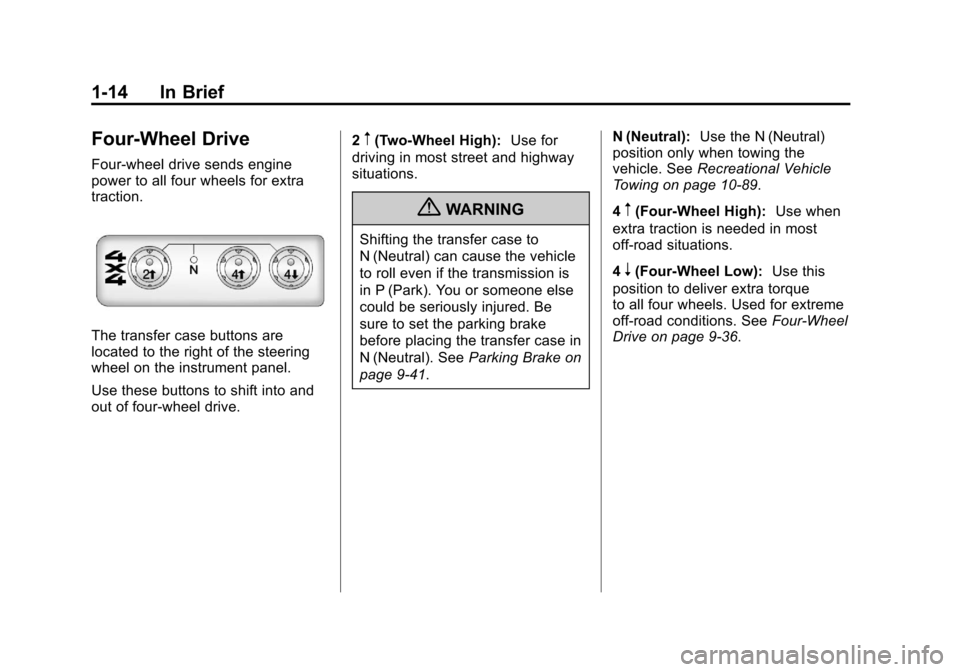
The transfer case buttons are
located to the right of the steering
wheel on the instrument panel.
Use these buttons to shift into and
out of four-wheel drive.2
m(Two-Wheel High):
Use for
driving in most street and highway
situations.
{WARNING
Shifting the transfer case to
N (Neutral) can cause the vehicle
to roll even if the transmission is
in P (Park). You or someone else
could be seriously injured. Be
sure to set the parking brake
before placing the transfer case in
N (Neutral). See Parking Brake on
page 9‑41. N (Neutral):
Use the N (Neutral)
position only when towing the
vehicle. See Recreational Vehicle
Towing on page 10‑89.
4
m(Four-Wheel High): Use when
extra traction is needed in most
off-road situations.
4
n(Four-Wheel Low): Use this
position to deliver extra torque
to all four wheels. Used for extreme
off‐road conditions. See Four-Wheel
Drive on page 9‑36.
Page 21 of 394
Black plate (15,1)Chevrolet Colorado Owner Manual - 2012
In Brief 1-15
Vehicle Features
Radio(s)
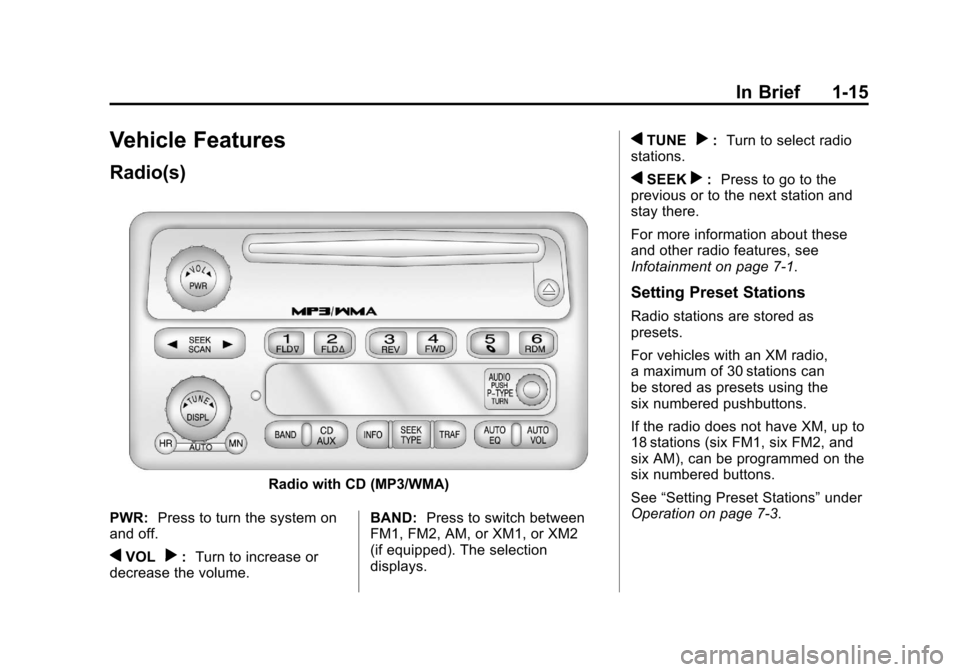
Radio with CD (MP3/WMA)
PWR: Press to turn the system on
and off.
qVOLr: Turn to increase or
decrease the volume. BAND:
Press to switch between
FM1, FM2, AM, or XM1, or XM2
(if equipped). The selection
displays.
qTUNEr: Turn to select radio
stations.
qSEEKr: Press to go to the
previous or to the next station and
stay there.
For more information about these
and other radio features, see
Infotainment on page 7‑1.
Setting Preset Stations
Radio stations are stored as
presets.
For vehicles with an XM radio,
a maximum of 30 stations can
be stored as presets using the
six numbered pushbuttons.
If the radio does not have XM, up to
18 stations (six FM1, six FM2, and
six AM), can be programmed on the
six numbered buttons.
See “Setting Preset Stations” under
Operation on page 7‑3.
Page 22 of 394
Black plate (16,1)Chevrolet Colorado Owner Manual - 2012
1-16 In Brief
Setting the Clock
To set the time and date for the
radio with CD (MP3/WMA):
Press and hold the HR button until
the correct hour displays. Press and
hold the MN button until the correct
minute displays. The time can be
set with the ignition on or off.
To synchronize the time with an
FM station broadcasting Radio Data
System (RDS) information, press
and hold the HR and MN buttons
at the same time until RDS TIME
displays. To accept this time, press
and hold the HR and MN buttons,
at the same time, for another
two seconds. If the time is not
available from the station, NO
UPDAT (update) displays.
RDS time is broadcast once a
minute. After tuning to an RDS
broadcast station, it could take a
few minutes for the time to update.For detailed instructions on setting
the clock for your specific audio
system, see
Clock on page 5‑4.
Satellite Radio
XM is a satellite radio service
based in the 48 contiguous United
States and 10 Canadian provinces.
XM satellite radio has a wide
variety of programming and
commercial-free music, coast to
coast, and in digital-quality sound.
A fee is required to receive the
XM service.
For more information, refer to:
.www.xmradio.com or call
1-800-929-2100 (U.S.)
.www.xmradio.ca or call
1-877-438-9677 (Canada)
See Satellite Radio on page 7‑11.
Cruise Control
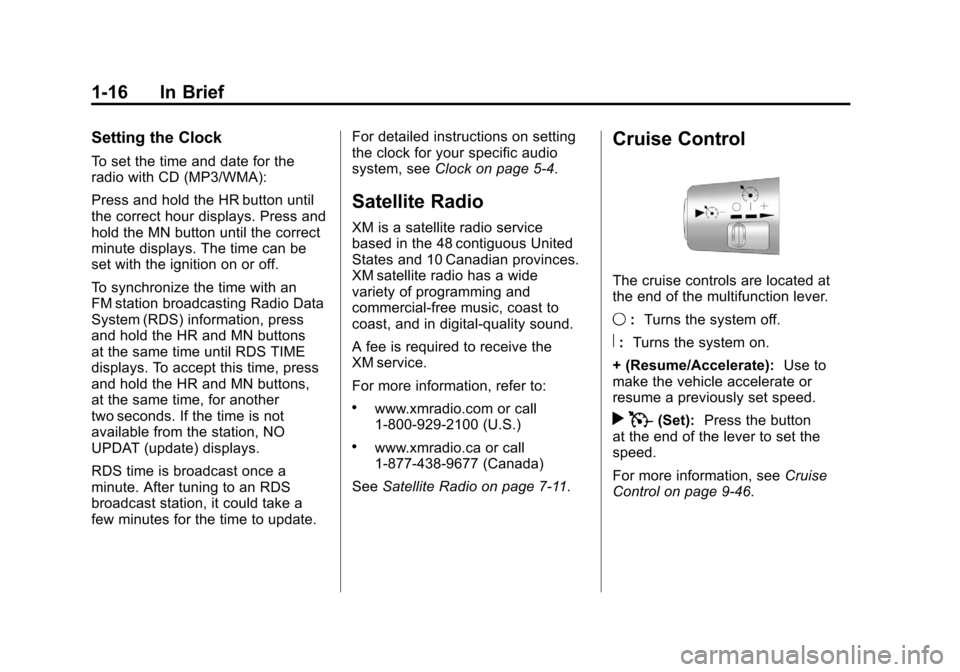
The cruise controls are located at
the end of the multifunction lever.
9:Turns the system off.
R:Turns the system on.
+ (Resume/Accelerate): Use to
make the vehicle accelerate or
resume a previously set speed.
r T(Set): Press the button
at the end of the lever to set the
speed.
For more information, see Cruise
Control on page 9‑46.
Page 27 of 394
Black plate (21,1)Chevrolet Colorado Owner Manual - 2012
In Brief 1-21
OnStar service cannot work unless
your vehicle is in a place where
OnStar has an agreement with a
wireless service provider for service
in that area, and the wireless
service provider has coverage,
network capacity, reception, and
technology compatible with OnStar's
service. Service involving location
information about your vehicle
cannot work unless GPS signals
are available, unobstructed, and
compatible with the OnStar
hardware. The vehicle must have
a working electrical system and
adequate battery power for the
OnStar equipment to operate.
OnStar service may not work if the
OnStar equipment is not properly
installed or you have not maintained
it even if your vehicle is in goodworking order and in compliance
with all government regulations.
If you try to add, connect, or modify
any equipment or software in your
vehicle, OnStar service may not
work. Other problems beyond
OnStar's control may prevent
service to you, such as hills, tall
buildings, tunnels, weather,
electrical system design and
architecture of your vehicle, damage
to important parts of your vehicle in
a crash, or wireless phone network
congestion or jamming.
See
Radio Frequency Statement on
page 13‑21 for information
regarding Part 15 of the Federal
Communications Commission (FCC)
rules and Industry Canada
Standards RSS-GEN/210/220/310.Your Responsibility
Increase the volume of the radio
if the OnStar Advisor cannot be
heard.
If the light next to the OnStar
buttons is red, the system may
not be functioning properly.
Push
Qand request a vehicle
diagnostic. If the light appears clear
(no light appears), your OnStar
subscription has expired and all
services have been deactivated.
Push
Qto confirm that the OnStar
equipment is active.
Page 41 of 394
Black plate (13,1)Chevrolet Colorado Owner Manual - 2012
Keys, Doors, and Windows 2-13
Manually fold the mirrors inward
to prevent damage when going
through an automatic car wash. To
fold, push the mirrors toward the
vehicle. Push outward, to return the
mirrors to their original position.
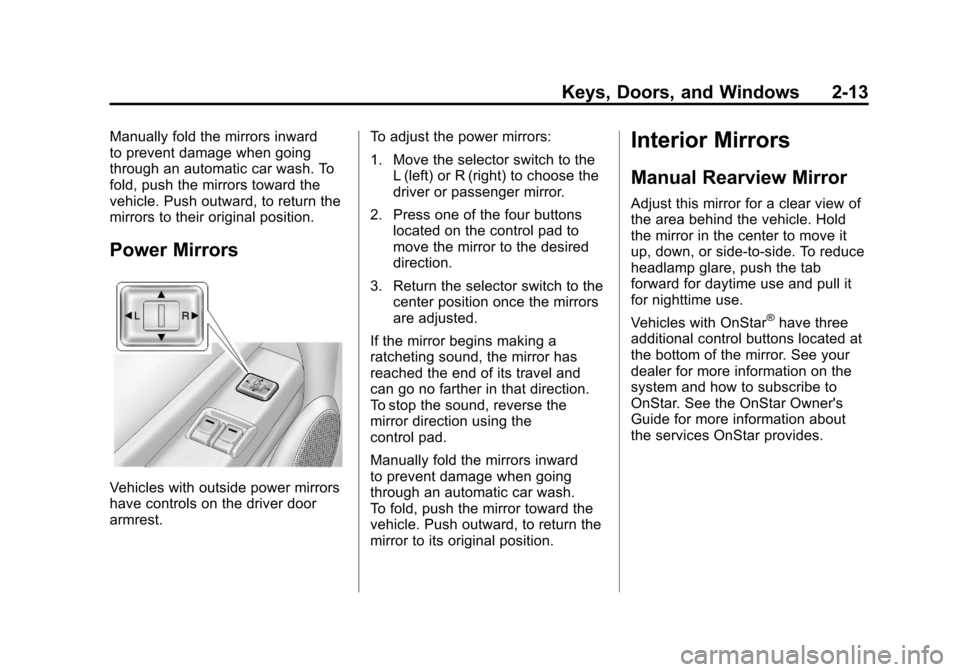
Power Mirrors
Vehicles with outside power mirrors
have controls on the driver door
armrest.To adjust the power mirrors:
1. Move the selector switch to the
L (left) or R (right) to choose the
driver or passenger mirror.
2. Press one of the four buttons located on the control pad to
move the mirror to the desired
direction.
3. Return the selector switch to the center position once the mirrors
are adjusted.
If the mirror begins making a
ratcheting sound, the mirror has
reached the end of its travel and
can go no farther in that direction.
To stop the sound, reverse the
mirror direction using the
control pad.
Manually fold the mirrors inward
to prevent damage when going
through an automatic car wash.
To fold, push the mirror toward the
vehicle. Push outward, to return the
mirror to its original position.
Interior Mirrors
Manual Rearview Mirror
Adjust this mirror for a clear view of
the area behind the vehicle. Hold
the mirror in the center to move it
up, down, or side-to-side. To reduce
headlamp glare, push the tab
forward for daytime use and pull it
for nighttime use.
Vehicles with OnStar
®have three
additional control buttons located at
the bottom of the mirror. See your
dealer for more information on the
system and how to subscribe to
OnStar. See the OnStar Owner's
Guide for more information about
the services OnStar provides.
Page 42 of 394
Black plate (14,1)Chevrolet Colorado Owner Manual - 2012
2-14 Keys, Doors, and Windows
Automatic Dimming
Rearview Mirror
The vehicle may have an automatic
dimming inside rearview mirror.
Automatic dimming reduces the
glare of lights from behind the
vehicle.
The mirror may also have OnStar
®
and/or a compass and outside
temperature display.
Control buttons for the OnStar
system are at the bottom of the
mirror. See the OnStar Owners
Guide for more information about
the services OnStar provides. See
Compass on page 5‑3for more
information about the compass
display. See “Temperature Display”
after, for more information about the
outside temperature display. AUTO/
(/O(On/Off):
Press
and hold AUTO/
(for about
three seconds or depending on the
mirror, press
Oto turn automatic
dimming on or off. The automatic
dimming feature comes on and the
indicator light illuminates each time
the vehicle is started.
Temperature Display
Y b/O(On/Off) : PressYbor
depending on the mirror, press
Oto
turn the display on or off.
To adjust between Fahrenheit and
Celsius:
1. Press and hold
Y b/Ofor a
few seconds. The current unit of
measure (C or F) flashes. 2. Press
Y
b/Oagain and
release to change the unit of
measure. Wait several seconds
and the compass/temperature
display returns with the selected
unit of measure.
It is normal under certain conditions
for the temperature update to be
delayed. If an incorrect temperature
displays for an extended period, see
your dealer.
Cleaning the Mirror
Do not spray glass cleaner directly
on the mirror. Use a soft towel
dampened with water.
Page 61 of 394
Black plate (15,1)Chevrolet Colorado Owner Manual - 2012
Seats and Restraints 3-15
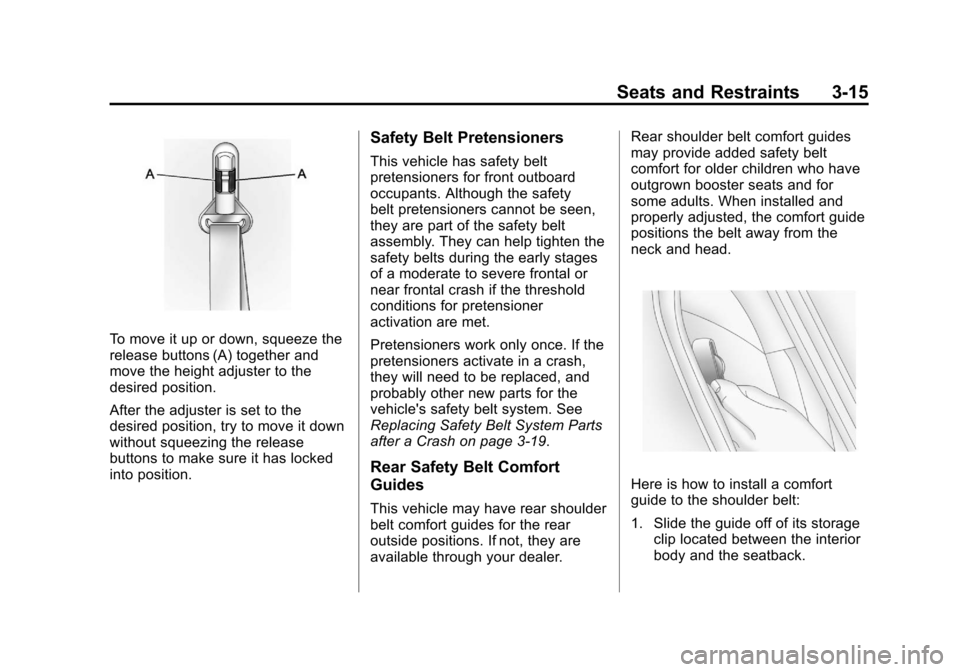
To move it up or down, squeeze the
release buttons (A) together and
move the height adjuster to the
desired position.
After the adjuster is set to the
desired position, try to move it down
without squeezing the release
buttons to make sure it has locked
into position.
Safety Belt Pretensioners
This vehicle has safety belt
pretensioners for front outboard
occupants. Although the safety
belt pretensioners cannot be seen,
they are part of the safety belt
assembly. They can help tighten the
safety belts during the early stages
of a moderate to severe frontal or
near frontal crash if the threshold
conditions for pretensioner
activation are met.
Pretensioners work only once. If the
pretensioners activate in a crash,
they will need to be replaced, and
probably other new parts for the
vehicle's safety belt system. See
Replacing Safety Belt System Parts
after a Crash on page 3‑19.
Rear Safety Belt Comfort
Guides
This vehicle may have rear shoulder
belt comfort guides for the rear
outside positions. If not, they are
available through your dealer.Rear shoulder belt comfort guides
may provide added safety belt
comfort for older children who have
outgrown booster seats and for
some adults. When installed and
properly adjusted, the comfort guide
positions the belt away from the
neck and head.
Here is how to install a comfort
guide to the shoulder belt:
1. Slide the guide off of its storage
clip located between the interior
body and the seatback.
Page 112 of 394
Black plate (4,1)Chevrolet Colorado Owner Manual - 2012
5-4 Instruments and Controls
The compass can be calibrated by
driving the vehicle in circles at
8 km/h (5 mph) or less until the
display reads a direction.
Compass Variance
The mirror is set to zone eight.
If you do not live in zone eight or
drive out of the area, the compass
variance needs to be changed to
the appropriate zone.
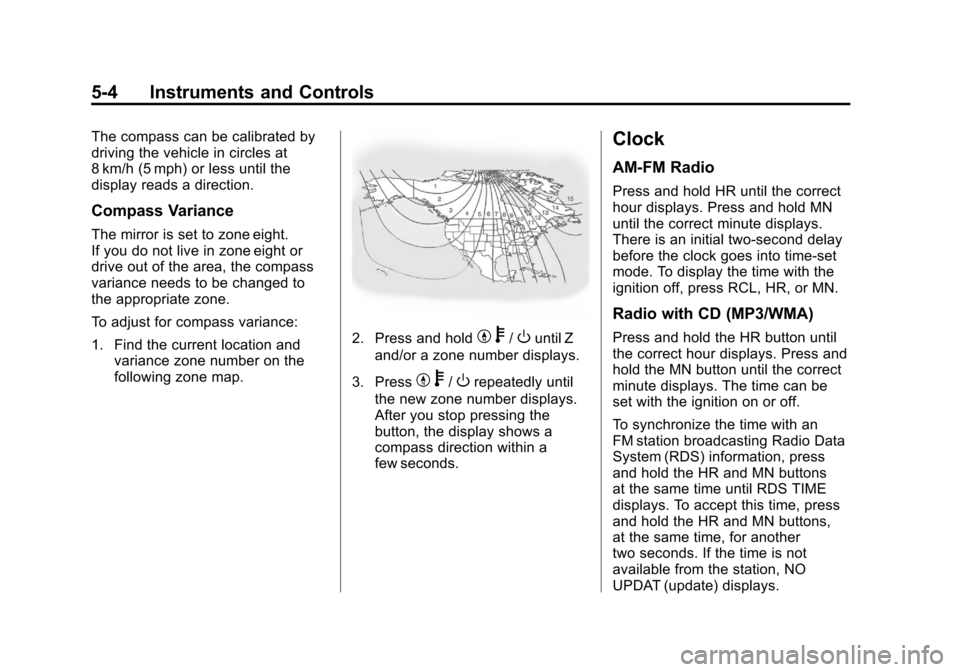
To adjust for compass variance:
1. Find the current location andvariance zone number on the
following zone map.
2. Press and holdYb/Ountil Z
and/or a zone number displays.
3. Press
Y b/Orepeatedly until
the new zone number displays.
After you stop pressing the
button, the display shows a
compass direction within a
few seconds.
Clock
AM-FM Radio
Press and hold HR until the correct
hour displays. Press and hold MN
until the correct minute displays.
There is an initial two-second delay
before the clock goes into time-set
mode. To display the time with the
ignition off, press RCL, HR, or MN.
Radio with CD (MP3/WMA)
Press and hold the HR button until
the correct hour displays. Press and
hold the MN button until the correct
minute displays. The time can be
set with the ignition on or off.
To synchronize the time with an
FM station broadcasting Radio Data
System (RDS) information, press
and hold the HR and MN buttons
at the same time until RDS TIME
displays. To accept this time, press
and hold the HR and MN buttons,
at the same time, for another
two seconds. If the time is not
available from the station, NO
UPDAT (update) displays.
Page 129 of 394
Black plate (21,1)Chevrolet Colorado Owner Manual - 2012
Instruments and Controls 5-21
3. To view the next availablemode, press and hold the reset
stem until the mode appears.
Release the reset stem and
press and hold again to view the
next mode.
4. Once the desired mode is shown on the DIC display, briefly
press the reset stem to set your
choice. The DIC display then
clears.
The following are the available
modes:
Lock 1 (default): On vehicles with
an automatic transmission, this
mode locks all of the doors when
the vehicle is shifted out of P (Park)
and unlocks all of the doors when
the vehicle is shifted into P (Park).
On vehicles with a manual
transmission, this mode locks all of
the doors when the vehicle speed is
greater than 24 km/h (15 mph) and
unlocks all of the doors when the
key is removed from the ignition. Lock 2:
On vehicles with an
automatic transmission, this mode
locks all of the doors when the
vehicle is shifted out of P (Park) and
unlocks the driver's door when the
vehicle is shifted into P (Park).
On vehicles with a manual
transmission, this mode locks all of
the doors when the vehicle speed is
greater than 24 km/h (15 mph) and
unlocks the driver's door when the
key is removed from the ignition.
Lock 3: On vehicles with an
automatic transmission, this mode
locks all of the doors when the
vehicle is shifted out of P (Park).
The doors will not automatically
unlock.
On vehicles with a manual
transmission, this mode locks all of
the doors when the vehicle speed is
greater than 24 km/h (15 mph). The
doors will not automatically unlock. Remote Keyless Entry (RKE)
Feedback
This feature allows you to program
the Remote Keyless Entry (RKE)
feedback to a preferred setting.
To set your choice for this feature:
1. With the engine off, turn the key
to LOCK/OFF. Do not remove
the key from the ignition.
2. Press and hold the lock and unlock buttons on the RKE
transmitter at the same time.
Hold both buttons until the DIC
display shows the current RKE
feedback mode.
3. To view the next available mode, press and hold the reset
stem until the mode appears.
Release the reset stem and
press and hold again to view the
next mode.
4. Once the desired mode is shown on the DIC display, briefly
press the reset stem to set your
choice. The DIC display then
clears.
Page 130 of 394
Black plate (22,1)Chevrolet Colorado Owner Manual - 2012
5-22 Instruments and Controls
The following are the available
modes:
RFA 1 (default):This mode flashes
the parking lamps when you press
the lock or unlock buttons on the
RKE transmitter.
RFA 2: This mode flashes the
parking lamps and sounds the horn
when you press the lock button on
the RKE transmitter. This mode also
flashes the parking lamps when you
press the unlock button on the RKE
transmitter.
RFA 3: This mode flashes the
parking lamps and sounds the horn
when you press the lock or unlock
buttons on the RKE transmitter.
RFA 4: This mode disables RKE
feedback. There will be no feedback
when you press the lock or unlock
buttons on the RKE transmitter.Vehicle Messages
Messages are displayed on the DIC
to notify the driver that the status of
the vehicle has changed and that
some action may be needed by
the driver to correct the condition.
Multiple messages may appear one
after another. The messages are
displayed for several seconds each.
Some messages may not require
immediate action, but you should
press and release the trip odometer
reset stem to acknowledge that
you received the messages and to
clear them from the display. Each
message must be acknowledged
individually.
Some messages cannot be cleared
from the DIC display because they
are more urgent. These messages
require action before they can be
cleared. You should take any
messages that appear on the
display seriously and remember that
clearing the messages only makes
the messages disappear, not correct
the problem. The following are the possible
messages that can be displayed
and some information about them.
Battery Voltage and
Charging Messages
SERVICE CHARG (Charge)
SYS (System)
This message displays if there is a
problem with the battery charging
system. Under certain conditions,
the battery warning light may also
turn on in the instrument panel
cluster. See
Charging System Light
on page 5‑12. The battery will not
be charging at an optimal rate and
the vehicle will lose the ability to
enter the fuel economy mode. The
vehicle is safe to drive, however
have the electrical system checked
by your dealer. Press and release
the reset stem to acknowledge
the message and clear it from the
display.