power steering CHEVROLET COLORADO 2016 2.G User Guide
[x] Cancel search | Manufacturer: CHEVROLET, Model Year: 2016, Model line: COLORADO, Model: CHEVROLET COLORADO 2016 2.GPages: 396, PDF Size: 6.6 MB
Page 196 of 396
Chevrolet Colorado Owner Manual (GMNA-Localizing-U.S/Canada/Mexico-
9159327) - 2016 - crc - 8/28/15
Driving and Operating 195
{Warning
Drinking and then driving is very
dangerous. Your reflexes,
perceptions, attentiveness, and
judgment can be affected by even
a small amount of alcohol. You
can have a serious—or even
fatal —collision if you drive after
drinking.
Do not drink and drive or ride with
a driver who has been drinking.
Ride home in a cab; or if you are
with a group, designate a driver
who will not drink.
Control of a Vehicle
Braking, steering, and accelerating
are important factors in helping to
control a vehicle while driving.
Braking
Braking action involves perception
time and reaction time. Deciding to
push the brake pedal is perception
time. Actually doing it is
reaction time. Average driver reaction time is
about three-quarters of a second. In
that time, a vehicle moving at
100 km/h (60 mph) travels 20 m
(66 ft), which could be a lot of
distance in an emergency.
Helpful braking tips to keep in mind
include:
.
Keep enough distance between
you and the vehicle in front
of you.
. Avoid needless heavy braking.
. Keep pace with traffic.
If the engine ever stops while the
vehicle is being driven, brake
normally but do not pump the
brakes. Doing so could make the
pedal harder to push down. If the
engine stops, there will be some
power brake assist but it will be
used when the brake is applied.
Once the power assist is used up, it
can take longer to stop and the
brake pedal will be harder to push.
Steering
Electric Power Steering
The vehicle has electric power
steering. It does not have power
steering fluid. Regular maintenance
is not required.
If power steering assist is lost due
to a system malfunction, the vehicle
can be steered, but may require
increased effort.
See your dealer if there is a
problem.
If the steering wheel is turned until it
reaches the end of its travel and is
held against that position for an
extended period of time, power
steering assist may be reduced.
If the steering assist is used for an
extended period of time, power
assist may be reduced.
Normal use of the power steering
assist should return when the
system cools down.
See specific vehicle steering
messages under Steering System
Messages 0134
ii. See your dealer if
there is a problem.
Page 213 of 396
Chevrolet Colorado Owner Manual (GMNA-Localizing-U.S/Canada/Mexico-
9159327) - 2016 - crc - 8/28/15
212 Driving and Operating
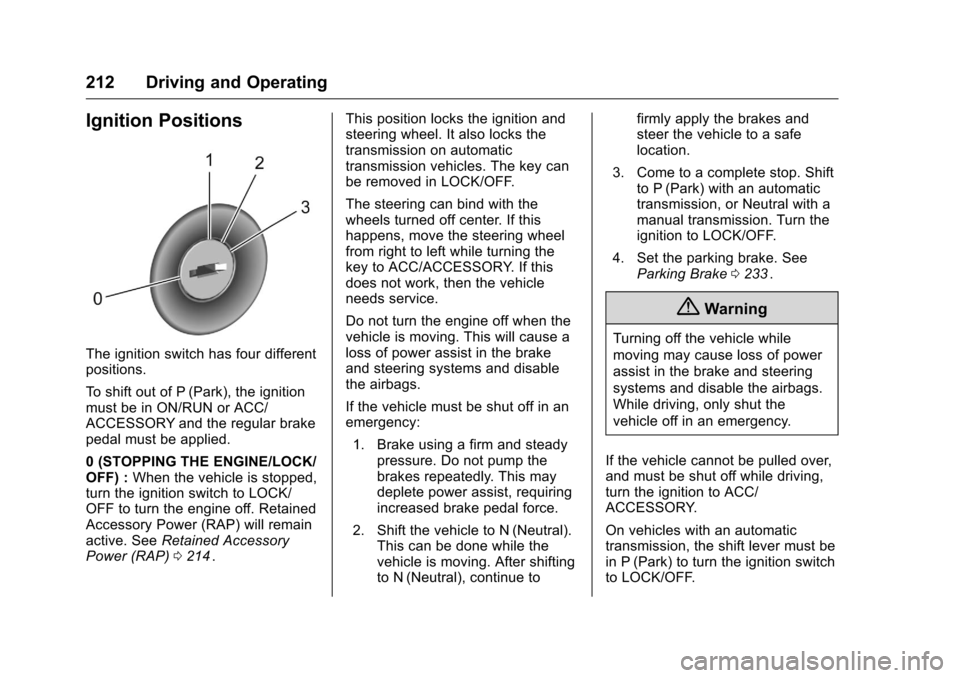
Ignition Positions
The ignition switch has four different
positions.
To shift out of P (Park), the ignition
must be in ON/RUN or ACC/
ACCESSORY and the regular brake
pedal must be applied.
0 (STOPPING THE ENGINE/LOCK/
OFF) :When the vehicle is stopped,
turn the ignition switch to LOCK/
OFF to turn the engine off. Retained
Accessory Power (RAP) will remain
active. See Retained Accessory
Power (RAP) 0214
ii. This position locks the ignition and
steering wheel. It also locks the
transmission on automatic
transmission vehicles. The key can
be removed in LOCK/OFF.
The steering can bind with the
wheels turned off center. If this
happens, move the steering wheel
from right to left while turning the
key to ACC/ACCESSORY. If this
does not work, then the vehicle
needs service.
Do not turn the engine off when the
vehicle is moving. This will cause a
loss of power assist in the brake
and steering systems and disable
the airbags.
If the vehicle must be shut off in an
emergency:
1. Brake using a firm and steady pressure. Do not pump the
brakes repeatedly. This may
deplete power assist, requiring
increased brake pedal force.
2. Shift the vehicle to N (Neutral). This can be done while the
vehicle is moving. After shifting
to N (Neutral), continue to firmly apply the brakes and
steer the vehicle to a safe
location.
3. Come to a complete stop. Shift to P (Park) with an automatic
transmission, or Neutral with a
manual transmission. Turn the
ignition to LOCK/OFF.
4. Set the parking brake. See Parking Brake 0233
ii.
{Warning
Turning off the vehicle while
moving may cause loss of power
assist in the brake and steering
systems and disable the airbags.
While driving, only shut the
vehicle off in an emergency.
If the vehicle cannot be pulled over,
and must be shut off while driving,
turn the ignition to ACC/
ACCESSORY.
On vehicles with an automatic
transmission, the shift lever must be
in P (Park) to turn the ignition switch
to LOCK/OFF.
Page 227 of 396
Chevrolet Colorado Owner Manual (GMNA-Localizing-U.S/Canada/Mexico-
9159327) - 2016 - crc - 8/28/15
226 Driving and Operating
Caution
Shifting to R (Reverse) while the
vehicle is moving forward could
damage the transmission. The
repairs would not be covered by
the vehicle warranty. Shift to
R (Reverse) only after the vehicle
is stopped.
Use R (Reverse), along with the
parking brake, for parking the
vehicle.
Shift Speeds
{Warning
If you skip a gear when
downshifting, you could lose
control of the vehicle. You could
injure yourself or others. Do not
shift down more than one gear at
a time when downshifting.
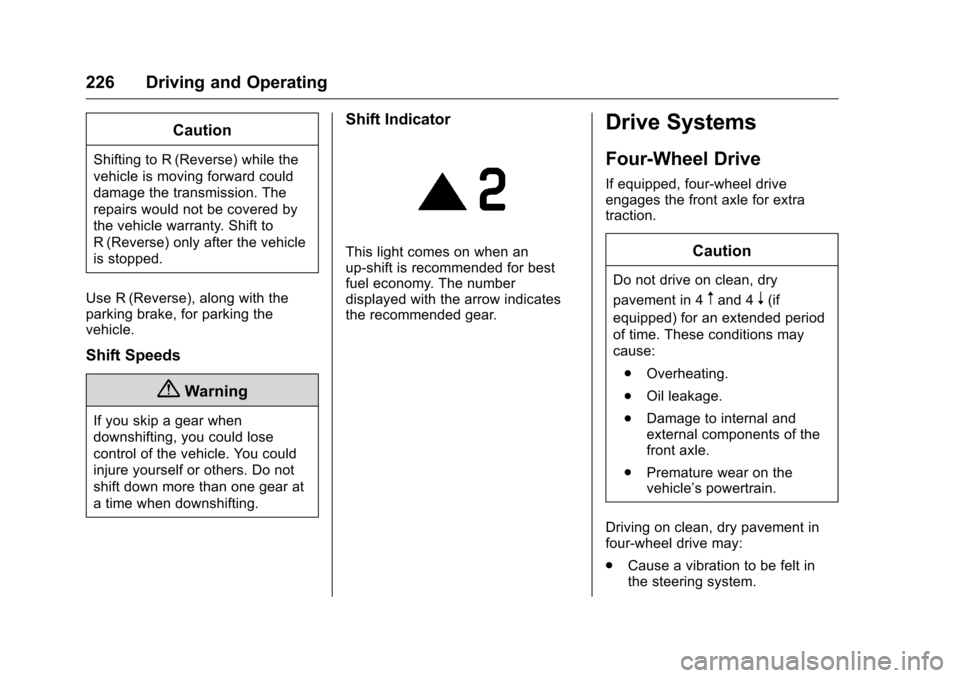
Shift Indicator
This light comes on when an
up-shift is recommended for best
fuel economy. The number
displayed with the arrow indicates
the recommended gear.
Drive Systems
Four-Wheel Drive
If equipped, four-wheel drive
engages the front axle for extra
traction.
Caution
Do not drive on clean, dry
pavement in 4
mand 4n(if
equipped) for an extended period
of time. These conditions may
cause:
. Overheating.
. Oil leakage.
. Damage to internal and
external components of the
front axle.
. Premature wear on the
vehicle’s powertrain.
Driving on clean, dry pavement in
four-wheel drive may:
. Cause a vibration to be felt in
the steering system.
Page 231 of 396
Chevrolet Colorado Owner Manual (GMNA-Localizing-U.S/Canada/Mexico-
9159327) - 2016 - crc - 8/28/15
230 Driving and Operating
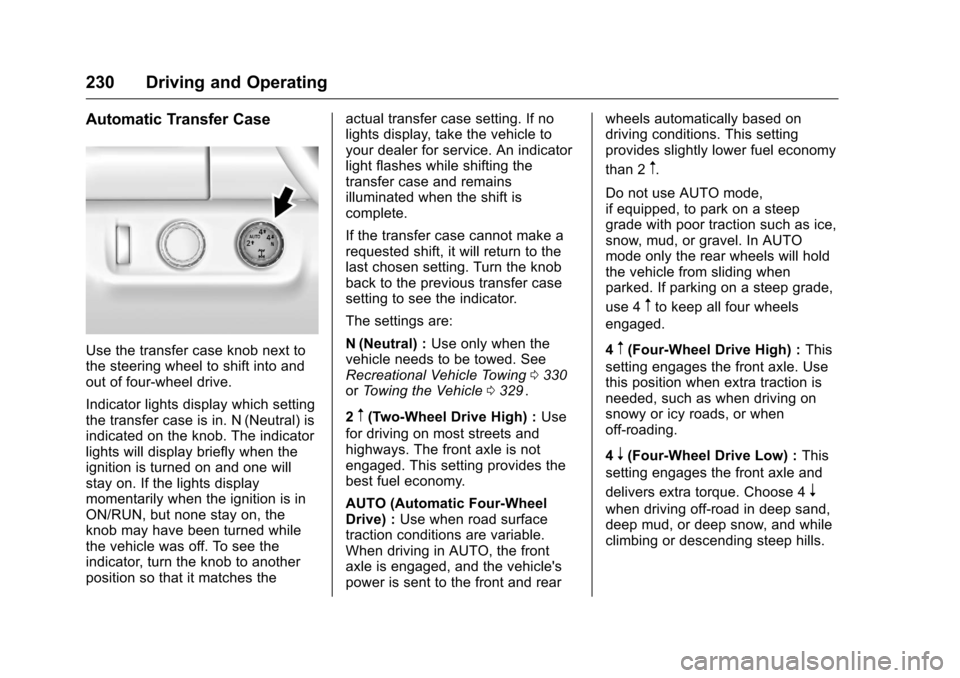
Automatic Transfer Case
Use the transfer case knob next to
the steering wheel to shift into and
out of four-wheel drive.
Indicator lights display which setting
the transfer case is in. N (Neutral) is
indicated on the knob. The indicator
lights will display briefly when the
ignition is turned on and one will
stay on. If the lights display
momentarily when the ignition is in
ON/RUN, but none stay on, the
knob may have been turned while
the vehicle was off. To see the
indicator, turn the knob to another
position so that it matches theactual transfer case setting. If no
lights display, take the vehicle to
your dealer for service. An indicator
light flashes while shifting the
transfer case and remains
illuminated when the shift is
complete.
If the transfer case cannot make a
requested shift, it will return to the
last chosen setting. Turn the knob
back to the previous transfer case
setting to see the indicator.
The settings are:
N (Neutral) :
Use only when the
vehicle needs to be towed. See
Recreational Vehicle Towing 0330
iior Towing the Vehicle 0329ii.
2
m(Two-Wheel Drive High) : Use
for driving on most streets and
highways. The front axle is not
engaged. This setting provides the
best fuel economy.
AUTO (Automatic Four-Wheel
Drive) : Use when road surface
traction conditions are variable.
When driving in AUTO, the front
axle is engaged, and the vehicle's
power is sent to the front and rear wheels automatically based on
driving conditions. This setting
provides slightly lower fuel economy
than 2
m.
Do not use AUTO mode,
if equipped, to park on a steep
grade with poor traction such as ice,
snow, mud, or gravel. In AUTO
mode only the rear wheels will hold
the vehicle from sliding when
parked. If parking on a steep grade,
use 4
mto keep all four wheels
engaged.
4
m(Four-Wheel Drive High) : This
setting engages the front axle. Use
this position when extra traction is
needed, such as when driving on
snowy or icy roads, or when
off-roading.
4
n(Four-Wheel Drive Low) : This
setting engages the front axle and
delivers extra torque. Choose 4
n
when driving off-road in deep sand,
deep mud, or deep snow, and while
climbing or descending steep hills.
Page 292 of 396
Chevrolet Colorado Owner Manual (GMNA-Localizing-U.S/Canada/Mexico-
9159327) - 2016 - crc - 8/28/15
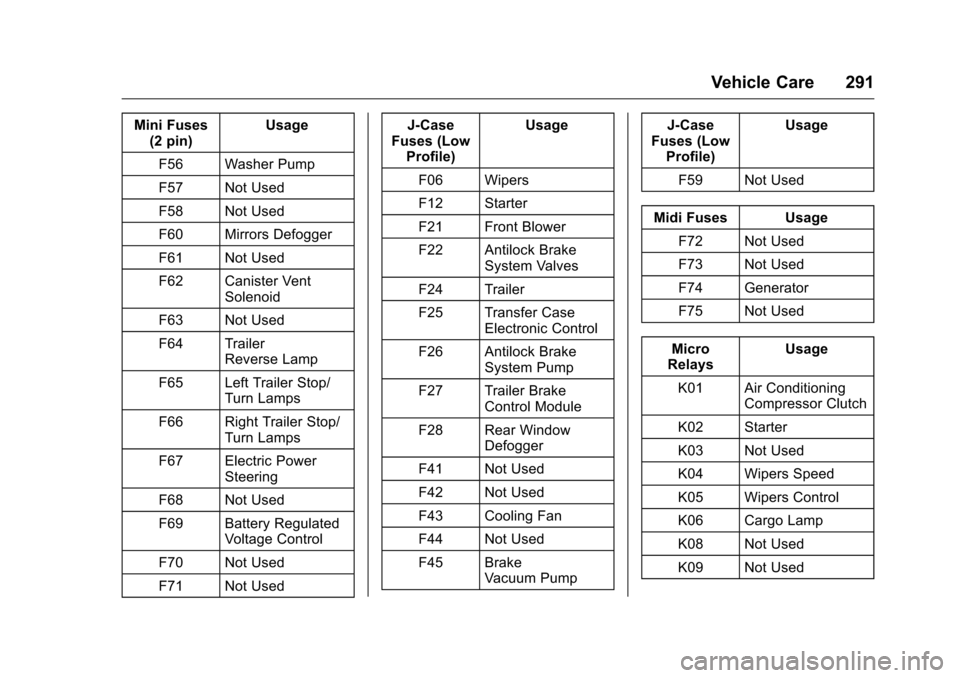
Vehicle Care 291
Mini Fuses(2 pin) Usage
F56 Washer Pump
F57 Not Used
F58 Not Used
F60 Mirrors Defogger
F61 Not Used
F62 Canister Vent Solenoid
F63 Not Used
F64 Trailer Reverse Lamp
F65 Left Trailer Stop/ Turn Lamps
F66 Right Trailer Stop/ Turn Lamps
F67 Electric Power Steering
F68 Not Used
F69 Battery Regulated Voltage Control
F70 Not Used
F71 Not Used J-Case
Fuses (Low Profile) Usage
F06 Wipers
F12 Starter
F21 Front Blower
F22 Antilock Brake System Valves
F24 Trailer
F25 Transfer Case Electronic Control
F26 Antilock Brake System Pump
F27 Trailer Brake Control Module
F28 Rear Window Defogger
F41 Not Used
F42 Not Used
F43 Cooling Fan
F44 Not Used
F45 Brake Vacuum Pump J-Case
Fuses (Low Profile) Usage
F59 Not Used
Midi Fuses Usage F72 Not Used
F73 Not Used
F74 Generator
F75 Not Used
Micro
Relays Usage
K01 Air Conditioning Compressor Clutch
K02 Starter
K03 Not Used
K04 Wipers Speed
K05 Wipers Control
K06 Cargo Lamp
K08 Not Used
K09 Not Used
Page 295 of 396
Chevrolet Colorado Owner Manual (GMNA-Localizing-U.S/Canada/Mexico-
9159327) - 2016 - crc - 8/28/15
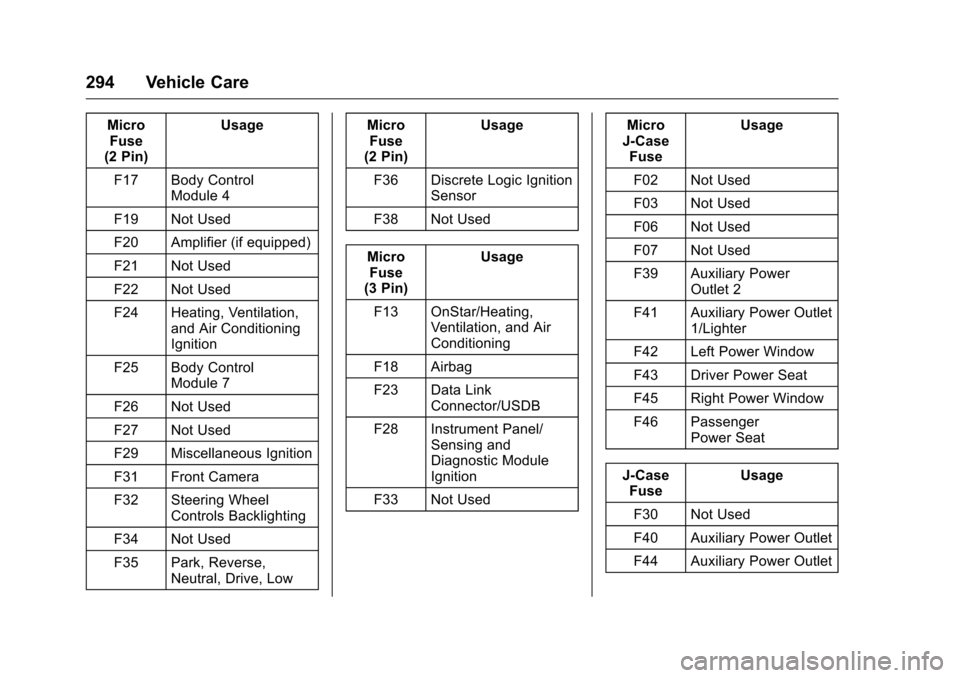
294 Vehicle Care
MicroFuse
(2 Pin) Usage
F17 Body Control Module 4
F19 Not Used
F20 Amplifier (if equipped)
F21 Not Used
F22 Not Used
F24 Heating, Ventilation, and Air Conditioning
Ignition
F25 Body Control Module 7
F26 Not Used
F27 Not Used
F29 Miscellaneous Ignition
F31 Front Camera
F32 Steering Wheel Controls Backlighting
F34 Not Used
F35 Park, Reverse, Neutral, Drive, Low Micro
Fuse
(2 Pin) Usage
F36 Discrete Logic Ignition Sensor
F38 Not Used
Micro Fuse
(3 Pin) Usage
F13 OnStar/Heating, Ventilation, and Air
Conditioning
F18 Airbag
F23 Data Link Connector/USDB
F28 Instrument Panel/ Sensing and
Diagnostic Module
Ignition
F33 Not Used Micro
J-Case Fuse Usage
F02 Not Used
F03 Not Used
F06 Not Used
F07 Not Used
F39 Auxiliary Power Outlet 2
F41 Auxiliary Power Outlet 1/Lighter
F42 Left Power Window
F43 Driver Power Seat
F45 Right Power Window
F46 Passenger Power Seat
J-Case Fuse Usage
F30 Not Used
F40 Auxiliary Power Outlet
F44 Auxiliary Power Outlet
Page 339 of 396
Chevrolet Colorado Owner Manual (GMNA-Localizing-U.S/Canada/Mexico-
9159327) - 2016 - crc - 8/28/15
338 Vehicle Care
Caution (Continued)
brushes. Damage could occur
and the repairs would not be
covered by the vehicle warranty.
Brake System
Visually inspect brake lines and
hoses for proper hook-up, binding,
leaks, cracks, chafing, etc. Inspect
disc brake pads for wear and rotors
for surface condition. Inspect drum
brake linings/shoes for wear or
cracks. Inspect other brake parts,
including drums, wheel cylinders,
calipers, parking brake, master
cylinder, brake fluid reservoir,
vacuum pipes, electric vacuum
pump including bracket and vent
hose, if equipped.
Steering, Suspension, and
Chassis Components
Visually inspect steering,
suspension, and chassis
components for damaged, loose,
or missing parts or signs of wear at
least once a year.Inspect power steering for proper
hook-up, binding, leaks, cracks,
chafing, etc.
Visually check constant velocity joint
boots and axle seals for leaks.
Body Component Lubrication
Lubricate all key lock cylinders,
hood hinges, liftgate hinges, steel
fuel door hinge, and power assist
step hinges, unless the components
are plastic. Applying silicone grease
on weatherstrips with a clean cloth
will make them last longer, seal
better, and not stick or squeak
Underbody Maintenance
At least twice a year, spring and fall,
use plain water to flush any
corrosive materials from the
underbody. Take care to thoroughly
clean any areas where mud and
other debris can collect.
Do not directly power wash the
transfer case and/or front/rear axle
output seals. High pressure water
can overcome the seals and
contaminate the fluid. Contaminated
fluid will decrease the life of the
transfer case and/or axles and
should be replaced.
Sheet Metal Damage
If the vehicle is damaged and
requires sheet metal repair or
replacement, make sure the body
repair shop applies anti-corrosion
material to parts repaired or
replaced to restore corrosion
protection.
Original manufacturer replacement
parts will provide the corrosion
protection while maintaining the
vehicle warranty.
Finish Damage
Quickly repair minor chips and
scratches with touch-up materials
available from your dealer to avoid
corrosion. Larger areas of finish
damage can be corrected in your
dealer's body and paint shop.
Chemical Paint Spotting
Airborne pollutants can fall upon
and attack painted vehicle surfaces
causing blotchy, ring-shaped
discolorations, and small, irregular
Page 352 of 396
Chevrolet Colorado Owner Manual (GMNA-Localizing-U.S/Canada/Mexico-
9159327) - 2016 - crc - 8/28/15
Service and Maintenance 351
.To avoid break-down or failure to
start the vehicle, maintain a
battery with full cranking power.
. Trained dealer technicians have
the diagnostic equipment to test
the battery and ensure that the
connections and cables are
corrosion-free.
Belts
. Belts may need replacing if they
squeak or show signs of
cracking or splitting.
. Trained dealer technicians have
access to tools and equipment
to inspect the belts and
recommend adjustment or
replacement when necessary.
Brakes
Brakes stop the vehicle and are
crucial to safe driving.
. Signs of brake wear may include
chirping, grinding, or squealing
noises, or difficulty stopping. .
Trained dealer technicians have
access to tools and equipment
to inspect the brakes and
recommend quality parts
engineered for the vehicle.
Fluids
Proper fluid levels and approved
fluids protect the vehicle’s systems
and components. See
Recommended Fluids and
Lubricants 0353
iifor GM approved
fluids.
. Engine oil and windshield
washer fluid levels should be
checked at every fuel fill.
. Instrument cluster lights may
come on to indicate that fluids
may be low and need to be
filled.
Hoses
Hoses transport fluids and should
be regularly inspected to ensure
that there are no cracks or leaks.
With a multi-point inspection, your
dealer can inspect the hoses and
advise if replacement is needed. Lamps
Properly working headlamps,
taillamps, and brake lamps are
important to see and be seen on
the road.
.
Signs that the headlamps need
attention include dimming, failure
to light, cracking, or damage.
The brake lamps need to be
checked periodically to ensure
that they light when braking.
. With a multi-point inspection,
your dealer can check the lamps
and note any concerns.
Shocks and Struts
Shocks and struts help aid in control
for a smoother ride.
. Signs of wear may include
steering wheel vibration, bounce/
sway while braking, longer
stopping distance, or uneven
tire wear.
. As part of the multi-point
inspection, trained dealer
technicians can visually inspect
the shocks and struts for signs
Page 392 of 396
Chevrolet Colorado Owner Manual (GMNA-Localizing-U.S/Canada/Mexico-
9159327) - 2016 - crc - 8/28/15
Index 391
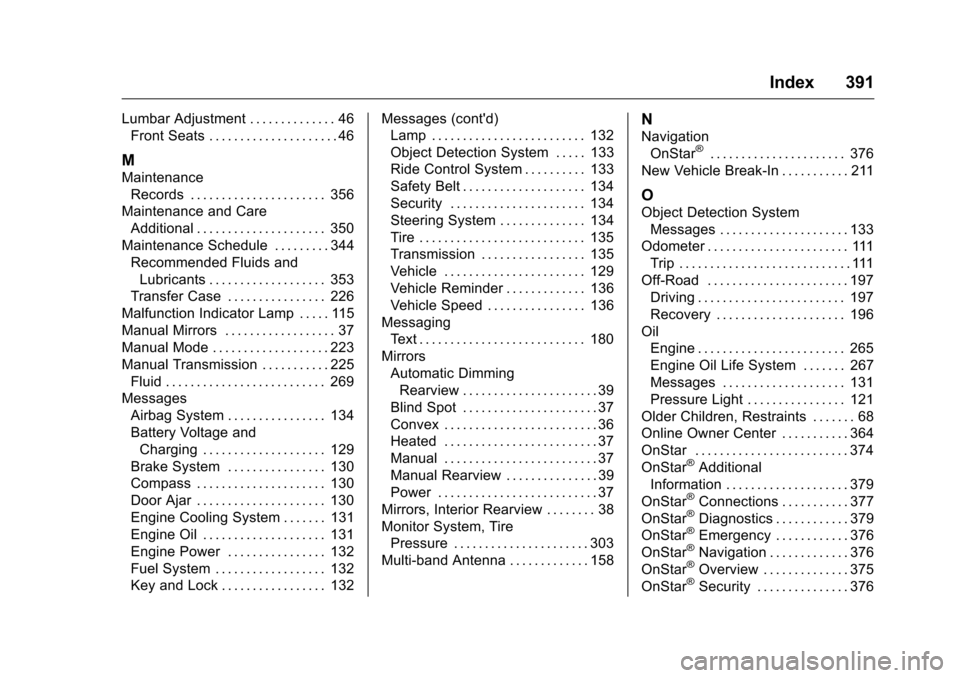
Lumbar Adjustment . . . . . . . . . . . . . . 46Front Seats . . . . . . . . . . . . . . . . . . . . . 46
M
Maintenance
Records . . . . . . . . . . . . . . . . . . . . . . 356
Maintenance and Care
Additional . . . . . . . . . . . . . . . . . . . . . 350
Maintenance Schedule . . . . . . . . . 344 Recommended Fluids andLubricants . . . . . . . . . . . . . . . . . . . 353
Transfer Case . . . . . . . . . . . . . . . . 226
Malfunction Indicator Lamp . . . . . 115
Manual Mirrors . . . . . . . . . . . . . . . . . . 37
Manual Mode . . . . . . . . . . . . . . . . . . . 223
Manual Transmission . . . . . . . . . . . 225 Fluid . . . . . . . . . . . . . . . . . . . . . . . . . . 269
Messages Airbag System . . . . . . . . . . . . . . . . 134
Battery Voltage andCharging . . . . . . . . . . . . . . . . . . . . 129
Brake System . . . . . . . . . . . . . . . . 130
Compass . . . . . . . . . . . . . . . . . . . . . 130
Door Ajar . . . . . . . . . . . . . . . . . . . . . 130
Engine Cooling System . . . . . . . 131
Engine Oil . . . . . . . . . . . . . . . . . . . . 131
Engine Power . . . . . . . . . . . . . . . . 132
Fuel System . . . . . . . . . . . . . . . . . . 132
Key and Lock . . . . . . . . . . . . . . . . . 132 Messages (cont'd)
Lamp . . . . . . . . . . . . . . . . . . . . . . . . . 132
Object Detection System . . . . . 133
Ride Control System . . . . . . . . . . 133
Safety Belt . . . . . . . . . . . . . . . . . . . . 134
Security . . . . . . . . . . . . . . . . . . . . . . 134
Steering System . . . . . . . . . . . . . . 134
Tire . . . . . . . . . . . . . . . . . . . . . . . . . . . 135
Transmission . . . . . . . . . . . . . . . . . 135
Vehicle . . . . . . . . . . . . . . . . . . . . . . . 129
Vehicle Reminder . . . . . . . . . . . . . 136
Vehicle Speed . . . . . . . . . . . . . . . . 136
Messaging Text . . . . . . . . . . . . . . . . . . . . . . . . . . . 180
Mirrors Automatic DimmingRearview . . . . . . . . . . . . . . . . . . . . . . 39
Blind Spot . . . . . . . . . . . . . . . . . . . . . . 37
Convex . . . . . . . . . . . . . . . . . . . . . . . . . 36
Heated . . . . . . . . . . . . . . . . . . . . . . . . . 37
Manual . . . . . . . . . . . . . . . . . . . . . . . . . 37
Manual Rearview . . . . . . . . . . . . . . . 39
Power . . . . . . . . . . . . . . . . . . . . . . . . . . 37
Mirrors, Interior Rearview . . . . . . . . 38
Monitor System, Tire Pressure . . . . . . . . . . . . . . . . . . . . . . 303
Multi-band Antenna . . . . . . . . . . . . . 158
N
Navigation OnStar®. . . . . . . . . . . . . . . . . . . . . . 376
New Vehicle Break-In . . . . . . . . . . . 211
O
Object Detection System Messages . . . . . . . . . . . . . . . . . . . . . 133
Odometer . . . . . . . . . . . . . . . . . . . . . . . 111 Trip . . . . . . . . . . . . . . . . . . . . . . . . . . . . 111
Off-Road . . . . . . . . . . . . . . . . . . . . . . . 197
Driving . . . . . . . . . . . . . . . . . . . . . . . . 197
Recovery . . . . . . . . . . . . . . . . . . . . . 196
Oil Engine . . . . . . . . . . . . . . . . . . . . . . . . 265
Engine Oil Life System . . . . . . . 267
Messages . . . . . . . . . . . . . . . . . . . . 131
Pressure Light . . . . . . . . . . . . . . . . 121
Older Children, Restraints . . . . . . . 68
Online Owner Center . . . . . . . . . . . 364
OnStar . . . . . . . . . . . . . . . . . . . . . . . . . 374
OnStar
®Additional
Information . . . . . . . . . . . . . . . . . . . . 379
OnStar
®Connections . . . . . . . . . . . 377
OnStar®Diagnostics . . . . . . . . . . . . 379
OnStar®Emergency . . . . . . . . . . . . 376
OnStar®Navigation . . . . . . . . . . . . . 376
OnStar®Overview . . . . . . . . . . . . . . 375
OnStar®Security . . . . . . . . . . . . . . . 376