ECO mode CHEVROLET COLORADO 2016 2.G Owner's Manual
[x] Cancel search | Manufacturer: CHEVROLET, Model Year: 2016, Model line: COLORADO, Model: CHEVROLET COLORADO 2016 2.GPages: 396, PDF Size: 6.6 MB
Page 257 of 396
Chevrolet Colorado Owner Manual (GMNA-Localizing-U.S/Canada/Mexico-
9159327) - 2016 - crc - 8/28/15
256 Driving and Operating
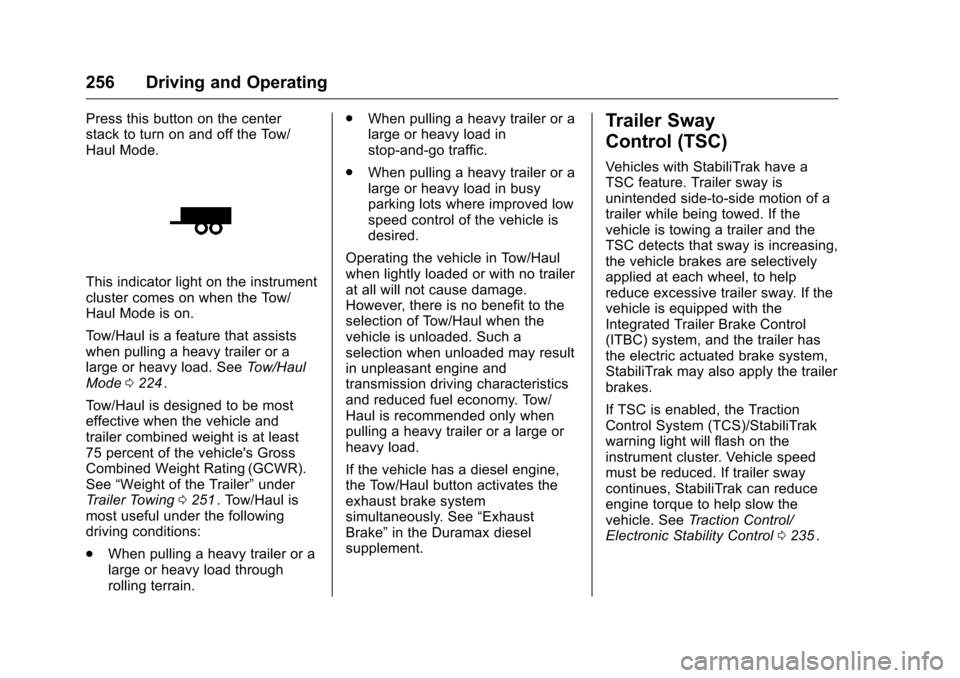
Press this button on the center
stack to turn on and off the Tow/
Haul Mode.
This indicator light on the instrument
cluster comes on when the Tow/
Haul Mode is on.
Tow/Haul is a feature that assists
when pulling a heavy trailer or a
large or heavy load. SeeTow/Haul
Mode 0224
ii.
Tow/Haul is designed to be most
effective when the vehicle and
trailer combined weight is at least
75 percent of the vehicle's Gross
Combined Weight Rating (GCWR).
See “Weight of the Trailer” under
Trailer Towing 0251
ii. Tow/Haul is
most useful under the following
driving conditions:
. When pulling a heavy trailer or a
large or heavy load through
rolling terrain. .
When pulling a heavy trailer or a
large or heavy load in
stop-and-go traffic.
. When pulling a heavy trailer or a
large or heavy load in busy
parking lots where improved low
speed control of the vehicle is
desired.
Operating the vehicle in Tow/Haul
when lightly loaded or with no trailer
at all will not cause damage.
However, there is no benefit to the
selection of Tow/Haul when the
vehicle is unloaded. Such a
selection when unloaded may result
in unpleasant engine and
transmission driving characteristics
and reduced fuel economy. Tow/
Haul is recommended only when
pulling a heavy trailer or a large or
heavy load.
If the vehicle has a diesel engine,
the Tow/Haul button activates the
exhaust brake system
simultaneously. See “Exhaust
Brake” in the Duramax diesel
supplement.
Trailer Sway
Control (TSC)
Vehicles with StabiliTrak have a
TSC feature. Trailer sway is
unintended side-to-side motion of a
trailer while being towed. If the
vehicle is towing a trailer and the
TSC detects that sway is increasing,
the vehicle brakes are selectively
applied at each wheel, to help
reduce excessive trailer sway. If the
vehicle is equipped with the
Integrated Trailer Brake Control
(ITBC) system, and the trailer has
the electric actuated brake system,
StabiliTrak may also apply the trailer
brakes.
If TSC is enabled, the Traction
Control System (TCS)/StabiliTrak
warning light will flash on the
instrument cluster. Vehicle speed
must be reduced. If trailer sway
continues, StabiliTrak can reduce
engine torque to help slow the
vehicle. See Traction Control/
Electronic Stability Control 0235
ii.
Page 302 of 396
Chevrolet Colorado Owner Manual (GMNA-Localizing-U.S/Canada/Mexico-
9159327) - 2016 - crc - 8/28/15
Vehicle Care 301
Light Truck (LT-Metric) Tire:A
tire used on light duty trucks and
some multipurpose passenger
vehicles.
Load Index
:An assigned
number ranging from 1 to 279
that corresponds to the load
carrying capacity of a tire.
Maximum Inflation Pressure
:
The maximum air pressure to
which a cold tire can be inflated.
The maximum air pressure is
molded onto the sidewall.
Maximum Load Rating
:The
load rating for a tire at the
maximum permissible inflation
pressure for that tire.
Maximum Loaded Vehicle
Weight
:The sum of curb
weight, accessory weight,
vehicle capacity weight, and
production options weight. Normal Occupant Weight
:The
number of occupants a vehicle
is designed to seat multiplied by
68 kg (150 lb). See Vehicle Load
Limits 0205
ii.
Occupant Distribution
:
Designated seating positions.
Outward Facing Sidewall
:The
side of an asymmetrical tire that
has a particular side that faces
outward when mounted on a
vehicle. The side of the tire that
contains a whitewall, bears
white lettering, or bears
manufacturer, brand, and/or
model name molding that is
higher or deeper than the same
moldings on the other sidewall
of the tire.
Passenger (P-Metric) Tire
:A
tire used on passenger cars and
some light duty trucks and
multipurpose vehicles.
Recommended Inflation
Pressure
:Vehicle
manufacturer's recommended tire inflation pressure as shown
on the tire placard. See
Tire
Pressure 0302
iiand Vehicle
Load Limits 0205
ii.
Radial Ply Tire
:A pneumatic
tire in which the ply cords that
extend to the beads are laid at
90 degrees to the centerline of
the tread.
Rim
:A metal support for a tire
and upon which the tire beads
are seated.
Sidewall
:The portion of a tire
between the tread and the bead.
Speed Rating
:An
alphanumeric code assigned to
a tire indicating the maximum
speed at which a tire can
operate.
Traction
:The friction between
the tire and the road surface.
The amount of grip provided.
Tread
:The portion of a tire that
comes into contact with
the road.
Page 308 of 396
Chevrolet Colorado Owner Manual (GMNA-Localizing-U.S/Canada/Mexico-
9159327) - 2016 - crc - 8/28/15
Vehicle Care 307
SeeDriver Information Center
(DIC) (Base Level) 0123iior
Driver Information Center (DIC)
(Uplevel) 0126
ii.
4. If the vehicle has an uplevel DIC, use the DIC controls on
the right side of the steering
wheel to scroll to the Tire
Pressure screen under the DIC
info page.
If the vehicle has a base level
DIC, use the MENU button to
select the Vehicle Information
menu in the DIC. Use the
thumbwheel to scroll to the Tire
Pressure Menu item screen.
5. If the vehicle has an uplevel DIC, press and hold the
V
(Set/Reset) button located in
the center of the DIC controls.
If the vehicle has a base level
DIC, press the SET/CLR button
to begin the sensor matching
process. A message asking if the
process should begin should
appear. Press the SET/CLR
button again to confirm the
selection.
The horn sounds twice to
signal the receiver is in relearn
mode and the TIRE
LEARNING ACTIVE message
displays on the DIC screen.
6. Start with the driver side front tire.
7. Place the relearn tool against the tire sidewall, near the valve
stem. Then press the button to
activate the TPMS sensor.
A horn chirp confirms that the
sensor identification code has
been matched to this tire and
wheel position.
8. Proceed to the passenger side front tire, and repeat the
procedure in Step 7.
9. Proceed to the passenger side rear tire, and repeat the
procedure in Step 7. 10. Proceed to the driver side rear
tire, and repeat the procedure
in Step 7. The horn sounds two
times to indicate the sensor
identification code has been
matched to the driver side rear
tire, and the TPMS sensor
matching process is no longer
active. The TIRE LEARNING
ACTIVE message on the DIC
display screen goes off.
11. Turn the ignition switch to LOCK/OFF.
12. Set all four tires to the recommended air pressure
level as indicated on the Tire
and Loading Information label.Tire Inspection
We recommend that the tires,
including the spare tire, if the
vehicle has one, be inspected
for signs of wear or damage at
least once a month.
Page 370 of 396
Chevrolet Colorado Owner Manual (GMNA-Localizing-U.S/Canada/Mexico-
9159327) - 2016 - crc - 8/28/15
Customer Information 369
Limited Warranty, and any vehicle
failure related to such parts is not
covered by that warranty.
Repair Facility
GM also recommends that you
choose a collision repair facility that
meets your needs before you ever
need collision repairs. Your dealer
may have a collision repair center
with GM-trained technicians and
state-of-the-art equipment, or be
able to recommend a collision repair
center that has GM-trained
technicians and comparable
equipment.
Insuring the Vehicle
Protect your investment in the GM
vehicle with comprehensive and
collision insurance coverage. There
are significant differences in the
quality of coverage afforded by
various insurance policy terms.
Many insurance policies provide
reduced protection to the GM
vehicle by limiting compensation for
damage repairs through the use of
aftermarket collision parts. Some
insurance companies will notspecify aftermarket collision parts.
When purchasing insurance, we
recommend that you ensure that the
vehicle will be repaired with GM
original equipment collision parts.
If such insurance coverage is not
available from your current
insurance carrier, consider switching
to another insurance carrier.
If the vehicle is leased, the leasing
company may require you to have
insurance that ensures repairs with
Genuine GM Original Equipment
Manufacturer (OEM) parts or
Genuine Manufacturer replacement
parts. Read the lease carefully, as
you may be charged at the end of
the lease for poor quality repairs.If a Crash Occurs
If there has been an injury, call
emergency services for help. Do not
leave the scene of a crash until all
matters have been taken care of.
Move the vehicle only if its position
puts you in danger, or you are
instructed to move it by a police
officer.
Give only the necessary information
to police and other parties involved
in the crash.
For emergency towing see
Roadside Assistance Program
0
365
ii.
Gather the following information:
. Driver name, address, and
telephone number.
. Driver license number.
. Owner name, address, and
telephone number.
. Vehicle license plate number.
. Vehicle make, model, and
model year.
. Vehicle Identification
Number (VIN).
. Insurance company and policy
number.
. General description of the
damage to the other vehicle.
Choose a reputable repair facility
that uses quality replacement parts.
See “Collision Parts” earlier in this
section.
Page 371 of 396
Chevrolet Colorado Owner Manual (GMNA-Localizing-U.S/Canada/Mexico-
9159327) - 2016 - crc - 8/28/15
370 Customer Information
If the airbag has inflated, seeWhat
Will You See after an Airbag
Inflates? 061
ii.
Managing the Vehicle Damage
Repair Process
In the event that the vehicle requires
damage repairs, GM recommends
that you take an active role in its
repair. If you have a pre-determined
repair facility of choice, take the
vehicle there, or have it towed there.
Specify to the facility that any
required replacement collision parts
be original equipment parts, either
new Genuine GM parts or recycled
original GM parts. Remember,
recycled parts will not be covered by
the GM vehicle warranty.
Insurance pays the bill for the repair,
but you must live with the repair.
Depending on your policy limits,
your insurance company may
initially value the repair using
aftermarket parts. Discuss this with
the repair professional, and insist on
Genuine GM parts. Remember,
if the vehicle is leased, you may be
obligated to have the vehicle repaired with Genuine GM parts,
even if your insurance coverage
does not pay the full cost.
If another party's insurance
company is paying for the repairs,
you are not obligated to accept a
repair valuation based on that
insurance company's collision policy
repair limits, as you have no
contractual limits with that company.
In such cases, you can have control
of the repair and parts choices as
long as the cost stays within
reasonable limits.
Service Publications
Ordering Information
(U.S. and Canada Only)
Service Manuals
Service Manuals have the diagnosis
and repair information on the
engines, transmission, axle,
suspension, brakes, electrical,
steering, body, etc.
Service Bulletins
Service Bulletins give additional
technical service information
needed to knowledgeably service
General Motors cars and trucks.
Each bulletin contains instructions
to assist in the diagnosis and
service of the vehicle.
Owner Information
Owner publications are written
specifically for owners and intended
to provide basic operational
information about the vehicle. The
Owner Manual includes the
Maintenance Schedule for all
models.
In-Portfolio: Includes a Portfolio,
Owner Manual, and Warranty
Manual.
RETAIL SELL PRICE: $35.00
–
$40.00 (U.S.) plus handling and
shipping fees.
Without Pouch: Owner Manual only.
RETAIL SELL PRICE:
$25.00 (U.S.) plus handling and
shipping fees.
Page 372 of 396
Chevrolet Colorado Owner Manual (GMNA-Localizing-U.S/Canada/Mexico-
9159327) - 2016 - crc - 8/28/15
Customer Information 371
Current and Past Models
Technical Service Bulletins and
Manuals are available for current
and past model GM vehicles.
ORDER TOLL FREE:
1-800-551-4123 Monday–Friday
8:00 AM –6:00 PM Eastern Time
For Credit Card Orders Only
(VISA-MasterCard-Discover), see
Helm, Inc. at: www.helminc.com.
Or write to:
Helm, Incorporated
Attention: Customer Service
47911 Halyard Drive
Plymouth, MI 48170
Prices are subject to change without
notice and without incurring
obligation. Allow ample time for
delivery.
All listed prices are quoted in U.S.
funds. Make checks payable in U.S.
funds.
Radio Frequency
Statement
This vehicle has systems that
operate on a radio frequency that
complies with Part 15/Part 18 of the
Federal Communications
Commission (FCC) rules and with
Industry Canada Standards
RSS-GEN/210/216/220/251/310,
ICES‐001.
Operation is subject to the following
two conditions:
1. The device may not cause harmful interference.
2. The device must accept any interference received, including
interference that may cause
undesired operation of the
device.
Changes or modifications to any of
these systems by other than an
authorized service facility could void
authorization to use this equipment.
Reporting Safety
Defects
Reporting Safety Defects
to the United States
Government
If you believe that your vehicle
has a defect which could cause
a crash or could cause injury or
death, you should immediately
inform the National Highway
Traffic Safety Administration
(NHTSA) in addition to notifying
General Motors.
If NHTSA receives similar
complaints, it may open an
investigation, and if it finds that
a safety defect exists in a group
of vehicles, it may order a recall
and remedy campaign.
However, NHTSA cannot
become involved in individual
problems between you, your
dealer, or General Motors.
Page 392 of 396
Chevrolet Colorado Owner Manual (GMNA-Localizing-U.S/Canada/Mexico-
9159327) - 2016 - crc - 8/28/15
Index 391
Lumbar Adjustment . . . . . . . . . . . . . . 46Front Seats . . . . . . . . . . . . . . . . . . . . . 46
M
Maintenance
Records . . . . . . . . . . . . . . . . . . . . . . 356
Maintenance and Care
Additional . . . . . . . . . . . . . . . . . . . . . 350
Maintenance Schedule . . . . . . . . . 344 Recommended Fluids andLubricants . . . . . . . . . . . . . . . . . . . 353
Transfer Case . . . . . . . . . . . . . . . . 226
Malfunction Indicator Lamp . . . . . 115
Manual Mirrors . . . . . . . . . . . . . . . . . . 37
Manual Mode . . . . . . . . . . . . . . . . . . . 223
Manual Transmission . . . . . . . . . . . 225 Fluid . . . . . . . . . . . . . . . . . . . . . . . . . . 269
Messages Airbag System . . . . . . . . . . . . . . . . 134
Battery Voltage andCharging . . . . . . . . . . . . . . . . . . . . 129
Brake System . . . . . . . . . . . . . . . . 130
Compass . . . . . . . . . . . . . . . . . . . . . 130
Door Ajar . . . . . . . . . . . . . . . . . . . . . 130
Engine Cooling System . . . . . . . 131
Engine Oil . . . . . . . . . . . . . . . . . . . . 131
Engine Power . . . . . . . . . . . . . . . . 132
Fuel System . . . . . . . . . . . . . . . . . . 132
Key and Lock . . . . . . . . . . . . . . . . . 132 Messages (cont'd)
Lamp . . . . . . . . . . . . . . . . . . . . . . . . . 132
Object Detection System . . . . . 133
Ride Control System . . . . . . . . . . 133
Safety Belt . . . . . . . . . . . . . . . . . . . . 134
Security . . . . . . . . . . . . . . . . . . . . . . 134
Steering System . . . . . . . . . . . . . . 134
Tire . . . . . . . . . . . . . . . . . . . . . . . . . . . 135
Transmission . . . . . . . . . . . . . . . . . 135
Vehicle . . . . . . . . . . . . . . . . . . . . . . . 129
Vehicle Reminder . . . . . . . . . . . . . 136
Vehicle Speed . . . . . . . . . . . . . . . . 136
Messaging Text . . . . . . . . . . . . . . . . . . . . . . . . . . . 180
Mirrors Automatic DimmingRearview . . . . . . . . . . . . . . . . . . . . . . 39
Blind Spot . . . . . . . . . . . . . . . . . . . . . . 37
Convex . . . . . . . . . . . . . . . . . . . . . . . . . 36
Heated . . . . . . . . . . . . . . . . . . . . . . . . . 37
Manual . . . . . . . . . . . . . . . . . . . . . . . . . 37
Manual Rearview . . . . . . . . . . . . . . . 39
Power . . . . . . . . . . . . . . . . . . . . . . . . . . 37
Mirrors, Interior Rearview . . . . . . . . 38
Monitor System, Tire Pressure . . . . . . . . . . . . . . . . . . . . . . 303
Multi-band Antenna . . . . . . . . . . . . . 158
N
Navigation OnStar®. . . . . . . . . . . . . . . . . . . . . . 376
New Vehicle Break-In . . . . . . . . . . . 211
O
Object Detection System Messages . . . . . . . . . . . . . . . . . . . . . 133
Odometer . . . . . . . . . . . . . . . . . . . . . . . 111 Trip . . . . . . . . . . . . . . . . . . . . . . . . . . . . 111
Off-Road . . . . . . . . . . . . . . . . . . . . . . . 197
Driving . . . . . . . . . . . . . . . . . . . . . . . . 197
Recovery . . . . . . . . . . . . . . . . . . . . . 196
Oil Engine . . . . . . . . . . . . . . . . . . . . . . . . 265
Engine Oil Life System . . . . . . . 267
Messages . . . . . . . . . . . . . . . . . . . . 131
Pressure Light . . . . . . . . . . . . . . . . 121
Older Children, Restraints . . . . . . . 68
Online Owner Center . . . . . . . . . . . 364
OnStar . . . . . . . . . . . . . . . . . . . . . . . . . 374
OnStar
®Additional
Information . . . . . . . . . . . . . . . . . . . . 379
OnStar
®Connections . . . . . . . . . . . 377
OnStar®Diagnostics . . . . . . . . . . . . 379
OnStar®Emergency . . . . . . . . . . . . 376
OnStar®Navigation . . . . . . . . . . . . . 376
OnStar®Overview . . . . . . . . . . . . . . 375
OnStar®Security . . . . . . . . . . . . . . . 376