AUX CHEVROLET COLORADO 2017 2.G User Guide
[x] Cancel search | Manufacturer: CHEVROLET, Model Year: 2017, Model line: COLORADO, Model: CHEVROLET COLORADO 2017 2.GPages: 419, PDF Size: 7.38 MB
Page 173 of 419
Chevrolet Colorado Owner Manual (GMNA-Localizing-U.S./Canada/Mexico-10122675) - 2017 - crc - 8/22/16
172 Infotainment System
The device battery rechargesautomatically while the vehicle is on.When the vehicle is off while adevice is connected using the USBcable, the device battery stopscharging and the device willautomatically turn off.
If the device is an unsupportedmodel, it can still be listened to inthe vehicle by connecting to theauxiliary input jack using a standard3.5 mm (1/8 in) stereo cable.
Menu
Press MENU to display the deviceMenu and the following may display:
Browse :Select to display the filesor songs on the device. See“Browse Device Media”later in thissection.
To n e S e t t i n g s :Select to adjustBass, Midrange, Treble, Balance,Fade, and EQ (Equalizer). See“To n e S e t t i n g s”inAM-FM Radio(Base Radio)0161orAM-FMRadio (Base Radio withTo u c h s c r e e n )0163.
EQ :If equipped, this featureadjusts the Equalizer settings. See“EQ (Equalizer)”inAM-FM Radio(Base Radio)0161orAM-FMRadio (Base Radio withTo u c h s c r e e n )0163.
Browse Device Media
Use the following to browse:
Playlists:
1. Turn MENU to highlight andpress to view the playlistsstored on the device.
2. Turn MENU to highlight andpress to select a playlist nameto view a list of all songs in theplaylist.
3. Turn MENU to highlight andpress to select the song fromthe list to begin playback.
Artists:
1. Turn MENU to highlight andpress to view the artists storedon the device.
2. Turn MENU to highlight andpress to select an artist nameto view a list of all albums bythe artist.
3. Turn MENU to highlight andpress to select an album nameto view a list of all songs on thealbum.
4. Turn MENU to highlight andpress to select the song fromthe list to begin playback.
Albums:
1. Turn MENU to highlight andpress to view the albumsstored on the device.
2. Turn MENU to highlight andpress to select an album nameto view a list of all songs on thealbum.
3. Turn MENU to highlight andpress to select the song fromthe list to begin playback.
Genres:
1. Turn MENU to highlight andpress to view the genres storedon the device.
2. Turn MENU to highlight andpress to select a genre nameto view a list of artists of thatgenre.
Page 174 of 419
Chevrolet Colorado Owner Manual (GMNA-Localizing-U.S./Canada/Mexico-10122675) - 2017 - crc - 8/22/16
Infotainment System 173
3. Turn MENU to highlight andpress to select to view albumsby that artist.
4. Turn MENU to highlight andpress to select an album toview songs.
5. Turn MENU to highlight andpress to select the song fromthe list to begin playback.
Songs:
1. Turn MENU to highlight andpress to view a list of all songsstored on the device.
2. Turn MENU to highlight andpress to select the song fromthe list to begin playback.
USB Port (Base Radio
with Touchscreen)
If equipped, there is a USB port fordata and charging in the centerstack, inside the center console,and/or at the rear of the centerconsole. For uplevel radios, see theinfotainment manual.
Using the USB Port
The infotainment system can playmusic by connecting an auxiliarydevice to the USB port.
USB Support
The USB port uses the USB 2.0standard. External devices such asiPhones/iPods®and USB storagedevices may be connected.
USB Supported Devices
.USB flash drives
.Portable USB hard drives
.iPod/iPhone devices
Not all iPods and USB drives arecompatible with the USB port.
Make sure the iPod has the latestfirmware from Apple®for properoperation. iPod firmware can beupdated using the latest iTunes®
application. See www.apple.com/itunes.
For help with identifying your iPod,go to www.apple.com/support.
The USB port can play both lowerand upper case .mp3, .wma, .ogg,and .wav files stored on a USBstorage device.
Supported Apple®Devices
To v i e w s u p p o r t e d d e v i c e s i n t h eU.S., see www.my.chevrolet.com/learned.
To v i e w s u p p o r t e d d e v i c e s i nCanada, seewww.chevroletowner.ca.
For supported devices in Mexico,see your dealer.
USB Supported File and FolderStructure
The infotainment system supports:
.FAT 1 6 .
.FAT 3 2 .
.exFAT.
Connecting a USB Storage
Device or iPod/iPhone
To c o n n e c t a U S B s t o r a g e d e v i c e ,connect the device to the USB port.
Page 180 of 419
Chevrolet Colorado Owner Manual (GMNA-Localizing-U.S./Canada/Mexico-10122675) - 2017 - crc - 8/22/16
Infotainment System 179
.Clock, Temp. Display:Allows selection of On orOff to show the clock andtemperature on the fullscreen.
.Display Settings: Adjustsfor Brightness and Contrast.
3. Touch0to exit.
Auxiliary Jack
If equipped, an AUX jack is locatedon the center stack or in the centerconsole storage. SeeCenterConsole Storage0101.
Possible auxiliary audio sourcesinclude:
.Laptop computer
.Audio music player
This jack is not an audio output. Donot plug headphones into theauxiliary input jack. Auxiliarydevices should be set up while thevehicle is in P (Park).
Connect a 3.5 mm (1/8 in) cablefrom the auxiliary device to theauxiliary input jack.
Base Radio
Playing from the AUX Jack
An auxiliary device is playedthrough the audio system andcontrolled through the device itself.
If an auxiliary device has alreadybeen connected, but a differentsource is currently active, press theMEDIA faceplate button repeatedlyto scroll through all of the availableaudio source screens, until the AUXsource screen is shown.
AUX Menu
Press the MENU knob to display theAUX menu and the following maydisplay:
To n e S e t t i n g s :Select to adjustBass, Midrange, Treble, Balance,Fade, and EQ (Equalizer). See“To n e S e t t i n g s”inAM-FM Radio(Base Radio)0161orAM-FMRadio (Base Radio withTo u c h s c r e e n )0163.
Auto Volume :If equipped, see“Auto Volume”under“Base Radio”inAM-FM Radio (Base Radio)0161orAM-FM Radio (Base Radio withTo u c h s c r e e n )0163.
DSP :If equipped, this featureadjusts the pre-defined settings.See“DSP”inAM-FM Radio (BaseRadio)0161orAM-FM Radio(Base Radio withTo u c h s c r e e n )0163.
EQ :If equipped, this featureadjusts the pre-defined equalizersettings. See“EQ (Equalizer)”inAM-FM Radio (Base Radio)0161orAM-FM Radio (Base Radio withTo u c h s c r e e n )0163.
Base Radio with Touchscreen
Play will begin when the system hasfinished reading the information onthe device.
Playing Music
To p l a y t h e m u s i c f r o m t h e d e v i c e ,if the device is already connected:
1. Press{.
2. Touch AUDIO.
Page 181 of 419
Chevrolet Colorado Owner Manual (GMNA-Localizing-U.S./Canada/Mexico-10122675) - 2017 - crc - 8/22/16
180 Infotainment System
3. Touch Source.
4. Touch AUX.
To a d j u s t t h e t o n e s e t t i n g s , s e e“Audio Settings”in“SystemSettings”underAM-FM Radio (BaseRadio)0161orAM-FM Radio(Base Radio withTo u c h s c r e e n )0163.
To a d j u s t t h e a u t o v o l u m e s e t t i n g s ,see“Auto Volume”under“BaseRadio with Touchscreen”inAM-FMRadio (Base Radio)0161orAM-FM Radio (Base Radio withTo u c h s c r e e n )0163.
Bluetooth Audio
If equipped, music may be playedfrom a paired Bluetooth device. See“Pairing”under“Bluetooth(Infotainment Controls - BaseRadio)”or“Bluetooth (InfotainmentControls - Base Radio withTo u c h s c r e e n )”inBluetooth(Overview)0187orBluetooth(Infotainment Controls - BaseRadio)0188orBluetooth (VoiceRecognition)0192orBluetooth
(Infotainment Controls - Base Radiowith Touchscreen)0197for helppairing a device.
Volume and song selection may becontrolled by using the infotainmentcontrols or the phone/device.If Bluetooth Audio is selected andnothing is heard, check the volumesetting on both the phone/deviceand the infotainment system.
Launch music by touching theMEDIA screen button on theHome Page.
To p l a y m u s i c v i a B l u e t o o t h :
1. Power on the device, and pairto connect the device.
2. Once paired, go into the audioapplication from the HomePage or via the application tray.Select MEDIA until Bluetoothdisplays.
Bluetooth Audio Menu
To u c h t h e M E N U s c r e e n b u t t o n t odisplay the Bluetooth Audio menu.The following may be available:
To n e :Turn the MENU knob toadjust the tone settings.
To u c hoBACK to go back to the
previous menu.
Manage Bluetooth Devices:Selectto go to the Bluetooth page to addor delete devices.
When selecting Bluetooth Audio, theradio may not be able to launch theaudio player on the connecteddevice to start playing. When thevehicle is not moving, use thephone to begin playback.
All devices launch audio differently.When selecting Bluetooth Audio asasource,theradiomayshowaspaused on the screen. Press play
on the device or pressrto begin
playback.
Some phones support sendingBluetooth music information todisplay on the radio. When the radioreceives this information, it willcheck to see if any is available anddisplay it. For more informationabout supported Bluetooth features,see www.gm.com/bluetooth in theU.S. and Canada only.
Page 317 of 419
Chevrolet Colorado Owner Manual (GMNA-Localizing-U.S./Canada/Mexico-10122675) - 2017 - crc - 8/22/16
316 Vehicle Care
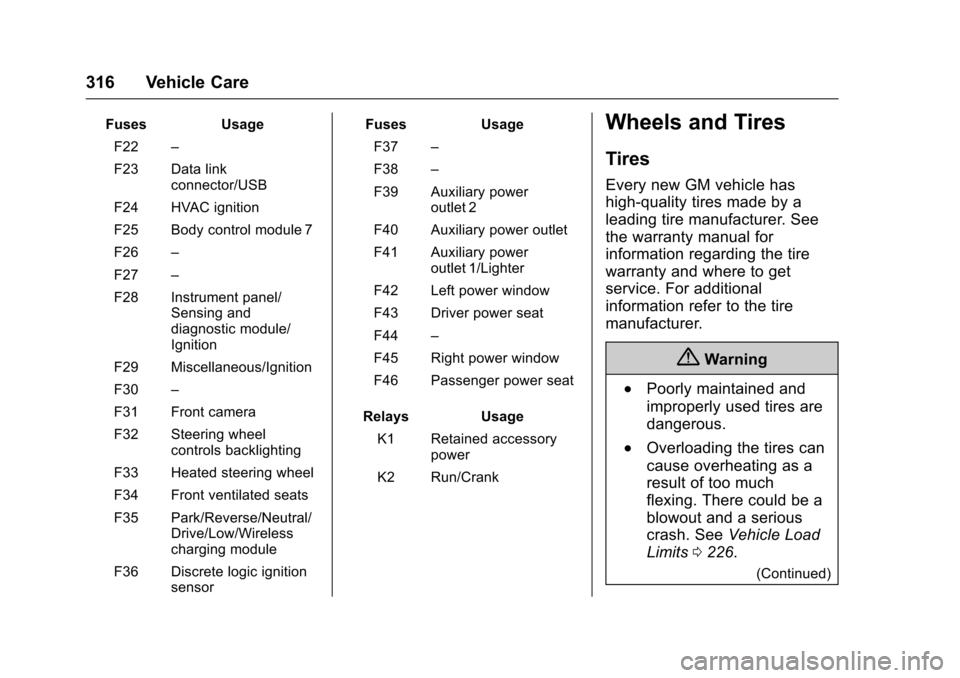
FusesUsage
F22–
F23 Data linkconnector/USB
F24 HVAC ignition
F25 Body control module 7
F26–
F27–
F28 Instrument panel/Sensing anddiagnostic module/Ignition
F29 Miscellaneous/Ignition
F30–
F31 Front camera
F32 Steering wheelcontrols backlighting
F33 Heated steering wheel
F34 Front ventilated seats
F35 Park/Reverse/Neutral/Drive/Low/Wirelesscharging module
F36 Discrete logic ignitionsensor
FusesUsage
F37–
F38–
F39 Auxiliary poweroutlet 2
F40 Auxiliary power outlet
F41 Auxiliary poweroutlet 1/Lighter
F42 Left power window
F43 Driver power seat
F44–
F45 Right power window
F46 Passenger power seat
RelaysUsage
K1 Retained accessorypower
K2 Run/Crank
Wheels and Tires
Tires
Every new GM vehicle has
high-quality tires made by a
leading tire manufacturer. See
the warranty manual for
information regarding the tire
warranty and where to get
service. For additional
information refer to the tire
manufacturer.
{Warning
.Poorly maintained and
improperly used tires are
dangerous.
.Overloading the tires can
cause overheating as a
result of too much
flexing. There could be a
blowout and a serious
crash. SeeVehicle Load
Limits0226.
(Continued)
Page 409 of 419

Chevrolet Colorado Owner Manual (GMNA-Localizing-U.S./Canada/Mexico-10122675) - 2017 - crc - 8/22/16
408 Index
Audio (cont'd)
Theft-Deterrent Feature . . . . . . . 154
Automatic
Climate Control System . . . . . . . 210
Door Locks . . . . . . . . . . . . . . . . . . . . . 34
Headlamp System . . . . . . . . . . . . 148
Transmission . . . . . . . . . . . . . . . . . 241
Transmission Fluid . . . . . . . . . . . 290
Automatic Transmission
Manual Mode . . . . . . . . . . . . . . . . . 244
Shift Lock Control Function
Check . . . . . . . . . . . . . . . . . . . . . . . 304
Auxiliary Jack . . . . . . . . . . . . . . . . . . . 179
Avoiding Untrusted Media
Devices . . . . . . . . . . . . . . . . . . . . . . . 170
Axle, Front . . . . . . . . . . . . . . . . . . . . . . 302
Axle, Rear . . . . . . . . . . . . . . . . . . . . . . 303
B
Battery
Load Management . . . . . . . . . . . . 152
Power Protection . . . . . . . . . . . . . 152
Voltage and Charging
Messages . . . . . . . . . . . . . . . . . . . 132
Battery - North America . . . . 300, 348
Blade Replacement, Wiper . . . . . 305
Blind Spot Mirrors . . . . . . . . . . . . . . . 39
Bluetooth
Overview . . . . . . . . 187, 188,192, 197
Bluetooth Audio . . . . . . . . . . . . . . . . 180
Brake
System Warning Light . . . . . . . . 120
Brakes . . . . . . . . . . . . . . . . . . . . . . . . . . 298
Antilock . . . . . . . . . . . . . . . . . . . . . . . 254
Assist . . . . . . . . . . . . . . . . . . . . . . . . . 255
Fluid . . . . . . . . . . . . . . . . . . . . . . . . . . 299
Parking . . . . . . . . . . . . . . . . . . . . . . . 254
System Messages . . . . . . . . . . . . 133
Braking . . . . . . . . . . . . . . . . . . . . . . . . . 216
Break-In, New Vehicle . . . . . . . . . . 232
Bulb Replacement . . . . . . . . . . . . . . 309
Center High-Mounted
Stoplamp (CHMSL) and
Cargo Lamp . . . . . . . . . . . . . . . . . 308
Halogen Bulbs . . . . . . . . . . . . . . . . 306
Headlamp Aiming . . . . . . . . . . . . . 306
Headlamps . . . . . . . . . . . . . . . . . . . 306
Headlamps, Front Turn
Signal, Sidemarker, and
Parking Lamps . . . . . . . . . . . . . . 307
Ta i l l a m p s , T u r n S i g n a l ,
Stoplamps, and Back-up
Lamps . . . . . . . . . . . . . . . . . . . . . . 307
Buying New Tires . . . . . . . . . . . . . . . 331
C
Calibration . . . . . . . . . . . . . . . . . . . . . . 105
California
Fuel Requirements . . . . . . . . . . . 267
Perchlorate Materials
Requirements . . . . . . . . . . . . . . . 280
California
Proposition
65 Warning . . . . . . . . . .280, 300, 348
Camera
Rear Vision (RVC) . . . . . . . . . . . . 261
Canadian Vehicle Owners . . . . . . . . 2
Capacities and
Specifications . . . . . . . . . . . . . . . . . 380
Carbon Monoxide
Engine Exhaust . . . . . . . . . . . . . . . 240
Ta i l g a t e . . . . . . . . . . . . . . . . . . . . . . . . . 3 5
Winter Driving . . . . . . . . . . . . . . . . 224
Cargo Lamp . . . . . . . . . . . . . . . . . . . . 150
Caution, Danger, and Warning . . . . 3
Center Console Storage . . . . . . . . 101
Center High-Mounted
Stoplamp (CHMSL) and
Cargo Lamp . . . . . . . . . . . . . . . . . . . 308
Chains, Tire . . . . . . . . . . . . . . . . . . . . 335
Charging
Wireless . . . . . . . . . . . . . . . . . . . . . . 107
Charging System Light . . . . . . . . . 118
Page 413 of 419

Chevrolet Colorado Owner Manual (GMNA-Localizing-U.S./Canada/Mexico-10122675) - 2017 - crc - 8/22/16
412 Index
Interior Rearview Mirrors . . . . . . . . . 40
Internet Radio
Pandora . . . . . . . . . . . . . . . . . . . . . . 167
Introduction . . . . . . . . . . . . . . . . . . . . . . . 2
J
Jack
Auxiliary . . . . . . . . . . . . . . . . . . . . . . 179
Jump Starting - North
America . . . . . . . . . . . . . . . . . . . . . . . 348
K
Key and Lock Messages . . . . . . . . 135
Keyless Entry
Remote (RKE) System . . . . . . . . . 30
Keys . . . . . . . . . . . . . . . . . . . . . . . . . . . . . 27
L
Labeling, Tire Sidewall . . . . . . . . . . 318
Lamps
Cargo . . . . . . . . . . . . . . . . . . . . . . . . . 150
Daytime Running (DRL) . . . . . . 147
Dome . . . . . . . . . . . . . . . . . . . . . . . . . 151
Exterior Controls . . . . . . . . . . . . . . 146
Exterior Lamps Off
Reminder . . . . . . . . . . . . . . . . . . . 147
Malfunction Indicator . . . . . . . . . .118
Messages . . . . . . . . . . . . . . . . . . . . 135
On Reminder . . . . . . . . . . . . . . . . . 125
Lamps (cont'd)
Reading . . . . . . . . . . . . . . . . . . . . . . 151
Lane Departure
Warning (LDW) . . . . . . . . . . . . . . . . 264
Lane Departure Warning
Light . . . . . . . . . . . . . . . . . . . . . . . . . . 122
Lap-Shoulder Belt . . . . . . . . . . . . . . . 53
LATCH System
Replacing Parts after a
Crash . . . . . . . . . . . . . . . . . . . . . . . . . 90
LATCH, Lower Anchors and
Te t h e r s f o r C h i l d r e n . . . . . . . . . . . . 7 7
Light
Hill Descent Control . . . . . . . . . . 121
Lighting
Entry . . . . . . . . . . . . . . . . . . . . . . . . . 151
Exit . . . . . . . . . . . . . . . . . . . . . . . . . . . 151
Illumination Control . . . . . . . . . . . 150
Lights . . . . . . . . . . . . . . . . . . . . . . . . . . . 122
Airbag Readiness . . . . . . . . . . . . . .117
Antilock Brake System
(ABS) Warning . . . . . . . . . . . . . . 121
Brake System Warning . . . . . . . 120
Charging System . . . . . . . . . . . . . .118
Cruise Control . . . . . . . . . . . . . . . . 125
Door Ajar . . . . . . . . . . . . . . . . . . . . . 126
Engine Oil Pressure . . . . . . . . . . 124
Flash-to-Pass . . . . . . . . . . . . . . . . . 147
Lights (cont'd)
Front Fog Lamp . . . . . . . . . . . . . . 125
High-Beam On . . . . . . . . . . . . . . . . 125
High/Low Beam Changer . . . . . 147
Lane Departure Warning . . . . . . 122
Low Fuel Warning . . . . . . . . . . . . 124
Safety Belt Reminders . . . . . . . . .116
Security . . . . . . . . . . . . . . . . . . . . . . 125
StabiliTrak®OFF . . . . . . . . . . . . . 122
Tire Pressure . . . . . . . . . . . . . . . . . 123
To w / H a u l M o d e . . . . . . . . . . . . . . . 1 2 1
Traction Control System
(TCS)/StabiliTrak®.......... 123
Traction Off . . . . . . . . . . . . . . . . . . . 122
Up-Shift . . . . . . . . . . . . . . . . . . . . . . 121
Locks
Automatic Door . . . . . . . . . . . . . . . . . 34
Delayed Locking . . . . . . . . . . . . . . . . 34
Door . . . . . . . . . . . . . . . . . . . . . . . . . . . . 33
Lockout Protection . . . . . . . . . . . . . . 34
Power Door . . . . . . . . . . . . . . . . . . . . . 34
Safety . . . . . . . . . . . . . . . . . . . . . . . . . . 35
Loss of Control . . . . . . . . . . . . . . . . . 217
Low Fuel Warning Light . . . . . . . . . 124
Lower Anchors and Tethers
for Children (LATCH
System) . . . . . . . . . . . . . . . . . . . . . . . . 77
Lumbar Adjustment . . . . . . . . . . . . . . 47