maintenance CHEVROLET COLORADO 2017 2.G User Guide
[x] Cancel search | Manufacturer: CHEVROLET, Model Year: 2017, Model line: COLORADO, Model: CHEVROLET COLORADO 2017 2.GPages: 419, PDF Size: 7.38 MB
Page 129 of 419
Chevrolet Colorado Owner Manual (GMNA-Localizing-U.S./Canada/Mexico-10122675) - 2017 - crc - 8/22/16
128 Instruments and Controls
recommended in the MaintenanceSchedule in this manual. SeeMaintenance Schedule0366.
The Oil Life display must be resetafter each oil change. Do not resetthe Oil Life display accidentally atany time other than when the oil hasjust been changed. It cannot bereset accurately until the next oilchange. To reset the engine oil lifesystem, seeEngine Oil LifeSystem0288.
Oil Pressure :Oil pressure isdisplayed in either kilopascal (kPa)or in pounds per square inch (psi).
Tire Pressure :Displays a vehiclewith the approximate pressures ofall four tires. Tire pressure isdisplayed in either kilopascal (kPa)or in pounds per square inch (psi).SeeTire Pressure Monitor System0325andTire Pressure MonitorOperation0326.
Battery Voltage :Displays thecurrent battery voltage, if equipped.Battery voltage changes are normalwhile driving. SeeCharging SystemLight011 8.Ifthereisaproblemwith the battery charging system,
the DIC will display a message. SeeBattery Voltage and ChargingMessages0132.
Engine Hours :Shows the totalnumber of hours the engine has run.
Tr a n s m i s s i o n F l u i dTe m p e r a t u r e :Shows thetemperature of the automatictransmission fluid in either degreesCelsius (°C) or degreesFahrenheit (°F).
Tr a i l e r B r a k e ( I f E q u i p p e d ) :TRAILER GAIN shows the trailergain setting. This setting can beadjusted from 0.0 to 10.0 with eitheratrailerconnectedordisconnected.
OUTPUT shows the power output tothe trailer anytime a trailer withelectric brakes is connected. Outputis displayed as a bar graph. Dashesmay appear in the OUTPUT displayif a trailer is not connected.
Units :Movewxto change
between Metric or US when the Unitdisplay is active. Press SET/CLR toconfirm the setting. This will changethe displays on the DIC to the typeof measurements you select.
ECO Drive Assist Menu (ECO)
Items
This menu is only available on somevehicles. Press MENU on the turnsignal lever until the ECO menu is
displayed. Usewxto scroll
through the menu items. Not allitems are available on every vehicle.The following is a list of all possiblemenu items:
Best Average Fuel Economy :Thebottom displays the best averagefuel economy (AFE) that is achievedfor a selected distance. The topdisplays a running average of fueleconomy for the most recentlytraveled selected distance. Thecenter bar graph displays theinstantaneous fuel economy.Quickly press the SET/CLR buttonto change the settings for thedistance options.
When viewing best AFE, a severalsecond press and hold of SET/CLRwill reset the best value. The bestvalue will show“---“until theselected distance has beentraveled.
Page 131 of 419
Chevrolet Colorado Owner Manual (GMNA-Localizing-U.S./Canada/Mexico-10122675) - 2017 - crc - 8/22/16
130 Instruments and Controls
Speed :Shows the vehicle speed ineither kilometers per hour (km/h) ormiles per hour (mph).
Tr i p A o r Tr i p B :Shows thecurrent distance traveled, in eitherkilometers (km) or miles (mi), sincethe trip odometer was last reset.
This also shows the approximateaverage liters per 100 kilometers(L/100 km) or miles pergallon (mpg). This number iscalculated based on the number ofL/100 km (mpg) recorded since thelast time this menu item was reset.This number reflects only theapproximate average fuel economythat the vehicle has right now, andwill change as driving conditionschange.
Press and holdVwhile this display
is active to reset the trip odometerand the average fuel economy. TripAandTripBcanalsoberesetby
pressingpand choosing reset.
Fuel Range :Shows theapproximate distance the vehiclecan be driven without refueling.LOW will be displayed when the
vehicle is low on fuel. The fuelrange estimate is based on anaverage of the vehicle's fueleconomy over recent driving historyand the amount of fuel remaining inthe fuel tank.
Oil Life :Shows an estimate of theoil's remaining useful life.If REMAINING OIL LIFE 99% isdisplayed, that means 99% of thecurrent oil life remains.
When the remaining oil life is low,the CHANGE ENGINE OIL SOONmessage will appear on the display.SeeEngine Oil Messages0134.The oil should be changed as soonas possible. SeeEngine Oil0286.In addition to the engine oil lifesystem monitoring the oil life,additional maintenance isrecommended in the MaintenanceSchedule. SeeMaintenanceSchedule0366.
The Oil Life display must be resetafter each oil change. It will notreset itself. Do not to reset the OilLife display at any time other thanwhen the oil has just been changed.It cannot be reset accurately until
the next oil change. To reset theengine oil life system, press and
holdVfor several seconds while
the Oil Life display is active. SeeEngine Oil Life System0288.
Tire Pressure :Shows theapproximate pressures of all fourtires. Tire pressure is displayed ineither kilopascal (kPa) or in poundsper square inch (psi). If the pressureis low, the value for that tire isshown in amber. SeeTire PressureMonitor System0325andTirePressure Monitor Operation0326.
Instantaneous Fuel Economy :Displays the current fuel economy inliters per 100 kilometers (L/100 km)or miles per gallon (mpg). Thisnumber reflects only theapproximate fuel economy that thevehicle has right now and changesfrequently as driving conditionschange. This display cannot bereset.
Average Vehicle Speed :Displaysthe average vehicle speed of thevehicle in kilometers per hour (km/h)or miles per hour (mph). Thisaverage is based on the various
Page 135 of 419
Chevrolet Colorado Owner Manual (GMNA-Localizing-U.S./Canada/Mexico-10122675) - 2017 - crc - 8/22/16
134 Instruments and Controls
ENGINE OVERHEATING, IDLE
ENGINE
This message displays when theengine coolant temperature is toohot. Stop and allow the vehicle toidle until it cools down. SeeEngineCoolant Temperature Gauge011 5.
When towing, use Tow/Haul Modeto prevent damage to the engine ortransmission. SeeTo w / H a u lMode0245.
ENGINE OVERHEATED STOP
ENGINE
This message displays and a chimemay sound if the engine coolingsystem reaches unsafetemperatures for operation. Stopand turn off the vehicle as soon as itis safe to do so to avoid severedamage. This message clears whenthe engine has cooled to a safeoperating temperature.
Engine Oil Messages
CHANGE ENGINE OIL SOON
This message displays when theengine oil needs to be changed.When you change the engine oil, besure to reset the CHANGE ENGINEOIL SOON message. SeeEngineOil Life System0288forinformation on how to reset themessage. SeeEngine Oil0286andMaintenance Schedule0366.
ENGINE OIL LOW ADD OIL
On some vehicles, this messagedisplays when the engine oil levelmay be too low. Check the oil levelbefore filling to the recommendedlevel. If the oil is not low and thismessage remains on, take thevehicle to your dealer for service.SeeEngine Oil0286.
ENGINE OIL HOT IDLE
ENGINE
This message displays when theengine oil becomes hotter than thenormal operating temperature. Stop
and allow the vehicle to idle until itcools down. SeeEngine CoolantTe m p e r a t u r e G a u g e011 5.
OIL PRESSURE LOW STOP
ENGINE
This message displays if low oilpressure levels occur. Stop thevehicle as soon as safely possibleand do not operate it until the causeof the low oil pressure has beencorrected. Check the oil as soon aspossible and have the vehicleserviced by your dealer. SeeEngineOil0286.
Engine Power Messages
ENGINE POWER IS REDUCED
This message displays and a chimemay sound when the cooling systemtemperature gets too hot and theengine further enters the enginecoolant protection mode. SeeEngine Overheating0296for moreinformation.
This message also displays whenthe vehicle's engine power isreduced. Reduced engine powercan affect the vehicle's ability to
Page 171 of 419
Chevrolet Colorado Owner Manual (GMNA-Localizing-U.S./Canada/Mexico-10122675) - 2017 - crc - 8/22/16
170 Infotainment System
Volume and song selection maybe controlled using theinfotainment controls or thephone/device. If Pandora isselected and nothing is heard,check the volume setting on thephone/device and theinfotainment system.
Common Pandora Messages
Pandora Error/Please CheckDevice :Not signed in or Pandorais down for maintenance.
No Stations Available :No stationsare available on the Pandora serverthrough the connected device.
Action Unavailable. Please CheckDevice Connection :Afewconditions for loss of Internetconnection are:
.The connected device loses itscellular connection.
.The device does not supportInternet connectivity.
.The device is not in the vehicle.
.The Bluetooth signal is lost.
No Skips Remaining For ThisStation or Permitted DuringAdvertisements :
.The maximum Pandora skip limithas been reached according tothe plan that was obtained.
.Skipping an advertisement wastried.
See www.pandora.com/help. If theservice will not work, see yourdealer for assistance.
Audio Players
Avoiding Untrusted Media
Devices
When using media devices such asCDs, DVDs, Blu-ray Discs®,SDcards, USB devices, and mobiledevices, consider the source.Untrusted media devices couldcontain files that affect systemoperation or performance. Avoid useif the content or origin cannot betrusted.
USB Port (Base Radio)
If equipped, there is a USB port fordata and charging in the centerstack, inside the center console,and/or at the rear of the centerconsole. For uplevel radios, see theinfotainment manual.
Playing from a USB
AUSBmassstoragedeviceorMedia Transfer Protocol (MTP)device can be connected to theUSB port.
Page 209 of 419
Chevrolet Colorado Owner Manual (GMNA-Localizing-U.S./Canada/Mexico-10122675) - 2017 - crc - 8/22/16
208 Climate Controls
Climate Controls
Climate Control Systems
Climate Control Systems . . . . . 208Automatic Climate ControlSystem . . . . . . . . . . . . . . . . . . . . . . 210
Air Vents
Air Vents . . . . . . . . . . . . . . . . . . . . . 212
Maintenance
Passenger Compartment AirFilter . . . . . . . . . . . . . . . . . . . . . . . . 213
Climate Control Systems
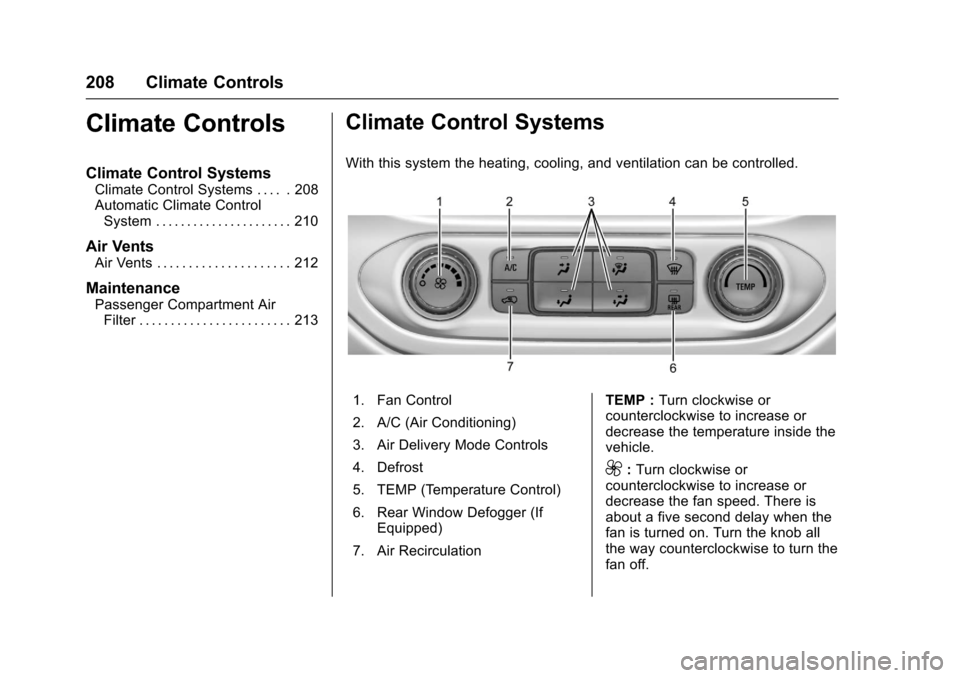
With this system the heating, cooling, and ventilation can be controlled.
1. Fan Control
2. A/C (Air Conditioning)
3. Air Delivery Mode Controls
4. Defrost
5. TEMP (Temperature Control)
6. Rear Window Defogger (IfEquipped)
7. Air Recirculation
TEMP :Turn clockwise orcounterclockwise to increase ordecrease the temperature inside thevehicle.
9:Turn clockwise orcounterclockwise to increase ordecrease the fan speed. There isabout a five second delay when thefan is turned on. Turn the knob allthe way counterclockwise to turn thefan off.
Page 214 of 419
Chevrolet Colorado Owner Manual (GMNA-Localizing-U.S./Canada/Mexico-10122675) - 2017 - crc - 8/22/16
Climate Controls 213
.Keep the path under the frontseats clear of objects to helpcirculate the air inside of thevehicle more effectively.
.Use of non-GM approved hooddeflectors can adversely affectthe performance of the system.Check with your dealer beforeadding equipment to the outsideof the vehicle.
Maintenance
Passenger Compartment
Air Filter
The passenger compartment airfilter reduces dust, pollen, and otherairborne irritants from outside airthat is pulled into the vehicle. Thefilter will need to be replacedperiodically. SeeMaintenanceSchedule0366.
Using the climate control systemwithout an air filter installed is notrecommended. Water or otherdebris could enter the system andresult in leaks or noises. Alwaysinstall a new filter when removingthe old filter.
For more information on filterreplacement, see your dealer.
Page 217 of 419
Chevrolet Colorado Owner Manual (GMNA-Localizing-U.S./Canada/Mexico-10122675) - 2017 - crc - 8/22/16
216 Driving and Operating
{Warning
Drinking and then driving is very
dangerous. Your reflexes,
perceptions, attentiveness, and
judgment can be affected by even
asmallamountofalcohol.You
can have a serious—or even
fatal—collision if you drive after
drinking.
Do not drink and drive or ride with
adriverwhohasbeendrinking.
Ride home in a cab; or if you are
with a group, designate a driver
who will not drink.
Control of a Vehicle
Braking, steering, and acceleratingare important factors in helping tocontrol a vehicle while driving.
Braking
Braking action involves perceptiontime and reaction time. Deciding topush the brake pedal is perceptiontime. Actually doing it isreaction time.
Average driver reaction time isabout three-quarters of a second. Inthat time, a vehicle moving at100 km/h (60 mph) travels 20 m(66 ft), which could be a lot ofdistance in an emergency.
Helpful braking tips to keep in mindinclude:
.Keep enough distance betweenyou and the vehicle in frontof you.
.Avoid needless heavy braking.
.Keep pace with traffic.
If the engine ever stops while thevehicle is being driven, brakenormally but do not pump thebrakes. Doing so could make thepedal harder to push down. If theengine stops, there will be somepower brake assist but it will beused when the brake is applied.Once the power assist is used up, itcan take longer to stop and thebrake pedal will be harder to push.
Steering
Electric Power Steering
The vehicle has electric powersteering. It does not have powersteering fluid. Regular maintenanceis not required.
If power steering assist is lost dueto a system malfunction, the vehiclecan be steered, but may requireincreased effort.
See your dealer if there is aproblem.
If the steering wheel is turned until itreaches the end of its travel and isheld against that position for anextended period of time, powersteering assist may be reduced.
If the steering assist is used for anextended period of time, powerassist may be reduced.
Normal use of the power steeringassist should return when thesystem cools down.
See specific vehicle steeringmessages underSteering SystemMessages0137.Seeyourdealerifthere is a problem.
Page 219 of 419
Chevrolet Colorado Owner Manual (GMNA-Localizing-U.S./Canada/Mexico-10122675) - 2017 - crc - 8/22/16
218 Driving and Operating
The vehicle may straighten out.Be ready for a second skid if itoccurs.
.Slow down and adjust yourdriving according to weatherconditions. Stopping distancecan be longer and vehiclecontrol can be affected whentraction is reduced by water,snow, ice, gravel, or othermaterial on the road. Learn torecognize warning clues—suchas enough water, ice, or packedsnow on the road to make amirrored surface—and slowdown when you have any doubt.
.Try to avoid sudden steering,acceleration, or braking,including reducing vehicle speedby shifting to a lower gear. Anysudden changes could causethe tires to slide.
Remember: Antilock brakes helpavoid only the braking skid.
Off-Road Driving
Four-wheel-drive vehicles can beused for off-road driving. Vehicleswithout four-wheel drive and
vehicles not equipped with AllTe r r a i n ( AT ) o r O n - O f f R o a d ( O O R )tires must not be driven off-roadexcept on a level, solid surface. Forcontact information about theoriginal equipment tires, see thewarranty manual.
One of the best ways for successfuloff-road driving is to control thespeed.
{Warning
When driving off-road, bouncing
and quick changes in direction
can easily throw you out of
position. This could cause you to
lose control and crash. You and
your passengers should always
wear safety belts.
Before Driving Off-Road
.Have all necessary maintenanceand service work completed.
.Fuel the vehicle, fill fluid levels,and check inflation pressure inall tires, including the spare,if equipped.
.Read all the information aboutfour-wheel-drive vehicles in thismanual.
.Remove any underbody airdeflector, if equipped. Re-attachthe air deflector after off-roaddriving.
.SeeHill Descent Control(HDC)0258.
.Know the local laws that apply tooff-road driving.
To g a i n m o r e g r o u n d c l e a r a n c e i fneeded, it may be necessary toremove the front fascia lower airdam. However, driving without theair dam reduces fuel economy.
Caution
Operating the vehicle for
extended periods without the front
fascia lower air dam installed can
cause improper airflow to the
engine. Reattach the front fascia
air dam after off-road driving.
Page 223 of 419
Chevrolet Colorado Owner Manual (GMNA-Localizing-U.S./Canada/Mexico-10122675) - 2017 - crc - 8/22/16
222 Driving and Operating
Traction is reduced on hard packedsnow and ice and it is easy to losecontrol. Reduce vehicle speed whendriving on hard packed snowand ice.
{Warning
Driving on frozen lakes, ponds,
or rivers can be dangerous. Ice
conditions vary greatly and the
vehicle could fall through the ice;
you and your passengers could
drown. Drive your vehicle on safe
surfaces only.
Driving in Water
{Warning
Driving through rushing water can
be dangerous. Deep water can
sweep your vehicle downstream
and you and your passengers
could drown. If it is only shallow
water, it can still wash away the
ground from under your tires.
(Continued)
Warning (Continued)
Traction could be lost, and the
vehicle could roll over. Do not
drive through rushing water.
Caution
Do not drive through standing
water if it is deep enough to cover
the wheel hubs, axles, or exhaust
pipe. Deep water can damage the
axle and other vehicle parts.
If the standing water is not too deep,drive slowly through it. At fasterspeeds, water splashes and thevehicle can stall. When goingthrough water, the brakes get wetand it may take longer to stop. See“Driving on Wet Roads”later in thissection.
After Off-Road Driving
Remove any brush or debris thathas collected on the underbody orchassis, or under the hood. Theseaccumulations can be a fire hazard.
After operation in mud or sand,have the brake linings cleaned andchecked. These substances cancause glazing and uneven braking.Check the body structure, steering,suspension, wheels, tires, andexhaust system for damage andcheck the fuel lines and coolingsystem for any leakage.
More frequent maintenance serviceis required. See theMaintenanceSchedule0366.
Driving on Wet Roads
Rain and wet roads can reducevehicle traction and affect yourability to stop and accelerate.Always drive slower in these typesof driving conditions and avoiddriving through large puddles anddeep-standing or flowing water.
Page 273 of 419
Chevrolet Colorado Owner Manual (GMNA-Localizing-U.S./Canada/Mexico-10122675) - 2017 - crc - 8/22/16
272 Driving and Operating
minutes before turning the engineoff. If the overheat warning comeson, seeEngine Overheating0296.
Parking on Hills
{Warning
Parking the vehicle on a hill with
the trailer attached can be
dangerous. If something goes
wrong, the rig could start to move.
People can be injured, and both
the vehicle and the trailer can be
damaged. When possible, always
park the rig on a flat surface.
If parking the rig on a hill:
1. Press the brake pedal, but donot shift into P (Park) yet. Turnthe wheels into the curb iffacing downhill or into traffic iffacing uphill.
2. Have someone place chocksunder the trailer wheels.
3. When the wheel chocks are inplace, release the regularbrakes until the chocks absorbthe load.
4. Reapply the brake pedal. Thenapply the parking brake andshift into P (Park).
5. Release the brake pedal.
Leaving After Parking on a Hill
1. Apply and hold the brakepedal.
2. Start the engine.
3. Shift into a gear.
4. Release the parking brake.
5. Let up on the brake pedal.
6. Drive slowly until the trailer isclear of the chocks.
7. Stop and have someone pickup and store the chocks.
Maintenance when Trailer
Towing
The vehicle needs service moreoften when pulling a trailer. SeeMaintenance Schedule0366.Things that are especially importantin trailer operation are automatictransmission fluid, engine oil, axlelubricant, belts, cooling system, and
brake system. It is a good idea toinspect these before and duringthe trip.
Check periodically to see that allhitch nuts and bolts are tight.
Trailer Towing
Do not tow a trailer during break-in.SeeNew Vehicle Break-In0232.
{Warning
The driver can lose control when
pulling a trailer if the correct
equipment is not used or the
vehicle is not driven properly. For
example, if the trailer is too heavy
or the trailer brakes are
inadequate for the load, the
vehicle may not stop as expected.
The driver and passengers could
be seriously injured. The vehicle
may also be damaged; the
resulting repairs would not be
covered by the vehicle warranty.
Pull a trailer only if all the steps in
this section have been followed.
(Continued)