infotainment CHEVROLET COLORADO 2017 2.G Repair Manual
[x] Cancel search | Manufacturer: CHEVROLET, Model Year: 2017, Model line: COLORADO, Model: CHEVROLET COLORADO 2017 2.GPages: 419, PDF Size: 7.38 MB
Page 202 of 419
Chevrolet Colorado Owner Manual (GMNA-Localizing-U.S./Canada/Mexico-10122675) - 2017 - crc - 8/22/16
Infotainment System 201
.The infotainment systemtransmits the order to play fromthe Bluetooth device in theBluetooth music play mode.If this is done in a differentmode, then the device transmitsthe order to stop. Depending onthe Bluetooth device options,this order to play/stop may taketime to activate.
.If the Bluetooth music playbackis not functioning, then check tosee if the Bluetooth device is inthe waiting screen mode.
.Sounds may be cut off duringthe Bluetooth music playback.
.The infotainment system outputsthe audio from the cell phone orBluetooth device as it istransmitted.
Text Messaging
If equipped, the infotainment systemmay allow text messages to bereceived and replied to. Receivedmessages can also be read aloud.
Text Menu
Inbox :Select to display incomingmessages. To view a message,select the name of the sender.Select LISTEN to listen to the text
message. PressoBACK on the
center stack to return to theprevious menu.
Settings :See“Te x t S e t t i n g s”laterin this section.
Reply :Select to reply using apredefined text message. See“Te x tSettings.”
Call :Select to place a call to thesender of the text message.
Viewing a Text Message
While viewing a text message:
.Select Reply to reply using apredefined text message.
.Select Call to place a call to thesender of the text message.
Viewing Sender Information
If equipped, select the name of thesender to view sender information ifthis information matches contactinformation already stored.
Select a Predefined Message :Select from a set of quickmessages. Select the messageto send.
Predefined Messages
These are short text messages thatcan be used to send so responseswill not have to be typed.
The messages can be deleted or anew message can be added.
To a d d a n e w m e s s a g e :
1. Select Text Settings, thenselect Manage PredefinedMessages.
2. While in the predefinedmessages list view, select AddNew Predefined Message andakeyboarddisplays.
Page 203 of 419
Chevrolet Colorado Owner Manual (GMNA-Localizing-U.S./Canada/Mexico-10122675) - 2017 - crc - 8/22/16
202 Infotainment System
3. Type a new message andselect NEW MSG when done
to add the message. Presso
BACK on center stack to goback to the predefined
messages list. Selectzto
delete one character at a time.
Memory Full
This message may display if there isno more room on the phone to storemessages.
Text Settings
Te x t A l e r t s :When on, this featurewill display an alert when a new textmessage has been received. Selecton or off.
Manage Predefined Messages :Select to add, change, or deletepredefined messages.
Trademarks and
License Agreements
FCC Information
SeeRadio FrequencyStatement0393.
"Made for iPod" and "Made foriPhone" mean that an electronicaccessory has been designed toconnect specifically to iPod oriPhone and has been certified bythe developer to meet Appleperformance standards. Apple is notresponsible for the operation of thisdevice or its compliance with safetyand regulatory standards. Pleasenote that the use of this accessorywith iPod or iPhone may affectwireless performance. iPhone®,iPod®,iPodclassic®,iPodnano®,
iPod shuffle®,andiPodtouch®aretrademarks of Apple Inc., registeredin the U.S. and other countries.
Fees and Taxes: Subscription fee,taxes, one time activation fee, andother fees may apply. Subscriptionfee is consumer only. All fees andprogramming subject to change.Subscriptions subject to CustomerAgreement available atwww.siriusxm.com. SiriusXM®
service only available in the48 contiguous United States andCanada.
In Canada: Some deterioration ofservice may occur in extremenorthern latitudes. This is beyondthe control of SiriusXM®SatelliteRadio.
Explicit Language Notice: Channelswith frequent explicit language areindicated with an“XL”preceding the
Page 204 of 419
Chevrolet Colorado Owner Manual (GMNA-Localizing-U.S./Canada/Mexico-10122675) - 2017 - crc - 8/22/16
Infotainment System 203
channel name. Channel blocking isavailable for SiriusXM SatelliteRadio receivers by notifyingSiriusXM:
.USA Customers—Seewww.siriusxm.com or call1-888-601–6296.
.Canadian Customers—Seewww.siriusxm.ca or call1-877-438-9677.
It is prohibited to copy, decompile,disassemble, reverse engineer,hack, manipulate, or otherwisemake available any technology orsoftware incorporated in receiverscompatible with the SiriusXM®
Satellite Radio System or thatsupport the SiriusXM website, theOnline Service or any of its content.Furthermore, the AMBER voicecompression software included inthis product is protected byintellectual property rights includingpatent rights, copyrights, and tradesecrets of Digital VoiceSystems, Inc.
General Requirements:
1. A License Agreement fromSiriusXM®is required for anyproduct that incorporatesSiriusXM Technology and/or foruse of any of the SiriusXMmarks to be manufactured,distributed, or marketed in theSiriusXM Service Area.
2. For products to be distributed,marketed, and/or sold inCanada, a separate agreementis required with CanadianSatellite Radio Inc. (operatingas SiriusXM Canada).
Other Information
The Bluetooth®word mark andlogos are owned by the Bluetooth®
SIG, Inc. and any use of such marksby General Motors is under license.Other trademarks and trade namesare those of their respective owners.
Schedule I: Gracenote EULA
Music recognition technology andrelated data are provided byGracenote®.Gracenoteistheindustry standard in musicrecognition technology and relatedcontent delivery. For moreinformation visitwww.gracenote.com.
Music-related data from Gracenote,Inc., copyright © 2000 to presentGracenote. Gracenote Software,copyright © 2000 to presentGracenote. One or more patentsowned by Gracenote may apply tothis product and service. See theGracenote website for anon-exhaustive list of applicableGracenote patents. Gracenote,CDDB, MusicID, MediaVOCS, theGracenote logo and logotype, andthe "Powered by Gracenote" logo
Page 205 of 419
Chevrolet Colorado Owner Manual (GMNA-Localizing-U.S./Canada/Mexico-10122675) - 2017 - crc - 8/22/16
204 Infotainment System
are either registered trademarks ortrademarks of Gracenote in theUnited States and/or othercountries.
Gracenote Terms of Use
This application or device containssoftware from Gracenote, Inc. ofEmeryville, California ("Gracenote").The software from Gracenote (the"Gracenote Software") enables thisapplication to do disc or fileidentification and obtainmusic-related information, includingname, artist, track, and titleinformation ("Gracenote Data") fromonline servers or embeddeddatabases (collectively, "GracenoteServers") and to perform otherfunctions. You may use GracenoteData only by means of the intendedEnd-User functions of thisapplication or device.
This application or device maycontain content belonging toGracenote’sproviders.Ifso,allofthe restrictions set forth herein withrespect to Gracenote Data shallalso apply to such content and suchcontent providers shall be entitled to
all of the benefits and protectionsset forth herein that are available toGracenote.
Yo u a g r e e t h a t y o u w i l l u s eGracenote Data, the GracenoteSoftware, and Gracenote Serversfor your own personalnon-commercial use only. You agreenot to assign, copy, transfer ortransmit the Gracenote Software orany Gracenote Data to any thirdparty. YOU AGREE NOT TO USEOR EXPLOIT GRACENOTE DATA,THE GRACENOTE SOFTWARE,OR GRACENOTE SERVERS,EXCEPT AS EXPRESSLYPERMITTED HEREIN.
Yo u a g r e e t h a t y o u r n o n - e x c l u s i v elicense to use the Gracenote Data,the Gracenote Software, andGracenote Servers will terminate ifyou violate these restrictions. If yourlicense terminates, you agree tocease any and all use of theGracenote Data, the GracenoteSoftware, and Gracenote Servers.Gracenote reserves all rights inGracenote Data, the GracenoteSoftware, and the GracenoteServers, including all ownership
rights. Under no circumstances willGracenote become liable for anypayment to you for any informationthat you provide. You agree thatGracenote may enforce its rightsunder this Agreement against youdirectly in its own name.
The Gracenote service uses aunique identifier to track queries forstatistical purposes. The purpose ofarandomlyassignednumericidentifier is to allow the Gracenoteservice to count queries withoutknowing anything about who youare. For more information, see theweb page for the Gracenote PrivacyPolicy for the Gracenote service.
The Gracenote Software and eachitem of Gracenote Data are licensedto you "AS IS." Gracenote makes norepresentations or warranties,express or implied, regarding theaccuracy of any Gracenote Data.Gracenote reserves the right todelete data from the GracenoteServers or to change datacategories for any cause thatGracenote deems sufficient. Nowarranty is made that the GracenoteSoftware or Gracenote Servers are
Page 206 of 419
Chevrolet Colorado Owner Manual (GMNA-Localizing-U.S./Canada/Mexico-10122675) - 2017 - crc - 8/22/16
Infotainment System 205
error-free or that functioning ofGracenote Software or GracenoteServers will be uninterrupted.Gracenote is not obligated toprovide you with new enhanced oradditional data types or categoriesthat Gracenote may provide in thefuture and is free to discontinue itsservices at any time.
GRACENOTE DISCLAIMS ALLWARRANTIES EXPRESS ORIMPLIED, INCLUDING, BUT NOTLIMITED TO, IMPLIEDWARRANTIES OFMERCHANTABILITY, FITNESSFOR A PARTICULAR PURPOSE,TITLE, AND NON-INFRINGEMENT.GRACENOTE DOES NOTWARRANT THE RESULTS THATWILL BE OBTAINED BY YOURUSE OF THE GRACENOTESOFTWARE OR ANYGRACENOTE SERVER. IN NOCASE WILL GRACENOTE BELIABLE FOR ANYCONSEQUENTIAL ORINCIDENTAL DAMAGES OR FORANY LOST PROFITS OR LOSTREVENUES.
©2013.Gracenote,Inc.AllRightsReserved.
PANDORA
PA N D O R A , t h e PA N D O R A l o g o ,and the Pandora trade dress aretrademarks or registered trademarksof Pandora Media, Inc. Used withpermission.
Unicode
Copyright © 1991-2013 Unicode,Inc. All rights reserved. Distributedunder the Terms of Use in http://www.unicode.org/copyright.html.
Free Type Project
Portions of this software arecopyright © 2013 The FreeTypeProject (http://www.freetype.org). Allrights reserved.
iType
iType is a trademark of MonotypeImaging Inc. registered in the U.S.Patent & Trademark Office and maybe registered in certain otherjurisdictions.
Open Source SW
The open source code used in thisdevice can be downloaded at thewebpage shown in the informationat the center stack display. Furtherinformation concerning the OSSlicenses is shown in the centerstack display.
QNX
Portions of this software arecopyright © 2008-2013, QNXSoftware Systems. All rightsreserved.
Part C–EULA
Copyright 2013, Software SystemsGmbH & Co. KG. All RightsReserved.
The product you have purchased("Product") contains Software(Runtime Configuration No. 505962;"Software") which is distributed byor on behalf of the Productmanufacturer "Manufacturer") underlicense from Software Systems Co.("QSSC"). You may only use theSoftware in the Product and incompliance with the license termsbelow.
Page 207 of 419

Chevrolet Colorado Owner Manual (GMNA-Localizing-U.S./Canada/Mexico-10122675) - 2017 - crc - 8/22/16
206 Infotainment System
Subject to the terms and conditionsof this License, QSSC herebygrants you a limited, non-exclusive,non-transferable license to use theSoftware in the Product for thepurpose intended by theManufacturer. If permitted by theManufacturer, or by applicable law,you may make one backup copy ofthe Software as part of the Productsoftware. QSSC and its licensorsreserve all license+C31 rights notexpressly granted herein, and retainall right, title and interest in and toall copies of the Software, includingall intellectual property rightstherein. Unless required byapplicable law you may notreproduce, distribute or transfer,or de-compile, disassemble orotherwise attempt to unbundle,reverse engineer, modify or createderivative works of, the Software.Yo u a g r e e : ( 1 ) n o t t o r e m o v e , c o v e ror alter any proprietary notices,labels or marks in or on theSoftware, and to ensure that allcopies bear any notice contained onthe original; and (2) not to export the
Product or the Software incontravention of applicable exportcontrol laws.
EXCEPT TO THE EXTENTOTHERWISE REQUIRED BYAPPLICABLE LAW, QSSC AND ITSLICENSORS PROVIDE THESOFTWARE ON AN "AS IS" BASIS,WITHOUT WARRANTIES ORCONDITIONS OF ANY KIND,EITHER EXPRESS OR IMPLIEDINCLUDING, WITHOUTLIMITATION, ANY WARRANTIESOR CONDITIONS OF TITLE,NON-INFRINGEMENT,MERCHANTABILITY OR FITNESSFOR A PARTICULAR PURPOSE.ANY WARRANTIES OR OTHERPROVISIONS OFFERED BY THEMANUFACTURER OR ITSDISTRIBUTOR(S) THAT DIFFERFROM THIS LICENSE AREOFFERED BY THEMANUFACTURER OR ITSDISTRIBUTOR(S) ALONE ANDNOT BY QSSC, ITS AFFILIATESOR THEIR LICENSORS. YOUASSUME ANY RISKS
ASSOCIATED WITH YOUR USEOF THE SOFTWARE UNDER THISLICENSE.
EXCEPT TO THE EXTENTOTHERWISE REQUIRED BYAPPLICABLE LAW (SUCH AS INTHE CASE OF DELIBERATE ORGROSSLY NEGLIGENT ACTS), INNO EVENT SHALL QSSC, ITSAFFILIATES OR THEIRLICENSORS BE LIABLE TO YOUUNDER ANY LEGAL THEORY,WHETHER IN TORT (INCLUDINGNEGLIGENCE), CONTRACT OROTHERWISE, FOR DAMAGES,INCLUDING ANY DIRECT,INDIRECT, SPECIAL, INCIDENTAL,OR CONSEQUENTIAL DAMAGESOF ANY CHARACTER ARISING ASARESULTOFTHISLICENSEOROUT OF THE USE OR INABILITYTO USE THE PRODUCT(INCLUDING BUT NOT LIMITEDTO DAMAGES FOR LOSS OFGOODWILL, WORK STOPPAGE,PRODUCT FAILURE ORMALFUNCTION, OR ANY AND ALLOTHER COMMERCIAL DAMAGESOR LOSSES), EVEN IF QSSC, ITSAFFILIATES OR THEIR
Page 208 of 419
Chevrolet Colorado Owner Manual (GMNA-Localizing-U.S./Canada/Mexico-10122675) - 2017 - crc - 8/22/16
Infotainment System 207
LICENSORS HAVE BEENADVISED OF THE POSSIBILITYOF SUCH DAMAGES.
WMA
This product is protected by certainintellectual property rights ofMicrosoft. Use or distribution ofsuch technology outside of thisproduct is prohibited without alicense from Microsoft.
For more information on theSoftware, including any open sourcesoftware license terms (andavailable source code) as well ascopyright attributions applicable tothe Runtime Configuration indicatedabove, please contact theManufacturer or [email protected].
END USER NOTICE
The marks of companies displayedby this product to indicate businesslocations are the marks of theirrespective owners. The use of suchmarks in this product does not implyany sponsorship, approval,or endorsement by such companiesof this product.
Page 216 of 419
Chevrolet Colorado Owner Manual (GMNA-Localizing-U.S./Canada/Mexico-10122675) - 2017 - crc - 8/22/16
Driving and Operating 215
Driving Information
Distracted Driving
Distraction comes in many formsand can take your focus from thetask of driving. Exercise goodjudgment and do not let otheractivities divert your attention awayfrom the road. Many localgovernments have enacted lawsregarding driver distraction. Becomefamiliar with the local laws inyour area.
To a v o i d d i s t r a c t e d d r i v i n g , k e e pyour eyes on the road, keep yourhands on the steering wheel, andfocus your attention on driving.
.Do not use a phone indemanding driving situations.Use a hands-free method toplace or receive necessaryphone calls.
.Watch the road. Do not read,take notes, or look upinformation on phones or otherelectronic devices.
.Designate a front seatpassenger to handle potentialdistractions.
.Become familiar with vehiclefeatures before driving, such asprogramming favorite radiostations and adjusting climatecontrol and seat settings.Program all trip information intoany navigation device prior todriving.
.Wait until the vehicle is parkedto retrieve items that have fallento the floor.
.Stop or park the vehicle to tendto children.
.Keep pets in an appropriatecarrier or restraint.
.Avoid stressful conversationswhile driving, whether with apassenger or on a cell phone.
{Warning
Ta k i n g y o u r e y e s o f f t h e r o a d t o o
long or too often could cause a
crash resulting in injury or death.
Focus your attention on driving.
Refer to the infotainment section formore information on using thatsystem and the navigation system,if equipped, including pairing andusing a cell phone.
Defensive Driving
Defensive driving means“alwaysexpect the unexpected.”The firststep in driving defensively is to wearthe safety belt. SeeSafetyBelts051.
.Assume that other road users(pedestrians, bicyclists, andother drivers) are going to becareless and make mistakes.Anticipate what they might doand be ready.
.Allow enough following distancebetween you and the driver infront of you.
.Focus on the task of driving.
Drunk Driving
Death and injury associated withdrinking and driving is a globaltragedy.
Page 262 of 419
Chevrolet Colorado Owner Manual (GMNA-Localizing-U.S./Canada/Mexico-10122675) - 2017 - crc - 8/22/16
Driving and Operating 261
Ending Cruise Control
There are four ways to end cruisecontrol:
.Step lightly on the brake pedal.
.Press*.
.Press the clutch pedal forseveral seconds or shift thetransmission to N (Neutral).
.To t u r n o f f c r u i s e c o n t r o l ,
press5.
Erasing Speed Memory
The cruise control set speed is
erased from memory if5is pressed
or if the ignition is turned off.
Driver Assistance
Systems
Rear Vision
Camera (RVC)
{Warning
The camera(s) do not display
children, pedestrians, bicyclists,
crossing traffic, animals, or any
other object outside of the
cameras’field of view, below the
bumper, or under the vehicle.
Shown distances may be different
from actual distances. Do not
drive or park the vehicle using
only these camera(s). Always
check behind and around the
vehicle before driving. Failure to
use proper care may result in
injury, death, or vehicle damage.
If equipped, the RVC system isdesigned to help the driver whenbacking up by displaying a view ofthe area behind the vehicle. Whenthe key is in ON/RUN and the driver
shifts the vehicle into R (Reverse),the video image automaticallyappears on the infotainment screen.The infotainment screen goes to theprevious screen after approximatelyfour seconds once the vehicle isshifted out of R (Reverse).
To s e e t h e p r e v i o u s s c r e e n s o o n e r,do one of the following:
.Press a hard key on theinfotainment system.
.Shift into P (Park).
The RVC will not work properly ifthe tailgate is down. If the tailgate isdown, do not use this system.
Guidelines
The RVC system may have aguideline overlay that can help thedriver align the vehicle whenbacking into a parking spot.
To t u r n t h e g u i d e l i n e s o n o r o f f :
1. Shift into P (Park).
2. Press SETTINGS on the homescreen of the infotainmentsystem.
3. Select Rear Camera.
Page 263 of 419
Chevrolet Colorado Owner Manual (GMNA-Localizing-U.S./Canada/Mexico-10122675) - 2017 - crc - 8/22/16
262 Driving and Operating
4. Select Guidance Lines, thenselect Off or On.
Rear Vision Camera ErrorMessages
SERVICE REAR VISION CAMERASYSTEM :This message candisplay on the infotainment screenwhen the system is not workingproperly.
If any other problem occurs or if aproblem persists, see your dealer.
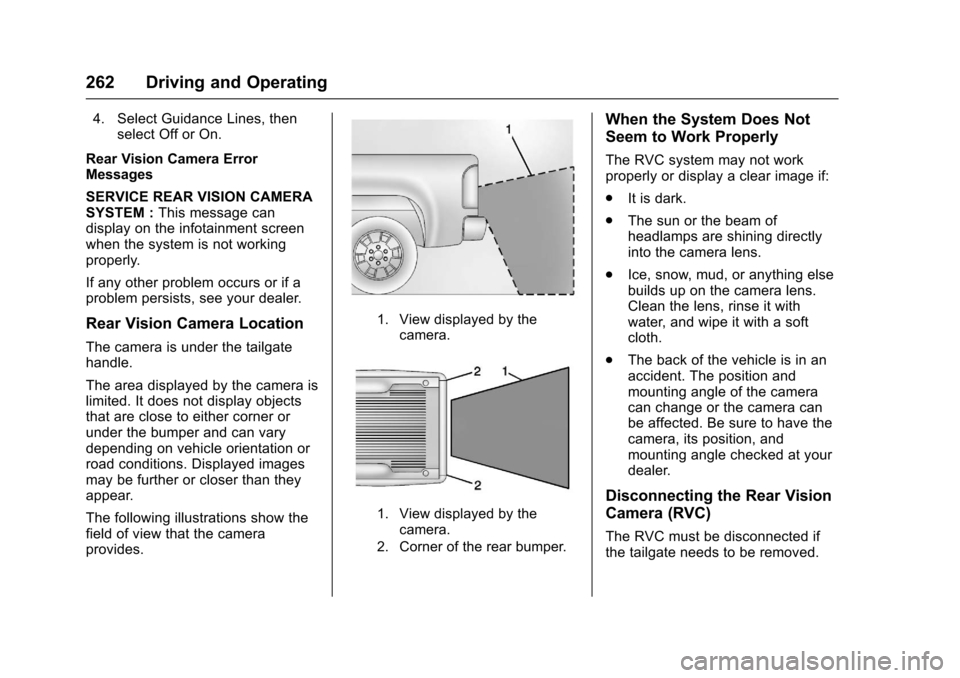
Rear Vision Camera Location
The camera is under the tailgatehandle.
The area displayed by the camera islimited. It does not display objectsthat are close to either corner orunder the bumper and can varydepending on vehicle orientation orroad conditions. Displayed imagesmay be further or closer than theyappear.
The following illustrations show thefield of view that the cameraprovides.
1. View displayed by thecamera.
1. View displayed by thecamera.
2. Corner of the rear bumper.
When the System Does Not
Seem to Work Properly
The RVC system may not workproperly or display a clear image if:
.It is dark.
.The sun or the beam ofheadlamps are shining directlyinto the camera lens.
.Ice, snow, mud, or anything elsebuilds up on the camera lens.Clean the lens, rinse it withwater, and wipe it with a softcloth.
.The back of the vehicle is in anaccident. The position andmounting angle of the cameracan change or the camera canbe affected. Be sure to have thecamera, its position, andmounting angle checked at yourdealer.
Disconnecting the Rear Vision
Camera (RVC)
The RVC must be disconnected ifthe tailgate needs to be removed.