cruise control CHEVROLET COLORADO 2017 2.G Owners Manual
[x] Cancel search | Manufacturer: CHEVROLET, Model Year: 2017, Model line: COLORADO, Model: CHEVROLET COLORADO 2017 2.GPages: 419, PDF Size: 7.38 MB
Page 4 of 419
Chevrolet Colorado Owner Manual (GMNA-Localizing-U.S./Canada/Mexico-10122675) - 2017 - crc - 8/22/16
Introduction 3
Danger, Warning, and
Caution
Warning messages found on vehiclelabels and in this manual describehazards and what to do to avoid orreduce them.
{Danger
Danger indicates a hazard with a
high level of risk which will result
in serious injury or death.
{Warning
Warning indicates a hazard that
could result in injury or death.
Caution
Caution indicates a hazard that
could result in property or vehicle
damage.
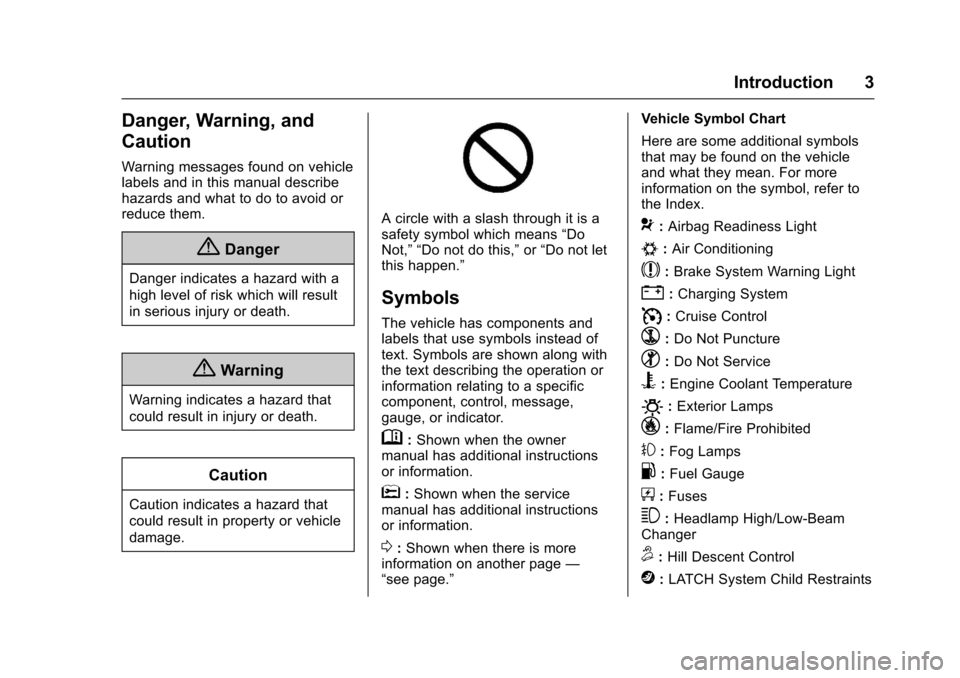
Acirclewithaslashthroughitisasafety symbol which means“DoNot,”“Do not do this,”or“Do not letthis happen.”
Symbols
The vehicle has components andlabels that use symbols instead oftext. Symbols are shown along withthe text describing the operation orinformation relating to a specificcomponent, control, message,gauge, or indicator.
M:Shown when the ownermanual has additional instructionsor information.
*:Shown when the servicemanual has additional instructionsor information.
0:Shown when there is moreinformation on another page—“see page.”
Vehicle Symbol Chart
Here are some additional symbolsthat may be found on the vehicleand what they mean. For moreinformation on the symbol, refer tothe Index.
9:Airbag Readiness Light
#:Air Conditioning
$:Brake System Warning Light
":Charging System
I:Cruise Control
`:Do Not Puncture
^:Do Not Service
B:Engine Coolant Temperature
O:Exterior Lamps
_:Flame/Fire Prohibited
#:Fog Lamps
.:Fuel Gauge
+:Fuses
3:Headlamp High/Low-BeamChanger
5:Hill Descent Control
j:LATCH System Child Restraints
Page 6 of 419
Chevrolet Colorado Owner Manual (GMNA-Localizing-U.S./Canada/Mexico-10122675) - 2017 - crc - 8/22/16
In Brief 5
In Brief
Instrument Panel
Instrument Panel . . . . . . . . . . . . . . . . 6
Initial Drive Information
Initial Drive Information . . . . . . . . . . 8Remote Keyless Entry (RKE)System . . . . . . . . . . . . . . . . . . . . . . . . 8Remote Vehicle Start . . . . . . . . . . . 8Door Locks . . . . . . . . . . . . . . . . . . . . . 9Windows . . . . . . . . . . . . . . . . . . . . . . . . 9Seat Adjustment . . . . . . . . . . . . . . . . 9Heated Seats . . . . . . . . . . . . . . . . . . 11Head Restraint Adjustment . . . . 11Safety Belts . . . . . . . . . . . . . . . . . . . . 11Passenger Sensing System . . . 12Mirror Adjustment . . . . . . . . . . . . . . 12Steering Wheel Adjustment . . . . 13Interior Lighting . . . . . . . . . . . . . . . . 14Exterior Lighting . . . . . . . . . . . . . . . 14Windshield Wiper/Washer . . . . . . 15Climate Controls . . . . . . . . . . . . . . . 15Transmission . . . . . . . . . . . . . . . . . . 17Four-Wheel Drive . . . . . . . . . . . . . . 18
Vehicle Features
Infotainment System . . . . . . . . . . . 19Radio(s) . . . . . . . . . . . . . . . . . . . . . . . 19Satellite Radio . . . . . . . . . . . . . . . . . 19
Portable Audio Devices . . . . . . . . 20Bluetooth®..................... 20Steering Wheel Controls . . . . . . . 20Cruise Control . . . . . . . . . . . . . . . . . 21Driver Information Center (DIC)(Base Level) . . . . . . . . . . . . . . . . . 21Driver Information Center (DIC)(Uplevel) . . . . . . . . . . . . . . . . . . . . . 22Forward Collision Alert (FCA)System . . . . . . . . . . . . . . . . . . . . . . . 22Lane DepartureWarning (LDW) . . . . . . . . . . . . . . . 23Rear Vision Camera (RVC) . . . . 23Power Outlets . . . . . . . . . . . . . . . . . 23
Performance and Maintenance
Traction Control/ElectronicStability Control . . . . . . . . . . . . . . 23Tire Pressure Monitor . . . . . . . . . . 24Fuel (Gasoline) . . . . . . . . . . . . . . . . 24Fuel (Diesel) . . . . . . . . . . . . . . . . . . . 24E85 or FlexFuel . . . . . . . . . . . . . . . . 24Engine Oil Life System . . . . . . . . 25Driving for Better FuelEconomy . . . . . . . . . . . . . . . . . . . . . 25Roadside AssistanceProgram . . . . . . . . . . . . . . . . . . . . . . 26
Page 8 of 419

Chevrolet Colorado Owner Manual (GMNA-Localizing-U.S./Canada/Mexico-10122675) - 2017 - crc - 8/22/16
In Brief 7
1.Air Vents0212.
2. Turn Signal Lever. SeeTu r nand Lane-ChangeSignals0149.
Driver Information Center (DIC)Controls. SeeDriverInformation Center (DIC) (BaseLevel)0126orDriverInformation Center (DIC)(Uplevel)0129.
3.Instrument Cluster (BaseLevel)011 0orInstrumentCluster (Uplevel)011 2.
4.Windshield Wiper/Washer0104.
5. Light Sensor. SeeAutomaticHeadlamp System0148.
Vehicle Alarm System Indicator(If Equipped). SeeVehicleAlarm System036.
6.Infotainment0153.
7.Climate Control Systems0208(If Equipped).
Automatic Climate ControlSystem0210(If Equipped).
8.Heated Front Seats048(IfEquipped).
9.Power Outlets0107(IfEquipped).
10. Shift Lever. SeeAutomaticTr a n s m i s s i o n0241orManualTr a n s m i s s i o n0246.
11 .Auxiliary Jack0179.
USB Port (Base Radio)0170orUSB Port (Base Radio withTo u c h s c r e e n )0173.
12.Hazard WarningFlashers0149.
Tr a c t i o n C o n t r o l / E l e c t r o n i cStability Control0256.
Cargo Lamp0150.
Lane Departure Warning(LDW)0264(If Equipped).
Hill Descent Control (HDC)0258(If Equipped).
To w / H a u l M o d e0245(IfEquipped).
13.Steering Wheel Controls0104(If Equipped).
14.Horn0104.
15.Steering Wheel Adjustment0103(Out of View).
16.Cruise Control0259.
Forward Collision Alert (FCA)System0263(If Equipped).
17. Transfer Case Knob (IfEquipped). SeeFour-WheelDrive0247.
18. Hood Release. SeeHood0282.
19.Parking Brake0254.
20. Data Link Connector (DLC)(Out of View). SeeMalfunctionIndicator Lamp (Check EngineLight)011 8.
21.Exterior Lamp Controls0146.
Fog Lamps0149(IfEquipped).
22.Instrument Panel IlluminationControl0150.
Page 22 of 419
Chevrolet Colorado Owner Manual (GMNA-Localizing-U.S./Canada/Mexico-10122675) - 2017 - crc - 8/22/16
In Brief 21
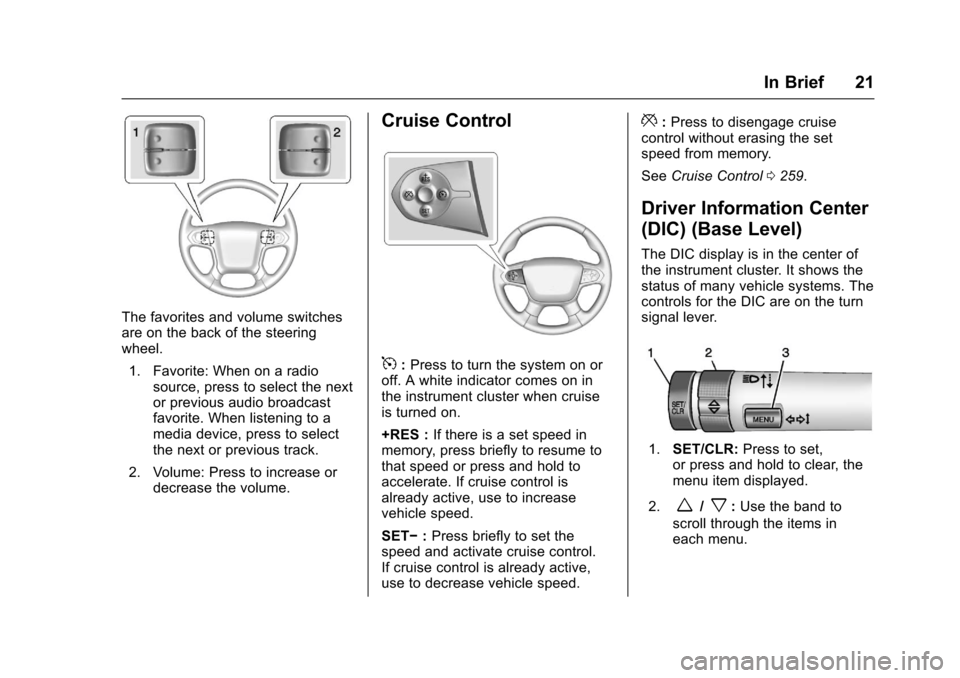
The favorites and volume switchesare on the back of the steeringwheel.
1. Favorite: When on a radiosource, press to select the nextor previous audio broadcastfavorite. When listening to amedia device, press to selectthe next or previous track.
2. Volume: Press to increase ordecrease the volume.
Cruise Control
5:Press to turn the system on oroff. A white indicator comes on inthe instrument cluster when cruiseis turned on.
+RES :If there is a set speed inmemory, press briefly to resume tothat speed or press and hold toaccelerate. If cruise control isalready active, use to increasevehicle speed.
SET✓:Press briefly to set thespeed and activate cruise control.If cruise control is already active,use to decrease vehicle speed.
*:Press to disengage cruisecontrol without erasing the setspeed from memory.
SeeCruise Control0259.
Driver Information Center
(DIC) (Base Level)
The DIC display is in the center ofthe instrument cluster. It shows thestatus of many vehicle systems. Thecontrols for the DIC are on the turnsignal lever.
1.SET/CLR:Press to set,or press and hold to clear, themenu item displayed.
2.w/x:Use the band to
scroll through the items ineach menu.
Page 26 of 419
Chevrolet Colorado Owner Manual (GMNA-Localizing-U.S./Canada/Mexico-10122675) - 2017 - crc - 8/22/16
In Brief 25
Engine Oil Life System
The engine oil life system calculatesengine oil life based on vehicle useand, on most vehicles, displays aDriver Information Center (DIC)message when it is necessary tochange the engine oil and filter. Theoil life system should be reset to100% only following an oil change.
Resetting the Oil Life System
To r e s e t t h e e n g i n e o i l l i f e s y s t e m :
1. Display OIL LIFE REMAININGon the DIC. SeeDriverInformation Center (DIC) (BaseLevel)0126orDriverInformation Center (DIC)(Uplevel)0129.Ifthevehicledoes not have DIC buttons, thevehicle must be in P (Park) toaccess this display.
2. Press and holdVon the DIC,
or SET/CLR on the turn signallever if the vehicle does nothave DIC buttons, for severalseconds. The oil life willchange to 100%.
The oil life system can also be resetas follows:
1. Display OIL LIFE REMAININGon the DIC. SeeDriverInformation Center (DIC) (BaseLevel)0126orDriverInformation Center (DIC)(Uplevel)0129.
2. Fully press the acceleratorpedal slowly three times withinfive seconds. If the displayshows 100%, the system isreset.
SeeEngine Oil Life System0288.
Driving for Better Fuel
Economy
Driving habits can affect fuelmileage. Here are some driving tipsto get the best fuel economypossible.
.Avoid fast starts and acceleratesmoothly.
.Brake gradually and avoidabrupt stops.
.Avoid idling the engine for longperiods of time.
.When road and weatherconditions are appropriate, usecruise control.
.Always follow posted speedlimits or drive more slowly whenconditions require.
.Keep vehicle tires properlyinflated.
.Combine several trips into asingle trip.
.Replace the vehicle's tires withthe same TPC Spec numbermolded into the tire's sidewallnear the size.
.Follow recommended scheduledmaintenance.
Page 103 of 419
Chevrolet Colorado Owner Manual (GMNA-Localizing-U.S./Canada/Mexico-10122675) - 2017 - crc - 8/22/16
102 Instruments and Controls
Instruments and
Controls
Controls
Steering Wheel Adjustment . . . 103Steering Wheel Controls . . . . . . 104Horn . . . . . . . . . . . . . . . . . . . . . . . . . . 104Windshield Wiper/Washer . . . . 104Compass . . . . . . . . . . . . . . . . . . . . . 105Clock . . . . . . . . . . . . . . . . . . . . . . . . . 106Power Outlets . . . . . . . . . . . . . . . . 107Wireless Charging . . . . . . . . . . . . 107
Warning Lights, Gauges, and
Indicators
Warning Lights, Gauges, andIndicators . . . . . . . . . . . . . . . . . . . 109Instrument Cluster (BaseLevel) . . . . . . . . . . . . . . . . . . . . . . . 110Instrument Cluster(Uplevel) . . . . . . . . . . . . . . . . . . . . 112Speedometer . . . . . . . . . . . . . . . . . 114Odometer . . . . . . . . . . . . . . . . . . . . . 114Trip Odometer . . . . . . . . . . . . . . . . 114Ta c h o m e t e r . . . . . . . . . . . . . . . . . . . 11 4Fuel Gauge . . . . . . . . . . . . . . . . . . . 114Engine Coolant TemperatureGauge . . . . . . . . . . . . . . . . . . . . . . 115Safety Belt Reminders . . . . . . . . 116
Airbag Readiness Light . . . . . . . 117Passenger Airbag StatusIndicator . . . . . . . . . . . . . . . . . . . . . 117Charging System Light . . . . . . . 118Malfunction Indicator Lamp(Check Engine Light) . . . . . . . . 118Brake System WarningLight . . . . . . . . . . . . . . . . . . . . . . . . 120Antilock Brake System (ABS)Warning Light . . . . . . . . . . . . . . . 121Up-Shift Light (ManualTransmission) . . . . . . . . . . . . . . . 121To w / H a u l M o d e L i g h t . . . . . . . . . 1 2 1Hill Descent Control Light . . . . 121Lane Departure Warning(LDW) Light . . . . . . . . . . . . . . . . . 122Vehicle Ahead Indicator . . . . . . 122Traction Off Light . . . . . . . . . . . . . 122StabiliTrak®OFF Light . . . . . . . . 122Traction Control System (TCS)/StabiliTrak®Light . . . . . . . . . . . 123Tire Pressure Light . . . . . . . . . . . 123Engine Oil Pressure Light . . . . 124Low Fuel Warning Light (BaseLevel) . . . . . . . . . . . . . . . . . . . . . . . 124Low Fuel Warning Light(Uplevel) . . . . . . . . . . . . . . . . . . . . 124Security Light . . . . . . . . . . . . . . . . . 125High-Beam On Light . . . . . . . . . . 125Front Fog Lamp Light . . . . . . . . . 125Lamps On Reminder . . . . . . . . . 125
Cruise Control Light . . . . . . . . . . 125Door Ajar Light (UplevelCluster) . . . . . . . . . . . . . . . . . . . . . 126
Information Displays
Driver Information Center (DIC)(Base Level) . . . . . . . . . . . . . . . . 126Driver Information Center (DIC)(Uplevel) . . . . . . . . . . . . . . . . . . . . 129
Vehicle Messages
Vehicle Messages . . . . . . . . . . . . 132Battery Voltage and ChargingMessages . . . . . . . . . . . . . . . . . . . 132Brake System Messages . . . . . 133Compass Messages . . . . . . . . . . 133Door Ajar Messages . . . . . . . . . . 133Engine Cooling SystemMessages . . . . . . . . . . . . . . . . . . . 133Engine Oil Messages . . . . . . . . . 134Engine Power Messages . . . . . 134Fuel System Messages . . . . . . . 135Key and Lock Messages . . . . . 135Lamp Messages . . . . . . . . . . . . . . 135Object Detection SystemMessages . . . . . . . . . . . . . . . . . . . 135Ride Control SystemMessages . . . . . . . . . . . . . . . . . . . 136Airbag System Messages . . . . 136Safety Belt Messages . . . . . . . . 136Security Messages . . . . . . . . . . . 137
Page 126 of 419
Chevrolet Colorado Owner Manual (GMNA-Localizing-U.S./Canada/Mexico-10122675) - 2017 - crc - 8/22/16
Instruments and Controls 125
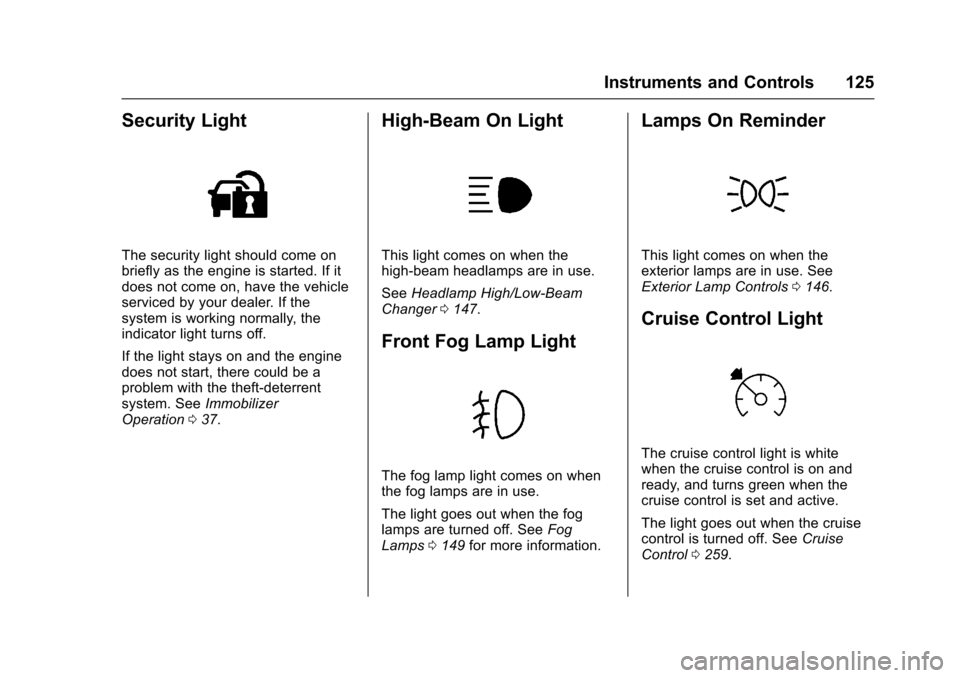
Security Light
The security light should come onbriefly as the engine is started. If itdoes not come on, have the vehicleserviced by your dealer. If thesystem is working normally, theindicator light turns off.
If the light stays on and the enginedoes not start, there could be aproblem with the theft-deterrentsystem. SeeImmobilizerOperation037.
High-Beam On Light
This light comes on when thehigh-beam headlamps are in use.
SeeHeadlamp High/Low-BeamChanger0147.
Front Fog Lamp Light
The fog lamp light comes on whenthe fog lamps are in use.
The light goes out when the foglamps are turned off. SeeFogLamps0149for more information.
Lamps On Reminder
This light comes on when theexterior lamps are in use. SeeExterior Lamp Controls0146.
Cruise Control Light
The cruise control light is whitewhen the cruise control is on andready, and turns green when thecruise control is set and active.
The light goes out when the cruisecontrol is turned off. SeeCruiseControl0259.
Page 215 of 419
Chevrolet Colorado Owner Manual (GMNA-Localizing-U.S./Canada/Mexico-10122675) - 2017 - crc - 8/22/16
214 Driving and Operating
Driving and
Operating
Driving Information
Distracted Driving . . . . . . . . . . . . 215Defensive Driving . . . . . . . . . . . . . 215Drunk Driving . . . . . . . . . . . . . . . . . 215Control of a Vehicle . . . . . . . . . . . 216Braking . . . . . . . . . . . . . . . . . . . . . . . 216Steering . . . . . . . . . . . . . . . . . . . . . . 216Off-Road Recovery . . . . . . . . . . . 217Loss of Control . . . . . . . . . . . . . . . 217Off-Road Driving . . . . . . . . . . . . . 218Driving on Wet Roads . . . . . . . . 222Hill and Mountain Roads . . . . . 223Winter Driving . . . . . . . . . . . . . . . . 224If the Vehicle Is Stuck . . . . . . . . 225Vehicle Load Limits . . . . . . . . . . . 226Truck-Camper LoadingInformation . . . . . . . . . . . . . . . . . . 232
Starting and Operating
New Vehicle Break-In . . . . . . . . . 232Ignition Positions . . . . . . . . . . . . . 233Starting the Engine . . . . . . . . . . . 234Engine Heater . . . . . . . . . . . . . . . . 235Retained AccessoryPower (RAP) . . . . . . . . . . . . . . . . 237Shifting Into Park . . . . . . . . . . . . . 238
Shifting out of Park . . . . . . . . . . . 239Parking . . . . . . . . . . . . . . . . . . . . . . . 239Parking over ThingsThat Burn . . . . . . . . . . . . . . . . . . . 240
Engine Exhaust
Engine Exhaust . . . . . . . . . . . . . . 240Running the Vehicle WhileParked . . . . . . . . . . . . . . . . . . . . . . 241
Automatic Transmission
Automatic Transmission . . . . . . 241Manual Mode . . . . . . . . . . . . . . . . . 244To w / H a u l M o d e . . . . . . . . . . . . . . . 2 4 5
Manual Transmission
Manual Transmission . . . . . . . . . 246
Drive Systems
Four-Wheel Drive . . . . . . . . . . . . . 247
Brakes
Antilock BrakeSystem (ABS) . . . . . . . . . . . . . . . 254Parking Brake . . . . . . . . . . . . . . . . 254Brake Assist . . . . . . . . . . . . . . . . . . 255Hill Start Assist (HSA) . . . . . . . . 255
Ride Control Systems
Traction Control/ElectronicStability Control . . . . . . . . . . . . . 256Hill Descent Control (HDC) . . . 258
Cruise Control
Cruise Control . . . . . . . . . . . . . . . . 259
Driver Assistance Systems
Rear Vision Camera (RVC) . . . 261Forward Collision Alert (FCA)System . . . . . . . . . . . . . . . . . . . . . . 263Lane DepartureWarning (LDW) . . . . . . . . . . . . . 264
Fuel
Fuel . . . . . . . . . . . . . . . . . . . . . . . . . . 266California FuelRequirements . . . . . . . . . . . . . . . 267Fuels in Foreign Countries . . . 267Fuel Additives . . . . . . . . . . . . . . . . 267Filling the Tank . . . . . . . . . . . . . . . 267Filling a Portable FuelContainer . . . . . . . . . . . . . . . . . . . 269
Trailer Towing
General TowingInformation . . . . . . . . . . . . . . . . . . 270Driving Characteristics andTo w i n g T i p s . . . . . . . . . . . . . . . . . 2 7 0Trailer Towing . . . . . . . . . . . . . . . . 272To w i n g E q u i p m e n t . . . . . . . . . . . . 2 7 5Trailer Sway Control (TSC) . . . 277
Conversions and Add-Ons
Add-On ElectricalEquipment . . . . . . . . . . . . . . . . . . 278
Page 224 of 419
Chevrolet Colorado Owner Manual (GMNA-Localizing-U.S./Canada/Mexico-10122675) - 2017 - crc - 8/22/16
Driving and Operating 223
{Warning
Wet brakes can cause crashes.
They might not work as well in a
quick stop and could cause
pulling to one side. You could
lose control of the vehicle.
After driving through a large
puddle of water or a car/vehicle
wash, lightly apply the brake
pedal until the brakes work
normally.
Flowing or rushing water creates
strong forces. Driving through
flowing water could cause the
vehicle to be carried away. If this
happens, you and other vehicle
occupants could drown. Do not
ignore police warnings and be
very cautious about trying to drive
through flowing water.
Hydroplaning
Hydroplaning is dangerous. Watercan build up under the vehicle'stires so they actually ride on thewater. This can happen if the road iswet enough and you are going fastenough. When the vehicle ishydroplaning, it has little or nocontact with the road.
There is no hard and fast rule abouthydroplaning. The best advice is toslow down when the road is wet.
Other Rainy Weather Tips
Besides slowing down, other wetweather driving tips include:
.Allow extra following distance.
.Pass with caution.
.Keep windshield wipingequipment in good shape.
.Keep the windshield washer fluidreservoir filled.
.Have good tires with propertread depth. SeeTires0316.
.Turn off cruise control.
Hill and Mountain Roads
Driving on steep hills or throughmountains is different than drivingon flat or rolling terrain. Tips include:
.Keep the vehicle serviced and ingood shape.
.Check all fluid levels and brakes,tires, cooling system, andtransmission.
.Shift to a lower gear when goingdown steep or long hills.
{Warning
Using the brakes to slow the
vehicle on a long downhill slope
can cause brake overheating, can
reduce brake performance, and
could result in a loss of braking.
Shift the transmission to a lower
gear to let the engine assist the
brakes on a steep downhill slope.
Page 225 of 419
Chevrolet Colorado Owner Manual (GMNA-Localizing-U.S./Canada/Mexico-10122675) - 2017 - crc - 8/22/16
224 Driving and Operating
{Warning
Coasting downhill in N (Neutral)
or with the ignition off is
dangerous. This can cause
overheating of the brakes and
loss of steering. Always have the
engine running and the vehicle
in gear.
.Drive at speeds that keep thevehicle in its own lane. Do notswing wide or cross thecenter line.
.Be alert on top of hills;something could be in your lane(e.g., stalled car, accident).
.Pay attention to special roadsigns (e.g., falling rocks area,winding roads, long grades,passing or no-passing zones)and take appropriate action.
Winter Driving
Driving on Snow or Ice
Snow or ice between the tires andthe road creates less traction orgrip, so drive carefully. Wet ice canoccur at about 0 °C (32 °F) whenfreezing rain begins to fall. Avoiddriving on wet ice or in freezing rainuntil roads can be treated.
For Slippery Road Driving:
.Accelerate gently. Acceleratingtoo quickly causes the wheels tospin and makes the surfaceunder the tires slick.
.Turn on Traction Control. SeeTr a c t i o n C o n t r o l / E l e c t r o n i cStability Control0256.
.The Antilock Brake System(ABS) improves vehicle stabilityduring hard stops, but thebrakes should be applied soonerthan when on dry pavement.SeeAntilock Brake System(ABS)0254.
.Allow greater following distanceand watch for slippery spots. Icypatches can occur on otherwiseclear roads in shaded areas.The surface of a curve or anoverpass can remain icy whenthe surrounding roads are clear.Avoid sudden steeringmaneuvers and braking whileon ice.
.Turn off cruise control.
Blizzard Conditions
Stop the vehicle in a safe place andsignal for help. Stay with the vehicleunless there is help nearby.If possible, use RoadsideAssistance. SeeRoadsideAssistance Program0387.Togethelp and keep everyone in thevehicle safe:
.Turn on the hazard warningflashers.
.Tie a red cloth to an outsidemirror.