seats CHEVROLET COLORADO 2017 2.G Owners Manual
[x] Cancel search | Manufacturer: CHEVROLET, Model Year: 2017, Model line: COLORADO, Model: CHEVROLET COLORADO 2017 2.GPages: 419, PDF Size: 7.38 MB
Page 2 of 419
Chevrolet Colorado Owner Manual (GMNA-Localizing-U.S./Canada/Mexico-10122675) - 2017 - crc - 8/22/16
ContentsIntroduction . . . . . . . . . . . . . . . . . . . . . . 2
In Brief . . . . . . . . . . . . . . . . . . . . . . . . . . . 5
Keys, Doors, and Windows . . . . . 27
Seats and Restraints . . . . . . . . . . . 44
Storage . . . . . . . . . . . . . . . . . . . . . . . 100
Instruments and Controls . . . . . . 102
Lighting . . . . . . . . . . . . . . . . . . . . . . . 146
Infotainment System . . . . . . . . . . 153
Climate Controls . . . . . . . . . . . . . . 208
Driving and Operating . . . . . . . . . 214
Vehicle Care . . . . . . . . . . . . . . . . . . 279
Service and Maintenance . . . . . 365
Te c h n i c a l D a t a . . . . . . . . . . . . . . . . 3 7 9
Customer Information . . . . . . . . . 383
Reporting Safety Defects . . . . . . 393
OnStar . . . . . . . . . . . . . . . . . . . . . . . . 397
Index . . . . . . . . . . . . . . . . . . . . 407
Page 6 of 419
Chevrolet Colorado Owner Manual (GMNA-Localizing-U.S./Canada/Mexico-10122675) - 2017 - crc - 8/22/16
In Brief 5
In Brief
Instrument Panel
Instrument Panel . . . . . . . . . . . . . . . . 6
Initial Drive Information
Initial Drive Information . . . . . . . . . . 8Remote Keyless Entry (RKE)System . . . . . . . . . . . . . . . . . . . . . . . . 8Remote Vehicle Start . . . . . . . . . . . 8Door Locks . . . . . . . . . . . . . . . . . . . . . 9Windows . . . . . . . . . . . . . . . . . . . . . . . . 9Seat Adjustment . . . . . . . . . . . . . . . . 9Heated Seats . . . . . . . . . . . . . . . . . . 11Head Restraint Adjustment . . . . 11Safety Belts . . . . . . . . . . . . . . . . . . . . 11Passenger Sensing System . . . 12Mirror Adjustment . . . . . . . . . . . . . . 12Steering Wheel Adjustment . . . . 13Interior Lighting . . . . . . . . . . . . . . . . 14Exterior Lighting . . . . . . . . . . . . . . . 14Windshield Wiper/Washer . . . . . . 15Climate Controls . . . . . . . . . . . . . . . 15Transmission . . . . . . . . . . . . . . . . . . 17Four-Wheel Drive . . . . . . . . . . . . . . 18
Vehicle Features
Infotainment System . . . . . . . . . . . 19Radio(s) . . . . . . . . . . . . . . . . . . . . . . . 19Satellite Radio . . . . . . . . . . . . . . . . . 19
Portable Audio Devices . . . . . . . . 20Bluetooth®..................... 20Steering Wheel Controls . . . . . . . 20Cruise Control . . . . . . . . . . . . . . . . . 21Driver Information Center (DIC)(Base Level) . . . . . . . . . . . . . . . . . 21Driver Information Center (DIC)(Uplevel) . . . . . . . . . . . . . . . . . . . . . 22Forward Collision Alert (FCA)System . . . . . . . . . . . . . . . . . . . . . . . 22Lane DepartureWarning (LDW) . . . . . . . . . . . . . . . 23Rear Vision Camera (RVC) . . . . 23Power Outlets . . . . . . . . . . . . . . . . . 23
Performance and Maintenance
Traction Control/ElectronicStability Control . . . . . . . . . . . . . . 23Tire Pressure Monitor . . . . . . . . . . 24Fuel (Gasoline) . . . . . . . . . . . . . . . . 24Fuel (Diesel) . . . . . . . . . . . . . . . . . . . 24E85 or FlexFuel . . . . . . . . . . . . . . . . 24Engine Oil Life System . . . . . . . . 25Driving for Better FuelEconomy . . . . . . . . . . . . . . . . . . . . . 25Roadside AssistanceProgram . . . . . . . . . . . . . . . . . . . . . . 26
Page 8 of 419

Chevrolet Colorado Owner Manual (GMNA-Localizing-U.S./Canada/Mexico-10122675) - 2017 - crc - 8/22/16
In Brief 7
1.Air Vents0212.
2. Turn Signal Lever. SeeTu r nand Lane-ChangeSignals0149.
Driver Information Center (DIC)Controls. SeeDriverInformation Center (DIC) (BaseLevel)0126orDriverInformation Center (DIC)(Uplevel)0129.
3.Instrument Cluster (BaseLevel)011 0orInstrumentCluster (Uplevel)011 2.
4.Windshield Wiper/Washer0104.
5. Light Sensor. SeeAutomaticHeadlamp System0148.
Vehicle Alarm System Indicator(If Equipped). SeeVehicleAlarm System036.
6.Infotainment0153.
7.Climate Control Systems0208(If Equipped).
Automatic Climate ControlSystem0210(If Equipped).
8.Heated Front Seats048(IfEquipped).
9.Power Outlets0107(IfEquipped).
10. Shift Lever. SeeAutomaticTr a n s m i s s i o n0241orManualTr a n s m i s s i o n0246.
11 .Auxiliary Jack0179.
USB Port (Base Radio)0170orUSB Port (Base Radio withTo u c h s c r e e n )0173.
12.Hazard WarningFlashers0149.
Tr a c t i o n C o n t r o l / E l e c t r o n i cStability Control0256.
Cargo Lamp0150.
Lane Departure Warning(LDW)0264(If Equipped).
Hill Descent Control (HDC)0258(If Equipped).
To w / H a u l M o d e0245(IfEquipped).
13.Steering Wheel Controls0104(If Equipped).
14.Horn0104.
15.Steering Wheel Adjustment0103(Out of View).
16.Cruise Control0259.
Forward Collision Alert (FCA)System0263(If Equipped).
17. Transfer Case Knob (IfEquipped). SeeFour-WheelDrive0247.
18. Hood Release. SeeHood0282.
19.Parking Brake0254.
20. Data Link Connector (DLC)(Out of View). SeeMalfunctionIndicator Lamp (Check EngineLight)011 8.
21.Exterior Lamp Controls0146.
Fog Lamps0149(IfEquipped).
22.Instrument Panel IlluminationControl0150.
Page 10 of 419
Chevrolet Colorado Owner Manual (GMNA-Localizing-U.S./Canada/Mexico-10122675) - 2017 - crc - 8/22/16
In Brief 9
Door Locks
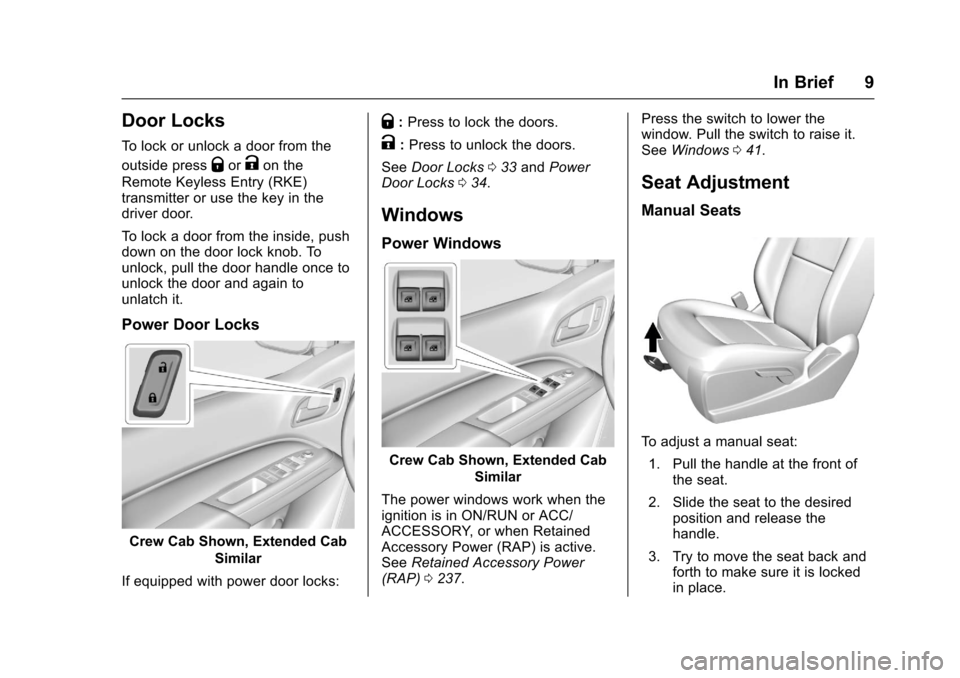
To l o c k o r u n l o c k a d o o r f r o m t h e
outside pressQorKon the
Remote Keyless Entry (RKE)transmitter or use the key in thedriver door.
To l o c k a d o o r f r o m t h e i n s i d e , p u s hdown on the door lock knob. Tounlock, pull the door handle once tounlock the door and again tounlatch it.
Power Door Locks
Crew Cab Shown, Extended Cab
Similar
If equipped with power door locks:
Q:Press to lock the doors.
K:Press to unlock the doors.
SeeDoor Locks033andPowerDoor Locks034.
Windows
Power Windows
Crew Cab Shown, Extended Cab
Similar
The power windows work when theignition is in ON/RUN or ACC/ACCESSORY, or when RetainedAccessory Power (RAP) is active.SeeRetained Accessory Power(RAP)0237.
Press the switch to lower thewindow. Pull the switch to raise it.SeeWindows041.
Seat Adjustment
Manual Seats
To a d j u s t a m a n u a l s e a t :
1. Pull the handle at the front ofthe seat.
2. Slide the seat to the desiredposition and release thehandle.
3. Try to move the seat back andforth to make sure it is lockedin place.
Page 11 of 419
Chevrolet Colorado Owner Manual (GMNA-Localizing-U.S./Canada/Mexico-10122675) - 2017 - crc - 8/22/16
10 In Brief
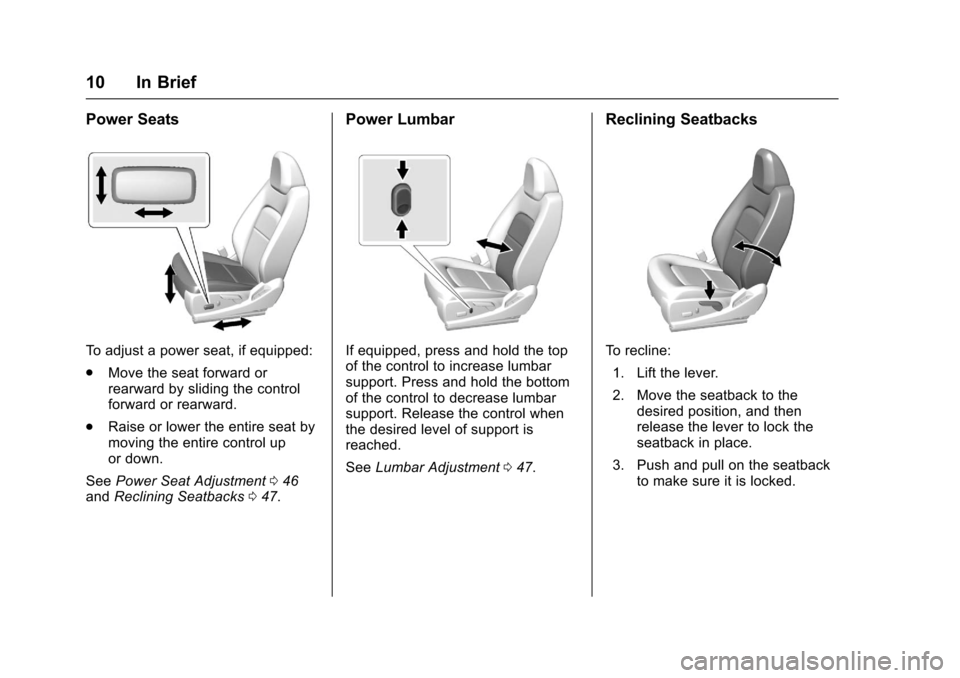
Power Seats
To a d j u s t a p o w e r s e a t , i f e q u i p p e d :
.Move the seat forward orrearward by sliding the controlforward or rearward.
.Raise or lower the entire seat bymoving the entire control upor down.
SeePower Seat Adjustment046andReclining Seatbacks047.
Power Lumbar
If equipped, press and hold the topof the control to increase lumbarsupport. Press and hold the bottomof the control to decrease lumbarsupport. Release the control whenthe desired level of support isreached.
SeeLumbar Adjustment047.
Reclining Seatbacks
To r e c l i n e :
1. Lift the lever.
2. Move the seatback to thedesired position, and thenrelease the lever to lock theseatback in place.
3. Push and pull on the seatbackto make sure it is locked.
Page 12 of 419
Chevrolet Colorado Owner Manual (GMNA-Localizing-U.S./Canada/Mexico-10122675) - 2017 - crc - 8/22/16
In Brief 11
To r e t u r n t h e s e a t b a c k t o t h e u p r i g h tposition:
1. Lift the lever fully withoutapplying pressure to theseatback.
2. Push and pull on the seatbackto make sure it is locked.
SeeReclining Seatbacks047.
Heated Seats
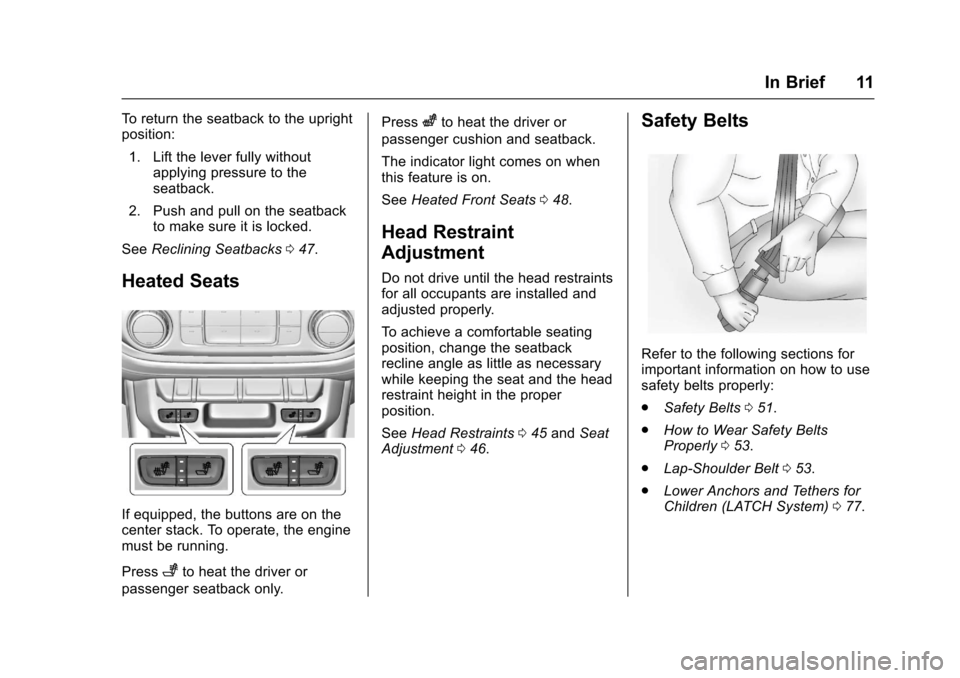
If equipped, the buttons are on thecenter stack. To operate, the enginemust be running.
Press+to heat the driver or
passenger seatback only.
Presszto heat the driver or
passenger cushion and seatback.
The indicator light comes on whenthis feature is on.
SeeHeated Front Seats048.
Head Restraint
Adjustment
Do not drive until the head restraintsfor all occupants are installed andadjusted properly.
To a c h i e v e a c o m f o r t a b l e s e a t i n gposition, change the seatbackrecline angle as little as necessarywhile keeping the seat and the headrestraint height in the properposition.
SeeHead Restraints045andSeatAdjustment046.
Safety Belts
Refer to the following sections forimportant information on how to usesafety belts properly:
.Safety Belts051.
.How to Wear Safety BeltsProperly053.
.Lap-Shoulder Belt053.
.Lower Anchors and Tethers forChildren (LATCH System)077.
Page 33 of 419
Chevrolet Colorado Owner Manual (GMNA-Localizing-U.S./Canada/Mexico-10122675) - 2017 - crc - 8/22/16
32 Keys, Doors, and Windows
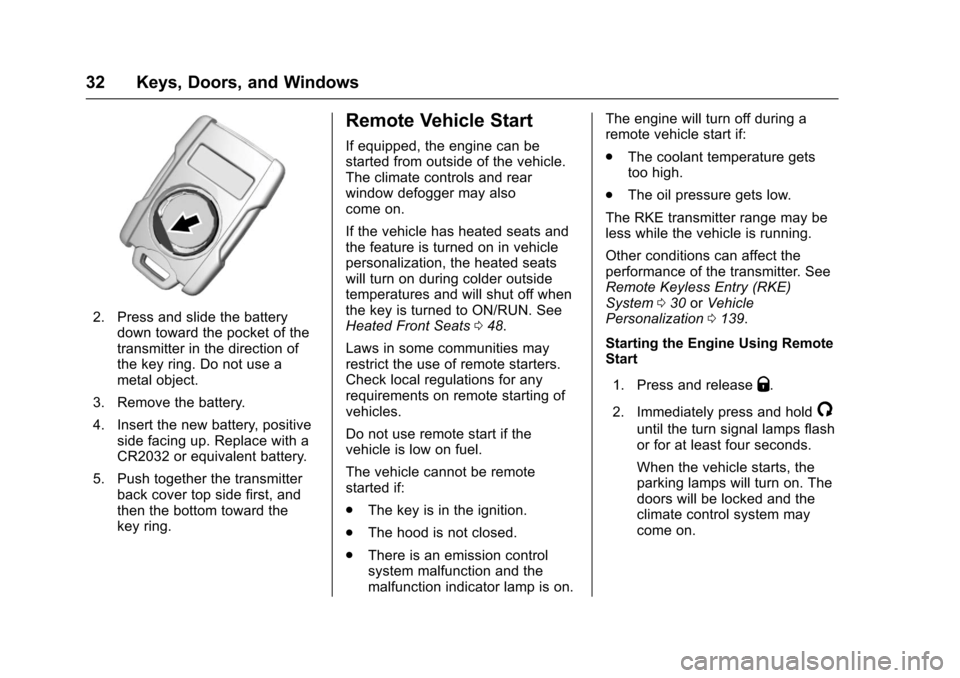
2. Press and slide the batterydown toward the pocket of thetransmitter in the direction ofthe key ring. Do not use ametal object.
3. Remove the battery.
4. Insert the new battery, positiveside facing up. Replace with aCR2032 or equivalent battery.
5. Push together the transmitterback cover top side first, andthen the bottom toward thekey ring.
Remote Vehicle Start
If equipped, the engine can bestarted from outside of the vehicle.The climate controls and rearwindow defogger may alsocome on.
If the vehicle has heated seats andthe feature is turned on in vehiclepersonalization, the heated seatswill turn on during colder outsidetemperatures and will shut off whenthe key is turned to ON/RUN. SeeHeated Front Seats048.
Laws in some communities mayrestrict the use of remote starters.Check local regulations for anyrequirements on remote starting ofvehicles.
Do not use remote start if thevehicle is low on fuel.
The vehicle cannot be remotestarted if:
.The key is in the ignition.
.The hood is not closed.
.There is an emission controlsystem malfunction and themalfunction indicator lamp is on.
The engine will turn off during aremote vehicle start if:
.The coolant temperature getstoo high.
.The oil pressure gets low.
The RKE transmitter range may beless while the vehicle is running.
Other conditions can affect theperformance of the transmitter. SeeRemote Keyless Entry (RKE)System030orVehiclePersonalization0139.
Starting the Engine Using RemoteStart
1. Press and releaseQ.
2. Immediately press and hold/
until the turn signal lamps flashor for at least four seconds.
When the vehicle starts, theparking lamps will turn on. Thedoors will be locked and theclimate control system maycome on.
Page 45 of 419
Chevrolet Colorado Owner Manual (GMNA-Localizing-U.S./Canada/Mexico-10122675) - 2017 - crc - 8/22/16
44 Seats and Restraints
Seats and
Restraints
Head Restraints
Head Restraints . . . . . . . . . . . . . . . 45
Front Seats
Seat Adjustment . . . . . . . . . . . . . . . 46Power Seat Adjustment . . . . . . . . 46Lumbar Adjustment . . . . . . . . . . . . 47Reclining Seatbacks . . . . . . . . . . . 47Heated Front Seats . . . . . . . . . . . . 48
Rear Seats
Rear Seats . . . . . . . . . . . . . . . . . . . . 49
Safety Belts
Safety Belts . . . . . . . . . . . . . . . . . . . . 51How to Wear Safety BeltsProperly . . . . . . . . . . . . . . . . . . . . . . 53Lap-Shoulder Belt . . . . . . . . . . . . . 53Safety Belt Use DuringPregnancy . . . . . . . . . . . . . . . . . . . . 56Safety Belt Extender . . . . . . . . . . . 56Safety System Check . . . . . . . . . . 57Safety Belt Care . . . . . . . . . . . . . . . 57Replacing Safety Belt SystemParts after a Crash . . . . . . . . . . . 57
Airbag System
Airbag System . . . . . . . . . . . . . . . . . 58Where Are the Airbags? . . . . . . . 60When Should an AirbagInflate? . . . . . . . . . . . . . . . . . . . . . . . 61What Makes an AirbagInflate? . . . . . . . . . . . . . . . . . . . . . . . 62How Does an AirbagRestrain? . . . . . . . . . . . . . . . . . . . . . 62What Will You See after anAirbag Inflates? . . . . . . . . . . . . . . 62Passenger Sensing System . . . 64Servicing the Airbag-EquippedVehicle . . . . . . . . . . . . . . . . . . . . . . . 68Adding Equipment to theAirbag-Equipped Vehicle . . . . . 68Airbag System Check . . . . . . . . . . 69Replacing Airbag System Partsafter a Crash . . . . . . . . . . . . . . . . . 69
Child Restraints
Older Children . . . . . . . . . . . . . . . . . 70Infants and Young Children . . . . 71Child Restraint Systems . . . . . . . 74Where to Put the Restraint . . . . . 75Lower Anchors and Tethers forChildren (LATCH System) . . . . 77Replacing LATCH System PartsAfter a Crash . . . . . . . . . . . . . . . . . 90
Securing Child Restraints (Withthe Safety Belt in theRear Seat) . . . . . . . . . . . . . . . . . . . 91Securing Child Restraints (Withthe Safety Belt in theFront Seat) . . . . . . . . . . . . . . . . . . . 96
Page 46 of 419
Chevrolet Colorado Owner Manual (GMNA-Localizing-U.S./Canada/Mexico-10122675) - 2017 - crc - 8/22/16
Seats and Restraints 45
Head Restraints
The vehicle's front seats haveadjustable head restraints in theoutboard seating positions.
{Warning
With head restraints that are not
installed and adjusted properly,
there is a greater chance that
occupants will suffer a neck/
spinal injury in a crash. Do not
drive until the head restraints for
all occupants are installed and
adjusted properly.
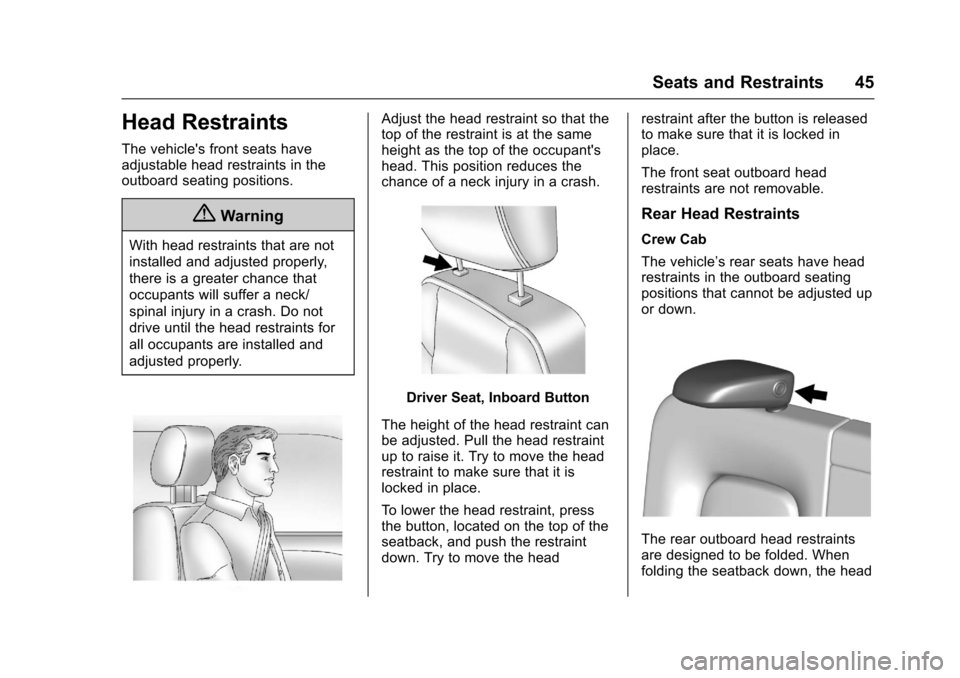
Adjust the head restraint so that thetop of the restraint is at the sameheight as the top of the occupant'shead. This position reduces thechance of a neck injury in a crash.
Driver Seat, Inboard Button
The height of the head restraint canbe adjusted. Pull the head restraintup to raise it. Try to move the headrestraint to make sure that it islocked in place.
To l o w e r t h e h e a d r e s t r a i n t , p r e s sthe button, located on the top of theseatback, and push the restraintdown. Try to move the head
restraint after the button is releasedto make sure that it is locked inplace.
The front seat outboard headrestraints are not removable.
Rear Head Restraints
Crew Cab
The vehicle’srearseatshaveheadrestraints in the outboard seatingpositions that cannot be adjusted upor down.
The rear outboard head restraintsare designed to be folded. Whenfolding the seatback down, the head
Page 47 of 419
Chevrolet Colorado Owner Manual (GMNA-Localizing-U.S./Canada/Mexico-10122675) - 2017 - crc - 8/22/16
46 Seats and Restraints
restraint must first be manuallyfolded forward out of the way to foldthe seatback down.
The head restraint can be foldedforward to allow for better visibilitywhen the rear seat is unoccupied.To f o l d t h e h e a d r e s t r a i n t , p r e s s t h ebutton on the side of the headrestraint.
When an occupant is in the seat,always return the head restraint tothe upright position until it locks intoplace. Push and pull on the headrestraint to make sure that it islocked.
If you are installing a child restraintin the rear seat, seeLower Anchorsand Tethers for Children (LATCHSystem)077.
Extended Cab
The vehicle’srearseatshaveheadrests in the outboard seatingpositions that cannot be adjusted.
If you are installing a child restraintin the rear seat, seeLower Anchorsand Tethers for Children (LATCHSystem)077.
Front Seats
Seat Adjustment
{Warning
Yo u c a n l o s e c o n t r o l o f t h e
vehicle if you try to adjust a driver
seat while the vehicle is moving.
Adjust the driver seat only when
the vehicle is not moving.
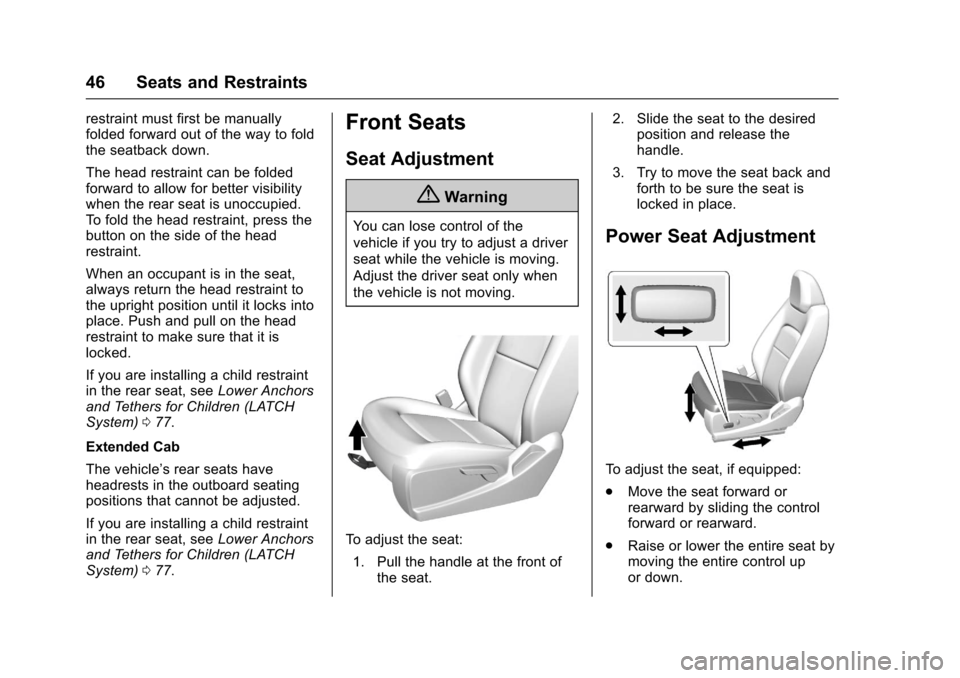
To a d j u s t t h e s e a t :
1. Pull the handle at the front ofthe seat.
2. Slide the seat to the desiredposition and release thehandle.
3. Try to move the seat back andforth to be sure the seat islocked in place.
Power Seat Adjustment
To a d j u s t t h e s e a t , i f e q u i p p e d :
.Move the seat forward orrearward by sliding the controlforward or rearward.
.Raise or lower the entire seat bymoving the entire control upor down.