ac system CHEVROLET COLORADO 2018 User Guide
[x] Cancel search | Manufacturer: CHEVROLET, Model Year: 2018, Model line: COLORADO, Model: CHEVROLET COLORADO 2018Pages: 421, PDF Size: 5.58 MB
Page 22 of 421
Chevrolet Colorado Owner Manual (GMNA-Localizing-U.S./Canada/Mexico-
11349743) - 2018 - crc - 10/12/17
In Brief 21
i:Press to decline an incoming
call or end a current call. Press to
mute or unmute the infotainment
system when not on a call.
oorp: Press the five-way control
to go to the previous or next area of
a display in the instrument cluster.
worx: Press the five-way
control to go up or down in a list on
the instrument cluster.
@: Press to select a highlighted
menu option.
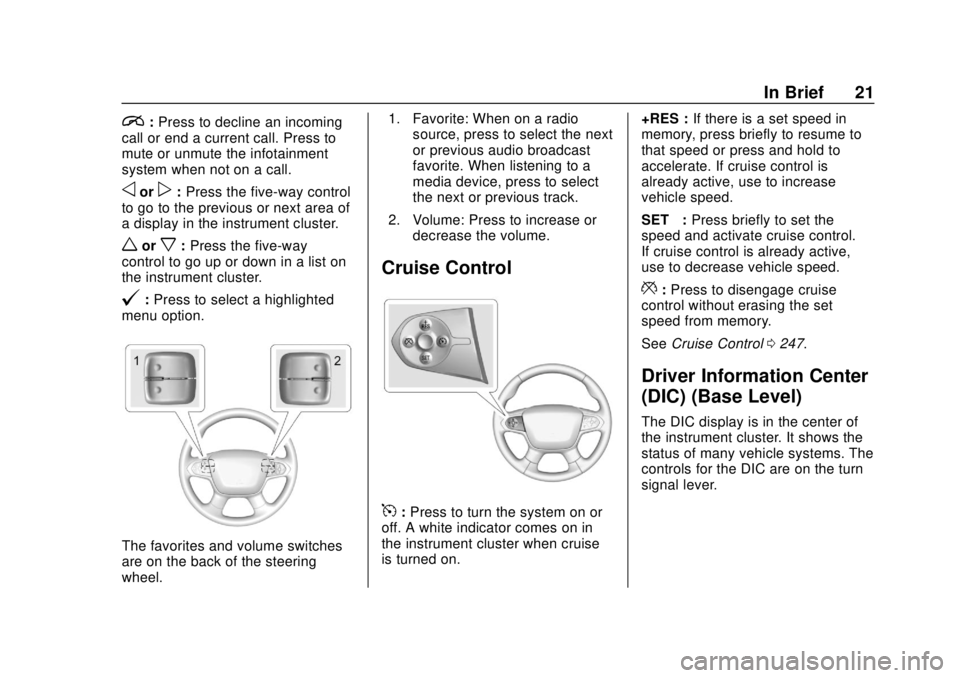
The favorites and volume switches
are on the back of the steering
wheel. 1. Favorite: When on a radio
source, press to select the next
or previous audio broadcast
favorite. When listening to a
media device, press to select
the next or previous track.
2. Volume: Press to increase or decrease the volume.
Cruise Control
5:Press to turn the system on or
off. A white indicator comes on in
the instrument cluster when cruise
is turned on. +RES :
If there is a set speed in
memory, press briefly to resume to
that speed or press and hold to
accelerate. If cruise control is
already active, use to increase
vehicle speed.
SET− :Press briefly to set the
speed and activate cruise control.
If cruise control is already active,
use to decrease vehicle speed.
*: Press to disengage cruise
control without erasing the set
speed from memory.
See Cruise Control 0247.
Driver Information Center
(DIC) (Base Level)
The DIC display is in the center of
the instrument cluster. It shows the
status of many vehicle systems. The
controls for the DIC are on the turn
signal lever.
Page 23 of 421
Chevrolet Colorado Owner Manual (GMNA-Localizing-U.S./Canada/Mexico-
11349743) - 2018 - crc - 10/12/17
22 In Brief
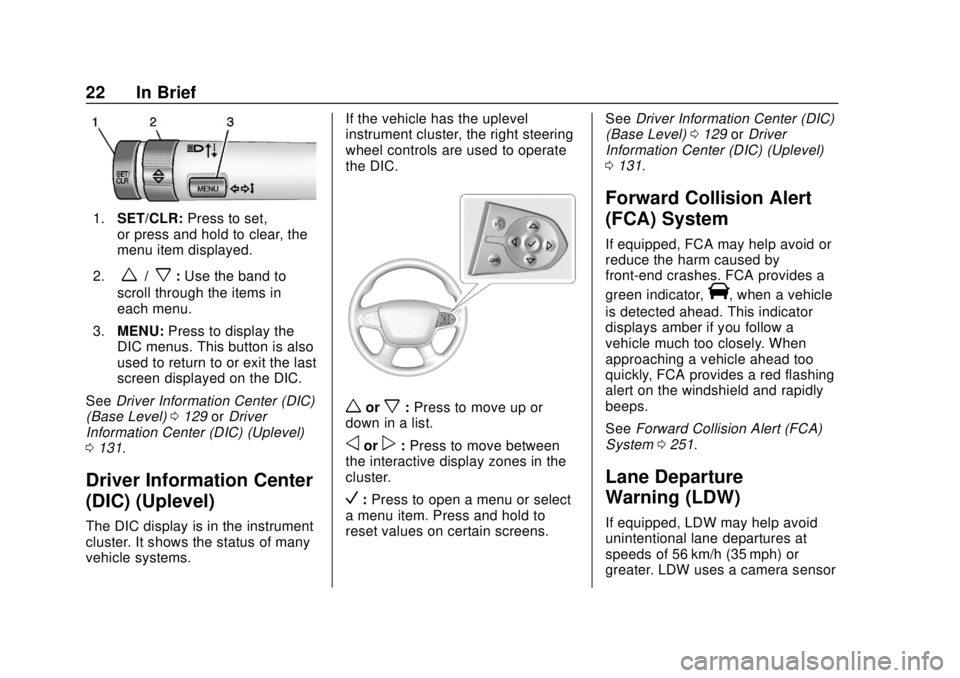
1.SET/CLR: Press to set,
or press and hold to clear, the
menu item displayed.
2.
w/x: Use the band to
scroll through the items in
each menu.
3. MENU: Press to display the
DIC menus. This button is also
used to return to or exit the last
screen displayed on the DIC.
See Driver Information Center (DIC)
(Base Level) 0129 orDriver
Information Center (DIC) (Uplevel)
0 131.
Driver Information Center
(DIC) (Uplevel)
The DIC display is in the instrument
cluster. It shows the status of many
vehicle systems. If the vehicle has the uplevel
instrument cluster, the right steering
wheel controls are used to operate
the DIC.
worx:
Press to move up or
down in a list.
oorp: Press to move between
the interactive display zones in the
cluster.
V: Press to open a menu or select
a menu item. Press and hold to
reset values on certain screens. See
Driver Information Center (DIC)
(Base Level) 0129 orDriver
Information Center (DIC) (Uplevel)
0 131.
Forward Collision Alert
(FCA) System
If equipped, FCA may help avoid or
reduce the harm caused by
front-end crashes. FCA provides a
green indicator,
V, when a vehicle
is detected ahead. This indicator
displays amber if you follow a
vehicle much too closely. When
approaching a vehicle ahead too
quickly, FCA provides a red flashing
alert on the windshield and rapidly
beeps.
See Forward Collision Alert (FCA)
System 0251.
Lane Departure
Warning (LDW)
If equipped, LDW may help avoid
unintentional lane departures at
speeds of 56 km/h (35 mph) or
greater. LDW uses a camera sensor
Page 24 of 421
Chevrolet Colorado Owner Manual (GMNA-Localizing-U.S./Canada/Mexico-
11349743) - 2018 - crc - 10/12/17
In Brief 23
to detect the lane markings. The
LDW light,
@, is green if a lane
marking is detected. If the vehicle
departs the lane without using a turn
signal in that direction, the light will
change to amber and flash. In
addition, beeps will sound.
See Lane Departure Warning (LDW)
0 253.
Rear Vision
Camera (RVC)
If equipped, RVC displays a view of
the area behind the vehicle, on the
infotainment display, when the
vehicle is shifted into R (Reverse).
See Rear Vision Camera (RVC)
0 250.
Power Outlets
Accessory power outlets can be
used to plug in electrical equipment,
such as a cell phone, MP3
player, etc. The vehicle may have accessory
power outlets:
.
On the center stack below the
climate control system,
if equipped.
. On the center floor console,
if equipped.
. On the rear of the center storage
console.
Lift the cover to access and replace
when not in use.
See Power Outlets 0109.
Performance and
Maintenance
Traction Control/
Electronic Stability
Control
The Traction Control System (TCS)
limits wheel spin. The system is on
when the vehicle is started.
The StabiliTrak system assists with
directional control of the vehicle in
difficult driving conditions. The
system is on when the vehicle is
started.
Turning the Systems Off and
On (Except ZR2)
.
To turn off TCS, press and
release
gon the center stack.
iilluminates in the instrument
cluster.
. To turn TCS on again, press and
release
g.iin the instrument
cluster will turn off.
Page 25 of 421
Chevrolet Colorado Owner Manual (GMNA-Localizing-U.S./Canada/Mexico-
11349743) - 2018 - crc - 10/12/17
24 In Brief
.To turn off both TCS and
StabiliTrak, press and hold
gon
the center stack until
iandg
illuminate in the instrument
cluster.
. To turn on both systems, press
and release
g.iandgturn off
in the instrument cluster.
StabiliTrak will automatically turn on
if the vehicle exceeds 56 km/h
(35 mph) in normal mode. TCS will
remain off until
gis pressed or until
the ignition is turned off and then
back on.
See Traction Control/Electronic
Stability Control 0240.
Turning the Systems Off and
On (ZR2 Only)
.
To turn off TCS, press and
release
gon the center stack.
iandgilluminate in the
instrument cluster.
. To turn TCS on again, press and
release
g.iandgin the
instrument cluster will turn off. .
To turn off both TCS and
StabiliTrak, press and hold
gon
the center stack, until
iandg
illuminate in the instrument
cluster.
. To turn on both systems, press
and release
g.iandgturn off
in the instrument cluster.
StabiliTrak will automatically turn on
if the vehicle exceeds 56 km/h
(35 mph) in normal mode. TCS will
remain off until
gis pressed or until
the ignition is turned off and then
back on.
See Traction Control/Electronic
Stability Control 0240.
Tire Pressure Monitor
This vehicle may have a Tire
Pressure Monitor System (TPMS).
The low tire pressure warning light
alerts to a significant loss in
pressure of one of the vehicle's
tires. If the warning light comes on,
stop as soon as possible and inflate
the tires to the recommended
pressure shown on the Tire and
Loading Information label. See
Vehicle Load Limits 0210. The
warning light will remain on until the
tire pressure is corrected.
The low tire pressure warning light
may come on in cool weather when
the vehicle is first started, and then
turn off as the vehicle is driven. This
may be an early indicator that the
tire pressures are getting low and
the tires need to be inflated to the
proper pressure.
The TPMS does not replace normal
monthly tire maintenance. Maintain
the correct tire pressures.
See Tire Pressure Monitor System
0 321.
Page 26 of 421
Chevrolet Colorado Owner Manual (GMNA-Localizing-U.S./Canada/Mexico-
11349743) - 2018 - crc - 10/12/17
In Brief 25
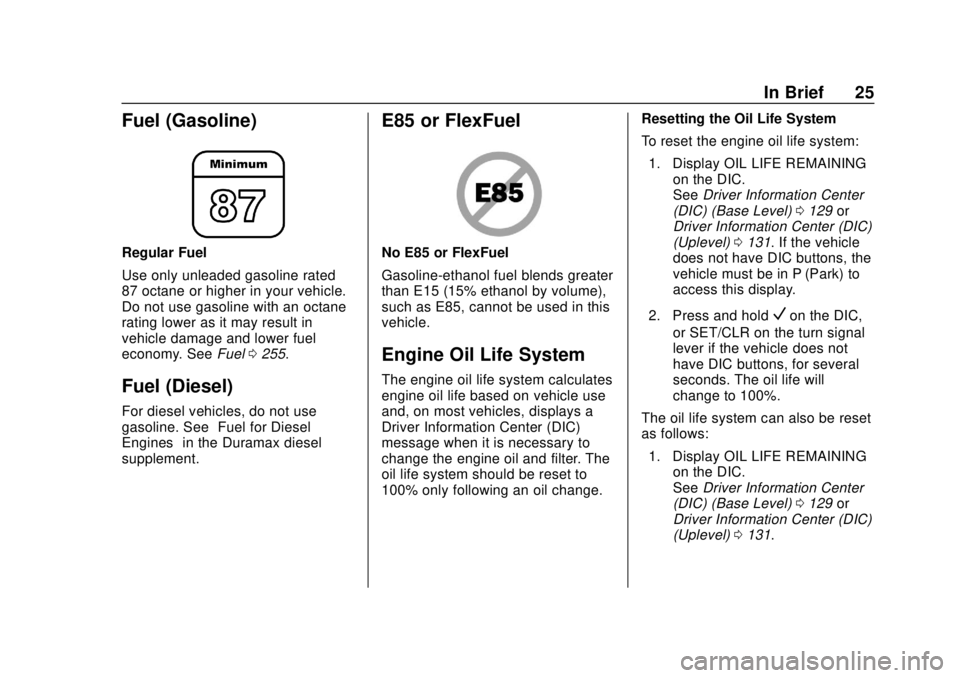
Fuel (Gasoline)
Regular Fuel
Use only unleaded gasoline rated
87 octane or higher in your vehicle.
Do not use gasoline with an octane
rating lower as it may result in
vehicle damage and lower fuel
economy. SeeFuel0255.
Fuel (Diesel)
For diesel vehicles, do not use
gasoline. See “Fuel for Diesel
Engines” in the Duramax diesel
supplement.
E85 or FlexFuel
No E85 or FlexFuel
Gasoline-ethanol fuel blends greater
than E15 (15% ethanol by volume),
such as E85, cannot be used in this
vehicle.
Engine Oil Life System
The engine oil life system calculates
engine oil life based on vehicle use
and, on most vehicles, displays a
Driver Information Center (DIC)
message when it is necessary to
change the engine oil and filter. The
oil life system should be reset to
100% only following an oil change. Resetting the Oil Life System
To reset the engine oil life system:
1. Display OIL LIFE REMAINING on the DIC.
See Driver Information Center
(DIC) (Base Level) 0129 or
Driver Information Center (DIC)
(Uplevel) 0131. If the vehicle
does not have DIC buttons, the
vehicle must be in P (Park) to
access this display.
2. Press and hold
Von the DIC,
or SET/CLR on the turn signal
lever if the vehicle does not
have DIC buttons, for several
seconds. The oil life will
change to 100%.
The oil life system can also be reset
as follows:
1. Display OIL LIFE REMAINING on the DIC.
See Driver Information Center
(DIC) (Base Level) 0129 or
Driver Information Center (DIC)
(Uplevel) 0131.
Page 27 of 421
Chevrolet Colorado Owner Manual (GMNA-Localizing-U.S./Canada/Mexico-
11349743) - 2018 - crc - 10/12/17
26 In Brief
2. Fully press the acceleratorpedal slowly three times within
five seconds. If the display
shows 100%, the system is
reset.
See Engine Oil Life System 0283.
Driving for Better Fuel
Economy
Driving habits can affect fuel
mileage. Here are some driving tips
to get the best fuel economy
possible.
.
Avoid fast starts and accelerate
smoothly.
. Brake gradually and avoid
abrupt stops.
. Avoid idling the engine for long
periods of time.
. When road and weather
conditions are appropriate, use
cruise control.
. Always follow posted speed
limits or drive more slowly when
conditions require. .
Keep vehicle tires properly
inflated.
. Combine several trips into a
single trip.
. Replace the vehicle's tires with
the same TPC Spec number
molded into the tire's sidewall
near the size.
. Follow recommended scheduled
maintenance.
Roadside Assistance
Program
U.S.: 1-800-243-8872
TTY Users (U.S. Only):
1-888-889-2438
Canada: 1-800-268-6800
New Chevrolet owners are
automatically enrolled in the
Roadside Assistance Program.
See Roadside Assistance Program
0 386.
Page 28 of 421
Chevrolet Colorado Owner Manual (GMNA-Localizing-U.S./Canada/Mexico-
11349743) - 2018 - crc - 10/12/17
Keys, Doors, and Windows 27
Keys, Doors, and
Windows
Keys and Locks
Keys . . . . . . . . . . . . . . . . . . . . . . . . . . . 27
Remote Keyless Entry (RKE)System . . . . . . . . . . . . . . . . . . . . . . . 30
Remote Keyless Entry (RKE) System Operation . . . . . . . . . . . . 30
Remote Vehicle Start . . . . . . . . . . 32
Door Locks . . . . . . . . . . . . . . . . . . . . 33
Power Door Locks . . . . . . . . . . . . . 34
Delayed Locking . . . . . . . . . . . . . . . 34
Automatic Door Locks . . . . . . . . . 34
Lockout Protection . . . . . . . . . . . . . 35
Safety Locks . . . . . . . . . . . . . . . . . . . 35
Doors
Tailgate . . . . . . . . . . . . . . . . . . . . . . . . 36
Vehicle Security
Vehicle Security . . . . . . . . . . . . . . . . 36
Vehicle Alarm System . . . . . . . . . 36
Immobilizer . . . . . . . . . . . . . . . . . . . . 37
Immobilizer Operation . . . . . . . . . 38
Exterior Mirrors
Convex Mirrors . . . . . . . . . . . . . . . . 38
Manual Mirrors . . . . . . . . . . . . . . . . . 38 Power Mirrors . . . . . . . . . . . . . . . . . . 39
Folding Mirrors . . . . . . . . . . . . . . . . . 39
Heated Mirrors . . . . . . . . . . . . . . . . . 39
Blind Spot Mirrors . . . . . . . . . . . . . . 39
Interior Mirrors
Interior Rearview Mirrors . . . . . . . 41
Manual Rearview Mirror . . . . . . . . 41
Automatic Dimming Rearview
Mirror . . . . . . . . . . . . . . . . . . . . . . . . . 41
Windows
Windows . . . . . . . . . . . . . . . . . . . . . . . 41
Power Windows . . . . . . . . . . . . . . . 42
Rear Windows . . . . . . . . . . . . . . . . . 43
Sun Visors . . . . . . . . . . . . . . . . . . . . . 44
Keys and Locks
Keys
{Warning
Leaving children in a vehicle with
the ignition key is dangerous and
children or others could be
seriously injured or killed. They
could operate the power windows
or other controls or make the
vehicle move. The windows will
function with the keys in the
ignition, and children or others
could be caught in the path of a
closing window. Do not leave
children in a vehicle with the
ignition key.
Page 29 of 421
Chevrolet Colorado Owner Manual (GMNA-Localizing-U.S./Canada/Mexico-
11349743) - 2018 - crc - 10/12/17
28 Keys, Doors, and Windows
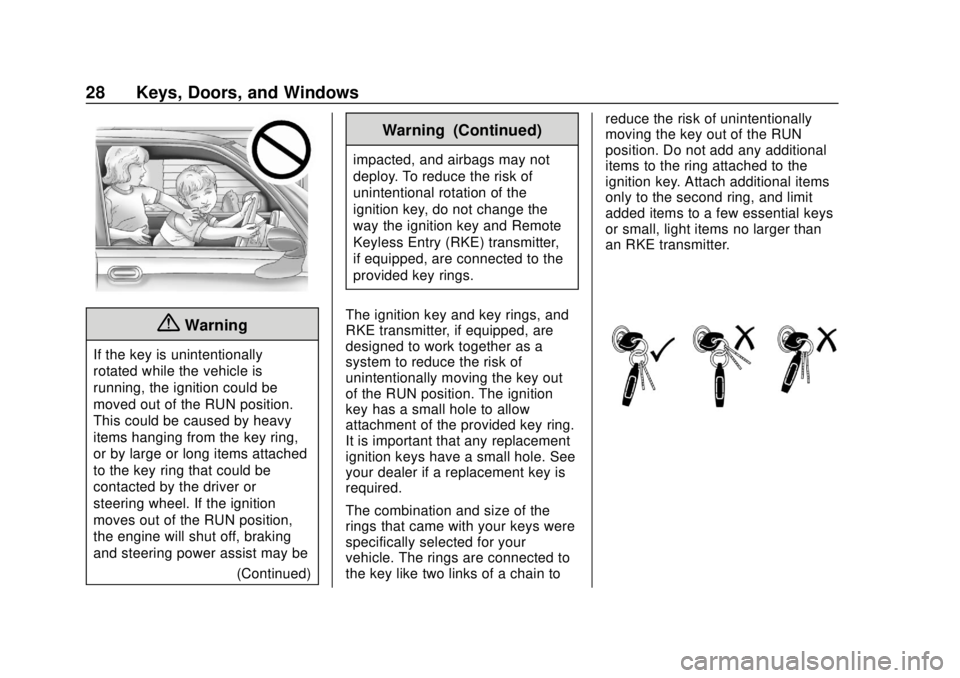
{Warning
If the key is unintentionally
rotated while the vehicle is
running, the ignition could be
moved out of the RUN position.
This could be caused by heavy
items hanging from the key ring,
or by large or long items attached
to the key ring that could be
contacted by the driver or
steering wheel. If the ignition
moves out of the RUN position,
the engine will shut off, braking
and steering power assist may be(Continued)
Warning (Continued)
impacted, and airbags may not
deploy. To reduce the risk of
unintentional rotation of the
ignition key, do not change the
way the ignition key and Remote
Keyless Entry (RKE) transmitter,
if equipped, are connected to the
provided key rings.
The ignition key and key rings, and
RKE transmitter, if equipped, are
designed to work together as a
system to reduce the risk of
unintentionally moving the key out
of the RUN position. The ignition
key has a small hole to allow
attachment of the provided key ring.
It is important that any replacement
ignition keys have a small hole. See
your dealer if a replacement key is
required.
The combination and size of the
rings that came with your keys were
specifically selected for your
vehicle. The rings are connected to
the key like two links of a chain to reduce the risk of unintentionally
moving the key out of the RUN
position. Do not add any additional
items to the ring attached to the
ignition key. Attach additional items
only to the second ring, and limit
added items to a few essential keys
or small, light items no larger than
an RKE transmitter.
Page 31 of 421
Chevrolet Colorado Owner Manual (GMNA-Localizing-U.S./Canada/Mexico-
11349743) - 2018 - crc - 10/12/17
30 Keys, Doors, and Windows
learned and all previously
known keys will no longer work
with the vehicle.
6. To learn the second key, turn the ignition off. Insert the
second key to be learned and
turn the ignition on.
After two keys are learned, the
remaining keys can be learned by
following the procedure in
“Programming with Two
Recognized Keys.”
The key has a bar-coded key tag
that the dealer or qualified locksmith
can use to make new keys. Store
this information in a safe place, not
in the vehicle.
If it becomes difficult to turn a key,
inspect the key blade for debris.
Periodically clean with a brush
or pick.
See your dealer if a replacement
key or additional key is needed.
If locked out of the vehicle, see
Roadside Assistance Program
0 386. With an active OnStar service plan,
an OnStar Advisor may remotely
unlock the vehicle. See
OnStar
Overview 0396.
Remote Keyless Entry
(RKE) System
See Radio Frequency Statement
0 392.
If there is a decrease in the Remote
Keyless Entry (RKE) operating
range:
. Check the distance. The
transmitter may be too far from
the vehicle.
. Check the location. Other
vehicles or objects may be
blocking the signal.
. Check the transmitter's battery.
See “Battery Replacement” later
in this section.
. If the transmitter is still not
working correctly, see your
dealer or a qualified technician
for service.
Remote Keyless Entry
(RKE) System Operation
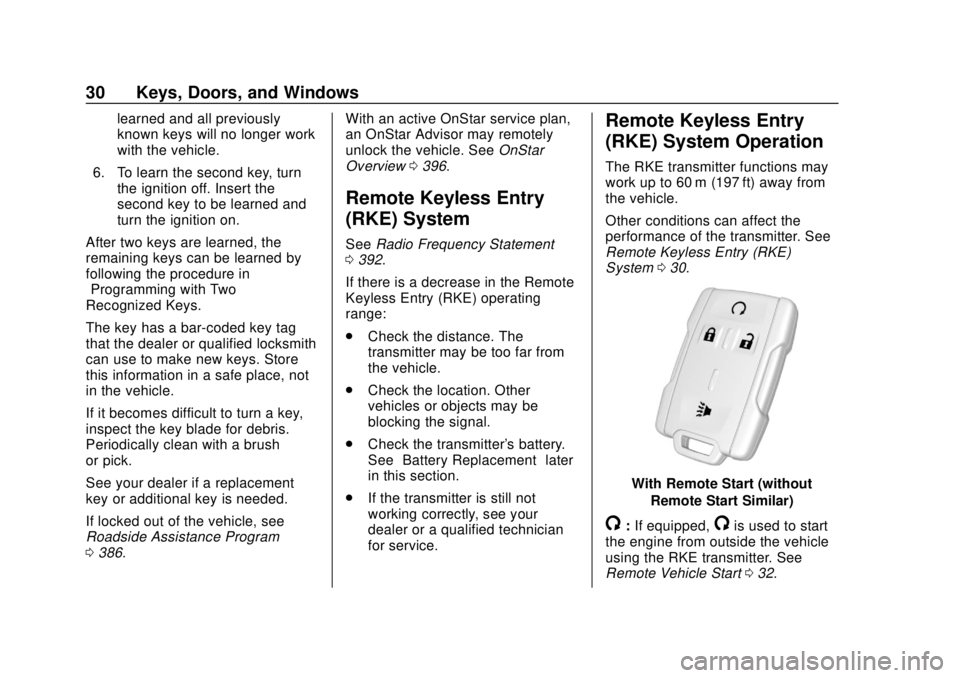
The RKE transmitter functions may
work up to 60 m (197 ft) away from
the vehicle.
Other conditions can affect the
performance of the transmitter. See
Remote Keyless Entry (RKE)
System 030.
With Remote Start (without
Remote Start Similar)
/:If equipped,/is used to start
the engine from outside the vehicle
using the RKE transmitter. See
Remote Vehicle Start 032.
Page 32 of 421
Chevrolet Colorado Owner Manual (GMNA-Localizing-U.S./Canada/Mexico-
11349743) - 2018 - crc - 10/12/17
Keys, Doors, and Windows 31
Q:Press to lock all doors.
If enabled through the Driver
Information Center (DIC), the turn
signal lamps flash once to indicate
locking has occurred. If enabled
through the DIC, the horn chirps
when
Qis pressed again within
three seconds. See Vehicle
Personalization 0136.
Pressing
Qarms the vehicle alarm
system. See Vehicle Alarm System
0 36.
K:Press once to unlock only the
driver door. If
Kis pressed again
within three seconds, all remaining
doors unlock. The interior lamps
may come on and stay on for
20 seconds or until the ignition is
turned on.
If enabled through the DIC, the turn
signal lamps flash twice to indicate
unlocking has occurred. See Vehicle
Personalization 0136. If enabled
through the DIC, the exterior lamps
may turn on. See Vehicle
Personalization 0136. Pressing
Kon the RKE transmitter
disarms the vehicle alarm system.
See Vehicle Alarm System 036.
7:Press and release one time to
initiate vehicle locator. The turn
signal lamps flash and the horn
sounds three times.
Press and hold
7for at least
three seconds to sound the panic
alarm. The turn signal lamps flash
and the horn sounds repeatedly for
30 seconds. The alarm turns off
when the ignition is turned on or
7
is pressed again. The ignition must
be off for the panic alarm to work.
Programming Transmitters to
the Vehicle
Only RKE transmitters programmed
to this vehicle will work. If a
transmitter is lost or stolen, a
replacement can be purchased and
programmed through your dealer.
Each vehicle can have up to
eight transmitters programmed to it.
See your dealer for transmitter
programming.
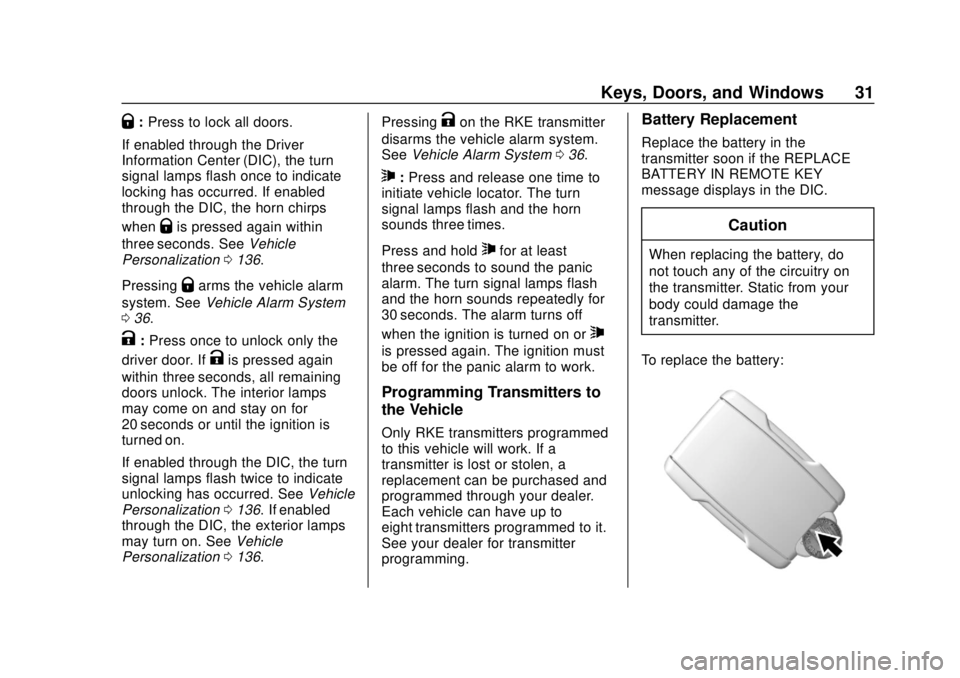
Battery Replacement
Replace the battery in the
transmitter soon if the REPLACE
BATTERY IN REMOTE KEY
message displays in the DIC.
Caution
When replacing the battery, do
not touch any of the circuitry on
the transmitter. Static from your
body could damage the
transmitter.
To replace the battery: