bluetooth CHEVROLET COLORADO 2018 Owner's Guide
[x] Cancel search | Manufacturer: CHEVROLET, Model Year: 2018, Model line: COLORADO, Model: CHEVROLET COLORADO 2018Pages: 421, PDF Size: 5.58 MB
Page 180 of 421
Chevrolet Colorado Owner Manual (GMNA-Localizing-U.S./Canada/Mexico-
11349743) - 2018 - crc - 10/12/17
Infotainment System 179
.Up to 10 cell phones can be
paired to the Bluetooth system.
. The pairing process is disabled
when the vehicle is moving.
. Pairing only needs to be
completed once, unless the
pairing information on the cell
phone changes or the cell phone
is deleted from the system.
. Only one paired cell phone can
be connected to the Bluetooth
system at a time.
. If multiple paired cell phones are
within range of the system, the
system connects to the first
available paired cell phone in the
order that they were first paired
to the system.
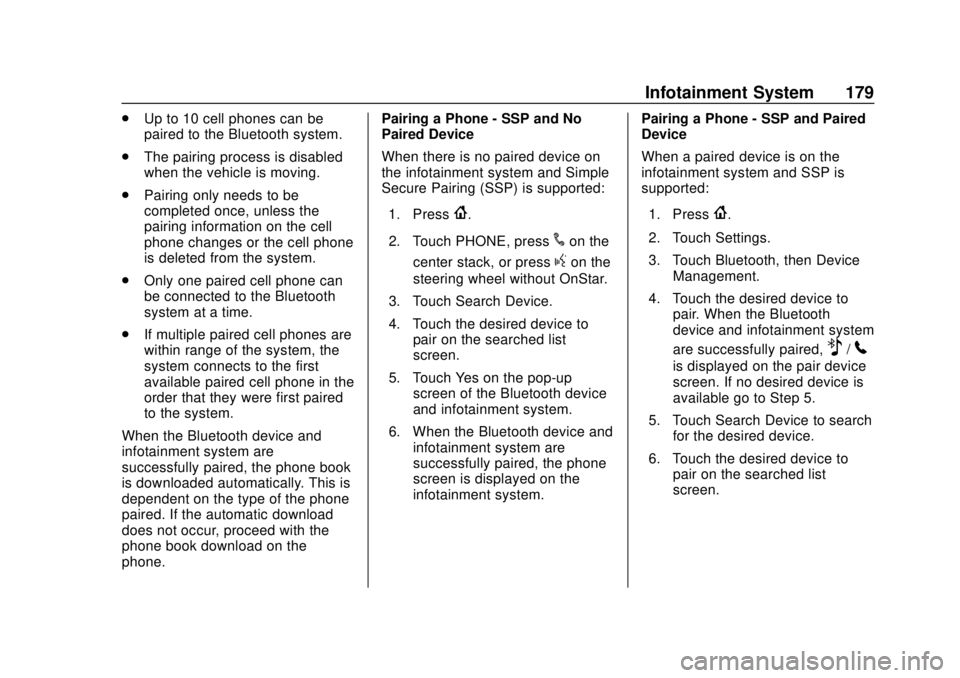
When the Bluetooth device and
infotainment system are
successfully paired, the phone book
is downloaded automatically. This is
dependent on the type of the phone
paired. If the automatic download
does not occur, proceed with the
phone book download on the
phone. Pairing a Phone - SSP and No
Paired Device
When there is no paired device on
the infotainment system and Simple
Secure Pairing (SSP) is supported:
1. Press
{.
2. Touch PHONE, press
#on the
center stack, or press
gon the
steering wheel without OnStar.
3. Touch Search Device.
4. Touch the desired device to pair on the searched list
screen.
5. Touch Yes on the pop-up screen of the Bluetooth device
and infotainment system.
6. When the Bluetooth device and infotainment system are
successfully paired, the phone
screen is displayed on the
infotainment system. Pairing a Phone - SSP and Paired
Device
When a paired device is on the
infotainment system and SSP is
supported:
1. Press
{.
2. Touch Settings.
3. Touch Bluetooth, then Device Management.
4. Touch the desired device to pair. When the Bluetooth
device and infotainment system
are successfully paired,
Z/5
is displayed on the pair device
screen. If no desired device is
available go to Step 5.
5. Touch Search Device to search for the desired device.
6. Touch the desired device to pair on the searched list
screen.
Page 181 of 421
Chevrolet Colorado Owner Manual (GMNA-Localizing-U.S./Canada/Mexico-
11349743) - 2018 - crc - 10/12/17
180 Infotainment System
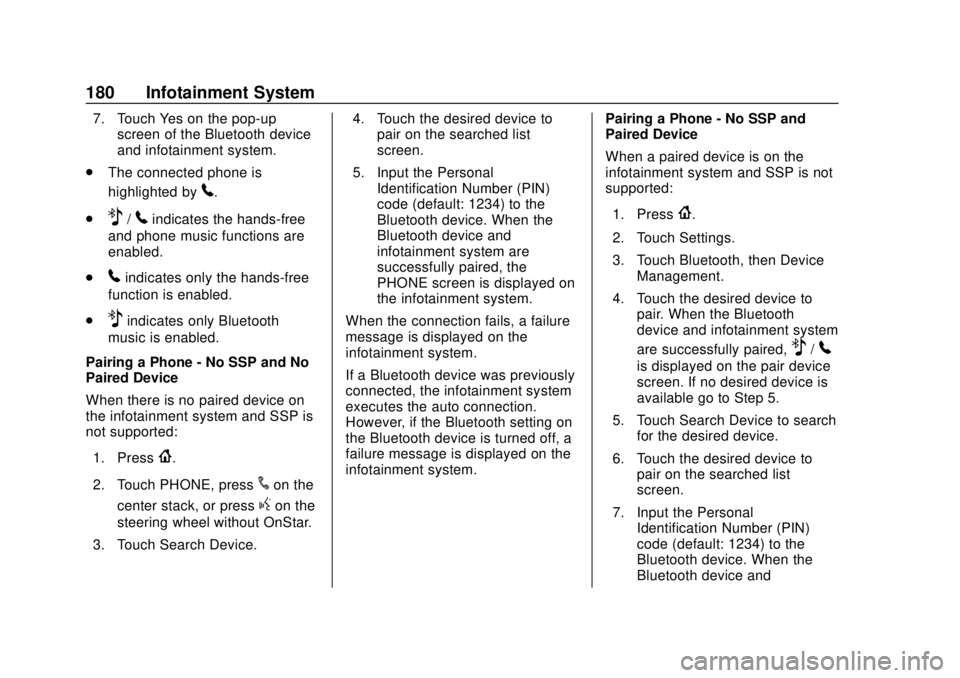
7. Touch Yes on the pop-upscreen of the Bluetooth device
and infotainment system.
. The connected phone is
highlighted by
5.
.
Z/5indicates the hands-free
and phone music functions are
enabled.
.
5indicates only the hands-free
function is enabled.
.
Zindicates only Bluetooth
music is enabled.
Pairing a Phone - No SSP and No
Paired Device
When there is no paired device on
the infotainment system and SSP is
not supported:
1. Press
{.
2. Touch PHONE, press
#on the
center stack, or press
gon the
steering wheel without OnStar.
3. Touch Search Device. 4. Touch the desired device to
pair on the searched list
screen.
5. Input the Personal Identification Number (PIN)
code (default: 1234) to the
Bluetooth device. When the
Bluetooth device and
infotainment system are
successfully paired, the
PHONE screen is displayed on
the infotainment system.
When the connection fails, a failure
message is displayed on the
infotainment system.
If a Bluetooth device was previously
connected, the infotainment system
executes the auto connection.
However, if the Bluetooth setting on
the Bluetooth device is turned off, a
failure message is displayed on the
infotainment system. Pairing a Phone - No SSP and
Paired Device
When a paired device is on the
infotainment system and SSP is not
supported:
1. Press
{.
2. Touch Settings.
3. Touch Bluetooth, then Device Management.
4. Touch the desired device to pair. When the Bluetooth
device and infotainment system
are successfully paired,
Z/5
is displayed on the pair device
screen. If no desired device is
available go to Step 5.
5. Touch Search Device to search for the desired device.
6. Touch the desired device to pair on the searched list
screen.
7. Input the Personal Identification Number (PIN)
code (default: 1234) to the
Bluetooth device. When the
Bluetooth device and
Page 182 of 421
Chevrolet Colorado Owner Manual (GMNA-Localizing-U.S./Canada/Mexico-
11349743) - 2018 - crc - 10/12/17
Infotainment System 181
infotainment system are
successfully paired,
Z/5is
displayed on the pair device
screen.
. The connected phone is
highlighted by
5.
.
Z/5indicates the hands-free
and phone music functions are
enabled.
.
5indicates only the hands-free
function is enabled.
.
Zindicates only Bluetooth
music is enabled.
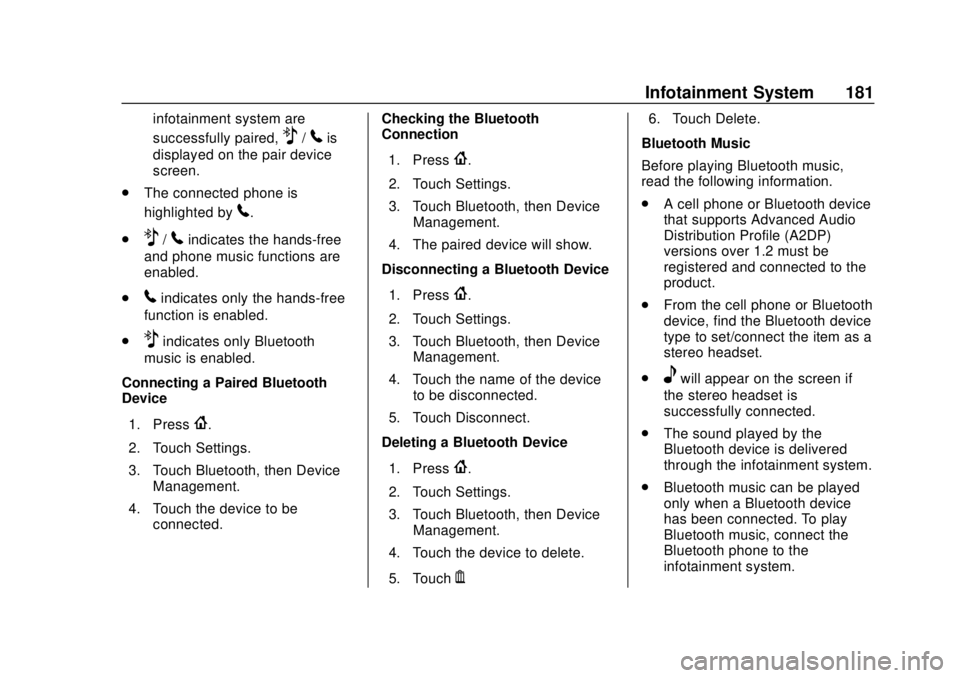
Connecting a Paired Bluetooth
Device
1. Press
{.
2. Touch Settings.
3. Touch Bluetooth, then Device Management.
4. Touch the device to be connected. Checking the Bluetooth
Connection
1. Press
{.
2. Touch Settings.
3. Touch Bluetooth, then Device Management.
4. The paired device will show.
Disconnecting a Bluetooth Device
1. Press
{.
2. Touch Settings.
3. Touch Bluetooth, then Device Management.
4. Touch the name of the device to be disconnected.
5. Touch Disconnect.
Deleting a Bluetooth Device
1. Press
{.
2. Touch Settings.
3. Touch Bluetooth, then Device Management.
4. Touch the device to delete.
5. Touch
Y. 6. Touch Delete.
Bluetooth Music
Before playing Bluetooth music,
read the following information.
. A cell phone or Bluetooth device
that supports Advanced Audio
Distribution Profile (A2DP)
versions over 1.2 must be
registered and connected to the
product.
. From the cell phone or Bluetooth
device, find the Bluetooth device
type to set/connect the item as a
stereo headset.
.
ewill appear on the screen if
the stereo headset is
successfully connected.
. The sound played by the
Bluetooth device is delivered
through the infotainment system.
. Bluetooth music can be played
only when a Bluetooth device
has been connected. To play
Bluetooth music, connect the
Bluetooth phone to the
infotainment system.
Page 183 of 421
Chevrolet Colorado Owner Manual (GMNA-Localizing-U.S./Canada/Mexico-
11349743) - 2018 - crc - 10/12/17
182 Infotainment System
.If the Bluetooth device is
disconnected while playing
phone music, the music is
discontinued. The audio
streaming function may not be
supported in some Bluetooth
phones. Only one function can
be used at a time between the
Bluetooth hands-free or Phone
music function. For example,
if you convert to Bluetooth
hands-free while playing Phone
music, the music is
discontinued. Playing music from
the car is not possible when
there are no music files stored in
the cell phone.
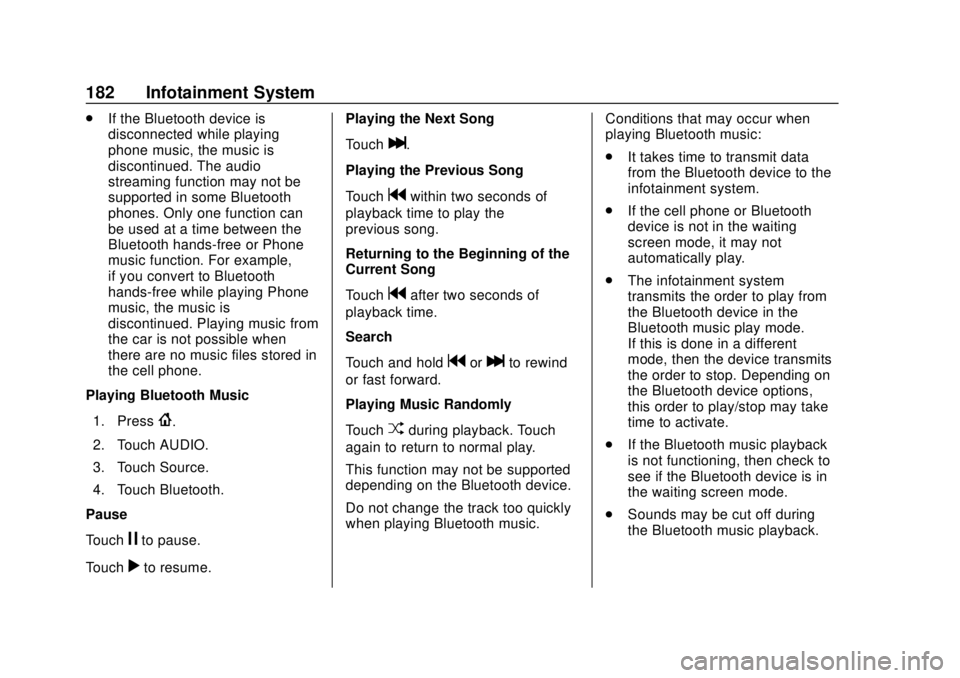
Playing Bluetooth Music
1. Press
{.
2. Touch AUDIO.
3. Touch Source.
4. Touch Bluetooth.
Pause
Touch
jto pause.
Touch
rto resume. Playing the Next Song
Touch
l.
Playing the Previous Song
Touch
gwithin two seconds of
playback time to play the
previous song.
Returning to the Beginning of the
Current Song
Touch
gafter two seconds of
playback time.
Search
Touch and hold
gorlto rewind
or fast forward.
Playing Music Randomly
Touch
Zduring playback. Touch
again to return to normal play.
This function may not be supported
depending on the Bluetooth device.
Do not change the track too quickly
when playing Bluetooth music. Conditions that may occur when
playing Bluetooth music:
.
It takes time to transmit data
from the Bluetooth device to the
infotainment system.
. If the cell phone or Bluetooth
device is not in the waiting
screen mode, it may not
automatically play.
. The infotainment system
transmits the order to play from
the Bluetooth device in the
Bluetooth music play mode.
If this is done in a different
mode, then the device transmits
the order to stop. Depending on
the Bluetooth device options,
this order to play/stop may take
time to activate.
. If the Bluetooth music playback
is not functioning, then check to
see if the Bluetooth device is in
the waiting screen mode.
. Sounds may be cut off during
the Bluetooth music playback.
Page 184 of 421
Chevrolet Colorado Owner Manual (GMNA-Localizing-U.S./Canada/Mexico-
11349743) - 2018 - crc - 10/12/17
Infotainment System 183
.The infotainment system outputs
the audio from the cell phone or
Bluetooth device as it is
transmitted.
Text Messaging
If equipped, the infotainment system
may allow text messages to be
received and replied to. Received
messages can also be read aloud.
Text Menu
Inbox : Select to display incoming
messages. To view a message,
select the name of the sender.
Select LISTEN to listen to the text
message. Press
oBACK on the
center stack to return to the
previous menu.
Settings : See“Text Settings” later
in this section.
Reply : Select to reply using a
predefined text message. See “Text
Settings.”
Call : Select to place a call to the
sender of the text message.
Viewing a Text Message
While viewing a text message:
. Select Reply to reply using a
predefined text message.
. Select Call to place a call to the
sender of the text message.
Viewing Sender Information
If equipped, select the name of the
sender to view sender information if
this information matches contact
information already stored.
Select a Predefined Message :
Select from a set of quick
messages. Select the message
to send.
Predefined Messages
These are short text messages that
can be used to send so responses
will not have to be typed.
The messages can be deleted or a
new message can be added.
To add a new message:
1. Select Text Settings, then select Manage Predefined
Messages. 2. While in the predefined
messages list view, select Add
New Predefined Message and
a keyboard displays.
3. Type a new message and select NEW MSG when done
to add the message. Press
o
BACK on center stack to go
back to the predefined
messages list. Select
zto
delete one character at a time.
Memory Full
This message may display if there is
no more room on the phone to store
messages.
Text Settings
Text Alerts : When on, this feature
will display an alert when a new text
message has been received. Select
on or off.
Manage Predefined Messages :
Select to add, change, or delete
predefined messages.
Page 187 of 421
Chevrolet Colorado Owner Manual (GMNA-Localizing-U.S./Canada/Mexico-
11349743) - 2018 - crc - 10/12/17
186 Infotainment System
General Requirements:1. A License Agreement from SiriusXM
®is required for any
product that incorporates
SiriusXM Technology and/or for
use of any of the SiriusXM
marks to be manufactured,
distributed, or marketed in the
SiriusXM Service Area.
2. For products to be distributed, marketed, and/or sold in
Canada, a separate agreement
is required with Canadian
Satellite Radio Inc. (operating
as SiriusXM Canada).
Other Information
The Bluetooth®word mark and
logos are owned by the Bluetooth®
SIG, Inc. and any use of such marks
by General Motors is under license.
Other trademarks and trade names
are those of their respective owners.
Schedule I: Gracenote EULA
Music recognition technology and
related data are provided by
Gracenote
®. Gracenote is the
industry standard in music
recognition technology and related
content delivery. For more
information visit
www.gracenote.com.
Music-related data from Gracenote,
Inc., copyright © 2000 to present
Gracenote. Gracenote Software,
copyright © 2000 to present
Gracenote. One or more patents
owned by Gracenote may apply to
this product and service. See the
Gracenote website for a
non-exhaustive list of applicable
Gracenote patents. Gracenote,
CDDB, MusicID, MediaVOCS, the
Gracenote logo and logotype, and
the "Powered by Gracenote" logo are either registered trademarks or
trademarks of Gracenote in the
United States and/or other
countries.
Gracenote Terms of Use
This application or device contains
software from Gracenote, Inc. of
Emeryville, California ("Gracenote").
The software from Gracenote (the
"Gracenote Software") enables this
application to do disc or file
identification and obtain
music-related information, including
name, artist, track, and title
information ("Gracenote Data") from
online servers or embedded
databases (collectively, "Gracenote
Servers") and to perform other
functions. You may use Gracenote
Data only by means of the intended
End-User functions of this
application or device.
This application or device may
contain content belonging to
Gracenote’s providers. If so, all of
the restrictions set forth herein with
respect to Gracenote Data shall
also apply to such content and such
content providers shall be entitled to
Page 410 of 421

Chevrolet Colorado Owner Manual (GMNA-Localizing-U.S./Canada/Mexico-
11349743) - 2018 - crc - 10/12/17
Index 409
AudioBluetooth . . . . . . . . . . . . . . . . . . . . . 165
Theft-Deterrent Feature . . . . . . . 151
Automatic Climate Control System . . . . . . . 193
Door Locks . . . . . . . . . . . . . . . . . . . . . 34
Headlamp System . . . . . . . . . . . . 144
Transmission . . . . . . . . . . . . . . . . . 224
Transmission Fluid . . . . . . . . . . . 285
Automatic Transmission Manual Mode . . . . . . . . . . . . . . . . . 227
Shift Lock Control Function
Check . . . . . . . . . . . . . . . . . . . . . . . 299
Auxiliary Jack . . . . . . . . . . . . . . . . . . . 165
Avoiding Untrusted Media Devices . . . . . . . . . . . . . . . . . . . . . . . 159
Axle Locking Front . . . . . . . . . . . . . . . . . 246
Axle, Front . . . . . . . . . . . . . . . . . . . . . . 297
Axle, Rear . . . . . . . . . . . . . . . . . . . . . . 298
B
Battery Exterior Lighting BatterySaver . . . . . . . . . . . . . . . . . . . . . . . 149
Load Management . . . . . . . . . . . . 148 Battery (cont'd)
Power Protection . . . . . . . . . . . . . 149
Battery - North America . . . . 295, 345
Blade Replacement, Wiper . . . . . 300
Blind Spot Mirrors . . . . . . . . . . . . . . . 39
Bluetooth Overview . . . . . . . . . . . 172, 174, 178
Bluetooth Audio . . . . . . . . . . . . . . . . 165
Brake System Warning Light . . . . . . . . 122
Brakes . . . . . . . . . . . . . . . . . . . . . . . . . . 293 Antilock . . . . . . . . . . . . . . . . . . . . . . . 238
Assist . . . . . . . . . . . . . . . . . . . . . . . . . 239
Fluid . . . . . . . . . . . . . . . . . . . . . . . . . . 294
Parking . . . . . . . . . . . . . . . . . . . . . . . 239
Braking . . . . . . . . . . . . . . . . . . . . . . . . . 199
Break-In, New Vehicle . . . . . . . . . . 216
Bulb Replacement Center High-MountedStoplamp (CHMSL) and
Cargo Lamp . . . . . . . . . . . . . . . . . 304
Halogen Bulbs . . . . . . . . . . . . . . . . 302
Headlamp Aiming . . . . . . . . . . . . . 302
Headlamps . . . . . . . . . . . . . . . . . . . 302
Headlamps, Front Turn Signal, Sidemarker, and
Parking Lamps . . . . . . . . . . . . . . 303 Bulb Replacement (cont'd)
Taillamps, Turn Signal,
Stoplamps, and Back-up
Lamps . . . . . . . . . . . . . . . . . . . . . . 303
Buying New Tires . . . . . . . . . . . . . . . 327
C
Calibration . . . . . . . . . . . . . . . . . . . . . . 108
California Fuel Requirements . . . . . . . . . . . 256
Perchlorate Materials
Requirements . . . . . . . . . . . . . . . 276
California Proposition
65 Warning . . . . . . . . . .275, 295, 345,
Back Cover
Camera Rear Vision (RVC) . . . . . . . . . . . . 250
Canadian Vehicle Owners . . . . . . . . 2
Capacities and
Specifications . . . . . . . . . . . . . . . . . 379
Carbon Monoxide Engine Exhaust . . . . . . . . . . . . . . . 223
Tailgate . . . . . . . . . . . . . . . . . . . . . . . . . 36
Winter Driving . . . . . . . . . . . . . . . . 207
Cargo Lamp . . . . . . . . . . . . . . . . . . . . 147
Caution, Danger, and Warning . . . . 2
Center Console Storage . . . . . . . . 104
Page 416 of 421

Chevrolet Colorado Owner Manual (GMNA-Localizing-U.S./Canada/Mexico-
11349743) - 2018 - crc - 10/12/17
Index 415
OrderingService Publications . . . . . . . . . . 391
Outlets Power . . . . . . . . . . . . . . . . . . . . . . . . 109
Overheating, Engine . . . . . . . . . . . . 291
Overview . . . . . . . . . . . . . . . . . . . . . . . 152
P
Park Shifting Into . . . . . . . . . . . . . . . . . . . 221
Shifting Out of . . . . . . . . . . . . . . . . 222
Parking . . . . . . . . . . . . . . . . . . . . . . . . . 222
Brake . . . . . . . . . . . . . . . . . . . . . . . . . 239
Brake and P (Park)Mechanism Check . . . . . . . . . . 300
Over Things That Burn . . . . . . . 223
Passenger Airbag Status
Indicator . . . . . . . . . . . . . . . . . . . . . . 119
Passenger Compartment Air Filter . . . . . . . . . . . . . . . . . . . . . . . . . . 196
Passenger Sensing System . . . . . 66
Perchlorate Materials
Requirements, California . . . . . . 276
Personalization Vehicle . . . . . . . . . . . . . . . . . . . . . . . 136
Phone
Apple CarPlay andAndroid Auto . . . . . . . . . . . . . . . . 184 Phone (cont'd)
Bluetooth . . . . . . . . . . . 172, 174, 178
Port USB . . . . . . . . . . . . . . . . . . . . . . . . . . 159
Power Door Locks . . . . . . . . . . . . . . . . . . . . . 34
Mirrors . . . . . . . . . . . . . . . . . . . . . . . . . . 39
Outlets . . . . . . . . . . . . . . . . . . . . . . . 109
Protection, Battery . . . . . . . . . . . . 149
Retained Accessory (RAP) . . . 220
Seat Adjustment . . . . . . . . . . . . . . . . 48
Windows . . . . . . . . . . . . . . . . . . . . . . . 42
Pregnancy, Using Seat Belts . . . . 58
Privacy Vehicle Data Recording . . . . . . . 394
Program Courtesy Transportation . . . . . . 388
Proposition
65 Warning,
California . . . . . . . . . . . .275, 295, 345, Back Cover
R
Radio Frequency Statement . . . . 392
Radio Reception . . . . . . . . . . . . . . . . 157
RadiosAM-FM Radio . . . . . . . . . . . . . . . . . 154 Radios (cont'd)
Satellite . . . . . . . . . . . . . . . . . . . . . . . 156
Reading Lamps . . . . . . . . . . . . . . . . . 148
Rear Axle . . . . . . . . . . . . . . . . . . . . . . . 298 Locking . . . . . . . . . . . . . . . . . . . . . . . 245
Rear Seats . . . . . . . . . . . . . . . . . . . . . . 51
Rear Vision Camera (RVC) . . . . . 250
Rear Windows . . . . . . . . . . . . . . . . . . . 43
Rearview Mirrors . . . . . . . . . . . . . . . . 41 Automatic Dimming . . . . . . . . . . . . . 41
Reclining Seatbacks . . . . . . . . . . . . . 48
Recognition Voice . . . . . . . . . . . . . . . . . . . . . . . . . 166
Recommended Fluids and
Lubricants . . . . . . . . . . . . . . . . . . . . . 374
Records Maintenance . . . . . . . . . . . . . . . . . . 377
Recreational Vehicle Towing . . . . 348
Reimbursement Program,
GM Mobility . . . . . . . . . . . . . . . . . . . 386
Remote Keyless Entry (RKE) System . . . . . . . . . . . . . . . . . . . . . . . . . 30
Remote Vehicle Start . . . . . . . . . . . . 32
Replacement Parts
Airbags . . . . . . . . . . . . . . . . . . . . . . . . . 72
Maintenance . . . . . . . . . . . . . . . . . . 375
Replacing Airbag System . . . . . . . . 72