traction control CHEVROLET COLORADO 2018 Owner's Guide
[x] Cancel search | Manufacturer: CHEVROLET, Model Year: 2018, Model line: COLORADO, Model: CHEVROLET COLORADO 2018Pages: 421, PDF Size: 5.58 MB
Page 229 of 421
Chevrolet Colorado Owner Manual (GMNA-Localizing-U.S./Canada/Mexico-
11349743) - 2018 - crc - 10/12/17
228 Driving and Operating
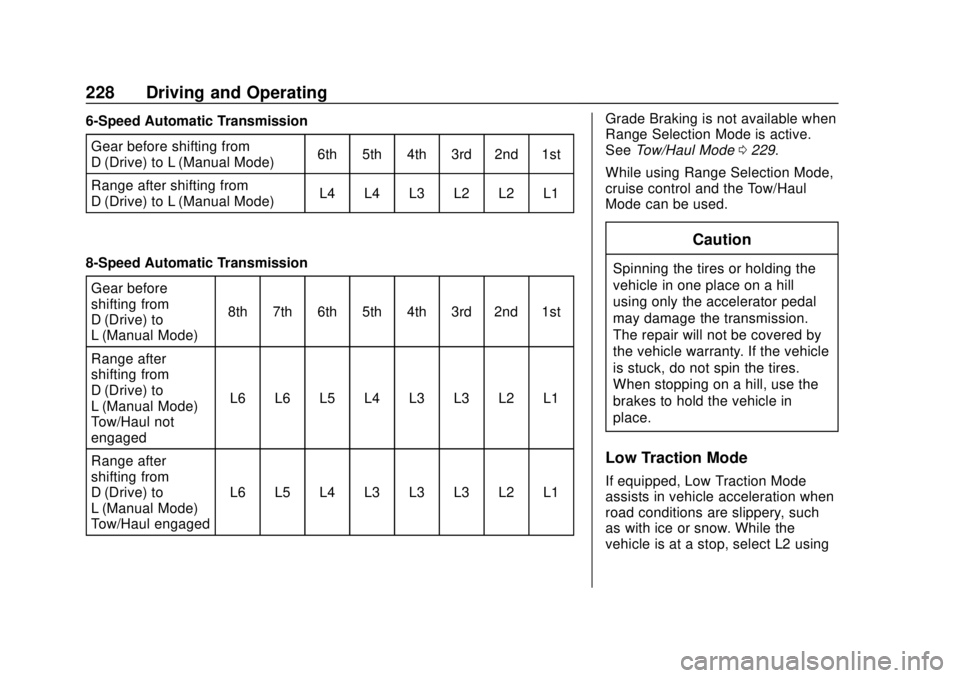
6-Speed Automatic TransmissionGear before shifting from
D (Drive) to L (Manual Mode) 6th 5th 4th 3rd 2nd 1st
Range after shifting from
D (Drive) to L (Manual Mode) L4 L4 L3 L2 L2 L1
8-Speed Automatic Transmission Gear before
shifting from
D (Drive) to
L (Manual Mode) 8th 7th 6th 5th 4th 3rd 2nd 1st
Range after
shifting from
D (Drive) to
L (Manual Mode) –
Tow/Haul not
engaged L6 L6 L5 L4 L3 L3 L2 L1
Range after
shifting from
D (Drive) to
L (Manual Mode) –
Tow/Haul engaged L6 L5 L4 L3 L3 L3 L2 L1 Grade Braking is not available when
Range Selection Mode is active.
See
Tow/Haul Mode 0229.
While using Range Selection Mode,
cruise control and the Tow/Haul
Mode can be used.
Caution
Spinning the tires or holding the
vehicle in one place on a hill
using only the accelerator pedal
may damage the transmission.
The repair will not be covered by
the vehicle warranty. If the vehicle
is stuck, do not spin the tires.
When stopping on a hill, use the
brakes to hold the vehicle in
place.
Low Traction Mode
If equipped, Low Traction Mode
assists in vehicle acceleration when
road conditions are slippery, such
as with ice or snow. While the
vehicle is at a stop, select L2 using
Page 232 of 421
Chevrolet Colorado Owner Manual (GMNA-Localizing-U.S./Canada/Mexico-
11349743) - 2018 - crc - 10/12/17
Driving and Operating 231
Caution (Continued)
the vehicle warranty. Shift to
R (Reverse) only after the vehicle
is stopped.
Use R (Reverse), along with the
parking brake, for parking the
vehicle.
Shift Speeds
{Warning
If you skip a gear when
downshifting, you could lose
control of the vehicle. You could
injure yourself or others. Do not
shift down more than one gear at
a time when downshifting.
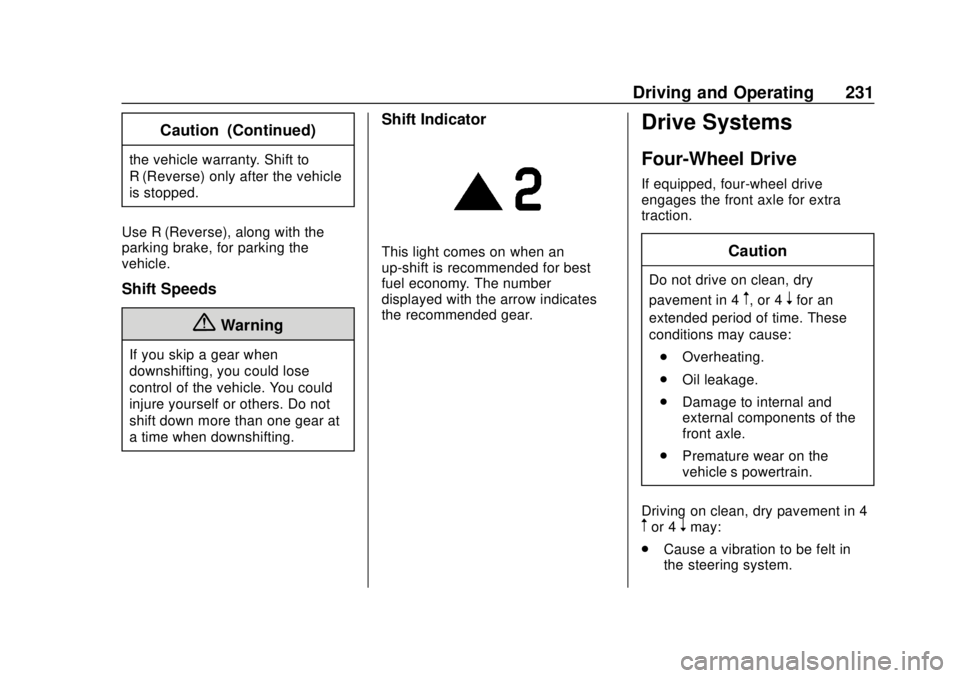
Shift Indicator
This light comes on when an
up-shift is recommended for best
fuel economy. The number
displayed with the arrow indicates
the recommended gear.
Drive Systems
Four-Wheel Drive
If equipped, four-wheel drive
engages the front axle for extra
traction.
Caution
Do not drive on clean, dry
pavement in 4
m, or 4nfor an
extended period of time. These
conditions may cause:
. Overheating.
. Oil leakage.
. Damage to internal and
external components of the
front axle.
. Premature wear on the
vehicle’s powertrain.
Driving on clean, dry pavement in 4
mor 4nmay:
. Cause a vibration to be felt in
the steering system.
Page 233 of 421
Chevrolet Colorado Owner Manual (GMNA-Localizing-U.S./Canada/Mexico-
11349743) - 2018 - crc - 10/12/17
232 Driving and Operating
.Cause tires to wear faster.
. Cause additional driveline noise.
{Warning
If equipped with four-wheel drive,
the vehicle will be free to roll if the
transfer case is in N (Neutral),
even when the shift lever is in
P (Park). You or someone else
could be seriously injured. Be
sure the transfer case is in a drive
gear —2
m, 4m, or 4nor set the
parking brake before placing the
transfer case in N (Neutral). See
Shifting Into Park 0221.
Caution
Extended high-speed operation in
4
nmay damage or shorten the
life of the drivetrain. Engagement noise and bump when
shifting between 4
nand 4mor from
N (Neutral), with the engine running,
is normal.
Shifting into 4
nwill turn Traction
Control and StabiliTrak off. See
Traction Control/Electronic Stability
Control 0240.
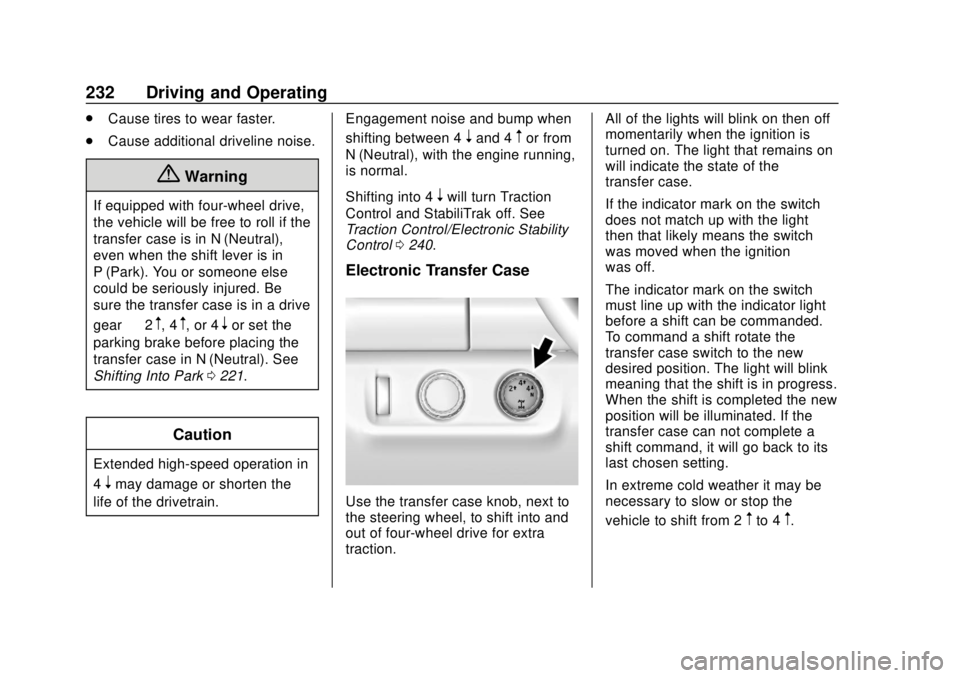
Electronic Transfer Case
Use the transfer case knob, next to
the steering wheel, to shift into and
out of four-wheel drive for extra
traction. All of the lights will blink on then off
momentarily when the ignition is
turned on. The light that remains on
will indicate the state of the
transfer case.
If the indicator mark on the switch
does not match up with the light
then that likely means the switch
was moved when the ignition
was off.
The indicator mark on the switch
must line up with the indicator light
before a shift can be commanded.
To command a shift rotate the
transfer case switch to the new
desired position. The light will blink
meaning that the shift is in progress.
When the shift is completed the new
position will be illuminated. If the
transfer case can not complete a
shift command, it will go back to its
last chosen setting.
In extreme cold weather it may be
necessary to slow or stop the
vehicle to shift from 2
mto 4m.
Page 234 of 421
Chevrolet Colorado Owner Manual (GMNA-Localizing-U.S./Canada/Mexico-
11349743) - 2018 - crc - 10/12/17
Driving and Operating 233
Delayed shifts from 4mto 2mmay
be experienced due to uneven tire
wear, low tire pressure, high vehicle
loading, or cold temperatures.
Caution
Shifting the transmission into gear
before the requested mode
indicator light has stopped
flashing could damage the
transfer case.
The settings are:
N (Neutral) : Use only when the
vehicle needs to be towed.
See Recreational Vehicle Towing
0 348 orTowing the Vehicle 0348.
2
m(Two-Wheel Drive High) : Use
for driving on most streets and
highways. The front axle is not
engaged. This setting provides the
best fuel economy.
4
n(Four-Wheel Drive Low) : This
setting engages the front axle and
delivers extra torque. Choose 4
nif
driving off-road in deep sand, deep mud, or deep snow, and while
climbing or descending steep hills.
When engaged, keep vehicle speed
below 72 km/h (45 mph).
Shifting into 4
nwill turn Traction
Control and StabiliTrak off. See
Traction Control/Electronic Stability
Control 0240.
4
m(Four-Wheel Drive High) : Use
when extra traction is needed. The
front axle engages and helps when
driving on snowy or icy roads, and
when off-roading. The vehicle can
be shifted from 2
mto 4mwhile the
vehicle is moving.
Shifting Into 4
m
Turn the knob to 4mat any speed
up to 121 km/h (75 mph), except
from 4
n. The indicator light will flash
while shifting and will remain on the
selected setting.
Shifting Into 2
m
Turn the knob to 2mat any speed,
except when shifting from 4
n. Shifting Into 4
n
When 4nis engaged, vehicle speed
should be kept below 72 km/h
(45 mph).
1. The ignition must be on and the vehicle must be stopped or
moving less than 5 km/h
(3 mph) with the transmission
in N (Neutral). It is best for the
vehicle to be moving
1.6 to 3.2 km/h (1 to 2 mph).
2. Turn the knob to 4
n. Wait for
the 4
nindicator light to stop
flashing before shifting the
transmission into gear.
If the transmission is in gear and/or
moving more than 5 km/h (3 mph),
the 4
nindicator light will flash for
30 seconds and not complete the
shift. After 30 seconds the transfer
case will shift to 4
m. Turn the knob
to 4
mto see the indicator. With the
vehicle moving less than 5 km/h
(3 mph), and the transmission in
N (Neutral), attempt the shift again.
Page 237 of 421
Chevrolet Colorado Owner Manual (GMNA-Localizing-U.S./Canada/Mexico-
11349743) - 2018 - crc - 10/12/17
236 Driving and Operating
AUTO (Automatic Four-Wheel
Drive) :Use when road surface
traction conditions are variable.
When driving in AUTO, the front
axle is engaged, and the vehicle's
power is sent to the front and rear
wheels automatically based on
driving conditions. This setting
provides slightly lower fuel economy
than 2
m.
Do not use AUTO mode,
if equipped, to park on a steep
grade with poor traction such as ice,
snow, mud, or gravel. In AUTO
mode only the rear wheels will hold
the vehicle from sliding when
parked. If parking on a steep grade,
use 4
mto keep all four wheels
engaged.
4
m(Four-Wheel Drive High) : This
setting engages the front axle. Use
this position when extra traction is
needed, such as when driving on
snowy or icy roads, or when
off-roading. 4
n(Four-Wheel Drive Low) :
This
setting engages the front axle and
delivers extra torque. Choose 4
n
when driving off-road in deep sand,
deep mud, or deep snow, and while
climbing or descending steep hills.
Shifting into 4
nwill turn Traction
Control and StabiliTrak off. See
Traction Control/Electronic Stability
Control 0240.
Shifting Into 4
mor AUTO
Turn the knob to the 4
mor AUTO
position at any speed, except from
4
n. The indicator light will flash
while shifting and will remain on
when the shift is completed.
Shifting Into 2
m
Turn the knob to 2mat any speed,
except when shifting from 4
n. The
indicator light will flash while shifting
and will remain on when the shift is
completed. Shifting Into 4
n
When 4nis engaged, keep vehicle
speed below 72 km/h (45 mph).
To shift into 4
n:
1. The ignition must be on and the vehicle must be stopped or
moving less than 5 km/h
(3 mph) with the transmission
in N (Neutral). It is best for the
vehicle to be moving
1.6 to 3.2 km/h (1 to 2 mph).
2. Turn the knob to 4
n. Wait for
the 4
nindicator light to stop
flashing before shifting the
transmission into gear.
Caution
Shifting the transmission into gear
before the requested mode
indicator light has stopped
flashing could damage the
transfer case.
Page 241 of 421
Chevrolet Colorado Owner Manual (GMNA-Localizing-U.S./Canada/Mexico-
11349743) - 2018 - crc - 10/12/17
240 Driving and Operating
the driving situation dictates. The
Brake Assist feature will
automatically disengage when the
brake pedal is released or brake
pedal pressure is quickly
decreased.
Hill Start Assist (HSA)
This vehicle has a Hill Start Assist
(HSA) feature, which may be useful
when the vehicle is stopped on a
grade sufficient enough to activate
HSA. This feature is designed to
prevent the vehicle from rolling,
either forward or rearward, during
vehicle drive off. After the driver
completely stops and holds the
vehicle in a complete standstill on a
grade, HSA will be automatically
activated. During the transition
period between when the driver
releases the brake pedal and starts
to accelerate to drive off on a grade,
HSA holds the braking pressure for
a maximum of two seconds to
ensure that there is no rolling. The
brakes will automatically release
when the accelerator pedal is
applied within the two-secondwindow. It will not activate if the
vehicle is in a drive gear and facing
downhill, or if the vehicle is facing
uphill and in R (Reverse).
Ride Control Systems
Traction Control/
Electronic Stability
Control
System Operation
The vehicle has a Traction Control
System (TCS) and StabiliTrak, an
electronic stability control system.
These systems help limit wheel spin
and assist the driver in maintaining
control, especially on slippery road
conditions.
TCS activates if it senses that any
of the drive wheels are spinning or
beginning to lose traction. When this
happens, TCS applies the brakes to
the spinning wheels and reduces
engine power to limit wheel spin.
StabiliTrak activates when the
vehicle senses a difference between
the intended path and the direction
the vehicle is actually traveling.
StabiliTrak selectively applies
braking pressure to any one of the
Page 244 of 421
Chevrolet Colorado Owner Manual (GMNA-Localizing-U.S./Canada/Mexico-
11349743) - 2018 - crc - 10/12/17
Driving and Operating 243
releaseg. The Traction Off lighti
and StabiliTrak Off lightgin the
instrument cluster turn off.
StabiliTrak will automatically turn on
if the vehicle exceeds 56 km/h
(35 mph). TCS will remain off
until
gis pressed or until the
ignition is turned off and then
back on.
Adding accessories can affect the
vehicle performance. See
Accessories and Modifications
0 276.
Stability Control Interaction
with Off-Road Mode (ZR2 Only)
The TCS and StabiliTrak
calibrations are different while in
Off-Road Mode. They provide
optimum performance in an off-road
environment.
Pressing and releasing
gwhile in
Off-Road Mode disables TCS and
changes the StabiliTrak calibration
to allow a greater difference
between vehicle path and intended
path. This reduces the amount of correction StabiliTrak will provide in
the event the vehicle is not traveling
on the intended path.
To turn off both TCS and StabiliTrak,
press and hold
guntil a StabiliTrak
off message displays in the
instrument cluster. To turn TCS and
StabiliTrak on again, press and
release
g.iandgin the
instrument cluster will turn off.
StabiliTrak will not automatically turn
on while in Off-Road Mode. TCS
and StabiliTrak will remain off in
Off-Road Mode until
gis pressed or
the ignition is turned off and then
back on.
Hill Descent
Control (HDC)
If equipped, HDC can be used when
driving downhill. It sets and
maintains vehicle speed while
descending a very steep incline in a
forward or reverse gear.
The HDC switch is on the center
stack, below the climate controls. Press
5to enable or disable HDC.
Vehicle speed must be below
60 km/h (37 mph).
The HDC light displays on the
instrument cluster when enabled.
HDC can maintain vehicle speeds
between 4 and 30 km/h (3 and
19 mph) on an incline greater than
or equal to a 10% grade. A blinking
HDC light indicates that the system
is actively applying the brakes to
maintain vehicle speed.
When HDC is set, that is the initial
set speed. It can be increased or
decreased by applying the
accelerator or brake pedal. Smaller
HDC speed control adjustments are
accomplished using the cruise up or
down buttons. Each tap of the
+RES will increase the set speed by
0.8 km/h (0.5 mph), while each tap
Page 245 of 421
Chevrolet Colorado Owner Manual (GMNA-Localizing-U.S./Canada/Mexico-
11349743) - 2018 - crc - 10/12/17
244 Driving and Operating
of the SET–will decrease the set
speed by 0.8 km/h (0.5 mph). This
adjusted speed becomes the new
set speed.
HDC will remain enabled between
30 and 60 km/h (19 and 37 mph),
however vehicle speed cannot be
set or maintained in this range.
It will automatically disable if the
vehicle speed is above 80 km/h
(50 mph) or above 60 km/h
(37 mph) for at least 30 seconds.
5
must be pressed again to
re-enable HDC.
When enabled, if the vehicle is at a
speed above 30 km/h (19 mph) and
less than 60 km/h (37 mph), a DIC
message will display instructing the
driver to reduce speed for HDC
operation.
Cruise control will not function while
HDC is enabled and vehicle speed
is below 40 km/h (25 mph).
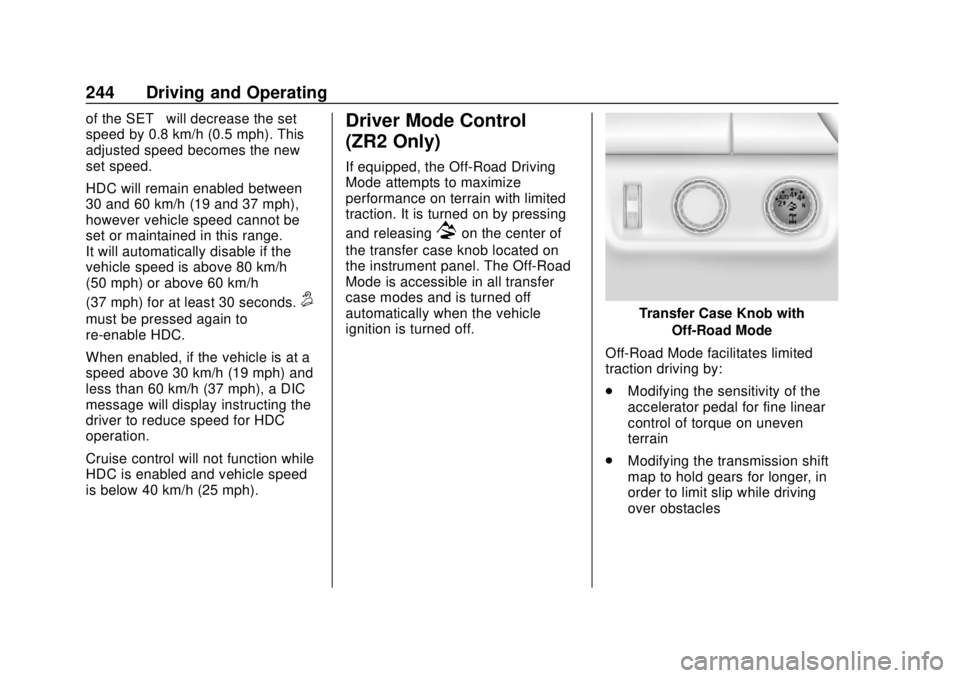
Driver Mode Control
(ZR2 Only)
If equipped, the Off-Road Driving
Mode attempts to maximize
performance on terrain with limited
traction. It is turned on by pressing
and releasing
7on the center of
the transfer case knob located on
the instrument panel. The Off-Road
Mode is accessible in all transfer
case modes and is turned off
automatically when the vehicle
ignition is turned off.
Transfer Case Knob with
Off-Road Mode
Off-Road Mode facilitates limited
traction driving by:
. Modifying the sensitivity of the
accelerator pedal for fine linear
control of torque on uneven
terrain
. Modifying the transmission shift
map to hold gears for longer, in
order to limit slip while driving
over obstacles
Page 246 of 421
Chevrolet Colorado Owner Manual (GMNA-Localizing-U.S./Canada/Mexico-
11349743) - 2018 - crc - 10/12/17
Driving and Operating 245
.Optimizing the performance of
the anti-lock brake (ABS),
Traction Control System (TCS)
and StabiliTrak systems on
slippery surfaces
For more information, on disabling
the TCS and StabiliTrak systems
see Traction Control/Electronic
Stability Control 0240.
Off-Road Mode also interact with
the axle locking system. It allows
the vehicle to travel at higher
speeds with a locked rear axle. See
Locking Rear Axle 0245 for more
information.
Limited-Slip Differential
If equipped, the limited-slip
differential can give more traction on
snow, mud, ice, sand, or gravel.
It works like a standard axle most of
the time, but when traction is low,
this feature allows the drive wheel
with the most traction to move the
vehicle. For vehicles with the
limited-slip differential, driven under severe conditions, the rear axle fluid
should be changed. See
Maintenance Schedule
0365.
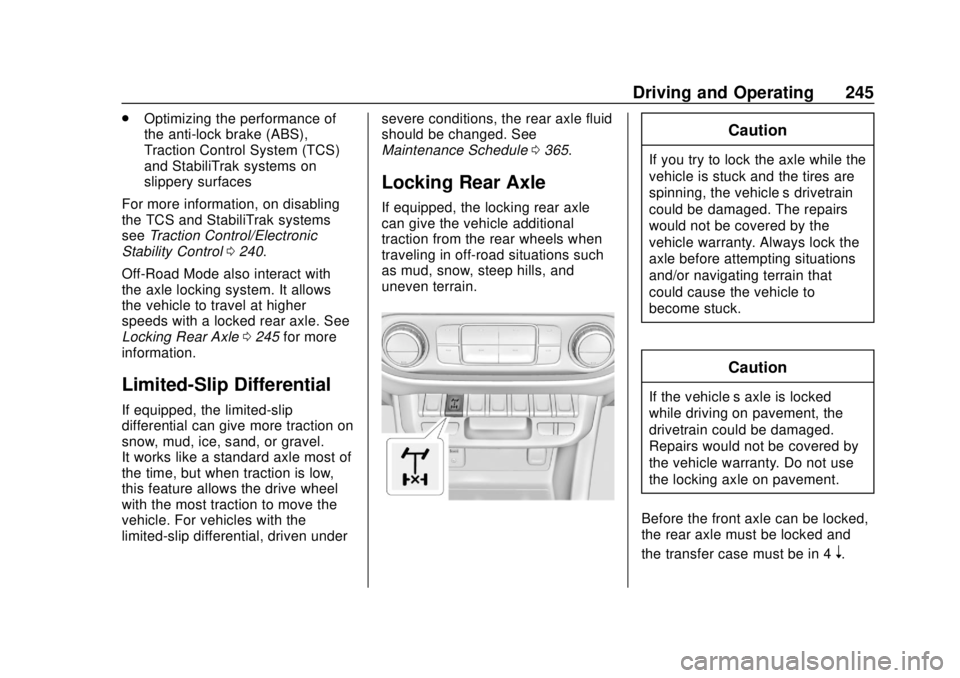
Locking Rear Axle
If equipped, the locking rear axle
can give the vehicle additional
traction from the rear wheels when
traveling in off-road situations such
as mud, snow, steep hills, and
uneven terrain.
Caution
If you try to lock the axle while the
vehicle is stuck and the tires are
spinning, the vehicle’ s drivetrain
could be damaged. The repairs
would not be covered by the
vehicle warranty. Always lock the
axle before attempting situations
and/or navigating terrain that
could cause the vehicle to
become stuck.
Caution
If the vehicle’ s axle is locked
while driving on pavement, the
drivetrain could be damaged.
Repairs would not be covered by
the vehicle warranty. Do not use
the locking axle on pavement.
Before the front axle can be locked,
the rear axle must be locked and
the transfer case must be in 4
n.
Page 248 of 421
Chevrolet Colorado Owner Manual (GMNA-Localizing-U.S./Canada/Mexico-
11349743) - 2018 - crc - 10/12/17
Driving and Operating 247
3. Wait for the light in the switchto stop flashing and remain
illuminated to show that the
rear axle is locked.
4. Press the front axle locking switch with the vehicle stopped
or moving less than 40 km/h
(25 mph).
5. Wait for the light in the switch to stop flashing and remain
illuminated to show that the
front axle is locked.
Engagement of the front axle
lock will disable the Antilock
Brake System (ABS) and
illuminate the ABS warning
light. Hill Decent Control (HDC)
will also be disabled.
The locking front axle will be
disengaged when the vehicle speed
exceeds 40 km/h (25 mph) or the
transfer case is shifted out of 4
n.
ABS will be automatically enabled
and the ABS warning light will turn
off when the locking front axle is
disengaged. If HDC was enabled prior to axle
lock, it will be automatically enabled
when the locking front axle is
disengaged.
After pressing the switch to unlock
the axle, it may remain locked due
to torque in the driveline. The axle is
more easily unlocked by turning the
steering wheel to the right and to
the left while traveling at a low
speed.
Cruise Control
With cruise control a speed of about
40 km/h (25 mph) or more can be
maintained without keeping your
foot on the accelerator. Cruise
control does not work at speeds
below about 40 km/h (25 mph).
{Warning
Cruise control can be dangerous
where you cannot drive safely at
a steady speed. Do not use
cruise control on winding roads or
in heavy traffic.
Cruise control can be dangerous
on slippery roads. On such roads,
fast changes in tire traction can
cause excessive wheel slip, and
you could lose control. Do not use
cruise control on slippery roads.
If equipped with a manual
transmission, the cruise control will
remain active when the gears are
shifted. The cruise is deactivated if
the clutch is pressed for several
seconds. If the cruise control is